How to Sell on Amazon in 2026: The Real Costs, the Steps, and the Launch Mistake Beginners Make
Published Updated
To start selling on Amazon in 2026 you create a Seller Central account, choose the Individual or Professional plan, list your products, pick a fulfillment method (FBA or FBM), and launch — but the step most beginner guides bury is the one that decides whether you make sales at all: a brand-new listing has no sales history, no reviews, and no search ranking, so it is effectively invisible until you pay to be seen. Everything below is the same core setup every guide covers, with two things they usually skip: what it actually costs to launch in 2026, and why advertising is not an optional “step 5” but the mechanism that earns a new product its first orders.
We run Amazon advertising for sellers as an Amazon Ads Verified Partner, so the part of this guide we can speak to first-hand — the cold-start problem and how new listings actually get their first sales — is the part we have weighted most heavily.
How do you start selling on Amazon in 2026?
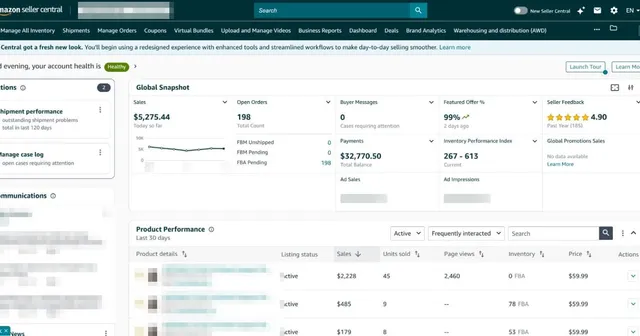
Selling on Amazon is a five-part process: register a seller account, choose a selling plan, create product listings, pick how orders get fulfilled, and drive traffic to the listing. The first four are setup you do once; the fifth — getting seen — is the ongoing work that actually produces revenue. Here is the whole flow at a glance:
- Register at Amazon Seller Central with your ID, bank account, and tax details.
- Choose a plan — Individual (pay per sale) or Professional (flat monthly fee).
- List your products with a keyword-led title, clean images, and scannable bullets.
- Choose fulfillment — let Amazon ship (FBA) or ship yourself (FBM).
- Get seen — because a new listing starts with zero ranking, advertising is how it earns its first orders and reviews.
The mechanics of registering and listing are the easy, well-documented part. The two questions that actually decide whether the business works are what it costs and how a cold listing gets its first sale — so this guide spends most of its time there.
How much does it cost to sell on Amazon in 2026?
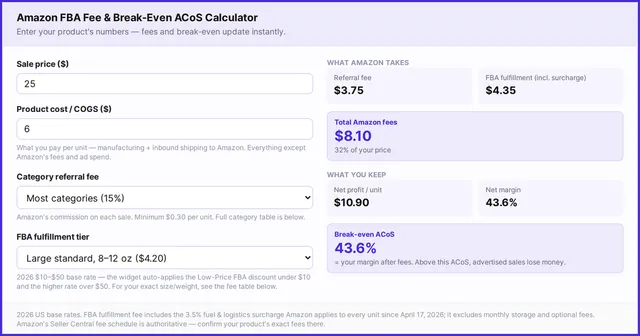
There are two account costs, and which one is cheaper flips at exactly 40 sales a month. The Individual plan has no monthly fee but charges $0.99 per item sold; the Professional plan is a flat $39.99 per month with no per-item charge. Since 40 × $0.99 = $39.60, once you sell more than about 40 units a month the Professional plan is cheaper — and it is the plan you need anyway, because running Amazon Ads requires it. On top of the plan you pay a referral fee on every sale (most categories 8–17%, with 15% the most common rate and a $0.30 per-item minimum), plus FBA fees if Amazon fulfills.
| Individual plan | Professional plan | |
|---|---|---|
| Monthly fee | None | $39.99 |
| Per-item fee | $0.99 per sale | None |
| Cheaper when | Under ~40 sales/month | Over ~40 sales/month |
| Amazon Ads eligible | No | Yes |
| Bulk listing, reports, Buy Box | No | Yes |
| Best for | Testing a handful of items | Anyone building a real business |
One 2026 note on the fees themselves: Amazon did not raise US referral fees for 2026 (they have held since January 2024), but FBA fulfillment fees rose about $0.08 per unit on average, effective January 15, 2026. For the full referral-fee schedule by category and the complete FBA fee tables, see how much it costs to sell on Amazon and our 2026 FBA fees guide.
What does it really cost to launch your first product?
The account and referral fees are trivial next to the real number: the working capital to get a first private-label product live. Reputable 2026 estimates cluster in the low-thousands — Jungle Scout’s seller survey puts typical spend to get a first product live at around $3,800, and broader launch estimates range from roughly $2,500 to $10,000+ per SKU depending on how competitive the niche is. The two line items that dominate are almost always the same: initial inventory and the advertising budget to launch it.
- Initial inventory — usually the single biggest cost; enough units to avoid running out during the launch window.
- Advertising budget — the launch fuel that gets a zero-history listing its first impressions (more on why below).
- Product photography — professional main + secondary images; conversion lives or dies here.
- A GS1-issued barcode (UPC) — Amazon validates UPCs against the GS1 database, so buy from GS1, not a reseller.
- Samples, packaging, and inserts — smaller but real per-unit costs.
Budget so you can fund inventory and a launch ad budget at the same time. Sellers who spend everything on inventory and nothing on ads are the ones who stall — which is the mistake the next section is about. (Figures above are third-party 2026 estimates; your real number depends entirely on product and category.)
FBA or FBM — which fulfillment should a beginner choose?
Choose FBA if your product is small, light, and fast-moving and you want the Prime badge; choose FBM if it is heavy, bulky, slow-moving, or you already have cheap fulfillment. The deciding number is simple: your FBA fulfillment fee versus your own per-unit cost to pack and ship, because the referral fee is identical either way and cancels out. Most new sellers start with FBA for the Prime badge and the hands-off logistics, then move oversized or slow SKUs to FBM as they learn their numbers. We walk through the exact break-even math — with a free calculator — in what is Amazon FBA.
Why does a new Amazon listing need ads to make its first sales?
Because Amazon ranks products largely on sales history, and a brand-new listing has none. On day one your ASIN has zero sales rank, zero reviews, and no relevance history, so Amazon has no signal that it should show your product for any search — which means near-zero organic impressions no matter how good the listing is. This is the cold-start problem, and it is why “just list it and wait” fails: with no impressions there are no sales, and with no sales there is never any ranking. Advertising is the only lever that breaks the loop.
Here is the mechanism, from an advertiser’s seat: Sponsored Products ads place your listing in front of shoppers before it has earned an organic rank. Those paid clicks generate the first orders; the first orders generate sales velocity and the first reviews; and that velocity and social proof are exactly the signals Amazon’s organic ranking rewards. Over a few weeks a well-run campaign pulls the listing up the organic results for its target keywords, at which point a growing share of sales comes free — and you can ease off paid spend. That is why experienced sellers treat the launch ad budget as non-optional: it is not marketing polish, it is how the listing is born into the algorithm. Start with a tight keyword list (our free keyword tool and the keyword-research guide help here), and know your break-even before you bid — the ACoS bid calculator and what counts as a good ACoS turn your margin into a safe maximum bid.
How do you set up your Amazon seller account?
Registration takes about an hour if your documents are ready. Amazon requires a government-issued photo ID, a chargeable credit card, a bank account for disbursements, a tax interview (for US 1099-K reporting), a phone number, and a business or residential address. Because of the federal INFORM Consumers Act, Amazon verifies the identity and bank details of higher-volume sellers, and — new for 2026 — prompts sellers to re-certify that those details are still accurate, within a 10-day window; miss it and Amazon can pause the account and hold payouts, so keep your registered information current. Then complete these steps in Seller Central:
- Create the account and pick a plan (Professional if you intend to advertise or sell at any volume).
- Enter business and tax information — bank account, card, and the tax interview.
- Verify your identity — upload the ID and complete any video or address verification Amazon requests.
- Build the listing — a keyword-led title, at least one clean 1000px+ white-background main image, benefit-first bullets, and a real description.
- Set notifications so you catch orders, messages, and any account-health alerts fast.
New to the whole thing? Our beginner’s walkthrough covers the setup in more detail, and what to sell first helps with product choice before you commit inventory.
How can WisePPC help you launch profitably?
Once you accept that a new listing needs ads to get its first sales, the next problem is running those ads without lighting money on fire — and that is exactly what WisePPC is for. WisePPC is an Amazon Ads management and analytics platform, and an Amazon Ads Verified Partner, that brings your Sponsored Products, Brands, and Display data into one place: 30+ metrics, a Unified Report, Search Terms and Targeting reports, an Excel-like analytics grid with CSV export, and a bulk-edit Management page for campaigns and negatives. Connect your Amazon Ads account and WisePPC backfills 24 months of daily history, so even during a launch you can see what is working and cut what is not. Prefer to bring your own AI? Connect a Claude or ChatGPT agent over MCP to your WisePPC data and it will propose bid, budget, and negative-keyword changes for you to approve inside WisePPC. Explore the WisePPC tools, compare plans, or start free: sign up for a 30-day trial with no credit card required.
Frequently Asked Questions
How much does it cost to start selling on Amazon in 2026?
The account itself is cheap — $0.99 per item on the Individual plan or $39.99 a month on the Professional plan, plus a referral fee (usually 15%) on each sale. The real cost is working capital to launch a product: reputable 2026 estimates put typical first-product spend around $3,800, and competitive private-label launches at roughly $2,500 to $10,000+ per SKU, dominated by inventory and the launch advertising budget.
Should I choose the Individual or Professional selling plan?
Choose Individual only if you are testing with fewer than about 40 sales a month, since 40 × $0.99 roughly equals the $39.99 Professional fee. Everyone building a real business should pick Professional — it drops the per-item fee and is required to run Amazon Ads, use bulk listing, and compete for the Buy Box.
Do I really need to advertise to sell on Amazon?
For a new listing, effectively yes. A brand-new product has no sales history, reviews, or search ranking, so Amazon shows it to almost no one organically. Sponsored Products ads put it in front of shoppers, and the resulting sales and reviews are what earn organic rank over time. Once a listing ranks, a growing share of sales comes free and you can reduce paid spend.
Do I need a registered business to sell on Amazon?
No. You can register as an individual using your own name and tax details. Many sellers start that way and form a company later for liability and tax reasons. Whichever you choose, your registered identity and bank information must be accurate — Amazon verifies them under the INFORM Consumers Act and, in 2026, asks sellers to re-certify them within a 10-day window when prompted.
How long does it take to start selling on Amazon?
Account registration takes about an hour if your ID, bank, and tax details are ready, though identity verification can add a few days. Building a strong listing and preparing inventory is the longer part. Realistically, plan for a few days to go live and several weeks of advertising to build the sales history that earns organic ranking.
Fees and requirements are current as of July 2026 and reflect Amazon’s US marketplace; Seller Central is always the authoritative source — confirm current plan pricing, referral rates, and registration requirements there before you commit. Startup-cost figures are third-party 2026 estimates and vary widely by product and category. WisePPC is an Amazon Ads management and analytics platform serving the US, UK, DE, and JP marketplaces.