The Amazon PPC Bid Math: From Margin to Your Max CPC
Published Updated
Most Amazon sellers set their bids by guessing — and then wonder why their ACOS won’t behave. But the right bid isn’t a guess. It falls straight out of three numbers you already have: your price and margin, your conversion rate, and the ACOS you’re willing to run. Chain them together and they hand you a precise number: the most you should pay for a click.
This guide shows you that chain — and the calculator below runs it for you. Punch in your numbers and you’ll instantly see your break-even ACOS and your target bid. Then read on to understand exactly why the math works, so you can trust the output and adjust it with intent.
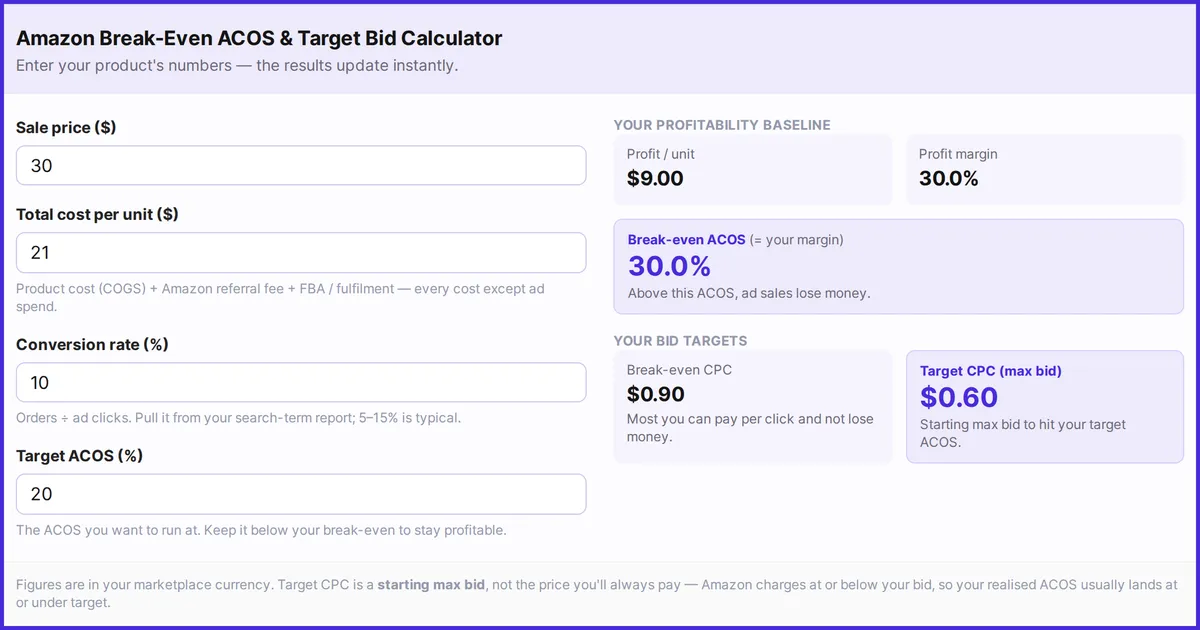
Amazon break-even ACOS and target bid calculator
Enter your product's numbers. The results update as you type.
Product cost (COGS) + Amazon referral fee + FBA / fulfilment: every cost except ad spend.
Orders ÷ ad clicks. Pull it from your search-term report; 5–15% is typical.
The ACOS you want to run at. Keep it below your break-even to stay profitable.
Your profitability baseline
Profit / unit
—
Profit margin
—
Break-even ACOS (= your margin)
—
Above this ACOS, ad sales lose money.
Your bid targets
Break-even CPC
—
Most you can pay per click and not lose money.
Target CPC (max bid)
—
Starting max bid to hit your target ACOS.
Figures are in your marketplace currency. Target CPC is a starting max bid, not the price you'll always pay: Amazon charges at or below your bid, so your realised ACOS usually lands at or under target.
The three metrics that decide every bid
Four inputs, but really three ideas. Get comfortable with what each one means and the rest is arithmetic:
- Profit margin — the share of your sale price left after product cost, Amazon’s referral fee, and FBA/fulfilment, but before ad spend. This is the pool of money your advertising is allowed to spend from.
- ACOS (Advertising Cost of Sales) — ad spend as a percentage of ad-generated revenue. Lower is better. New to the metric? Our primer on what Amazon PPC is covers ACOS, CPC, CVR and the rest.
- Conversion rate (CVR) — the share of ad clicks that turn into orders. This is the hidden hinge: it decides how much a click is actually worth to you.
The output of the chain is your CPC (cost per click) — specifically the maximum bid that keeps you at your chosen ACOS. Here’s how the three inputs produce it, one step at a time.
Step 1 — From price and margin to break-even ACOS
Your break-even ACOS is simply your profit margin. At that ACOS, advertising eats exactly the profit you had on the sale, and you net zero. Below it you profit; above it you lose money on each ad-attributed sale.
Break-even ACOS = profit margin = (price − cost) ÷ price
Sell at $30 with $21 of total cost and you keep $9 a unit — a 30% margin, so a 30% break-even ACOS. That single number reframes everything: a 30% ACOS isn’t “good” or “bad” in the abstract, it’s exactly break-even for this product. (Want to set a sensible target from it? See what a good ACOS is and how to find yours.)
Step 2 — From break-even to your target ACOS
Break-even is the ceiling, not the goal. Your target ACOS is how much of your margin you’re willing to spend acquiring a sale — the rest is profit. A mature, profit-focused product might target 20% against a 30% break-even, banking the 10-point gap. A product in launch might run right up at break-even to buy rank and reviews.
The point: target ACOS is a decision, bounded above by your break-even. Pick it on purpose. If you ever set a target at or above break-even, the calculator flags it — that’s bidding into a loss. (ACOS vs ROAS as a lens for this choice is covered in ACOS vs ROAS: which metric should you track.)
Step 3 — From conversion rate to your max bid
This is where conversion rate earns its keep. Here’s the whole derivation in three lines:
- ACOS = ad spend ÷ ad sales
- Over many clicks: ad spend = clicks × CPC, and ad sales = (clicks × CVR) × price
- The clicks cancel, leaving: ACOS = CPC ÷ (CVR × price)
Rearrange that for the bid and you get the formula that should drive every keyword you run:
Target CPC = target ACOS × CVR × price
With our example — 20% target ACOS, 10% conversion rate, $30 price — that’s 0.20 × 0.10 × $30 = $0.60. Bid up to 60 cents a click on that keyword and, at a 10% conversion rate, you’ll land at a 20% ACOS. Set your bid higher and your ACOS drifts above target; lower and you may starve the keyword of clicks.
Swap in your break-even ACOS instead of your target and you get your break-even CPC — the absolute most you can pay per click before the keyword turns unprofitable. For this product that’s 0.30 × 0.10 × $30 = $0.90. Anything above $0.90 a click loses money.
Why conversion rate is the lever everyone forgets
Look at the formula again: bid scales directly with CVR. Double your conversion rate and you can afford to bid twice as much for the same ACOS — which means you can win placements your competitors can’t. That’s why improving a listing (images, title, price, reviews) is also a bidding strategy: a higher-converting page quietly raises the ceiling on every bid. It’s the same reason two sellers on the identical keyword can both be “right” at very different bids.
It also means a low conversion rate is expensive twice over: you waste spend on clicks that don’t convert, and the math forces your bids down, costing you visibility. Fixing conversion is often the highest-leverage move on this whole chain.
From keyword to bid: where this fits your workflow
Keyword research tells you which terms to target; this math tells you how much to bid on each one. They’re two halves of the same job. Once you’ve built your list — see our walkthrough on how to do Amazon keyword research — run each keyword’s expected conversion rate through the formula to set a disciplined starting bid instead of Amazon’s one-size-fits-all suggestion.
Then let the data refine it. As real conversion rates come in from your search-term report, recompute and adjust. High-converting search terms can carry a higher bid; poor converters should be cut or bid down. The deeper tactics live in Amazon PPC bid management strategies and how to reduce ACOS and improve ROAS.
One caveat: a bid is a ceiling, not a price
Your target CPC is a starting maximum bid, not the amount you’ll pay on every click. Amazon’s auction charges at or just above the next-highest bid, so your realised CPC usually comes in below your bid — which means your actual ACOS typically lands at or under target. Treat the calculator’s output as a confident starting point, then tune with real performance data. And remember ACOS only counts ad-attributed sales; for the whole-business view, pair it with TACOS.
Track the whole chain in WisePPC
Doing this by hand for one product is easy. Doing it across hundreds of keywords, as margins and conversion rates shift week to week, is exactly what software is for. WisePPC tracks ACOS, ROAS, TACOS, CPC and conversion rate together — 30+ metrics in customisable charts, with performance history that outlasts Amazon’s reporting window and bulk bid editing across campaigns and keywords. As an Amazon Ads Verified Partner it reads straight from Amazon’s advertising API, and its AI integration lets you connect your own assistant — Claude, ChatGPT, or any MCP-compatible agent — to ask, in plain English, which keywords are bidding above their break-even, then approve the changes inside WisePPC.
Explore the WisePPC tools, see the AI integration, or compare plans and pricing and start a free 30-day trial.
Keep learning
- What is a good ACOS on Amazon? — turn your break-even into a target.
- ACOS vs ROAS — the two lenses on the same number.
- What is Amazon TACOS? — the whole-business efficiency metric.
- How to do Amazon keyword research — find the terms you’ll bid on.
- Amazon PPC bid management strategies — bidding tactics in depth.
- What is Amazon PPC? — every key metric, explained.
The bottom line
A good Amazon bid isn’t a feeling — it’s a calculation. Your margin sets your break-even ACOS, your goal sets a target ACOS below it, and your conversion rate turns that target into a precise maximum bid: target ACOS × CVR × price. Run your own numbers through the calculator above, set bids with that logic instead of guesswork, and let real conversion data sharpen them over time.
See WisePPC track every one of these metrics together, see the AI integration, or compare plans and start your free trial today.