
 EN
EN  ES
ES  FR
FR  DE
DE  IT
IT  KO
KO  JA
JA  ZH
ZH  AR
AR  PT
PT  TR
TR PL
PL
Introduction
If you’re spending money on Amazon PPC without a systematic bid management strategy, you’re essentially gambling with your advertising budget. With average ACOS (Advertising Cost of Sales) creeping higher across most categories and competition intensifying, simply “setting and forgetting” your bids is a recipe for shrinking margins.
The sellers who consistently win on Amazon in 2025 share one trait: they’ve mastered bid management. Not just adjusting bids up or down when they remember, but implementing structured, data-driven bidding strategies that scale profitably.
This guide covers the advanced bid management tactics that separate six-figure sellers from seven-figure operators. Whether you’re managing campaigns manually or looking to streamline with automation, these strategies will help you capture more sales at lower advertising costs.
Understanding the Fundamentals of Amazon Bidding
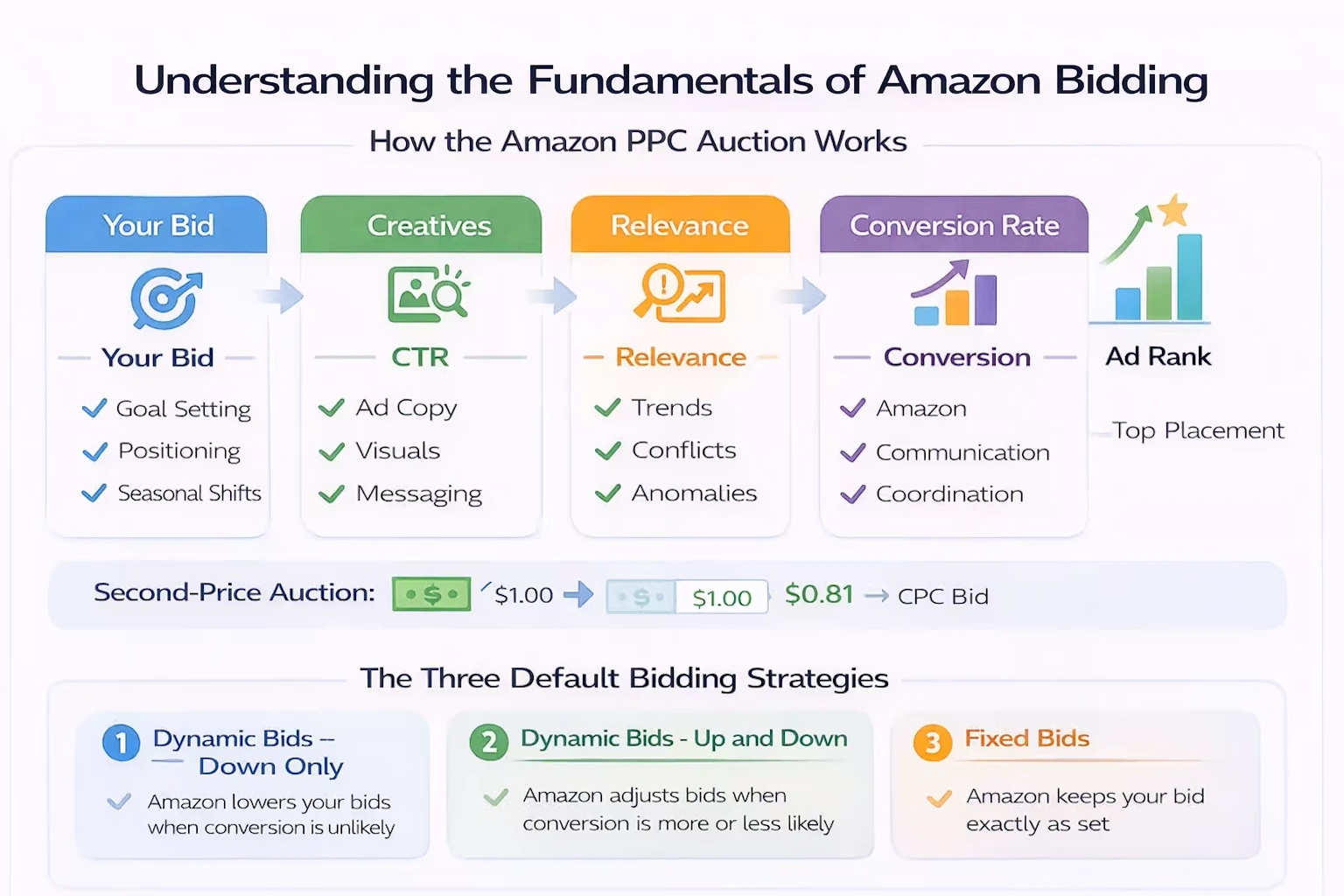
Before diving into advanced tactics, let’s align on how Amazon’s auction actually works. When a shopper searches for a keyword, Amazon runs a real-time auction to determine which ads appear and in what order.
How the Amazon PPC Auction Works
Your bid represents the maximum amount you’re willing to pay for a click—not what you actually pay. Amazon uses a second-price auction model, meaning you typically pay just slightly more than the next-highest bidder, not your full bid amount.
However, Amazon doesn’t simply award the top spot to the highest bidder. Your Ad Rank depends on:
- Your bid amount
- Your expected click-through rate (CTR)
- The relevance of your ad to the search query
- Your historical conversion rate
This means a lower bid can still win placement if your listing converts well. This is critical—it means bid management isn’t just about outbidding competitors; it’s about bidding smarter based on your actual performance data.
The Three Default Bidding Strategies
Amazon offers three bidding strategy options at the campaign level:
- Dynamic Bids – Down Only
Amazon reduces your bid in real-time when a conversion is less likely. This is the safest option for most sellers and typically results in lower average CPCs. - Dynamic Bids – Up and Down
Amazon can increase your bid (up to 100% for top-of-search or 50% for other placements) when a conversion is more likely, or decrease it when less likely. This strategy can capture more high-intent traffic but requires close monitoring to prevent runaway costs. - Fixed Bids
Your bid stays exactly as set. Amazon won’t adjust based on conversion probability. Use this only when you have extremely consistent conversion rates and want maximum control.
Recommendation: Start with “Down Only” for most campaigns. Only move to “Up and Down” after you’ve collected significant conversion data and understand your true conversion rates by placement.
The ACOS-Driven Bid Adjustment Formula
ACOS is the north star metric for bid management. The basic formula is simple:
Target Bid = Current Bid × (Target ACOS / Current ACOS)
If your current ACOS is 40% and your target is 25%, you’d reduce bids by approximately 37.5%. If your ACOS is 15% and you’re comfortable scaling, you might increase bids by 66% to capture more volume.
But this is where most sellers stop—and where you can get an edge.
Why Time-Based Adjustments Matter
ACOS fluctuates. Weekend shoppers might browse differently than weekday buyers. Holiday periods compress decision-making. Without accounting for these patterns, you’re making bid decisions on noisy data.
The 14-Day Rule: Never make bid adjustments based on less than 14 days of data, and preferably 30 days. Amazon’s attribution window can extend up to 14 days, meaning a click today might convert two weeks later. Premature adjustments based on incomplete data lead to the classic mistake: pausing winners and scaling losers.
The Portfolio Approach
Smart sellers don’t manage individual keywords in isolation. They think in portfolios:
- High ACOS, High Volume: These are your problem children. These keywords drive spend but underperform on profitability. Options: aggressive bid reductions, move to negative exact if truly unprofitable, or investigate listing optimization if the traffic is relevant but not converting.
- High ACOS, Low Volume: Low priority. Reduce bids or pause after sufficient data. Don’t let these distract from bigger opportunities.
- Low ACOS, High Volume: Your golden geese. Maintain bids here and monitor closely. Any increase should be gradual (10-15% max per adjustment) to avoid shocking the system.
- Low ACOS, Low Volume: Your expansion opportunities. These keywords are profitable but limited in scale. Gradually increase bids to test volume potential.
Advanced Bid Management Strategies
Strategy 1: Placement-Based Bid Modifiers
Amazon allows you to adjust bids specifically for “Top of Search (First Page)” and “Product Pages” placements. This is powerful because conversion rates vary dramatically by placement.
Typical Conversion Rate Patterns:
- Top of Search: Highest conversion rate (often 2-3x other placements)
- Rest of Search: Baseline conversion rate
- Product Pages: Variable, often lower than search but higher volume
Rather than using placement percentages blindly, calculate your true ACOS by placement:
- Download a placement report from Amazon
- Calculate ACOS for each placement type
- Set modifiers based on performance, not rules of thumb
If Top of Search converts at 15% ACOS while Rest of Search is at 35%, you should be aggressively increasing your Top of Search modifier, not following generic advice.
Pro Tip: Top of Search placement often costs significantly more per click. A 50% bid increase for Top of Search might result in 80-100% higher CPCs. Factor this into your calculations—improved conversion rate doesn’t always mean improved profitability if the CPC premium is too steep.
Strategy 2: The Dayparting Decision
Dayparting—adjusting bids based on time of day or day of week—remains controversial in the Amazon PPC community. Amazon doesn’t offer native dayparting, so it requires third-party tools or manual campaign scheduling.
When Dayparting Makes Sense:
- Your products have clear usage patterns (office supplies peak on weekdays, hobby products on weekends)
- Your budget consistently runs out early in the day
- You have sufficient data showing conversion rate variance by time period
When Dayparting Is a Distraction:
- You’re still optimizing basic campaign structure
- Your daily budget doesn’t fully deplete
- You have fewer than 100 conversions per month
The reality: most sellers should master fundamentals before adding dayparting complexity. If you do implement it, start conservatively—reducing bids during proven low-performance windows rather than trying to perfectly optimize every hour.
Strategy 3: New Keyword Testing Protocol
Finding new keywords is only half the battle. The other half is testing them efficiently without destroying your ACOS.
The 30-Day Keyword Testing Framework:
Days 1-7: Discovery Phase
Set initial bids at 70% of your estimated target CPC. This conservative start prevents overspending on unproven keywords. Aim for at least 10-15 clicks per keyword before making decisions.
Days 8-14: Evaluation Phase
Review early performance. Keywords with zero clicks can increase bids by 20-30%. Keywords with high spend and zero sales should be paused or bid down aggressively.
Days 15-30: Optimization Phase
By now you should have statistically significant data. Apply the ACOS formula: reduce bids on underperformers, maintain or slightly increase on winners. Any keyword without at least one conversion after 30 days and meaningful spend should be paused.
Key Insight: Don’t judge keywords solely by ACOS in the testing phase. A keyword with 40% ACOS in week one might settle at 20% as Amazon’s algorithm learns to show your ad to the right shoppers. Give keywords time to mature before cutting them.
Strategy 4: The Long-Tail Expansion Strategy
Broad and phrase match keywords are essential for discovery, but they often drive higher ACOS due to irrelevant search terms. The solution isn’t abandoning them—it’s using them strategically to find long-tail opportunities.
The Process:
- Run broad match keywords with moderate bids
- Mine the Search Term Report weekly for high-performing exact match variations
- Add these exact match keywords to dedicated campaigns with higher bids
- Add the exact match as negative exact in the broad campaign to prevent cannibalization
This approach lets broad match do what it does best—discover new opportunities—while protecting your budget from waste and capturing high-intent exact match traffic aggressively.
Example:
- Broad match: “protein powder” → discovers “organic whey protein powder for women”
- Add exact match “organic whey protein powder for women” to dedicated campaign
- Negative exact “organic whey protein powder for women” from broad campaign
- Now you can bid higher on the exact match while broad continues discovering
The Role of Bulk Operations
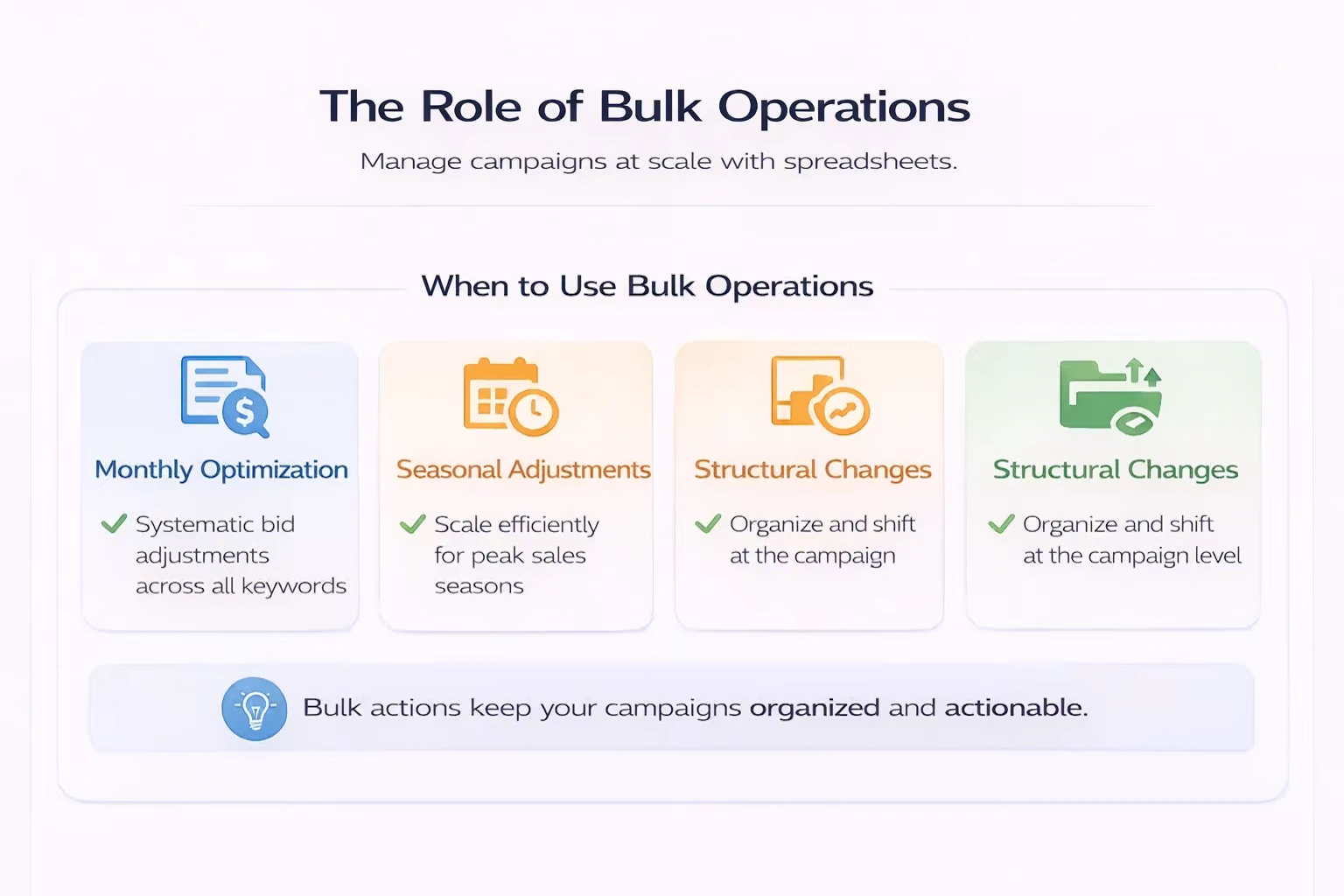
Manual bid management breaks down at scale. When you’re managing hundreds of campaigns with thousands of keywords, spreadsheet-based bulk operations become essential.
When to Use Bulk Operations
Monthly Optimization: Download campaign data, apply the ACOS formula systematically across all keywords, upload changes. This is your foundational optimization rhythm.
Seasonal Adjustments: Before Prime Day, Q4, or your category’s peak season, bulk adjustments let you scale bids efficiently across your entire account.
Structural Changes: Moving keywords between campaigns, adjusting budgets across portfolios, or implementing new naming conventions.
Bulk Operation Best Practices
Always Backup First: Before any bulk upload, export your current settings. Amazon’s bulk operations are powerful but mistakes can cascade quickly.
Test Before Scaling: Apply changes to a small subset of campaigns first. Verify the results look correct before rolling out account-wide.
Document Changes: Keep a change log. When ACOS suddenly shifts, you’ll want to know what was adjusted when.
Use Filters: Don’t blanket-adjust every keyword. Filter for meaningful data thresholds—at least 10 clicks or 1,000 impressions before making bid decisions.
Automation vs. Manual Management: Finding Your Balance
The debate between manual and automated bid management misses the point. They’re not mutually exclusive—they’re complementary approaches for different scenarios.
When Manual Management Wins
- New campaigns: Automation requires data. New campaigns need manual nurturing until patterns emerge.
- Low-volume keywords: Automation often struggles with sparse data and makes poor decisions.
- Strategic changes: Major account restructuring, seasonal pivots, or competitive responses need human judgment.
- Learning phase: If you’re not deeply familiar with your metrics, manual management builds the intuition that informs later automation.
When Automation Shines
- High-volume accounts: When you’re managing 50+ campaigns, automation handles the routine adjustments you’d never have time for manually.
- Consistent patterns: Mature campaigns with stable conversion rates respond well to rule-based automation.
- 24/7 responsiveness: Manual management happens when you’re at your computer. Automation responds to performance changes immediately.
The Hybrid Approach
Most sophisticated sellers use a hybrid model:
- Manual for strategy: Humans set goals, budgets, and structural decisions
- Automation for execution: Systems handle the routine bid adjustments within defined guardrails
- Manual for exceptions: High-stakes keywords or unusual performance gets human attention
- Automation for scale: Bulk operations and cross-campaign optimization happens through tools
Common Bid Management Mistakes
Even experienced sellers fall into these traps:
Mistake 1: Adjusting Too Frequently
Amazon’s attribution window means today’s click might convert in a week. Making daily bid adjustments based on yesterday’s data creates chaos. Set a schedule—weekly for high-volume campaigns, bi-weekly for smaller ones—and stick to it.
Mistake 2: Ignoring Conversion Rate
ACOS = Ad Spend / Ad Revenue. It doesn’t exist in isolation. A keyword with 30% ACOS and 20% conversion rate is very different from one with 30% ACOS and 5% conversion. The first suggests strong intent but potentially over-bidding. The second suggests traffic quality issues that bidding alone won’t fix.
Mistake 3: Chasing Position
Ranking first doesn’t guarantee profitability. Some sellers obsess over top position when second or third delivers better ROI. Track placement performance and optimize for profit, not vanity metrics.
Mistake 4: Uniform Bid Strategies Across Campaign Types
Sponsored Products, Sponsored Brands, and Sponsored Display have different auction dynamics and conversion patterns. A bid strategy that works for Products may fail for Brands. Treat each campaign type as a separate optimization problem.
Mistake 5: Neglecting Negative Keywords
Bid management isn’t just about what you bid on—it’s about what you exclude. A robust negative keyword strategy reduces wasted spend and improves the efficiency of your positive bids. Review search term reports religiously.
Measuring Bid Management Success
How do you know your bid management is working? Track these metrics:
Primary Metrics
- TACOS (Total ACOS): Ad spend divided by total sales (organic + paid). This shows true advertising efficiency, not just campaign performance.
- Ad Sales Growth: Are you scaling profitably, or just cutting spend?
- Click-Through Rate: Improved CTR suggests better ad relevance and placement optimization.
Secondary Metrics
- CPC Trends: Are you maintaining or improving efficiency as you scale?
- Conversion Rate: Changes here indicate whether you’re attracting better-qualified traffic.
- Share of Voice: Tools that estimate impression share help you understand competitive position.
The Ultimate Test
The goal of bid management isn’t the lowest ACOS—it’s the highest profitable sales volume. A campaign at 15% ACOS generating $10,000/month is better than one at 10% ACOS generating $2,000/month if your margins support it. Don’t sacrifice growth for efficiency if the math works.
Building Your Bid Management Rhythm
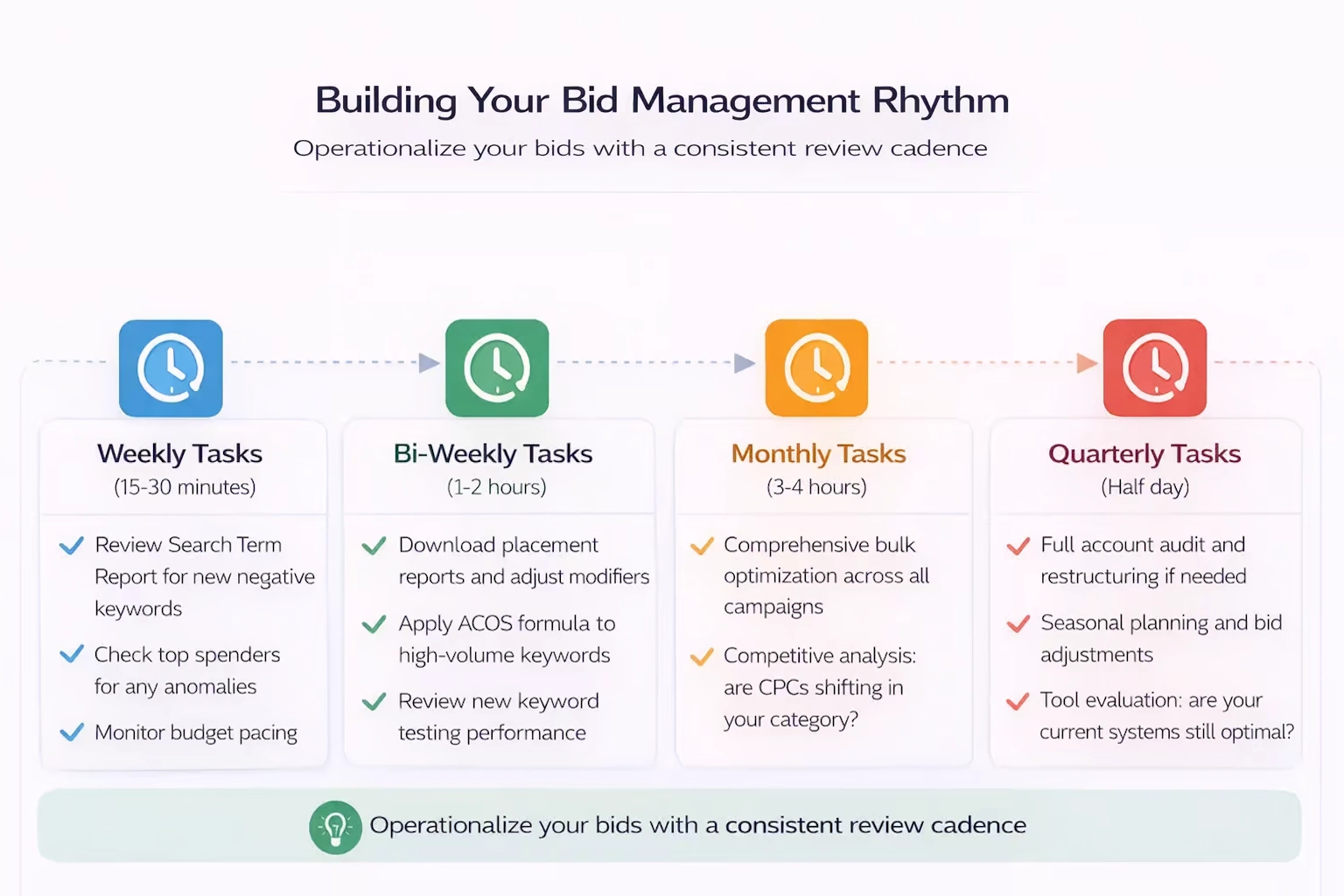
Successful bid management is a process, not a one-time setup. Here’s a framework to operationalize it:
Weekly Tasks (15-30 minutes)
- Review Search Term Report for new negative keywords
- Check top spenders for any anomalies
- Monitor budget pacing
Bi-Weekly Tasks (1-2 hours)
- Download placement reports and adjust modifiers
- Apply ACOS formula to high-volume keywords
- Review new keyword testing performance
Monthly Tasks (3-4 hours)
- Comprehensive bulk optimization across all campaigns
- Structural review: campaign organization still makes sense?
- Competitive analysis: are CPCs shifting in your category?
- Strategy review: are your targets still appropriate?
Quarterly Tasks (Half day)
- Full account audit and restructuring if needed
- Seasonal planning and bid adjustments
- Tool evaluation: are your current systems still optimal?
Conclusion
Mastering Amazon PPC bid management separates profitable sellers from those burning cash. The strategies in this guide—from basic ACOS formulas to advanced placement optimization—give you a systematic approach to capturing more sales at lower costs.
Remember: bid management is never “done.” Markets shift, competitors adjust, and Amazon’s algorithm evolves. The sellers who win are those who build bid optimization into their operational rhythm, making data-driven adjustments consistently rather than sporadically.
Whether you’re managing campaigns manually or exploring automation tools, the principles remain the same: know your numbers, give data time to mature, and always optimize for profitable growth—not just low ACOS.
Start with one strategy from this guide. Implement it fully. Measure the results. Then add the next. That’s how you build an advertising machine that scales.
WisePPC helps Amazon sellers automate bid management, bulk operations, and campaign optimization. Our platform processes millions of bid adjustments daily so you can focus on strategy while systems handle execution.
 No credit card required