How to Do Amazon Keyword Research: A Step-by-Step Walkthrough
Published Updated
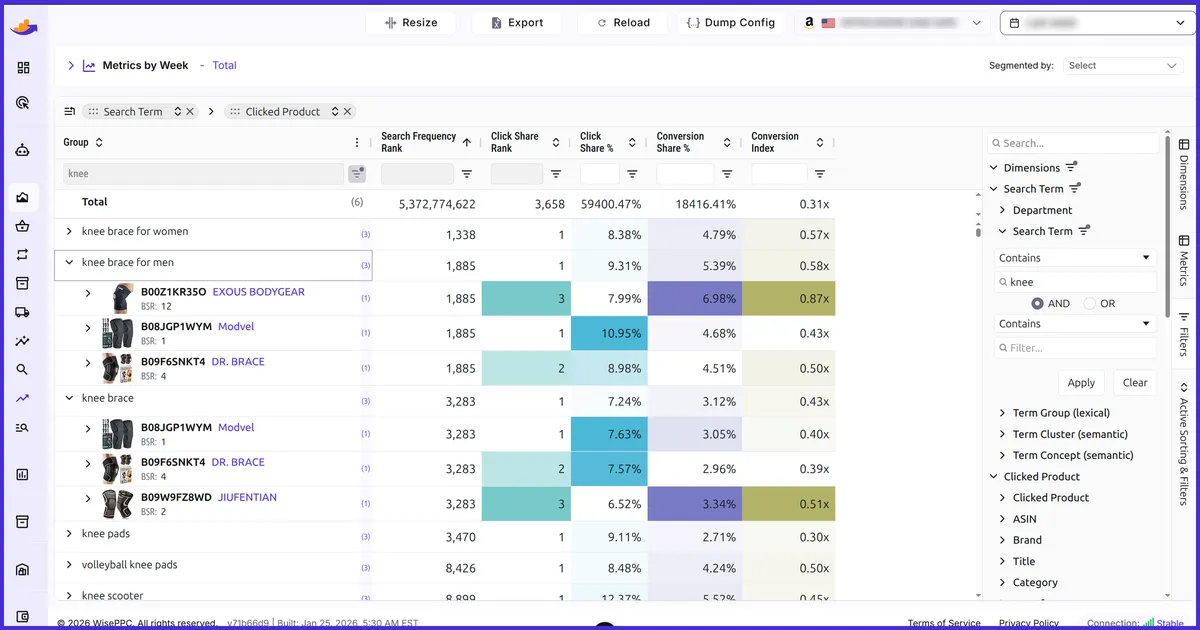
Amazon keyword research is the process of finding the exact words and phrases shoppers type into Amazon’s search bar to find products like yours — and it’s the single highest-leverage thing you can do before writing a listing or launching a campaign. Get it right and everything downstream works better: your listing ranks, your ads find real buyers, and your ACOS stays under control.
This is the hands-on companion to our ultimate Amazon keyword research guide. That guide explains the why and surveys the landscape; this one is the how — a repeatable, seven-step workflow you can follow today, including a full reverse-ASIN walkthrough for mining your competitors’ keywords. Let’s build a keyword list from scratch.
Before you start: what you’ll need
- A product (or product idea) and a clear sense of what it is — its category, use case, and standout features.
- Access to Amazon’s search bar (no login required for the early steps).
- A spreadsheet to collect terms — you’ll be merging several sources into one list.
- Optionally, a keyword tool for search-volume and reverse-ASIN data. To build and structure the list itself, try our free Amazon keyword tool.
Step 1: Brainstorm your seed keywords
Start with the obvious. Seed keywords are the handful of plain-language terms that describe your product at its core — if you sell an insulated water bottle, your seeds are “water bottle,” “stainless steel water bottle,” “insulated water bottle,” and so on.
Don’t overthink this stage. Write down five to ten ways a shopper might describe your product, covering:
- The core product — “yoga mat”
- Key variations by material, size, color, or use — “thick yoga mat,” “travel yoga mat”
- The problem it solves — “non-slip yoga mat,” “yoga mat for bad knees”
These seeds are the input for every step that follows, so think like a customer, not a marketer.
Step 2: Expand with Amazon autocomplete
Amazon’s own search bar is the most underrated keyword tool there is — and it’s completely free. As you type a seed term, Amazon suggests the most popular completions, ranked by real shopper search behavior. That’s a direct window into live demand.
Work through each seed methodically:
- Type the seed into the Amazon search bar and note every suggestion that appears.
- Add a trailing letter — “yoga mat a,” “yoga mat b,” and so on — to surface the long-tail variations hiding behind each prefix.
- Repeat inside relevant category dropdowns; suggestions change by department.
Within a few minutes you’ll have dozens of real, in-demand phrases you’d never have guessed on your own. Drop them all into your spreadsheet.
Step 3: Mine competitor keywords with a reverse-ASIN lookup
This is where you stop guessing and start borrowing from competitors who’ve already done the work. A reverse-ASIN lookup takes a single product’s ASIN — the 10-character identifier Amazon assigns every listing — and returns the keywords that product ranks for and advertises on. In effect, it reverse-engineers a competitor’s entire keyword strategy.
Why it’s so powerful: your best-selling competitors have spent months, and real ad dollars, discovering which terms convert. Their indexed keywords are a validated shortlist you can stand on top of instead of starting from zero.
Here’s the walkthrough:
- 1. Pick three to five true competitors. Search your main seed keyword and look at the products ranking on page one. Choose genuine substitutes — same use case, similar price and format — not just the category’s biggest brand.
- 2. Grab each ASIN. You’ll find it in the listing URL (the
/dp/segment, e.g.amazon.com/dp/B0XXXXXXXX) or in the “Product information” section further down the page. - 3. Run each ASIN through a reverse-ASIN tool. Paste the ASIN, run the lookup, and you’ll get that product’s keywords alongside metrics like estimated search volume and the competitor’s organic rank.
- 4. Export and combine. Pull every competitor’s keyword list into one sheet. Pay special attention to terms that appear across multiple competitors — those are the proven, category-defining keywords you can’t afford to miss.
- 5. Reverse-lookup your own ASIN, too. If you already have a live listing, run it through the same tool to see where you rank — and spot the gaps where competitors rank for valuable terms and you don’t.
Several tools offer reverse-ASIN lookups across a range of price points; to turn the terms you find into a match-typed campaign list, use our free Amazon keyword tool.
Step 4: Add search volume and filter hard for relevance
By now your spreadsheet is long — too long to act on. The next step is to size each term and cut the dead weight.
Run your combined list through a search-volume tool to attach an estimated monthly search count to each keyword (our guide to free Amazon keyword search-volume tools covers the options). Then apply two filters:
- Volume. Flag which terms are high-volume head terms versus low-volume long-tail. You want a mix — head terms for reach, long-tail for cheaper, higher-converting traffic.
- Relevance. This is the filter that matters most. Ruthlessly cut any keyword that describes a product different from yours, however tempting the volume. An irrelevant keyword brings the wrong shopper, who clicks (you pay) and leaves without buying — damaging both your ad efficiency and your organic conversion signals.
A short list of highly relevant keywords beats a huge list of loose matches every single time.
Step 5: Organize your keywords by intent
Not every keyword has the same job. Group your filtered list so you know where each term should live — in your listing, in your ads, or both.
| Keyword group | What it looks like | Best home |
|---|---|---|
| Primary / head | High volume, directly names the product (“yoga mat”) | Title + exact-match Sponsored Products |
| Secondary / mid-tail | Descriptive modifiers (“non-slip yoga mat”) | Bullet points + phrase-match campaigns |
| Long-tail | Specific, lower volume, high intent (“thick yoga mat for bad knees”) | Description + low-bid exact match |
| Backend-only | Synonyms, alternate spellings, other terms shoppers use | Backend search-term fields (never visible copy) |
This mapping does double duty: it tells you how to write your listing and how to structure your first campaigns.
Step 6: Put your keywords to work
Research only pays off when the keywords go live. There are two places to deploy them:
Your listing (organic). Work your highest-volume, most relevant terms naturally into your title, then your bullet points and description. Reserve synonyms, alternate spellings, and terms that don’t fit the visible copy for your backend search-term fields — Amazon indexes them without showing them to shoppers.
Your ads (PPC). Feed your prioritized keywords into Sponsored Products campaigns by match type — exact for your proven winners, phrase and broad for discovery. New to advertising? Start with what Amazon PPC is, then see our Amazon PPC strategies for campaign structure.
Step 7: Validate and refine with your own data
Here’s the step most guides skip — and it’s the most important one. Every tool above estimates; your own account knows. Once your campaigns have run for a week or two, your search-term report shows the exact queries that triggered your ads and, crucially, which ones actually converted into sales.
That turns keyword research from a one-time task into a continuous loop:
- Harvest winners. Pull converting search terms out of your automatic and broad campaigns and promote them into exact-match targeting, where you control the bid — and now that you know each term’s real conversion rate, set that bid with math instead of guesswork using our Amazon break-even ACOS and bid calculator.
- Add negatives. Any term that spends without converting becomes a negative keyword, so you stop paying for it.
- Feed it back. New converting terms become new seeds — back to Step 1, this time with money-backed data instead of estimates.
To read this data well, see keyword performance intelligence beyond match types and how to reduce ACOS and improve ROAS.
Common keyword research mistakes to avoid
- Chasing volume over relevance. The biggest keyword in your category is worthless if it doesn’t match your exact product.
- Stuffing keywords into your copy. Index each term once; Amazon doesn’t reward repetition, and shoppers don’t buy from keyword soup.
- Putting competitor brand names in your backend. It breaks Amazon’s terms of service and is ignored by the algorithm — target competitors through PPC product targeting instead.
- Treating research as one-and-done. Demand shifts with seasons and trends; revisit your list every quarter and after every search-term harvest.
Doing it faster: from spreadsheet to software
The workflow above runs entirely on free tools and a spreadsheet — and for a single product, that’s perfectly fine. The friction shows up at scale: dozens of products, thousands of keywords, search-term reports to mine every week, and bids to adjust across all of it. That’s when the manual loop starts eating your time.
WisePPC is built for exactly that loop. As an Amazon Ads Verified Partner it reads your search-term data straight from Amazon’s official advertising API and keeps it far longer than the ~60 days Amazon’s own search-term report retains — so you can still see the seasonal and slow-burn converters that have already scrolled off Amazon’s window. From that report you can:
- Harvest winners in a click. Promote a converting search term out of an automatic or broad campaign into its own exact-match target — one at a time or in bulk — instead of shuttling ASINs and phrases between spreadsheets.
- Negate with the full blast radius in view. Before you add a phrase-match negative, WisePPC shows every existing search term that negative would catch, each with its metrics — so you cut waste without killing a converter. Negating an irrelevant ASIN? It surfaces the whole product variation family, so you exclude it in one move.
- Never negate the same term twice. Already-excluded terms are flagged right in the report, and you can filter your analytics to active-only or negated-only — so you always know exactly what your negatives are removing.
Prefer to ask instead of dig? WisePPC’s AI integration lets you connect your own assistant — Claude, ChatGPT, or any MCP-compatible agent — and ask, in plain English, which terms are worth harvesting or negating; it proposes, and you approve every change inside WisePPC.
Explore the WisePPC tools, see the AI integration, or compare plans and pricing and start a free 30-day trial.
Keep learning
- The ultimate Amazon keyword research guide — the strategy and theory behind this workflow.
- Free Amazon keyword tool — generate and structure the keywords for each step above.
- Amazon backend keywords — where your non-visible terms belong.
- Amazon PPC strategies — turn your keyword list into campaigns that convert.
- How to reduce ACOS and improve ROAS — keep the traffic profitable.
- Amazon negative keywords — the defensive half of the harvest loop.
- How to use AI agents for Amazon PPC — let your own AI surface harvest and negate candidates.
The bottom line
Good Amazon keyword research isn’t a guessing game — it’s a repeatable workflow: brainstorm seeds, expand with autocomplete, mine competitors with reverse-ASIN lookups, filter hard for relevance, organize by intent, deploy across your listing and ads, then let your own search-term data refine the list over time. Do it once properly and you’ll have the foundation every profitable listing and campaign is built on.
See how WisePPC can do the heavy lifting, see the AI integration, or compare plans and start your free trial today.