How to Use AI Agents for Amazon PPC — Bring Your Own Assistant
Published Updated

You can use AI to run Amazon PPC better without handing the controls to a black box. The most useful approach today is to bring your own AI assistant — Claude, ChatGPT, or any agent you already use — connect it to your real account data, ask questions in plain English, and approve every change yourself. That keeps the reasoning power of a modern AI model and leaves the final decision where it belongs: with you.
This guide cuts through the hype. It explains the two very different things people call “AI for Amazon PPC,” why bringing your own model is so appealing, what MCP actually is in plain English, and the propose-then-approve workflow that lets AI help without taking surprise actions on your account. It also covers — honestly — where AI helps and where it doesn’t.
The state of “AI for Amazon PPC” today
Two completely different products both get marketed as “AI,” and conflating them is how sellers get burned.
- Black-box auto-bidders. These tools take the wheel. You hand over your account, set a target, and a proprietary algorithm changes bids, budgets, and keywords on its own. The appeal is “set it and forget it.” The problem is visibility: when something goes wrong — spend spikes, a profitable keyword gets paused, ACOS drifts — you often can’t see why it happened or fully explain the logic. You’re trusting a hidden system with your money.
- AI assistants and agents. These are general-purpose large language models like Claude or ChatGPT. They read your data, analyze it, explain what they find, and recommend moves — but they don’t quietly act behind your back. You stay in the loop and approve what actually changes.
This guide is about the second kind. Not because automation is evil, but because for most sellers the right balance right now is AI that advises while a human decides. You get the analysis without surrendering control or visibility.
Why bring-your-own-model is so compelling
If you already pay for Claude or ChatGPT, you’re sitting on a powerful PPC analyst you haven’t pointed at your account yet. A few reasons the bring-your-own-model approach has taken off:
- You already have the subscription. Millions of sellers and agencies already use a general AI assistant for emails, research, and writing. Using that same assistant for PPC adds capability without adding another standalone tool to learn.
- General models are genuinely strong at the work PPC needs. Reasoning over messy numbers, summarizing thousands of rows, spotting patterns, and explaining a recommendation in plain language are exactly what these models do well.
- You’re not locked into one vendor’s proprietary model. With a black-box auto-bidder you trust whatever algorithm that one company built. Bring your own model and you can switch from one assistant to another as the models improve — the data connection stays the same.
- You see the reasoning. When an assistant recommends negating a search term, it can show you the spend, clicks, and conversion data behind that call. A hidden algorithm rarely shows its work.
What MCP is, in plain English
The piece that makes “ask your own AI about your account” possible is something called MCP — the Model Context Protocol. It sounds technical, but the idea is simple.
MCP is an open standard that lets an AI assistant securely connect to an outside tool’s data and actions through a controlled interface. Think of it as a common plug. Without it, an AI model only knows what you paste into the chat — so the best it can give you is generic advice. With an MCP connection, your assistant can reach into your actual account data — your campaigns, your search terms, your real performance numbers — and answer questions about your account instead of PPC in the abstract.
The “controlled interface” part matters. The connection only exposes the specific data and actions it’s designed to, so the AI isn’t given a master key to your whole business — just a defined, permissioned window into the data you want it to analyze. Because MCP is an open standard rather than one company’s private hookup, the same connection works across different assistants that support it.
In short: MCP is what turns a smart-but-blind chatbot into an analyst that can read your real numbers.
The propose-then-approve workflow
Here’s the workflow that makes AI safe to use on a real ad account — and the heart of why bring-your-own beats a black box.
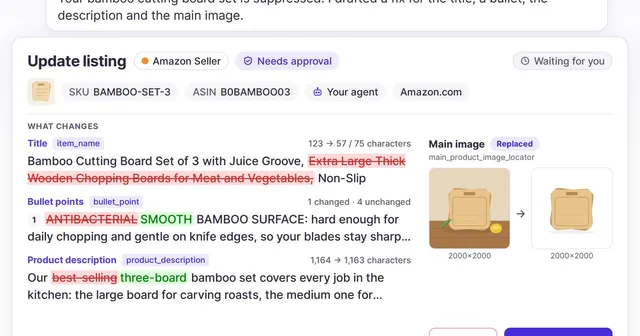
The AI reads your data and proposes concrete moves: lower this bid, raise that budget, add these negative keywords, restructure this campaign. Each proposal comes with the numbers behind it. Then you review and approve — nothing changes on the account until you say so. The AI does the heavy analytical lifting; you make the call.
Contrast that with black-box auto-apply:
| Propose-then-approve | Black-box auto-apply | |
|---|---|---|
| Visibility | You see every proposed change and the data behind it | Changes happen silently; logic is hidden |
| Control | A human approves before anything executes | The algorithm acts on its own |
| Audit trail | A record of what was proposed and what you decided | Often hard to reconstruct what changed and why |
| Surprises | None — nothing moves without your sign-off | You find out after spend already shifted |
That human-in-the-loop step is not a limitation — it’s the whole point. You get an analyst that works at machine speed and a final decision that’s still yours.
What you can actually ask
Once your assistant can see your real data, the value comes from asking the questions you’d normally dig through reports to answer. Plain English is enough. A few that map directly to everyday PPC work:
- “Which search terms are wasting spend and should I negate?” The AI surfaces high-spend, low-conversion terms — the candidates for your negative keyword list — and shows the numbers so you can confirm before excluding them.
- “Where is my ACOS drifting above break-even?” It flags campaigns and keywords running over the line where they stop being profitable. If you’re not sure what that line is, our guide to what a good ACOS on Amazon is walks through finding your break-even.
- “Which terms convert well enough to promote to exact match?” It finds proven performers in your auto and broad campaigns worth graduating into tightly targeted exact-match campaigns — the harvesting step at the core of Amazon keyword research.
- “How should I reallocate budget across these campaigns?” It compares pacing and efficiency across campaigns and proposes where to shift spend, with the supporting metrics attached.
Notice the pattern: these aren’t generic “how do I do PPC” questions. They’re questions about your account that used to mean an hour in spreadsheets. New to the underlying mechanics? Start with what Amazon PPC is.
Where AI helps — and where it doesn’t
Being honest about the limits is what separates a useful AI workflow from a disappointing one.
AI is genuinely good at:
- Surfacing patterns across a lot of data. Reading thousands of search terms and rows of history to find the handful that matter is exactly its strength.
- Summarizing and explaining. Turning a wall of numbers into “here are the three things to look at and why” saves real time.
- Drafting. A first pass at a negative list, a budget reallocation, or a campaign restructure that you then refine.
- Hypothesis generation. “Your ACOS rose last week — here are three likely causes to check” points you at the right places fast.
AI is weak or risky at:
- Acting without context. It doesn’t know you’re deliberately running a launch at a high ACOS unless you tell it. Left to act alone, it might “fix” something that wasn’t broken.
- Hallucinating specifics. A model can state a confident-sounding number that’s wrong. Grounding it in your real data and verifying its claims is essential — never approve a change you can’t see the evidence for.
- Replacing judgment on strategy and margins. Whether a 40% ACOS is fine depends on your margin, your goals, and your roadmap. That’s a business decision, not a math problem.
The pattern is consistent: AI is excellent at the analysis and the draft, and shouldn’t be trusted with the final, unsupervised decision. The human-approval step is precisely what covers its weaknesses.
Guardrails that matter
If you take three things from this guide, make them these:
- Keep a human in the loop. Let AI propose; you approve. This single rule neutralizes most of the risk of using AI on a live ad account.
- Mind data privacy. Your account data should be used to answer your questions only — not to train models that benefit other people. Check how any tool handles your data before you connect it.
- Start small and verify. Begin with questions that change nothing, confirm the AI’s numbers match reality, and only then move on to reviewing proposed changes. Trust is earned by checking its work, not by assuming it’s right.
How to get started
Getting going is more approachable than it sounds:
- Bring your own assistant. You need your own Claude or ChatGPT subscription (or another compatible agent). The AI provider is separate from your PPC tooling — you subscribe to it directly.
- Connect it to your PPC data. Use an MCP connection so the assistant can read your actual campaigns, search terms, and performance instead of giving generic advice.
- Start with questions only. Ask it to summarize account health, find wasted spend, or flag drifting ACOS. Confirm the answers hold up against your reports.
- Graduate to reviewing proposed changes. Once you trust the analysis, let it draft bid, budget, and negation moves — and approve the ones that make sense.
Bring your own AI to WisePPC
This is exactly the model WisePPC is built around — and it’s worth being precise about what that means. WisePPC does not ship its own chatbot. Instead it offers an AI integration via MCP: you bring your own assistant — Claude, ChatGPT, or any MCP-compatible agent, including tools like OpenClaw or n8n — and connect it to your WisePPC advertiser data.
You connect with a WisePPC login or a key, and from there your assistant can read your campaigns, performance, search terms, products, and trends. Then you ask about your account in plain English through your own AI client, grounded in your real data — and the AI proposes bid, budget, negation, and structure changes. Proposed changes land in an approval queue inside WisePPC. Today that covers Amazon Ads and Seller Central listings. For each AI key you set every kind of change to Off, Gated or Direct, so you decide whether changes need your sign-off. We recommend keeping keys gated. The propose-then-approve workflow from this guide, made concrete.
Because it reasons over official Amazon Ads data with up to 24 months of history, the recommendations are grounded in real, deep history rather than a 60-day snapshot — so seasonality and long-run trends are part of the analysis, not blind spots. On privacy, your data is used to answer only your questions and is never used to train models for others; you bring your own Claude or ChatGPT subscription, so the AI relationship stays yours.
See exactly how the AI integration works, or compare plans and pricing and start a free 30-day trial — no credit card required.
The bottom line
“AI for Amazon PPC” doesn’t have to mean surrendering your account to a black box. The stronger play for most sellers is to bring your own AI model, connect it to your real data through MCP, ask in plain English, and approve changes before they go live. You keep the reasoning power of a modern assistant and the visibility, audit trail, and control that an opaque auto-bidder can’t give you. Let the AI propose — and keep the decision.
Keep learning
- What is Amazon PPC? — the metrics and mechanics from the ground up.
- How to do Amazon keyword research — find and harvest the terms your AI can help promote.
- Amazon negative keywords — cut wasted spend, the top thing to ask AI to surface.
- What is a good ACOS on Amazon? — find the break-even line your AI should watch.
- Sponsored Products vs Sponsored Brands — which ad type to put your budget behind.
See the WisePPC AI integration, explore the WisePPC tools, or compare plans and start your free trial today.