The holidays are the busiest and most important time for most Amazon sellers.
The first thing you should do in preparation for the holiday shopping season is analyze your sales from last year, keyword search trends, and other data and determine how much inventory you need to have available.
It’s also a good idea to make changes to your product listings to include holiday-themed images and related keywords.
Sellers should also consider increasing their ad bids and offering holiday deals and discounts to customers.
Finally, you should keep the post-holiday season in mind and get ready for an influx of returns in January.
Check And Analyze Your Product Inventory
The ability to correctly calculate inventory quantity is a crucial skill for anyone who wants to run a successful Amazon business. Accurate forecasting is essential during peak seasons. After all, you don’t want to run out of your products just before Christmas and miss out on a significant number of sales. On the other side, having too much inventory that you can’t sell will result in high storage fees and cause you to lose a lot of money. So how can you avoid these situations and determine precisely how much inventory you need to have before the holiday shopping rush?
Analyze whether your product is relevant during the season. If you sell Halloween costumes, Christmas trees, or garlands, it is no secret that you will see peak sales during the holiday season.
Make use of the knowledge you gained last year. Get out your inventory records for the same quarter previous year and calculate how many products you will require now. Don’t forget to check your sales: have they increased or decreased over the past year? Another good idea is to see which products sold the best last year and analyze what keywords you used in those listings. Perhaps some strategies worked well, or while others didn’t deliver the results you expected. Don’t forget to review all of the results at the end of the season; this will help you determine how to improve your business plan for the following year.
Examine your competitors’ sales history. This is a good method for those new to the Amazon online marketplace who don’t yet know how to accurately calculate how much inventory they need for the holiday season. Another thing to keep in mind is that the best time to order your inventory is between the middle of September and the beginning of October in preparation for Black Friday, Cyber Monday, and other upcoming holidays.
Optimize Your Listings
To increase your sales and improve your business strategy for holiday sales, it is vital to check whether your listings are optimized specifically for this period. You need to make the listings as convenient for customers as possible to help them rank better and convert more customers. Here are some more pointers to help you prepare your listings for Q4:
If you are a Brand Registry Program member, use the Brand Analytics tool to see which keywords performed well during the holiday shopping season last year. Choose the most relevant phrases and test them in your listings right away.
Refresh the images. Use your creativity and Adobe Photoshop to add some holiday-themed stickers of pumpkins, Christmas trees, deer, and other holiday symbols. Organizing a themed photoshoot for your products is another great idea. First impressions are essential, especially when people are shopping online, and you can significantly increase interest in your product by making your listings extra festive.
Holiday-related keywords are also a good idea if you want your listings to rank high. For example, you can use the words “Christmas,” “Gift,” or “holiday.” You should also look over the current Amazon trends to see if there is anything relevant to your products. Choose the best keywords for the many options available.
Check all product descriptions to ensure that there are no misstatements. Things like product size, weight, color, material, etc., are crucial, so try to provide as much accurate product information as possible.
Keep track of time because some customers begin looking for gifts in early fall. So the best time to work on your listings is at the end of September, when buyers are just starting to think about the upcoming holidays.
Increase Your PPC Bids
Like most online retail platforms, Amazon experiences a significant increase in traffic during Q4. This causes a large increase in the amount of competition on the platform, and as a result, sellers need to revise their PPC campaign budgets in advance to ensure that their advertising campaigns can run consistently. As much as you may want to avoid it, you will need to raise your keyword bids during the holidays to stay competitive. For example, if a $2 big is sufficient to maintain a good PPC campaign during the year, it is unlikely to work during the holiday season. Do not ignore this fact, or you will risk losing your positions.
Your ads will also likely see a significant increase in clicks, so you should review your daily budget because it may run out sooner than usual. It’s a good idea to increase your budget to ensure that your ads remain active all day. Then you can properly configure your finances and not be concerned about running out of resources.
Tip: instead of changing the bids for each keyword your target, use “Dynamic bids – up and down.” You can find this bidding feature in the Seller Central’s Campaign Manager. This strategy will automatically adjust your keyword bids. The bid will increase if Amazon believes your ads will result in a sale and fall if Amazon thinks it will not.
Keep Calculating
You should determine your target ACos and RoAS before the holidays and continuously monitor how your campaigns are performing in Q4. It is an expensive time of year, and because you will need to increase your budget, it is best to keep the numbers under control to avoid risking your business becoming unprofitable.
Use A+ Content
If you’re a brand registered seller, you should start using A+ Content as soon as possible, as this tool has been shown to boost conversions significantly. You can use it to customize your listing page and make it more appealing to customers. Use your creativity to create a holiday-themed listing page or work under a minimalist aesthetic.
Try Out Different Strategies
If you are a member of the Brand Registry Program, you are incredibly fortunate because you have access to a variety of tools that ordinary sellers do not have. The holiday season is an excellent time to try something new, and many strategies can prove successful during the holidays and in the long run. Here are a few examples:
Sponsored Brands ads allow you to create a one-of-a-kind shopping experience for your customers. After clicking on your ad, Amazon will direct them to a custom page where they can learn everything about your product without being bombarded with competitor ads.
Sponsored Display ads. With this method, you can place your ads on competitors’ listing pages and retarget customers who previously have visited your shop but didn’t buy anything.
Sponsored Brands Video ads. This ad type allows you to use videos as an advertisement, and it is one of the most effective advertisements you can buy on Amazon. Customers will at the very least take notice of your product, and many of them will be interested in purchasing it.
Create Holiday Deals
This tip is especially handy for sellers who don’t participate in the Brand Registry program. One of the features on Seller Central allows all sellers to create coupons and deals. If a customer likes your product and you offer a discount on it, there is a good chance that the customer will purchase this product. We all love getting a good deal, so offering coupons and discounts is a great way to get more sales. Running Black Friday deals and coupons will also help you engage more people and attract new customers.
So, how do you create deals and coupons on Amazon? You need to go to the Advertising tab, find the “Deals” section and click “Create a new deal”. There are various types of deals, and Amazon will automatically determine which of them are appropriate for your products.
Just like with all other actions you take on Amazon, you will have to pay to run deals. The cost will vary depending on the type and duration of the deal you’re running. Conventional deals will cost you $300 per week, but you will need to pay $150 per week if you want a lightning deal.
You should also consider utilizing clippable coupons which appear in search results for customers. Go to the Advertising Tab and select either a percentage discount or a price discount to create a coupon. The redemption fee for running coupons is set at a minimum of $100, and you will have to pay an additional $0.60 for each coupon used by customers.
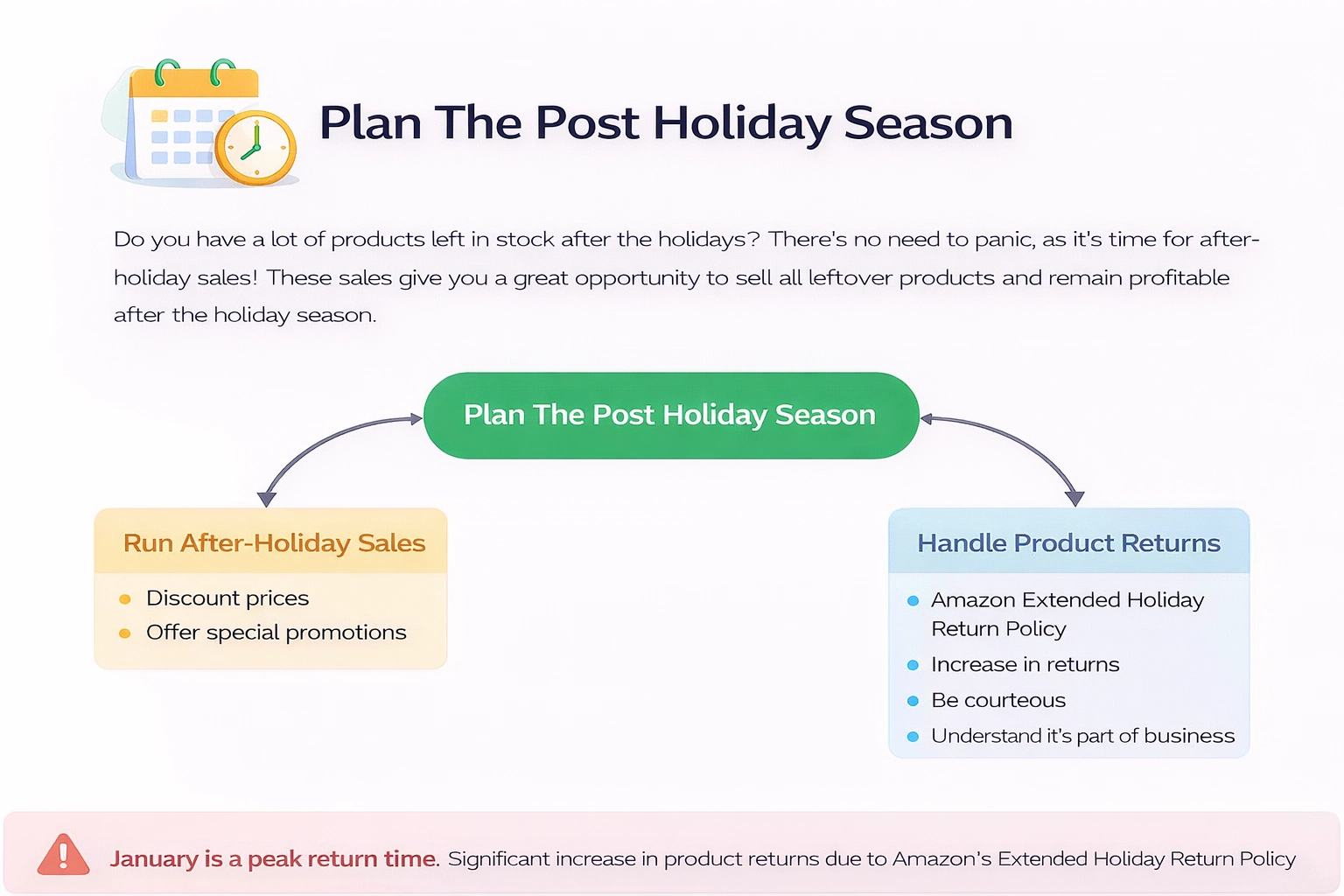
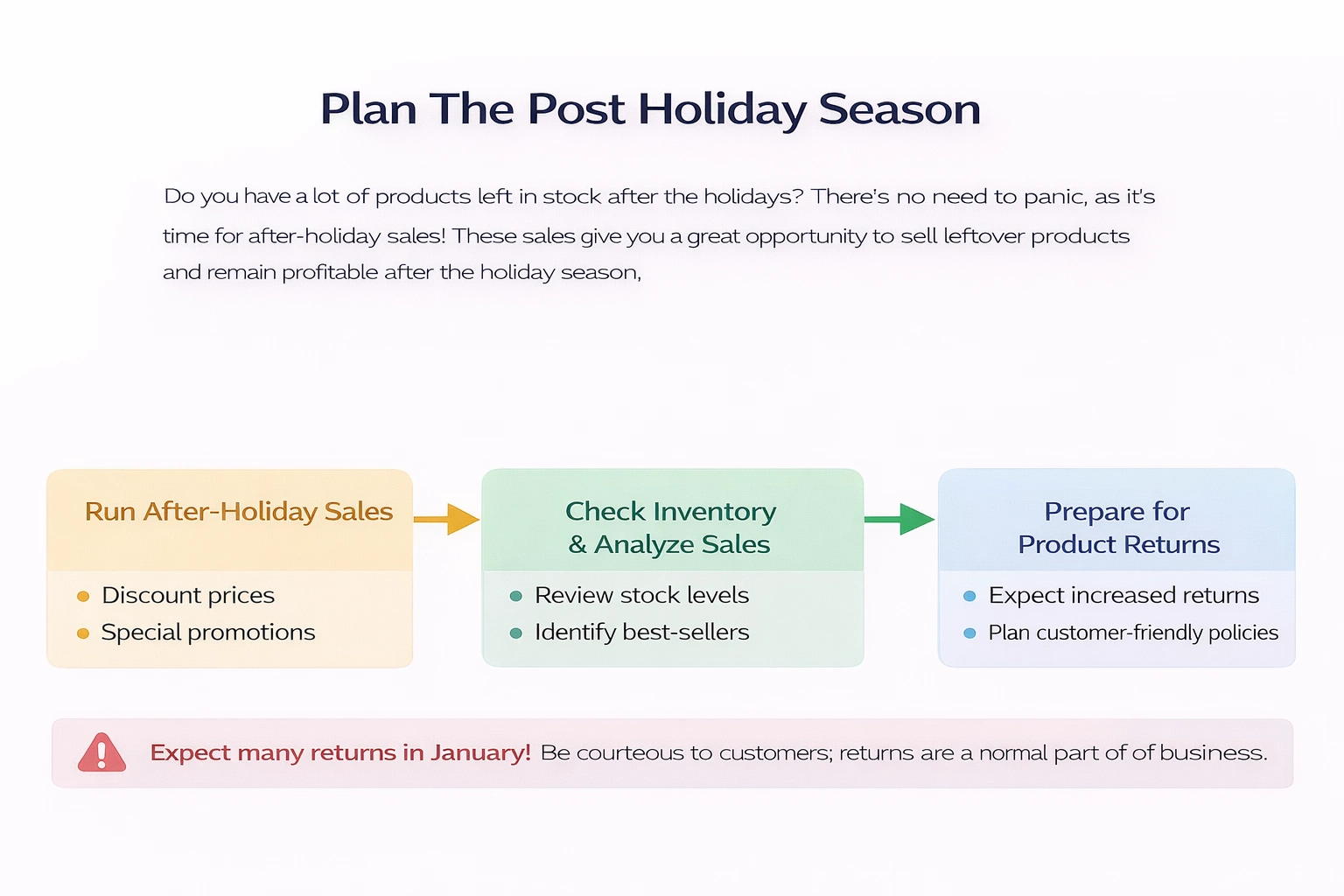
Plan The Post Holiday Season
Do you have a lot of products left in stock after the holidays? There’s no need to panic, as it’s time for after-holiday sales! These sales give you a great opportunity to sell all leftover products and remain profitable after the holiday season.
However, there is something else you should be aware of. The weeks after the holidays are also the hot season for product returns, which is impossible to avoid. While December is the best month for sales, January is the best month for returns, thanks to Amazon’s Extended Holiday Return Policy. The best way to deal with the influx of returns is to be courteous to customers and understand that it is just another aspect of being a seller.
Final Thoughts
By following the suggestions we’ve outlined above, you can prepare for the holiday season and ensure that your business strategy for the holidays will be successful. Of course, you will have to put a lot of effort and time into holiday preparation, but it will be worth it in terms of increased sales and profits. Just make sure that you work on your strategy, analyze the data, and experiment with various marketplace features without being afraid to make mistakes.
However, competing with millions of other Amazon sellers can be difficult at times, which is why we recommend that each Amazon seller seek professional assistance by hiring an agency to help grow their Amazon business. Sign up for a free discovery call with one of our Amazon experts, or leave your email address so we can contact you and tell you more about the services we offer.
FAQ
How long do Amazon holiday deals last?
Your Amazon deals can last up to 7 days before you have to pay a fee to reactivate them.
Why is the fourth quarter so important for sales?
Q4 is one of the busiest times of the year, with all sellers attempting to end the year with as much profit as possible. Customers’ demand also increases in the run-up to the holiday season. As a result, the fourth quarter is frequently regarded as the most crucial for retail.
How strict is Amazon’s return policy?
Amazon has a pretty generous return policy. There is no specific return limit, but the customer must provide a reason for returning the product. Amazon’s return policy does not permit buyers to return damaged or used items.
Split testing or A/B testing is a marketing technique used to determine which image, product description, price, ad copy, etc., results in more sales and increased revenue.
A/B testing is essential for Amazon sellers because it allows you to increase conversions and profits without spending any money.
You can conduct Amazon split testing manually or use the Manage Your Experiments tool if you’re a brand registered seller.
You can also use various third-party tools for A/B testing on Amazon. These include Splitly, Cashcowpro, Listing Dojo, and PickFu.
If you’ve been working in retail for some time, you probably know that two people selling identical products can have completely different results because they have different product descriptions and selling approaches. Yet, at the same time, a company can significantly boost its sales without making any changes to its products or service. All that’s needed is a few tweaks to the product description.
The main rule of online marketing is “Test everything”. It doesn’t matter what you prefer, what your intuition is telling you, or what strategies you’ve read about online. When you’re selling products online, you have the opportunity to test absolutely everything, so why would you leave anything to chance? AB testing gives you the opportunity to optimize your Amazon product listings to perfection. And in this article, we will talk about what it is, explain how to perform product testing, and give an overview of different tools you can use to perform AB testing on Amazon.
What is AB testing?
A/B testing or split testing is a marketing tool that compares two versions of a website, landing page, product, image, product copy, etc., and records a variety of metrics such as conversion rate, traffic, and of course, profits. In traditional split tests, the tester creates two versions of a web page, product description, ad, etc., and directs a portion of all traffic to each version. So activity on both versions is compared simultaneously. However, only sellers who participate in the Brand Registry Program on Amazon can utilize this type of simultaneous testing. All others have to run consecutive tests. This is not a big issue, but there are a few rules you have to follow to do them correctly, and we will discuss them further in this article.
Split testing is essential for Amazon sellers
Split testing gives you one huge advantage – it allows you to increase your revenue without making any significant changes to your products or spending money on advertising. Let’s take a look at an example of a typical Amazon split test.
Let’s say you’re selling skincare products and the current conversion rate for your top product is 5%. This means that 5% of all people who view your listing purchase the product. At the moment, the product description in the listing focuses on the product’s features, for example, its natural ingredients, cruelty-free testing, etc. You can keep this description for 1 month and track all the crucial metrics such as sessions and conversions. Once that month is up, you will change the description to one that highlights results that consumers were able to see with your product and their positive reviews. You will then keep this description for another month, tracking the same metrics. At the end of the month, you will compare the results you got with both descriptions and choose the one that resulted in a better conversion rate. This simple tool can result in a significant increase in revenue and profits.
Features for A/B split testing
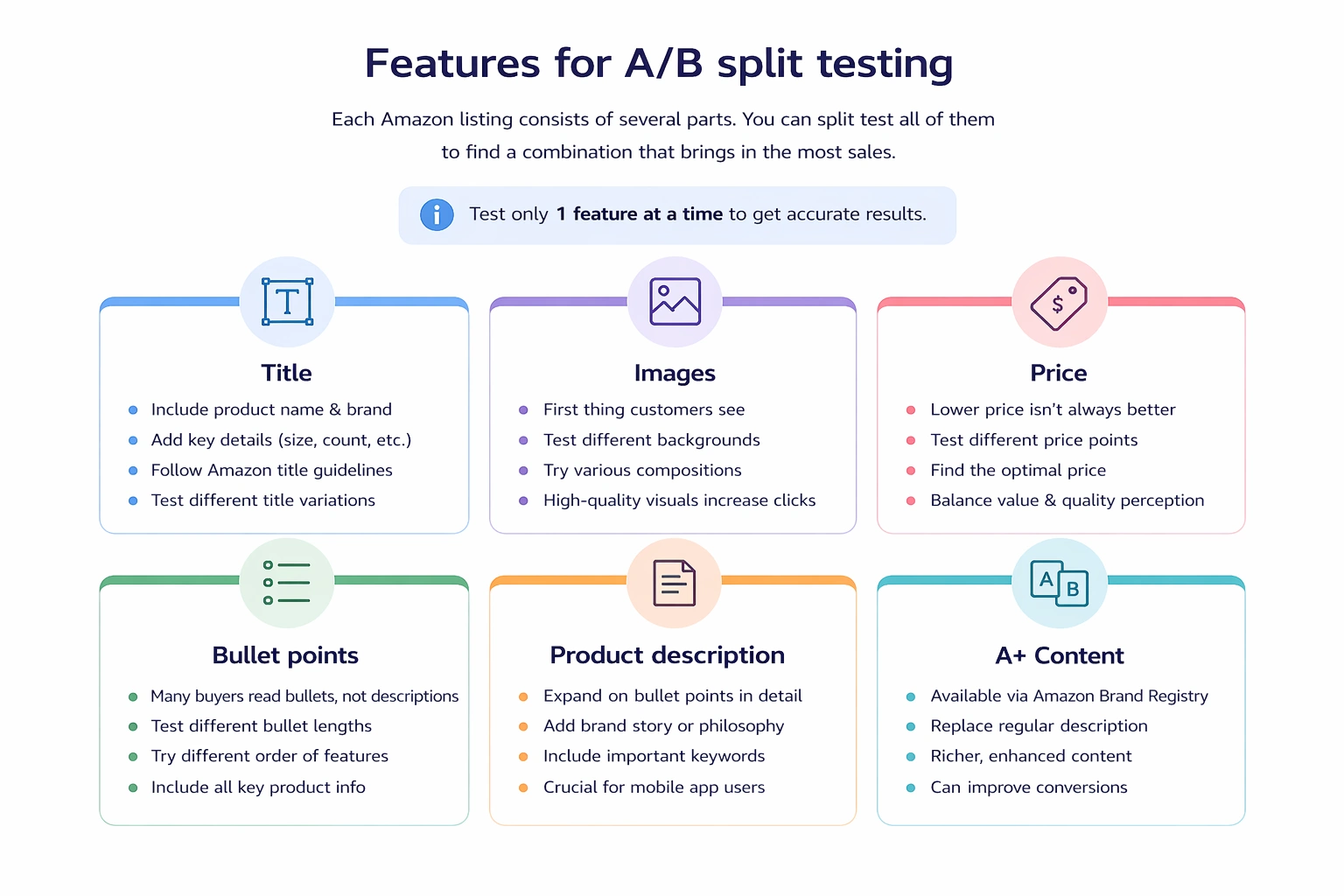
Each Amazon listing consists of several parts. You can split test all of them to find a combination that brings in the most sales. However, you should keep in mind that you should only test 1 feature at a time to get accurate results.
Title
Naturally, the product title is one of the most essential parts of any listing. A good Amazon product title should not only contain the name of the product you’re selling and your brand, it should also give all other information customers may need to know upfront, such as size, number of items in the product, etc. Otherwise, people may click on your product and then immediately leave the page because they discover that it’s not the right size or count.
That being said, you should always stick to Amazon listing guidelines when composing different titles to try.
Images
Product images are arguably one of the most critical parts of any Amazon listing. No matter how many details you include in your product description, people will still get most of their information about the product from images since they can’t see or feel it in real life. Plus, product images are the first thing a customer sees on the search page when looking for a particular product on Amazon. So naturally, good images will attract customers to your listing, while bad ones will discourage people from clicking to view your listings in more detail.
You can try testing images on different backgrounds, with different compositions, etc.
Price
You may think that setting a lower price will attract more people to your products, but this is not always the case. Of course, people like getting good deals on things they purchase, but if the price is too low, you’re risking scaring people off because they may think that your product is low quality. Split testing your products at different price points can help you find the optimal price.
Bullet points
Many people who purchase products online tend to read bullet points but skip the product description. This means that you should put a lot of thought into their composition and include all the info customers need to know about the product in the bullet points. A lot of sellers test different bullet point lengths and orders of features to see what works best. If you suspect your bullets may be too long, you can try shortening them. Alternatively, if you don’t think they contain enough information, you can try rewriting them with more specs and product features.
Product description
Users who are browsing Amazon using a computer or mobile browser will see actual product descriptions only if they scroll down the page, as this information is not shown on the so-called first screen that the users see immediately after the page loads. On the other hand, people who use the Amazon app will see descriptions first, so product descriptions can play an important role in converting people to buy your product. Most product descriptions include the same information as bullet points but expand on it in more detail. You can also try including information about your brand, its philosophy, etc., in the description. Plus, product descriptions could be used to include all the necessary keywords for listing optimization.
If you’ve had the chance to join Amazon’s Brand Registry program, you will have the option to replace the regular description with A+ Content.
How to conduct an A/B test on Amazon?
There are a few ways you can do split testing on Amazon. If you’re not enrolled in the Brand Registry program, you will need to perform manual testing, but if you are part of the program, you will have access to the “Manage Your Experiments” tool provided by Amazon. In addition to this, you can use several third-party tools for Amazon A/B testing.
Conventional Amazon split testing
Split testing product listings on Amazon by hand can take lots of time, but it can also significantly increase your revenue and profits. We’ve already described the manual testing process earlier in this article – you simply need to record listing metrics using the current version of the listing for a set period of time, such as a month, then change one parameter and record metrics once again. Then compare the metrics for the two periods of time and see which version performed better.
You can find your Amazon listing metrics by logging into your Seller Central account, going to Reports, and selecting Business Reports. Then, choose “Detail Page Sales and Traffic By Child Item” in the menu on the left. You will see a spreadsheet with numerous data columns, including Product Sales, Units Ordered, Sessions, Unit Session Percentage (the conversion rate), and Buy Box Percentage. You can also customize the dates for which you want to view the report.
Remember to only change one listing parameter at a time to keep the results accurate. You should also choose a long monitoring period since you won’t get accurate results if you change the listing after a few days or a week.
Conduct Amazon A/B testing using the Manage Your Experiments tool
This tool allows you to conduct simultaneous A/B tests on Amazon. Unfortunately, it is available only to the Brand Registry program participants. This tool will enable you to run traditional split tests, meaning that some people who view your article will see one version of the listing, while the rest will see the other version. You can test different titles, main product images, and A+ Content using this feature.
If you’re a brand registered seller, you should open the Brands tab and press Manage Experiments. Next, select the experiment type, pick a product you want to test, provide all the information that will be used in the test and set the duration of the test. Finish by pressing the Schedule Experiment button.
Interestingly, you don’t need to wait until the end of the experiment to see its results. You can browse them after each week.
Split testing tools for Amazon listings
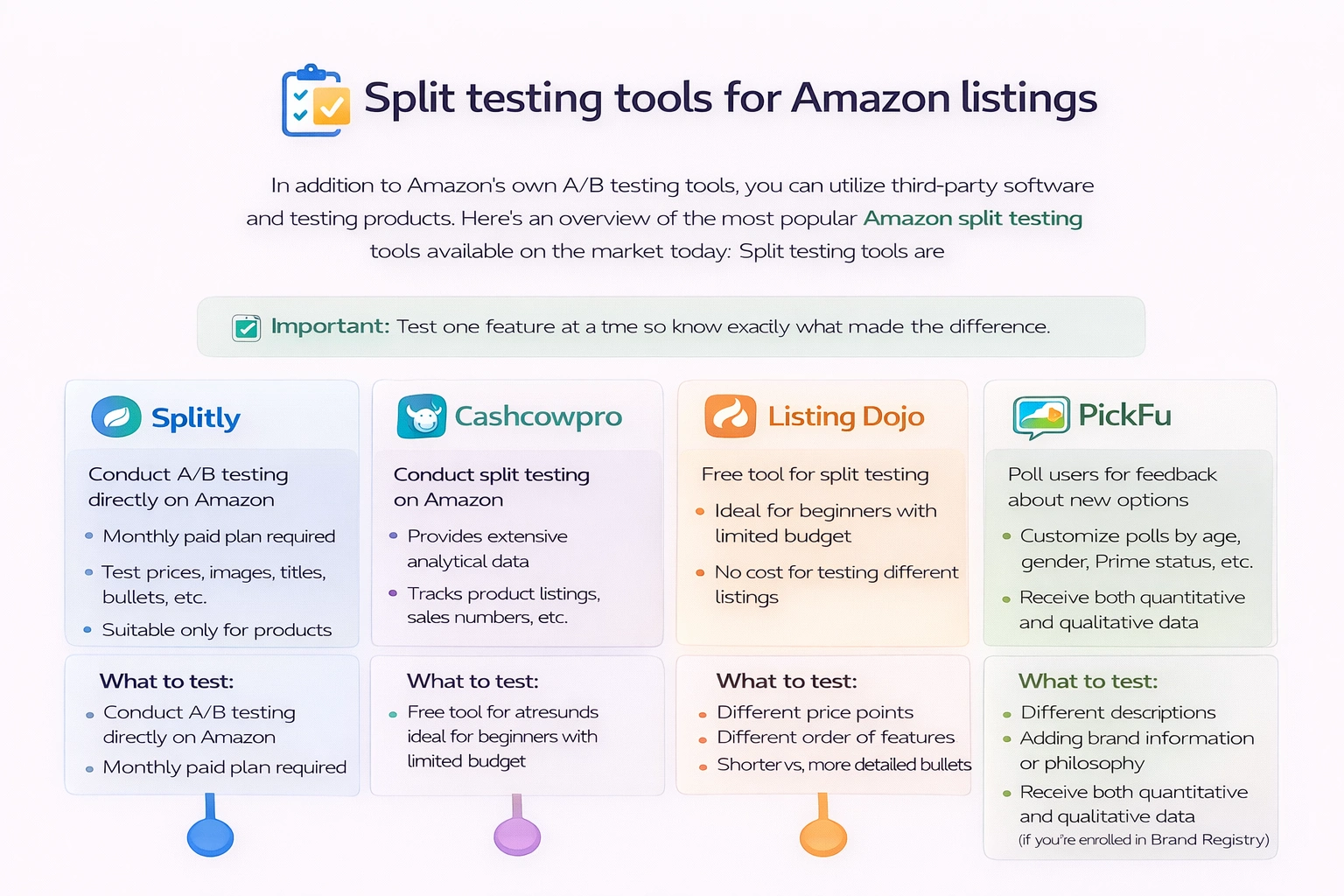
In addition to Amazon’s own A/B testing tools, you can utilize third-party software and testing products. Here’s an overview of the most popular Amazon split testing tools available on the market today:
Splitly
Splitly allows you to conduct A/B testing directly on Amazon. However, you need to sign up for their paid monthly plan to start running tests. Keep in mind that you can only use Splitly and other similar tools if you have at least a few sales per day on the product in question, so these tools won’t be suitable for new sellers.
Splitly allows you to test a variety of product prices, images, titles, bullets, etc.
Cashcowpro
In addition to allowing you to conduct split testing, this tool also provides lots of analytical data about your Amazon product listings, sales numbers, etc.
Listing Dojo
Unlike other software listed in this section, this is a free tool for split testing. Thus, it’s perfect for people who want to try split testing for the first time and don’t want to spend lots of money on it.
PickFu
This split testing tool is different from the other programs mentioned in this article in that it doesn’t actually test Amazon sales. Instead, it allows you to poll PickFu users on which image, iconographic, etc., they prefer. The platform enables you to select which groups of people you would like to poll according to their gender, age, and other parameters. You can even choose to show your poll only to Amazon Prime users. In addition to the poll results, you’ll also get the reasons why users preferred one option over the other.
Final thoughts
Even though split testing can seem like a tedious and time-consuming task, it is something each seller has to do to ensure that they can stay ahead of the competition on the platform and make a profit. But if you don’t have a lot of marketing experience or want to focus on other aspects of the business instead of spending your days doing split testing, you can hire an Amazon growth agency to take care of this and other business tasks for you.
FAQ
How do I split a test listing on Amazon?
If you’re not enrolled in the Brand Registry program, you will need to conduct manual split testing on Amazon. To do this, you need to record the number of sessions and conversions for your current listing version for a set period of time. Then, change one part of the listing, such as the product image, title, bullet points, etc., and record the same metrics for an identical period of time. Finally, compare the two sets of data to discover which version of the listing performed better.
What is AB testing in Amazon?
A/B testing or split testing is the process during which a marketer creates two versions of a product listing that vary in one characteristic, such as product images, title, etc. Next, each listing is used on the platform for a set period of time (usually several weeks), and the conversion rate for each listing is recorded. The listing that performed better is used in the future.
How do you perform Amazon title testing?
You need to create two titles for your Amazon products and use one title for several weeks or a month while recording the number of sessions and conversions for the products. Next, change the title to the second version and record these metrics over an identical period. Compare the results.
Amazon makes it easy for any person to start a business selling products online in a very short time span.
If you’re considering opening an Amazon store, you should first determine what products you’re going to sell, how you will source those products, and what business model you’re planning to use.
Once you’re ready to start your business, you will need to decide on a budget for your business, create an Amazon seller account, determine whether you can do everything on your own or need to hire helpers, and get all the necessary licenses and documents.
The next steps will be to decide what products you’re going to sell, find a place to source them, order samples, decide on the branding of your products, and order stock. Once everything is ready, launch your business and start working on optimising and growing it!
Are you tired of working from 9 a.m. to 5 p.m. every day? Have you considered starting your own business selling products online? It’s an idea that many people have, but few are willing to take on the risks as they don’t believe they can succeed. Yes, the online retail market is a difficult place to achieve success, but there are numerous ways to go about starting your business, and some of them are more likely to give good results. One of these is Amazon, one of the largest online marketplaces for selling and purchasing products. It is the platform with millions of customers, dozens of useful tools and services, and an easy-to-use interface for running an online business. So, if you want to start a business on Amazon but don’t know how it works, you’ve come to the right place. In this article, we will explain how to begin selling on Amazon and how to manage the entire selling process step-by-step.
Getting Started on Amazon
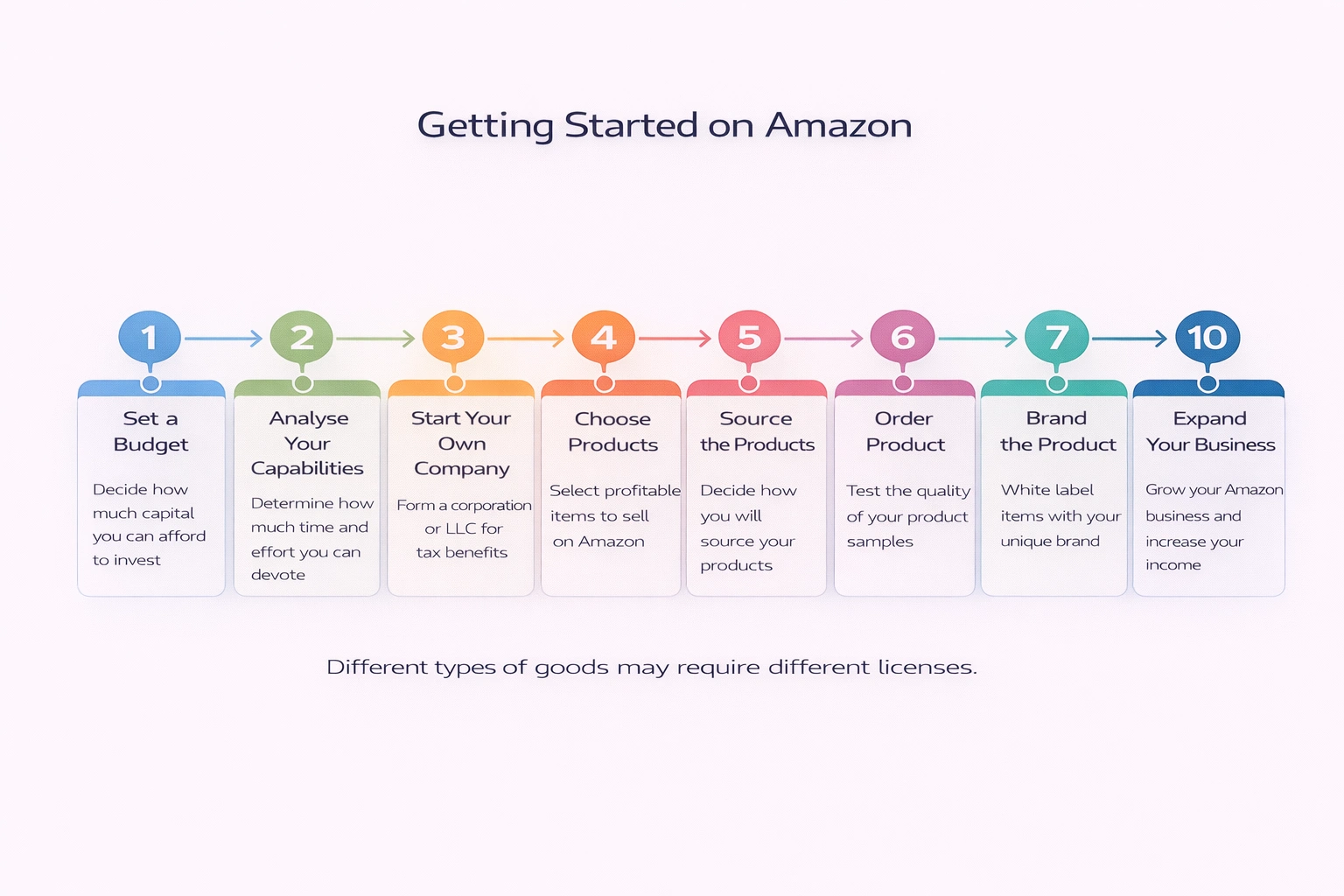
Before you can establish yourself as a seller, you must first decide what you want to sell, how much time you can devote to your new business, and how you will build your strategy. It will be much easier to start a business once you have answers to these questions because you won’t have to stop and solve key problems along the way. Instead, you will have a steady foundation for your business.
Step 1: Set a Budget
It is critical to consider how much capital you are willing to invest in your business, as this will influence the strategy you choose and the products you sell. The key is to find a balance: don’t spend all of your money on the business, and don’t be too frugal.
Take into account all the expenses you will incur and determine the amount of money you can afford to spend. This will typically include inventory purchases, Amazon fees, shipping costs, marketing, and so on.
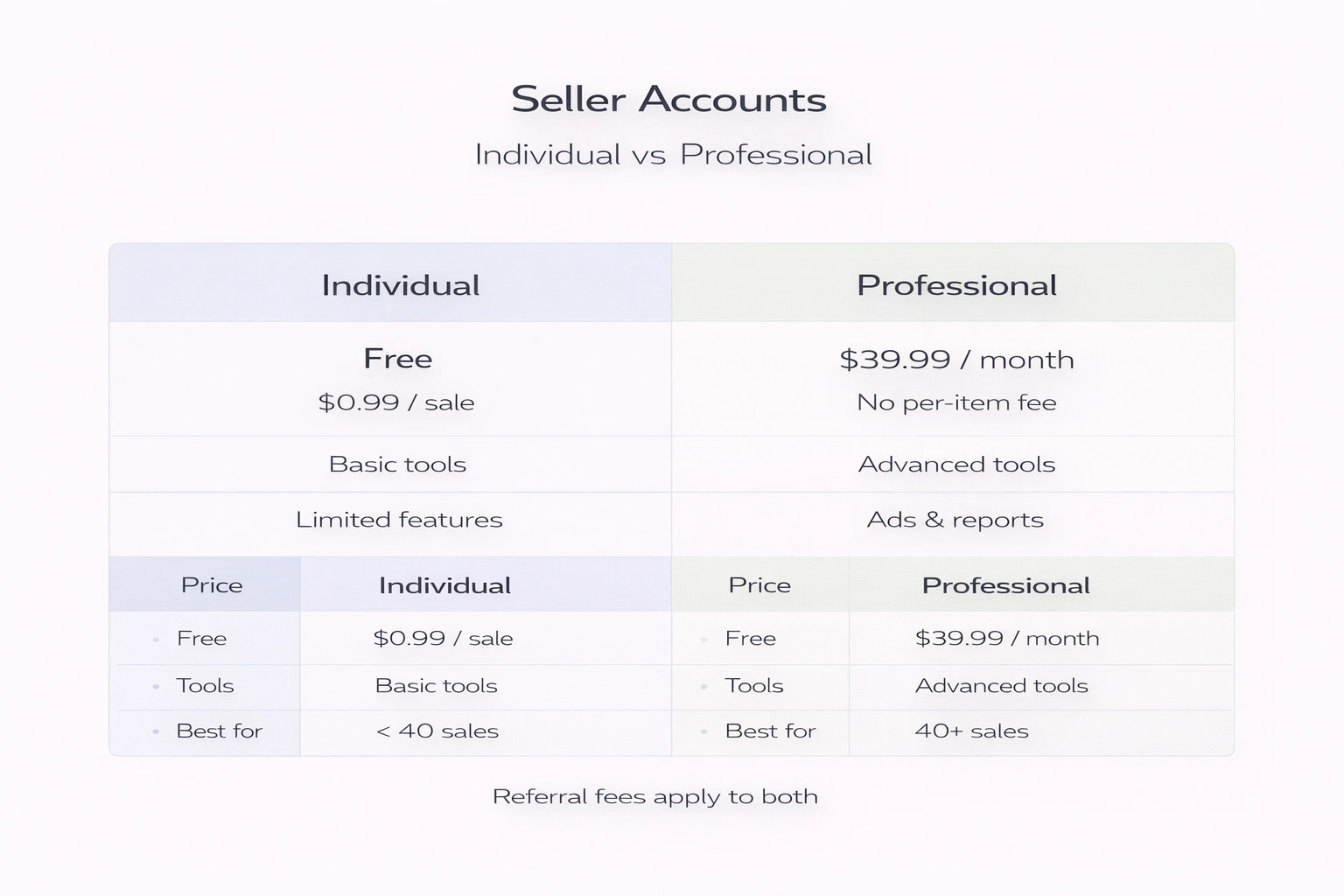
The first thing you’ll need to purchase is an Amazon Seller Account plan. Amazon offers two types of plans (individual and professional) to account for the sales levels you anticipate for your business. Here are some key distinctions between the two plans:
Individual
Choose Individual if:
You have a low turnover of goods (fewer than 40 sales per month).
You are new to the Amazon business and are still developing your sales strategy.
You’re not interested in advanced tools just yet.
You are unwilling to pay a monthly fee in exchange for some bonuses.
Professional
Apply as a professional, if:
You sell more than 40 items per month.
You want to have access to premium tools.
You are already confident in your business strategy and have sold products online before.
You’re willing to pay $39.99 per month to receive some Amazon bonuses.
Of course, you can always begin selling as an Individual and upgrade your account to the Professional selling plan when you feel more confident about your business.
Step 2: Analyse Your Capabilities
Consider whether you want to run a business as your full-time job or as a side hustle. Do you own a warehouse where products can be stored before shipping or have experience in logistics? Do you need additional assistance with some parts of the job, or can you handle it all yourself? Consider all of these factors before deciding on a business model, as they will influence your budget and workload. For instance, if you want to spend as little time as possible on order fulfilment, you can join the Amazon FBA program.
Step 3: Start Your Own Company
While you do not need a business license to sell on Amazon if you live in the UK, it is still a smart idea to form your own corporation or LLC. Experienced sellers claim that it will make the tax process more straightforward and understandable.
Step 4: Choose Products
You should not take the process of selecting products lightly because you must consider all of the factors that will influence your products’ success and profitability on Amazon. Here are some of the most popular categories on Amazon:
Products from the Home & Kitchen category account for nearly half of all sales.
The Toys & Games category accounts for 40% of total sales.
34% of sellers prefer to sell books.
The majority of other sellers work in the Health, Household & Baby, Kitchen and Dining, and Pet Supplies categories.
This is not to say that you must limit your product selection to these categories – these are simply the most popular and profitable options. You can certainly find good products to sell in a different category and make a lot of money.
No matter what category you choose, you should consider your chances of beating other sellers who are selling the same product and taking the top spot, as this will have a huge impact on your success. If you’re considering highly popular categories, look for items with a Best Sellers Rank between 100 and 6,000 and try to select products that are selling well but don’t face a lot of competition.
Step 5: Source the Products
There are many business models you can choose from, and all of them influence how you will source products for your Amazon business. Each of them has its own pros and cons, so you should try to find one that fits you most:
Private labelling. Choose this option if you want to rebrand products manufactured under a white label.
Online and/or Retail Arbitrage: Sellers who use this method find discounted or bargain goods in brick-and-mortar or online stores and purchase them with the goal of reselling them on Amazon at a higher price.
Wholesale: This model is similar to the arbitrage model, but instead of finding individual units, you buy low-cost or discounted goods in bulk.
Dropshipping: Sellers who use the dropshipping method do not keep physical stock in their warehouse but instead transfer orders directly to a third-party supplier.
Handmade: Some sellers make products by hand and sell them on Amazon. You can sell jewellery, clothing, decorations, and so on.
Step 6: Order Product Samples
Before ordering a large number of products to resell from a third party, it is a good idea to order a few samples to evaluate their quality and determine if they are a good fit for you. You can get products from local manufacturers, but many sellers prefer to get their inventory from China because there are so many low-cost and varied items there.
In China, there are two massive shopping platforms most sellers prefer to use Aliexpress and Alibaba. So, you can go to these websites and search for manufacturers who make products you’d like to sell and ask them if you can order a few samples (2 to 3 will be enough). You can try out the items and also inquire if the manufacturers can customise the products for you, as many sellers will do so for free. Keep in mind that because these products are shipped from China, delivery can be extremely slow.
Step 8: Brand the Product
If you source products from a third-party manufacturer, you can obviously sell them as is, but it could also be a good idea to “white label” the items to make them unique and sell them under your own brand. First and foremost, it will increase the visibility of your product and create the impression that it is one-of-a-kind. As a result, you can grow your own brand, which will help you to beat the competition and create a strong and profitable company. But keep in mind that having your own brand requires more work than simply reselling products you’ve purchased from China. You will need to create a logo, customise the packaging, promote your brand, and so on.
Step 7: Order Inventory
Remember that in addition to ordering inventory, you will need to store it somewhere, pack it, and ship it to the customer. All of this costs money, which is why you must decide whether it will be better for you to handle the entire process yourself or seek additional assistance.
On Amazon, sellers have two options for doing business: FBA (Fulfillment by Amazon) or FBM (Fulfillment by Merchant). Under the FBA program, Amazon handles shipping, customer service and returns, whereas the seller is responsible for doing all of this if they choose the FBM option. If you want to know more about FBA and FBM, read our article that explains all the differences in detail.
Step 9: Promote Your Business
If you want to promote your products on Amazon, you will only need a few hundred dollars to get started with marketing. There are several ways to run ads, but the most popular is to use Amazon ads, which are typically the most profitable option, with conversion rates ranging between 20 to 30 per cent. Another option is to drive external traffic to your listings from sites like Facebook, Google, and YouTube. Most sellers need to market their products for one to five months before the listings start attracting enough organic traffic on their own. The duration of this time period depends on the quality of your advertisement and the type of products you sell.
Step 10: Expand Your Business
Once you’ve launched your first listings, you can finally start growing your company and making it profitable! The easiest way to do this is to add more products to attract more people and increase your income. Also, don’t be afraid to try Amazon services like Brand Registry. Amazon Brand Registry verifies and protects registered trademarked brands. It also provides sellers with advanced tools for promoting their brands and monitoring other sellers’ listings for content that infringes on their intellectual property rights.
Final Thoughts
Once you decide to enter the world of Amazon business, you open Pandora’s box full of opportunities! Of course, in addition to gaining access to lots of new opportunities, you will face some challenges, as selling on Amazon is a lot of work, especially if you have no experience. It is a good idea to seek support from professionals to assist you with issues and aid you with the development of your business.
FAQ
How much does it cost to start your own Amazon store?
The amount of money you need to start selling products on Amazon varies depending on your intentions, but you won’t need a lot of money upfront. In many cases, $500 to $1,000 is enough to get started.
Is selling on Amazon free?
You will not be charged for signing up as a seller on Amazon, but when you create your Seller Account, you will be asked to select a selling plan. The individual selling plan will only cost you $0.99 per item sold, but you will also need to pay for some services in the process.
If you’re planning on selling products online in the United Kingdom, you don’t need to obtain a business license.
At the same time, as a UK online seller, you are required to register with HM Revenue & Customs. This process allows the government to ensure that you’re paying all the necessary taxes and that your products and business operating procedures meet all requirements.
In the US, online sellers are usually required to obtain a business licence. However, platforms like Amazon and eBay won’t ask you for a license when you register.
US-based sellers may be required to obtain other licenses and permits in addition to a general business license, but the rules differ by state.
With each passing year, the e-commerce sector grows larger and larger, with the percentage of online sales constantly increasing. It is believed that e-commerce sales currently account for over half of all retail sales in the United Kingdom. Therefore, establishing an online store is an excellent idea for people who are looking to create a new business and those who already own a brick-and-mortar store. However, setting up an online shop requires a lot of preparation, and the first step is getting a proper license.
Do you want to know whether you need a license to sell products online in different countries? In this article, we will tell you all the rules for online retail licenses in the US and UK so you can feel safe and confident when starting your new company.
What Is a Business License?
A business license is essentially a permit from the government that allows you to operate your business. The type of business license you’ll need depends on the country or even the state where you work, but they all serve the same purpose – they confirm that you’ve received official local government approval to run your business in a specific jurisdiction.
A business license is usually required for online selling since it is an important aspect of demonstrating your company’s legitimacy and legality. However, acquiring this document isn’t as easy as simply filling out a form. There are a few other matters you’ll need to take care of. In addition, as we’ve already mentioned, the requirements concerning business licenses can vary depending on the country. In the next sections, we will discuss the particularities of business licenses in the UK and USA.
Online Business License Requirements in the UK
Most online businesses in the UK are allowed to trade without a business license. However, you must make sure to properly register with HM Revenue & Customs. This is the first mandatory step in creating your online shop, which should be done within three months after the establishment of your business. This is necessary because the government wants to ensure that you’re paying the correct amount of tax and National Insurance and to ascertain that your buyers’ personal information is protected and your goods and services meet all quality criteria.
Although you do not need a license to sell general products online in the UK, you still have to follow a set of rules. One of these rules is that you need to indicate what your customers need to do to place an order and indicate the total cost of delivery on your website.
However, there are a number of additional requirements you need to take into account. To find out more, you can consult the government’s Online and Distance Selling page.
License Requirements for Selling Restricted Goods in the UK
While most general goods can be sold without a permit, if you are planning to sell restricted products like alcohol, you’ll be required to acquire several licenses:
Personal license
To get this license, you will need to go through training to receive a BIIAB Level 2 Award for Personal License Holders from a legitimate provider and then apply for a personal license online on a government website. The training takes only up to one day and costs approximately £100. The application for a personal license, on the other hand, can last three weeks and costs £37.
Premises license
After getting the personal license, you’ll need to apply for a premises license. You can acquire this license only from your local authority or council. It can be attached to any commercial property, such as a warehouse or a shop floor. Keep in mind that you are unlikely to get a premises license for selling from your house since it is considered a domestic dwelling. A small building on your property that is distinct from your house, on the other hand, may be granted a license, given that you will have planning permission that enables it to function as commercial premises. The cost of this license depends on the value of your business premises and will be levied annually.
Another thing you need to keep in mind is that selling alcohol to anyone under the age of 18 is illegal. Although verifying the age of your customers over the internet is nearly impossible, you will be required to put adequate verification measures in place to check the person’s age.
License Requirements for Selling Goods Online From the UK To Other Countries
It can be pretty intimidating to open your online commerce business to an international audience. However, it is estimated that US buyers spend around £12.5 billion on UK products and services online each year, meaning that making your goods available to foreigners could help your small business increase sales and profit margins.
While selling to an international audience can significantly increase your revenue, you may experience some difficulties in the process. Before shipping your goods, you must ensure they have all the necessary documentation. In addition, when your products arrive in the United States or other countries, they will be liable for both customs duty and sales taxes. You can utilise the UK Trade Commission database to calculate the duty rates you’ll need to pay. You can also get in touch with customs agents at the destinations where your goods are expected to arrive to get more information regarding import rules and taxes.
When selling to the United States, keep in mind that the country’s taxation system is pretty perplexing. Although the US does not have a VAT, there are many states that have their own sales taxes that apply to products sold by companies from other states and countries. To get more accurate information on the sales tax in different states, visit the US government’s page on exporting goods to the United States.
Based on the sector to which your products are related, you may need a specific license to export them from the UK to the EU. You’ll also be required to fill in a proforma invoice to charge VAT on the sale. Don’t forget to include the invoice and all other necessary documents when shipping the goods. Make sure to always keep copies of commercial invoices and customs documents even after your customers receive their orders.
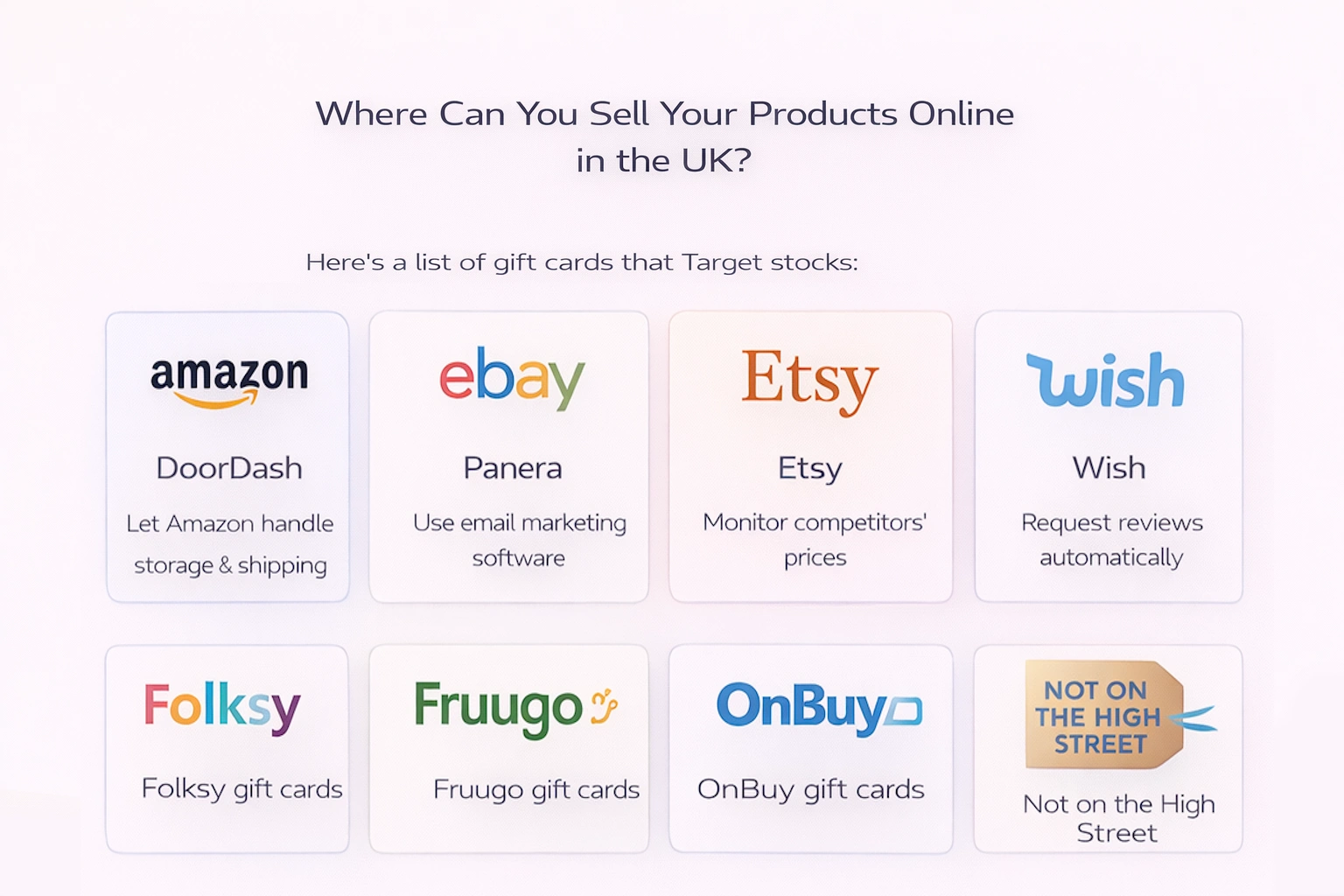
Where Can You Sell Your Products Online in the UK?
Amazon
eBay
Etsy
Wish
Folksy
Fruugo
OnBuy
Not on the High Street
Online Business License Requirements in the USA
In a nutshell, the answer to whether a business license is necessary for selling products online in the US is a definitive yes.
A business license is required for online selling, and it is an important step in establishing your company as legitimate and legal. However, acquiring a general business license will probably be the least of your problems. There are also several requirements for online selling that you’ll have to meet before launching your e-commerce business. In the next section, we will take a closer look at those requirements and explain common types of business licenses and permits.
Business license (general license)
A business license, also known as a “general license” or “business operating license,” allows you to operate a company in a specific area, usually your town, state, or county.
Generally, all businesses, whether online or offline, will require a business license to operate. However, if you are a physical retailer who already owns an existing brick-and-mortar store and a has license for selling products there, you won’t need an additional online business license. The only thing that matters here is the duration of the business license that allows you to sell your products and registers you to pay all the taxes that you as a business owner are responsible for as well.
The mechanism of applying for a business license varies among different jurisdictions and states, and so do the fees for obtaining one (although they are usually relatively low). Keep in mind that business licenses aren’t issued forever, and you will need to renew them every few years.
Sales tax license or seller’s permit
Most US states require you to acquire a seller’s permit if you sell products that are taxed, regardless of whether your business is run from a physical store or solely online. The “seller’s permit” is known by many names in different states. For example, it is often called a sales tax license, but the purpose of this document is always the same – it enables you to collect and remit tax from the sale.
Sometimes, this document will also allow sellers to buy certain goods from suppliers without having to pay sales tax. To do this, you’ll need to obtain a “resale certificate”, which confirms that the products you’re purchasing will be sold wholesale or retailed through your own store.
Usually, you won’t have to pay any fees to acquire this permit.
In general, any state where you have a “nexus” requires you to obtain a seller’s permit. Originally, this used to refer only to states in which a business had a physical presence, but the rules and terms have been rapidly changing. According to recent US Supreme Court decisions and law changes, many states now consider what’s known as an “economic nexus” when determining whether or not you need to have a permit and submit tax documentation in a certain state. In many states, this economic nexus does not come into force until you sell over $100,000 worth of products or services in the state or carry out more than 200 transactions.
Once again, these requirements vary by state, so you’ll have to check with your local authority to see if you need a seller’s permit. Alaska, Delaware, Montana, New Hampshire, and Oregon, for instance, do not collect state taxes at all. Furthermore, if you physically operate in several states — including housing inventory — you may be forced to acquire multiple seller’s permits to be able to conduct business in each of the states.
You can also benefit from “temporary seller’s permits”, but only in some states such as California and Idaho. If you are looking for a permit that allows you to sell online temporarily, this is exactly what you need.
Tax ID Number
There is one more document you’ll need to get before applying for a seller’s permit – a tax ID number. In some states, you will be allowed to use your social security number instead of a tax ID number if you are a sole proprietor. In others, state officials will ask you to provide your EIN (federal employer identification number). If you don’t know what an EIN is and where you can get it, don’t worry, we will elaborate more on this matter in the following section.
Keep in mind that state and federal tax identification numbers are not the same thing. However, in situations where you’re required to provide one of these numbers, you’ll also need to give the other one as well. You’ll find out whether you need an EIN to operate an online business when you go through the process of registering with your state to collect taxes.
These numbers effectively serve as a means for the government to keep an eye on your business, taxes, and all your employees.
Federal employer identification number
The federal employer identification number (EIN) is crucial for any business. It is similar to a social security number for your company. The EIN defines you as a business owner and makes it possible for you to comply with tax and other regulations. If you intend to register and operate as a business entity rather than having a sole proprietorship, having EIN is not optional – it is a requirement you need to comply with. However, if you are registered as a sole proprietor, you can use your social security number instead.
The EIN will also allow you to open a business bank account. At first glance, this might seem unimportant, but eventually, you’ll need to deposit your earnings into a distinct business account since it’s crucial to keep your business and personal assets separate.
You can acquire an EIN from the IRS online. If you plan to recruit some employees, you’ll definitely need an EIN to be able to withhold tax from them.
“Doing business as” license
The majority of companies register their business name at the same time as they register their company with the state. But in fact, not all business enterprises have to create and register a separate business name. For example, owners of sole proprietorships and general partnerships are required to register a name. In those cases, the business’ name is set to the owner’s legal name by default.
But if you don’t want to conduct business under your own name or under the name you registered with your state, a DBA license is a perfect option for you. This license will allow you to trade under a different name. You’ll have to approach the Secretary of State’s office to acquire this license. The process of getting DBA and fees for this document differ in each state, and some states don’t charge any fees at all. If you operate a business under a different name, you’ll also likely need a DBA license to execute some transactions, such as opening a business bank account.
However, you will have to double-check with your local authorities to learn about the restrictions around DBA licenses in your state, especially if you’ve previously operated under another name and would like to amend it now.
Home occupation permit
If you run your business from home, as many online sellers do, you might be required to get a home occupation permit. This license is not uncommon among e-commerce business owners, and it comes in handy for vendors who ship orders from their homes. If you want to hire some employees, you will likely require a home occupation permit as well.
The home occupation permit can also help you to avoid breaching restrictions if your business carries out services such as commercial sign installation or interior decoration or if you have a lot of foot traffic from shipping companies or from customers.
Please be advised that regulations and requirements concerning this license can vary depending on the area you operate your business in.
Professional and industry licenses
These types of licenses are also known as occupational licenses. In some states, occupational licenses are designed for people working in certain fields such as accounting or real estate. These professionals may be required to get a specific state license for their work. Online merchants that sell alcohol or tobacco may be required to get specialised industry licenses as well.
Statewide general business licenses
A general business license or a business operation license is necessary to run a business in a specific state. These documents are regarded as typical business licenses.
But some types of business entities are required to obtain specific state business licenses. The same goes for brick-and-mortar stores or online retail stores – these types of businesses usually aren’t required to get a general business license.
Federal business license
If you plan on selling your products to entities that are overseen by the government, you’ll need a federal business license. You’ll also have to charge federal tax on these sales.
Are you required to get a business license to sell on Amazon?
While the US government generally requires sellers to have a business license, Amazon won’t request it when you register a seller account.
In fact, a business license is typically not necessary to create an account on any of the following marketplaces:
Amazon
eBay
Etsy
Craigslist
Facebook
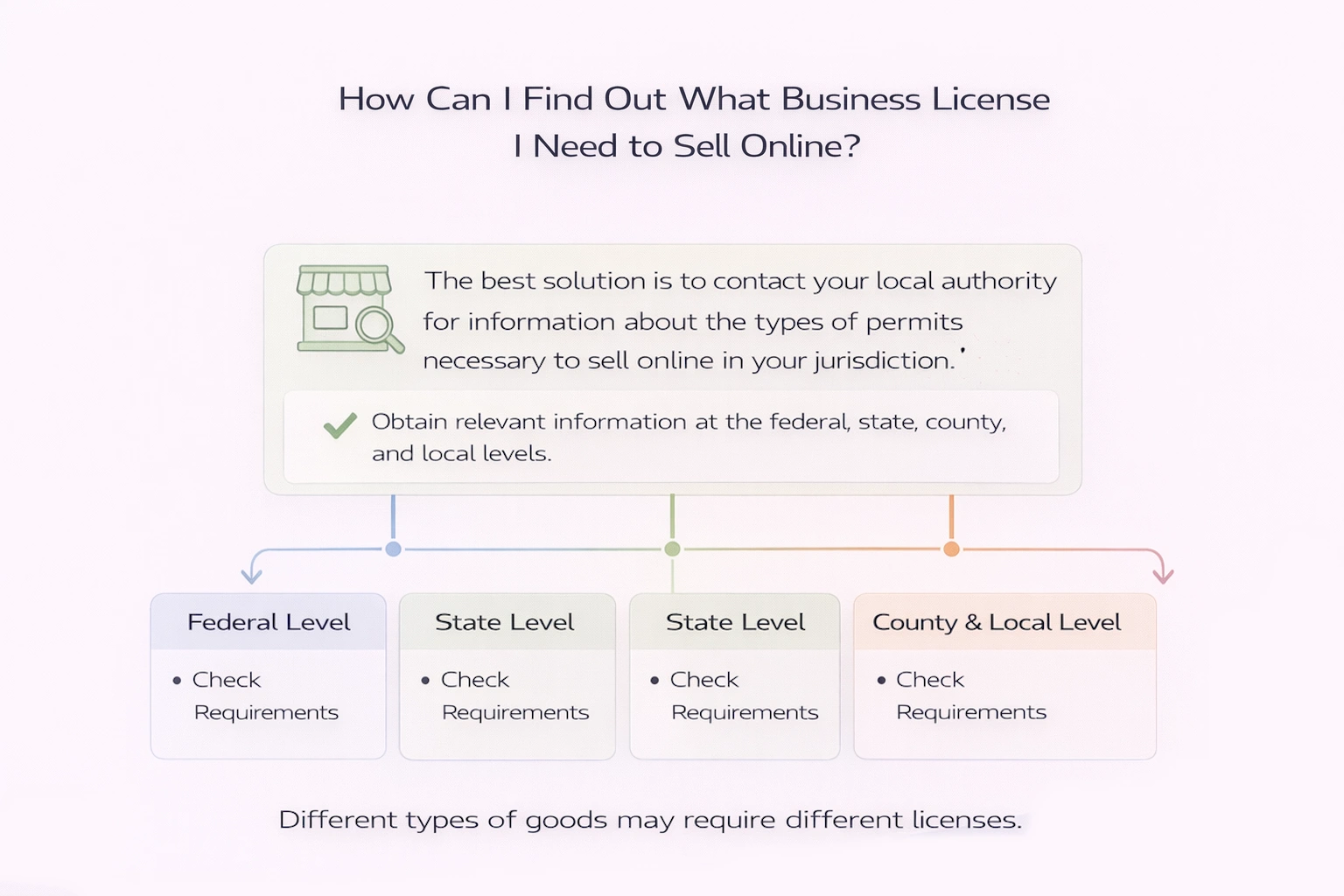
How Can I Find Out What Business License I Need to Sell Online
The best solution is to contact your local authority for information about the types of permits necessary to sell online in your jurisdiction. Some jurisdictions may require you to obtain licenses and permits that are not on this list and are unique to your location. You should obtain relevant information at the federal, state, county, and local levels.
The licenses you will be required to get may be determined by the types of goods you offer as well. For example, if you plan on selling pyrotechnics, you will probably need a different license than if you were selling clothes.
Final Thoughts
At first, it may seem like it’s very difficult to determine what kind of licenses you need to sell online. A lot of people worry about starting an online business because the process seems very confusing, overwhelming, and complex, but this is only true when you are selling restricted products or exporting your goods to other countries. But you can easily avoid problems with the government if you check the requirement with local authorities, find out which licenses you need, and make sure to comply with all regulations, restrictions, and requirements. This will guarantee that you won’t accidentally end up breaking the law.
FAQ
What kind of business license do I need to sell online?
The most basic kind of business license you may require to run a business is a local business operating license, which allows you to conduct your business. However, the type of license you’ll need depends on the area where you are operating.
What steps should I take to obtain a company license?
Here is the step-by-step process for getting a business license:
Check your local regulations and file the necessary care paperwork.
Create a business entity.
Create a Doing Business As (DBA) name for your company.
Target doesn’t sell Amazon gift cards in physical stores or online. However, customers can choose among other gift cards available for sale at Target, including cards for different retailers, restaurants, entertainment, travel, and much more.
Customers can purchase Amazon gift cards at many other places, including many pharmacies, Safeway, and 7-eleven. Amazon gift cards can also be bought directly from Amazon.com. You can choose gift cards at any value up to $500.
Target is a perfect store for those who want to run errands quickly and buy everything they need in one place. It offers a lot of diverse products at a reasonable price, and gift cards are one of the many types of items Target sells. In fact, Target is one of the most popular destinations to purchase gift cards, but does it carry Amazon gift cards? Keep on reading and find out.
Can You Buy Amazon Gift Cards At Target?
As of now, unfortunately, you cannot buy Amazon gift cards at Target. The store does, however, carry many other gift cards from different types of businesses.
The reason why customers can’t buy Amazon gift cards at Target is that Target (and many other shops, including Walmart and Costco) perceives Amazon as its main competitor. Therefore, it doesn’t sell its gift cards in order not to lose clients.
Also, Target stocks many of the same products as Amazon. Thus, by not selling Amazon gift cards, the company tries to prevent the online platform from “stealing” its potential revenue.
But there’s no reason to worry. People who want to purchase a gift card at Target as a present for someone have many other alternatives they can choose from.
What Gift Cards Does Target Sell?
Even though Target doesn’t have Amazon gift cards for sale, customers still can choose among a great variety of gift card options. Buyers can purchase gift cards either in-store or online and select among different monetary amounts for each kind of card. Target also sells different types of gift cards, including physical and eGift cards.
Here’s a list of gift cards that Target stocks:
DoorDash gift cards
Panera gift cards
PlayStation Store gift cards
Nordstrom gift cards
Disney gift cards
Mastercard gift cards
Apple gift cards
Lyft gift cards
Netflix gift cards
Ribbon Box gift cards
Lowe’s gift cards
Match.com gift cards
Darden Restaurants gift cards
American Express gift cards
Google Play gift cards
Cheesecake factory gift cards
Grubhub gift cards
Chipotle gift cards
Hulu gift cards
eBay gift cards
Nintendo eShop gift cards
Michaels gift cards
Roblox gift cards
Domino’s Pizza gift cards
Hotels.com gift cards
Where To Find Amazon Gift Cards?
Amazon gift cards are available at many retailers, including pharmacies, corner stores, and grocery stores. For example, Barnes and Noble, Safeway, CVS, GameStop, and 7-11 all stock Amazon gift cards.
Customers can also purchase Amazon gift cards at online gift card retailers, such as Dundle.com, Giftcards.com, and even through online payment services like PayPal.
Another option is to purchase Amazon gift cards directly from the Amazon website. They come in pre-set values of $15, $20, $25, $50, $75, and $100, but you can also create a custom Amazon gift card with a value of up to $500. Amazon can mail or deliver your gift cards, or they can be printed at home as well.
FAQ
Does Target sell Amazon gift cards?
No, Target doesn’t sell Amazon gift cards in any of their physical or online stores. But they have a great variety of other gift cards for sale.
Can I buy an Amazon gift card at Walmart?
No, Walmart doesn’t stock Amazon gift cards just like Target. These companies view Amazon as the major competitor, so they don’t sell any Amazon products or gift cards.
Can you buy Amazon gift cards at Home Depot?
No, because of high competition, Home Depot doesn’t carry Amazon gift cards at their stores.
What is the maximum Amazon gift card value?
Amazon gift cards are available at different values of $15, $20, $25, $50, $75, and $100, but you can also buy a customised gift card with a value of up to $500.
By automating their Amazon businesses, sellers can maximise their efficiency and save dozens of hours every month without creating any issues for their businesses. Amazon automation is an excellent solution that allows sellers to focus on growing their company, sourcing new products, and improving their service.
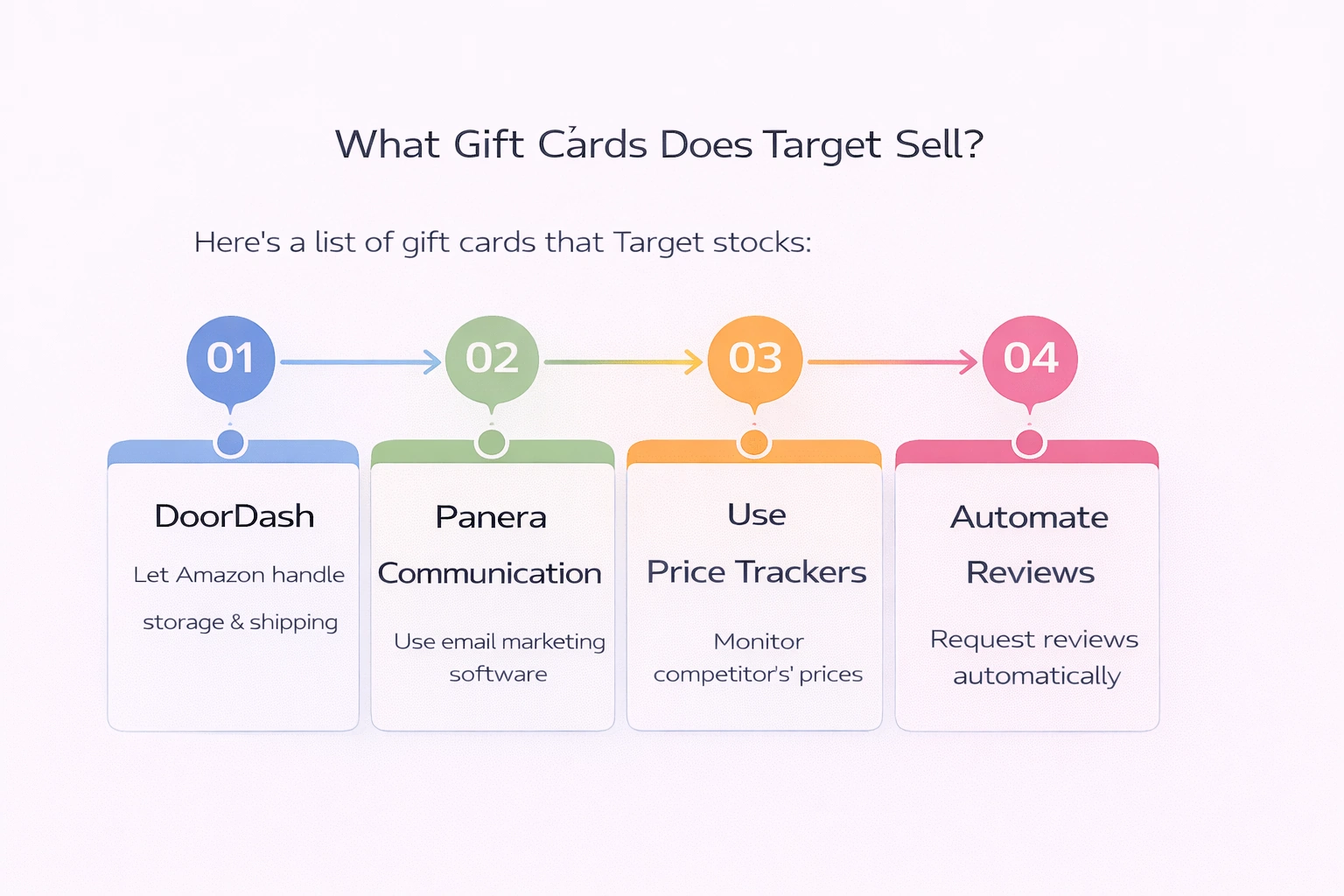
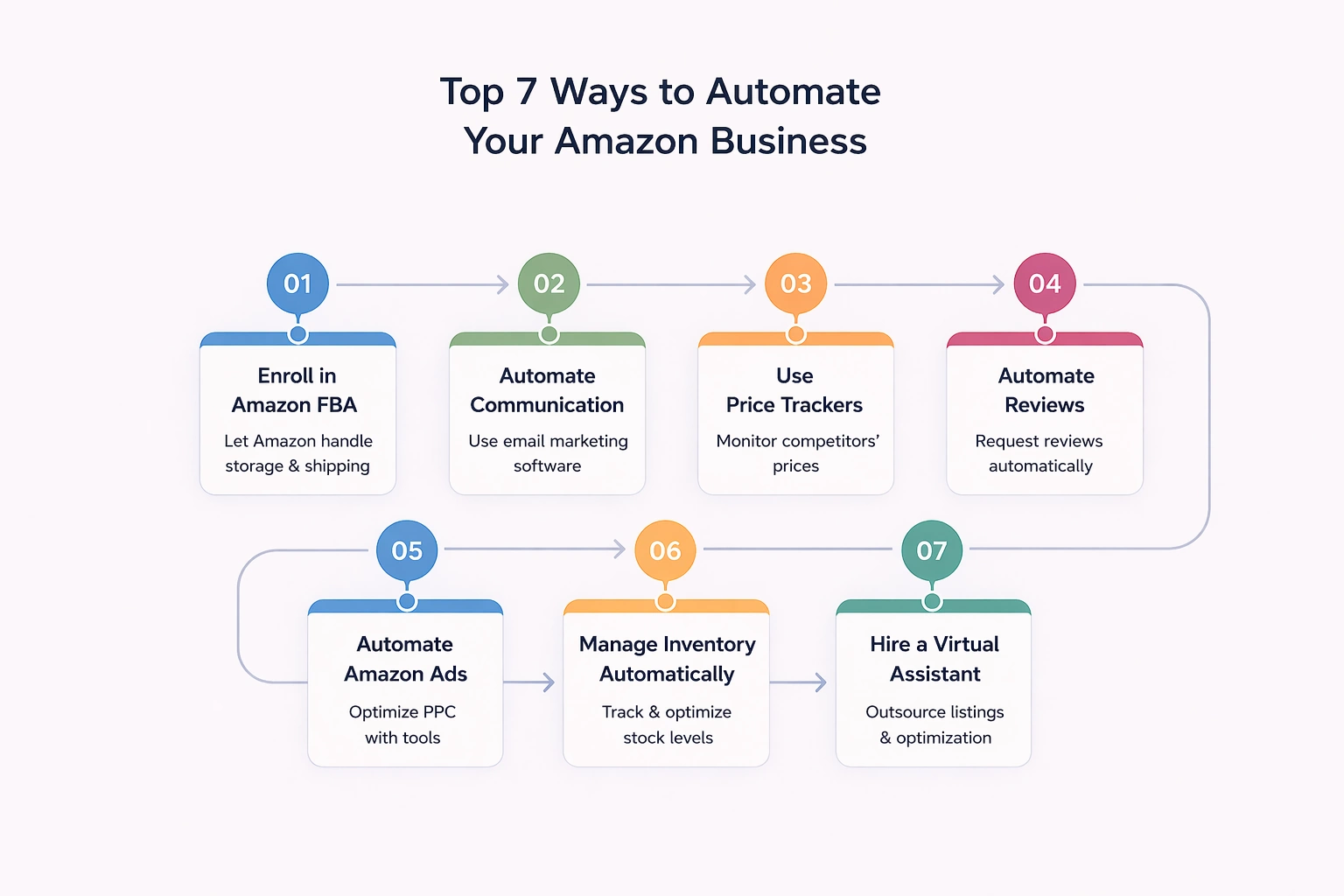
There are several ways to automate an Amazon store. This includes joining the Amazon FBA program, using specialised email marketing software, and utilising price trackers and automatic Amazon review programs.
Another way to automate your Amazon business is to hire a virtual assistant who can create product listings and manage orders, use a multi-marketplace inventory management system to ensure that your products are always in stock, or use PPC software to optimise and manage ads.
Being an Amazon merchant has become an extremely challenging task these days. And it’s not only Amazon sellers who are facing difficulties but also merchants working on other platforms. Each more or less popular shopping website offers thousands of products from millions of sellers eager to increase their profit margins. And as competition heats up, the struggle to get ahead becomes more and more brutal. Building a successful business comes at a very high price and demands thousands of hours of your precious time. But thankfully, there are ways to optimise your business that will also help you to free up some time for more important areas of your life.
If you dream of becoming a successful marketplace merchant and taking your business to the next level, Amazon automation is an amazing option. Regardless of how big or small your Amazon business is, there is nothing that can boost it more than Amazon automation. Not to mention how much automation can ease the burden of mundane work. We all know how exhausting it is to manage several projects at once. But imagine that you no longer have to worry about handling shipping, asking for feedback, managing PPC advertisements, finding inventory, and creating product listings. Wouldn’t that be amazing? Delegating such repetitive and mundane tasks to someone else will significantly free up your time and save a few extra hours every day.
In this article, we’ve compiled the best advice on how you can automate some aspects of your Amazon business and use these ideas to increase the productivity and efficiency of your own business.
What Is Amazon Automation?
Let’s figure out what Amazon automation means in the first place.
Amazon automation implies outsourcing repetitive and mundane tasks to software or a third-party service without compromising your business. The purpose of Amazon automation is to free up the time and resources required to expand your Amazon company. It can also help you increase order processing efficiency, ensure better management of customer relationships, and cut down on operating expenses.
Effective automation enables you to:
boost your bottom line
enhance client satisfaction
expand your business
lower the frequency of order processing mistakes
gather more information about your buyers
increase inventory management efficiency
assist you in running a profitable Amazon business in general
These tasks can be accomplished by using Amazon’s internal Fulfillment by Amazon (FBA) program or via utilising third-party partners like Expandly or Inventory Source.
Now that you know why it’s so important to automate your Amazon business, let’s look into how to achieve it.
Top 7 Ways to Automate Your Amazon Business
#1 Enroll in Amazon FBA
In spite of being the most trivial way to automate Amazon’s business, Fulfillment by Amazon (FBA) is still the easiest and most effective option. The Amazon FBA business model is a blend of traditional e-commerce and dropshipping businesses.
Known as one of the most advanced fulfilment programs, FBA takes over most mundane tasks associated with running an Amazon business, including storing inventory, packing, shipping, and communicating with customers about their Amazon orders. It also grants you as a seller a competitive advantage, which can be pretty helpful when you’re trying to win the Buy Box.
Since the Amazon FBA team manages all customer-related processes, they also handle returns and provide customer service for all FBA sales. All you have to do as an FBA seller is ship your inventory to Amazon Fulfillment Centers and let them handle inventory storage, order fulfilment, refunds, interactions with customers concerning delivery issues, and everything else.
However, there are some fees you’ll have to pay to benefit from FBA services. Amazon charges a storage fee and a fulfilment fee for each fulfilled order. The size of the storage fee depends on the dimensions and weight of your products, while the fulfilment fee depends on the category. FBA can seem very expensive, but its benefits outweigh the expenses for many small business owners.
But what if you have some orders that are not eligible for FBA? No problem at all. You can always take advantage of Amazon’s multi-channel fulfilment service that ships and fulfils all orders that do not qualify for FBA.
#2 Automate Communication with Potential Customers with the Help of Email Marketing Software
Sending timely, up-to-date messages is crucial for improving your reputation on Amazon Marketplace, as it affects how customers view your brand. Implementing email marketing software into your business strategy allows you to save valuable time for more important issues that might result in you achieving your goals faster than expected. Automating something so ordinary not only frees up your time and saves your money but increases customer satisfaction as well.
Email automation enables you to quickly compose customised messages to your target audience and send them at a predetermined time or at set points in time that are tied to the customers’ activity. Such a technique is most helpful in terms of building strong, long-lasting relationships not only with repeat customers but also with potential buyers, which may later result in a boost in sales and profitability.
Don’t know what types of automated emails to create? Try setting up a welcome email which will go out when someone new subscribes to your mailing list, or a new email gets added to your database. You can also send regular curated emails based on the customer’s specific preferences (discovered by analysing their purchasing activity) and discount emails that entice customers to buy again.
Remember that you can also automate answers to anyone who contacts you with inquiries or concerns regarding purchase confirmations and delivery details.
#3 Price Trackers are the Key to Success
Beating the competition on marketplaces like Amazon can’t be an easy task. In spite of all the hard work, it can often seem like you’re missing out on something and can improve even further, no matter how big your business is. Instead of simply offering high-quality goods at affordable prices, some merchants use pricing as a marketing technique to increase conversions and win over customers. This is especially important on Amazon, where the majority of sellers use price trackers to determine the best price points for their products.
Remember that you will never be able to create a sustainable business by sacrificing the quality of your products or if you set prices so low that you can never make a profit. And you won’t be able to grow a robust business until you do proper research, either.
Regularly checking Amazon listings and product pricing is an amazing way to ensure that your business remains competitive enough to maintain high profit margins and still retain customers. However, this kind of task can be incredibly time-consuming if you do it manually.
Instead, many sellers use services like CamelCamelCamel, Prisync, or Competera to keep up with trends and keep an eye on Amazon products and their prices.
#4 Get More Reviews by Utilising Amazon Review Automation
When purchasing goods online, customers are always taking a risk. They can’t really see or touch your product before they buy it. Their decision is based on reviews of previous customers. This is why asking your past customers to leave a review should be your main strategy for building a successful Amazon business.
There are plenty of online tools that make it easy for sellers to automatically ask people for product reviews. These services are compliant with Amazon’s ToS, and their use can have a significant impact on seller feedback.
However, please keep in mind that if Amazon temporarily bans your seller account from sending proactive messages to customers, you won’t be able to use the templates created by such tools. In this situation, you’ll need to use Amazon’s ‘Request a Review’ template.
#5 Automate Amazon Ads
Amazon advertising is probably the only source which can instantly bring you a significant increase in traffic. Amazon ads is an umbrella term for paid advertisements located in search results, Amazon listings, and on other websites.
Amazon ads can improve your conversion rates, and they are also very helpful in terms of introducing new product listings that haven’t yet reached Amazon’s organic search results.
If you are looking for a way to automate this side of your business, you should consider implementing Amazon PPC software into your business strategy. These online tools help you to control your bid amounts and streamline your expenditure by eliminating irrelevant keywords to ensure that your advertisements are seen as much as possible at a better price.
Being an Amazon seller also means having to handle inventory and logistics. You need to analyse your sales and determine which products are the most popular with customers, how much inventory you need to have on hand, and where to keep it, and all of these tasks need to be managed by someone.
In spite of the importance of inventory management, it often turns out to be a time-consuming and exhausting task. There are plenty of mistakes you might make in the process, and it demands lots of thought and care, diverting your attention away from other very real problems associated with running a business. Moreover, poor inventory management can lead to overstocking or understocking of your goods, which can later result in a decrease in your profit margins, loss of buy boxes, and low rankings on Amazon search.
Good inventory management software will make the processing of orders and returns much more efficient and help you to optimise your selling process and prices. It will also track inventory stored in different warehouses and warn you when you are running low. Inventory management software will also assist you with vendor procurement and business process automation while providing you with the information you need to anticipate future stock needs with extreme accuracy.
Multi-marketplace inventory management systems offer all these features as well as some additional capabilities that might be helpful for growing your business.
#7 Hire a Virtual Assistant to Create and Optimise Amazon Listings
The first thing customers who find your products on Amazon see are your product listings. They can either attract them and convince them to buy your goods or drive them away and discourage them from making a purchase from your brand.
But information and images contained in the listing are not the only important thing for achieving Amazon success. You also have to pay attention to keywords. Searching for products through relevant keywords is the main way for shoppers to find the products they are looking for on Amazon. Therefore, including highly relevant keywords in your product listings is crucial for getting lots of traffic and sales.
High-quality listings require outstanding photos and convincing descriptions. These tasks are just perfect for a virtual assistant! You could hire a photographer to take pictures of your goods and a copywriter to create keyword-rich descriptions for them. It might be a good idea to look for workers who have experience working with Amazon listings, and perhaps you’ll be lucky enough to come across people who specialise in this field.
There are several websites where you can find freelancers to hire. However, Upwork and FreeUp are considered the two best options. Place your job description on one of these websites and choose the best candidates for the job.
Final Thoughts
In today’s extremely competitive e-commerce market, sellers spend most of their time developing new strategies to grow their business, which leaves them with no time for other tasks. Therefore, automating Amazon order management and delegating a few mundane, repetitive tasks to software or an assistant is an important step toward achieving Amazon success.
FAQ
What is Amazon automation?
Amazon automation entails delegating mundane, repetitive, and unimportant tasks to software or third-party service providers. The goal of Amazon automation is to free up the time and resources needed to manage your Amazon business. It can also assist you in improving order processing efficiency and managing customer relationships. This can be done with the help of Amazon’s Fulfillment by Amazon (FBA) program or third-party partners.
Is Amazon automation a pyramid scheme?
No, Amazon automation is not a fraud but a smart investment that can bring lots of benefits as long as you choose a high-quality management service.
When you think about selling or buying products online, eBay is probably one of the first platforms that pop into your mind. This website has long been one of the most popular eCommerce marketplaces worldwide. The number of live listings present on the platform at any point in time exceeds 1.6 billion. Since its grand opening in 1995, the number of active users of this platform has increased to 171 million. The site has virtually anything you could wish for, starting with clothes and accessories and ending with vehicles and sports goods. Nevertheless, more and more sellers are leaving the platform looking for alternatives to eBay. There are numerous reasons behind this, including significant policy changes, high fees, and intense competition. In addition, making your listing stand out among thousands of others can be a pretty challenging and time-consuming task.
The good news is that there are plenty more alternative retail sites where you can sell your products. In this article, we will guide you through the most popular options and explain their advantages and downsides.
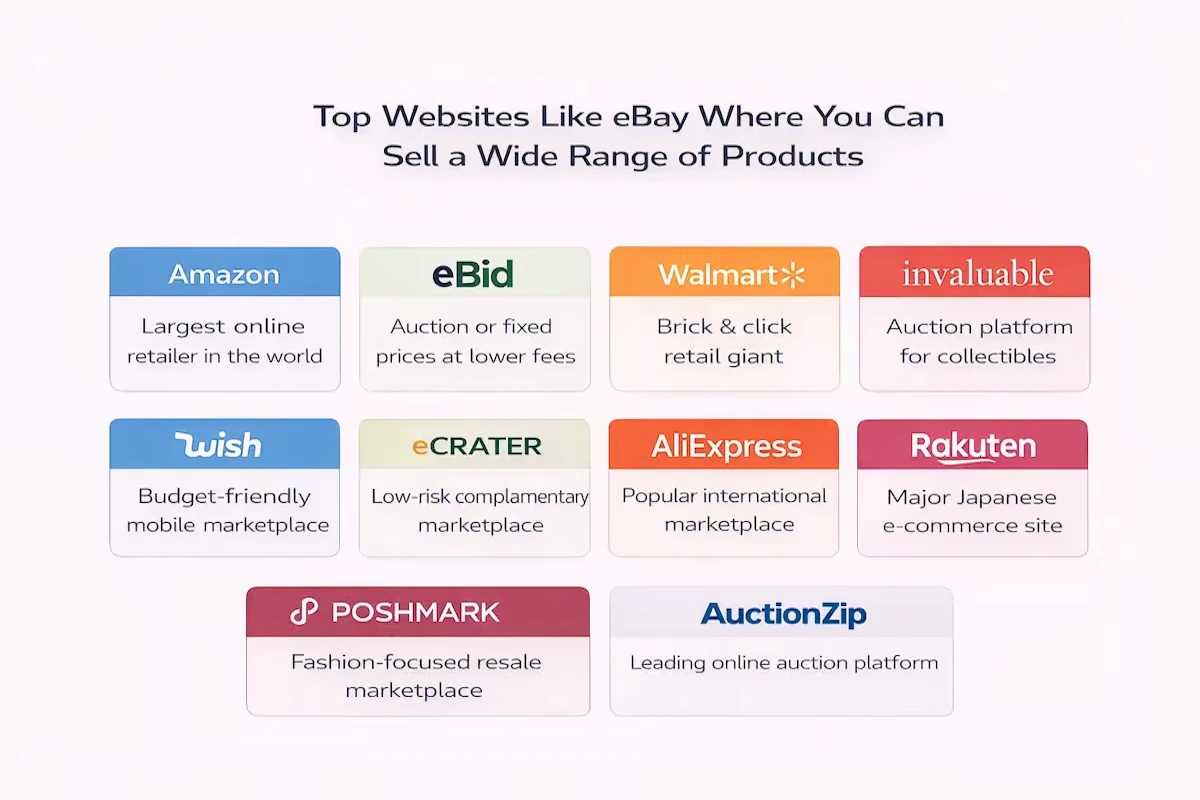
Top Websites Like eBay Where You Can Sell a Wide Range of Products
Amazon
The mind-blowing history of success of one of the biggest retail giants that started as a small bookstore is well-known across the whole world. And it’s not surprising, as Amazon is one of the most frequently visited websites, selling billions of items across a wide range of product categories. The goods listed on the platform are sold not only by Amazon but also by third parties, including large brands, resellers, and even individuals. In addition, Amazon has a large international presence. There are more than 17 Amazon marketplaces in various countries across the world.
Both Amazon and eBay have huge customer bases. If your business meets all the requirements of a large platform and can successfully stand out among others, customers will be more inclined to purchase your products, provided you are a trustworthy seller with a good ranking. And the bigger the customer base of the platform where you’re selling is, the greater your income can eventually become. However, there is a price to pay, as a large number of potential customers on a platform ensues higher fees and more competition.
Amazon offers a plethora of useful features for sellers, as well as powerful tools intended to assist them in selling more products on the platform. One huge advantage of Amazon is its built-in algorithm that offers your products to customers who are inclined to take an interest in them based on their search history. Another tool that can increase your traffic is the Amazon buy box.
Since eBay is an auction site, customers will usually bid to buy your goods unless you list them as “Buy It Now”. Amazon, on the other hand, uses a classic retail setup that enables instant sales at a fixed price.
When it comes to the fees, Amazon is a definite winner. eBay doesn’t charge sellers when a purchase is made. Instead, you have to pay a fee when you create a listing for your product on the site, regardless of whether it will be sold or not. On Amazon, it’s free to list products. You won’t have to pay anything until someone buys your product. People with a basic seller account have to pay a fee of $0.99 per item sold, while people with a professional seller account pay a $39 monthly charge but are exempt from extra fees for each item sold. The commission for the sale is mandatory for both account types. The amount of commission fluctuates depending on the product type, but generally, it is around 15%.
Another difference between the two websites is that eBay doesn’t sell anything itself, which is why it isn’t good at providing additional facilities to buyers and sellers. Therefore, it is the sellers’ responsibility to ensure that their customers have a good experience. Amazon, on the other hand, provides various perks for buyers who have paid for a Prime membership (including free 2-day delivery on all eligible items) and an overall great customer service, which serve as incentives to bring in more repeat shoppers.
Amazon FBA is a great option for smaller sellers to facilitate the fulfilment of orders on Amazon. Sellers can simply ship their products to Amazon and pay the platform a fee to handle order fulfilment and handle customer care – something that eBay cannot do.
eBid
eBid is a trusted marketplace that resembles both eBay and Amazon a lot, meaning it provides auctions as well as fixed-price items. The platform allows people to sell almost anything. However, since it is less popular than other sites, the number of people you’ll be selling your products to will be much smaller, and the traffic will be lower. Both eBid and eBay use a similar auction-style format for their product listings, though eBid doesn’t charge a listing fee.
Free product listings and a modest 3% commission levied from each sale make eBid’s marketplace pretty appealing for sellers. eBid is certainly a much cheaper option than eBay, but you should take into account that this platform is also less profitable. Overall, it’s a low-risk option to try out, so if you’re seeking a change, eBid is a good choice.
You can choose from two types of account levels – Seller and Seller+. The former is free to use, whereas the latter has a membership charge. This fee is levied on a weekly, monthly, quarterly, or annual basis. It is also possible to pay a one-time fee of $99.98 for a lifetime membership.
People using a regular Seller account have to pay a mandatory fee calculated as 5% of the final value fee (FVF) on each purchase. Seller+ account holders don’t need to pay this fee in many cases. But even when they do, it’s not higher than 2%. The final fee amount depends on the listing type and product cost.
Walmart
Originally created as a “brick and mortar” store, Walmart has now expanded into a “brick and click” retail giant and quickly mastered the e-commerce market. While in-person sales continue to account for the majority of the company’s revenue, walmart.com is one of the most popular and frequently visited e-commerce sites in the USA. All inventory found in the physical stores can be purchased on the website, and many products are also available for one or two-day delivery.
In addition to selling their own products on their website, Walmart also allows third-party sellers to create listings on the platform. This allows you as a seller to take advantage of free listings without having to pay monthly membership fees. Instead, Walmart charges a referral fee for each sale, which ranges from 8% to 20% of the sale price.
Unlike eBay, this website only allows fixed-price listings. There is always a chance that you will face fierce competition from Walmart-owned brands which may be given precedence on the website. But this is not always the case, everything depends on the type of products you sell.
You should also prepare yourself for working with lower traffic. Your margins may also be lower compared to eBay or Amazon since Walmart favours competitively-priced products, meaning sometimes you’ll be forced to cut your prices significantly.
Invaluable
Invaluable is an online auction platform designed for selling jewellery, fine art, and collectables. As of now, it has products from over 5,000 different sellers, including some of the world’s first-rate auction houses. Invaluable offers both live and timed auctions. Many of them are open for in-person and online bidding.
If you want to sell on Invaluable, you’ll need to represent a registered auction house.
Invaluable also provides a few more tools for sellers that can be helpful for expanding your business. As a seller, you will also benefit from this platform’s on-site advertising and email marketing services, which will help you to increase the visibility of your company. And if you want to get a custom-designed site and mobile app to run auctions on your own, you should consider trying Invaluable Private Label.
Wish
If you are looking for a shopping application and eCommerce site that brings together buyers and third-party sellers, Wish is the perfect match. This marketplace is well-known for its extremely low prices and outrageously slow delivery. Since many merchants are in China, it can easily take weeks or even months for orders to arrive.
Apart from low prices, Wish’s engaging in customer experience is the key to helping the platform attract more shoppers. For instance, each customer is shown a tailored feed based on their browsing history.
Brand owners, creators, manufacturers, DIY enthusiasts, retailers, and artists can sell their products on Wish. The company charges a fee of around 15% of the product’s value on each sale.
Wish sellers may benefit from a few of the platform’s useful features. ProductBoost enables sellers to advertise their best-selling items in an effort to gain more exposure and recognition. Sellers who have a successful selling record have an opportunity to obtain a badge that indicates that they have been validated by Wish. This is one more way to increase the shoppers’ confidence, resulting in a higher number of purchases.
eCrater
eCrater has numerous advantages sellers can benefit from. For instance, the company allows sellers to set up a store for free. In addition, it offers different templates so that sellers can make their stores more visually appealing to buyers. You can also personalise your store by adding your company’s branding to it.
eCrater sellers also love the feature that allows them to easily import their listings from eBay.
One downside of this site is that its quantity of buyers and traffic rate pales in comparison to larger eCommerce platforms. Therefore, eCrater works much better as a low-risk and low-cost complementary marketplace rather than the main source of income for a store owner.
As we’ve already mentioned, opening and running a store on eCrater is completely free, but sellers are charged a fee of 2.9% of the total sale price for each product sold.
AliExpress
These days it would be pretty hard to find a person who hasn’t heard of AliExpress, as it is an international online marketplace and one of the most popular selling platforms in the world. It was created by the eCommerce giant Alibaba Group.
It is a perfect fit for businesses that wish to sell their goods directly to customers. The platform itself does not sell any products, which means all of the items found on the site are from third-party sellers.
Hundreds of products from dozens of categories are available on this platform. You can find almost anything you can think of there, starting with cell phone holders and 3D printers and ending with jewellery and stickers. While AliExpress is designed for direct-to-consumer sales, many shoppers use the platform to find items for reselling. AliExpress is especially popular among businesses that prefer to drop ship their inventory. It is a very convenient option for them since their orders can be shipped straight to the buyers right after they place the order on the platform.
To sign up as a seller on AliExpress, you will need to provide a tax registration number, business address, and company name. After you’re done setting up an account, you can start adding as many goods as you want.
AliExpress doesn’t charge sellers a recurring monthly fee or listing fee. However, the website takes a commission on each sale. Depending on the product type, its amount varies between 5% and 8%.
Rakuten
Rakuten is often regarded as the “Amazon of Japan” since it is a typical online retail shopping platform. This retail giant is used by more than 90% of Japan’s internet users and can undoubtedly be considered one of the biggest marketplaces in the world.
A great advantage of Rakuten is that you have no competition from the owner of the website since Rakuten does not sell its products. In addition, Rakuten enables you to have more control over customising your store, while other big e-commerce sites don’t give sellers that luxury. Rakuten is used by various well-known companies, including Lenovo, Dell, Dyson, and others, so you don’t need to worry about it being reputable.
The so-called “Amazon of Japan” gives sellers significant leeway in developing their own brand within the site. Rakuten gives you the possibility to set up your store as you want, design your goods, and even start a blog and create content – all within its marketplace. It also offers amazing seller tools and excellent support.
Since there are no restrictions concerning communication with customers whatsoever, you can choose how to interact with potential buyers on your own. However, Rakuten charges slightly higher fees than eBay. Sellers are charged a monthly fee of $33, a product category charge ranging from 8% to 15%, and a $0.99 fee for each product sold.
Poshmark
Poshmark is another alternative online marketplace where people can sell second-hand goods such as clothing, accessories, and jewellery. The platform is available to any person who wants to sell their products, and there are no subscription or listing fees, making it a great option for individuals who don’t want to invest money upfront.
Customers using Poshmark can not only sell items but trade them as well. Buyers and sellers can find each other and exchange their stuff instead of selling it for money. Since Poshmark customers can follow each other and share posts just like users of other popular social networks, this platform can help you to expand your social circle, accumulate a loyal customer base, and build a strong business.
After you’re finished downloading the app, all you need to do is snap a photo, write a description, and set a price for your products. Poshmark offers its sellers several great features, including PoshPost. It is a shipping service that provides sellers with pre-paid shipping labels that they can use when delivering orders.
AuctionZip
AuctionZip is an online auction market (just like eBay) where auctioneers and buyers can trade goods such as antiques, toys, vintage, jewellery, fine art, or furniture. This marketplace is one of the most popular auction sites on the internet, with over 1.5 million monthly visitors. Live auctions are another AuctionZip feature that allows potential buyers to bid on things in person.
To be able to sell on AuctionZip, you must first sign up for a free auctioneer account. Then you can create a listing for your auction. AuctionZip charges a $20 listing fee.
One great advantage of using AuctionZip is its customer base. The site attracts a large number of visitors, and according to Google, it is the best platform for auction-related searches. AuctionZip also gives you the possibility to run website and email adverts, making it easy for you to reach out to your target buyers.
eBay Alternatives for Selling Locally
Craigslist
Craigslist is a platform where you are allowed to sell almost everything you can think of, yourself included (in the “personals” section). It is a great match for merchants who are looking to sell locally and are more inclined to handle their deals in person. People who use this platform often claim that selling with Craigslist helps them to meet new people, so this service has a small social aspect. And, of course, cash payments will allow you to avoid network and shipping expenses. All Craigslist sellers are independent third-party merchants. Anyone can easily sign up on the website and start posting listings.
Since there are no charges for listing or selling goods (except for a small selection of post types, like job or vehicle listings), the platform is quite basic in terms of design and automation of the selling process. It was established as a forum, meaning you are basically on your own when it comes to solving problems with customers.
The platform calls for selling locally, and in some situations, you will have to handle pick-ups or drop-offs of orders, which significantly narrows down your market in comparison to eBay.
In contrast to eBay, Craigslist has a “free” area for individuals who aren’t attempting to earn money but rather want to get rid of items they don’t need or want anymore. Most of it will be useless junk, but sometimes you can come across something you can buy and resell for a nice profit.
OfferUp
OfferUp is another option for sellers who are looking for a market to sell goods locally. A huge advantage of OfferUp is the absence of listing or selling fees. The website is well-organised and there are pictures of products for sale right on the home page.
Since the site’s home page does not include categorised listings, you’ll have to use search by category to find the needed product. OfferUp features all the categories that eBay, Craigslist, and other similar websites do. Just like on Craigslist, it is your responsibility as a seller to arrange a meeting or delivery date with customers.
Facebook
Facebook marketplace is another great alternative to selling products on eBay. All you need to be able to sell on this platform is a Facebook account and some inventory.
Selling on Facebook is considered to be even more local than selling on Craigslist. Facebook Marketplace and specialised ‘for sale’ groups don’t charge listing or selling fees, but you have to handle pick-ups or deliveries on your own. On the other hand, interacting with potential customers directly through Messenger (a Facebook tool that enables users to communicate and chat) will allow you to quickly and easily arrange meetings and deliveries without having to give away your personal information.
If you want to ship an order to the customer, Facebook Marketplace allows you to manage the payment process online as well.
Bookoo
Bookoo is rather a new website designed specifically for selling and purchasing items locally. Bookoo doesn’t have listing or selling charges. All you have to do is meet up with a buyer for the exchange, provided you didn’t previously make other arrangements for the shipping process.
Bookoo is more popular in some states than others. This might be an advantage for you as a seller since potential buyers would have fewer listings to consider, meaning the competition will be much lower. But at the same time, given the fact that Bookoo isn’t yet as popular as other sites, potential buyers may have difficulties locating your listing in the first place.
Websites Like eBay for Selling Handmade Items
Etsy
Etsy is the most well-known and popular website for selling handmade goods and crafts, with 1.6 million active sellers and 26.1 million regular shoppers. The platform has succeeded in becoming the Sellers’ Choice for ease of use and earned the title of the third-best platform for profitability after Amazon and eBay.
However, the specialisation of Etsy is pretty narrow. While eBay offers mass-produced goods and big brands, Etsy is designed only for sellers of handmade and vintage items. Both Etsy and eBay collect a listing fee, but the amounts are different. eBay listings last 10 days or 30 days for a fixed price. Etsy’s listings, however, can stay up for up to 4 months. Moreover, Etsy requires only a 20-cent listing charge per item and a fixed 3.5% commission. Such a fixed pricing strategy is much more convenient than eBay’s.
Since Etsy is generally used for direct sales, you won’t have to wait for someone to purchase your product as long as you might have to wait when selling on eBay. Etsy has also established an advertising platform that sellers can use to increase the recognition and popularity of their products. However, due to its larger market share and bigger customer base, eBay can give you access to more traffic than Etsy.
Bonanza
Despite being rather a new player in the e-commerce sector, Bonanza is doing extremely well and is becoming more and more popular with each passing year. Its tagline is “Find everything but the ordinary”, so you can expect to find any unusual, eccentric, or one-of-a-kind objects you can think of on this site.
Since Bonanza doesn’t make money until its sellers do, the profitability ratio for sellers on this site will be substantially higher. Listing an item on Bonanza doesn’t cost anything at all, and the average charge per sale is 3.5%, which is significantly cheaper than on eBay.
As we’ve already mentioned, eBay is an auction site that does not ensure that your product will be sold at a fixed price, unlike Bonanza.
Since every listing on this website is listed on Google and Bing, sellers using Bonanza can take advantage of Pricegrabber, Nextag, and Bonanza’s advertising programs. In addition, Bonanza has easy-to-use import features for listings on Etsy, Amazon, and eBay.
Despite having lower monthly traffic in comparison to eBay, Bonanza can pride itself on having a higher ratio of buyers to sellers, meaning the competition here is much lower.
Ruby Lane
Ruby Lane is another amazing alternative to eBay. It was created to bring together shoppers and sellers of high-quality vintage collectables, antiques, jewellery, and art, just like Etsy and Bonanza. Considering that Ruby Lane is a niche marketplace, the site’s traffic is outstanding – it gets more than 1.1 million unique visitors every month.
Ruby Lane offers only fixed-price products and is designed for a highly targeted category of visitors. The fees Ruby Lane charges are a bit higher compared to other platforms, and at the end of the day, selling on this site may cost you more. Although there are no commissions, Ruby Lane requires a $0.19 transaction fee for each listing and a tiered “maintenance” cost that varies from $69 per month for small sellers to $0.01 per item for large merchants. Sellers that use Ruby Lane are also charged a one-time setup fee of $100.
Websites like eBay for Selling Electronics
Newegg
Newegg is an online retailer that prides itself on being the best marketplace for everything tech. The platform sells computers and computer parts, electronics, smart home systems, and much more. Its customer base reaches up to 36 million people.
Since Newegg is designed as a website for selling only tech goods, you may find that this fairly specialised marketplace simply isn’t for you. But on the other hand, you may be able to take advantage of the platform’s well-defined target audience and a large pool of potential buyers.
Unlike eBay, Newegg provides a fulfilment service called Shipped By Newegg (SBN), which resembles Amazon’s FBA in some ways. You can also benefit from an account manager provided by Newegg, who will assist you in setting up your business and creating a selling strategy.
When it comes to costs and fees, Newegg has three membership tiers: free, $29.95 per month, and $99.95 per month. A subscription to a paid membership allows you to take advantage of additional tools, features, and listings. Newegg also charges a commission rate ranging from 8% to 15%.
Glyde
This platform allows you to sell various electronic devices. However, unlike when selling gadgets on eBay, you don’t have to add images or manage auctions. All you have to do is list your product, and Glyde will handle the rest.
Glyde takes a 15% selling fee per item sold, as well as a shipping kit price that ranges (usually) between $1 and $6. Sellers use these kits to ship their products to buyers, and Glyde transfers the money paid by the customer to the seller’s PayPal account. In addition, Glyde moderates the marketplace to make sure that only trustworthy buyers and sellers remain on the platform, protecting both sellers and shoppers.
SellCell
SellCell is another website geared toward helping people to sell different types of used electronic devices. This platform makes it a lot easier for sellers and buyers to find the best deals by providing all available options in one place. As a seller, all you have to do is go to the SellCell website, type in the make, model, and condition of your phone or other devices, and SellCell will offer you a list of companies that may be interested in purchasing it from you. Then, follow the link to the website and complete the transaction. It’s as simple as that. A great advantage of SellCell is that they allow you to sell your devices while still offering pretty competitive prices.
Generally, SellCell pays sellers via PayPal, Amazon e-gift card, or check. In addition, they take on all the shipping costs. SellCell guarantees that they will find the best deal for you and make sure that your device will be sold for the highest possible price.
Conclusion
As you can see, there are many websites you might want to consider if you’re looking for an alternative to eBay. Each of these online marketplaces has a distinct product offering and unique set of features, attracting both customers and sellers.
FAQ
How do I install Keepa?
Launch Microsoft Edge.
To install Keepa, go to the Edge Add-ons store.
Press the Get button.
Choose the Add extension option.
How do I learn Keepa?
When you install the Keepa Chrome browser extension, it will automatically show a Keepa graph directly on the Amazon product page you are currently viewing. If you are searching for the pricing levels, just look on the left side of the Keepa graph. The dates are listed across the bottom. The sales ranks are located on the right side.
How much does Keepa cost?
A Keepa subscription costs 15 € per month, which is currently approximately $17.50, but most sellers consider it “priceless” because of the information it provides. Keepa offers a free version as well, however it lacks some crucial features, such as historical sales rank, product finder, buy box.
Becoming a seller makes it your main goal to keep up with all trends and prices in order to increase your revenue without having to waste money on slow stock. Figuring out what data to pay attention to and how to make sense of it is one of the most crucial steps on the path to a successful business on Amazon. Whether it is a small and little-known business or a giant and well-known company, keeping track of product movements on the Amazon marketplace is very important, especially taking into account its enormous competition. Pricing, buy box ownership, and sales rank are all key data points that might encourage or break a stock purchase or liquidation move.
Becoming a seller makes it your main goal to keep up with all trends and prices in order to increase your revenue without having to waste money on slow stock. Figuring out what data to pay attention to and how to make sense of it is one of the most crucial steps on the path to a successful business on Amazon. Whether it is a small and little-known business or a giant and well-known company, keeping track of product movements on the Amazon marketplace is very important, especially taking into account its enormous competition. Pricing, buy box ownership, and sales rank are all key data points that might encourage or break a stock purchase or liquidation move.
However, Amazon does not make it simple to monitor this data. Nevertheless, third-party tools are attempting to fill the void. This is where Keepa swings into action. While Keepa is able to carry out many activities, its main advantage sellers can benefit from is sales rank and price history charts. However, learning how to use the data provided by Keepa to make informed and relevant purchasing decisions takes some expertise.
In this article, we will go over what Keepa is, how to use it and what are its main benefits and features.
What Is Keepa?
Keepa, a website and browser extension, is an Amazon price tracking tool that monitors hundreds of millions of goods across all major Amazon marketplaces. Keepa enables you to keep track of product price fluctuations, and keep abreast of sales rank trends.
Having all this data at your disposal will help you figure out how quickly a product truly sells and save money with downward price notifications. It gathers a great amount of essential and relevant information on any stock you have a stake in and shows it in an easy-to-read graph style.
Most importantly, the data on Amazon’s selling behaviour is part of the information Keepa provides. You are most likely familiar with such a situation: you purchase stocks of a product only to discover that Amazon has begun to sell it itself at a price that no other average merchant could hope to match. But you have a great chance of escaping this fate by learning how to use Keepa.
How Keepa Works
Keepa is available in two formats: browser extensions and the website (keepa.com). Let’s take a look at both and find out how they differ.
The Website
Keepa.com is considered the powerhouse of both the website and the browser extension. Here you’ll find all of its features, however, depending on your needs and requirements, they may or may not be useful to you. Some enjoy using this website to conduct programmatic analysis with the help of API (Application Programming Interface). If you have a list of ASINs you would like to track, Keepa.com is an excellent place to do it.
If you’re in search of a good deal, the Keepa Deals website will offer you a plethora of options. This tool might come in handy if you’re looking for something to flip somewhere else. Not to mention their features that reflect Keepa’s historical pricing and rank tracking. Plus the amount of information and data they collect is mind-boggling.
The Browser extension
Keepa shines the brightest when used in the browser. Most major browsers provide access to high-powered, high-detail graphing and data. Keepa browser extension that is readily accessible for Firefox, Chrome, Opera, and Microsoft Edge.
Keepa Browser Extension VS Keepa Web Site
Generally, a browser extension is reserved for mundane day-to-day tasks and simple product research, whereas the website is more convenient for high-volume data collection or analysis.
In addition, over and above its sales rank and price history charts, Keepa’s website offers other useful tools for product discovery, evaluation, and research. You can also look for the top goods or merchant storefronts by category since Keepa collects data from users every time they view an item.
This has contributed to one of the most extensive lists of goods and sellers on the Amazon market. Taking into account this additional component, it would be more appropriate to consider Keepa a data company that gives insights beyond showing price charts.
At the end of the day, the information and data available on the website are available on a browser extension as well. It all depends on where Keepa fits into your workflow, and how and what you want to use it. Try out both options to see which one works best for you.
What information does Keepa provide?
Keepa provides information on Amazon’s top-selling items and top-ranked sellers, as well as new offer price, used offer price, history and price sales rank, Amazon offer price, and a total of offers in general, and the list goes on and on.
The ability to manage this software may significantly increase your chances of coming across high-quality items that will sell rapidly and ensure the projected ROI.
In this article, we are going to discuss many of the features and uses for Keepa, however, bear in mind that this is not an exhaustive list. We would recommend you devote the better part of a day to truly exploring everything this software provides, both on product detail pages with the extension and on the Keepa website. That way, you will find out how to navigate the data quickly and efficiently and can rely on it in the future when you need to analyze products.
Why is the information that Keepa offers important?
Frankly speaking, the product’s current sales rank and price reflect just a small part of the whole analyzing process.
Although the current sales rank and price might more or less precisely show a product’s selling in normal conditions, there are several things that might have a negative impact on the selling process in the future. For instance:
Temporary supply shortage
Seasonality
Temporary supply excess
Strong demand in the Q4
Changes in the supply of competing products
Current situation
Plus, it is impossible to understand the selling experience and potential of the product. For example:
Product A is a brand new product that was listed on Amazon less than a month ago. Today it was bought for the very first time, at last. After one sale, the rank decreased from one million to 50,000.
Product B has been on the market for some years now and has sold extremely well, ranking around 2,000 in its category. Recently Amazon has run out of stock, prompting other sellers to raise their prices. The selling of the product slowed down a bit, its rank decreased but it continued to sell at a higher price until those retailers also sold out as well. The remaining sellers are charging far more than the market will bear, therefore, the product has ceased to sell. A few weeks later, the rank has risen to 50,000.
If you had to make a buying decision based solely on the current rank, they would both seem equally appealing options, yet there are significant differences that the rank does not reveal. Product A has no sales history so far. Product B might start selling again if some sellers dropped their prices.
Above, we’ve listed only a handful of the factors that may cause short-term amendments in sales rank and price. Therefore, using only the product’s current sales rank won’t get you anywhere, let alone help you predict the future selling condition of the item. Having access to previous data, on the other hand, allows you to make a more accurate forecast of what might happen in the future.
Is Keepa Free?
No, Keepa is not a free tool; it costs €15 per month. This is their premium package cost, which includes all of their features. They do provide a free plan that gives you access to some information but does not cover all we have discussed in this post.
When you consider the data it offers you, Keepa is a really low-cost tool for your business. This investment provides an immediate positive ROI since it allows you to access the data designed to make your buying, research and pricing decisions as great as they can be.
How to Read Keepa Charts
Understanding how to use a Keepa chart to determine whether or not to opt for a specific option takes practice, not because it’s difficult or complex, but because you don’t know how to navigate the graph properly. Finding the right pattern that will provide the data and information you need can turn into minutes of staring instead of a few seconds of quick mental analysis and decision making. Here is a small guide to Keepa navigation:
The product’s pricing is located on the left.
The date can be found at the bottom.
The sales rank (marked by a green line) is situated on the right.
You may change the date for any time period you want, from a single day to the whole product’s history on Amazon. Usually, somewhere around the middle is the most useful and efficient —one or three months are incredible options. After analyzing the past performance, you will be able to find out how often and regularly products are bumped up and down the sales rankings and how the price responds.
The Most Important Components of a Keepa Chart For Amazon Sellers
Sales Rank
Keepa’s sales rank history is for sure one of its most crucial features. Before making a final buying decision, it is extremely important to understand how well a product sells and the trends therein. Without this data you risk ending up with large amounts of surplus inventory you are unable to move unless you had been selling this product before.
The sales rank, also called the BSR, reflects how popular a product is within its category. Usually, the more in demand the product is, the higher it ranks, and the more units it sells every month compared to others in its category. You might notice the dramatic variability in the up-and down motions of the line on a Keepa chart. Do not let this scare you: the chart’s depiction of the sales rank scale is rather relative.
This ranking (with 1 meaning the greatest and highest-volume-selling product in its category) represents the item’s status as “best selling.” When items are sold, whatever the category they’re in, listings on Amazon will always bounce around and jostle for position, so-called place in the sun. For instance, an item with a BSR of 2,456 would then become the 2,457th best-selling product in that category.
A Keepa sales rank, also known as BSR feature, demonstrates the upward and downward trends of a certain ASIN’s sales rank. The scale can be between one and 10,000 or one and 1,000,000, depending on the time’s window displayed. In addition, with time, it becomes even harder and harder to notice small movements and changes.
Amazon is rather dumb on how a product is rated, but we can draw a few assumptions:
A product’s sales are considered for the computation of N best-selling for a specific time period. We just don’t know how long that time window is open.
The number of units sold has a direct (positive) impact on an item’s sales rank in that category, moving it higher up the list and down.
The category’s sales rank is most likely logarithmic in the number of units necessary to achieve a given place.
Amazon’s position (orange, shaded)
For some sellers, the fact that Amazon is on the listing and their pricing may be quite discouraging and repulsive. If Amazon is selling an item sellers have been considering acquiring, they will abandon that idea right away, without doing any further research, since Amazon is a pretty vicious competitor, and it’s extremely difficult to top their prices. On the other hand, some merchants aren’t bothered by this and can even interpret Amazon price data as a hint of possible competition.
The Buy Box (magenta diamond)
Each mark denotes a spot where Keepa saw a change in the buy box. If you hover your cursor over these points, you will be able to see what Keepa noticed at that period of time. A steady buy box level suggests that the price is well supported. If you have noticed slow and consistent drops that do not rebound, there might be a penny war going on.
A penny war, often called a “race to the bottom,” occurs when many sellers set their repricers to lower the current buy box price by $0.01. As each seller’s repricer adjusts to take the buy box position, the sellers’ repricers adjust accordingly and drop the price by a penny. Frequently this leads to a continuous decline in prices, margins, and profitability, as well as a toxic and unfriendly selling atmosphere. A well-configured repricer will return to a truly high level. A better repricer configuration will help you to follow that trend, enabling maximum competition without inflating an item’s price and worth.
New, 3rd Party FBA (orange triangle)
In many cases, this symbol will correspond to the buy box in position on the chart. It means that an FBA offer is priced competitively enough to merit the buy box for their listing. Sometimes, an FBA offer is located considerably above the buy box position, meaning that the offer is overpriced, thus, it lacks competitiveness (in Amazon’s opinion).
New, 3rd Party FBM (blue square)
This part of the chart does not get as much attention, but it might be quite useful for sellers doing Amazon-Amazon flips. From time to time, you can see FBM merchants offering items at far lower prices than the FBA/Buy Box pricing, therefore leaving money on the table and a possibility for profits. Checking out this indicator might be very helpful for the booksellers who perform this type of flipping.
Cross-Referencing Charts with the Advanced Data Table
We’ve already discussed the components of a Keepa chart, but we haven’t yet mentioned the Data table that goes with it.
The Data table contains all relevant data and information about an ASIN, such as its brand details,category, measurements, listing data, UPC, and more. Furthermore, with the Data table, you can access even more useful sales-related data, such as average and peak sales ranks, as well as offers. All these additional metrics enable you to make more informed and smarter decisions about how a listing is performing. The average sales ranks will reveal a lot about the company’s long-term viability.
Final Thoughts – Why Should The Amazon Sellers Use Keepa?
Keepa is one of the most versatile and effective tools you could ever find in an Amazon seller’s arsenal. I’d even say it’s mandatory. The ability to track a product’s BSR and overall sales profile on the Amazon marketplace can contribute a great deal to a seller’s success and grant the ones who use it wisely a major competitive advantage. The last thing any merchant wants is stale inventory or a pile of goods they have no idea what to do with.
FAQ
How do I install Keepa?
Launch Microsoft Edge.
To install Keepa, go to the Edge Add-ons store.
Press the Get button.
Choose the Add extension option.
How do I learn Keepa?
When you install the Keepa Chrome browser extension, it will automatically show a Keepa graph directly on the Amazon product page you are currently viewing. If you are searching for the pricing levels, just look on the left side of the Keepa graph. The dates are listed across the bottom. The sales ranks are located on the right side.
How much does Keepa cost?
A Keepa subscription costs 15 € per month, which is currently approximately $17.50, but most sellers consider it “priceless” because of the information it provides. Keepa offers a free version as well, however it lacks some crucial features, such as historical sales rank, product finder, buy box.
Storing and selling as many goods as Amazon does requires a framework elaborated to keep track of all existing products. And this is the exact reason why Amazon’s American marketplace has implemented UPC codes into its strategy.
Each product sold on Amazon is granted a unique string of numbers known as a Unique Product Code, or Amazon UPC codes. These codes make it easier to categorize, find and sell products on Amazon. However, with so many possibilities available, how do you know where to look for UPC codes, and why do you need them in the first place? In this article, we will look into what these UPCs are, why they’re so important, how to use them and where to purchase them.
What are UPC Codes?
UPC (Unique Product Code) is a unique 12-digit code designed to identify retail goods. It is often complemented by a barcode that may be scanned for easier identification or inventory tracking within a warehouse and significantly expedites the checkout process. The barcode provides all relevant information on a product as well, such as the product’s name, size, brand, and colour. UPC is most commonly used in the United States, Canada, the United Kingdom, and Australia.
Needless to say, UPCs offer various advantages, including automation of the registration process. Imagine you no longer have to manually enter all product information. For small businesses, it might not make a huge difference, but for retail giants like Amazon, which consistently stores millions of products in their warehouses, it is crucial indeed.
When And Why Do Sellers Need UPC Codes for Amazon?
As a seller, you will have to acquire a UPC code for every item that doesn’t already have one. Normally this happens when you’re developing your own private label items and haven’t yet registered your brand with Amazon.
Since you are establishing a brand new product, a UPC has to be generated and issued specifically to it. For the product to be traceable, you’ll also need a scannable barcode. You can either use a UPC code or an Amazon barcode (ASIN, FNSKU, or MSKU).
If you want to conduct business on Amazon, it is necessary for you to acquire UPCs. Amazon requires a unique product identification, which the UPC code provides. Without it, you won’t be able to fill a tab called ‘Product ID’ when establishing a new listing, and you won’t certainly be allowed to sell on the platform, except for one case, which we’ll discuss in the next section.
Note that although it is necessary to have a UPC code to sell on Amazon, it is not required to attach the barcode to each of your products (unless you plan on using it yourself).
In Which Cases Do Sellers Not Need a UPC Code?
All products sold on Amazon.com must have a UPC number, with one exception. If you establish your own brand and register it with Amazon via their Brand Registry Program, you can qualify for a GTIN (Global Trade Item Numbers) exemption. Taking advantage of this option will allow you to upload your products without a UPC code.
Besides, just because your product doesn’t have a UPC number doesn’t mean you have to purchase one right away.
If you’re acquiring your goods from a wholesaler, dropshipping, or doing retail arbitrage, there is a great chance that your products will already have a scannable UPC number on their packaging. If that’s so, your goods are most likely in Amazon’s system already, and all you’ll have to take care of is adding existing numbers to the product ID field when creating an Amazon listing. To get the right UPC number, simply contact your supplier or the manufacturer.
Another scenario is if exactly the same product you’re offering is already available on Amazon, you won’t need to establish a new page to support it. All you have to do is choose ASIN (Amazon Standard Identification Number) option from the product ID dropdown list and enter the ASIN of an existing and active Amazon listing.
Other Types of Codes
Although those are namely UPCs that are widely recognized and that serve as the most popular identifying standard in the market, there are some great alternatives to them, such as ASIN, GTIN, EAN, and a few others. We’ll introduce you to some of them, and we’ll explain when can you take advantage of them:
European Article Number (EAN)
EAN code is the UPC’s European equivalent. If you are considering selling your goods on Amazon’s European or Indian marketplaces, you’ll need to use one of these instead of a UPC. In case you’ve already acquired a UPC code, you can always convert it to an EAN by simply adding a zero to the beginning of UPC.
Japan Article Number (JAN)
JAN is the Japanese analogue to EAN and UPC. The difference between JAN and EAN codes is their beginning, they start with different digits, which helps to make them unique.
Global Trade Item Number (GTIN)
GTIN is a 14-digit code that is recognized and used anywhere in the world. You can use them with both UPC and EAN barcodes. It is also possible for you to convert EAN into a GTIN. All you have to do is simply add a zero to the front of an EAN.
International Standard Book Number (ISBN)
ISBN is a code intended to identify books all around the world. It is required for each published book to have one. Obviously, ISBN is not your responsibility unless you are the one selling books.
Before embarking on selling on Amazon, make sure you have acquired all of the required codes to avoid any problems that might occur while creating listings for your products.
A Little Preparation Before Purchasing UPCs For Amazon
There are a few things you should take care of before rushing to buy a bunch of UPCs.
1. Pick a pricing plan
The pricing plan doesn’t just limit itself to buying in bulk. GS1 provides a number of price options depending on the quantity of distinct you want to acquire. If your business is rather small and offers only a few goods, you can get a single UPC or GS1 US GTIN. However, those businesses that expect their product lines to expand in the near future might find the Company Prefix option more beneficial. Each code costs $30, and you don’t have to pay a renewal fee. Those sellers that need more than nine UPCs should instead choose the standard GS1 Company Prefix model, which is intended to assist them in managing a wider product range and expanding their business. This pricing plan includes the initial charge of $250, with a $50 annual renewal fee. With the next higher tier of 1 to 100 UPCs, the prices triple ($750 initial fee and $150 annual renewal fee). The key is to decide which pricing plan suits you the best.
2. Determine how many UPCs you’ll need
Since buying in bulk is usually a lot more advantageous and gets you lower prices, take your time to calculate how many UPCs you want to purchase. Bundles need their own UPCs, just like separate products. Each size and colour combination requires a unique barcode. Don’t forget to calculate how many individual and bundled products you want to sell.
3. Acquire the correct UPC
If you are both an online and offline merchant, your UPC requirements may differ from those of a solely online seller. For instance, if you have a physical store that sells the same products as your Amazon business, you can use the same GTIN for both. However, if these products are likewise being scanned in a warehouse or distribution centre, you’ll need separate codes for the same item.
How to Buy a UPC Code
Now you’re probably wondering how to acquire a UPC code for your goods. Turns out the process is actually rather straightforward.
However, before we get on with discussing how to buy UPC codes, let’s take a look at where to buy them.
First and foremost, you cannot generate code on your own. You have to acquire it through GS1, a non-profit organization charged with establishing standards for business communication and identifying retail goods around the world. There are more than100 GS1 organizations that serve various locations. For the United States, it is GS1 US, for example.
GS1 is considered the best spot to purchase Amazon UPC codes since it is the only provider Amazon acknowledges. They also use the GS1 database to check the authenticity of each and every one of the barcodes. Such precautions are taken to ensure that all codes are legitimate, and if any mismatch or misuse occurs, the listing will be rejected and withdrawn from the platform. Further action may later have a negative impact on the seller and his business. Therefore, it is critical to own a valid and active UPC for your goods. This is also the reason why we suggest getting all of your UPCs from GS1 or legitimate GS1 resellers.
Now let’s move to our initial question. Here is a catch-all guide explaining how to get a UPC code on the GS1 website:
1. Acquire a GS1 Company Prefix
GS1 сompany prefix is the part of your UPC code that identifies your business specifically. It might range from 6 to 10 digits, depending on how many UPC codes you need. The more of them you purchase, the shorter your business prefix will be, allowing you to fit more product numbers in.
A great number of business owners slip up and acquire this prefix from third-party sellers, who, for their part, purchased it in bulk to resell. And as we’ve already mentioned, it can gravely affect the credibility of your brand when Amazon discovers that your UPC does not match the one recorded in the GS1 database.
2. Create Product Numbers
The type of product is identified by the numbers within your UPC codes. And once again, this number’s length is determined by the length of your company’s prefix. If your business prefix contains seven digits, your product numbers will include four digits (the 12th digit serves as the check digit).
3. Choose your label design
Another thing you need to take care of is the deployment of your barcodes on your products. If you haven’t yet drafted the label and packaging for your goods, you can ask for a digital barcode and print it right on the labelling and packaging. However, in case you’ve already set your mind on the design of your packaging, you can simply get the barcode label stickers to stick on your goods.
If you’re subscribed for Fulfillment by Amazon (FBA), you have to physically attach the UPCs to the products. To fulfil this task, you’ll need to get yourself adhesive barcode labels, put the downloaded UPC pictures on them, and stick them on your goods. Ensure the barcode is in a visible and scannable location – the front and the back are particularly well suited, whereas the sides are not at all.
4. Obtain your barcodes!
What Is an FNSKU?
An FNSKU, or Fulfillment Network Stock Keeping Unit, is Amazon fulfilment’s unique number. If are you using FBA instead of delivering orders to the customers on your own, you will be required to attach an FNSKU barcode to all products sent to an Amazon fulfilment centre. An FNSKU is not necessary if you are not leveraging FBA.
When an Amazon fulfilment centre receives your package, they will scan the FNSKU barcodes to identify an Amazon seller who sent the shipment. To make the fulfilment process easier, Amazon requests sellers to attach this number to every product they ship. Since FNSKU helps Amazon to determine which seller to credit when a sale occurs, it is a very crucial part of the platform. It also enables Amazon to track each product back to the Seller of record in the case there is some quality issue and allows to prevent stock’s commingling.
If the products you’re selling have special packaging, you can place the FNSKU on the outside of the package so it will be easily accessible for a scan. If you didn’t provide the packaging for your item (for instance, a single t-shirt), the FNSKU could be attached to any tags on the product, including the size tag.
Where Can I get an FNSKU?
If you choose to print your shipping labels in Seller Central, FNSKU codes will be created automatically for your items, and each other product or its variation will get a different code.
At this point, you will have to decide whether it will be you or Amazon who will place the labels on the dropdown list. FNSKU labels may be applied to products individually, and if you haven’t yet had your packaging designed, you can create unique packaging with a place for FNSKU.
If, for some reason, you can’t attach the FNSKU labels yourself, Amazon may do it for you in exchange for a small charge. However, there are no fees for the FNSKU number itself.
Conclusions
UPC codes might be quite a perplexing matter for sellers, but once you put your finger on how they work and what their purpose is, getting codes for your products will be no problem at all.
When selling on Amazon, there’s a lot to consider, and acquiring UPC codes correctly is only one of many. However, with our company on your side, you can save yourself a lot of time and get things done right from the beginning. You no longer have to worry about developing a profitable business strategy on your own since we are at your side to help you find the most lucrative one that will assist in growing your business. Schedule a free discovery call with one of our professionals right now, or leave your email address, and we’ll get in touch with you as soon as possible.
FAQ
Does Amazon require UPC codes?
The short answer is yes. Amazon requires that each product registered on their platform has UPC codes with one exception. You can apply for a GTIN (Global Trade Item Numbers) exemption instead if you set up your own brand and register it with Amazon through their Brand Registry Program. Leveraging this option will make it possible for you to upload your goods without a UPC number.
Can I create a UPC code for Amazon on my own?
No, it is strictly forbidden to generate an Amazon UPC code on your own. Amazon’s only condition is that you purchase a “GS1 UPC number” from GS1or legitimate GS1 resellers since it is the only provider Amazon acknowledges. They even use their database to check the authenticity of each barcode. If Amazon discovers any mismatch or misuse occurred, the listing will be rejected and withdrawn immediately.
What is the procedure for obtaining UPC numbers for my products?
Here is a catch-all guide to acquiring a UPC code on the GS1 website:
Determine how many of your goods need UPC codes.
Become a member of GS1 US and qualify for the GS1 corporate prefix.
Establish a unique product number for each of your products.
Amazon offers two types of accounts to its customers: Individual and Professional. The individual one allows users to sell on Amazon for free, and it offers access to all the necessary listings set and order management tools.
A professional seller account requires its users to pay a $39.99 monthly fee even if they don’t sell anything. However, it offers more benefits when compared with the individual seller account.
To create an individual seller account, the users should gather all the information, including their legal name, business name and address, government-issued ID, contact information, a ‘ship from’ address, bank account information, and tax identity information. Then go to the Amazon website and choose ‘Sign up for individual’ and proceed with the registration.
Amazon customers can create two types of accounts: Individual and Professional. Many Amazon users wonder whether they can sell with an individual account, and the answer is yes! Amazon is not only for big brands, and everyone can sell on this platform. Keep on reading and find out more about each account type, their perks and cons and learn how to set up an individual seller account.
Individual v.s. Professional Seller Account
Individual account type allows users to sell on Amazon for free, but this account type has some limitations as compared to the Professional seller account, which has a monthly fee. It’s perfect for those who want to start selling without spending any money right away. Users can also upgrade or downgrade their accounts at any time.
Individual Seller Account
An individual account is free to make, but users only have to pay a fee of $0.99 on each sale they make, and there’s no monthly payment. When using this account type, users have access to a basic set of listing and order management tools. There are also other referral and closing fees that are part of every Amazon sale. Individual sellers don’t have access to or cannot do the following:
Add multiple users to their account
Get in-depth inventory reports
Sell restricted products or products in restricted categories
Run promotions
Use Amazon’s advertising services
Create listings in bulk
Change or create product detail pages
Set shipping rates
Individual seller accounts offer the basic selling plan, and it’s a perfect option if you’re selling less than 40 products per month. Once you start selling more than 40 products per month on a regular basis, you can switch from an individual to a professional account. Most sellers first start with an individual account, and as they expand their business, they switch to a professional seller account.
Professional seller account
A professional account requires users to pay a $39.99 monthly fee, along with some additional referral fees and variable closing fees for every sale. However, sellers with professional accounts are not charged an extra $0.99 per item sold. Professional seller accounts also have a lot of benefits, including access to some advertising features, receiving in-depth inventory reports, and running promotions.
Regardless of the account type, Amazon collects a referral fee on each sale. It is different for each product category, and it is a percentage of the total transaction.
How to Make an Amazon Individual Seller Account
Registering to sell on Amazon is an easy process that shouldn’t take more than an hour. Have this information ready when registering as an individual seller on Amazon:
Your legal name, business name, and address. The customers will see only your business name and not a legal one when buying your products.
Government-issued ID.
Contact information: Create a separate email address for your Amazon business. That way, your customers will reach you directly, and the emails won’t be lost in the pile of others. Have a working phone number too. During the registration process, Amazon will verify your contact information.
A ‘ship from’ address: In case you will ship your products from an address that is not your business address.
Bank Account Information: This account is where Amazon will send you the proceeds of your sales. You will usually get the money every 14 days.
Tax identity information: In the United States, you put your Social Security number or your company’s Federal Tax ID number. You have to submit your tax information, and it’ll be verified. Amazon does not pay the sellers’ taxes, it’s the seller’s responsibility. The company is required by law to collect the tax ID information so that relevant authorities know about taxable earnings you make as a seller.
Once you have all the necessary information, you can start creating your account. In order to do that, go to sell.amazon.com and check underselling plans. Choose the ‘Sign up for individual’ option, and you will be redirected to your seller central account if you have one. If you don’t, just click “Sign up” and enter the required details.
Once you log in, you will be redirected to a page where you can continue with the registration process. Remember that you can stop the registration process at any point and return where you left off.
List The First Product As an Amazon Individual Seller
Once the account is set up, the next step is to start listing products on Amazon. Amazon individual sellers can’t create listings for items that aren’t already on the platform, so when putting the products on the market, it’s easier to search for them on Amazon.
Find the product on Amazon, and open its product page. On the right side of the listing, you will see the Buy Box. Scroll down until the ‘Sell on Amazon’ option appears.
As you click on the button, you will be redirected to a page where you will need to add the information below.
SKU: You can enter a code yourself or leave it blank, and Amazon will randomly generate an SKU for your inventory.
Price: Set the selling price of the product, there will be a button that lets you match the lowest price.
Quantity: The default quantity is one unit. Change the number depending on the number of products you have to sell.
Condition: Most products only have two options – ‘Used’ or New’.
Fulfilment method: Enter your preferred fulfilment method. You can choose from FBM (fulfilment by merchant) or SFP (seller fulfilled Prime), or FBA (fulfilment by Amazon).
As you list your product for sale, wait for the sales to roll in. Amazon individual sellers cannot win the Buy Box, which reduces the chances of making a sale, but if you price competitively and set cheaper prices, the customers will choose your product over the others.
When choosing the product price, there are a lot of factors to consider, including referral, closing, shipping, and FBA fees if you are fulfilling orders via FBA. Referral fees vary with the product category, the closing fee depends on the product’s price range, and the shipping fee is proportional to the size of the package and the distance of the delivery.
Manage Product Orders
For each new order, the sellers will be notified with an email saying “Sold, Ship Now.” This email will have a guide on how to complete the order. Merchants can also view orders by choosing Manage Orders in their seller account.
This page also allows the sellers to print a shipping label and packing slip, ship the product, and confirm your shipment. To manage existing listings, go to the Manage Inventory page of your seller account.
If, for some reason, the seller is unable to sell products for a short period of time, there’s an option of changing the status of the listings to Inactive. When changing the listings’ status, the listings will be removed from Amazon product detail pages and search results. And when the seller can sell again, they can change the status back to Active, and the listings will reappear shortly.
FAQ
Is the Amazon seller account free?
If you use an individual seller account, there’s no monthly subscription fee, but you’ll be charged $0.99 per each item you sell, in addition to referral fees and variable closing fees. So, it’s basically free to start selling on Amazon.
Can you sell on Amazon without a seller account?
No, if you want to sell on Amazon, you’ll need to create an Amazon seller account and fill out an application if you are creating a professional seller account. Once you submit your seller application, it takes a week or so for it to process.
Can you start Amazon FBA with no money?
You don’t have to pay a monthly fee while you start selling on Amazon FBA. However, there are several other Amazon fees, but if you sell less than 40 items per month and use an individual seller account, you don’t have to worry about these fees unless you become a professional seller.
How much does Amazon make per sale?
Individual sellers pay $0.99 for each item they sell, as well as other variable closing fees ranging from $0.45 to $1.35. Professional sellers pay variable closing fees and referral fee percentages that range from 6% to 25%.
Is there a monthly fee for Amazon individual sellers?
The Individual plan is free, but the sellers pay $0.99 per unit sold, and the Professional plan costs $39.99 per month no matter how many units you sell or if you sell them at all.
We care about your privacy
To provide the best experiences, we use technologies like cookies to store and/or access device information. Consenting to these technologies will allow us to process data such as browsing behavior or unique IDs on this site. Not consenting or withdrawing consent, may adversely affect certain features and functions.
Functional
Always active
The technical storage or access is strictly necessary for the legitimate purpose of enabling the use of a specific service explicitly requested by the subscriber or user, or for the sole purpose of carrying out the transmission of a communication over an electronic communications network.
Preferences
The technical storage or access is necessary for the legitimate purpose of storing preferences that are not requested by the subscriber or user.
Statistics
The technical storage or access that is used exclusively for statistical purposes.The technical storage or access that is used exclusively for anonymous statistical purposes. Without a subpoena, voluntary compliance on the part of your Internet Service Provider, or additional records from a third party, information stored or retrieved for this purpose alone cannot usually be used to identify you.
Marketing
The technical storage or access is required to create user profiles to send advertising, or to track the user on a website or across several websites for similar marketing purposes.

 EN
EN  ES
ES  FR
FR  DE
DE  IT
IT  KO
KO  JA
JA  ZH
ZH  AR
AR  PT
PT  TR
TR  PL
PL  ID
ID  VI
VI