What's New in WisePPC: Your Own AI Agents, Seller Tools, Amazon Ads Rules and $45/Month
Published Updated

The headline of this release: run your Amazon business with your own AI agents. WisePPC gives them the data and the guardrails. The app now shows more analytics, and offers more actions, than anyone can manage by hand, so we made it easy for your own agent to work through it for you. The same release adds seller tools that work without ad spend, Amazon’s Ads rules next to your campaigns, and a plan, now called Founders, that is $45/month.
Here is what changed in the October 2026 release.
Your own AI agents, with the permissions you set
You bring your own agent (Grok Bot, Hermes Agent, Claude or another agent), and WisePPC provides the data and the guardrails.
- All your data, available to your agent. Your agent reads your Amazon Ads and seller numbers in one connection: performance, search terms, profit, inventory, returns and Brand Analytics, where your accounts are connected. Ad numbers run through today, and your agent reads the same numbers you see in WisePPC, with no exports or downloads. It also gets 22 ready-made analyses and the goals you save as preferences, and every chat starts knowing your account and the changes waiting for you.
- It proposes Amazon Ads and Seller Central listing changes. In Amazon Ads: campaigns, ad groups, ads, targets and negatives, bids, budgets, portfolios, Amazon Ads rules and creative assets, plus draft Brand Store ASIN edits. In Seller Central: a listing’s title, bullets, description, price, quantity and other attributes, creating a listing, and deleting one (which always needs your approval). It can also cancel a Multi-Channel Fulfillment order, which has no approval step: that permission is Off or Direct.
- You set the limits. For each agent, marketplace and kind of change, choose Off, Gated or Direct. Gated changes wait in an approval queue with the reasoning and the details of what would change; you approve or decline individually or in batches. Your agent can’t approve its own changes, some changes always need a person, and every change records which agent proposed it and who approved it.
- Easy to start. Claude.ai and Claude Desktop connect with a login. Grok Bot, Hermes Agent, Claude Code and other agents use a key that you set up in WisePPC. Your own scripts can use the same key. It also works with ChatGPT through developer mode.
Today agents can change Amazon Ads and Seller Central listings. Ad changes need Amazon Ads connected. Listing changes need Seller Central connected (seller accounts). Read the setup guide, see how we run our own business with agents, or open the AI integration page.
WisePPC is also no longer only a PPC tool. You can now connect Seller Central on its own, with no ad spend, and see profit, product costs, inventory, orders and returns in one place.
Seller tools: profit, costs, inventory and orders
These need Seller Central and a seller account. Vendors and KDP authors do not have a Seller Central account, so the seller tools do not apply to them.
- Economics and P&L. See profit per product after Amazon fees, refunds and ad spend, with a fee-by-fee breakdown and a P&L waterfall. TACoS and refund cost sit alongside. Add your product costs to see net profit.
- Product costs (COGS). Enter or import product costs per SKU, with a preview before anything is saved. Economics uses them for net profit.
- Inventory. One table across FBA, AWD and your own warehouse, with days of availability, refund rate and sales velocity.
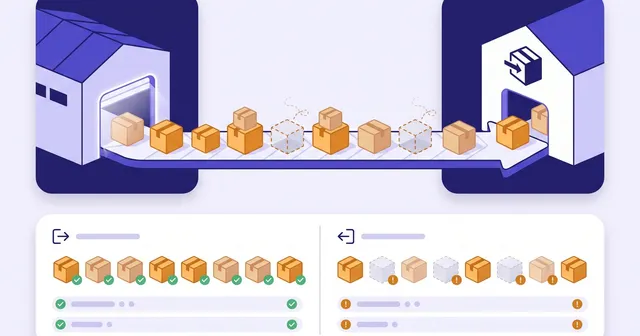
- Orders, MCF orders and FBA returns. Each has its own page, and MCF orders load with up to two years of history.
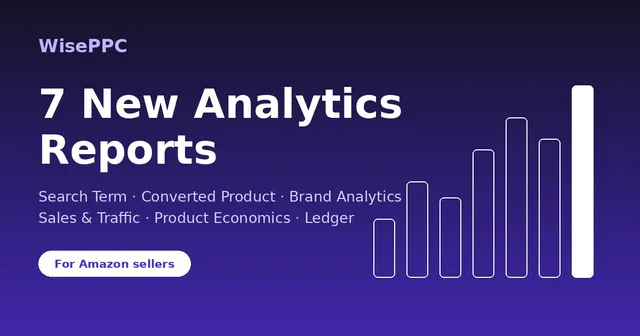
They join Sales & Traffic, Brand Analytics, Converted Product, the Search Terms report and the Transactions Ledger that shipped earlier. You do not need to run ads to use any of it.
PPC: Amazon Ads rules, effective bids and more metrics
These need Amazon Ads connected.
- Amazon Ads rules. See and manage your Amazon Ads rules (budget rules, bid schedules, ROAS bidding and cost targets) right next to your campaigns, with a confirmation step before changes that cannot be undone. These are Amazon’s own native rules: Amazon runs them, WisePPC shows and edits them.
- Effective bids. See the effective bid after placement adjustments, and an estimate with bid schedules, before you change a target’s bid.
- A metric catalog. Hundreds of Amazon Ads metrics in the Advertised Product, Search Terms and Converted Product reports, grouped and explained. The report you may know as the Unified Report is now called Advertised Product in the app.
- Fresher, faster ad reports. Advertised Product and Traffic & Conversion now include the newest days from Amazon’s hourly numbers, so you see numbers up to today without waiting for Amazon’s final reports, and both reports load faster.
Amazon Attribution reports
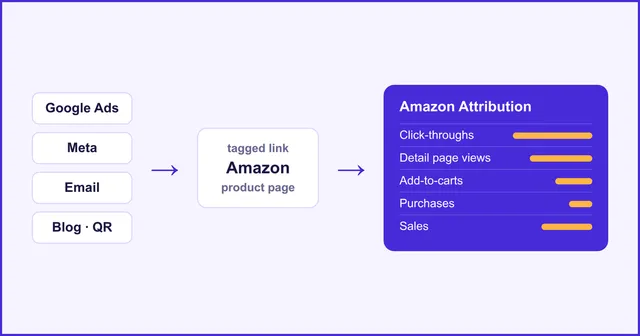
Added October 5. If you use Amazon Attribution, your tagged links now report in WisePPC: clicks, detail page views, add-to-carts, purchases and sales from your Google, Meta, email and other off-Amazon traffic, by campaign, publisher and product. There are two report pages, Performance and Products, under Amazon Attribution in the sidebar, and your AI agent can read the same data. Tags are still created in the Amazon Ads console. How Amazon Attribution reports work in WisePPC.
A new home page and an easier start
- Overview. Sales, ad spend, TACoS and ROAS across your connected accounts, plus a needs-attention list: expired connections, out-of-stock products with active ads, and wasted spend.
- Start without the wall. Sign up and explore first, then connect Seller Central, Amazon Ads, both, or skip.
- Page guides. Every report explains what it shows and which questions it answers.
- A cleaner sidebar, grouped by marketplace.
Pricing: $45/month
The plan, now called Founders, is $45/month, plus 1% of Amazon ad spend only if you advertise, and that price stays locked for as long as you stay subscribed. If you connect Seller Central and do not run ads, it is a flat $45. It was $99/month before. The trial is unchanged: free for 30 days, full access, no credit card. See the pricing page for the details.
If you already have a trial account
Existing trial accounts get 30 more days with full access, so you have time to try the new tools. If your trial had already ended, your account is open again until at least November 2, 2026.
What is next
eBay is next.
Try it
Start with Seller Central, Amazon Ads or both. See how to get started, explore the seller tools, or check the pricing, then start your free 30-day trial below.