How to Connect Grok Bot, Claude and Hermes Agent to Your Amazon Ads and Seller Central Data
Published Updated

WisePPC exposes your Amazon Ads and Seller Central data to AI agents through an MCP server. This guide shows how to connect Grok Bot, Claude, Claude Code and Hermes Agent, how to create a key with the permissions you choose, and how to approve the first change.
You bring the agent and subscribe to its provider; WisePPC provides the data and the guardrails. If you want the bigger picture first, read how we run our own Amazon business with AI agents or the AI integration overview.
What you need
- A WisePPC account (the free 30-day trial works) with Amazon Ads, Seller Central or both connected. Seller data needs a Seller Central seller account. Ad changes need Amazon Ads connected. Listing changes need Seller Central connected (seller accounts).
- An AI agent that supports MCP: Grok Bot, Claude, Claude Code, Hermes Agent or another.
- The server address:
https://mcp.wiseppc.com/mcp
Option 1: Claude.ai or Claude Desktop (sign in)
This is the quickest start: you sign in with your WisePPC account, and there is nothing to install.
- In Claude, open Settings, then Connectors, then add a custom connector.
- Paste
https://mcp.wiseppc.com/mcpas the server address. - Log in with your WisePPC account when prompted.
Claude Desktop uses the same connector, shared with your claude.ai account. It also works with ChatGPT developer mode, which connects the same way.
Option 2: create a key with the permissions you choose
Anything that should be able to propose changes needs an API key. Keys are created in WisePPC under AI Integration, on the MCP Keys page (you need the Management role).
- Create a new key and name it after the client, for example “Claude Code, laptop”.
- Choose what it can read: per Ads profile and per seller marketplace.
- Choose what it can write, per marketplace and per operation: Off, Gated or Direct.
- Choose an expiry: 30 days, a date you pick, or none.
- Copy the key. It starts with
wpp_ak_and is shown only once.
How to pick modes:
- Off means the key cannot do that operation at all. Leave everything Off to begin with if you only want analysis.
- Gated means the key can propose the change, and a person approves it in WisePPC before anything is sent to Amazon. Start here.
- Direct means the change goes through WisePPC’s change queue and is applied automatically, without a separate approval. Use it only for operations and agents you trust.
Two rules worth knowing: an agent cannot choose its own mode, and a key can never approve its own change. You can revoke a key at any time, and a revoked or expired key stops working on its next request.
Claude Code
Claude Code takes the server and the key in one command:
claude mcp add --transport http wiseppc https://mcp.wiseppc.com/mcp --header "Authorization: Bearer wpp_ak_YOUR_KEY"Replace wpp_ak_YOUR_KEY with the key you created. Start a new session, and ask Claude Code which WisePPC tools it can see.
Other MCP clients
Other agents and tools that support MCP connect with the same two things: the server address https://mcp.wiseppc.com/mcp and an Authorization: Bearer wpp_ak_... header carrying your key. The place you enter them differs between clients and changes between versions, so follow the MCP section of your client’s own documentation rather than a snippet that may be out of date.
Hermes Agent
Hermes Agent is an open-source agent from Nous Research that you run yourself, with chat gateways and scheduled jobs. It is an MCP client, so you add WisePPC as an MCP server entry with the same address and Bearer key. Its configuration format changes between releases, so use the MCP integration page of the Hermes documentation for the exact syntax. If you let Hermes run scheduled jobs against your account, keep the key Gated: a scheduled job should propose, and a person should approve.
Grok Bot (xAI)
Grok Bot is xAI’s always-on AI agents app, in public beta since August 2026. Its agents can use MCP-enabled tools, so it works with WisePPC like any other MCP client: it connects to WisePPC’s MCP server with a key you create in WisePPC. Create the key as described above and keep it Gated, so a scheduled agent proposes and a person approves. What it can change is exactly what the key grants, which today means Amazon Ads and Seller Central listings. WisePPC is not affiliated with xAI, and Grok Bot access is a separate subscription from your WisePPC plan.
Your own scripts: the REST API
The same key works on a plain REST API at https://mcp.wiseppc.com/api/v1. The Swagger documentation is at https://mcp.wiseppc.com/api/v1/docs, including the authentication header and the request shapes. Write calls need an Idempotency-Key header so a retry cannot apply a change twice. Grants apply exactly as they do on MCP.
First prompts to try
Your agent starts each session by reading your account context: saved preferences, pending changes and what your key may do. Then try:
- “Summarize my account health and the top 3 things to fix.”
- “Which campaigns are leaking budget this week?”
- “Show me unadvertised products with sales momentum.”
- “Compare the last two complete weeks for my best-selling product family and split it by child SKU. What changed?”
- “From now on, always show campaign names instead of IDs.” (Your agent saves this as a preference that it applies in later sessions. You can edit preferences in WisePPC.)
The agent can also follow 22 built-in analysis playbooks, such as search term analysis, placement bids and week-over-week anomalies, so ask it to use one by name when you want a repeatable method.
Approving your first change
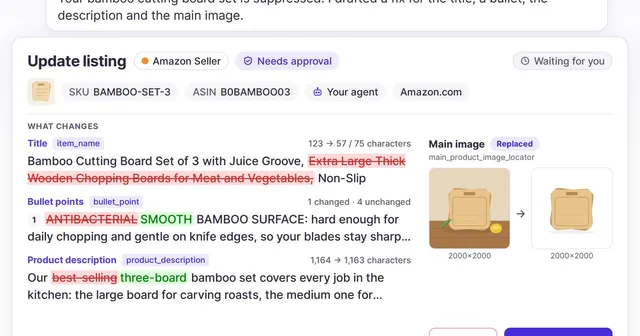
With a Gated key, ask for something small: “Propose lowering the bid on my highest-spend target with no sales.” The change does not go to Amazon. It appears in the AI Actions queue in WisePPC with the reasoning and the real details of the target.
- Open AI Actions in WisePPC.
- Read what was proposed and why.
- Approve or decline it, or review a batch in one go. The screen warns you when a change in the batch cannot be reversed.
After you approve, the change is sent to Amazon and WisePPC verifies that it landed. Every change records which key proposed it and who approved it, and AI changes are labelled in change history. An unreviewed gated request expires after 7 days.
What agents can and cannot change
Today agents can change Amazon Ads: campaigns, ad groups and ads, targets and negatives, bids, budgets, portfolios, Amazon Ads rules and creative assets, plus draft Brand Store ASIN edits. In Seller Central they can change a listing’s title, bullets, description, price, quantity and other attributes (including variations), create a listing, and delete one (which always needs your approval). They can also cancel a Multi-Channel Fulfillment order, which has no approval step: that permission is Off or Direct. The same permission model extends to new channels as they roll out. See the AI integration page for the full permission model, and the seller analytics page for what the data covers.
Ready to try it? Start your free 30-day trial below, connect Claude with a login, and ask your first question.