Amazon Attribution Reports in WisePPC: What Your Off-Amazon Traffic Does on Amazon
Published
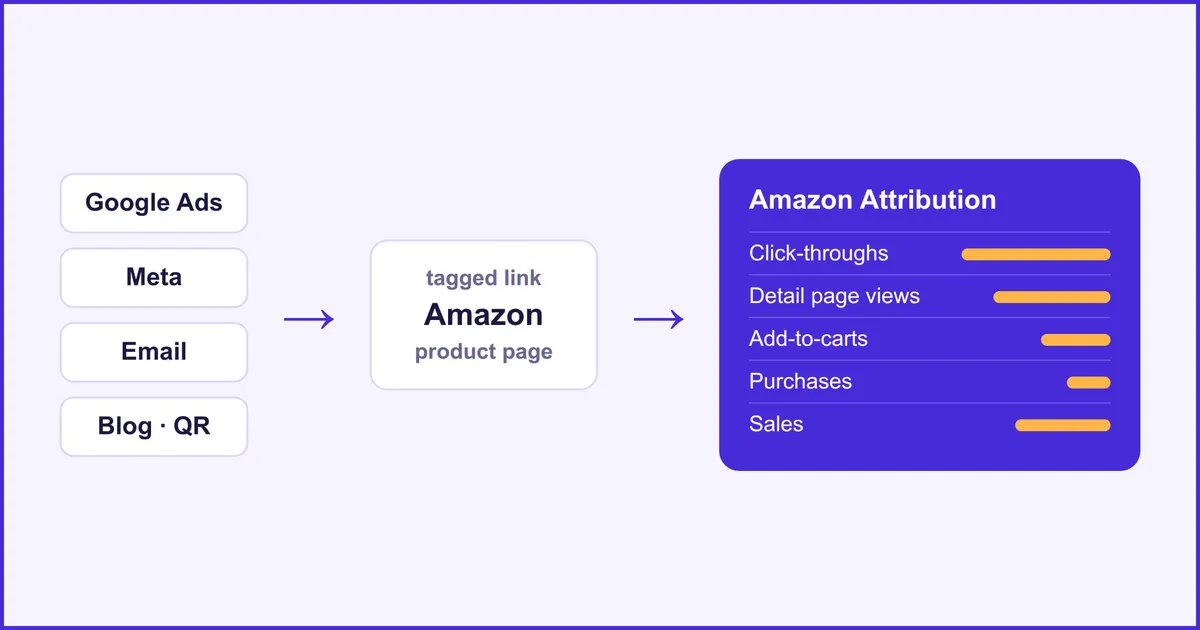
Amazon Attribution is Amazon’s free measurement program for traffic that starts outside Amazon. You put a tagged link in a Google ad, a Meta ad or an email, and Amazon reports the clicks, detail page views, add-to-carts, purchases and sales that followed. WisePPC now pulls those reports every night and shows them next to your Amazon Ads data.
This post explains what Amazon Attribution measures, who can use it, how to read the numbers without fooling yourself, and what the new WisePPC reports show.
What is Amazon Attribution?
Amazon Attribution is a program inside Amazon Ads that measures what off-Amazon marketing does on Amazon. Amazon Ads reports only cover ads that run on Amazon. A shopper who clicks your Google ad, lands on your product page and buys is invisible there. Amazon Attribution closes that gap with tagged links: every click through a tagged link is followed for 14 days, and what the shopper did on Amazon is reported back to you.
It works for any channel where you control the link: search ads, social ads, email, a blog, an influencer post, a QR code on packaging.
Who can use Amazon Attribution?
According to Amazon, the program is open to sellers enrolled in Amazon Brand Registry and to vendors, in the United States, Canada, Mexico, the United Kingdom, Germany, France, Italy, Spain and the Netherlands. There is no fee. You turn it on and create your tags in the Amazon Ads console, under Measurement & reporting.
In WisePPC, the reports use your Amazon Ads connection. If your account is not enrolled in Amazon Attribution, or no tagged link has produced data yet, the pages say so and list the setup steps.
How do you set it up?
Setup takes four steps, and the first three happen at Amazon and in your ad platforms, not in WisePPC:
- Open Amazon Attribution in the Amazon Ads console (Measurement & reporting, then Amazon Attribution) and create a campaign for the products you promote.
- Create a tag for each channel. You choose the publisher (Google Ads, Meta, Microsoft Ads, Pinterest or another channel) and Amazon gives you a tagged link.
- Use the tagged link as the destination of your ad, email or post.
- Open the report. WisePPC picks the data up in its next nightly sync.
Name your campaigns and ad groups carefully when you create the tags. Those names are your own free text, they come back in every report row, and they are the only way to tell one channel or creative from another later.
What do the WisePPC Amazon Attribution reports show?
WisePPC adds an Amazon Attribution group to the Amazon section of the sidebar, with two report pages. Both are the same kind of grid as the other WisePPC reports: a date range, a marketplace selector, column filters, a metrics panel and charts.
| Report | Answers | Break it down by | Metrics |
|---|---|---|---|
| Performance | Which channel, campaign and link sends shoppers who buy? | Campaign, ad group, publisher, link, landing product; day, week, month, quarter or year | Click-throughs, detail page views, add-to-carts, purchases, units, sales, conversion rate, average order value, and the total versions that include other products of your brand |
| Products | What did those shoppers actually buy? | Product, brand, category, and whether it was the promoted product or another product of your brand (brand halo) | Purchases, units and sales, with brand halo and new-to-brand versions |
Saved views cover the common questions: by campaign, by publisher, by landing product, a monthly trend, and promoted versus brand halo.
How should you read the numbers?
Read them as everything that happened after a click on your tagged link, not as revenue your ad caused. Four things matter when you compare them with what your ad platform says:
- There is no ad spend in the report. You paid Google or Meta, not Amazon, so Amazon Attribution has no cost, ACoS or ROAS. To get a return figure, divide the sales here by the spend your ad platform reports for the same campaign.
- A tag counts every visit that uses the link. If the same tagged link also gets shared, bookmarked or picked up by another site, those visits and their purchases count too. Treat the sales as an upper bound for the channel.
- The newest days are not final. Clicks appear within about a day and conversions within about two, and Amazon keeps restating the figures for up to 28 days as late purchases come in. Purchases are reported on the day they happened, not on the day of the click.
- Small links are grouped. Amazon does not show a link until it has at least 10 clicks. WisePPC keeps that traffic in a “below threshold” row so that your totals still match the Amazon Ads console. The product report covers the top 100 products per ad group.
History goes back up to 13 months for performance. Product detail goes back 90 days, which is as far as Amazon provides it.
What can your AI agent do with it?
If you connect your own AI agent to WisePPC (Claude, Grok Bot, Hermes Agent or any MCP client), it can read the same Amazon Attribution data and answer questions such as “which of my Meta campaigns sent buyers last month, and what did they buy?” or “how much of the sales from my Google traffic was brand halo?”. It can also build the tagged link for a product from a tag you already created, so a new ad starts with the right link.
The agent reads Amazon Attribution; it does not change it. Tags and campaigns are created in the Amazon Ads console. See how agents connect to WisePPC.
How fresh is the data?
The data is Amazon’s own Amazon Attribution reporting, refreshed every night. If you already use Amazon Attribution, open the Performance report the day after you connect Amazon Ads and compare a campaign with the Amazon Ads console.
One note on names: this is a different subject from Amazon’s 2026 change to view-through attribution inside Amazon Ads, which we covered in the “all views” metrics post.
Try it
If you already have a WisePPC account with Amazon Ads connected, look for Amazon Attribution in the sidebar. New here? See how to get started, read what else is new in WisePPC, or check the pricing, then start your free 30-day trial below.