Quick Summary: The Amazon Search Term Report reveals which customer search queries triggered your ads and generated clicks, sales, or wasted spend. By analyzing this data from Sponsored Products campaigns, sellers can identify high-converting keywords to add to campaigns, negative keywords to exclude, and backend search terms to optimize for organic visibility—ultimately improving both PPC efficiency and organic ranking performance.
Running Sponsored Products campaigns without checking your Search Term Report is like driving blindfolded. You’re spending money, sure. But you have no idea whether you’re heading toward profitability or straight into a wall of wasted budget.
The Amazon Search Term Report shows exactly which customer searches triggered your ads, how much you spent on each term, and whether those clicks converted into sales. This data feeds two critical optimization loops: improving your paid campaigns and strengthening your organic search visibility.
Here’s the thing though—most sellers download the report once, get overwhelmed by the spreadsheet, and never touch it again. That’s leaving money on the table.
What the Search Term Report Actually Shows (And Why It Matters for Both PPC and Organic)
The Search Term Report lives inside your Amazon Advertising console. It captures actual customer search queries that triggered your Sponsored Products ads during a specific date range.
Each row shows a search term along with performance metrics: impressions, clicks, click-through rate (CTR), cost-per-click (CPC), spend, sales, advertising cost of sales (ACoS), return on ad spend (ROAS), and conversion rate.
But wait. This isn’t just an advertising tool.
Search terms that convert well in your ads are strong signals for what belongs in your backend keyword fields and even your product title or bullet points. When customers use a specific phrase to find and buy your product through ads, that same phrase will likely drive organic sales if your listing ranks for it naturally.
According to best practices shared on Amazon Seller Central, search terms entered in the Generic Keyword field (backend keywords) help Amazon’s algorithm match your ASIN to customer queries. The Search Term Report tells you which phrases are worth adding there.
How to Access and Download Your Search Term Report
Accessing the report is straightforward. Log into your Amazon Advertising console, navigate to the campaign manager, and look for the reports section. Select “Search term report” under Sponsored Products.
Choose your date range—most sellers pull 30 or 60 days to capture meaningful patterns. Download the file as a CSV or Excel document.
Real talk: don’t just glance at it in the browser interface. Download the raw data so you can sort, filter, and run calculations. The in-console view is too limited for serious analysis.
Key Metrics You Need to Understand
Not all columns in the Search Term Report carry equal weight. Here’s what matters most:
Metric
What It Tells You
Optimization Action
ACoS
Ad spend as percentage of sales
Low ACoS = profitable terms to scale; high ACoS = reduce bids or add negatives
ROAS
Revenue per dollar spent
High ROAS terms deserve more budget
Conversion Rate
Orders divided by clicks
Low CVR with high spend = poor keyword-product match
Impressions
How often your ad showed
High impressions, low clicks = weak relevance or creative
CPC
Average cost per click
Unusually high CPC can signal fierce competition or bid mismanagement
Amazon cares about conversion signals for organic ranking. If a search term shows strong conversion in your ads, Amazon’s algorithm interprets that as relevance—which can boost your organic position for that term over time.
Analysis Strategy: Sorting Winners from Wasters
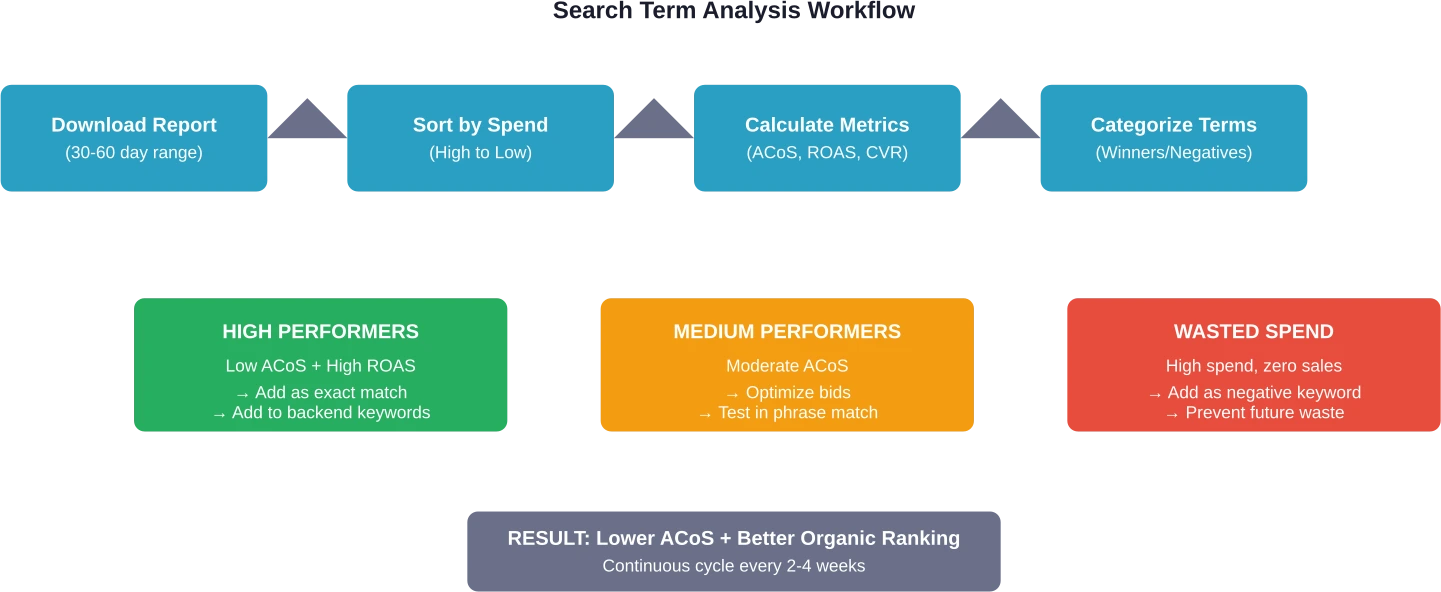
Open your downloaded report in Excel or Google Sheets. Start by creating a summary table using formulas to calculate totals: total spend, total sales, total clicks, total orders. Then compute overall ACoS, ROAS, CVR, and average CPC from those aggregated numbers.
Now sort the data by spend (highest to lowest). The top 20% of search terms by spend usually account for 80% of your budget. Focus there first.
Identifying High-Value Terms to Scale
Look for search terms with ACoS below your target threshold (typically 20-30% for most sellers) and at least 3-5 orders. These are proven converters. Add them to your campaigns as exact match keywords with competitive bids.
Don’t stop at your ad account. Copy these high-performers into your backend keyword fields. According to Amazon’s official guidance, backend search terms help the algorithm index your product for organic search—even if those terms don’t appear in your visible listing copy.
Spotting Wasteful Terms and Adding Negatives
Sort by spend again, but filter for terms with zero orders or ACoS above 100%. If you’ve spent $20+ on a term with no sales, it’s almost certainly a mismatch. Add it as a negative keyword (exact or phrase, depending on specificity).
Community discussions on Amazon seller forums highlight the value of negative keywords for reducing wasted spend. It’s low-effort, high-impact.
Optimization Actions: From Data to Results
Analysis means nothing without execution. Here’s what to do with your findings:
Create exact match campaigns for winners: High-converting terms deserve dedicated exact match keywords with higher bids. This gives you tighter control and prevents budget bleed.
Update backend keywords: Add profitable search terms to your Generic Keyword field (max 250 bytes). Use lowercase, separate with spaces, skip punctuation. Seller Central documentation emphasizes avoiding repetition and filler words like “a,” “an,” “the.”
Refine broad and phrase match campaigns: Use negatives aggressively to trim irrelevant traffic. Broad match is useful for discovery, but only if you prune bad terms weekly.
Test new product targeting: If you see ASIN codes in your Search Term Report (not words), customers clicked your ad from a competitor’s product page. High-converting ASINs are candidates for dedicated product targeting campaigns.
Backend Keyword Optimization Using Search Term Insights
Backend keywords don’t show to customers, but they tell Amazon’s algorithm what your product is. They’re especially valuable for synonyms, alternate spellings, and abbreviations that don’t fit naturally in your title or bullets.
Best practices from Amazon Seller Central include:
Keep total character count under the limit (typically 250 bytes, but check your category in Seller Central)
Use synonyms and common variations
Include abbreviations (“BPA” if you sell “BPA-free” items)
Avoid punctuation, repetition, and stop words
Use singular OR plural, not both (Amazon handles stemming automatically)
The Search Term Report shows which variations actually drive conversions. If “stainless steel water bottle” converts but “stainless bottle” doesn’t, prioritize the full phrase in your backend.
Long-Tail Terms and Emerging Trends
Sort your Search Term Report by impressions (low to high). Long-tail terms—specific, lower-volume phrases—often hide in the bottom rows. They typically have lower competition and higher intent.
A term with 15 impressions, 3 clicks, and 2 orders at $0.40 CPC might seem insignificant. But that’s a 67% conversion rate. Scale it, and you’ve found a pocket of profit.
Seasonality and trends shift fast. Running this analysis monthly helps catch emerging search behavior before competitors notice.
Common Mistakes That Kill ROI
Even experienced sellers trip over these pitfalls:
Ignoring high-spend, low-conversion terms: If a broad match keyword is bleeding $50/day with zero sales, cut it. Immediately.
Not updating backend keywords: Your Search Term Report changes monthly. Your backend keywords should too.
Treating all match types the same: Broad match for discovery, phrase for scaling, exact for profit. Each has a role. Mixing them carelessly wastes the budget.
Analyzing too infrequently: Weekly checks catch problems before they cost hundreds. Monthly is bare minimum.
Tying PPC Data Back to Organic Strategy
Here’s where it gets interesting. Amazon’s A9 algorithm uses conversion signals to determine organic ranking. When a search term consistently leads to sales (whether through ads or organic clicks), Amazon interprets that as relevance.
By adding high-converting ad terms to your backend keywords and optimizing your listing content around them, you’re teaching Amazon’s algorithm that your product is the right match for those queries. Over time, this can lift your organic rank—reducing reliance on paid ads.
It’s a flywheel: better PPC data → smarter keyword choices → stronger organic visibility → lower overall advertising cost.
Turn Search Term Data Into Decisions, Not Guesswork
Search term reports only help if you can actually connect keywords to real outcomes. Most sellers end up exporting data, filtering it manually, and still missing the bigger picture – which terms drive sales, which just burn budget, and how performance changes over time.
WisePPC solves that by pulling search term, ad, and sales data into one place. You can track keyword performance alongside actual revenue, analyze trends across longer time periods, and make changes directly without jumping between tools. Instead of working with limited Amazon data windows, you get a clearer view of what’s worth scaling and what needs to be cut.
If you want search term optimization to be more than routine cleanup, you need that level of visibility. Start using WisePPC and base your keyword decisions on real performance, not partial data.
Start Mining Your Search Term Data Today
The Amazon Search Term Report isn’t just a spreadsheet. It’s a roadmap showing exactly where your customers are, what they’re searching for, and which paths lead to profit versus waste.
Download your report right now. Sort by spend. Find one term draining budget with zero sales, and add it as a negative. Find one term with strong ROAS, and add it as an exact match keyword plus a backend term. That’s two actions, maybe 10 minutes of work, and they’ll pay dividends for months.
Optimization isn’t a one-time event. Set a weekly reminder, build a simple tracking template, and watch your ACoS drop while your organic visibility climbs. The sellers who win on Amazon aren’t the ones with the biggest budgets—they’re the ones who use data to make smarter bets every single week.
Frequently Asked Questions
How often should I download and analyze my Search Term Report?
Weekly analysis is ideal for active campaigns with significant spend. Monthly works for lower-budget accounts. The key is consistency—set a recurring calendar reminder so it becomes routine rather than something you remember only when performance tanks.
What’s the difference between the Search Term Report and the Search Query Performance report?
The Search Term Report shows terms that triggered your ads (PPC data only). The Search Query Performance report (available in Brand Analytics for brand-registered sellers) shows organic search behavior across the category, including top clicked ASINs and conversion rates—even for searches where you didn’t run ads. Both are valuable, but they serve different purposes.
Can I see search terms for Sponsored Brands or Sponsored Display campaigns?
The Search Term Report is primarily designed for Sponsored Products. Sponsored Brands and Sponsored Display both provide search term reports. Sponsored Display search term reports are available for campaigns using ‘Contextual targeting’.
Why do some search terms show as ASIN codes instead of words?
ASIN codes in your Search Term Report indicate that a customer clicked your ad from a product detail page rather than from search results. This happens with product targeting campaigns or when customers browse related items. High-converting ASINs are worth targeting directly with dedicated product targeting campaigns.
How do I add negative keywords based on the Search Term Report?
In your campaign manager, navigate to the campaign or ad group where the wasteful term appeared. Go to the Negative Keywords tab and add the term as either negative exact (blocks only that precise phrase) or negative phrase (blocks any query containing that phrase). Negative exact is safer for testing; negative phrase is more aggressive.
What ACoS should I target when analyzing search terms?
It depends on your profit margin and business goals. Generally, 20-30% ACoS is healthy for most products. Calculate your break-even ACoS based on your profit margins and use that as your ceiling. Terms below break-even are profitable; terms above it lose money unless you’re bidding for market share or launching a new product.
Should I add every high-converting search term to my backend keywords?
Not necessarily. Prioritize terms that don’t already appear in your title, bullets, or description. Backend keywords are for synonyms, abbreviations, and alternate phrasings that didn’t fit in visible content. If “wireless headphones” is already in your title, adding it to the backend is redundant—Amazon already indexes it. Use backend space for hidden gems like “cordless earbuds” or “bluetooth headset.”
Quick Summary: A good product launch combines strategic planning, cross-functional team alignment, quality management oversight, and clear quantifiable benefits that resonate with target audiences. Recent Harvard research shows high-quality managers can increase new product revenue by nearly 20% within six months, while BCG reports that three-quarters of yearly product launches fail without proper innovation cycles and consumer insight integration.
Product launches fail at alarming rates. According to BCG, three-quarters of yearly product launches fail. That’s a staggering failure rate for something companies invest millions developing.
But here’s what separates the winners from the rest: it’s not just about having a great product. Launch success depends on strategic execution, team quality, and how well the offering connects with actual market needs.
So what actually makes a product launch good? Research from Harvard Business School, MIT Sloan, and leading consulting firms reveals specific factors that drive launch success. This analysis cuts through the noise to identify what works.
The Critical Role of Management Quality
Recent research from Harvard Business School reveals something most launch frameworks ignore: the quality of managers executing the rollout matters enormously.
Professors Tomomichi Amano and Jorge Tamayo studied product launches across retail environments. Their findings? High-quality managers significantly boost new product revenue and expand market reach compared to lower-quality counterparts.
The impact is quantifiable. Within six months of a high-quality manager’s arrival, revenue per new product increased by nearly 20%. That’s substantial growth from management effectiveness alone.
This research challenges the traditional focus on the four Ps (product, price, place, promotion). While those elements remain important, the people managing the rollout can make or break execution. A mediocre product with excellent management outperforms an excellent product with poor execution.
What defines a high-quality manager in launch contexts?
The research points to several characteristics:
Strategic coordination across multiple teams
Data-driven decision making during rollout phases
Rapid problem identification and course correction
Clear communication of launch objectives to frontline teams
Organizations often overlook this human element when planning launches. They focus resources on product development and marketing campaigns but underinvest in management capability for the launch phase itself.
Cross-Functional Team Alignment
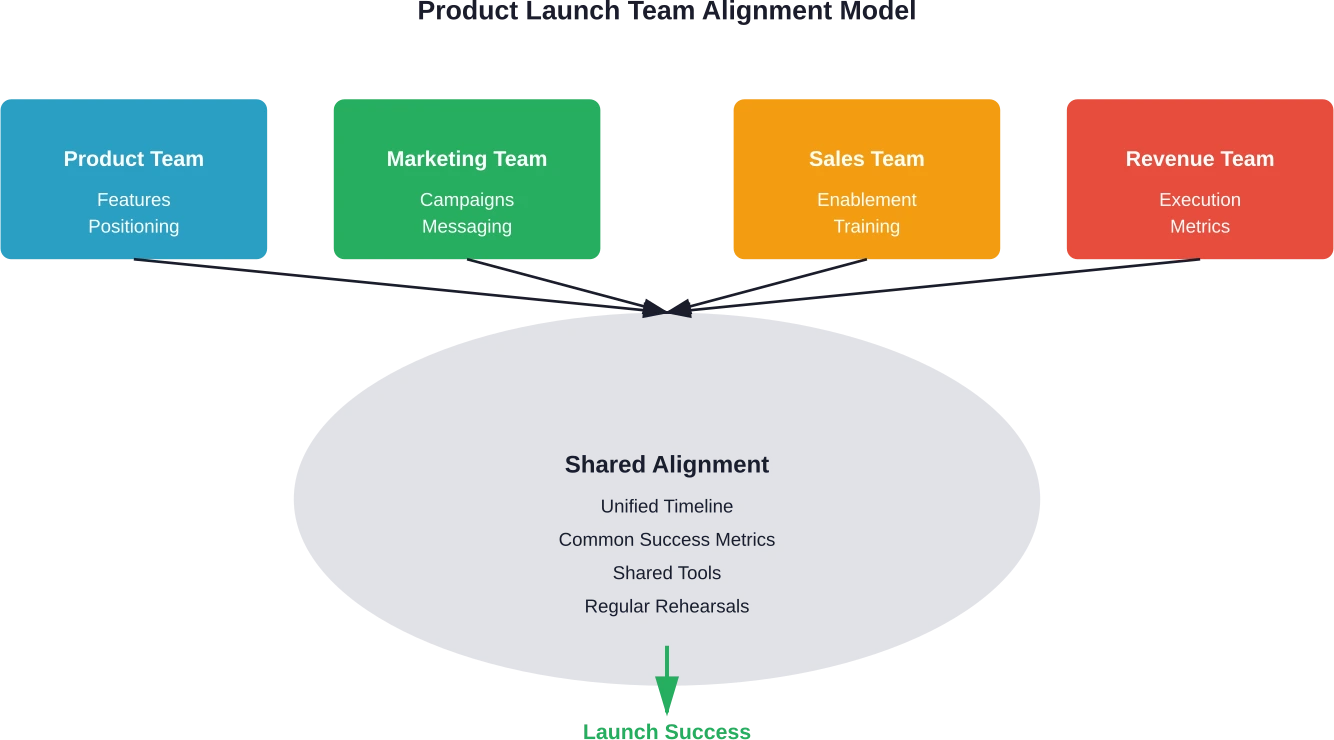
The most successful product launch strategies connect product, marketing, enablement, and revenue teams around shared timing, tools, and ownership. This isn’t just theory—it’s what separates launches that accelerate company growth from ones that fizzle.
Harvard Business Review’s 2026 research on digital product management emphasizes permanent, cross-functional teams over temporary project-based approaches. Traditional project structures have high failure rates because teams disband once the system launches, limiting opportunities for learning and improvement.
Successful launches require each go-to-market team to own their piece of the rollout process. Product teams define features and positioning. Marketing creates campaigns and messaging. Sales enablement prepares customer-facing teams. Revenue teams execute in market.
But ownership alone isn’t enough.
These teams must synchronize around critical milestones:
Unified launch timeline with dependencies mapped
Shared definitions of success metrics
Common tools for tracking launch progress
Regular rehearsal of key launch moments
By launch week, well-aligned teams are dialing in the final 10%, not scrambling at 110%. They’ve collectively rehearsed key moments and shaken loose potential challenges before they manifest in market.
Quantifiable Benefits Over Feature Lists
Here’s where most product launches go wrong: teams focus on what the product does instead of what problem it solves and how well it solves it.
Community discussions consistently highlight this gap. Launch posts often list features without explaining why they matter. After shipping something significant, tired teams write quick notes and move on. But that approach wastes the launch opportunity.
Effective launches demonstrate measurable outcomes. Instead of saying a product solves a problem, prove it with data, testimonials, and case studies. Quantifiable claims like “reduces time spent on X by 40%” or “saves users an average of Y dollars per month” resonate far more than generic benefit statements.
This principle extends beyond marketing copy.
The entire launch narrative should center on customer outcomes:
What specific pain point does this address?
How much better is the customer’s situation after adoption?
What metrics demonstrate this improvement?
Can early users validate these benefits?
Testing different messages matters too. Small ad or landing-page experiments before launch reveal which value propositions connect. Instead of “an efficient meal-planning app,” try “helps busy parents save 30 minutes every evening by turning what’s in the fridge into a ready plan.” That’s concrete, human, and instantly meaningful.
The shift from feature-centric to outcome-centric communication isn’t just about marketing effectiveness. It forces product teams to validate that their solution genuinely delivers measurable value. If quantifiable benefits are hard to articulate, that’s a red flag about product-market fit.
Strategic Foresight and Market Timing
Timing isn’t everything, but it’s close. Companies that excel at strategic foresight systematically track both predictable future events and true unknowns across short and long-term horizons.
Companies that excel at strategic foresight demonstrate performance advantages. This advantage comes from data-forward methods, continuous signal detection, and explicit focus on potential upsides to risks, not just downsides.
For product launches, foresight capability translates to:
Launching when market conditions favor adoption
Anticipating competitive responses and planning accordingly
Identifying emerging customer needs before they become obvious
Avoiding launches during market disruptions or saturation periods
The path to foresight leadership lies in building it as an organizational capability embedded in strategy, not a set of one-off exercises. That means continuous environmental scanning, not just quarterly planning sessions.
MIT Sloan research on learning from outcomes emphasizes that understanding why initiatives succeed or fail helps leaders make better decisions about future strategies. Launches should feed into this learning cycle. Post-launch retrospectives that honestly assess what worked and what didn’t create institutional knowledge that improves subsequent launches.
The Five Key Stages Framework
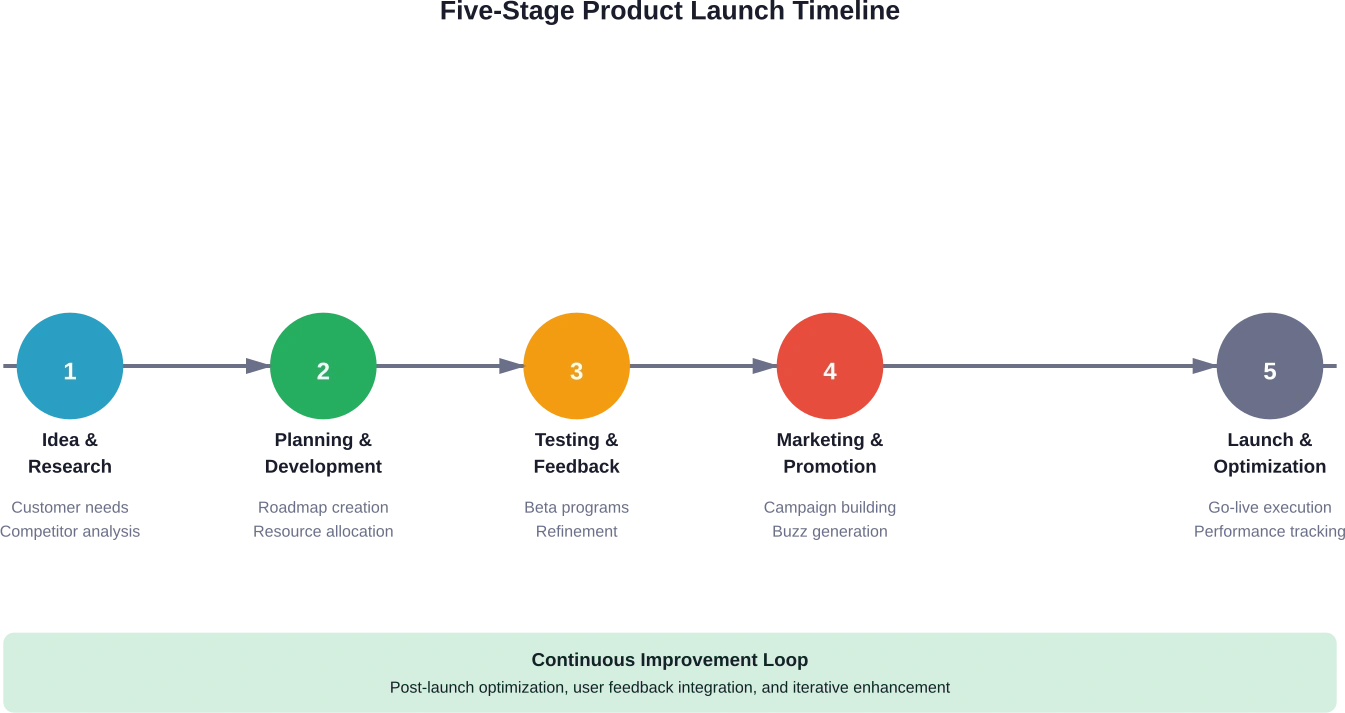
Despite the complexity of modern launches, the fundamental structure remains consistent. Successful launches typically follow five key stages, each with distinct objectives and success criteria.
Stage 1: Idea and Research
This foundation stage involves brainstorming, studying competitors, and understanding customer needs. The research phase shouldn’t be rushed—inadequate understanding of market dynamics causes many launch failures.
Effective research goes beyond surface-level competitor analysis.
It includes:
Deep customer interviews to uncover unmet needs
Analysis of competitor positioning and messaging
Market size and growth trajectory assessment
Regulatory or compliance considerations
Technology trends that might accelerate or hinder adoption
Stage 2: Planning and Development
With research complete, teams build roadmaps, create prototypes, and allocate resources. This stage establishes the foundation for cross-functional alignment discussed earlier.
Planning encompasses both product development and go-to-market strategy. The two must evolve in parallel, not sequentially. Waiting until development finishes to begin launch planning creates time pressure that compromises execution quality.
Stage 3: Testing and Feedback
Testing with select users, gathering insights, and refining based on feedback prevents launching with critical flaws. This stage validates assumptions from earlier phases.
The testing approach should match product type and market. B2B products might involve pilot programs with key accounts. Consumer products might use beta programs or soft launches in specific geographies.
Stage 4: Marketing and Promotion
Generating buzz through campaigns, teasers, and partnerships builds anticipation before launch day. The marketing phase shouldn’t start on launch day—it should create momentum leading into it.
Different launch strategies fit different contexts. Influencer-led launches work for consumer products with visual appeal. Partnership launches leverage complementary brands or platforms. Content marketing launches educate audiences about new problem-solution paradigms.
Stage 5: Launch Day and Beyond
Going live, promoting strategically, and tracking performance marks the transition from preparation to execution. But launch day isn’t the finish line—it’s the starting line for ongoing optimization.
Digital product management principles emphasize permanent teams that continue improving products post-launch. Success is judged by adoption, user retention, and revenue over time, not just initial launch metrics.
Measuring Launch Success with Modern Metrics
Traditional operational KPIs like utilization, throughput, and quarterly margins served organizations well in stable environments. But in the transformation age, these legacy metrics often derail product launches by focusing attention on the wrong outcomes.
Harvard Business Review’s research on transformation metrics reveals that organizations should measure what will make them successful in the future, not what worked in the past. For product launches, this means shifting from output metrics to value-creation metrics.
Modern launch measurement focuses on:
Value: Revenue impact, customer lifetime value increases, or cost savings generated
Alignment: How well the launch advances strategic objectives versus tactical wins
Velocity: Speed of adoption, time to revenue, or market penetration rate
Team Health: Cross-functional collaboration quality and sustainable execution pace
These metrics can be tracked in a live operating system that monitors real-time health, velocity, and strategic alignment of the launch. When performance is measured through these project-driven KPIs, leaders gain confidence, trust in the launch grows, and results follow.
BCG research emphasizes that top-line growth is the most important driver of value creation. Over the longer term, it accounts for about half of ten-year total shareholder return. Margins, free cash flow, and multiples remain important, but they take a back seat to top-line improvement.
This has direct implications for launch measurement. Early fixation on profitability or efficiency might optimize the wrong things. The primary question should be: Is this launch driving growth? Secondary questions about margin and efficiency come later.
Metric Category
Traditional Approach
Modern Approach
Why It Matters
Success Definition
Launch completed on time
Customer adoption and value creation
Launches are starting points, not endpoints
Timeline Focus
Pre-launch execution
Post-launch performance trajectory
Long-term outcomes matter more than launch day
Team Measurement
Individual function performance
Cross-functional collaboration quality
Alignment drives better outcomes than siloed excellence
Financial Metrics
Cost management and margins
Top-line growth and market expansion
Growth drives long-term value creation
Customer Metrics
Initial sales or signups
Retention, engagement, and satisfaction
Sustainable adoption matters more than launch spike
Track Ad Performance With WisePPC
Launching a new product on Amazon involves more than listing optimization. Advertising performance, keyword visibility, and early sales signals all influence how a product gains traction. WisePPC helps sellers analyze campaign data, keyword performance, and product metrics in one dashboard. This makes it easier to understand which campaigns support a launch and which ones need adjustment.
Running Amazon Ads for a Product Launch?
Use WisePPC to:
analyze keyword and campaign performance
track early product sales signals
adjust PPC campaigns during launch
👉 Explore WisePPC to better understand your Amazon advertising data.
The Role of AI in Modern Product Launches
Artificial intelligence and generative AI are reshaping how organizations approach product innovation and launches. Right now, many consumer packaged goods firms struggle with innovation, and three-quarters of yearly product launches fail.
AI provides a path forward by accelerating the innovation cycle, expanding the range of ideas explored, and surfacing concepts that resonate with customers. These capabilities apply across multiple launch stages.
During the research phase, AI tools analyze market trends, competitor positioning, and customer sentiment at scale. Pattern recognition capabilities identify opportunities human analysts might miss.
In planning and development, AI accelerates prototyping and testing cycles. Generative AI can produce multiple positioning variations, messaging frameworks, or campaign concepts rapidly, enabling broader exploration of strategic options.
For testing and feedback, AI analyzes user responses and behavioral data to identify what’s working and what isn’t. Sentiment analysis across customer conversations reveals issues early, when they’re still easy to fix.
The marketing phase benefits from AI’s ability to optimize messaging for different audience segments and channels. Personalization at scale becomes feasible, improving campaign effectiveness.
Post-launch, AI continuously monitors performance metrics and flags anomalies or opportunities. Predictive analytics help anticipate when momentum might stall, enabling proactive intervention.
That said, AI tools are enablers, not replacements for strategic thinking. The research emphasizes that high-quality management still matters enormously. AI amplifies management capability but doesn’t substitute for it.
Common Launch Strategy Approaches
Different product types and market contexts call for different launch strategies. No single approach works universally, but several proven patterns emerge across successful launches.
Teaser Campaign Strategy
Building anticipation before revealing the full product creates buzz and primes the market. This approach works well for consumer products with visual appeal or innovative features that generate excitement.
Teaser campaigns release information gradually, often through social media, email sequences, or strategic media placements. The key is maintaining interest without frustrating potential customers through excessive secrecy.
Soft Launch Strategy
Releasing to a limited audience or geography before full rollout reduces risk and enables learning. Soft launches identify issues in controlled environments where damage is contained.
This approach suits complex products where unexpected interactions might occur, or markets where local customization might be needed. Geographic soft launches are common for global products.
Partnership Launch Strategy
Leveraging complementary brands or platforms accelerates market access and credibility. Partnership launches work when the partner’s audience aligns with target customers.
Successful partnerships require clear value exchange. Both parties should gain something meaningful—market access, revenue share, or strategic positioning benefits.
Influencer-Led Launch Strategy
Engaging influencers to introduce and validate the product to their audiences provides social proof and reach. This strategy is particularly effective for consumer products targeting demographics that trust influencer recommendations.
The challenge lies in authenticity. Audiences detect inauthentic endorsements quickly, which can backfire. Influencers should genuinely believe in the product, not just accept payment for promotion.
Content Marketing Launch Strategy
Creating valuable content that educates audiences about the problem space positions the product as a solution within a broader context. This approach works well for products that address problems audiences don’t fully understand yet.
Content marketing launches take longer to generate results but often create more sustainable adoption. Educated customers who understand why they need a solution become stronger advocates than those responding to promotional campaigns.
Launch Strategy
Best For
Timeline
Key Success Factor
Teaser Campaign
Consumer products with visual appeal
4-8 weeks pre-launch
Maintaining excitement without frustration
Soft Launch
Complex products or new markets
2-6 months before full launch
Learning quickly and adapting
Partnership Launch
Products with clear complementary fit
3-6 months for partnership development
Mutual value creation
Influencer-Led
Consumer products for specific demographics
6-12 weeks including relationship building
Authentic influencer belief in product
Content Marketing
Products addressing poorly understood problems
3-6 months of content before launch
Educational value beyond product promotion
Learning From Launch Outcomes
Post-launch retrospectives separate organizations that improve over time from those that repeat mistakes. MIT Sloan research emphasizes that understanding why initiatives succeed or fail helps leaders make better decisions about future strategies.
Market response: Did target customers adopt as expected? If not, why?
Execution quality: Did teams execute the plan effectively? Where did breakdowns occur?
Assumption validation: Which assumptions about customers, competition, or market conditions proved correct or incorrect?
Metric performance: How did actual performance compare to projections across different metrics?
The key is honest assessment. Organizations that only celebrate successes without examining failures miss valuable learning opportunities. Conversely, those that conduct witch hunts after disappointing launches create cultures where teams hide problems rather than surfacing them.
Structured learning processes capture insights systematically. Launch playbooks that document what worked and what didn’t become institutional knowledge that improves subsequent launches.
This learning orientation connects to the digital product management principle of permanent teams. When teams stay together across multiple product cycles, they compound learning. Each launch informs the next, creating continuous improvement.
Avoiding Common Launch Pitfalls
Even well-planned launches encounter predictable problems. Awareness of common pitfalls enables proactive mitigation.
Insufficient Product-Market Fit Validation
The hidden reason behind many launch failures is inadequate consumer insight integration. Organizations assume they understand customer needs without rigorous validation. Despite bigger R&D budgets and better data, many launches still fall short. PDMA’s global study found that just 61% of new products meet their business goals, and that, on average, it takes nearly nine ideas to produce one success.
Inside many organizations, product teams work in isolation from real customer input until late in development. By then, course correction becomes expensive or impossible.
Feature-Centric Communication
As discussed earlier, focusing on what the product does rather than what problems it solves disconnects launches from customer motivations. This mistake appears in launch materials, sales enablement, and customer-facing messaging.
The fix requires discipline. Every feature description should connect to a specific customer outcome. If that connection isn’t clear, either the feature isn’t important enough to highlight, or the team doesn’t understand its value.
Inadequate Cross-Functional Coordination
Siloed execution creates gaps where critical tasks fall through or conflicting messages confuse customers. Marketing launches a campaign while sales remains untrained. Product releases features that support teams don’t understand. Enablement creates materials that don’t align with actual positioning.
The solution is the cross-functional alignment framework described earlier. But alignment requires deliberate effort—it doesn’t happen automatically just because teams report to the same executive.
Poor Timing Decisions
Launching during market disruptions, immediately before major industry events, or when internal capabilities are stretched creates unnecessary headwinds. Some timing factors are controllable, others aren’t, but strategic foresight capability helps navigate both.
Neglecting Post-Launch Optimization
Treating launch day as the finish line abandons momentum when it matters most. The weeks immediately following launch represent the highest-leverage period for optimization. Customer feedback is fresh, team attention is focused, and course correction is easiest.
Organizations that transition immediately to the next project waste this opportunity. Building post-launch optimization into plans ensures teams capture early learnings while they’re most actionable.
Conclusion
Good product launches don’t happen by accident. They result from strategic planning, cross-functional coordination, quantifiable value demonstration, and continuous learning.
The research is clear: management quality matters enormously, alignment across teams separates success from failure, and outcome-focused communication resonates better than feature lists. Modern metrics that emphasize growth and value creation guide better decisions than traditional operational KPIs.
But perhaps most important is this: launches aren’t endpoints. They’re starting points for ongoing optimization and value creation. Teams that treat them as such, maintaining focus through the critical post-launch period, see substantially better results.
The framework exists. The research validates it. What separates organizations that consistently launch successfully from those that struggle is disciplined execution of these principles, adapted to specific product and market contexts.
For teams planning launches now, the path forward is clear: align teams early, validate customer outcomes rigorously, communicate benefits quantitatively, measure what actually drives value, and learn systematically from each launch to improve the next.
Frequently Asked Questions
What is the most important factor in a successful product launch?
Cross-functional team alignment around shared objectives, timing, and success metrics is the most critical factor. Harvard research shows that high-quality management executing coordinated launches can increase new product revenue by nearly 20% within six months. No single element—product quality, marketing budget, or timing—matters as much as how well teams synchronize execution.
How long should product launch planning take?
Planning timelines vary by product complexity and market, but generally range from three to six months for B2B products and two to four months for consumer products. The key is starting go-to-market planning in parallel with product development, not sequentially after it. Teams that wait until development finishes to begin launch planning face time pressure that compromises execution quality.
Should launches focus on features or benefits?
Launches should focus on quantifiable customer outcomes rather than features. Effective messaging demonstrates measurable results like “reduces time spent on X by 40%” rather than listing capabilities. Features only matter when connected to specific problems they solve. Testing different message frames before launch reveals which value propositions resonate most strongly with target audiences.
What metrics best measure launch success?
Modern launch measurement emphasizes value creation metrics over traditional operational KPIs. The most important metrics are revenue impact or customer value generated, speed of adoption, strategic alignment with business objectives, and cross-functional team health. Focusing on completion milestones or launch-day metrics misses the point—launches are starting points for ongoing value creation, not endpoints.
How do soft launches differ from full launches?
Soft launches release products to limited audiences or geographies before full rollout, enabling controlled learning and risk reduction. They work well for complex products where unexpected issues might arise, or markets requiring local customization. Full launches skip this phase and go directly to broad market availability. The choice depends on product complexity, market uncertainty, and organizational risk tolerance.
What role does AI play in modern product launches?
AI accelerates multiple launch phases by analyzing market trends and customer sentiment at scale during research, generating positioning and messaging variations during planning, analyzing user responses during testing, optimizing campaigns during marketing, and monitoring performance post-launch. BCG research indicates AI helps address the problem that three-quarters of yearly product launches fail by expanding ideation, accelerating cycles, and surfacing concepts that resonate with customers.
How can teams learn from previous launches?
Structured post-launch retrospectives that honestly examine market response, execution quality, assumption validation, and metric performance create institutional knowledge. Organizations should document what worked and what didn’t in accessible launch playbooks. MIT Sloan research shows that understanding why initiatives succeed or fail helps leaders make better decisions about future strategies. Permanent product teams compound this learning across multiple cycles better than temporary project teams.
Quick Summary: The FBA Dashboard provides powerful analytics tools including Product Performance Spotlight, Returns & Recovery Insights, and Voice of the Customer metrics that directly impact sales. By leveraging proactive alerts, monitoring 30+ ASIN-level metrics, and acting on performance trends, sellers can identify issues faster, optimize listings, and recover sales opportunities before they’re lost.
Amazon’s FBA Dashboard has evolved into something sellers can’t afford to ignore. But here’s the thing—most sellers barely scratch the surface of what these analytics tools can actually do for sales performance.
The difference between struggling and thriving often comes down to how sellers use the data sitting right in front of them. Amazon provides multiple dashboard tools specifically designed to help FBA sellers identify problems, spot opportunities, and act before competitors do.
This guide breaks down the specific dashboard features that directly impact sales and shows exactly how to use them for measurable results.
Understanding the FBA Dashboard Ecosystem
Amazon doesn’t have just one “FBA Dashboard.” The platform offers several interconnected analytics tools that serve different purposes. Understanding which dashboard does what is the first step toward driving sales effectively.
The primary dashboards FBA sellers should monitor include Product Performance Spotlight (PPS), the Returns and Recovery dashboard, Voice of the Customer (VOC), FBA Inventory pages, and Business Reports. Each provides distinct metrics that influence sales from different angles.
Product Performance Spotlight stands out as the central hub for ASIN-level performance. According to the official Amazon Seller Central announcement, PPS consolidates more than 30 metrics into one interface, eliminating the need to jump between separate reports. This centralization saves time and makes pattern recognition significantly easier.
Why Dashboard Analytics Matter for Sales
Data without action means nothing. But the right data interpreted correctly can prevent sales losses before they happen.
According to Amazon Seller Central data, sellers using PPS performance alerts experienced metric recoveries in half the time—just 3 days compared to nearly 6 days for sellers without alerts. Faster problem detection means less revenue loss during the recovery period.
Think about what a three-day difference means when a listing experiences a sudden drop in conversion rate or visibility. Three days of depressed sales on a product moving 50 units daily at $30 profit per unit equals $4,500 in lost profit. Multiply that across multiple ASINs and the impact becomes substantial.
Product Performance Spotlight: The Central Analytics Hub
Product Performance Spotlight serves as the command center for ASIN monitoring. This tool brings together sales data, traffic metrics, inventory status, pricing information, costs, and promotional performance into one consolidated view.
Accessing PPS is straightforward. Navigate to Seller Central, select Reports, then Business Reports, then the By Child ASIN Report. Click into any child ASIN to open the Product Performance Spotlight interface.
Setting Up Proactive Alerts
The alert system represents PPS’s most valuable sales-protection feature. These notifications flag significant performance changes automatically, allowing sellers to respond immediately rather than discovering problems during routine checks days later.
Custom alerts can be configured based on specific needs. Sellers can set thresholds for metrics like conversion rate drops, inventory level changes, pricing fluctuations, or traffic decreases. When a metric crosses the defined threshold, an alert triggers.
Real talk: alerts only help if someone acts on them. Build a process for reviewing and responding to alerts within 24 hours. Assign responsibility if multiple people manage the account.
Monitoring the 30+ ASIN-Level Metrics
PPS tracks dozens of metrics, but not all carry equal weight for driving sales.
Focus on these high-impact indicators:
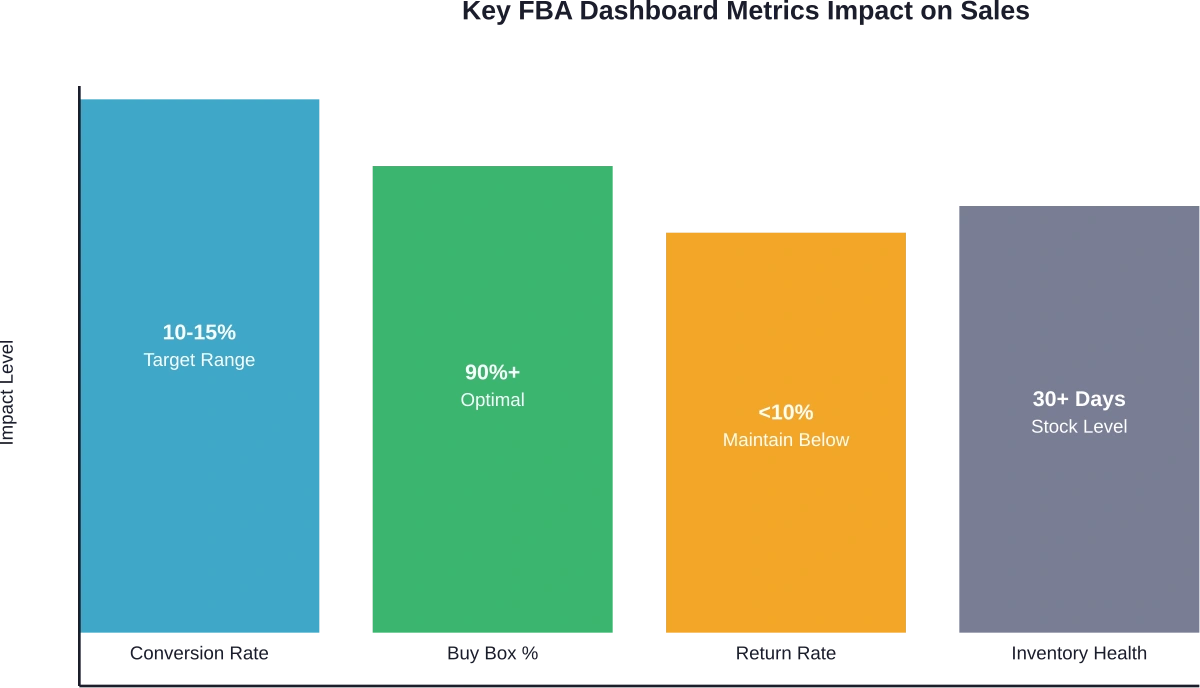
Unit Session Percentage: This conversion rate metric shows how many sessions result in purchases. According to authoritative sources, the average Unit Session Percentage for Amazon is between 10-15%. Numbers below this range typically indicate listing optimization needs.
Sessions: Total product page views indicate traffic levels. Sudden drops suggest search ranking issues, suppressed Buy Box, or seasonal shifts.
Buy Box Percentage: Time spent owning the Buy Box directly correlates with sales. Lost Buy Box means lost revenue.
Return Rate: High return rates trigger performance flags and reduce profitability. The metric also appears in the Voice of the Customer dashboard.
Tracking trends matters more than single data points. A 20% week-over-week conversion drop deserves immediate investigation. A 2% fluctuation might be normal variance.
Comparing Against Competition
PPS includes competitive benchmarking that shows how ASINs perform versus similar products. This context reveals whether performance issues stem from internal problems or market-wide trends.
If conversion rates drop but competitors show similar declines, the issue might be seasonal demand shifts or category-wide price compression. If only one ASIN underperforms while competitors maintain steady metrics, the problem is specific to that listing.
Use competitive insights to identify improvement opportunities. Products outperforming the category average represent strengths to double down on. Underperformers need immediate optimization attention.
Leveraging Returns and Recovery Dashboard
Amazon introduced the Returns and Recovery: Insights and Opportunities dashboard for all sellers to provide centralized visibility into return patterns and inventory recovery options.
Returns directly impact profitability and sales velocity. High return rates trigger account health concerns and reduce net profit per unit. More importantly, return patterns often signal fixable product or listing issues.
ASIN-Level Return Insights
The dashboard provides detailed return metrics including return rate by ASIN, top return reasons, and trending patterns over time. This granular data helps pinpoint exactly why customers send products back.
Common return reasons include:
Item not as described (often a listing accuracy problem)
Defective or doesn’t work properly (quality control issue)
Bought by mistake (impulse purchase with weak product-market fit)
Better price available (pricing strategy problem)
No longer needed (slow shipping or wrong product expectations)
Each return reason suggests a different solution. “Item not as described” returns require listing updates with more accurate images, dimensions, or feature descriptions. “Defective” returns demand supplier conversations or quality checks. “Better price available” returns might indicate pricing is too high relative to perceived value.
Reducing Return Rates to Boost Net Sales
Lower return rates mean more revenue retained. A product with $100,000 in gross sales and a 15% return rate nets $85,000 in retained revenue. Reducing returns to 8% improves retained revenue to $92,000.
Actionable steps to reduce returns:
Update product images to show accurate colors, sizes, and details
Enhance product descriptions with precise specifications
Add comparison charts in A+ Content to set proper expectations
Include dimensional diagrams or scale references
Address common questions proactively in bullet points
Improve packaging to prevent shipping damage
Conduct quality control audits with suppliers
Monitor return rate changes after implementing corrections. The dashboard’s trend tracking shows whether interventions work.
Recovery Metrics for Grade and Resell
For sellers enrolled in Amazon’s Grade and Resell program, the Returns and Recovery dashboard displays recovery metrics including net recovery value, units sold as graded items, and total sales from recovered inventory.
This feature turns a cost center (returns) into a revenue stream. Products returned in resalable condition get graded and relisted, recovering value that would otherwise be lost.
Voice of the Customer Dashboard for Sales Protection
The Voice of the Customer (VOC) dashboard consolidates customer feedback signals including product reviews, customer questions, return rates, and star ratings.
As announced in 2024, Amazon enhanced VOC with integrated Return Rate and Star Rating features, creating a single location to monitor customer experience indicators that directly impact search ranking and conversion.
Understanding Star Rating Impact
Star ratings appear prominently in search results and on product detail pages. They influence click-through rates from search and conversion rates on the listing itself.
Products with 4.5+ star ratings typically see higher click-through and conversion compared to products below 4 stars. The difference compounds—better ratings lead to more sales, more sales generate more reviews, more reviews strengthen rating stability.
The VOC dashboard displays star ratings as they appear to customers, making it easy to spot ASINs with rating problems. Products below 4 stars need immediate attention through listing improvements, product quality fixes, or proactive customer support.
Acting on Customer Feedback
Customer questions and negative reviews reveal specific concerns preventing purchases or causing dissatisfaction. The VOC dashboard aggregates this feedback for systematic analysis.
Look for patterns in questions. If multiple customers ask about dimensions, the listing doesn’t communicate size clearly. If questions focus on compatibility, add a compatibility chart. Answer questions thoroughly—responses appear publicly and help future customers.
Negative reviews deserve equally careful analysis. Sort by rating to read 1-star and 2-star reviews first. Categorize complaints by theme (quality issues, shipping problems, inaccurate descriptions, missing features). Themes with multiple mentions require corrective action.
Optimizing FBA Inventory Management
Inventory levels directly affect sales potential. Stockouts kill momentum and ranking. Excess inventory ties up capital and incurs storage fees. The FBA Inventory page helps balance these competing concerns.
Monitoring Inventory Performance Index
The Inventory Performance Index (IPI) score reflects overall inventory health. Scores above 450 unlock benefits including unlimited storage and better placement options. Scores below 450 trigger storage limits that constrain growth.
IPI factors include:
Excess inventory percentage
FBA sell-through rate
Stranded inventory percentage
In-stock inventory rate
Improving IPI requires addressing each component. Reduce excess inventory by running promotions on slow movers. Improve sell-through by optimizing listings and adjusting prices. Fix stranded inventory by resolving listing errors. Maintain in-stock rates through better forecasting.
Using Restock Recommendations
The FBA Inventory page provides restock recommendations based on sales velocity and lead time. These suggestions help prevent stockouts on high-performing ASINs.
But wait. Restock recommendations aren’t perfect. They assume consistent demand and don’t account for seasonality, promotional plans, or market changes. Use recommendations as a starting point, then adjust based on business knowledge.
Track historical days of supply to understand seasonal patterns. Products that sell 10 units daily in December might sell 3 daily in February. Restock quantities should reflect these variations.
Monitor Ad Performance With WisePPC
FBA logistics handle fulfillment, but advertising and product visibility still drive sales. WisePPC helps sellers analyze campaign data and product performance through detailed dashboards. By reviewing keyword results, campaign metrics, and product trends, sellers can see how advertising supports their FBA listings.
Managing FBA Sales and Amazon Ads?
Use WisePPC to:
track campaign and keyword performance
review product-level sales metrics
manage and adjust Amazon PPC campaigns
👉 Explore WisePPC to get clearer visibility into your Amazon advertising data.
Actionable Strategies to Drive Sales
Dashboard data becomes valuable only when translated into action. Here’s how to turn metrics into sales improvements.
Strategy 1: Create a Weekly Dashboard Review Routine
Set a recurring calendar block for dashboard analysis. Consistency matters more than duration—30 minutes weekly beats an occasional 3-hour deep dive.
During each review:
Check PPS alerts and investigate any flagged ASINs
Review top 10 products for metric changes (conversion, sessions, Buy Box %)
Examine VOC dashboard for new negative reviews or rating drops
Scan Returns dashboard for return rate increases
Verify inventory levels on best sellers
Document findings and actions in a simple spreadsheet. This creates a performance history that reveals long-term trends.
Strategy 2: Prioritize High-Impact Problems
Not every metric deserves equal attention. Focus on issues with the biggest revenue impact first.
A 5% conversion drop on a product generating $10,000 monthly in sales costs $500 per month. A 10% conversion drop on a $1,000 monthly product costs $100. Fix the $10,000 product first.
Calculate potential revenue impact using this formula: Current Monthly Revenue × Metric Change % = Monthly Impact. Rank problems by monthly impact and work down the list.
Issue Type
Revenue Impact
Fix Difficulty
Priority Level
Lost Buy Box
High
Medium
Urgent
Conversion Rate Drop
High
Medium
High
Increased Return Rate
Medium
Medium
High
Stock Out Risk
High
Low
High
Rating Below 4.0
High
High
Medium
Excess Inventory
Low
Medium
Medium
Traffic Decline
Medium
High
Medium
Strategy 3: Test and Measure Listing Optimizations
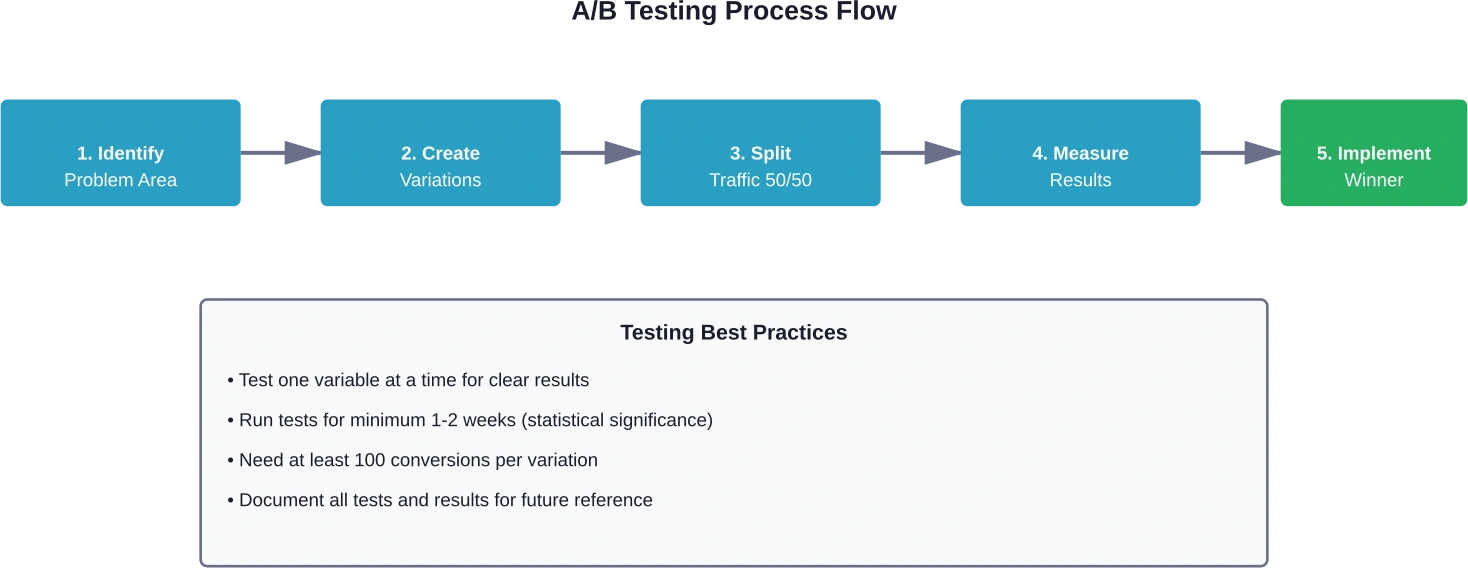
Dashboard metrics provide the feedback loop for optimization experiments. Make one change at a time and monitor metrics for 7-14 days to assess impact.
Testing workflow:
Identify underperforming metric (low conversion, high returns, etc.)
Hypothesize cause (unclear images, inaccurate description, weak bullet points)
Make single targeted change (add dimension photo, rewrite bullets, etc.)
Monitor metric in PPS for 7-14 days
Evaluate results and iterate
This systematic approach builds knowledge about what actually moves metrics for specific products. Over time, it becomes easier to diagnose and fix problems quickly.
Strategy 4: Leverage Seasonal Insights
Historical data in dashboards reveals seasonal patterns that inform inventory planning and promotional timing.
Compare current year metrics to the same period in previous years. Products showing consistent November-December spikes need inventory buildup by October. Products with summer peaks require different planning.
Seasonal insights also guide when to refresh listings. According to Amazon’s Spring Listing Refresh guidance (published February 2026), optimizing listings before traffic peaks captures more demand during high-volume periods.
Strategy 5: Address Buy Box Loss Immediately
Lost Buy Box typically stems from pricing, inventory, or account health issues. The impact is severe—most customers purchase from whoever holds the Buy Box.
When Buy Box percentage drops in PPS:
Check pricing against featured offer
Verify sufficient inventory levels
Review account health metrics
Ensure fulfillment speed remains competitive
Pricing adjustments often restore Buy Box within hours. Inventory shipments take longer but remain critical for sustained Buy Box ownership.
Strategy 6: Use Returns Data to Improve Product Quality
Returns dashboard insights extend beyond listings into product development and supplier management. High return rates for specific defects indicate quality control problems worth addressing at the source.
Share return data with suppliers. Products with “defective” returns above 5% need supplier investigation. This collaborative approach improves product quality, reduces future returns, and protects margins.
Some suppliers respond well to data. Others don’t. Persistent quality issues might require finding alternative suppliers.
Advanced Dashboard Tactics
Once basic dashboard monitoring becomes routine, more sophisticated approaches can extract additional value.
Cross-Reference Multiple Dashboards
Insights deepen when connecting data across dashboards. A conversion rate drop in PPS combined with increased negative reviews in VOC suggests a recent product quality change. Traffic decline in PPS alongside lost Buy Box percentage points to pricing or inventory issues.
Look for correlations between seemingly unrelated metrics. Return rate increases that coincide with star rating drops indicate customer dissatisfaction that requires urgent attention. Inventory Performance Index declines alongside slow sell-through rates signal excess inventory problems.
Build Custom Reports for Trend Analysis
Amazon allows exporting data from various dashboard views. Download weekly snapshots of key metrics and compile them in spreadsheets for longer-term trend analysis than dashboards provide by default.
Track metrics like:
Weekly conversion rates by top ASINs
Monthly return rates by product category
Quarterly inventory turnover ratios
Year-over-year seasonal pattern comparisons
Historical data reveals patterns that inform strategic decisions about product line expansion, seasonal inventory planning, and pricing strategy adjustments.
Set Competitive Benchmarks
Use PPS competitive comparison data to establish internal benchmarks. If top competitors maintain 14% conversion rates while yours sits at 11%, that 3-point gap represents improvement opportunity.
Calculate what closing that gap means financially. A product with 10,000 monthly sessions at 11% conversion makes 1,100 sales. At 14% conversion, the same traffic generates 1,400 sales—a 27% increase in units sold from improved conversion alone.
Common Dashboard Mistakes to Avoid
Even with access to comprehensive analytics, sellers make predictable mistakes that limit results.
Mistake 1: Alert Fatigue
Setting too many alerts creates noise that drowns out meaningful signals. Configure alerts only for metrics that actually warrant immediate action.
Low-priority alerts: Minor traffic fluctuations, small session changes, normal seasonal variations.
Mistake 2: Reacting to Short-Term Variance
Metrics fluctuate daily due to random variation. A single day’s conversion rate drop doesn’t necessarily indicate a real problem. Wait for 3-5 days of consistent decline before diagnosing issues and implementing fixes.
Exception: Buy Box loss warrants immediate investigation regardless of duration since it stops sales completely.
Mistake 3: Ignoring Smaller ASINs
It’s natural to focus dashboard monitoring on top sellers. But emerging products and mid-tier ASINs deserve attention too. Small problems caught early prevent them from becoming big problems.
Dedicate at least 20% of dashboard review time to non-top-10 products. Scan for significant metric changes even on lower-volume SKUs.
Mistake 4: Analysis Without Action
Looking at dashboards accomplishes nothing without follow-through. Every review session should end with a prioritized action list and assigned responsibilities.
Document three things after each dashboard review: what changed, why it likely changed, and what action will be taken. Without this discipline, dashboard monitoring becomes busywork.
Integrating Dashboard Insights with Broader Strategy
FBA dashboards shouldn’t exist in isolation. The metrics and insights should inform decisions across all aspects of the business.
Inventory Planning and Forecasting
Historical sales velocity data from dashboards improves inventory forecasting accuracy. Rather than guessing reorder quantities, base decisions on actual sell-through rates adjusted for seasonal patterns.
Use the FBA Inventory page’s historical days of supply metric to calculate appropriate reorder points. Products selling 20 units daily with 30-day lead times need reordering when inventory drops to 600 units (20 × 30 days), plus safety stock.
Product Development Decisions
Return reasons and customer feedback from dashboards reveal product improvement opportunities and new product ideas.
Frequent “too small” return reasons suggest adding a larger size. Common questions about missing features indicate demand for those features. Low star ratings with specific complaint patterns guide product redesign efforts.
Marketing and Advertising Optimization
Dashboard metrics inform advertising strategy. Products with strong organic conversion rates but low traffic are ideal candidates for increased ad spend. Products with high traffic but weak conversion need listing optimization before justifying more advertising investment.
Use conversion rate data to set appropriate Advertising Cost of Sales (ACoS) targets. Products converting at 15% can support higher ad costs than products converting at 8%.
Staying Current with Dashboard Updates
Amazon continuously evolves its seller tools. New dashboard features appear regularly, existing ones get enhanced, and metrics sometimes change.
Product Performance Spotlight launched officially in October 2025. The Returns and Recovery dashboard arrived in November 2025. Voice of the Customer gained Return Rate and Star Rating integration in December 2024. These are recent additions—more changes will come.
Monitor Amazon Seller Central announcements and the “News” section for updates about dashboard enhancements. When new features launch, invest time learning them. Early adopters of new analytics tools gain competitive advantages while others lag behind.
Real-World Application: A Dashboard-Driven Sales Recovery
Theory matters, but practical application demonstrates real value. Consider a seller monitoring a product that suddenly showed declining performance in PPS.
The alert flagged a 20% conversion rate drop over five days. Investigation revealed the cause: a competitor launched with aggressive pricing that captured the Buy Box. The seller’s Buy Box percentage fell from 95% to 30%.
Cross-referencing with the VOC dashboard showed no review or rating changes, confirming the issue wasn’t product quality. The Returns dashboard showed stable return rates, further evidence of pricing rather than product problems.
Action taken: adjusted pricing to regain Buy Box competitiveness while analyzing whether the new price point remained profitable. Buy Box percentage recovered to 85% within 48 hours. Conversion rates normalized within a week.
Total time from alert to resolution: 3 days. Without proactive monitoring, the issue might have persisted for weeks, causing significantly more revenue loss.
Taking Dashboard Insights to the Next Level
Mastering FBA dashboards represents just one component of successful selling. The data provides visibility, but sustained growth requires combining dashboard insights with strong fundamentals across product selection, listing optimization, inventory management, and customer service.
The sellers seeing the best results don’t just check dashboards—they build systematic processes around the data. They create standard operating procedures for responding to specific alert types. They maintain documentation of what optimizations worked. They train team members on dashboard interpretation.
This systematic approach transforms dashboard data from interesting information into competitive advantage. Problems get solved faster. Opportunities get identified earlier. Decisions get made with confidence backed by data rather than guesswork.
Conclusion: Data-Driven Sales Growth
Amazon’s FBA Dashboard ecosystem offers powerful tools that most sellers underutilize. Product Performance Spotlight, Returns and Recovery, Voice of the Customer, and FBA Inventory dashboards provide the visibility needed to drive sales systematically.
The difference between average and exceptional performance often comes down to how quickly problems get identified and resolved. Sellers using proactive alerts and regular dashboard monitoring recover from issues in half the time—3 days versus 6 days according to Amazon’s data. That speed advantage compounds across dozens of ASINs and hundreds of potential issues annually.
Start with the fundamentals: set up Product Performance Spotlight alerts, schedule weekly dashboard reviews, and create a simple process for acting on insights. As comfort with the tools grows, layer in more sophisticated analysis like cross-dashboard correlation and competitive benchmarking.
The dashboards are ready. The data is available. The question is whether sellers will use these tools to their full potential or let valuable insights sit unexamined while competitors pull ahead.
Ready to transform dashboard data into sales results? Start by accessing Product Performance Spotlight in Seller Central today and configuring alerts for the top 10 ASINs. That single action will begin building the data-driven approach that separates growing businesses from stagnant ones.
Frequently Asked Questions
How often should FBA sellers check dashboard metrics?
Top-performing sellers typically check critical metrics daily and conduct comprehensive dashboard reviews weekly. Daily checks focus on alerts and key indicators like Buy Box percentage and inventory levels. Weekly reviews involve deeper analysis of trends, return patterns, and customer feedback. Monthly reviews should include competitive benchmarking and strategic assessment of overall account performance.
Which dashboard metric has the biggest impact on sales?
Conversion rate (Unit Session Percentage) typically impacts sales most directly since it determines how efficiently traffic converts to revenue. Buy Box percentage runs a close second—losing the Buy Box can reduce sales by 70-90% overnight. Both metrics deserve primary focus during dashboard monitoring since improvements yield immediate results.
Can dashboard data help prevent account suspensions?
Absolutely. The Voice of the Customer dashboard and Account Health metrics provide early warning signs of performance problems that could lead to suspension. Monitoring return rates, negative feedback, and order defect rates allows sellers to address issues proactively before they reach suspension thresholds. Quick response to dashboard alerts helps maintain account health.
What’s the difference between Product Performance Spotlight and Business Reports?
Product Performance Spotlight consolidates ASIN-level data from multiple sources into a single interface with proactive alerts and competitive benchmarking. Business Reports provide broader historical data across the entire catalog. PPS focuses on real-time monitoring and problem detection for individual ASINs, while Business Reports serve historical analysis and trend identification across products.
How do returns shown in the Returns dashboard affect sales?
High return rates impact sales through multiple mechanisms. They reduce net revenue directly, trigger potential account health issues, signal quality problems that may lead to negative reviews, and increase operational costs. More importantly, products with consistently high return rates may receive reduced search visibility as Amazon protects customer experience. Monitoring and reducing return rates protects both current and future sales.
Should sellers using FBA also monitor Multi-Channel Fulfillment analytics?
Sellers using Amazon’s fulfillment network for non-Amazon orders should definitely monitor the Multi-Channel Fulfillment Analytics dashboard. It provides insights into fulfillment costs, delivery performance, and order volumes from other channels. This data helps optimize multi-channel strategy and ensures FBA remains cost-effective for off-Amazon sales.
What actions have the fastest impact on sales after dashboard analysis?
Regaining lost Buy Box, restocking products approaching stockout, and fixing stranded inventory typically produce the fastest sales impact—often within hours or days. Pricing adjustments and resolving inventory issues take immediate effect. Listing optimizations based on return data or customer feedback require longer (7-14 days) to show measurable improvement as the changes accumulate traffic and conversion data.
Quick Summary: Amazon offers completely free webinars and training through Seller University and live webinar sessions to teach new and existing sellers how to succeed on the platform. These official resources cover account setup, product listing, fulfillment strategies, advertising, and business growth—all without the cost or risk of third-party courses.
The e-commerce education industry has a problem. Sellers spend thousands on courses promising Amazon success, only to receive outdated information that sometimes violates platform policies.
But here’s what many aspiring sellers don’t realize: Amazon provides comprehensive training completely free.
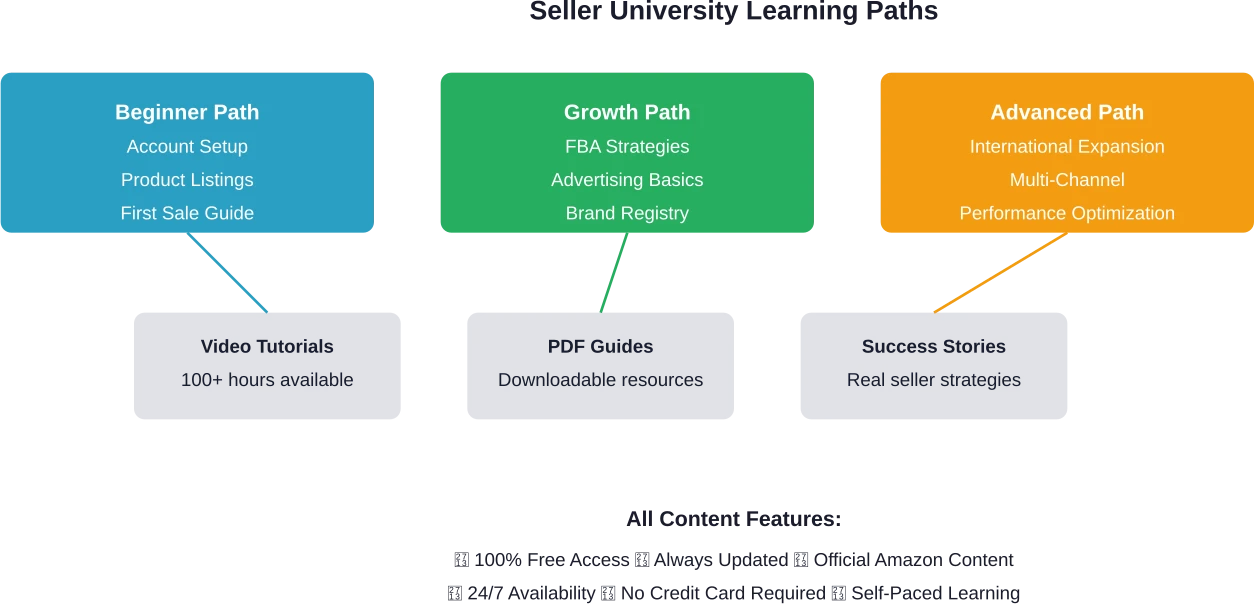
According to Amazon’s official Seller Central forums, the platform offers Seller University—a complete learning hub with video tutorials, PDF guides, and real-world strategies. No payment required. No upsells. Just direct access to the same information that successful sellers use.
The Federal Trade Commission has taken action against e-commerce business opportunity scams, with enforcement actions resulting in significant settlements. This makes official, free resources more valuable than ever.
What Amazon Seller University Offers
Seller University serves as Amazon’s central learning platform. It’s available 24/7 to anyone with a seller account—or even those just exploring the possibility.
The platform includes step-by-step video tutorials that walk through every aspect of selling. Detailed PDF guides provide written reference materials. Real-world seller success strategies show what actually works in practice.
Topics cover the full seller journey. Account setup and listing creation get beginners started. Brand building and growth strategies help established sellers scale. Inventory management, advertising fundamentals, and international expansion address advanced needs.
Here’s the critical advantage: all content comes directly from Amazon. That means policies are current, features are accurately explained, and best practices align with what the platform actually rewards.
Live Webinar Schedule and Registration
Beyond on-demand content, Amazon hosts free live webinars every week. These sessions provide direct interaction with Amazon experts and live Q&A opportunities.
The flagship offering is “Selling on Amazon 101″—a beginner-focused session covering account setup, shipping optimization, product listing creation, advertising basics, and account health maintenance. Sessions typically run at 10 a.m. or noon Pacific Time, with multiple dates offered weekly.
Reseller-specific webinars address product listing techniques for existing catalog items, category approval processes, detail page edit suggestions, and automated pricing strategies. These sessions help sellers working with established products rather than private label.
Advanced topics get dedicated sessions too. Fulfillment channel strategy webinars compare FBA and FBM approaches. Brand Registry sessions explain trademark requirements and brand-building tools. International expansion webinars walk through cross-border selling.
Registration happens through Seller Central. Sessions fill up but Amazon typically offers the same content multiple times per month. Each webinar includes a live Q&A segment where participants can ask specific questions.
What Makes Live Webinars Valuable
The live format offers advantages beyond recorded content. Real-time Q&A means sellers get answers to their specific situations. Expert presenters often share insights not covered in standard documentation.
Community discussions reveal what other sellers struggle with. Hearing questions from peers often surfaces issues sellers didn’t know they needed to address.
And recordings become available after each session. So even if the live timing doesn’t work, the content remains accessible.
Seller University vs. Paid Courses
Third-party Amazon course programs exist at various price points, with many promising insider secrets and proven systems.
Amazon forum moderators have noted that many paid courses provide outdated or incorrect information. This creates real risks—policy violations can lead to account suspension. Incorrect optimization techniques waste time and money.
Seller University avoids these problems by definition. Content comes from the platform itself. When Amazon updates policies or features, the training updates simultaneously.
Aspect
Seller University
Typical Paid Courses
Cost
$0
$997-$3,997
Content Source
Official Amazon
Third-party interpretation
Update Frequency
Continuous
Periodic or none
Policy Accuracy
100% current
May be outdated
Access Duration
Unlimited
Varies by program
Support
Seller Central forums
Varies widely
This doesn’t mean all paid education is worthless. Some successful sellers offer genuine value through coaching or community access. But the foundational knowledge—the information needed to start and operate compliantly—already exists for free.
Real talk: if someone promises a “secret loophole” or “hack” that Amazon doesn’t want sellers to know, that’s a red flag. Amazon actively wants sellers to succeed. The platform makes money when sellers make money. Legitimate strategies appear in official documentation.
SCORE Partnership and Extended Resources
SCORE, the nation’s largest network of volunteer business mentors and an official SBA resource partner, collaborates with Amazon to offer expanded training.
The Amazon Seller Success Series provides structured learning paths. These programs combine Amazon’s platform expertise with SCORE’s broader business mentorship. Topics extend beyond platform mechanics into business fundamentals.
Sessions are recorded and available on-demand. This makes them accessible regardless of schedule constraints. The partnership reflects Amazon’s recognition that successful sellers need both platform skills and general business knowledge.
For sellers seeking personalized guidance, SCORE also provides free one-on-one mentoring. These mentors bring decades of business experience and can address challenges beyond Amazon-specific questions.
Understand Amazon Performance With WisePPC
Webinars and tutorials can help sellers learn the basics, but real performance comes from analyzing how campaigns and listings actually perform. WisePPC provides detailed analytics for Amazon PPC campaigns, including keyword data, campaign performance, and product-level insights. Sellers can use this data to understand what drives visibility and sales.
Learning to Sell on Amazon and Running Ads?
Use WisePPC to:
review campaign and keyword performance
monitor product-level sales signals
manage and adjust Amazon PPC campaigns
How to Actually Use These Resources
Access starts with Seller Central. Current sellers can navigate directly to Seller University through the main menu. Prospective sellers can view much of the content by creating a free account without committing to a paid selling plan.
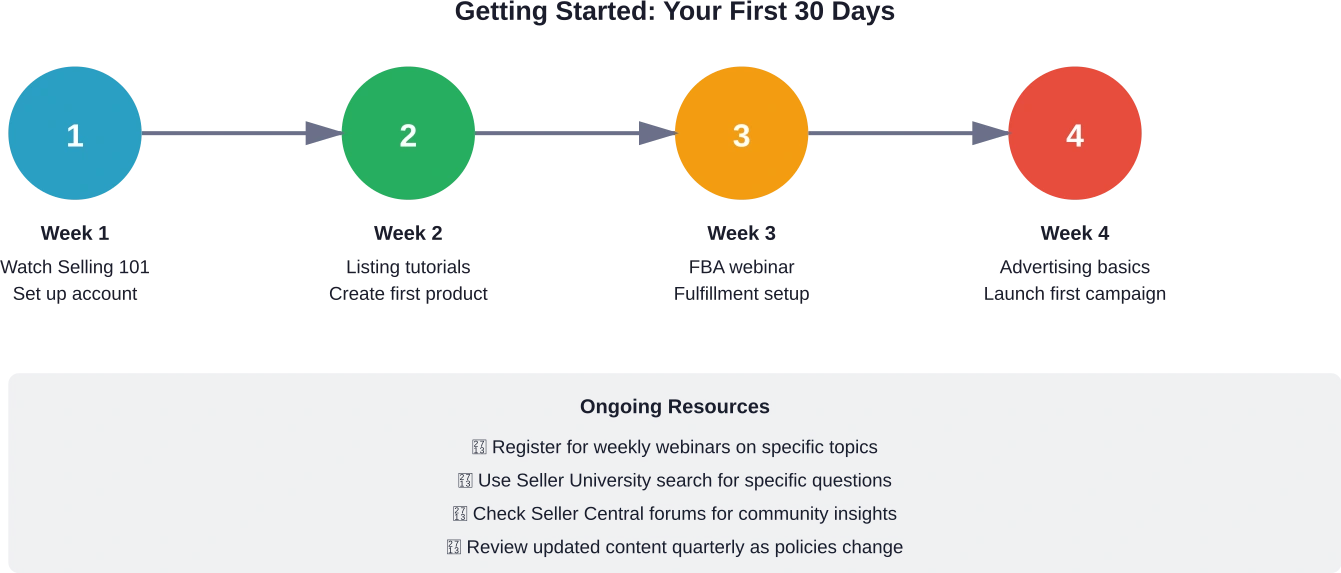
Start with the beginner path if selling is new. The “Selling on Amazon 101” content provides the foundation. Watch videos in order rather than jumping around—they build on each other logically.
For those with existing businesses, the search function becomes crucial. Type specific challenges or features into Seller University’s search bar. This surfaces relevant tutorials and guides quickly.
Webinar Registration Best Practices
Webinars require advance registration through Seller Central. Popular sessions fill quickly, so register as soon as the schedule posts.
Amazon typically announces upcoming webinars on “Webinar Wednesday”—a weekly forum post highlighting the next week’s offerings. Following these announcements ensures access to relevant sessions.
If a session fills, check back. Amazon often adds additional dates for high-demand topics. And remember that recordings become available, so missing the live event doesn’t mean missing the content.
Prepare questions in advance. Live Q&A segments offer valuable opportunities to address specific challenges. Having questions ready maximizes this benefit.
Beyond Platform Training: Business Fundamentals
Amazon’s resources excel at platform mechanics but assume basic business knowledge. Topics like tax compliance, entity formation, and bookkeeping receive limited coverage.
This is where the SBA partnership adds value. The U.S. Small Business Administration provides free resources on business fundamentals. Their website includes guides on business planning, finance, and operations.
SCORE mentors can address these broader questions directly. Their expertise extends beyond e-commerce into general small business management.
For specific Amazon-related tax questions, the platform’s Tax Library provides documentation. But general tax advice requires a qualified tax professional familiar with e-commerce businesses.
Common Misconceptions About Free Resources
Some sellers assume free training must be inferior to paid alternatives. This logic doesn’t apply here—Amazon has direct incentive to educate sellers effectively. Better-trained sellers build more successful businesses, which generates more revenue for Amazon.
Others worry that free resources lack depth. But Seller University contains extensive content covering beginner through advanced topics. The depth rivals or exceeds many paid programs.
A third misconception holds that free resources don’t provide support. While Seller University doesn’t offer personal coaching, the Seller Central forums provide community support. Amazon moderators actively participate, answering questions and clarifying policies.
When Paid Education Might Make Sense
Free resources cover fundamentals comprehensively. But specific situations might warrant paid education.
Highly specialized strategies—like international VAT navigation or complex brand portfolio management—may require expert consultation. Paid programs focusing on these niches can provide value.
Community access represents another legitimate benefit. Some paid programs offer peer networking with experienced sellers. This community knowledge-sharing can accelerate problem-solving.
Accountability and structure matter for some learners. Paid programs often include deadlines, checkpoints, and direct feedback. These elements help certain people maintain momentum.
The key distinction: paid education should add value beyond what’s freely available, not simply repackage it. Before purchasing any program, verify that the content extends beyond Seller University basics.
Staying Current as Amazon Evolves
E-commerce platforms change constantly. New features launch. Policies update. Best practices evolve.
Seller University updates continuously as these changes occur. This automatic currency is perhaps its greatest advantage over static courses. A video about listing optimization reflects current requirements, not outdated practices from when the course was filmed.
The platform’s search function helps navigate updates. When Amazon announces a new feature, searching Seller University typically surfaces relevant training within days.
Webinars often focus on new releases. If Amazon launches a significant advertising feature or fulfillment option, expect a dedicated webinar soon after.
Resource Type
Best For
Time Investment
Selling 101 Webinar
Complete beginners
1 hour
Beginner Path Videos
First 30 days
8-10 hours
Topic-Specific Webinars
Solving specific challenges
1 hour per topic
Advanced Path Content
Scaling existing business
15-20 hours
Seller Forums
Community troubleshooting
Ongoing, as needed
Real Seller Experiences with Free Training
Community discussions on Seller Central forums reveal how sellers actually use these resources. Many successful sellers credit Seller University as their primary education source.
Common themes emerge from these discussions. Sellers appreciate the ability to learn at their own pace. Parents with irregular schedules, people working full-time jobs while building a side business, and international sellers in different time zones all benefit from 24/7 access.
The search functionality receives frequent praise. When specific problems arise—a listing gets suppressed, a shipping template doesn’t work correctly, advertising performance drops—sellers can search for targeted guidance immediately.
Forum moderators consistently recommend Seller University before outside resources. This isn’t just platform promotion; it’s practical advice based on seeing countless sellers struggle with misinformation from unreliable sources.
Actionable Next Steps
For prospective sellers, the path forward is straightforward. Create a free Seller Central account to access Seller University. Watch the “Selling on Amazon 101” series. Register for an upcoming beginner webinar.
Current sellers should audit their knowledge gaps. What aspects of the platform remain unclear? Which features haven’t been fully explored? Search Seller University for those specific topics.
Subscribe to the Seller Central announcements. These posts highlight new training content, upcoming webinars, and platform changes that require attention.
Set a quarterly review schedule. Every three months, check Seller University for new content in relevant categories. E-commerce moves quickly—regular learning prevents falling behind.
Consider SCORE mentorship if business fundamentals need strengthening. The combination of Amazon platform training and general business guidance creates a complete education.
Making the Most of Free Education
The availability of comprehensive, official, free training changes the economics of Amazon selling. The barrier to entry isn’t education cost—it’s willingness to invest time in learning.
Seller University and Amazon’s live webinars provide everything needed to start and grow a compliant, successful business. The information comes from the definitive source. Updates happen automatically. Access costs nothing.
The Federal Trade Commission has taken action against e-commerce business opportunity scams, with enforcement actions resulting in significant settlements. This regulatory environment makes official, free resources more valuable than ever. Why risk account issues from questionable third-party advice when authoritative training exists at no cost?
The platform’s success depends on seller success. Amazon has invested significantly in education infrastructure because thriving sellers benefit everyone in the ecosystem. Taking advantage of these resources isn’t just smart economics—it’s using the most reliable information available.
Start with Seller University today. Register for the next Selling on Amazon 101 webinar. Explore the learning paths relevant to your business stage. The investment is time, not money. And the knowledge comes from the source that matters most.
Frequently Asked Questions
Do I need to be an active seller to access Amazon Seller University?
No. Anyone can create a free Seller Central account to access most Seller University content without committing to a paid selling plan. Full access to all features requires an active seller account, but the core training remains available to prospective sellers exploring the platform.
How often does Amazon add new webinars and training content?
Amazon hosts multiple live webinars weekly, typically announced each Wednesday. Seller University content updates continuously as features and policies change. New training modules appear regularly, particularly around major platform updates or seasonal selling periods like Prime Day and the holiday season.
Are the webinars really free, or do they require a Professional selling plan?
All webinars and Seller University content are completely free regardless of selling plan. Both Individual and Professional sellers have full access. Even those without active selling plans can attend many webinars, though some advanced topics may require an active seller account for registration.
Can I download Seller University videos to watch offline?
Most Seller University content is designed for online streaming through Seller Central. PDF guides can be downloaded for offline reference. Webinar recordings become available after live sessions but typically require an internet connection to view. The platform prioritizes browser-based access to ensure users always see the most current version.
How does Seller University compare to YouTube videos about selling on Amazon?
Seller University provides official information directly from Amazon, ensuring accuracy and currency. YouTube content varies widely in quality and accuracy—some creators offer genuine value while others provide outdated or incorrect information. For foundational knowledge and policy compliance, official resources eliminate the risk of misinformation that could lead to account issues.
What if I have questions not covered in Seller University content?
The Seller Central forums provide community support where sellers and Amazon moderators answer questions. For account-specific issues, Seller Support offers direct assistance. SCORE mentorship addresses broader business questions beyond platform mechanics. This multi-layer support system covers most seller needs without requiring paid programs.
Is there training specifically for international sellers or non-English speakers?
Amazon provides localized Seller Central interfaces and training in multiple languages depending on the marketplace. International sellers can access region-specific Seller University content relevant to their marketplace’s policies and features. Language options vary by region, with major marketplaces offering comprehensive localized support.
Quick Summary: Improving online conversion rates requires simplifying checkout, optimizing product pages with clear visuals and compelling copy, using A/B testing to identify what resonates with customers, and leveraging AI-powered personalization. According to UC Berkeley research, AI agents drove 60% higher purchase completion rates for Amazon users, demonstrating the power of intelligent assistance in the buying process.
Online retailers face a persistent challenge: traffic doesn’t automatically translate into sales. According to U.S. Census Bureau data, e-commerce sales in the third quarter of 2025 increased 5.1 percent from the third quarter of 2024, while total retail sales increased 4.1 percent in the same period. But that growth means nothing if visitors leave without purchasing.
The gap between browsing and buying is where conversion rate optimization comes into play. Small changes to checkout flows, product presentations, and customer interactions can dramatically shift purchase completion rates.
This guide covers actionable strategies backed by recent research and real-world results. No fluff, just practical tactics that work in 2026.
Understanding Conversion Rate Fundamentals
Conversion rate measures the percentage of visitors who complete a desired action—typically making a purchase. Calculate it by dividing total conversions by total visitors, then multiplying by 100.
A retailer with 1,000 monthly visitors and 30 sales has a 3% conversion rate. That might sound modest, but context matters. Industry benchmarks vary wildly depending on product category, price point, and traffic source.
Here’s the thing though—obsessing over industry averages misses the point. The goal isn’t matching arbitrary benchmarks. It’s improving from wherever the baseline currently sits.
Why Conversion Rates Matter More Than Traffic
Driving traffic costs money. Whether through paid ads, content marketing, or social media campaigns, every visitor represents an investment. Improving conversion efficiency means extracting more value from existing traffic without additional acquisition costs.
Consider two scenarios: doubling traffic while maintaining a 2% conversion rate, versus keeping traffic steady while improving conversions to 4%. The second approach delivers identical results without doubling marketing spend.
According to research on digital marketing in 2026, AI-assisted targeting and data-led personalization have become standard practice for high-performing teams. Manual targeting and static approaches no longer compete effectively.
Simplify the Checkout Process
Cart abandonment remains one of the biggest conversion killers. Complicated checkout flows create friction that sends customers elsewhere.
Start by counting steps. How many pages stand between adding items to cart and purchase completion? Each additional step increases abandonment probability.
Key Checkout Optimizations
Guest checkout options eliminate forced account creation. Many customers abandon purchases rather than create yet another account. Offering a guest path reduces this friction immediately.
Auto-fill capabilities speed up form completion. Address lookup tools and saved payment methods cut completion time significantly. Mobile users particularly benefit from reduced typing requirements.
Progress indicators show customers exactly where they stand in the process. Knowing “Step 2 of 3” provides psychological reassurance that completion is near.
Multiple payment options matter more than ever. Credit cards, digital wallets, buy-now-pay-later services—customer payment preferences vary widely. Limiting options means losing sales.
Optimize Product Pages for Conversion
Product pages serve as digital salespeople. They need to answer questions, overcome objections, and motivate action—all without human interaction.
High-quality product images rank among the most critical elements. Multiple angles, zoom functionality, and lifestyle context shots help customers visualize ownership. Video demonstrations perform even better for complex products.
But visuals alone don’t close sales. Product descriptions need to balance technical specifications with benefit-oriented copy. Customers care about what products do for them, not just what they are.
Writing Compelling Product Copy
Effective product descriptions address specific customer pain points. Instead of generic feature lists, focus on problems solved and outcomes achieved.
Social proof elements—reviews, ratings, testimonials—build trust and reduce purchase anxiety. According to Federal Trade Commission guidelines, these endorsements must be truthful and not misleading. Fake reviews violate consumer protection standards and damage credibility when discovered.
Scarcity and urgency elements can drive action when used authentically. Limited stock indicators or time-sensitive offers create motivation. The key word is authentic—fabricated scarcity backfires when customers recognize manipulation.
Element
Impact on Conversion
Implementation Priority
High-quality images
High
Critical
Customer reviews
High
Critical
Clear pricing
High
Critical
Detailed descriptions
Medium
Important
Video demonstrations
Medium
Important
Size guides
Medium
Category-dependent
Related products
Low-Medium
Optional
Use WisePPC to Track Ad and Sales Performance
Improving conversion rates often depends on understanding how traffic and advertising interact with product listings. WisePPC gives sellers detailed visibility into campaign results, keyword performance, and product metrics. This helps sellers see which ads bring qualified traffic and how that traffic contributes to product sales.
Looking at How Ads Influence Product Sales?
Use WisePPC to:
analyze campaign and keyword performance
identify ads driving product sales
manage and optimize Amazon PPC campaigns
Leverage A/B Testing to Identify What Works
Assumptions about customer preferences frequently prove wrong. A/B testing replaces guesswork with data.
The concept is straightforward: show different versions to different visitor segments, then measure which performs better. Version A might feature a green “Add to Cart” button, while Version B uses orange. Actual results determine the winner.
According to shared case studies, testing three ad variations for a single-product store showed version “B” brought $1,000 in just 72 hours—significantly outperforming the alternatives.
What to Test First
Prioritize high-impact elements before minor details. Headline variations, primary images, and call-to-action buttons typically produce the most significant results.
Pricing presentation deserves testing attention. Does showing the original price with a discount convert better than displaying the sale price alone? Does bundling multiple items increase average order value? Test to find out.
Product page layout variations can reveal surprising preferences. Some audiences prefer detailed information above the fold, while others respond better to visual-heavy presentations with expandable detail sections.
Implement AI-Powered Personalization
Generic experiences no longer cut it. According to UC Berkeley’s California Management Review, AI agents are fundamentally changing how purchases happen. Amazon’s Rufus assistant drove over $10 billion in additional annual sales by fall 2025, with users who engaged the assistant completing purchases at 60% higher rates.
That’s not a small improvement—it’s a massive conversion lift from intelligent assistance.
Personalization extends beyond product recommendations. Dynamic pricing, customized messaging, and individualized content all contribute to higher conversion rates.
Practical Personalization Tactics
Behavioral targeting shows different content based on browsing history. Someone viewing running shoes repeatedly might appreciate seeing new arrivals in that category prominently featured.
Geographic personalization adjusts content for location-specific preferences, weather patterns, or local events. A retailer selling outdoor gear might promote rain jackets to Pacific Northwest visitors while highlighting sun protection products for Southwest customers.
Abandoned cart recovery emails remain one of the highest-converting personalization tactics. Automated reminders with product images and direct purchase links recapture sales that would otherwise be lost.
According to digital marketing research, automation and data-led personalization are now built into high-performing strategies. Manual approaches simply can’t match the scale and responsiveness of AI-assisted systems.
Optimize Site Speed and Mobile Experience
Technical performance directly impacts conversion rates. Slow-loading pages lose customers before they ever see product offerings.
Research consistently shows that page load time correlates inversely with conversion rates. Each additional second of delay costs sales. Mobile users prove particularly impatient with slow experiences.
Speaking of mobile—U.S. Census Bureau data shows e-commerce continuing its strong growth trajectory. Much of that activity happens on smartphones. Sites that don’t perform flawlessly on mobile devices leave money on the table.
Technical Optimization Priorities
Image compression reduces file sizes without noticeable quality loss. Large, unoptimized images are often the primary culprit behind slow load times.
Content delivery networks distribute site assets across multiple servers geographically. This reduces the physical distance between servers and users, improving load speeds globally.
Mobile-responsive design isn’t optional anymore. Layouts must adapt seamlessly to various screen sizes. Buttons need adequate sizing for touch interaction. Forms should minimize typing requirements.
Touch-friendly navigation elements prevent frustration. Small clickable areas lead to misclicks and abandoned sessions. Generous button sizing and spacing improve mobile conversion rates measurably.
Build Trust Through Transparency
Online transactions require trust. Customers can’t physically examine products or interact with salespeople. Digital trust signals fill that gap.
Clear return policies reduce purchase anxiety. When customers know they can return products easily, they’re more likely to take the initial buying risk.
Security badges and trust seals provide visual reassurance. SSL certificates, payment processor logos, and third-party verification symbols all contribute to credibility.
According to Federal Trade Commission guidelines on consumer protection, transparency in advertising and honest business practices form the foundation of legitimate commerce. Deceptive practices—whether misleading prices, fake reviews, or hidden terms—violate consumer protection standards.
Trust Element
Purpose
Placement
SSL certificate
Secure data transmission
Entire site (HTTPS)
Money-back guarantee
Risk reduction
Product pages, checkout
Customer reviews
Social proof
Product pages
Contact information
Accessibility
Footer, contact page
Clear shipping costs
Price transparency
Product pages, cart
Privacy policy
Data protection assurance
Footer, checkout
Transparency in Pricing
Hidden fees at checkout represent a major conversion killer. Customers who discover unexpected shipping charges or service fees often abandon carts immediately.
Display total costs as early as possible. Product pages should indicate shipping costs or offer calculators based on location. Surprises at checkout destroy trust and tank conversion rates.
Use Scarcity and Urgency Authentically
Real scarcity and genuine urgency motivate action. Fake countdown timers and fabricated inventory claims do the opposite.
Actual limited-time promotions create legitimate urgency. Flash sales, seasonal offers, and time-bound discounts give customers concrete reasons to purchase now rather than later.
Real inventory levels provide authentic scarcity. If only three items remain in stock, saying so encourages faster purchase decisions. The critical factor is honesty—displaying false scarcity damages credibility permanently.
Social proof elements like “X people viewing this item” or “Y purchases in the last 24 hours” work when accurate. These signals indicate popularity and create mild competitive pressure.
Optimize for Different Traffic Sources
Not all visitors arrive with equal purchase intent. Traffic source significantly impacts conversion probability.
Paid search traffic typically converts at higher rates than social media traffic. Someone actively searching for “buy wireless headphones” demonstrates stronger purchase intent than someone scrolling through social feeds.
Landing page optimization means matching content to traffic source expectations. An ad promoting 20% off should lead to a page highlighting that discount prominently, not a generic homepage.
Retargeting for Conversion Recovery
Most visitors don’t purchase on first visit. Retargeting brings them back.
Display ads following previous visitors around the web serve as reminders. These work particularly well when showcasing specific products customers previously viewed.
Email retargeting captures visitors who provided addresses but didn’t complete purchases. Newsletter signups, account creations, and abandoned carts all represent retargeting opportunities.
Monitor and Analyze Performance Data
Improving conversion rates requires measuring them first. Analytics platforms reveal where customers drop off and which changes produce results.
Conversion funnel analysis identifies specific bottlenecks. High traffic to product pages but low add-to-cart rates suggests product page problems. Many cart additions but few completed purchases points to checkout issues.
Heat mapping tools show where customers click, scroll, and focus attention. This visual data reveals whether important elements receive notice or get overlooked.
Session recordings provide qualitative insights that complement quantitative data. Watching how real users navigate reveals friction points that numbers alone might miss.
Conclusion
Improving conversion rates combines psychology, technology, and continuous testing. The strategies covered here—simplified checkout, optimized product pages, A/B testing, AI personalization, technical performance, trust building, and traffic-specific optimization—work together to move visitors toward purchase decisions.
Start with the highest-impact changes: streamline checkout flows, improve product page clarity, and implement basic personalization. Measure results rigorously, then iterate based on data rather than assumptions.
The e-commerce landscape continues evolving. According to recent digital marketing research, AI-assisted approaches and data-driven personalization have become standard practice for competitive retailers. Staying current with these developments while maintaining focus on fundamental conversion principles positions online stores for sustained growth.
What will be tested first? Pick one element, create variations, measure results, and build from there. Conversion rate optimization is not a one-time project but an ongoing process of incremental improvements that compound over time.
Frequently Asked Questions
What is a good conversion rate for e-commerce?
Conversion rates vary significantly by industry, product type, and price point. Generally speaking, e-commerce conversion rates between 2-3% are common, though some niches perform better or worse. Rather than fixating on industry benchmarks, focus on improving from the current baseline. A store moving from 1.5% to 2.5% conversion achieves meaningful growth regardless of industry averages.
How long does it take to see conversion rate improvements?
Timeline depends on traffic volume and change magnitude. High-traffic sites may see results within days, while smaller operations need weeks for statistical significance. Most A/B tests require 1-2 weeks minimum and at least 100 conversions per variation to produce reliable results. Fundamental changes like checkout redesigns may show immediate impact, while subtle optimizations require longer measurement periods.
Should I focus on increasing traffic or improving conversion rates first?
Improving conversion rates typically delivers faster ROI than traffic acquisition. Optimizing for existing visitors costs less than paying for new ones. Once conversion rates reach competitive levels, traffic growth becomes more cost-effective. Start with conversion optimization when rates sit below 2%, then balance both strategies for sustainable growth.
Do AI-powered tools really improve conversion rates?
According to UC Berkeley research, Amazon’s AI assistant drove 60% higher purchase completion rates for engaged users, demonstrating substantial impact. AI-powered personalization, product recommendations, and automated targeting consistently outperform manual approaches at scale. However, implementation quality matters—poorly configured AI tools can confuse customers rather than help them.
What’s the biggest mistake that hurts conversion rates?
Complicated checkout processes represent the most common conversion killer. Each additional form field, extra page, or unexpected requirement increases abandonment probability. Hidden costs revealed at checkout also destroy conversion rates immediately. Customers who discover surprise shipping fees or service charges frequently abandon carts and don’t return.
How do mobile conversion rates compare to desktop?
Mobile conversion rates traditionally lag behind desktop, though the gap continues narrowing. Mobile shopping has grown substantially according to U.S. Census Bureau data on e-commerce trends. Sites optimized specifically for mobile performance—fast loading, touch-friendly interfaces, simplified forms—can achieve mobile conversion rates approaching desktop levels.
Are customer reviews really necessary for conversions?
Reviews provide essential social proof that reduces purchase anxiety. Products without reviews face higher abandonment rates as customers seek reassurance elsewhere. According to Federal Trade Commission guidelines, reviews must be authentic and not fabricated. Genuine customer feedback builds trust far more effectively than marketing claims alone, making review collection a high-priority conversion optimization tactic.
Quick Summary: The Amazon Shipping app is a mobile application designed for ecommerce sellers to manage ground shipping pickups, track packages, and access support on the go. Available on iOS and Android, it provides real-time notifications, pickup scheduling, and shipment tracking for businesses using Amazon’s 2-5 day ground delivery service.
Managing shipping logistics while running an ecommerce business means you can’t always be at a desktop. That’s exactly why Amazon built a dedicated mobile app for its ground shipping service—designed specifically for sellers who need pickup control and shipment visibility from anywhere.
The app connects directly to the same infrastructure that powers Amazon’s delivery network for Prime and other services. But this isn’t about Prime orders from Amazon.com. This app is for businesses shipping products through their own websites or other sales channels using Amazon’s ground delivery service.
What the Amazon Shipping App Actually Does
The core functionality centers on three priorities: pickup management, shipment tracking, and support access. Real-time notifications keep sellers informed about pickup schedules without checking emails or logging into dashboards.
Scheduling pickups takes just a few taps. Change pickup times, cancel scheduled collections, or request additional pickups when order volumes spike. Everything that typically requires desktop access now fits in a mobile interface designed for speed.
Shipment tracking provides visibility from warehouse to doorstep. Each package gets monitored through Amazon’s logistics network, with status updates pushed directly to the mobile device. No more hunting down tracking numbers across multiple platforms.
Download and Platform Support
The app is available on both major platforms. iOS users find it in the App Store, rated 4.8 stars across 142 reviews. The app size is 87.9 MB. Android users download it from Google Play with over 10,000 installs.
Both versions require business accounts with Amazon Shipping. The service itself focuses on 2-5 day ground delivery for ecommerce brands shipping outside Amazon’s marketplace—meaning your Shopify store, WooCommerce site, or other sales channels.
Who Actually Needs This App
This app targets ecommerce sellers using Amazon Shipping as their fulfillment carrier. Not Amazon FBA sellers—those use different tools. This is for businesses that maintain their own inventory and ship orders through Amazon’s ground network.
According to the official Amazon Shipping website, the service provides transparent rates and 2-5 day delivery backed by Amazon’s transportation infrastructure. Sellers ship from their websites or other sales channels, integrating through ecommerce platforms or APIs.
The mobile app makes sense for sellers who need flexibility. Managing pickups from a warehouse floor, checking shipment status between meetings, or requesting support during non-office hours all become straightforward tasks.
Monitor Advertising Performance With WisePPC
When using tools like the Amazon Shipping app to handle pickups and tracking, sellers still need clear visibility into how their advertising performs. WisePPC provides detailed analytics for Amazon advertising, helping sellers track campaign results, keyword performance, and product metrics. This makes it easier to connect advertising activity with overall sales performance.
Running Amazon Ads Alongside Your Shipping Operations?
Use WisePPC to:
review campaign and keyword performance
track how ads influence product sales
manage and optimize Amazon PPC campaigns
Getting Started Requirements
Before downloading the app, businesses need active Amazon Shipping accounts. The official site requires completion of a form including business details, warehouse zip code, average daily shipments, and company website information.
Once approved for Amazon Shipping services, the mobile app credentials match the main account login. The app connects to existing shipments, pickup schedules, and support cases automatically.
Making Mobile Management Work
The Amazon Shipping app solves a specific problem: desktop-dependency for logistics management. For businesses already using Amazon’s ground delivery service, it extends control beyond office hours and fixed locations.
The app won’t make sense for everyone. FBA sellers, personal shoppers, and businesses not using Amazon Shipping have no use for it. But for ecommerce brands managing their own fulfillment through Amazon’s delivery network, mobile access to pickups and tracking fills a real operational gap.
Download from the App Store or Google Play to get started, but remember—you’ll need that Amazon Shipping business account first.
FAQ
Is the Amazon Shipping app free to download?
Yes, the app is free on both iOS and Android. However, it requires an active Amazon Shipping business account to use its features.
Can I track personal Amazon orders with this app?
No. This app is exclusively for businesses using Amazon Shipping services for their own ecommerce orders, not for tracking personal Amazon.com purchases.
What’s the difference between this and Amazon Flex?
Amazon Flex is for delivery drivers earning money delivering packages. The Amazon Shipping app is for business sellers managing their outbound shipments and pickups.
Does the app work for international shipping?
Amazon Shipping currently focuses on ground delivery within specific regions. Check the official Amazon Shipping website for current service area coverage.
How do I get Amazon Shipping if I’m a new seller?
Visit shipping.amazon.com and complete the signup form. Amazon reviews applications based on shipment volume, location, and business requirements.
Can I manage multiple warehouses in the app?
The app connects to your Amazon Shipping account settings. Multi-location management depends on your account configuration—contact Amazon Shipping support for specifics.
What happens if a pickup is missed?
The app sends notifications about pickup status. If issues occur, quick access to support within the app allows immediate case creation and resolution tracking.
Quick Summary: Managing seller-fulfilled returns on Amazon involves using the Manage Returns tool in Seller Central to process requests within 4 calendar days, authorize returns, and issue refunds. The process includes handling prepaid return labels (automatic for US sellers), addressing special situations like damaged or wrong items, and filing SAFE-T claims within 30 days when eligible. Following Amazon’s Return Policy while maintaining efficient processes helps preserve seller metrics and customer satisfaction.
Returns are an unavoidable part of selling on Amazon. When fulfilling orders independently rather than using FBA, the responsibility for handling returns falls directly on the seller. This means processing return requests, issuing refunds, and managing the logistics of getting products back.
The system has changed significantly. As of January 26, 2026, sellers now have 4 calendar days to process refunds before Amazon automatically issues them (previously 2 business days). And starting February 16, 2026, the window to file SAFE-T claims drops from 60 days to 30 days. These updates demand tighter operations.
But here’s the thing: efficient return management protects seller metrics, maintains customer satisfaction, and can even reduce costs through strategic approaches like returnless refunds. Understanding the tools, policies, and best practices makes the difference between returns becoming a costly burden or a manageable aspect of operations.
Understanding Amazon’s Return Policy for Seller-Fulfilled Orders
Amazon allows customers to return most items within 30 days of the estimated delivery date. This applies regardless of whether the order was fulfilled through FBA or by the seller directly. When a seller fulfills the order, the returned item comes back to that seller’s location.
The Return Policy covers situations where customers receive defective items, products that don’t match the listing description, or simply change their minds. Not all returns qualify for prepaid labels or automatic authorization, though. Certain categories have restrictions.
What the Federal Trade Commission Requires
Beyond Amazon’s internal policies, federal regulations apply. The FTC’s Mail or Telephone Order Merchandise Rule covers online sales, establishing baseline requirements for order fulfillment and refunds.
According to the FTC, businesses must ship orders within the timeframe stated in their advertisements or within 30 days if no timeframe is specified. When items can’t be shipped on time, sellers must notify customers and offer the option to cancel for a full refund.
The rule exempts certain sales including magazine subscriptions, seeds and plants, and COD orders. But for standard e-commerce transactions, these federal protections apply regardless of the platform used.
Key Differences from FBA Returns
With Fulfillment by Amazon, the company handles the entire return process. Customers ship items back to Amazon facilities, and Amazon processes refunds and handles customer service.
For seller-fulfilled orders, sellers manage everything. This includes providing return addresses, authorizing requests, inspecting returned items, and issuing refunds. The seller also bears the cost of return shipping in most cases, unless enrolled in specific programs.
The trade-off? More control over the process but also more operational responsibility.
The Amazon Prepaid Return Label Program
US sellers are automatically enrolled in the prepaid returns program. This program issues prepaid return labels on behalf of sellers for eligible returns through Amazon Buy Shipping.
When a customer initiates a return that qualifies, Amazon automatically generates a prepaid shipping label. The customer prints this label, attaches it to the package, and ships the item back. The return shipping cost is then deducted from the seller’s account.
How the Program Works
Amazon automatically authorizes return requests when they’re covered by the Return Policy. Most returns receive instant authorization without requiring seller action.
The prepaid label appears in the customer’s account immediately after the return is authorized. Customers can print it at home or, in some cases, receive a QR code to present at carrier locations.
For returns outside the US, sellers might need to provide their own return shipping method. International returns don’t automatically receive prepaid labels through the Amazon program.
Costs and Exemptions
The cost of prepaid return shipping gets deducted from seller payments. Rates vary based on package size, weight, and destination but typically align with commercial shipping rates through Amazon’s carrier partnerships.
Some US sellers can request exemptions from the prepaid returns program under specific circumstances. The exemption process requires demonstrating that particular products or business models make prepaid returns impractical.
Categories like large appliances or items requiring special handling may qualify for exemptions. Sellers need to submit a request through Seller Central for evaluation.
Using the Manage Returns Tool in Seller Central
The Manage Seller Fulfilled Returns tool serves as the central hub for processing all return requests. Located in Seller Central under Orders, this tool displays pending requests, return statuses, and refund processing.
Every return request appears here with customer-provided reason codes, order details, and required actions. The interface shows which requests need seller authorization versus those automatically approved.
Navigating the Interface
The main dashboard shows return requests organized by status: pending authorization, awaiting return, return received, and completed. Filters help sort by date range, product category, or return reason.
Each request displays the order ID, product details, customer return reason, request date, and deadline for action. Clicking into a specific request reveals the full conversation history and available actions.
Sellers can authorize returns, deny requests (when policy allows), communicate with customers, and issue full or partial refunds directly from this interface.
Response Timeframes That Matter
When requests require seller authorization, responding within 24 hours is essential. Delayed responses frustrate customers and can negatively impact seller metrics.
The critical timeline change: sellers now have 4 calendar days from authorization to issue a refund before Amazon automatically processes it. Previously, this window was just 2 business days. The extension provides more time for return transit and inspection.
But that 4-day window is absolute. Miss it, and Amazon issues the refund automatically, potentially before the item returns. This makes tracking return shipments essential.
Processing Return Requests Step-by-Step
Most return requests receive automatic authorization when they align with Amazon’s Return Policy. These appear in the Manage Returns tool with prepaid labels already issued.
For requests requiring manual review, the process involves several decisions. Should the return be authorized? Does it qualify for a prepaid label? Is a full refund appropriate, or should restocking fees apply?
Authorizing or Declining Returns
When a request appears as pending authorization, sellers must evaluate it against the Return Policy. Returns within 30 days for defective items, wrong products, or items not as described must be authorized.
Declining returns is only appropriate when requests fall outside policy parameters—items beyond the return window, products in non-returnable categories, or clear policy violations.
Even when declining seems justified, responding professionally matters. Explanation messages should reference specific policy language and remain courteous.
Issuing Refunds Properly
Refunds should be issued promptly once the returned item is received and inspected. The 4-calendar-day window starts from either the return delivery scan or the refund date, whichever comes later.
Full refunds include the item price and original shipping costs (if the return reason is seller fault). Partial refunds may apply when items return damaged due to customer handling or when restocking fees are appropriate.
The refund interface in Manage Returns allows selecting full or partial amounts and adding explanatory notes that customers see. Clear communication prevents disputes.
Communicating with Customers
The Manage Returns tool includes messaging functionality. Use it to request additional information, clarify return reasons, or explain refund decisions.
Messages should be concise and professional. Avoid confrontational language even when dealing with suspected abuse. Document concerns through proper channels rather than customer-facing communications.
Response time matters here too. Quick replies demonstrate attentiveness and can de-escalate frustrated customers before they leave negative feedback.
Special Return Situations and How to Handle Them
Not every return follows the standard path. Some situations require different approaches or additional steps beyond the typical process.
Wrong Item Returned
Sometimes customers return items that don’t match the original order. This might be an honest mistake—multiple orders confused—or intentional switching.
When receiving the wrong item, document it thoroughly with photos showing the item received versus the order details. Contact the customer through the return request to clarify.
If the customer acknowledges the error, they may need to return the correct item. If they insist they sent the right product, escalate through proper seller support channels rather than engaging in arguments.
Damaged or Incomplete Returns
Items that return significantly damaged (beyond original condition) or with missing parts present another challenge. Partial refunds may be appropriate in these cases.
Amazon’s Return Policy allows restocking fees up to 50% of the item price when products return damaged due to customer handling or missing components. Apply these fees by selecting partial refund options and documenting the reason.
Photo evidence is crucial. Capture the packaging condition, item damage, and any missing accessories before issuing partial refunds.
Lost Return Shipments
Occasionally, return shipments go missing in transit. The tracking shows the customer shipped the item, but it never arrives at the seller’s location.
For lost shipments, SAFE-T claims provide potential reimbursement. The 30-day filing window starts from the last tracking scan event. File promptly when shipments appear lost.
However, recent policy changes limit SAFE-T eligibility. If Amazon issues the automatic refund after 4 days, SAFE-T claims may not be available. This makes tracking returns and processing refunds quickly even more critical.
Potentially Hazardous Materials
Products containing batteries, chemicals, or other regulated materials require special handling for returns. Special handling requirements may apply to returns of items containing batteries, chemicals, or other regulated materials.
When selling products in these categories, the return settings should reflect the special requirements. Some sellers offer returnless refunds for low-cost hazardous items rather than managing complex return logistics.
For higher-value items, providing specific return instructions with appropriate shipping labels and documentation becomes necessary.
Track Amazon Ad Performance With WisePPC
Seller-fulfilled orders often require more operational control, especially when handling returns and customer service. While logistics and returns are part of the process, understanding how advertising affects sales performance is equally important. WisePPC gives sellers a detailed view of campaign performance, keywords, and product-level metrics so they can understand how ads contribute to overall sales results.
Managing Orders and Ads at the Same Time?
Use WisePPC to:
analyze keyword and campaign performance
track how advertising affects product sales
adjust Amazon PPC campaigns more efficiently
Understanding SAFE-T Claims for Return Reimbursement
The Seller Assurance for E-commerce Transactions (SAFE-T) program provides reimbursement for certain return-related losses. This includes situations where customers abuse the return system or items get lost in return transit.
As of February 16, 2026, the filing window is just 30 days from either the return delivery scan or the refund date, whichever comes later. For lost shipments, the 30-day window starts from the last scan event.
When SAFE-T Claims Apply
SAFE-T covers situations where the seller followed all policies correctly but still suffered a loss. Examples include customers returning empty boxes, wrong items, or significantly damaged products beyond what the customer reported.
Claims for items lost in transit also qualify, provided tracking shows the customer shipped the return but it never arrived.
One critical limitation: if Amazon issues the automatic refund after the 4-day window expires, SAFE-T claims may not be available except for specific situations like items lost in transit. This policy change effectively requires sellers to process refunds promptly to preserve claim rights.
Filing Process and Documentation
SAFE-T claims are filed through Seller Central under the Orders menu. The claim requires detailed information about the return, including order ID, tracking numbers, and description of the issue.
Strong documentation dramatically improves approval rates. Photos of damaged items, images showing wrong products received, weight discrepancies from shipping labels—all strengthen the case.
Claims receive review within several business days. Approvals result in reimbursement credited to the seller account. Denials can be appealed with additional evidence.
Common Denial Reasons
Many SAFE-T claims get denied due to insufficient documentation. Vague descriptions or missing evidence lead to rejections.
Claims filed outside the 30-day window automatically fail. The system strictly enforces this deadline with no exceptions.
Another common issue: claims for situations that fall outside SAFE-T’s scope. Normal wear and tear, minor packaging damage, or situations where seller error contributed don’t qualify for reimbursement.
Returnless Refunds: When and How to Use Them
Returnless refunds allow issuing refunds without requiring customers to ship items back. This approach works well for low-value items where return shipping costs exceed the product value.
For international returns, if a seller does not provide a valid return address in the US or a prepaid return label, Amazon will issue a returnless refund to the customer regardless of the item value.
Setting Up Returnless Refund Rules
Sellers can configure returnless refund rules in their return settings. These rules specify conditions under which refunds are issued without requiring returns.
Common criteria include item price thresholds (such as products under $10), specific product categories, or particular return reasons like “item arrived damaged.”
The strategy reduces operational costs by eliminating inbound shipping expenses, receiving labor, and restocking efforts for low-value items.
Benefits and Considerations
Returnless refunds improve customer satisfaction. Customers receive immediate refunds without packaging and shipping hassles.
The approach also protects seller metrics. Faster resolution times and improved customer experiences can positively impact feedback ratings and order defect rates.
The trade-off is absorbing the product cost. For items with thin margins, even low-value returnless refunds add up. Calculate the break-even point where return processing costs exceed the product cost plus refund.
Best Practices for Return Management
Efficient return operations require both reactive and proactive strategies. Handling individual returns promptly is essential, but analyzing patterns and preventing returns reduces overall volume.
Monitor Returns Metrics
Track return rates by product, category, and reason codes. Products with unusually high return rates signal potential issues with descriptions, quality, or sizing.
The Manage Returns tool provides basic reporting, but exporting data to spreadsheets enables deeper analysis. Look for patterns in return reasons—if “not as described” appears frequently, listings may need better photos or details.
Return rates directly impact seller performance metrics. High return rates can trigger account reviews or restrictions on certain product categories.
Improve Product Listings to Reduce Returns
Many returns stem from unmet expectations. Customers order based on listings, then return products when reality doesn’t match.
High-quality images showing products from multiple angles help. Size charts for apparel, dimension diagrams for furniture, compatibility lists for accessories—these details prevent misunderstandings.
Accurate, detailed descriptions matter more than marketing copy. Specify materials, dimensions, capabilities, and limitations clearly. Better to lose a sale upfront than gain a return later.
Package Products Securely
Items damaged in transit generate returns and negative feedback. Protective packaging reduces damage rates significantly.
Use appropriately sized boxes with adequate cushioning material. Fragile items need extra protection. Electronics should be sealed in anti-static bags.
The few cents spent on better packaging materials pay for themselves through reduced return rates and damage claims.
Respond to Returns Quickly
The 4-day refund window leaves little room for delays. Establish processes to inspect returned items and issue refunds within 24-48 hours of receipt.
Consider setting up alerts for return deliveries. Track return shipments actively rather than waiting for items to appear in inventory.
Quick refund processing preserves SAFE-T claim eligibility and demonstrates professionalism to customers who may order again despite the return.
Train Staff on Policies
Anyone handling returns needs to understand Amazon’s Return Policy, SAFE-T claim requirements, and proper documentation procedures.
Create standard operating procedures documenting how to inspect returns, when partial refunds apply, and how to photograph issues for SAFE-T claims.
Consistent processes reduce errors that can lead to policy violations or missed reimbursement opportunities.
Managing Return Fraud and Abuse
Return fraud exists in e-commerce. Some customers deliberately abuse return policies—keeping products while claiming they never arrived, returning used items as new, or switching products.
While Amazon acknowledges return abuse occurs, seller responses must remain professional and policy-compliant. Accusations without evidence harm seller standing more than the fraud itself.
Recognizing Potential Abuse
Patterns often indicate fraud better than individual incidents. Customers with multiple returns for the same reason across different orders warrant attention.
Weight discrepancies between outbound and return shipments sometimes reveal problems. A package shipped at 5 pounds that returns weighing 1 pound suggests missing contents.
Returns of expensive electronics with cheap replacements, empty boxes, or items showing clear signs of use beyond inspection also raise concerns.
Documenting and Reporting
Never confront customers directly about suspected fraud. Instead, document everything thoroughly with photos, weights, and detailed descriptions.
File SAFE-T claims for situations that qualify. Include all documentation and let Amazon investigate.
For serial abusers, report patterns through Seller Support with compiled evidence. Amazon’s fraud prevention teams handle enforcement, not individual sellers.
Balancing Protection and Customer Service
The vast majority of returns are legitimate. Treating every customer with suspicion damages relationships and can result in negative feedback.
Focus on clear policies, documentation, and following proper channels. Let Amazon’s systems handle fraud detection and account enforcement.
Protecting the business from abuse matters, but maintaining positive customer experiences matters more for long-term success.
Tools and Automation for Efficient Return Management
Manual return processing works for small operations but becomes unsustainable as order volumes grow. Several tools help automate and streamline the process.
Third-Party Return Management Software
Various software solutions integrate with Amazon Seller Central to automate return workflows. These tools can auto-approve qualifying returns, trigger refunds when tracking shows delivery, and generate SAFE-T claim documentation.
Features vary by platform but often include automated customer communications, return tracking dashboards, and analytics reporting on return patterns.
The trade-off is additional cost. Evaluate whether automation savings in time and labor justify the software expense based on return volumes.
Inventory Management Integration
Returned items need to flow back into inventory systems accurately. Integrating return management with inventory software prevents stock count errors and enables quick restocking of sellable items.
Some systems automatically categorize returns by condition—immediately resellable, needs refurbishing, or unsellable—and route them to appropriate processes.
Accurate inventory accounting from returns prevents overselling and stockouts while providing better data on actual product performance.
Tracking and Alerts
Setting up automated tracking alerts for return shipments helps meet the 4-day refund deadline. Notifications when returns deliver enable immediate inspection and processing.
Shipment tracking APIs from carriers can feed directly into dashboards showing all pending returns, expected delivery dates, and approaching refund deadlines.
These systems prevent refunds from slipping past the deadline and triggering automatic Amazon refunds that limit SAFE-T eligibility.
Return Management Task
Manual Process Time
With Automation
Efficiency Gain
Authorize return request
2-3 minutes
Instant (auto-approved)
100%
Generate return label
3-5 minutes
Automatic with authorization
90%
Track return shipment
5-10 minutes daily
Automated alerts on delivery
85%
Inspect and document issues
10-15 minutes
5-10 minutes (template photos)
40%
Issue refund
3-5 minutes
Auto-triggered on delivery scan
100%
File SAFE-T claim
15-20 minutes
8-10 minutes (pre-populated data)
50%
Impact of Returns on Seller Performance Metrics
Returns directly affect several key performance indicators that Amazon uses to evaluate seller accounts. Understanding these connections helps prioritize return management efforts.
Order Defect Rate
The Order Defect Rate (ODR) includes negative feedback, A-to-Z Guarantee claims, and credit card chargebacks. Returns can contribute to all three.
Poor return handling frequently generates negative feedback. Slow refunds, denied returns without proper justification, or poor communication frustrate customers.
A-to-Z claims often follow when customers believe they’re not receiving proper refunds. These claims directly increase ODR and can lead to account suspension if ODR exceeds 1%.
Late Shipment and Valid Tracking Rates
While returns don’t directly affect shipping metrics, the same operational discipline that ensures fast return processing typically correlates with better fulfillment performance.
Sellers who struggle with return management often have broader operational issues affecting multiple metrics simultaneously.
Customer Service Responsiveness
Responding to return requests within 24 hours contributes to customer service metrics. Delayed responses lower these scores and can affect account standing.
The automated authorization system helps here, but requests requiring manual review still need prompt attention.
Taking Control of Your Return Operations
Managing seller-fulfilled returns effectively requires understanding Amazon’s policies, using the available tools efficiently, and maintaining operational discipline. The recent policy changes—4 calendar days for refund processing and 30 days for SAFE-T claims—make timing more critical than ever.
Focus on the fundamentals: respond to requests within 24 hours, process refunds within 2 days of receiving returns when possible, and document everything thoroughly for potential SAFE-T claims. Use returnless refunds strategically for low-value items to reduce costs and improve customer experiences.
Track return patterns to identify product issues early. Better listings with accurate descriptions and quality images prevent many returns before they happen. Secure packaging reduces damage-related returns.
The goal isn’t eliminating returns entirely—that’s unrealistic in e-commerce. The goal is managing them efficiently enough that they don’t drain profitability or damage seller metrics. With proper processes and attention to deadlines, returns become a manageable operational task rather than a constant crisis.
Review your return settings in Seller Central regularly. Make sure returnless refund rules align with current product costs and shipping rates. Stay informed about policy updates that affect filing windows and reimbursement eligibility.
Efficient return management protects both customer relationships and business profitability. Master these processes, and returns transform from a liability into a competitive advantage over sellers who struggle with this essential operational component.
Frequently Asked Questions
How long do I have to refund a seller-fulfilled return on Amazon?
Sellers have 4 calendar days from the return authorization to issue a refund before Amazon automatically processes it. This window starts from either the return delivery scan at the seller’s warehouse or the refund date, whichever comes later. The extension from 2 business days to 4 calendar days took effect January 26, 2026, providing more time for return transit and inspection.
What is the SAFE-T claim filing deadline for returns?
The SAFE-T claim filing window is 30 days starting from either the return delivery scan, the refund date (whichever comes later), or the last scan event for lost shipments. This deadline was reduced from 60 days effective February 16, 2026. Claims filed after 30 days are automatically denied regardless of circumstances. Additionally, if Amazon issues an automatic refund after the 4-day processing window, SAFE-T claims may not be available except for lost shipment situations.
Can I decline a return request as a seller-fulfilled merchant?
Declining returns is only appropriate when requests fall outside Amazon’s Return Policy parameters. This includes returns beyond the 30-day window, products in non-returnable categories, or clear policy violations. Most return requests within policy must be authorized. Inappropriate denials can lead to negative feedback, A-to-Z claims, and potential account penalties. When declining, provide clear, policy-based explanations to customers.
How much does Amazon charge for prepaid return labels?
The cost of prepaid return shipping through Amazon Buy Shipping is deducted from seller payments and varies based on package dimensions, weight, and destination. Rates typically align with commercial shipping rates through Amazon’s carrier partnerships. US sellers are automatically enrolled in the prepaid returns program. Some sellers may request exemptions for specific products or situations, but these require approval through Seller Central.
When should I use returnless refunds for seller-fulfilled orders?
Returnless refunds work best for low-value items where return shipping costs exceed the product value. Many sellers set thresholds like $10 or less for automatic returnless refunds. Amazon also automatically issues returnless refunds for orders under $25 on non-US returns. Configure returnless refund rules in return settings based on price thresholds, product categories, or specific return reasons. This approach reduces operational costs and improves customer satisfaction while protecting seller metrics.
What happens if a customer returns the wrong item?
When receiving an item that doesn’t match the original order, document it thoroughly with photos showing the received item versus order details. Contact the customer through the return request messaging to clarify the situation. If the customer acknowledges the error, they may need to return the correct item. File a SAFE-T claim with documentation if the customer insists they sent the correct product. Never issue full refunds for wrong items without attempting to resolve the situation and documenting it properly for potential reimbursement.
How do returns affect my Amazon seller metrics?
Returns impact several performance metrics. High return rates by product category can trigger account reviews or restrictions. Poor return handling generates negative feedback and A-to-Z claims, both of which increase the Order Defect Rate. If ODR exceeds 1%, account suspension becomes possible. Delayed responses to return requests lower customer service metrics. However, efficiently managed returns with quick refund processing and professional communication can actually improve customer satisfaction scores and reduce negative impacts.
Quick Summary: Amazon Global Selling enables businesses to tap into international markets by listing products across Amazon’s 20+ global marketplaces. With access to hundreds of millions of international customers and built-in logistics support, sellers can expand their reach beyond domestic borders while leveraging Amazon’s infrastructure for payments, shipping, and localization.
The ecommerce landscape has transformed dramatically. What started as domestic online retail has evolved into a genuinely global marketplace where borders matter less than customer demand.
Amazon’s global reach generated $638 billion in net sales worldwide recently, marking an 11% year-over-year increase. That’s not just impressive—it represents millions of daily transactions across continents.
But here’s the thing: most sellers only scratch the surface of what’s possible. They focus on their home market while international customers actively search for their products.
Understanding Global Market Demand
Market demand represents the total quantity of products consumers are willing and able to purchase in a specific region. It’s shaped by search patterns, purchasing power, seasonal trends, and local preferences.
Amazon’s marketplace infrastructure spans North America, Europe, Asia-Pacific (including Australia, India, Japan, and Singapore), and emerging markets. Each region brings distinct opportunities and challenges.
According to the U.S. International Trade Administration, the global B2B ecommerce market will reach approximately $36 trillion by 2026, growing at a 14.5% compound annual growth rate. While B2C represents a smaller slice, it’s growing rapidly in specific sectors.
The Asia-Pacific marketplaces offer particularly strong growth potential. Canada’s ecommerce retail trade sales hit an all-time high of US$3.82 billion in December 2020, demonstrating sustained consumer appetite for online shopping.
Why International Demand Matters Now
The COVID pandemic permanently shifted consumer behavior worldwide. Physical store limitations forced millions of first-time buyers online, and many never went back.
Based on trade data, ecommerce’s share of total global retail sales continues climbing year after year. Fashion and consumer electronics dominate by volume, but biohealth pharmaceuticals represent the fastest-growing product segment internationally.
Social commerce in Canada was valued at USD $6.47 billion in 2024, projected to reach USD $10.99 billion by 2029 as platforms like Instagram, TikTok, and Facebook integrate shopping features more deeply.
How Amazon Global Selling Works
The program allows established sellers to list products on international Amazon marketplaces. Whether you’re based in the US selling to Europe, or outside the US targeting American customers, the infrastructure supports bidirectional trade.
Amazon provides a unified seller account that can manage multiple international storefronts. This streamlines operations compared to managing separate platforms in each country.
The Professional selling plan costs $39.99 monthly plus applicable selling fees, giving access to advanced tools for international expansion.
Key Components of the Program
Cross-listing tools enable sellers to replicate successful domestic listings to international marketplaces with localized adjustments. Product titles, descriptions, and keywords need translation and cultural adaptation, but the core listing structure transfers.
Amazon’s global logistics network includes Fulfillment by Amazon (FBA) options in most major markets. Products can ship from local fulfillment centers, reducing delivery times and improving customer satisfaction.
Payment processing handles currency conversion automatically. Sellers receive payments in their local currency while customers pay in theirs. Amazon Currency Converter for Sellers (ACCS) fees typically range from 0.75% to 1.5% for high-volume sellers, with a standard top tier often around 1.5%.
Vetted shipping providers offer international logistics for merchants using Fulfillment by Merchant (FBM). This matters for oversized items, custom products, or sellers preferring direct inventory control.
Tools for Identifying International Demand
Amazon offers several built-in resources for evaluating global opportunities. These tools transform guesswork into data-driven decisions.
Sell Globally Dashboard
This centralized interface shows high-level metrics about international marketplace performance. It highlights which products are generating cross-border interest and where demand clusters exist.
Sellers can view search volume trends, competitive intensity, and estimated sales potential across different regions. The dashboard updates regularly to reflect current market conditions.
Expansion Research Tool
More detailed than the dashboard, this resource provides product-specific analysis. Enter an ASIN, and the tool evaluates its performance potential in various international markets.
The analysis considers factors like existing competition, price positioning, seasonal demand patterns, and regulatory requirements. It ranks marketplaces by opportunity score, helping prioritize expansion efforts.
Marketplace Product Guidance
This feature identifies product categories with strong demand but limited supply in specific countries. It essentially highlights market gaps where competition is lighter.
The guidance updates monthly, reflecting shifting consumer preferences and emerging trends. Categories showing consistent month-over-month growth signal sustainable opportunities rather than temporary spikes.
Tool
Best For
Data Provided
Update Frequency
Sell Globally Dashboard
Quick overview
High-level metrics, trends
Weekly
Expansion Research
Product-specific analysis
Opportunity scores, competition
Daily
Marketplace Product Guidance
Finding gaps
Category demand, supply levels
Monthly
Track Demand Trends With WisePPC
Selling internationally on Amazon means understanding how products perform across different marketplaces and advertising environments. WisePPC helps sellers analyze advertising performance, product data, and campaign metrics across their Amazon accounts. With detailed reporting on campaigns, keywords, and product performance, sellers can see which products gain traction and where demand is growing.
Managing Ads Across Multiple Amazon Markets?
Use WisePPC to:
analyze campaign and product performance
identify products gaining traction in new markets
manage advertising data across multiple accounts
👉 Explore WisePPC to get clearer insights into your Amazon advertising performance.
Selecting Your Target Markets
Not all international marketplaces offer equal opportunity for every product. Strategic selection matters more than casting the widest possible net.
Start with Geographic Proximity
For US-based sellers, Canada represents the easiest entry point. Language barriers are minimal (outside Quebec), logistics are simpler, and regulatory requirements closely mirror American standards.
Canadian ecommerce continues growing steadily. The market is mature but not oversaturated in most categories.
Mexico offers another nearby option with less competition than more established markets, though Spanish language requirements and different consumer preferences require more adaptation.
European Marketplace Considerations
The European Union operates as a somewhat unified market, but each country maintains distinct characteristics. Germany represents the largest economy, while the UK (post-Brexit) requires separate consideration.
France, Italy, and Spain each offer substantial populations with growing ecommerce adoption. Language localization becomes more critical in these markets—machine translation rarely suffices for product descriptions.
Logistics within Europe benefit from Amazon’s pan-European FBA program, which distributes inventory across multiple fulfillment centers to optimize delivery speeds.
Asia-Pacific Growth Potential
Japan offers a sophisticated, high-value market with strong consumer purchasing power. Cultural attention to quality and presentation means product photography and descriptions need extra polish.
Australia provides English-language advantages with a developed ecommerce infrastructure. The population is smaller but concentrated in major urban centers, simplifying logistics.
India represents massive population scale with rapidly expanding middle-class purchasing power. Competition is intense, but opportunities exist for differentiated products.
Singapore serves as a regional hub with high per-capita income and strong cross-border shopping habits.
Registration and Compliance Requirements
International selling introduces regulatory complexity that doesn’t exist for domestic operations. Each country maintains its own tax structures, product standards, and business registration requirements.
Tax Considerations
Value-added tax (VAT) applies in most countries outside North America. Sellers must register for VAT once they exceed country-specific thresholds, then collect and remit it on sales.
Amazon offers tax calculation services that handle most of this automatically, but sellers remain ultimately responsible for compliance. Working with international tax advisors familiar with ecommerce prevents costly mistakes.
Canada recently introduced simplified tax collection for foreign sellers, reducing administrative burden while ensuring compliance.
Product Standards and Certifications
Electrical products sold in Europe require CE marking, indicating conformity with health, safety, and environmental protection standards. This often necessitates third-party testing and documentation.
Japan maintains strict standards for various product categories, particularly anything related to health, children, or food. Products may require modification to meet local specifications.
Australia enforces clear country-of-origin labeling for many categories. Packaging and product documentation must meet these requirements before listing.
Optimizing Listings for International Markets
Successful international listings go beyond simple translation. They adapt to local search behavior, cultural preferences, and competitive positioning.
Keyword Research Across Languages
Direct translation of keywords rarely captures how native speakers actually search. A product called “sneakers” in American English might be searched as “trainers” in British English or “baskets” in French.
Amazon’s search term report for each marketplace reveals actual customer queries. Analyzing top competitors’ listings in target markets also uncovers effective keyword strategies.
Cultural Adaptation
Product photography preferences vary by region. Japanese consumers often expect more detailed, multiple-angle shots with packaging clearly visible. European markets tend to favor lifestyle imagery showing products in use.
Color associations differ culturally. What signals quality or luxury in one market might convey different meanings elsewhere.
Sizing conventions need conversion and clear communication. Clothing, shoes, and home goods all use different measurement standards across regions.
Pricing Strategy
International pricing can’t just convert domestic prices at current exchange rates. It must account for local competition, purchasing power, shipping costs, taxes, and perceived value.
Some markets support premium pricing for imported products perceived as higher quality. Others are extremely price-sensitive with strong local competition.
Dynamic repricing tools can help maintain competitiveness as exchange rates fluctuate, but they should operate within parameters that protect margins.
Fulfillment and Logistics Options
Getting products to international customers efficiently determines much of the customer experience and overall profitability.
Amazon FBA for International Markets
Fulfillment by Amazon handles storage, packing, shipping, customer service, and returns in local markets. Products ship from in-country fulfillment centers, enabling Prime eligibility and fast delivery.
The pan-European FBA program distributes inventory across EU fulfillment centers based on demand patterns. A single shipment to the network can serve multiple countries.
FBA fees vary by marketplace and are subject to periodic adjustments. As announced in official updates, Canada saw no increases to referral and FBA fees for 2026, though a new FBA Liquidations program launched effective November 5, 2025, with a 15% referral fee plus per-item processing fees (ranging from CAD 0.25 to CAD 1.90 for items 0-5 kg, with additional CAD 0.20 per kg for items over 5 kg).
Merchant-Fulfilled International Shipping
Some sellers prefer maintaining direct control over inventory and fulfillment. This works particularly well for high-value items, custom products, or sellers with existing international logistics capabilities.
Amazon’s Seller Fulfilled Prime program extends Prime benefits to merchant-fulfilled orders in some markets, though requirements are strict regarding delivery speed and reliability.
Working with vetted global shipping providers simplifies customs documentation and tracking integration. Amazon provides access to discounted rates with several international carriers.
Real-World Success: What Works
According to Amazon’s own case studies, companies like Blink have turned global product demand into substantial sales growth by systematically approaching international expansion.
The pattern among successful global sellers involves starting with one or two adjacent markets rather than launching everywhere simultaneously. This allows learning and refinement before broader expansion.
Community discussions among sellers emphasize the importance of maintaining adequate inventory levels across markets. Stockouts damage rankings more severely in newer international listings where algorithms have less historical data.
Testing pricing across markets reveals different optimal price points. What works domestically may be too high or too low internationally, depending on local competition and consumer expectations.
Common Challenges and How to Address Them
International expansion introduces complexity. But awareness of common pitfalls enables proactive solutions.
Currency Fluctuations
Exchange rates shift constantly, affecting profit margins on international sales. Large swings can turn profitable products into money-losers if pricing isn’t adjusted.
Some sellers build currency buffers into pricing. Others use financial instruments to hedge against major moves. At minimum, regular monitoring and willingness to adjust prices maintains healthy margins.
Returns and Customer Service
International returns cost more and take longer than domestic ones. FBA handles this, but the fees impact profitability.
Clear product descriptions, accurate sizing information, and quality photography reduce return rates. The upfront investment in excellent listings pays ongoing dividends.
Customer service in multiple languages presents challenges for smaller operations. Amazon provides basic customer service for FBA orders, but seller messages still require language capability. Translation services or multilingual virtual assistants help bridge gaps.
Inventory Management
Spreading inventory across multiple countries ties up capital and complicates planning. Predicting demand in newer markets is harder than in established ones.
Starting conservatively with smaller inventory shipments limits risk while gathering actual sales data. Gradually scaling based on performance prevents both stockouts and overstock situations.
Measuring International Performance
Expansion decisions should be driven by clear metrics rather than assumptions.
Key performance indicators for international marketplaces include sales velocity, conversion rate, advertising cost of sale (ACoS), return rate, and profit margin after all fees and logistics costs.
Comparing these metrics across marketplaces reveals which are genuinely profitable versus which generate sales without adequate returns. Some markets may show strong revenue but weak profits once all costs are accounted for.
Timeframe for reaching sustainable profitability varies significantly by product category, market maturity, and seller preparation; timeline expectations should be validated against your specific business metrics.
Future Trends in Global Ecommerce
The trajectory points toward continued international ecommerce growth. Trade administration data shows cross-border online shopping becoming increasingly normalized worldwide.
Social commerce integration is accelerating, with platforms like TikTok and Instagram adding shopping features globally. Social commerce in Canada was valued at USD $6.47 billion in 2024, exemplifying this trend.
Regulatory frameworks continue evolving. Tax collection has simplified in many jurisdictions, but product safety and environmental regulations are tightening. Staying ahead of compliance requirements becomes more important as scrutiny increases.
Localization technology improves constantly. AI-powered translation gets more nuanced, and tools for adapting content to cultural contexts become more sophisticated and accessible.
Taking the First Step Toward Global Growth
International expansion through Amazon Global Selling represents one of the most accessible paths to worldwide market access for businesses of all sizes.
The infrastructure exists. Customer demand spans continents. Tools for identifying opportunities and managing complexity continue improving.
Success doesn’t require perfection from day one. It requires starting strategically, learning continuously, and adapting based on real performance data.
The brands that thrive internationally over the coming years will be those that begin testing markets now, building experience while competition in many regions remains lighter than in saturated domestic markets.
Ready to explore what international demand looks like for your products? Start with Amazon’s Sell Globally dashboard to see where opportunity exists, then take the first step into your highest-potential market.
Frequently Asked Questions
What are the costs of selling internationally through Amazon?
The Professional selling plan costs $39.99 monthly and works across all marketplaces you activate. Additional costs include referral fees (typically 8-15% depending on category), FBA fees if used (varying by marketplace and product size), currency conversion fees (4% unless you establish local bank accounts), and international shipping if sending inventory to foreign fulfillment centers. Tax registration and compliance may require professional services in some countries.
Which marketplace should I start with for international expansion?
For US-based sellers, Canada typically offers the easiest entry point due to geographic proximity, minimal language barriers, simpler logistics, and similar regulatory environment. The market is mature with established ecommerce adoption. European sellers often start with neighboring countries where language or cultural similarities exist. The key is choosing a market where demand exists for your products with manageable complexity rather than simply the largest available market.
Do I need to translate my product listings myself?
Amazon provides basic translation tools, but professional translation delivers better results. Machine translation misses cultural nuances and may use awkward phrasing that reduces conversion rates. For competitive categories, investing in native-speaker translation and localization provides meaningful advantage. At minimum, have native speakers review machine translations before publishing. Keywords especially require local market research rather than direct translation.
How does VAT work for international Amazon sales?
Value-added tax applies in most countries outside North America. Once sales in a country exceed specific thresholds, sellers must register for VAT, collect it from customers, and remit it to tax authorities. Amazon can calculate and collect VAT automatically in many jurisdictions, but sellers remain responsible for registration and remittance. Requirements vary significantly by country. Many sellers work with international tax advisors to ensure compliance across multiple markets.
Can I use the same product listings in multiple international markets?
Listings can be duplicated across markets, but they should be adapted rather than used identically. Different markets require different keywords based on local search behavior, pricing adjusted for local competition and purchasing power, images that resonate with cultural preferences, and measurements converted to local standards. Amazon’s cross-listing tools help replicate the structure while allowing necessary customization for each marketplace.
What happens if my international inventory runs out?
Stockouts damage search ranking and sales velocity more severely in international markets where listings have less history and customer reviews. Recovery takes longer than in established domestic listings. Maintaining adequate inventory becomes critical. Amazon’s inventory management tools provide restock alerts, but building buffers for international shipping delays prevents stockouts. Some sellers use more conservative forecasting for international markets until demand patterns stabilize.
Is FBA required for international selling?
Fulfillment by Amazon is not required but provides significant advantages including Prime eligibility, faster delivery from local fulfillment centers, simplified logistics and customer service, and better search placement. Merchant fulfillment works for certain product types like high-value items, custom products, or sellers with existing international logistics capabilities. The Seller Fulfilled Prime program extends some Prime benefits to merchant-fulfilled orders in select markets if delivery standards are met.
Quick Summary: Building an Amazon Brand Store requires enrollment in Amazon Brand Registry with a registered trademark, a Professional seller account, and then using the Store builder to design a multi-page storefront. The process involves planning your store structure, creating content with templates, adding products, and submitting for moderation review before publishing your free branded shopping destination.
An Amazon Brand Store transforms how customers discover and shop your products. Instead of scattered listings, you get a dedicated, multi-page shopping destination that tells your brand story and showcases your full catalog.
The best part? Brand Stores are completely free for eligible sellers. No advertising spend required, though promoting your store can amplify results.
But here’s the catch—you can’t just sign up and start building. Amazon has specific requirements that lock out casual sellers. This guide walks through everything needed to create a Brand Store that actually drives sales.
What Exactly Is an Amazon Brand Store?
An Amazon Brand Store is a free, customizable multi-page shopping experience hosted on Amazon’s platform. Think of it as your mini-website within Amazon’s ecosystem, complete with custom layouts, branded imagery, and curated product collections.
Each store gets a dedicated URL (amazon.com/brand-name) that shoppers can bookmark and share. The storefront features drag-and-drop design tools, analytics dashboards, and mobile optimization built in.
According to Amazon Ads, Brand Stores are available for free to sellers enrolled in Amazon Brand Registry, vendors, and agencies. The store builder provides templates and widgets that don’t require coding knowledge, making professional designs accessible even without technical skills.
Shoppers discover Brand Stores through multiple channels: clicking your brand name on product listings, following links in ads, searching for your brand directly, or through external marketing campaigns.
Why Building a Brand Store Actually Matters
Brand Stores solve a fundamental problem: scattered product listings don’t build brand equity. When customers land on a single product page, they rarely explore your other offerings organically.
A Brand Store changes this dynamic. Visitors can browse your full catalog, understand your brand positioning, and discover complementary products they didn’t know you offered.
The benefits extend beyond discovery. Brand Stores provide detailed analytics showing visitor behavior, traffic sources, and sales attribution. This data reveals which products attract attention and which marketing channels drive qualified traffic.
For brands running Amazon advertising, stores provide a destination for Sponsored Brands campaigns. Instead of sending clicks to a single product, ads can direct shoppers to themed landing pages within your store.
The immersive experience also builds trust. Professional store design signals legitimacy and investment in customer experience, separating established brands from fly-by-night sellers.
Prerequisites You Must Complete First
Amazon doesn’t hand out Brand Stores to everyone. The platform requires specific credentials proving you own the brand you’re selling.
Professional Seller Account Required
Individual seller accounts can’t access Brand Stores. A Professional selling plan is mandatory, which changes how Amazon bills monthly fees.
Professional accounts pay a flat monthly subscription plus per-item referral fees.This plan unlocks additional tools beyond Brand Stores, including bulk listing capabilities and advanced reporting.
Brand Registry Enrollment Is Non-Negotiable
Brand Registry acts as Amazon’s verification system. It confirms you legally own the trademark for the brand you’re representing.
According to Amazon Seller Central, Brand Registry enrollment requires a pending or registered trademark from a designated government trademark office. The trademark must appear permanently on your products or packaging.
The trademark requirement trips up many sellers. Generic product descriptions don’t count. Your actual brand name—the one customers recognize—needs official trademark protection.
Processing times vary by country. In some jurisdictions, trademark registration takes months. Plan accordingly before expecting immediate Brand Store access.
Active Product Listings
You need products to showcase. Brand Stores require at least one active ASIN (Amazon Standard Identification Number) under your registered brand.
The products must be live and available for purchase. Draft listings or out-of-stock inventory won’t satisfy the requirement.
Step-by-Step: Building Your Amazon Brand Store
Once prerequisites are satisfied, the actual store creation follows a structured process. Amazon’s Store builder guides the workflow, but understanding each stage prevents common mistakes.
Step 1: Access the Store Builder
Log into Amazon Seller Central using credentials for the Professional account. Navigate to the Stores section under the Stores menu in the main navigation.
If Brand Registry enrollment is complete and verified, a “Create Store” button appears prominently. Clicking this launches the Store builder interface.
Note: Some sellers report delays between Brand Registry approval and Store builder access appearing. According to Amazon Seller Central community discussions, the most common causes for missing Store creation options include not having a selling role (Brand Representative or Authorized Reseller) assigned.
Step 2: Choose Your Store Template
Amazon provides multiple template options, each offering different layout structures. Templates determine the overall design framework and available widgets.
The Marquee template works well for brands with hero products and strong visual storytelling. The Product Grid template suits catalogs with many similar items. The Store Spotlight template balances imagery with product focus.
Templates aren’t permanent decisions. The builder allows switching templates during creation, though extensive customization might not transfer cleanly between radically different layouts.
Step 3: Design Your Homepage
The homepage acts as your store’s front door. It should communicate brand identity immediately while guiding visitors toward key product categories.
Start with a compelling header image that reflects brand aesthetic. This banner spans the full width and sets the visual tone. High-quality lifestyle photography typically outperforms generic product shots.
Below the header, use text tiles to articulate brand value propositions. Keep copy concise—shoppers skim rather than read lengthy paragraphs.
Add product tiles showcasing bestsellers or featured items. Each tile links to either a product detail page or a deeper store page. Strategic linking keeps visitors exploring rather than bouncing.
Step 4: Create Additional Pages
Multi-page stores perform better than single-page layouts. Additional pages allow category segmentation and deeper product exploration.
Common page structures include category pages (organizing by product type), collection pages (grouping by theme or use case), and about pages (telling brand origin stories).
Each page supports the same drag-and-drop widgets as the homepage. Maintain visual consistency across pages by reusing color schemes and design patterns.
Navigation gets automatically generated based on page structure. The Store builder creates a menu bar pulling from page names, so descriptive page titles improve usability.
Step 5: Add Products Throughout the Store
Product widgets display actual listings with live pricing, images, and buy buttons. These widgets pull directly from your catalog based on ASIN selection.
Manually select specific products for curated experiences, or use automated widgets that populate based on criteria like “best sellers” or “new arrivals.” Automated widgets update dynamically as inventory changes.
Product placement strategy matters. Featured products should appear above the fold on relevant pages. Complementary items benefit from proximity—show related accessories near main products.
Step 6: Optimize for Mobile Experience
The Store builder automatically creates mobile-responsive layouts, but previewing mobile rendering is essential. Many shoppers browse exclusively on smartphones.
Use the preview toggle to switch between desktop and mobile views. Text that’s readable on desktop might become illegibly small on mobile. Images that look balanced on wide screens might get awkwardly cropped on narrow displays.
Mobile optimization extends to content strategy. Shorter text blocks work better on small screens. Prioritize visual storytelling over dense copy.
Step 7: Configure Store Settings
Store settings control metadata and technical configurations. Add a store meta description that summarizes brand offerings—this helps with discoverability in Amazon search.
Set a custom store URL if available. Amazon generates URLs based on brand names, but variations might be configurable if multiple formatting options exist.
Review language settings if selling in multiple regions. Stores can be created for different Amazon marketplaces, each requiring separate setup.
Step 8: Submit for Moderation
Before going live, stores undergo Amazon’s moderation review. This process checks for policy compliance, prohibited content, and design guidelines adherence.
According to Amazon Seller Central documentation, the moderation review can take up to 24 hours. Complex stores or those flagged for review might take longer.
Common rejection reasons include image quality issues, misleading claims, or trademark violations. The moderation team provides specific feedback when stores require revisions.
Step 9: Publish and Promote Your Store
Once approved, publishing makes the store live at its dedicated URL. The store immediately becomes accessible through brand name clicks on product listings.
But publication is just the beginning. Stores need traffic to generate results. Promote the store URL through external marketing channels: email campaigns, social media, influencer partnerships, and advertising.
Within Amazon’s ecosystem, Sponsored Brands campaigns can drive traffic directly to store pages. This strategy works particularly well for new product launches or seasonal promotions.
Building an Amazon Brand Store is only part of the process. To understand whether it actually drives sales, you need clear data on how advertising, listings, and store traffic work together. WisePPC helps sellers analyze Amazon advertising and performance data in one place. The platform provides detailed reporting on campaigns, keywords, placements, and product performance so brands can see how their ads and store pages contribute to overall results.
Running Ads to Your Brand Store?
Use WisePPC to:
analyze campaign and keyword performance
track how advertising affects product sales
manage and adjust Amazon PPC campaigns more easily
Design Strategies That Drive Performance
Technical setup gets stores published, but design quality determines results. Certain strategies consistently improve engagement and conversion rates.
Visual Hierarchy Guides Attention
Shoppers scan pages in predictable patterns. Design should leverage these patterns by placing critical elements where eyes naturally land.
The upper-left quadrant gets viewed first in most cultures. Reserve this space for brand logos and primary messaging. High-priority calls-to-action belong in the upper-middle or center-right regions.
Size creates emphasis. Larger images and text draw more attention than smaller elements. Use size variation deliberately rather than making everything large.
Consistent Branding Builds Recognition
Brand colors, fonts, and imagery styles should remain consistent across all store pages. This consistency reinforces brand identity and creates a cohesive experience.
Inconsistency signals unprofessionalism. Mixing multiple font families or clashing color schemes distracts from products and erodes trust.
Develop a simple style guide before designing: primary and secondary brand colors, one or two font styles, and photography aesthetic rules. Apply these consistently throughout.
Whitespace Improves Comprehension
Cramming excessive content into limited space creates visual overwhelm. Generous spacing between elements improves readability and focus.
Whitespace doesn’t mean wasted space—it provides visual breathing room that makes designs feel premium rather than cluttered.
Let hero images stand alone rather than surrounding them with competing elements. Give text blocks adequate padding. Resist the temptation to fill every available pixel.
Compelling Storytelling Connects Emotionally
Product specifications alone rarely inspire purchases. Effective stores weave narratives that connect products to customer aspirations and pain points.
Lifestyle photography showing products in use context tells stories more effectively than isolated product shots. Accompanying copy should highlight benefits and transformations rather than merely listing features.
Customer testimonials and use cases add credibility to brand narratives. Real stories from actual customers resonate more than marketing hyperbole.
Driving Traffic to Your Brand Store
A beautifully designed store generates zero value without visitors. Traffic generation requires intentional strategy across multiple channels.
Leverage Amazon Advertising
Sponsored Brands campaigns allow advertisers to direct clicks to Brand Stores rather than individual product pages. These ads appear in search results with custom headlines and multiple product showcases.
Targeting strategy matters significantly. Broad keywords attract awareness-stage shoppers, while specific product terms capture high-intent buyers. Adjust bidding based on keyword performance and conversion data.
Sponsored Display ads can also drive store traffic through retargeting. These ads reach shoppers who previously viewed your products or similar items, reminding them to explore your full catalog.
Optimize Product Listings for Store Clicks
Every product listing displays the brand name as a clickable link directing to the Brand Store. This organic traffic source costs nothing but requires optimization.
Compelling product listings drive more clicks overall, including brand name clicks. High-quality images, detailed descriptions, and positive reviews increase listing engagement.
Amazon’s algorithm favors well-optimized listings in search results. Better rankings mean more visibility, which translates to more potential store visitors.
Promote Through External Channels
Brand Stores aren’t restricted to Amazon-only traffic. The dedicated URL works perfectly for external marketing campaigns.
Email newsletters can feature store links alongside product promotions. Social media posts can direct followers to new collections or seasonal offerings within the store.
Influencer partnerships benefit from store links by providing a curated shopping destination rather than scattered product links. This approach simplifies the path from discovery to purchase.
Use Amazon Posts and Brand Follow
Amazon Posts function similarly to social media feeds, displaying lifestyle images with tagged products. These posts can link to Brand Store pages, creating another discovery pathway.
The Brand Follow feature lets customers subscribe to updates from favorite brands. Followers receive notifications about new products and promotions, creating repeat traffic opportunities.
Analyzing Store Performance
Amazon provides detailed analytics for Brand Stores, revealing what works and what needs improvement. Understanding these metrics guides optimization decisions.
Key Metrics to Monitor
Visitors represent the total number of unique shoppers viewing the store within a selected timeframe. This top-line metric indicates overall reach.
Visits count individual sessions, including repeat visits from the same shopper. High visit counts relative to unique visitors suggest strong engagement or effective retargeting.
Page views show how many store pages visitors explore. Higher page views per visit indicate effective navigation and compelling content that encourages exploration.
Sales metrics reveal revenue attributed to store visits. This includes both immediate purchases during the session and attributed sales within the conversion window.
According to Amazon Ads documentation, store metrics also break down traffic sources. This shows which marketing channels drive qualified visitors versus low-intent browsers.
Traffic Source Analysis
Understanding where visitors originate helps optimize marketing spend. Traffic sources typically include Amazon ads, organic Amazon search, external referrals, and direct navigation.
High-converting traffic sources deserve increased investment. Low-converting channels might need messaging adjustments or audience refinement.
External traffic quality varies significantly by source. Social media might drive awareness visits, while email campaigns typically convert better due to established customer relationships.
Conversion Path Insights
Analytics reveal which store pages drive the most sales. This information identifies high-performing content and underutilized sections.
If certain product categories consistently convert while others languish, consider redesigning low-performing sections or featuring different products more prominently.
Page abandonment data shows where visitors exit without taking action. High abandonment on specific pages signals design issues or unclear value propositions.
Store Metric
What It Measures
Optimization Signal
Visitors
Unique shoppers viewing store
Low numbers indicate traffic generation issues
Visits
Total sessions including repeats
High repeat visits suggest strong engagement
Page Views
Total pages viewed across visits
Low views per visit mean poor navigation or content
Sales
Revenue attributed to store traffic
Primary success metric for ROI calculation
Units Sold
Products purchased by store visitors
Reveals which products drive conversions
Traffic Sources
Where visitors originate
Shows which channels deliver best ROI
Common Mistakes to Avoid
Even sellers who complete technical setup correctly often undermine results through preventable errors.
Launching Before Content Is Ready
The Store builder allows publishing with minimal content, but bare-bones stores create poor first impressions. Launching prematurely wastes initial traffic from promotional pushes.
Complete all pages, add comprehensive product selections, and refine copy before publishing. First impressions matter—shoppers rarely return after disappointing experiences.
Neglecting Mobile Optimization
Desktop preview mode feels more comfortable during design, but mobile devices drive substantial Amazon traffic. Stores that only work well on desktop alienate mobile shoppers.
Test every page on actual mobile devices before launching. Emulators help but don’t perfectly replicate real device behavior.
Ignoring Analytics
Publishing a store doesn’t complete the process. Ongoing optimization based on performance data separates successful stores from abandoned projects.
Review analytics weekly during initial months, then monthly once patterns stabilize. Look for declining metrics that signal needed adjustments.
Overcomplicated Navigation
Excessive pages and deep hierarchies confuse rather than organize. Shoppers want quick access to products, not maze-like category structures.
Limit top-level pages to five or fewer. Use descriptive, obvious page names. Test navigation with someone unfamiliar with your catalog to identify confusion points.
Static Content That Never Updates
Brands that launch stores and never refresh content miss opportunities for repeat engagement. Stale stores signal abandoned or defunct brands.
Update store content quarterly at minimum. Refresh featured products seasonally, update imagery to reflect new photography, and adjust messaging based on customer feedback.
Advanced Optimization Strategies
Once basics are mastered, advanced techniques can significantly amplify results.
Seasonal Store Updates
Major shopping periods—holiday seasons, Prime Day, back-to-school—present opportunities for themed store updates. Temporary homepage redesigns highlighting seasonal offerings capitalize on increased shopping activity.
These updates don’t require complete rebuilds. Swap hero images, adjust featured product tiles, and modify headlines to reflect seasonal themes.
A/B Testing Different Layouts
Amazon doesn’t provide built-in split testing for stores, but sellers can manually test variations. Run one layout for a month, switch to an alternative, then compare performance metrics.
Test one variable at time: homepage hero image, featured product selection, or call-to-action button placement. Changing multiple elements simultaneously makes attributing performance changes impossible.
Deep Linking to Specific Pages
Brand Store URLs support deep links to specific pages beyond the homepage. Use these in targeted campaigns to send traffic directly to relevant sections.
A campaign promoting a new product line should link to that collection’s page rather than the homepage. This reduces friction and improves conversion likelihood.
Integration with Amazon Live
Amazon Live streams can embed into Brand Stores, creating interactive shopping experiences. Live video showcases products while allowing real-time customer questions.
This strategy works particularly well for complex products benefiting from demonstrations or brands with strong personalities that translate to video.
Taking Your Brand Store Live
Building an Amazon Brand Store represents more than technical setup—it’s creating a dedicated space where brand identity and product offerings converge into a cohesive shopping experience.
The process requires patience through prerequisite phases, especially trademark registration. But once Brand Registry approval comes through, the actual store creation moves quickly using Amazon’s intuitive builder tools.
Success doesn’t end at publication. The most effective stores evolve continuously based on performance data, customer feedback, and catalog changes. Treat the store as a living marketing asset rather than a one-time project.
Start with the prerequisites today. If trademark registration is pending, use the waiting period to plan store structure, gather content assets, and develop design concepts. When access arrives, execution becomes straightforward.
The competitive advantage goes to brands that claim their dedicated Amazon real estate and optimize it relentlessly. A well-executed Brand Store doesn’t just showcase products—it builds lasting customer relationships that drive repeat purchases and brand loyalty.
Ready to establish your brand’s presence on Amazon? Begin the Brand Registry enrollment process and start planning the store that will differentiate your brand from countless competitors.
Frequently Asked Questions
How much does it cost to create an Amazon Brand Store?
Brand Stores are completely free to create and maintain. The only costs are the Professional seller account subscription (required for access) and any advertising spend used to drive traffic to the store. No design fees, hosting costs, or platform charges apply to the store itself.
Can I create a Brand Store without a registered trademark?
No. Amazon Brand Registry enrollment requires a pending or registered trademark from a designated government trademark office. This trademark must appear on products or packaging. Without Brand Registry enrollment, store builder access isn’t available.
How long does it take to get a Brand Store approved?
According to Amazon Seller Central documentation, the moderation review can take up to 24 hours after submission. Some stores receive approval faster, while complex stores or those requiring clarification might take slightly longer. Stores violating guidelines receive specific feedback about required changes.
Can I have multiple Brand Stores for different product lines?
Each registered brand can have one Brand Store per Amazon marketplace. If multiple brands are registered under the same seller account, each brand gets its own store. However, multiple stores for sub-brands or product lines under a single trademark aren’t supported—use separate pages within one store instead.
Do I need to advertise on Amazon to benefit from a Brand Store?
No. While advertising drives traffic effectively, stores generate value without ad spend. Organic traffic arrives through brand name clicks on product listings, external marketing, and direct URL navigation. The store provides value by converting traffic more effectively regardless of source.
How often should I update my Brand Store content?
Quarterly updates represent a practical minimum for most brands. Refresh featured products, update imagery to reflect new photography, and adjust messaging based on seasonal themes or customer feedback. Brands launching new products or running major campaigns should update stores more frequently to maintain relevance.
Can I see which products perform best in my Brand Store?
Yes. Amazon’s Brand Store analytics show which products generate the most units sold and revenue from store traffic. This data reveals which items drive conversions and which might need better positioning, updated content, or promotional support.
Quick Summary: Supply chain management (SCM) is the coordination of a business’s entire production flow, from sourcing raw materials to delivering finished products to customers. It encompasses planning, sourcing, production, delivery, and returns management while optimizing efficiency and reducing costs throughout the network of suppliers, manufacturers, distributors, and retailers.
Every product in your hands traveled through an intricate network before reaching you. That smartphone? It required rare earth metals from one continent, assembly in another, and distribution through multiple touchpoints. The complexity behind this journey is what supply chain management tackles every single day.
At the most fundamental level, supply chain management (SCM) is management of the flow of goods, data, and finances related to a product or service. It covers everything from procurement of raw materials through manufacturing and into the final delivery to the consumer.
But here’s the thing—modern supply chains aren’t linear anymore. They’re complex, interconnected networks operating around the clock, with consumers expecting orders fulfilled exactly when and how they want them. According to IBM’s research, organizations with advanced SCM capabilities were 23% more profitable than their peers.
Understanding SCM isn’t just academic. It directly impacts profitability and allows businesses to gain competitive advantage in today’s global marketplace.
The Core Definition of Supply Chain Management
Supply chain management is the coordination of a business’s entire production flow. This spans from sourcing raw materials to delivering a finished item to customers.
The global supply chain is a complex network of suppliers, manufacturers, distributors, retailers, wholesalers, and customers. Effective SCM is about optimizing this network to reduce costs, improve efficiency, and deliver value.
Think of it as orchestrating multiple moving parts. Raw materials need sourcing. Components require assembly. Finished products demand warehousing and transportation. Customer orders need fulfillment. Returns require processing.
Each stage involves coordination across different organizations, time zones, and systems. The goal? Getting the right product to the right place at the right time—while minimizing costs and maximizing customer satisfaction.
Why Supply Chain Management Matters
Supply chain management isn’t just operational busywork. It’s a strategic differentiator that impacts every aspect of business performance.
First, there’s the cost factor. Efficient supply chain operations reduce expenses across procurement, manufacturing, warehousing, and transportation. When organizations optimize their supply chains, they directly improve their bottom line.
Second, SCM helps companies anticipate and mitigate risks. Supply chain disruptions can cripple businesses—as the world learned during recent global events. Organizations with robust SCM practices can pivot quickly, identify alternative suppliers, and maintain operations when disruptions occur.
Customer satisfaction represents another critical dimension. Fast, reliable delivery isn’t a luxury anymore. It’s expected. Supply chain efficiency determines whether businesses can meet those expectations consistently.
Competitive advantage matters too. Companies that master their supply chains can bring products to market faster, respond to demand shifts more nimbly, and operate with lower overhead than competitors.
According to research from MIT’s Digital Supply Chain Transformation initiative, organizations are tackling complex supply chain challenges using rigorous, empirical approaches that ensure findings are grounded in industry and directly actionable.
Make Sure Your Ads Support Your Supply Chain
Good supply chain management keeps products available, but sales still depend on visibility inside Amazon. Even when inventory, logistics, and fulfillment are handled well, advertising often determines how quickly products actually move.
WisePPC helps sellers manage and analyze Amazon advertising alongside sales data. By connecting Amazon Ads and seller account data, the platform lets sellers track campaign performance, review historical metrics, and adjust campaigns without switching between multiple dashboards.
If you want your supply chain to work together with your advertising, WisePPC can help you:
monitor Amazon PPC campaigns and performance data
identify which ads and keywords drive product sales
manage campaigns and bids from a single interface
Keep your ads working alongside your supply chain.
Key Elements of Supply Chain Management
Understanding SCM means breaking it down into core components. The Council of Supply Chain Management Professionals (CSCMP) has developed process standards that identify critical areas within supply chain operations.
Planning and Strategy
Everything starts with planning. Supply chain planning involves forecasting demand, aligning supply with that demand, and managing inventory levels appropriately.
This isn’t guesswork. It requires analyzing historical data, market trends, seasonal patterns, and external factors that might affect demand. Organizations need to balance having enough inventory to meet demand without tying up excessive capital in stock.
Sourcing and Procurement
Sourcing involves identifying, evaluating, and selecting suppliers who can provide the raw materials and components needed for production. Strategic sourcing, supplier management, purchasing, and inbound material management all fall under this umbrella.
The goal is finding reliable suppliers who deliver quality materials at competitive prices, on time. This often involves negotiating contracts, managing supplier relationships, and continuously evaluating supplier performance.
Production and Manufacturing
The production phase transforms raw materials and components into finished products. This involves scheduling manufacturing runs, managing production capacity, ensuring quality control, and coordinating with other supply chain activities.
Efficiency here determines how quickly businesses can convert materials into sellable products and how much that conversion costs.
Delivery and Logistics
Getting finished products to customers requires sophisticated logistics operations. This includes warehousing, inventory management, order fulfillment, transportation, and last-mile delivery.
Order management systems track customer orders from placement through delivery. Logistics networks optimize routes, consolidate shipments, and coordinate across multiple carriers and distribution centers.
Returns Management
Reverse logistics handles product returns, repairs, recycling, and disposal. While often overlooked, effective returns management recovers value from returned products and maintains customer satisfaction.
This process needs to be as efficient as forward logistics. Customers expect easy returns, and businesses need cost-effective ways to handle them.
SCM Element
Primary Function
Key Metrics
Planning
Demand forecasting and inventory alignment
Forecast accuracy, inventory turnover
Sourcing
Supplier selection and procurement
Supplier performance, material costs
Production
Manufacturing and quality control
Production efficiency, defect rates
Delivery
Order fulfillment and transportation
On-time delivery, shipping costs
Returns
Reverse logistics and recovery
Return rate, recovery value
The Customer-Centric Supply Chain
Today’s SCM is all about the customer. The supply chain is no longer a linear entity—it’s a complex collection of disparate networks that can be accessed 24 hours a day.
At the center of these networks are consumers expecting their orders to be fulfilled when they want them, the way they want them. This shift has fundamentally changed how supply chains operate.
Traditional supply chains focused on pushing products through a pipeline from manufacturer to consumer. Modern supply chains are demand-driven, responding in real-time to actual customer orders and preferences.
This requires visibility across the entire network, agile operations that can pivot quickly, and technology that connects all stakeholders.
Technology and Digital Transformation in SCM
Technology has revolutionized supply chain management. Digital transformation isn’t optional anymore—it’s essential for competitive operations.
Supply Chain Management Software
Modern SCM software integrates planning, execution, and analytics into unified platforms. These systems provide visibility across the supply chain, automate routine tasks, and enable data-driven decision-making.
Features typically include demand planning, inventory optimization, warehouse management, transportation management, and supplier collaboration tools.
Artificial Intelligence and Machine Learning
AI is transforming how supply chains operate. Machine learning algorithms analyze vast datasets to improve demand forecasting, optimize routes, predict maintenance needs, and identify potential disruptions before they occur.
MIT xPRO offers programs on supply chain management that emphasize digital, flexible, and resilient strategies that leverage AI and digital transformation.
Cloud-Based Solutions
Cloud platforms enable real-time collaboration across global supply chain networks. They provide scalability, reduce infrastructure costs, and make supply chain data accessible from anywhere.
Cloud solutions also facilitate integration between different systems and partners, breaking down data silos that traditionally hindered supply chain visibility.
Blockchain for Traceability
Blockchain technology addresses traceability, repudiation, and trust challenges in supply chains. It creates immutable records of transactions and product movements, enabling end-to-end visibility and verification.
This matters especially for industries where provenance, authenticity, and compliance are critical—pharmaceuticals, food and beverage, luxury goods.
Supply Chain Agility and Resilience
Supply chains need agility—the ability to respond quickly to changes in demand, disruptions, or market conditions. Rigid, inflexible supply chains break when unexpected events occur.
Agility requires several capabilities. Real-time visibility into inventory, orders, and shipments across the network enables quick responses. Flexible sourcing arrangements with multiple suppliers reduce dependency on single sources. Modular processes allow rapid reconfiguration when needed.
Recent research from MIT Sloan Management Review emphasizes that protecting supply chains from disruption caused by political actions requires a structured approach to risk management. Organizations need frameworks for identifying geopolitical risks, assessing their potential impact, and developing mitigation strategies.
Resilience goes hand-in-hand with agility. Resilient supply chains can absorb shocks and recover quickly from disruptions. This involves building redundancy where critical, diversifying supplier bases, and maintaining strategic inventory buffers.
The Role of Supply Chain Managers
Supply chain managers orchestrate all these moving parts. Their responsibilities span strategic planning, operational execution, and continuous improvement.
Key duties include developing supply chain strategies aligned with business goals, managing relationships with suppliers and logistics providers, overseeing inventory levels and order fulfillment, analyzing performance metrics, and identifying improvement opportunities.
They also coordinate across functions. Supply chain managers work with sales and marketing to understand demand, with finance to manage costs and working capital, with operations to schedule production, and with IT to implement and optimize systems.
The Association for Supply Chain Management (ASCM) offers certifications including the Certified Supply Chain Professional (CSCP) credential, which validates knowledge across supply chain planning, sourcing, production, delivery, and returns.
Career Paths in Supply Chain Management
Supply chain careers offer diverse opportunities. Entry-level positions might include buyer, planner, logistics coordinator, or inventory analyst roles. Mid-level positions include supply chain manager, logistics manager, materials manager, sourcing manager, or master planner roles.
Senior positions involve director or vice president of supply chain, chief supply chain officer, or global supply chain leadership roles overseeing entire networks.
Industry-Specific Supply Chain Considerations
Supply chain management principles apply across industries, but specific sectors face unique challenges and requirements.
The U.S. Department of Commerce’s Supply Chain Center works on increasing the resilience of critical supply chains by integrating industry expertise and data analytics to develop innovative risk assessment tools and coordinating case studies on select critical supply chains.
Manufacturing
Manufacturing supply chains focus heavily on production scheduling, materials requirement planning, and just-in-time inventory to minimize carrying costs while ensuring materials availability.
Retail and E-commerce
Retail supply chains prioritize rapid fulfillment, omnichannel coordination, and handling high volumes of small orders. E-commerce has intensified these challenges with expectations for same-day or next-day delivery.
Healthcare and Pharmaceuticals
Healthcare supply chains must ensure product integrity, maintain cold chain requirements for temperature-sensitive items, comply with strict regulations, and manage traceability for patient safety.
Food and Beverage
Perishability creates unique constraints. Food supply chains require cold chain management, rapid transportation, inventory rotation, and traceability for food safety and recall management.
Measuring Supply Chain Performance
Effective management requires measurement. Supply chain professionals track numerous metrics to assess performance and identify improvement areas.
Metric Category
Example Metrics
What It Measures
Cost Efficiency
Total supply chain cost, cost per order, freight cost percentage
Financial performance and cost control
Operational Efficiency
Order cycle time, warehouse productivity, inventory turnover
Process efficiency and asset utilization
Customer Service
On-time delivery, perfect order rate, fill rate
Customer satisfaction and reliability
Supply Chain Agility
Forecast accuracy, demand variability, response time
Flexibility and responsiveness
The best supply chain organizations don’t just track metrics—they use data analytics to uncover insights, predict trends, and drive continuous improvement.
Common Supply Chain Challenges
Despite best practices and technology, supply chain management faces persistent challenges.
Demand volatility makes planning difficult. Consumer preferences shift, market conditions change, and unexpected events disrupt normal patterns. Forecasting becomes more art than science.
Supplier issues create bottlenecks. Quality problems, capacity constraints, financial instability, or reliability issues with suppliers can cascade through the supply chain.
Visibility gaps remain common. Many organizations lack real-time visibility into inventory levels, shipment status, or supplier performance across their networks.
Complexity continues increasing. Global supply chains span multiple countries, currencies, regulations, and time zones. Managing this complexity strains systems and people.
Talent shortages affect many organizations. Finding professionals with the right combination of analytical skills, technology expertise, and supply chain knowledge remains challenging.
The Future of Supply Chain Management
Supply chain management continues evolving rapidly. Several trends are shaping its future trajectory.
Sustainability is becoming central to supply chain strategy. Organizations face pressure from consumers, investors, and regulators to reduce environmental impact, source responsibly, and operate sustainably.
According to MIT’s research on supply chain strategy, professionals need to explore the next big trend in supply chain strategy and develop key skills required to be successful in structuring company supply chain strategies and making strategic sourcing decisions.
Automation and robotics are transforming warehouses, manufacturing facilities, and even last-mile delivery. Automated guided vehicles, robotic picking systems, and drone delivery are moving from pilot projects to production operations.
Nearshoring and reshoring are gaining traction. Companies are rethinking global supply chains, bringing production closer to end markets to reduce risk, improve responsiveness, and support local economies.
Digital twins—virtual replicas of physical supply chains—enable scenario planning, simulation, and optimization without disrupting actual operations.
Collaborative networks are replacing traditional arms-length relationships. Organizations increasingly view supply chain partners as strategic collaborators rather than transactional vendors.
Getting Started with Supply Chain Management
For organizations looking to improve their supply chain operations, several practical steps provide a foundation.
Start by mapping current processes. Understanding the current state—how materials flow, where inventory sits, who makes decisions—provides a baseline for improvement.
Identify pain points and bottlenecks. Where do delays occur? Which processes generate the most errors? What creates the highest costs? Prioritize addressing high-impact issues.
Invest in visibility. Implementing systems that provide real-time data on inventory, orders, and shipments pays dividends across all supply chain activities.
Develop collaborative relationships with key suppliers. Strategic partnerships create value that transactional relationships cannot.
Build analytical capabilities. Data-driven decision-making separates leading supply chain organizations from the rest. This might involve hiring analytical talent, implementing advanced analytics tools, or partnering with specialists.
For individuals pursuing supply chain careers, organizations like ASCM and CSCMP offer educational programs, certifications, and resources. The Council of Supply Chain Management Professionals provides workshops like Fundamentals of Supply Chain Management and comprehensive online courses like Supply Chain Management Essentials.
Conclusion
Supply chain management represents one of the most critical capabilities for modern organizations. From sourcing raw materials through delivering finished products to customers, effective SCM touches every aspect of business operations.
The fundamentals remain consistent—planning, sourcing, production, delivery, and returns management. But the execution continues evolving as technology advances, customer expectations rise, and global markets become more complex and interconnected.
Organizations that invest in supply chain excellence reap measurable rewards: lower costs, higher customer satisfaction, reduced risk, and competitive advantage. Those that neglect their supply chains face escalating challenges and eroding market position.
Whether you’re a business leader looking to optimize operations, a professional building a career in the field, or simply someone curious about how products reach your hands, understanding supply chain management provides valuable insight into the mechanisms driving modern commerce.
Ready to deepen your supply chain knowledge? Explore professional certifications from ASCM, educational programs from organizations like CSCMP, or academic offerings from institutions like MIT that combine rigorous research with practical application. The investment in supply chain expertise pays dividends throughout your career and organization.
Frequently Asked Questions
What is the main purpose of supply chain management?
The main purpose of supply chain management is to coordinate and optimize the flow of goods, information, and finances from raw material sourcing through production and delivery to customers. This coordination reduces costs, improves efficiency, enhances customer satisfaction, and creates competitive advantage by ensuring products reach customers at the right time, place, and cost.
What are the 5 basic components of supply chain management?
The five basic components are: Plan (demand forecasting and inventory strategy), Source (supplier selection and procurement), Make (production and manufacturing), Deliver (logistics and order fulfillment), and Return (reverse logistics and returns management). These components work together in a continuous cycle with feedback loops connecting all stages.
How does technology improve supply chain management?
Technology improves SCM by providing real-time visibility across the network, automating routine tasks, enabling data-driven decision-making through analytics, and facilitating collaboration among partners. AI and machine learning enhance demand forecasting, route optimization, and predictive maintenance. Cloud platforms enable scalable, integrated operations. Blockchain provides traceability and trust in complex networks.
What’s the difference between supply chain management and logistics?
Logistics is a subset of supply chain management that focuses specifically on the transportation, warehousing, and distribution of goods. Supply chain management encompasses logistics but also includes strategic planning, sourcing, supplier relationships, production coordination, demand management, and overall network optimization. Logistics handles the physical movement; SCM coordinates the entire system.
Why is supply chain agility important?
Supply chain agility enables organizations to respond quickly to disruptions, demand changes, or market shifts. Agile supply chains can pivot suppliers, adjust production schedules, reroute shipments, and reconfigure operations when unexpected events occur. This flexibility reduces risk, maintains customer service during disruptions, and allows businesses to capitalize on emerging opportunities faster than competitors with rigid supply chains.
What skills do supply chain managers need?
Supply chain managers need analytical skills to interpret data and metrics, strategic thinking to align operations with business goals, technology proficiency with SCM software and analytics tools, relationship management abilities to work with suppliers and partners, problem-solving capabilities to address disruptions, and communication skills to coordinate across functions. Certifications like CSCP from ASCM validate these competencies.
How can companies measure supply chain performance?
Companies measure performance using metrics across multiple dimensions: cost efficiency (total supply chain cost, cost per order), operational efficiency (inventory turnover, cycle time), customer service (on-time delivery, perfect order rate, fill rate), and agility (forecast accuracy, response time). Leading organizations combine these metrics into scorecards and dashboards that provide visibility into overall supply chain health and highlight improvement opportunities.
We care about your privacy
To provide the best experiences, we use technologies like cookies to store and/or access device information. Consenting to these technologies will allow us to process data such as browsing behavior or unique IDs on this site. Not consenting or withdrawing consent, may adversely affect certain features and functions.
Functional
Always active
The technical storage or access is strictly necessary for the legitimate purpose of enabling the use of a specific service explicitly requested by the subscriber or user, or for the sole purpose of carrying out the transmission of a communication over an electronic communications network.
Preferences
The technical storage or access is necessary for the legitimate purpose of storing preferences that are not requested by the subscriber or user.
Statistics
The technical storage or access that is used exclusively for statistical purposes.The technical storage or access that is used exclusively for anonymous statistical purposes. Without a subpoena, voluntary compliance on the part of your Internet Service Provider, or additional records from a third party, information stored or retrieved for this purpose alone cannot usually be used to identify you.
Marketing
The technical storage or access is required to create user profiles to send advertising, or to track the user on a website or across several websites for similar marketing purposes.

 EN
EN  ES
ES  FR
FR  DE
DE  IT
IT  KO
KO  JA
JA  ZH
ZH  AR
AR  PT
PT  TR
TR  PL
PL  ID
ID  VI
VI