111222

3 Amazon Sellers Who Conquered Challenges in 2026

Quick Summary: Three inspiring Amazon sellers overcame significant challenges to build thriving businesses: Angela Stephens recovered from a $12,500 phishing scam, Moisture Love’s founder pivoted during the pandemic, and Numa Foods successfully rebranded their product. Their stories demonstrate resilience, adaptability, and strategic thinking in the face of business disruptions.

Building a successful Amazon business sounds straightforward until reality hits. Then come the challenges that test every seller’s resolve—phishing scams, global pandemics, trademark disputes, and branding nightmares.

But here’s the thing: some sellers face these obstacles head-on and emerge stronger. Their stories aren’t just inspiring—they’re packed with practical lessons for anyone selling online.

According to the U.S. Small Business Administration, e-commerce sales contributed more than $770 billion to the U.S. economy in 2022, representing about one-fifth of total annual retail sales. Behind these numbers are thousands of individual sellers who’ve navigated their own unique challenges.

Real talk: success on Amazon isn’t about avoiding problems. It’s about how sellers respond when things go wrong.

Angela Stephens: Recovering from a $12,500 Phishing Scam

Angela Stephens runs RE-FOCUS THE CREATIVE OFFICE, and she learned a brutal lesson about cybersecurity the hard way. When placing a product order with a manufacturer, she followed what seemed like standard procedure—wiring $12,500 to the account details provided in an email.

Except those weren’t the real account details.

“They said, ‘You haven’t sent the money.’ I said, ‘Yes, we have,'” Angela recalled. After showing the manufacturer the wire details from her bank, the truth became clear. Scammers had intercepted their communications and sent fake banking information.

The manufacturer threatened to sell the product to other clients. Angela faced losing both her money and her inventory. She ended up sending another $12,500 from her personal funds to secure the order while trying to recover the stolen amount.

The Recovery Strategy

Angela didn’t let this setback define her business. She implemented stronger verification protocols for all financial transactions. Before wiring money, her team now confirms account details through multiple channels—phone calls, verified email addresses, and direct manufacturer contacts.

She also worked with her bank and law enforcement to track the fraudulent transaction. While recovery took time, she eventually recouped a portion of the lost funds.

The experience made her business stronger. She now advocates for other Amazon sellers to implement security measures before they become victims.
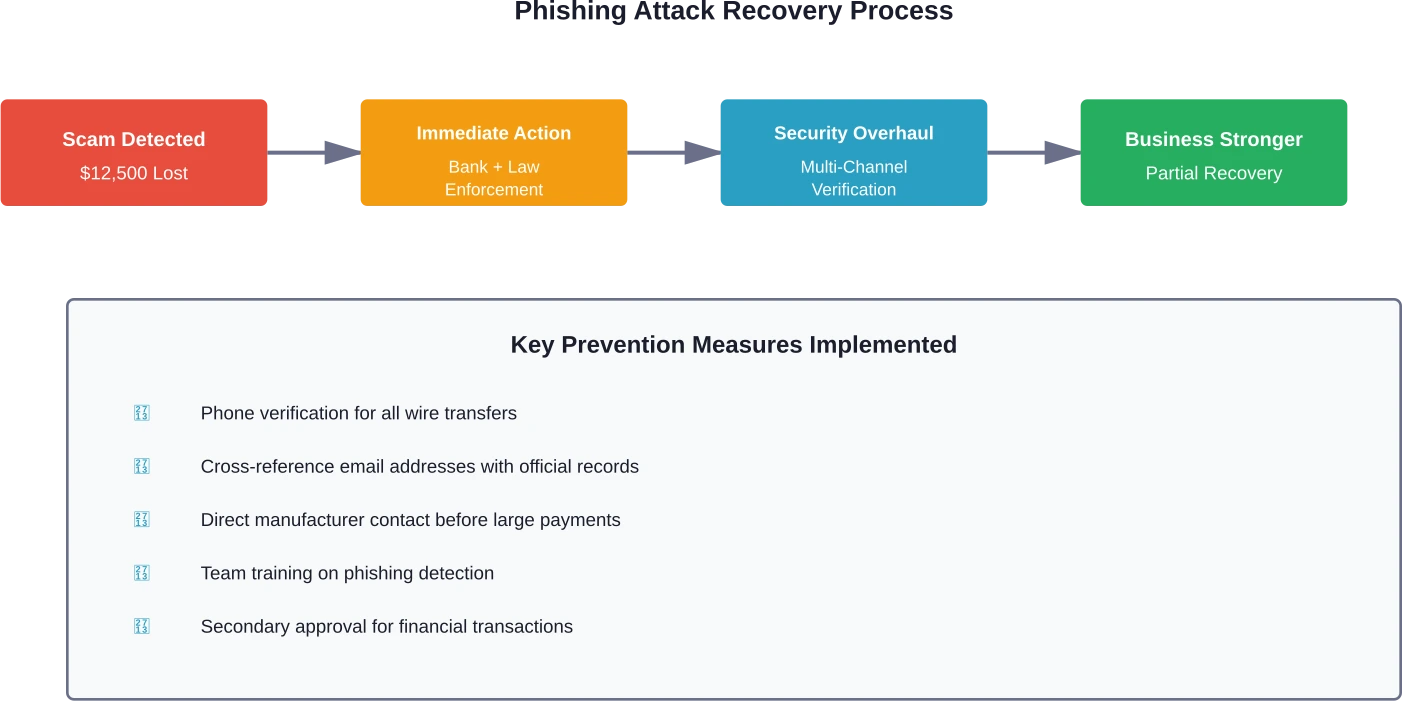
The four-stage recovery process Angela Stephens implemented after falling victim to a phishing scam, including prevention measures to protect future transactions.

Moisture Love: Pivoting During the Pandemic

When COVID-19 hit, many Amazon sellers watched their businesses crumble. Supply chains broke. Shipping delays stretched from days to weeks. Customer behavior shifted overnight.

Moisture Love’s founder faced all these challenges while running a beauty and skincare business that relied on consistent product availability and customer trust.

According to source material about Moisture Love’s founder, the pandemic forced a complete operational rethink. Suppliers became unreliable. Fulfillment centers faced capacity limits. Customers worried about product safety and delivery times.

Strategic Adaptation

Instead of waiting for things to return to normal, Moisture Love’s founder made proactive changes. She diversified her supplier base, reducing dependence on any single manufacturer. When Amazon warehouses faced restrictions, she explored alternative fulfillment options.

Communication became critical. She updated product listings with realistic shipping expectations. Customer service responses addressed pandemic-related concerns directly and honestly.

The business also adjusted its product focus. Some skincare items saw increased demand as people invested more in self-care during lockdowns. She prioritized inventory for these high-demand products while scaling back others.

According to the U.S. Small Business Administration, nearly two-thirds of small businesses have gone digital, with e-commerce becoming essential rather than optional. Moisture Love was already online but had to become more agile.

Numa Foods: The Product Naming Challenge

Sometimes the biggest obstacle isn’t money or logistics—it’s finding the right name for a product.

Based on Numa Foods’ story, the company faced challenges with product naming as part of their product launch process. The formulation was perfect. The packaging looked professional. Everything was ready for launch.

Except they couldn’t legally use their original product name.

Trademark conflicts stopped them cold. Another company held rights to their first choice. Their second option had similar issues. Each delay meant lost momentum and additional costs.

The Branding Solution

The team went back to basics. They researched competitor names, analyzed trademark databases, and tested new options with focus groups. They learned that a name needed to be more than available—it had to resonate with target customers.

Numa Foods worked to find a product name that resonated with customers and had proper legal clearance. Before committing, they thoroughly vetted it for trademark issues across multiple jurisdictions.

This process taught them that brand identity matters more than speed to market. A strong, legally sound name protects the business long-term.
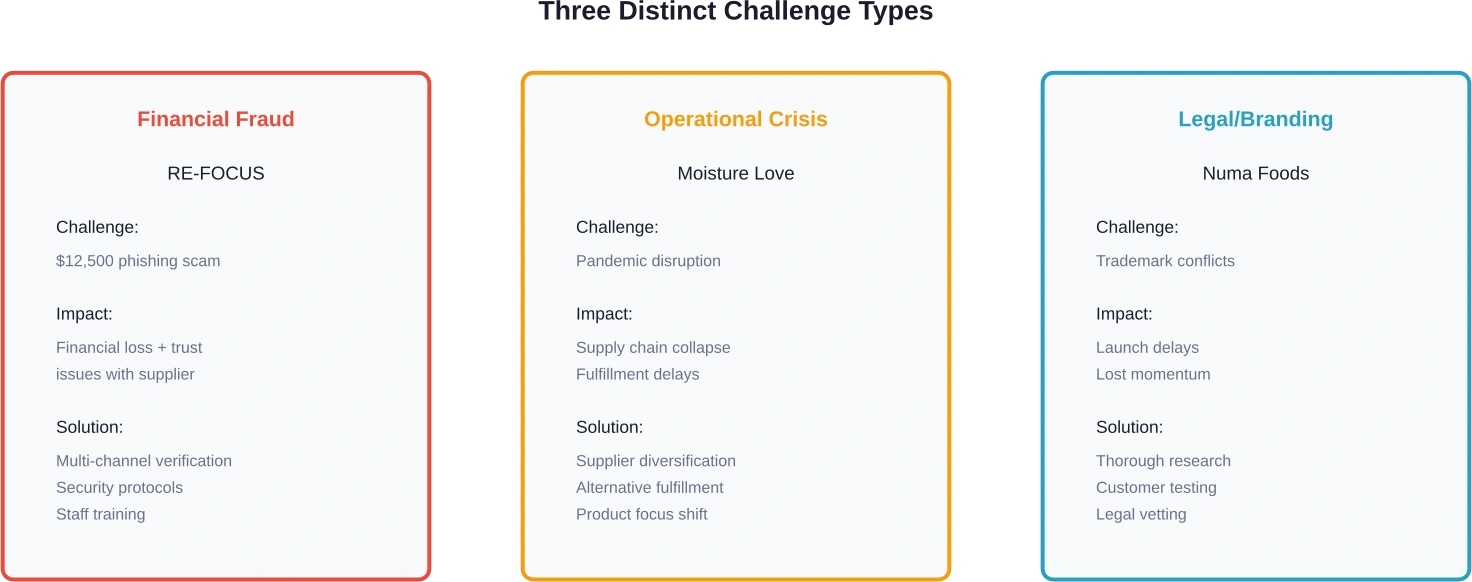
Comparison of three different challenge types faced by Amazon sellers and their corresponding solutions.

Common Patterns in Seller Success

These three stories reveal consistent patterns. Successful Amazon sellers don’t avoid challenges—they develop frameworks for handling them.

First, they act quickly. Angela didn’t wait weeks to address the phishing scam. Moisture Love’s founder adapted during the pandemic, not after it ended. Numa Foods pushed through naming issues rather than abandoning their product.

Second, they learn from setbacks. Each challenge became a teaching moment that strengthened their operations. Angela’s security protocols protect against future scams. Moisture Love’s supply chain diversification creates resilience. Numa Foods’ branding process ensures legal compliance.

Third, they maintain perspective. A $12,500 loss could have shut down a business. Instead, it became an investment in better systems. Pandemic disruptions could have ended Moisture Love. Instead, the founder saw opportunities to improve.

Success Factor Angela Stephens Moisture Love Numa Foods
Response Time Immediate action with bank and law enforcement Quick pivot to alternative suppliers Thorough research before next attempt
System Changes Multi-channel verification protocols Diversified supply chain Legal vetting process
Mindset Problem as learning opportunity Adaptation over waiting Quality over speed
Long-term Impact Stronger security prevents future fraud More resilient operations Protected brand identity

Practical Lessons for Amazon Sellers

What can other sellers take from these experiences?

Verify everything financial. Before wiring money, confirm details through multiple channels. Phone calls, verified contacts, and secondary approvals prevent costly mistakes.

Build redundancy into operations. Single suppliers, single fulfillment methods, and single points of failure create vulnerability. Diversification costs more upfront but saves businesses during disruptions.

Invest in proper legal foundations. Trademark searches, brand registration, and compliance checks seem tedious until they prevent disasters. Numa Foods learned this the expensive way.

Communicate transparently with customers. When problems arise, honest updates build trust. Silence creates suspicion.

Document processes. Angela’s team now has written protocols for financial transactions. When challenges occur, documented procedures ensure consistency.

Want to Avoid the Same Mistakes Other Amazon Sellers Made?

Many successful Amazon sellers talk about the same turning points – learning how to manage ads properly, understanding their data, and adjusting campaigns based on real performance. Without that visibility, it is easy to waste budget or miss growth opportunities.

WisePPC is built to help sellers see what is actually happening inside their Amazon business. The platform connects with Seller Central and Amazon Ads accounts to track campaign performance, sales data, and inventory signals in one place, helping sellers make clearer decisions instead of guessing.

If you are building your own Amazon success story, WisePPC can help you:

  • analyze Amazon PPC campaigns and performance metrics
  • identify what drives sales and what wastes ad spend
  • manage campaigns and marketplace data from a single dashboard

The Broader Amazon Seller Landscape

These success stories reflect broader trends in e-commerce. According to the U.S. Small Business Administration, the U.S. ecommerce market brought in more than $504 billion in revenue in 2018, with projections to exceed $735 billion by 2023. The market keeps growing, but so does competition.

Many manufacturers don’t want to handle Amazon’s complex compliance and logistics rules. This creates opportunities for sellers who specialize in these areas. Geneva Supply, an SBA loan success story, built an entire business helping manufacturers sell through Amazon’s marketplace.

Founded in 2009, Geneva Supply provides logistics, packaging, and e-commerce marketing support. They used a $1.6 million SBA-backed loan in 2017 to purchase their building, leveraging the 25-year term and low fixed interest rate to maintain cash flow for growth.

But wait. Not everyone needs seven-figure loans. Many Amazon businesses start with minimal investment. The U.S. Small Business Administration notes that online store costs can run under $50 monthly for the selling platform, plus transaction fees and inventory.

Moving Forward as an Amazon Seller

The stories of Angela Stephens, Moisture Love, and Numa Foods demonstrate that challenges don’t determine success—responses do.

Every Amazon seller will face obstacles. Supply issues, financial problems, legal complications, or marketplace changes all happen eventually. The sellers who thrive build systems that handle these disruptions.

They verify financial transactions, diversify suppliers, protect their brands legally, and communicate honestly with customers. They treat setbacks as education rather than defeat.

Most importantly, they take action. Problems don’t solve themselves through hope or waiting. The three sellers profiled here acted decisively when challenges emerged.

That’s the real lesson: Amazon success comes from resilience, not perfection. Build strong foundations, expect challenges, and respond strategically when they arrive. The marketplace rewards sellers who persist through difficulties, adapt to changing conditions, and learn from every obstacle.

Ready to start or grow an Amazon business? Study these success stories, implement their lessons, and prepare for the inevitable challenges ahead. The path won’t be smooth, but with the right approach, obstacles become stepping stones rather than roadblocks.

Frequently Asked Questions

What’s the biggest challenge new Amazon sellers face?

Cash flow management tops the list. Between inventory costs, Amazon fees, and marketing expenses, sellers need sufficient capital to sustain operations before profits arrive. Many underestimate the time between investment and returns.

How can sellers protect themselves from phishing scams?

Implement multi-channel verification for all financial transactions. Confirm wire transfer details through phone calls to known contacts, never rely solely on email. Use two-factor authentication on all accounts and train staff to recognize phishing attempts.

Should Amazon sellers have backup suppliers?

Absolutely. Single-supplier dependence creates massive risk. Even reliable manufacturers face disruptions—natural disasters, equipment failures, or capacity issues. Having at least two qualified suppliers for critical products protects business continuity.

How long does trademark registration take for Amazon products?

The trademark registration process typically takes 12-18 months through the USPTO as of 2024-2026. Sellers should begin this process before product launch, not after. Conducting comprehensive trademark searches early prevents costly rebranding later.

What’s the best way to handle customer communication during disruptions?

Proactive transparency works best. Update product listings with realistic expectations. Send direct communications explaining delays or issues. Customers tolerate problems far better when kept informed rather than left wondering.

Do Amazon sellers need business insurance?

Product liability insurance protects against claims related to products sold. As businesses grow, additional coverage for property, cyber liability, and business interruption becomes important. Insurance costs less than the lawsuits or losses it prevents.

How much capital do sellers need to start on Amazon?

Initial investment varies widely based on product type and business model. Some sellers start with a few thousand dollars for inventory and fees. Others need substantially more for product development, branding, and marketing. Adequate cash reserves for 6-12 months of operations increase success odds.

How AWD Makes Your Supply Chain & FBA Work Better (2026)

Quick Summary: Amazon Warehousing and Distribution (AWD) provides low-cost bulk storage and automatic replenishment to FBA centers, helping sellers reduce storage fees by 30-80% during peak seasons. When combined strategically with FBA, AWD streamlines supply chains by storing excess inventory affordably while maintaining fast fulfillment through FBA’s network. Sellers benefit most by storing slow-moving or seasonal products in AWD while keeping fast movers in FBA for immediate order fulfillment.

Managing Amazon inventory has become increasingly complex for FBA sellers. Storage limits tighten during Q4. Fees spike when seasonal products sit too long. And balancing stock levels without running out—or hemorrhaging money on storage—feels like walking a tightrope.

That’s where Amazon Warehousing and Distribution enters the picture.

AWD offers sellers an upstream storage solution designed to work alongside FBA. Think of it as a holding area for bulk inventory that automatically feeds products into FBA centers when stock runs low. The promise? Lower storage costs, simplified replenishment, and better inventory control across your entire supply chain.

But does AWD actually deliver on these claims? And more importantly, how can sellers use both services together without creating new headaches?

Let‘s break down exactly how AWD functions, where it fits into your existing FBA strategy, and when it makes financial sense to split your inventory between both systems.

What Is Amazon Warehousing and Distribution?

Amazon Warehousing and Distribution is a bulk storage service that launched as an upstream solution for FBA sellers. Unlike FBA centers optimized for rapid order fulfillment, AWD facilities focus on long-term inventory storage at significantly reduced rates.

The core concept is straightforward. Sellers send large shipments from manufacturers or third-party warehouses directly to AWD facilities. Amazon stores these products in bulk. Then, based on settings configured by the seller, AWD automatically replenishes FBA centers as inventory depletes.

No enrollment process is required to start using AWD. Sellers can simply create a shipment plan through Seller Central and designate AWD as the destination. This differs from FBA, which requires formal enrollment before sending the first shipment.

AWD serves as a buffer between your supplier and Amazon’s fulfillment network. Products move from manufacturer to AWD to FBA to customer. This staged approach prevents overstocking FBA centers while maintaining healthy inventory levels for order fulfillment.

How AWD Differs From Traditional FBA

The distinction between AWD and FBA comes down to purpose and optimization. FBA centers handle customer orders. AWD facilities manage inventory storage and distribution.

Feature AWD FBA
Primary purpose Long-term bulk storage and inventory management Direct-to-customer order fulfillment
Enrollment process No enrollment needed Requires enrollment
Storage optimization Bulk storage, pallets, larger quantities Unit-level storage, fast picking
Replenishment Automatic transfer to FBA Manual shipments from external sources
Storage duration Designed for extended storage Optimized for rapid turnover
Fee structure Lower per cubic foot rates Higher rates, seasonal increases


Inventory stored in AWD and FBA occupies different parts of Amazon’s logistics network. AWD facilities use warehouse space optimized for bulk pallets and extended storage periods. FBA centers prioritize accessibility and speed, storing products in locations that enable same-day or next-day delivery.

This fundamental difference in design explains why AWD costs less. The facilities don’t need the same level of automation, geographic distribution, or rapid access infrastructure that FBA requires.

Why Sellers Are Adding AWD to Their FBA Strategy

The value proposition for AWD centers on three main benefits: cost reduction, operational simplification, and inventory flexibility. Each addresses specific pain points that FBA sellers commonly face.

Substantial Storage Cost Savings

Storage fees represent one of the largest ongoing expenses for FBA sellers, especially those carrying seasonal products or large inventories. AWD’s rates run significantly lower than standard FBA storage.

For standard-size items, savings can range from 30% to 80% depending on the season. The gap widens dramatically during Q4, when FBA implements peak storage surcharges but AWD rates remain consistent.

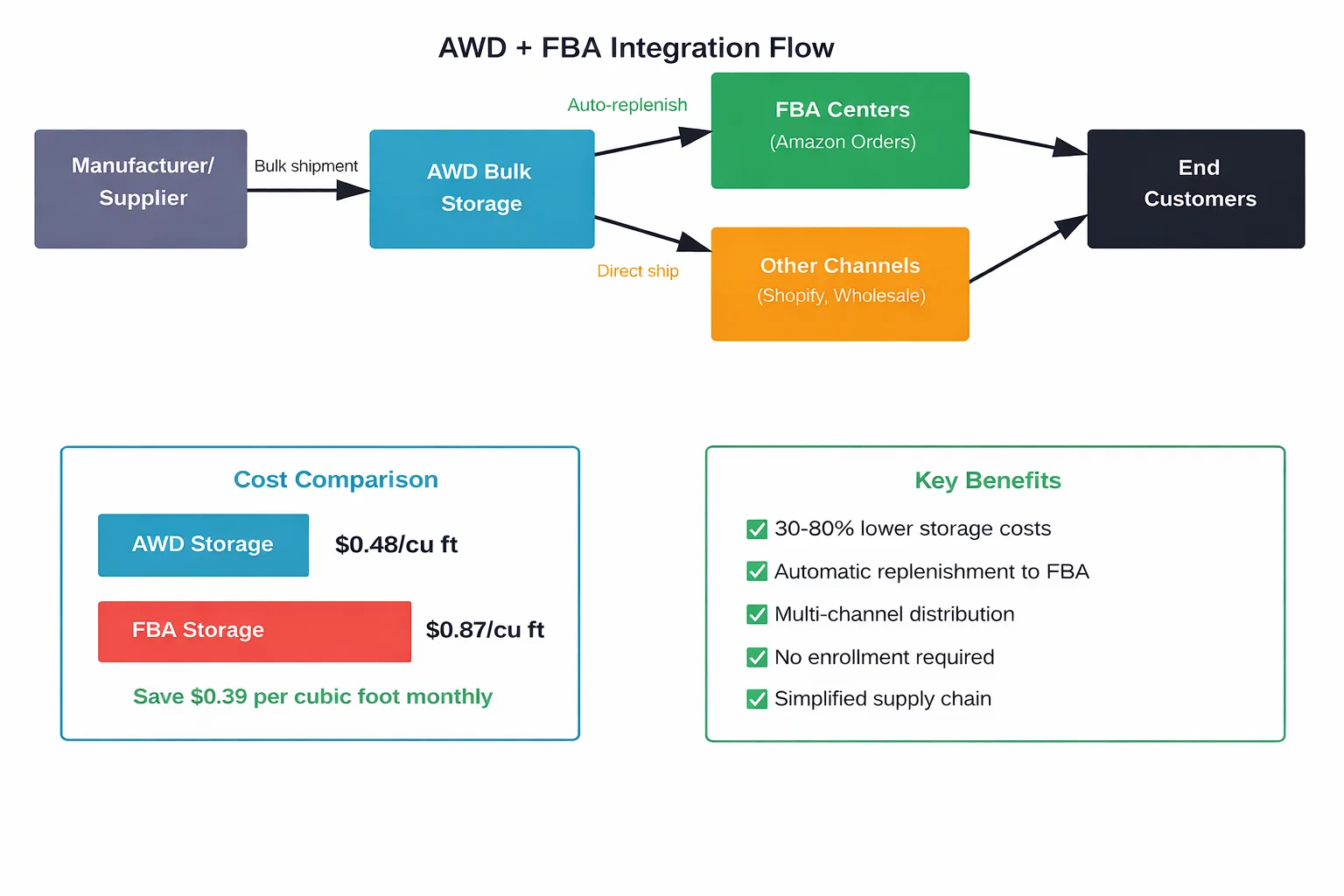
Here’s the math that matters. AWD storage costs approximately $0.48 per cubic foot monthly. Standard FBA storage runs $0.87 per cubic foot for the same period. That $0.39 difference per cubic foot compounds quickly across large inventories.

Consider a seller storing 1,000 cubic feet of inventory. In AWD, monthly storage runs $480. The same inventory in FBA costs $870. Over twelve months, that’s $4,680 in savings just from choosing AWD for bulk storage.

The savings become even more pronounced during October through December, when FBA adds peak storage fees. During these months, FBA rates can climb significantly while AWD maintains standard pricing.

Automatic Replenishment Eliminates Manual Work

Managing FBA inventory traditionally requires constant monitoring. Sellers check stock levels, forecast demand, create shipment plans, coordinate with suppliers, and track inbound inventory. It’s time-consuming and prone to human error.

AWD’s automatic replenishment removes most of these manual steps. Sellers configure minimum and maximum stock thresholds for each product. When FBA inventory drops below the minimum, AWD automatically creates a replenishment shipment.

The system handles transfer logistics internally. Products move from AWD facilities to the appropriate FBA centers without seller intervention. No shipment plans to create. No carrier coordination. No tracking multiple inbound shipments.

For products with multiple seller SKUs under the same ASIN, Amazon uses the highest value set across all SKUs to determine replenishment quantity. Updates to these settings can take up to 24 hours to take effect.

This automation particularly benefits sellers managing large catalogs. Instead of monitoring dozens or hundreds of SKUs individually, the replenishment system maintains target stock levels across the entire inventory.

One Inventory Pool for Multi-Channel Distribution

Many sellers operate beyond just Amazon. They might have Shopify stores, wholesale accounts, or other sales channels. Traditional FBA inventory can only fulfill Amazon orders, creating fragmentation across different warehouses and systems.

AWD offers multi-channel distribution capabilities. Inventory stored in AWD facilities can feed FBA for Amazon orders while also supporting shipments to other channels. This creates a single inventory pool rather than splitting stock across multiple locations.

The unified approach reduces total inventory requirements. Instead of maintaining separate stock for Amazon and other channels, sellers can draw from one larger pool. This improves inventory turnover and reduces the risk of stock imbalances where one channel is overstocked while another runs dry.

How AWD integrates with FBA and other sales channels to create a unified inventory system with automatic replenishment.

Strategic Implementation: When to Use AWD vs FBA

The real question isn’t whether AWD or FBA is better. It’s which products belong in each system and how to optimize the split.

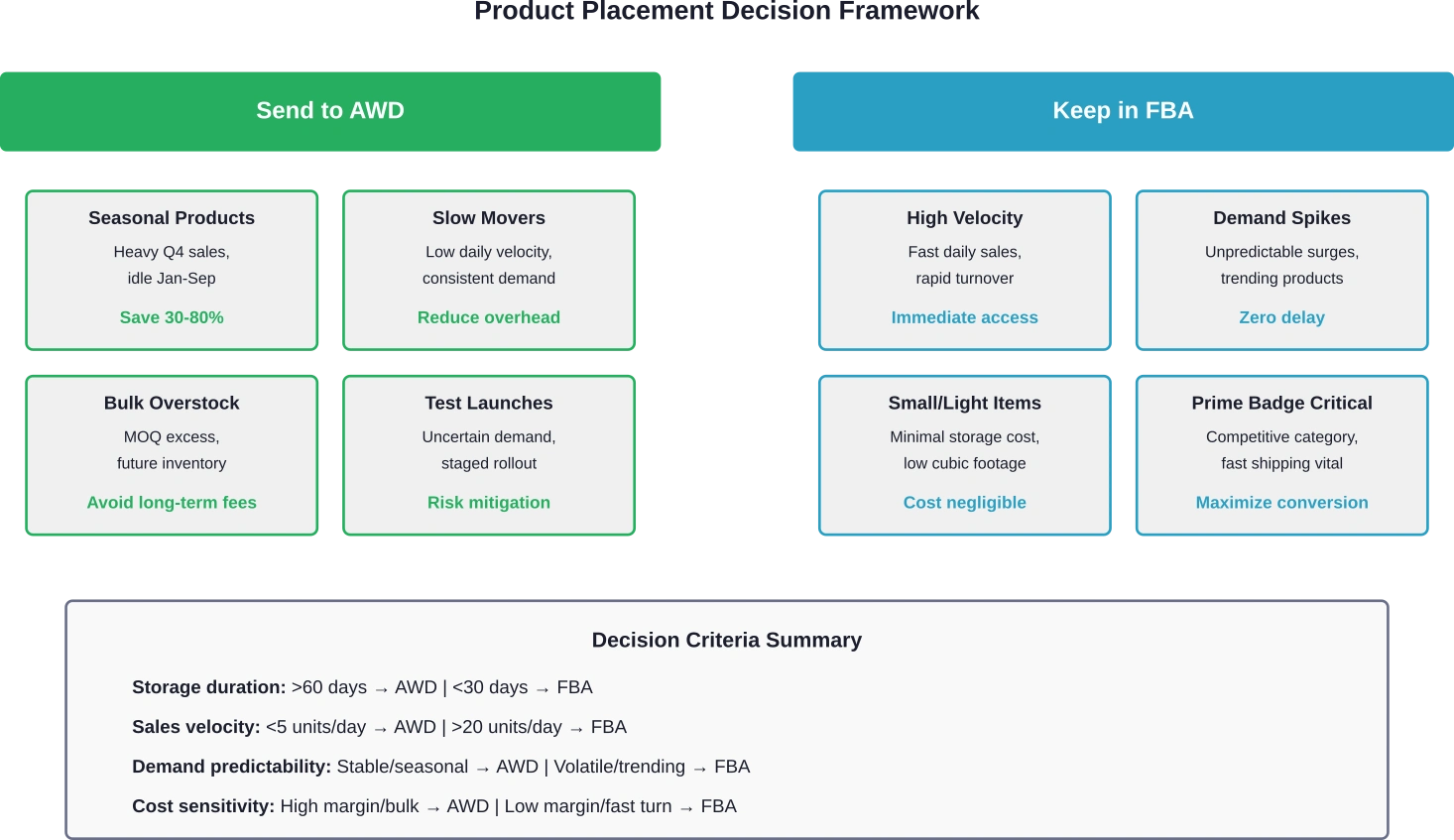
Not every product makes sense for AWD. Fast-moving items with high daily sales velocity need the immediacy of FBA. But slow movers, seasonal products, and bulk overstock? Those are prime candidates for AWD storage.

Products That Belong in AWD

Seasonal inventory represents the clearest use case. Products that sell heavily during specific periods but sit idle the rest of the year incur massive storage fees in FBA. Moving these items to AWD during off-seasons cuts costs dramatically while maintaining availability for replenishment when demand returns.

Slow-moving products with consistent but low sales velocity also benefit from AWD placement. These items tie up expensive FBA space without generating enough velocity to justify the premium storage costs. AWD provides a cost-effective holding area while automatic replenishment ensures FBA never runs dry.

New product launches with uncertain demand create another opportunity. Instead of sending large quantities directly to FBA and risking long-term storage fees, sellers can stage inventory in AWD. Small initial quantities go to FBA for testing. If the product performs well, AWD automatically feeds additional units into the fulfillment network.

Bulk overstock from manufacturer minimum order quantities fits naturally into AWD. Many suppliers require minimum purchases that exceed short-term FBA needs. Sending everything to FBA invites high storage fees. Routing the excess to AWD while keeping active inventory in FBA balances cost and availability.

Products That Should Stay in FBA

High-velocity products need to remain in FBA. These items sell rapidly enough that storage costs become negligible compared to sales revenue. The faster turnover and direct fulfillment path justify FBA’s higher storage rates.

Products with unpredictable demand spikes also work better in FBA. If sales can suddenly triple due to external factors, having inventory already positioned in fulfillment centers prevents stockouts. The automatic replenishment from AWD introduces a delay—typically 2-3 days at minimum—that can miss unexpected demand surges.

Community discussions highlight concerns about AWD replenishment timing. Real data from October 2025 showed AWD averaging 7.1 days for check-in compared to 4.7 days for standard FBA direct shipments. That 2.4-day difference matters for fast-moving inventory. Reports indicate AWD transfer times can vary significantly by fulfillment center and conditions.

Small, lightweight products with minimal storage footprint might not benefit enough from AWD to justify the added complexity. If FBA storage fees are already negligible, splitting inventory between two systems adds operational overhead without meaningful cost savings.

Strategic framework for determining which products to store in AWD versus FBA based on sales characteristics and business priorities.

Configuring Automatic Replenishment Settings

The effectiveness of AWD depends heavily on proper replenishment configuration. Set thresholds too high and inventory flows to FBA unnecessarily, negating storage savings. Set them too low and stockouts become a constant threat.

Minimum threshold represents the trigger point. When FBA inventory drops to this level, AWD initiates a replenishment shipment. Setting this requires understanding lead time—how many days between AWD shipment creation and FBA availability.

Based on community discussions, AWD to FBA transfer times can average 7 days or more, with reports of delays extending to 14+ days during peak periods. Conservative minimum thresholds should account for this variability plus a safety buffer.

Maximum threshold determines how much inventory FBA should hold at peak. This prevents over-replenishment that would recreate the storage cost problem AWD is meant to solve. The maximum should cover peak daily sales multiplied by the replenishment cycle time.

Regular monitoring and adjustment of these settings becomes crucial. Seasonal demand shifts, promotional periods, and trending products all require threshold updates to maintain optimal performance.

Need Better Results From AWD and FBA? Start With the Ads

Improving your supply chain with Amazon AWD and FBA can help products move faster and stay in stock – but inventory alone does not drive sales. Once products are available in Amazon’s network, performance often depends on how well your advertising is managed.

WisePPC focuses specifically on Amazon advertising and marketplace growth. Their team works with brands to manage Sponsored Ads, improve campaign structure, and connect advertising data with listing and inventory performance.

If you are investing in AWD and FBA to scale your Amazon operations, WisePPC can help you:

  • manage and optimize Amazon PPC campaigns
  • improve visibility for stocked products
  • align advertising strategy with inventory and fulfillment

The Real Costs: AWD vs FBA Storage Breakdown

Understanding the true cost difference requires looking beyond simple per-cubic-foot rates. Transfer fees, processing times, and operational overhead all factor into the total equation.

AWD storage runs approximately $0.48 per cubic foot monthly for standard-size items. FBA standard storage sits at $0.87 per cubic foot outside peak season. During October through December, FBA rates climb higher while AWD maintains consistent pricing.

But storage represents only one component. AWD to FBA transfers include processing and transportation fees. These costs vary based on distance between facilities and shipment size but typically add $0.10 to $0.30 per unit for standard items.

The transfer fees can erode savings for products with high turnover. If inventory cycles through AWD to FBA multiple times per quarter, the cumulative transfer costs might exceed the storage savings.

Real value emerges with products that sit in AWD for extended periods—60, 90, or 120+ days—before requiring replenishment. The longer storage duration amplifies the monthly savings while transfer fees remain fixed per cycle.

Hidden Costs and Considerations

Replenishment delays create an indirect cost through potential lost sales. User experiences shared in seller communities highlight situations where AWD transfers took 10-14 days during peak periods, causing temporary stockouts despite adequate total inventory.

The opportunity cost of stockouts can exceed storage savings. Extended delays create lost sales during critical periods that may outweigh monthly storage cost reductions.

Reduced control and visibility represent another less tangible cost. FBA shipments provide detailed tracking and predictable check-in times. AWD transfers operate more like a black box—inventory leaves AWD and eventually appears in FBA, but interim visibility remains limited.

This opacity complicates inventory planning and makes it harder to diagnose issues when problems occur. Sellers accustomed to tight control over every shipment may find the reduced transparency frustrating.

Practical Implementation: Sending Your First AWD Shipment

Getting started with AWD requires no special enrollment or application. Sellers with active FBA accounts can create AWD shipments immediately through Seller Central.

The process begins in the inventory management section. Select products to send to AWD and specify quantities. Amazon generates a shipment plan with the designated AWD facility as the destination.

Pack products following standard FBA prep requirements. AWD facilities accept the same packaging specifications as FBA centers. Label boxes with the provided shipment IDs and carrier labels.

Ship using Amazon’s partnered carriers or approved third-party carriers. Tracking information uploads automatically to Seller Central, allowing monitoring of inbound progress.

Once AWD receives and checks in the inventory, products become available for automatic replenishment or manual transfer to FBA. The check-in process typically completes within 3-5 business days for standard shipments.

Setting Up Automatic Replenishment

After inventory arrives at AWD, configure replenishment settings for each SKU. Navigate to the AWD inventory management dashboard and select the products to set up.

Enter minimum and maximum FBA quantities based on sales velocity and desired reorder cycle. Conservative settings prioritize stock availability while aggressive settings maximize storage savings.

Enable automatic replenishment and save the configuration. The system begins monitoring FBA levels immediately and will initiate transfers when thresholds trigger.

Monitor performance during the first few replenishment cycles. Adjust thresholds if stockouts occur or if FBA inventory consistently exceeds maximum targets.

Common Challenges Sellers Face With AWD

AWD isn’t without drawbacks. Several recurring issues emerge from community discussions and user experiences.

Longer and Less Predictable Check-In Times

The most frequently cited complaint involves transfer delays. While FBA direct shipments typically check in within 3-5 days, AWD replenishments average 7 days and can extend significantly longer.

Transfer times vary significantly by fulfillment center location and conditions, with some reports indicating delays of 10-14 days during peak periods compared to 2-5 days for direct FBA shipments.

This unpredictability complicates inventory planning. Sellers can’t reliably predict when replenishments will become available, making it harder to maintain optimal stock levels during high-velocity periods.

Limited Visibility During Transfers

Once inventory ships from AWD to FBA, detailed tracking information becomes sparse. Sellers see that a transfer initiated and eventually that products arrived, but the interim status remains opaque.

This limited visibility creates anxiety during critical periods. Is the shipment delayed? Lost? Sitting in a receiving queue? The lack of detailed status updates makes it difficult to answer these questions or take corrective action.

Minimum Shipment Requirements

AWD works best for bulk storage, and the service reflects this in its requirements. Minimum shipment sizes and quantity restrictions mean not every product qualifies for practical AWD use.

Small test quantities or low-volume SKUs may not meet minimum thresholds, forcing these products to use standard FBA exclusively. This creates operational complexity for sellers with diverse catalogs mixing high and low volume items.

Optimizing Your Mixed AWD and FBA Strategy

The most successful implementations don’t treat AWD and FBA as either-or choices. Instead, they strategically split inventory based on product characteristics and business objectives.

Start by analyzing existing inventory performance. Identify products with low turnover rates, high storage costs relative to sales, or significant seasonal variation. These become the initial AWD candidates.

Keep fast movers and products with unpredictable demand spikes in FBA exclusively. The immediate availability and faster replenishment cycles justify the higher storage costs for these items.

For products sitting in the middle—moderate velocity, predictable demand, significant storage footprint—test AWD with a portion of inventory. Keep a base quantity in FBA while storing excess in AWD. Monitor performance over 30-60 days and adjust based on results.

Track key metrics for AWD products: replenishment frequency, transfer times, stockout incidents, total storage costs, and sales velocity changes. This data drives ongoing optimization and helps identify which products benefit most from the AWD approach.

Seasonal adjustments become particularly important. Pre-load AWD with inventory several months before peak season, allowing time for gradual replenishment to FBA as demand builds. This spreads the transfer timing risk across multiple cycles rather than relying on a single large replenishment during the crucial sales period.


Frequently Asked Questions

What products are eligible for Amazon Warehousing and Distribution?

Most standard FBA-eligible products can use AWD, including standard-size and oversize items. Products must meet FBA prep requirements and cannot include restricted or hazardous materials. Items already enrolled in FBA qualify automatically without additional enrollment for AWD.

How much cheaper is AWD storage compared to FBA?

Effective January 15, 2026, AWD storage in the West Region is $0.57/cu ft (other regions $0.48). Base transportation fees are $1.40/cu ft ($1.26 for Amazon Managed), and processing fees are $1.40 per box.

How long does AWD to FBA replenishment take?

Average transfer times run 5-7 days under normal conditions but can extend to 14+ days during peak periods or for certain fulfillment center destinations. Real data from October 2025 showed AWD averaging 7.1 days compared to 4.7 days for direct FBA shipments. Sellers should factor this longer and more variable timeline into replenishment threshold settings.

Can AWD inventory fulfill orders from other sales channels besides Amazon?

Yes, AWD supports multi-channel distribution. Inventory stored in AWD facilities can be directed to FBA for Amazon orders or shipped directly to other channels including Shopify stores, wholesale accounts, or third-party marketplaces. This creates a unified inventory pool serving multiple sales channels from a single storage location.

What happens if AWD runs out of inventory before replenishing FBA?

If AWD depletes before automatic replenishment triggers or completes, FBA inventory will eventually sell down to zero, creating a stockout. AWD cannot replenish what it doesn’t have. Sellers must monitor total inventory across both systems and send new shipments to AWD before complete depletion to maintain continuous availability.

Does using AWD affect my FBA storage limits?

Inventory in AWD does not count against FBA storage limits. Only products physically stored in FBA centers apply to capacity restrictions. This allows sellers to maintain large total inventory positions while staying within FBA capacity constraints by keeping excess stock in AWD and only transferring what FBA limits permit.

Can I manually control when AWD sends inventory to FBA instead of using automatic replenishment?

Yes, sellers can choose manual or automatic replenishment. Manual mode requires creating transfer requests through Seller Central each time FBA needs additional inventory. Automatic mode handles transfers based on configured minimum and maximum thresholds. Many sellers use automatic replenishment for predictable products and manual control for items with variable or seasonal demand patterns.


Final Thoughts: Making AWD and FBA Work Together

AWD represents a valuable tool for sellers struggling with storage costs, inventory limits, or seasonal demand fluctuations. The cost savings are real—30-80% reductions in storage fees add up quickly for products sitting in inventory for months.

But AWD isn’t a universal solution. The longer transfer times, reduced visibility, and operational complexity mean it works better for some inventory profiles than others. Fast-moving products, trending items, and anything with unpredictable demand typically performs better staying in FBA exclusively.

The sweet spot? Seasonal products, slow movers with consistent demand, bulk overstock, and new product launches with uncertain velocity. These inventory types benefit from AWD’s low-cost storage while automatic replenishment maintains availability in FBA for order fulfillment.

Successful implementation requires thoughtful product selection, conservative replenishment thresholds, and ongoing monitoring. Start with a subset of inventory—10-20% of total SKUs that clearly fit the ideal profile. Learn how AWD performs for your specific business before committing large portions of inventory.

Track the metrics that matter: total storage costs, transfer frequency, stockout incidents, and sales velocity. If storage savings exceed the cost of occasional stockouts and the operational overhead feels manageable, gradually expand AWD usage to additional products.

The question isn’t whether AWD or FBA is better. It’s how to use both strategically to minimize costs while maintaining the inventory availability that drives sales. Get the split right, and the combination delivers lower overhead without sacrificing customer experience.

Ready to optimize your Amazon inventory strategy? Start by analyzing your current storage costs and identifying products spending 60+ days in FBA. Those are your first AWD candidates. Configure conservative replenishment settings and monitor performance for 30 days. Adjust based on results and expand gradually.

The sellers winning with AWD aren’t the ones going all-in. They’re the ones strategically splitting inventory based on data, not hope. Run the numbers for your specific products. The math will tell you exactly where AWD makes sense and where it doesn’t.

How to Reduce ACOS and Improve ROAS: Data-Driven Strategies for Amazon Sellers

Introduction

ACOS—Advertising Cost of Sale—is the metric that keeps Amazon sellers awake at night. It’s the clearest signal of whether your ad spend generates profit or burns cash. When ACOS climbs above your margin, every sale costs more than it earns. When it drops below target, you’ve found the holy grail of scalable, profitable advertising.

But here’s the uncomfortable truth: most Amazon advertisers don’t truly understand their ACOS. They see the headline number in Campaign Manager, make reactive bid adjustments, and hope for improvement. They miss the structural drivers of high ACOS. They ignore the relationship between ACOS and ROAS (Return on Ad Spend). They fail to account for product lifecycle, competitive dynamics, and customer acquisition value.

This guide changes that. We’ll dissect ACOS from every angle—what drives it, how to diagnose problems, and most importantly, systematic strategies to reduce it while maintaining (or growing) sales volume. These aren’t theoretical concepts; they’re battle-tested approaches from accounts managing millions in monthly ad spend.

Whether you’re struggling with 100%+ ACOS bleeding money, or optimizing a profitable 15% ACOS for even better returns, you’ll find actionable tactics here.


Understanding ACOS: Beyond the Headline Number

The ACOS Formula

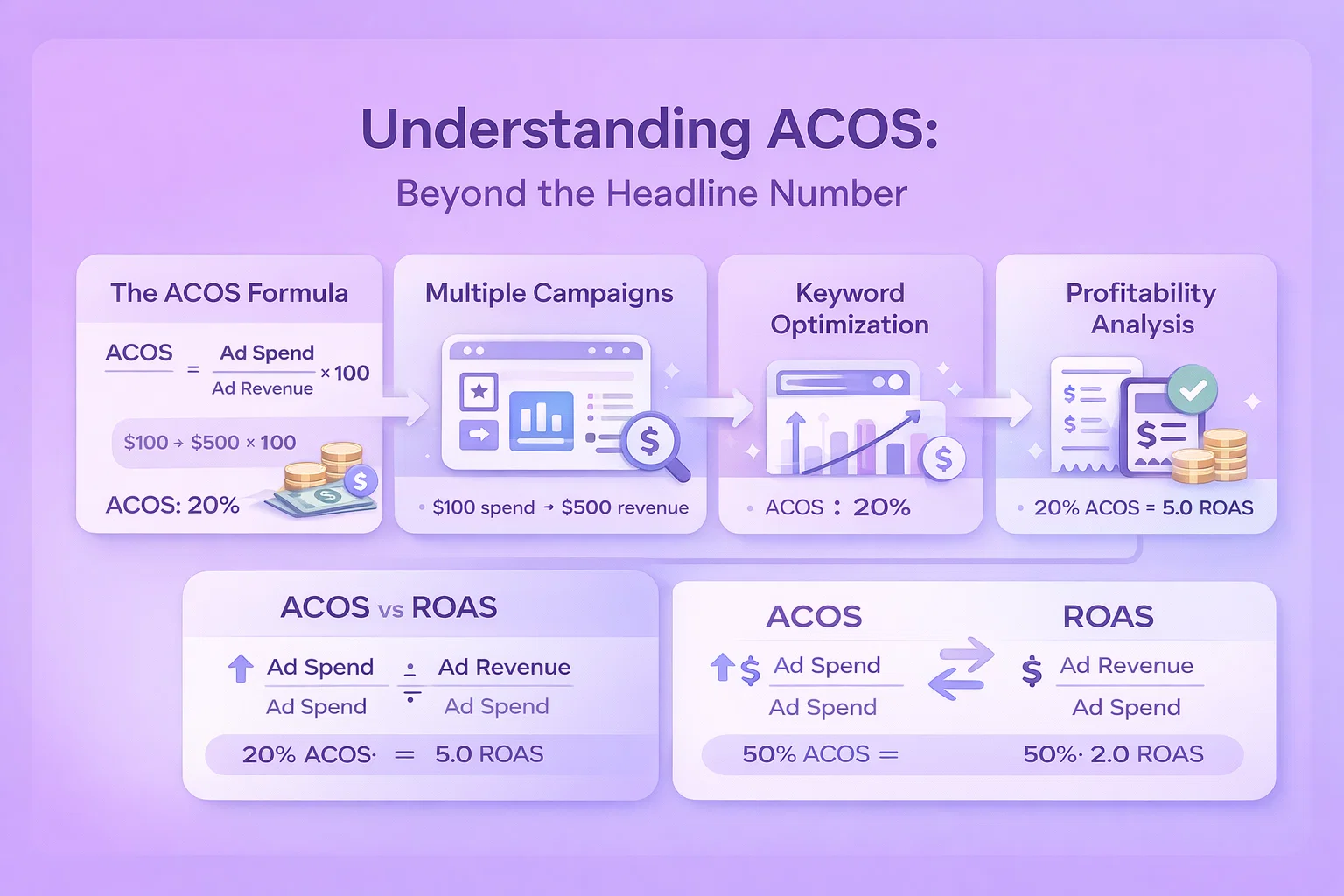
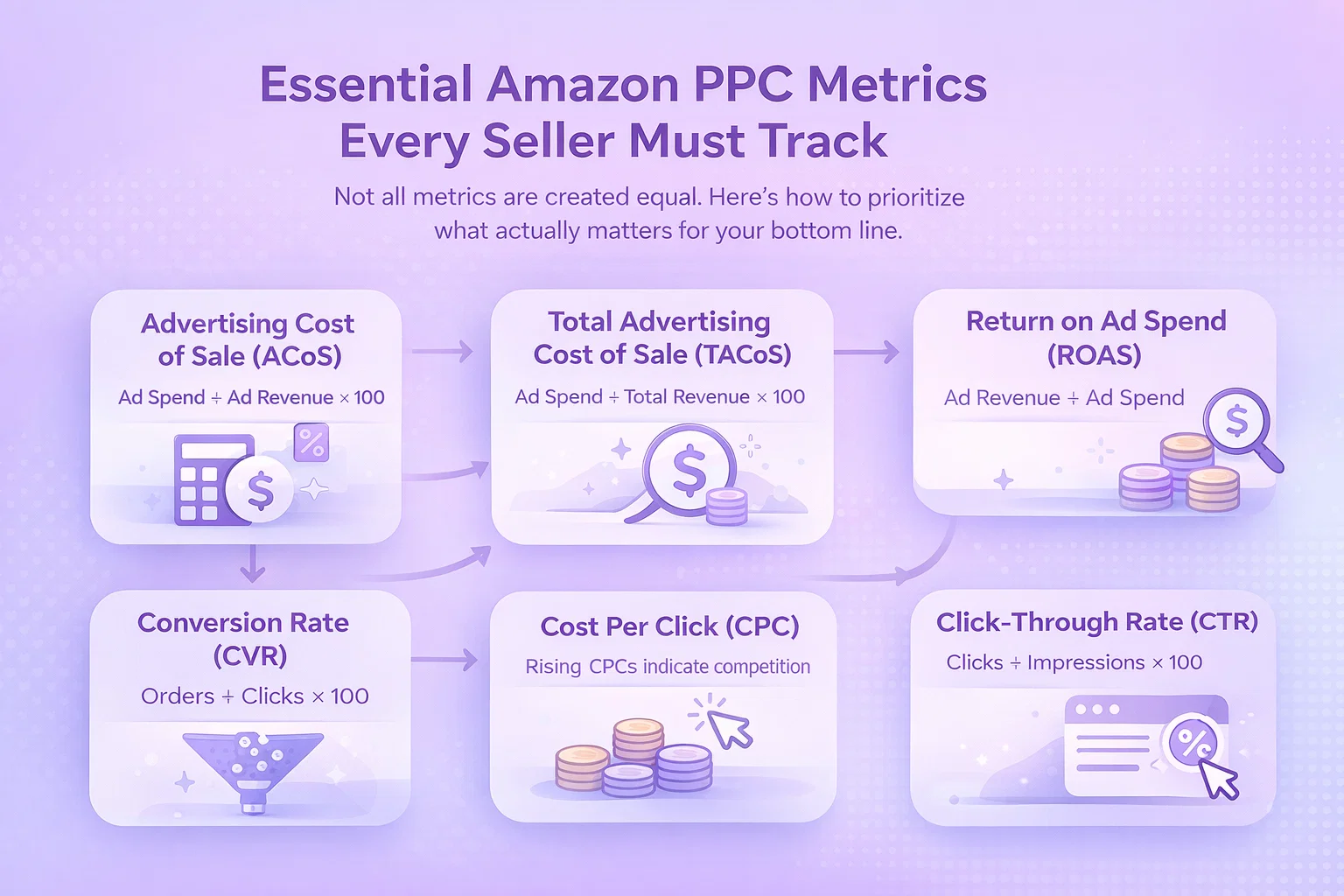
ACOS = (Ad Spend / Ad Revenue) × 100

Simple enough. Spend $100, generate $500 in sales, ACOS is 20%. But this simplicity masks enormous complexity. The headline ACOS in Campaign Manager aggregates diverse performance across:

  • Multiple campaigns with different objectives
  • Keywords at various stages of optimization
  • Products with different margin profiles
  • Customer segments with varying lifetime value
  • Time periods with seasonal fluctuations

Treating this as a single number is like diagnosing a patient’s health from their weight alone. You need to unpack the components.

ACOS vs. ROAS: Two Sides of the Same Coin

ROAS = Ad Revenue / Ad Spend

ACOS and ROAS measure the same relationship inverted:

  • 20% ACOS = 5.0 ROAS
  • 50% ACOS = 2.0 ROAS
  • 10% ACOS = 10.0 ROAS

Different contexts favor different metrics:

  • ACOS is intuitive for margin-based thinking (“I have 30% margin, so 25% ACOS is profitable”)
  • ROAS is intuitive for return-based thinking (“Every $1 spent returns $4 in revenue”)

Use whichever aligns with your mental model, but understand both. Some optimization decisions are clearer through one lens than the other.

Break-Even ACOS: Your North Star

Before optimizing ACOS, you must know your break-even point:

Break-Even ACOS = Profit Margin Before Ads

Calculate this for each product:

  1. Selling Price: $50
  2. Amazon Fees (15% referral + FBA): $18
  3. Cost of Goods Sold: $15
  4. Other Costs (returns, storage): $2
  5. Profit Margin: $15 (30%)

Your break-even ACOS is 30%. Spend more, you lose money on every ad-attributed sale. Spend less, advertising generates incremental profit.

Critical Insight: Break-even ACOS varies dramatically by product. A premium item with 45% margin can sustain 40% ACOS and still profit. A thin-margin product at 15% margin must achieve sub-15% ACOS or advertising destroys profitability.

Never optimize to a single account-wide ACOS target. Set product-specific targets based on margin and strategic objectives.

The ACOS Spectrum: From Bleeding to Scaling

Different ACOS levels indicate different situations:

ACOS > 100%: Losing money on every sale. Immediate intervention required. Check for:

  • Incorrect bids (bidding $5 on a $10 product)
  • Irrelevant keyword targeting
  • Technical tracking issues
  • New campaigns in learning phase

ACOS 50-100%: Marginally unprofitable or break-even. Common for:

  • Competitive keywords in early optimization
  • Brand awareness campaigns
  • New product launches building sales velocity
  • High-intent, low-margin categories

ACOS 25-50%: Moderately profitable for most categories. Typical for:

  • Mature campaigns with ongoing optimization
  • Competitive markets with reasonable margins
  • Mixed portfolio of proven and experimental targeting

ACOS 10-25%: Strong profitability. Usually indicates:

  • Brand keyword campaigns (highest intent, lowest competition)
  • Long-tail keyword focus
  • Defensive advertising on owned ASINs
  • High-margin products with limited competition

ACOS < 10%: Exceptional performance. Possible scenarios:

  • Brand defense campaigns
  • Retargeting to past purchasers
  • Product with strong organic rank amplifying ad efficiency
  • Underinvestment (could scale volume profitably)


Diagnosing High ACOS: Root Cause Analysis

Before fixing ACOS, diagnose why it’s high. Different problems require different solutions.

Diagnostic Framework: The ACOS Tree

Start with the headline number, then drill down:

Account-Level ACOS → By Campaign Type (Sponsored Products vs. Brands vs. Display) → By Campaign Objective (Brand Defense vs. Conquesting vs. Awareness) → By Product/Margin Profile → By Keyword Category (Brand vs. Category vs. Competitor) → By Match Type (Exact vs. Phrase vs. Broad) → By Placement (Top of Search vs. Product Pages vs. Rest of Search)

Each branch reveals different optimization opportunities.

Common High ACOS Causes

  1. Bid Inflation

Symptoms: High CPCs, competitive keywords, auction pressure

Root causes:

  • Bidding wars with aggressive competitors
  • Automatic campaign overbidding
  • New entrants with high bids and low quality scores
  • Seasonal competition (Q4, Prime Day)

Solution approach: Strategic bid management, not blanket reductions

  1. Poor Keyword Relevance

Symptoms: Low CTR (<0.3%), high bounce rate, few conversions

Root causes:

  • Broad match bleeding on irrelevant queries
  • Missing negative keywords
  • Keyword-product mismatch
  • Search terms not matching customer intent

Solution approach: Tighter targeting, extensive negatives

  1. Weak Conversion Rate

Symptoms: Good CTR, many clicks, few sales

Root causes:

  • Listing quality issues (images, bullets, reviews)
  • Price uncompetitive
  • Poor inventory (out of stock, slow shipping)
  • Weak product-market fit

Solution approach: Fix the listing before the ads

  1. Wrong Campaign Structure

Symptoms: Uneven performance within campaigns, conflicting metrics

Root causes:

  • Too many keywords per ad group
  • Mixed intent in same campaign
  • No segmentation by margin or objective
  • Inherited legacy structure

Solution approach: Restructure for control and clarity

  1. Inappropriate Targets

Symptoms: High spend, low conversion, unrelated search terms

Root causes:

  • Automatic campaigns without proper negatives
  • ASIN targeting on irrelevant products
  • Broad match without monitoring
  • Competitor conquesting on mismatched offerings

Solution approach: Surgical targeting refinement


Strategy 1: Precision Bid Management

Bid management is the most direct ACOS lever. These approaches reduce wasteful spend while preserving volume.

The Bid-ACOS Relationship

Mathematically, ACOS = (CPC × Clicks) / (CVR × Clicks × Price) = CPC / (CVR × Price)

Your ACOS is directly proportional to CPC and inversely proportional to conversion rate and price. To reduce ACOS:

  • Lower CPC (reduce bids)
  • Increase CVR (improve listing/offers)
  • Focus on higher-priced variants

Bid adjustments are immediate; conversion optimization takes time. Start with bids for quick wins.

Bid Reduction Strategies

The Gradual Descent

Never slash bids 50% hoping to halve ACOS. You’ll kill volume and destroy campaign history. Instead:

Week 1: Reduce bids 15% on high-ACOS keywords Week 2: Evaluate impact—if ACOS improved and volume acceptable, reduce another 10% Week 3: Find the floor where ACOS targets meet minimum volume thresholds

The Position Targeting Approach

Different positions have different ACOS profiles:

  • Position 1 (Top of Search): Highest visibility, often highest ACOS due to competitive bidding
  • Position 2-3: Sweet spot for many keywords—good visibility, better efficiency
  • Position 4-6: Lower volume, potentially better ACOS for long-tail terms

Use placement reports to identify where your ACOS is highest. Reduce Top of Search multipliers if that placement drives poor efficiency.

The Portfolio Rebalancing

Not all keywords deserve the same bid approach:

  • Defensive Brand Keywords: Lower bids to maintain position 1-2 at efficient ACOS
  • Category Keywords: Aggressive bids only on proven converters; test new ones conservatively
  • Competitor Keywords: High bids rarely sustainable; focus on where you win
  • Long-Tail Keywords: Often underbid—these can scale profitably with higher bids

Dynamic Bid Rules

Set up systematic bid adjustments based on performance signals:

Rule Set: Weekly Optimization


Metric Threshold Action
ACOS > 2× target Reduce bid 20%
ACOS 1.5-2× target Reduce bid 10%
ACOS 1.0-1.5× target Reduce bid 5%
ACOS 0.5-1.0× target Maintain bid
ACOS < 0.5× target Increase bid 15%
Spend > $50, Orders = 0 Pause keyword


Apply these rules weekly across your account for systematic ACOS improvement.

Bid Caps and Floors

Prevent extreme bids that destroy ACOS:

Maximum Bid Formula: Max Bid = Target ACOS × Product Price × Expected CVR

Example: 25% target ACOS, $40 product, 10% expected CVR Max Bid = 0.25 × $40 × 0.10 = $1.00

Never bid above this ceiling regardless of competition.

Minimum Bid Consideration: Too-low bids lose volume and learning data. Generally, maintain bids that generate at least 10 clicks per week per keyword.


Strategy 2: Surgical Keyword Optimization

Keywords are where intent meets your product. Precision here dramatically impacts ACOS.

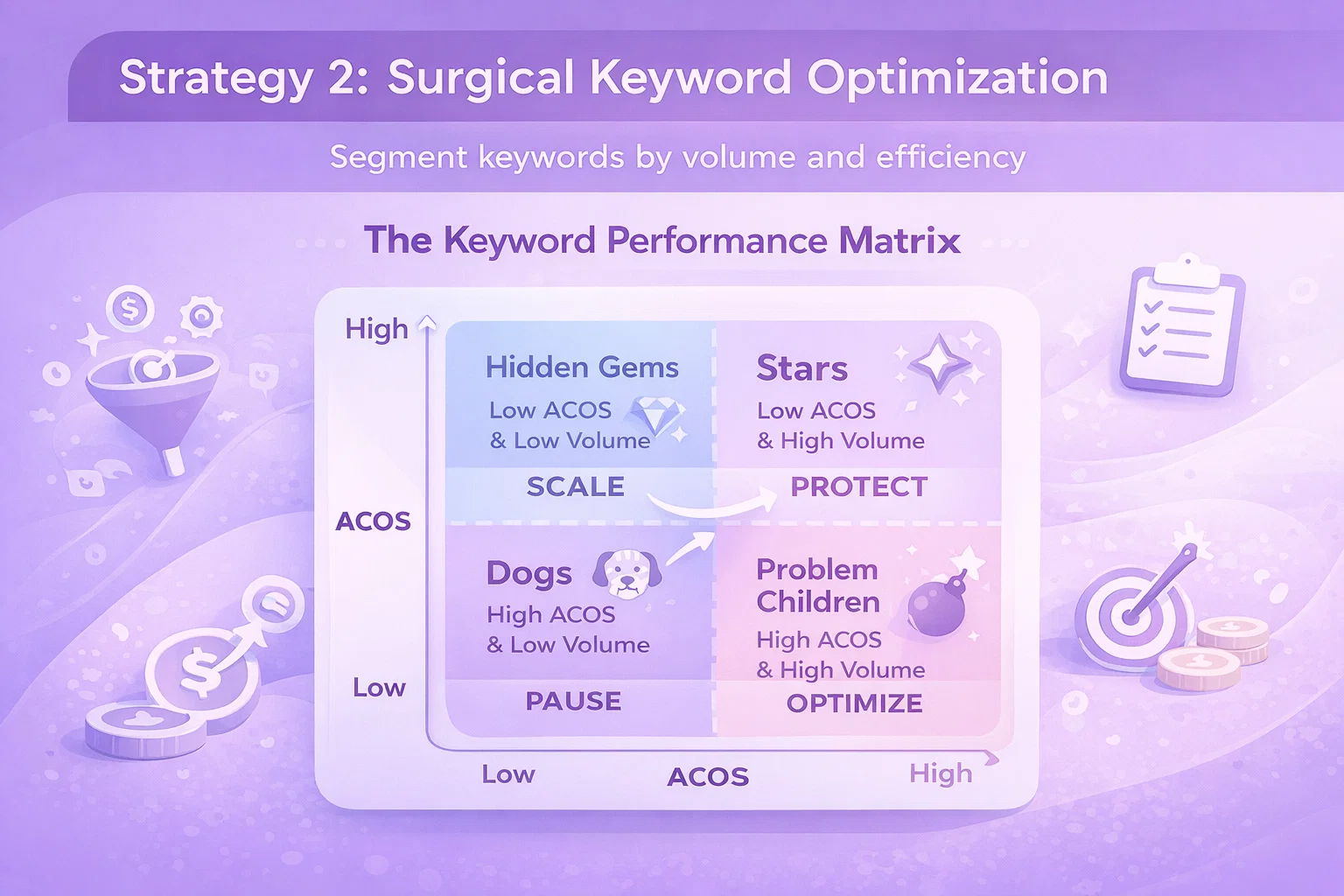
The Keyword Performance Matrix

Segment keywords by volume and efficiency:

High Volume, Low ACOS (Stars):

  • Action: Protect and expand
  • Increase bids moderately to capture more volume
  • Add as exact match negatives to broader campaigns to prevent cannibalization
  • Monitor closely for competitive pressure

High Volume, High ACOS (Problem Children):

  • Action: Optimize or eliminate
  • Reduce bids aggressively if conversion possible
  • Add negative if fundamentally mismatched
  • Check search term alignment

Low Volume, Low ACOS (Hidden Gems):

  • Action: Scale
  • Increase bids to test volume potential
  • Expand match type or add variations
  • Often underinvested opportunities

Low Volume, High ACOS (Dogs):

  • Action: Pause
  • Minimal impact but drag down account
  • Free up budget for better performers

Match Type Strategy

Different match types have different ACOS profiles:

Exact Match: Highest control, typically best ACOS

  • Use for proven keywords with sufficient volume
  • Highest bids justified by performance certainty

Phrase Match: Moderate expansion, monitor ACOS closely

  • Broader than exact but still targeted
  • Higher volume potential with some quality loss

Broad Match: Maximum reach, often ACOS killer

  • Only use with extensive negative keyword lists
  • Best for discovery, not core performance
  • Consider broad match modifiers or phrase instead

Recommended Structure:

  • 70% budget in exact match (proven performers)
  • 20% budget in phrase match (controlled expansion)
  • 10% budget in broad match (discovery only, heavy negatives)

Negative Keyword Discipline

The fastest way to improve ACOS is stopping spend on irrelevant traffic.

Weekly Negative Keyword Workflow:

  1. Pull Search Term Report (last 30 days)
  2. Filter: Spend > $15, Orders = 0
  3. Review each term—would a customer searching this buy your product?
  4. Add obvious mismatches as negative exact match
  5. Add broader irrelevant themes as negative phrase match

The 30-Day Rule: Any search term with 30+ clicks and zero conversions is a negative keyword candidate. No exceptions.

Preemptive Negatives:

Maintain lists of universally irrelevant terms:

  • Free, giveaway, sample, trial
  • DIY, homemade, how to make, build
  • Cheap, discount, wholesale, bulk
  • Jobs, careers, employment, hiring
  • Competitor brand names you don’t want to conquest

Apply these to new campaigns before launch.

Keyword Expansion vs. ACOS

Growing keywords can temporarily spike ACOS. New keywords go through phases:

Phase 1: Learning (Weeks 1-2)

  • High ACOS as algorithm tests placement
  • Limited data for optimization
  • Accept higher ACOS temporarily

Phase 2: Optimization (Weeks 3-6)

  • Performance stabilizes
  • Apply bid adjustments based on emerging data
  • Prune or scale based on early signals

Phase 3: Maturity (Week 6+)

  • Stable, predictable performance
  • ACOS reaches steady state
  • Optimize incrementally

Budget for learning phase ACOS. Don’t kill promising keywords too early, but set spend limits (e.g., $50 without conversion = pause).


Strategy 3: Campaign Structure for ACOS Control

Structure determines how precisely you can optimize. Poor structure forces averaged decisions; good structure enables surgical precision.

The Single Keyword Ad Group (SKAG) Approach

Traditional structure: Multiple keywords per ad group SKAG structure: One keyword per ad group

Advantages for ACOS:

  • Bid at keyword level, not ad group average
  • Search term mapping is clear
  • Quality Score optimization per keyword
  • Negative keyword control at keyword level

Trade-off: More management overhead. Use bulk tools to handle scale.

Margin-Based Campaign Segmentation

Group products by margin profile:

High-Margin Campaigns (40%+ margin):

  • Target ACOS: 30-35% (profitable with volume)
  • Aggressive bidding on proven keywords
  • Higher appetite for testing

Medium-Margin Campaigns (20-40% margin):

  • Target ACOS: 15-25%
  • Balanced approach to growth and efficiency
  • Careful keyword selection

Low-Margin Campaigns (<20% margin):

  • Target ACOS: <15%
  • Defensive strategy—brand protection, proven keywords only
  • Minimal testing, maximum efficiency

Never average these together. Averaging forces suboptimal decisions on both high and low margin products.

Objective-Based Structure

Separate campaigns by goal, each with appropriate ACOS tolerance:

Profit Campaigns: Direct sales, strict ACOS targets Growth Campaigns: New products, review generation, accept higher ACOS temporarily
Defense Campaigns: Brand protection, maintain presence regardless of ACOS Research Campaigns: Testing, learning, limited budgets

Report and optimize each separately. Don’t let research campaigns poison profit campaign metrics.

Portfolio-Level ACOS Management

At scale, manage ACOS across portfolio, not individual keywords:

The Portfolio Rule: Some keywords will have high ACOS. That’s okay if they serve strategic purposes (new customer acquisition, competitor conquesting, awareness). Maintain portfolio-level ACOS below target while allowing individual variation.

Structure to enable this:

  • Label campaigns by objective
  • Set different ACOS targets by label
  • Report aggregate ACOS by label group
  • Make optimization decisions within context


Strategy 4: Placement and Timing Optimization

When and where ads appear affects ACOS as much as what they target.

Placement Performance Analysis

Amazon offers three placement types:

Top of Search (First Page): Premium position, often premium CPC

  • Check placement report: is ACOS here sustainable?
  • Adjust placement multipliers based on performance
  • Sometimes lowering Top of Search bids improves overall ACOS significantly

Product Pages: Competitor ASIN targeting, related products

  • Often different ACOS profile than search
  • May convert better for certain product categories
  • Adjust placement modifiers separately from search bids

Rest of Search: Lower positions on first page and subsequent pages

  • Usually lower CPC, variable conversion
  • Balance volume vs. efficiency

The Placement Modifier Formula:

If Top of Search ACOS is 40% vs. 20% Rest of Search, and your target is 25%:

  • Current Top of Search multiplier: 100%
  • Reduce to 50% to align ACOS closer to target
  • Test and iterate

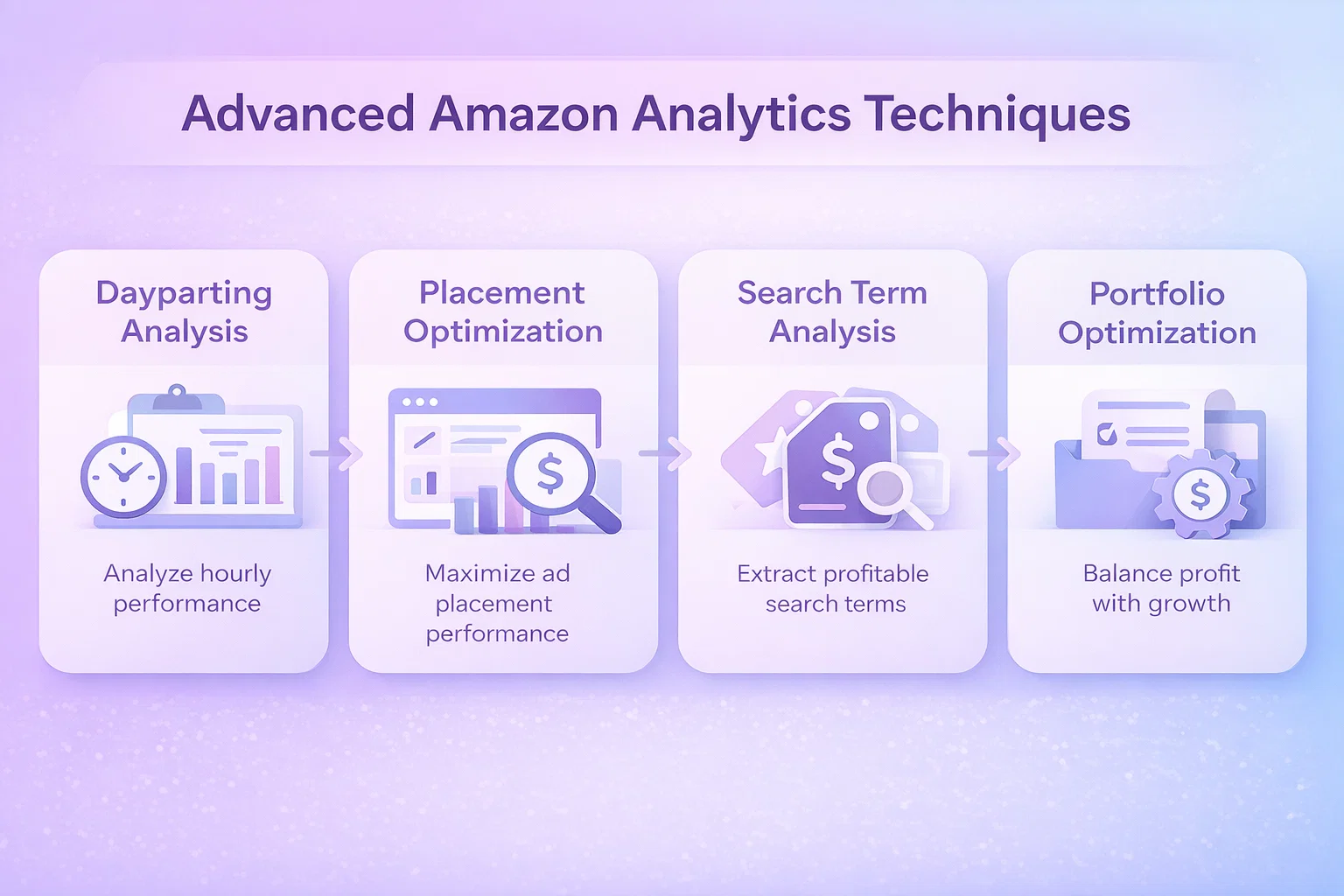
Dayparting for ACOS Control

Performance varies by time of day:

Analysis Approach:

  1. Pull placement/time reports
  2. Calculate ACOS by hour
  3. Identify patterns (often: business hours = competitive = higher ACOS)

Common Patterns:

  • Early morning (5-8 AM): Lower competition, sometimes better ACOS
  • Business hours (9 AM-5 PM): Peak competition, often higher ACOS
  • Evening (7-10 PM): High intent, variable ACOS
  • Late night (11 PM-4 AM): Low volume, unpredictable ACOS

Dayparting Strategy: Reduce bids 20-30% during consistently high-ACOS hours. Increase during efficient hours. This is advanced optimization—ensure you have sufficient data before implementing.


Strategy 5: Conversion Rate Optimization

ACOS depends on conversion rate. Improve CVR, and the same bids produce better ACOS.

The CVR-ACOS Relationship

Double your conversion rate, halve your ACOS (assuming constant CPC).

Before: 5% CVR, $1 CPC, $40 product ACOS = $1 / (0.05 × $40) = 50%

After: 10% CVR, $1 CPC, $40 product
ACOS = $1 / (0.10 × $40) = 25%

Conversion optimization is ACOS optimization.

Listing Quality Impact on ACOS

Before adjusting bids on high-ACOS keywords, audit your listing:

Images:

  • Main image drives CTR
  • Lifestyle images drive conversion
  • Infographics communicate value
  • Video increases engagemen

Test: Pause a high-ACOS keyword, improve listing, relaunch. Often ACOS improves without bid changes.

Pricing:

  • Check competitor pricing
  • Consider promotional pricing for new products
  • Bundle strategy for value perception

Reviews:

  • Products with <10 reviews struggle to convert
  • Consider Vine program for new launches
  • Address negative feedback patterns

Content:

  • Bullet points should answer customer questions
  • A+ Content increases conversion 5-15%
  • Brand Story builds trust

Inventory and Fulfillment Impact

Out-of-stock products waste ad spend. Slow shipping reduces conversion.

Inventory-Based Rules:

  • < 30 days inventory: Reduce bids 40%
  • Out of stock: Pause campaigns immediately
  • Overstock: Increase bids to drive velocity

WisePPC’s inventory integration automates this, preventing ACOS damage from fulfillment issues.


Strategy 6: Product-Level ACOS Management

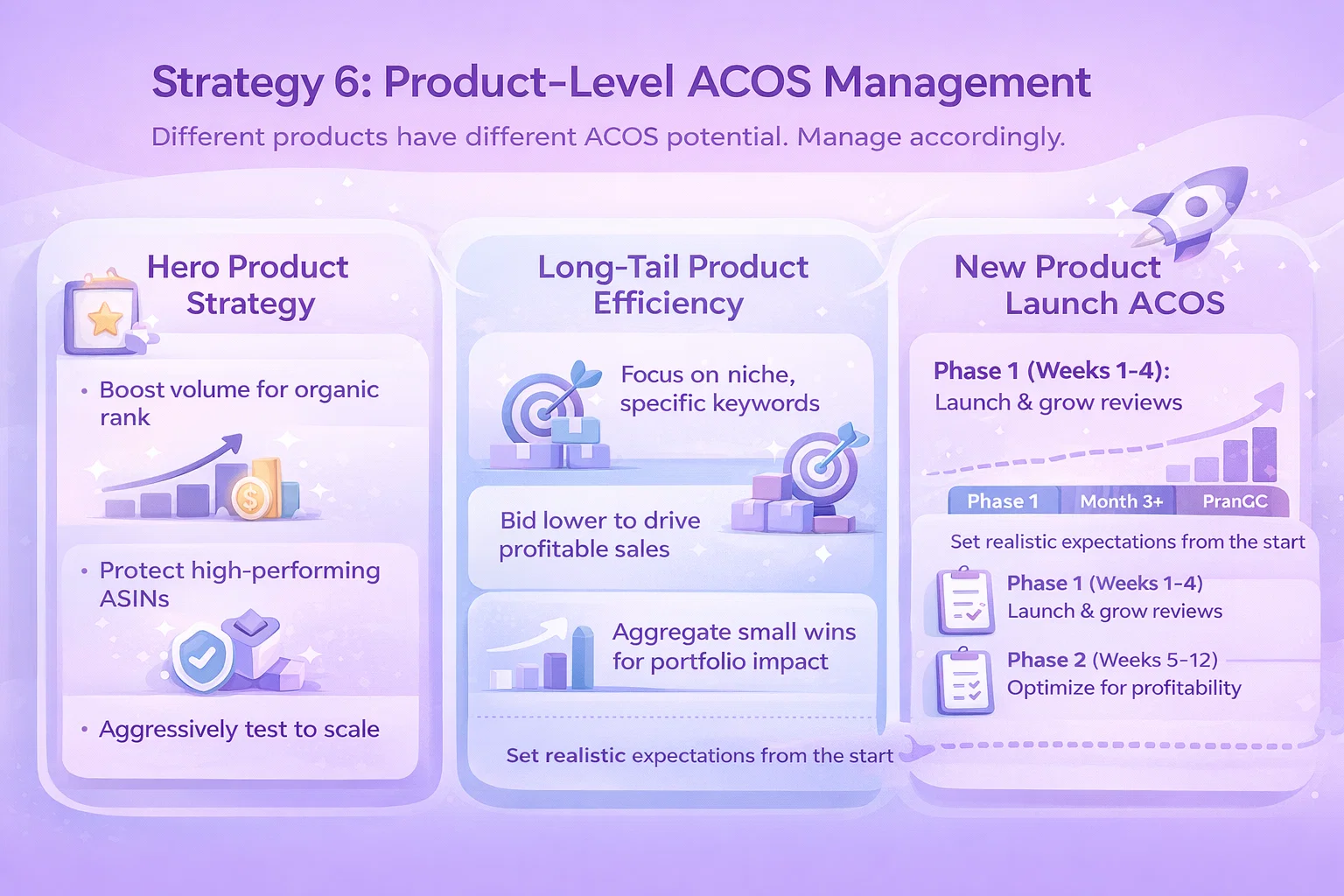
Different products have different ACOS potential. Manage accordingly.

Hero Product Strategy

Your top sellers deserve special treatment:

  • Accept higher ACOS for volume leaders (builds organic rank)
  • Protect ASINs with proven performance
  • Test aggressively to find scaling opportunities

ACOS on hero products is an investment in organic visibility, not just direct profit.

Long-Tail Product Efficiency

Low-volume products often achieve better ACOS with less competition:

  • Target specific, long-tail keywords
  • Lower bids sufficient for niche terms
  • Aggregate many small wins for portfolio impact

New Product Launch ACOS

New products start with zero reviews and no organic rank. Expect high ACOS initially:

Phase 1 (Weeks 1-4): Launch and review generation

  • Target ACOS: Break-even or slightly above
  • Goal: Sales velocity and initial reviews
  • Aggressive bidding to generate data

Phase 2 (Weeks 5-12): Optimization

  • Target ACOS: Gradual reduction to profitable level
  • Prune poor performers, scale winners
  • Build toward target ACOS

Phase 3 (Month 3+): Profitability

  • Target ACOS: Margin-appropriate level
  • Maintain with ongoing optimization
  • Scale volume within ACOS constraints

Don’t kill new products in Phase 1. Set appropriate expectations and timelines.


Measuring and Reporting ACOS Progress

The ACOS Dashboard

Track these metrics weekly:

Overall ACOS: Portfolio aggregate ACOS by Product Category: Identify problem areas ACOS by Campaign Type: SP vs. SB vs. SD performance ACOS Trend: 7-day, 30-day, 90-day moving averages ACOS vs. Target: Gap analysis by segment

Granular Reporting with WisePPC

WisePPC enables multi-dimensional ACOS analysis impossible in native Amazon:

Cross-Dimension Analysis:

  • ACOS by keyword × placement
  • ACOS by time × campaign type
  • ACOS by product × match type

Historical Tracking:

  • ACOS trends over any time period
  • Impact of specific optimization actions
  • Seasonal ACOS patterns

Automated Alerts:

  • ACOS spikes above threshold
  • Keywords exceeding spend without conversion
  • Campaigns deviating from target

This granularity reveals ACOS drivers invisible in aggregated reporting.


Common ACOS Mistakes to Avoid

Mistake 1: Chasing Low ACOS at All Costs

A 5% ACOS sounds great. But if it’s on $100/month spend, who cares? Volume matters. Sometimes 25% ACOS on $10,000/month generates more profit than 10% on $1,000.

Rule: Optimize for profit, not ACOS percentage.

Mistake 2: Ignoring Customer Lifetime Value

First-order ACOS ignores repeat purchases. A 50% ACOS on a customer who buys 3 more times at 0% ACOS (organic) is actually excellent.

Solution: Track blended ACOS including organic attribution for repeat customers.

Mistake 3: Comparing ACOS Across Categories

Beauty products average 30% ACOS. Electronics might average 15%. Comparing them is meaningless.

Solution: Benchmark against category competitors, not arbitrary targets.

Mistake 4: Overreacting to Short-Term Fluctuation

ACOS varies day-to-day. Panic adjustments based on 3-day data create volatility.

Solution: Make decisions on 14+ day windows minimum. 30-day preferred.

Mistake 5: Neglecting Organic Impact

Advertising drives organic rank. A 35% ACOS campaign might be profitable indirectly through improved organic visibility.

Solution: Measure total sales (organic + paid), not just ACOS.


Advanced ACOS Optimization

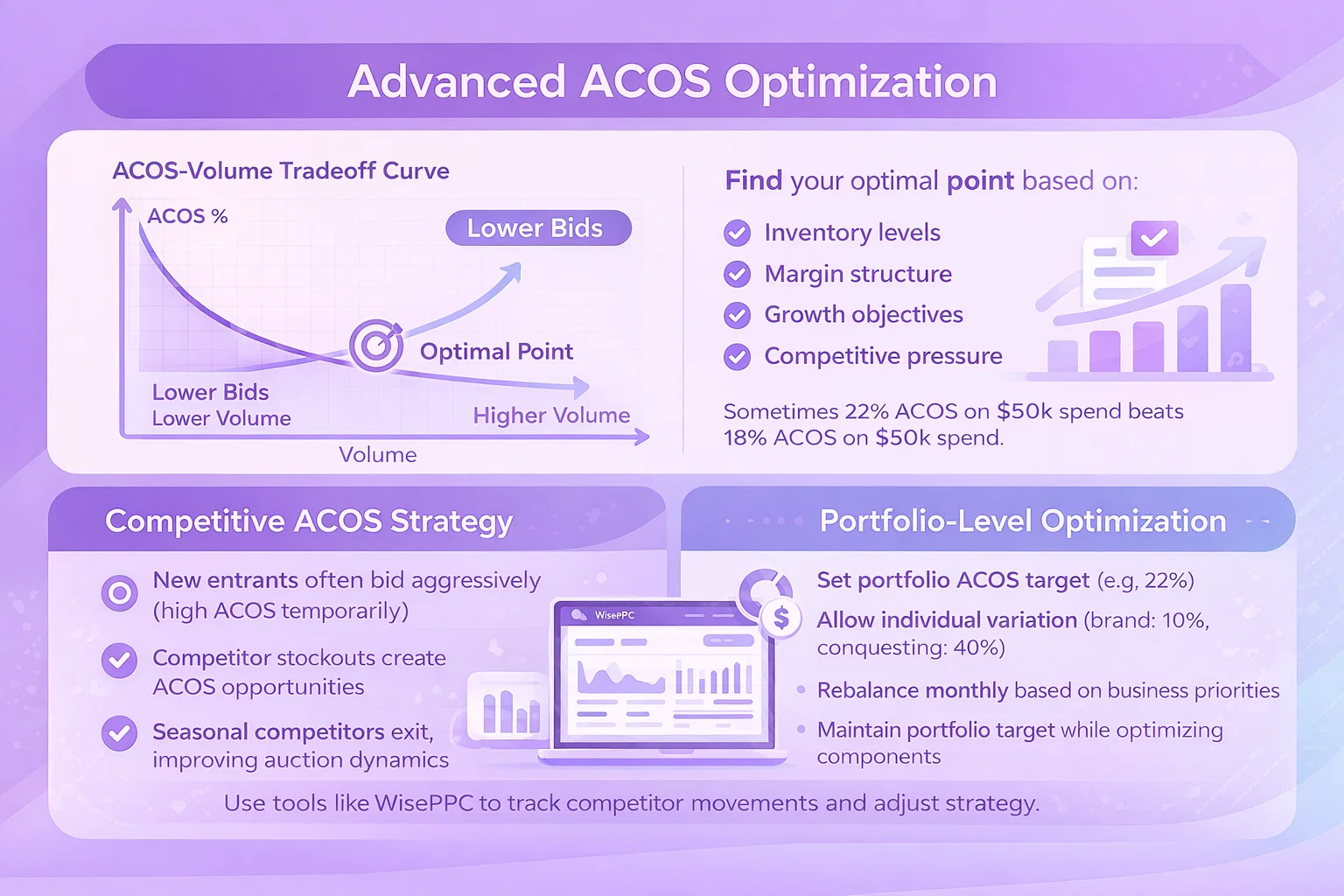
The ACOS-Volume Tradeoff Curve

There’s a relationship between ACOS and volume:

  • Lower bids → Lower ACOS, Lower Volume
  • Higher bids → Higher ACOS, Higher Volume

Find your optimal point based on:

  • Inventory levels
  • Margin structure
  • Growth objectives
  • Competitive pressure

Sometimes 22% ACOS on $50k spend beats 18% ACOS on $30k spend.

Competitive ACOS Strategy

Monitor competitor actions:

  • New entrants often bid aggressively (high ACOS temporarily)
  • Competitor stockouts create ACOS opportunities
  • Seasonal competitors exit, improving auction dynamics

Use tools like WisePPC to track competitor movements and adjust strategy.

Portfolio-Level Optimization

Advanced advertisers optimize across portfolio, not individual campaigns:

  • Set portfolio ACOS target (e.g., 22%)
  • Allow individual variation (brand: 10%, conquesting: 40%)
  • Rebalance monthly based on business priorities
  • Maintain portfolio target while optimizing components


Conclusion

Reducing ACOS isn’t about slashing bids and praying. It’s systematic diagnosis, surgical optimization, and strategic tradeoffs between efficiency and growth.

The advertisers who master ACOS don’t just follow generic best practices. They understand their specific situation: margin structure, product lifecycle, competitive dynamics, and business objectives. They segment intelligently. They measure granularly. They optimize continuously.

Start with diagnosis—understand why your ACOS is where it is. Apply the strategies in order: bid management for quick wins, keyword precision for targeting efficiency, structure for long-term control, and conversion optimization for fundamental improvement.

Track progress weekly. Celebrate improvements. Learn from setbacks. ACOS optimization is a journey, not a destination.

Your path to profitable Amazon advertising starts with the first systematic adjustment. Make it today.


Quick Reference: ACOS Optimization Checklist

Weekly Tasks:

  • Review keywords with >$20 spend, 0 orders → Add negatives
  • Adjust bids on 1.5×+ ACOS keywords
  • Check search term reports for irrelevant traffic
  • Review placement performance, adjust modifiers

Monthly Tasks:

  • Audit campaign structure for efficiency
  • Analyze ACOS by product category
  • Test new keywords with conservative bids
  • Review and update negative keyword lists

Quarterly Tasks:

  • Restructure underperforming campaigns
  • Audit listing quality for high-ACOS products
  • Reassess ACOS targets by product margin
  • Competitive landscape analysis


Ready to take control of your ACOS? Try WisePPC for advanced analytics and optimization tools designed for serious Amazon advertisers.

The Complete Guide to Amazon PPC Bulk Campaign Management

Introduction

If you’re managing more than a handful of Amazon PPC campaigns, you’ve felt the pain. Opening campaign after campaign. Clicking through endless tabs. Making the same bid adjustment fifty times. Copy-pasting keywords between ad groups. Watching precious hours evaporate while your competition moves faster.

The median Amazon advertiser manages 12-15 campaigns per account. Power sellers and agencies often juggle 100+. At that scale, manual management isn’t just inefficient—it’s impossible. You can’t optimize what you can’t touch, and most of your campaigns sit in “set it and forget it” purgatory, slowly bleeding budget on underperformers while winners starve for attention.

Bulk campaign management changes the equation. Instead of one-by-one edits, you operate on dozens, hundreds, or thousands of entities simultaneously. A 30-minute optimization session suddenly accomplishes what used to take entire days. More importantly, you can actually maintain optimized campaigns rather than letting them decay between sporadic check-ins.

This guide covers everything you need to master Amazon PPC bulk operations: from native Amazon tools to advanced third-party solutions, practical workflows to avoid common pitfalls, and strategies to scale your advertising without scaling your workload.


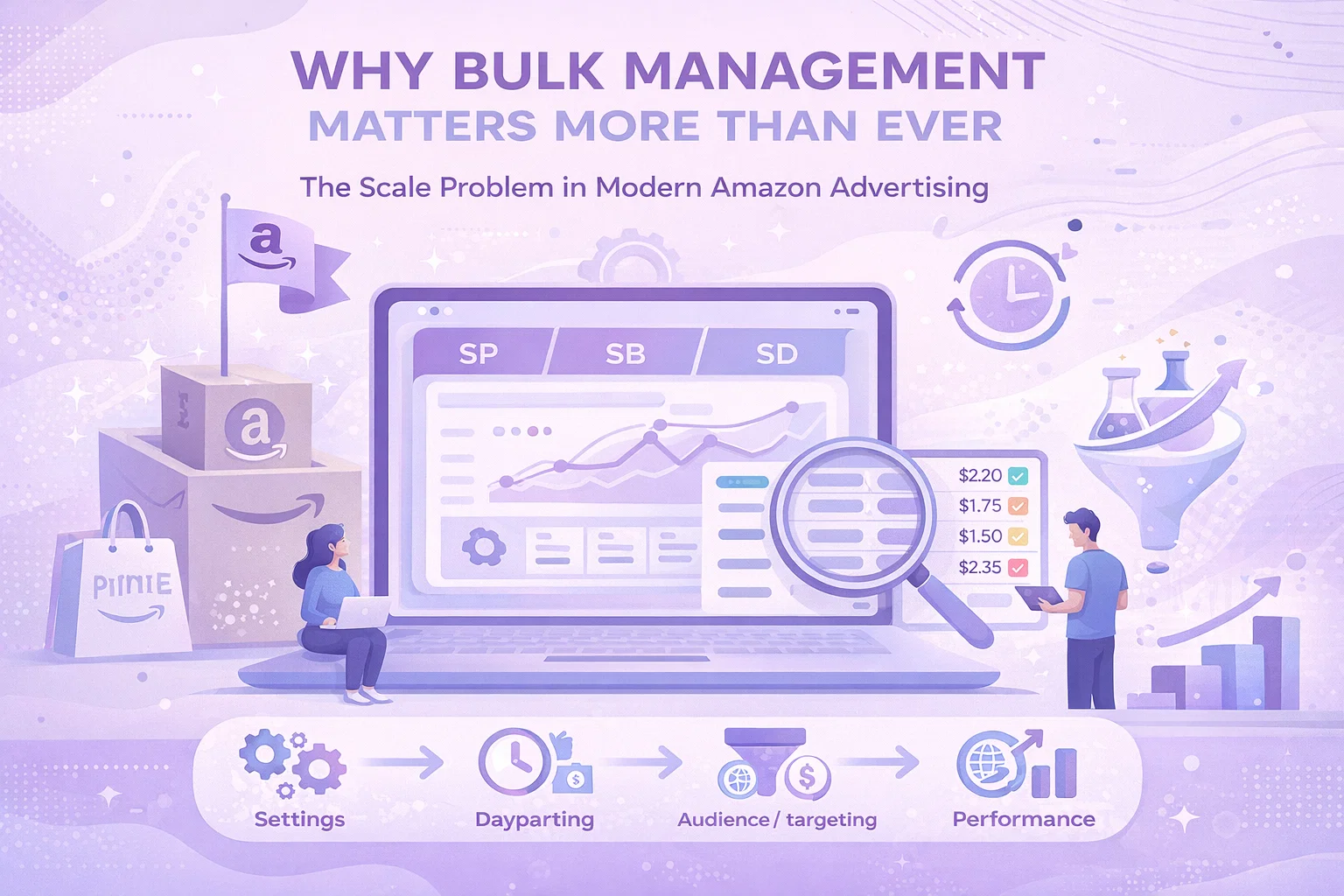
Why Bulk Management Matters More Than Ever

The Scale Problem in Modern Amazon Advertising

Amazon’s advertising platform has evolved dramatically. What started as a simple keyword bidding system has expanded into a complex ecosystem:

  • Sponsored Products with automatic and manual targeting
  • Sponsored Brands with video, store spotlight, and custom image formats
  • Sponsored Display with audience and product targeting
  • Demand-Side Platform (DSP) for programmatic display
  • Multiple match types (exact, phrase, broad, negative)
  • Placement modifiers for top of search and product pages
  • Dayparting and schedule-based bid adjustments
  • Portfolio-level budgeting and bidding strategies

Each of these dimensions multiplies your management surface area. A single SKU might have campaigns across three ad types, twenty keywords across three match types, placement adjustments, and negative keyword lists. Multiply by your catalog size, and you’re looking at thousands of individual settings requiring ongoing optimization.

The Hidden Cost of Manual Management

Let’s quantify the problem. A typical optimization workflow for a single campaign includes:

  1. Review performance metrics (30 seconds)
  2. Identify underperforming keywords (1 minute)
  3. Adjust bids or pause keywords (30 seconds)
  4. Add negative keywords (1 minute)
  5. Update campaign settings if needed (30 seconds)

That’s roughly 4 minutes per campaign. For 50 campaigns, you’re at 3+ hours for a single optimization pass. And that’s assuming you don’t get distracted, make errors, or need to navigate between multiple browser tabs and reports.

Most advertisers give up. They optimize their top 10-20 campaigns and ignore the rest. The result? Suboptimal performance across 60-80% of ad spend. It’s like leaving money on the table because picking it up takes too long.

What Bulk Management Enables

Bulk operations flip this dynamic entirely:

Speed: Complete optimization workflows in minutes, not hours. Apply changes across your entire account simultaneously.

Consistency: Apply the same optimization logic everywhere. No campaigns fall through the cracks because you ran out of time.

Testing: Run systematic experiments across campaign groups. Test bid strategies, targeting approaches, or ad creative at scale.

Responsiveness: React quickly to market changes. When competitors launch, budgets shift, or seasons change, update everything in one action.

Strategic Focus: Spend less time on mechanical edits and more time on strategic decisions—budget allocation, new opportunities, competitive positioning.


Understanding Amazon’s Native Bulk Tools

Amazon provides several built-in options for bulk management, each with different capabilities and limitations.

Bulk Operations in Campaign Manager

The simplest bulk option lives inside the standard Campaign Manager interface. Amazon allows basic multi-select operations:

Campaign-Level Actions:

  • Enable/pause multiple campaigns
  • Adjust daily budgets
  • Modify end dates
  • Change campaign names

Ad Group Actions:

  • Adjust default bids for multiple ad groups
  • Enable/pause ad groups

Keyword/Target Actions:

  • Adjust bids for selected keywords
  • Enable/pause keywords
  • Add negative keywords

These operations work through checkboxes and bulk action dropdowns. They’re accessible, require no technical knowledge, and handle the most common use cases.

Limitations:

  • Limited to visible items per page (typically 50-100)
  • No advanced filtering or segmentation
  • Cannot bulk edit keyword text or match types
  • No formula-based bid adjustments
  • Cannot export data for offline work

Best for: Simple status changes, budget adjustments, and basic bid tweaks on small-to-medium accounts.

Bulk Files (Spreadsheet Uploads)

For more complex operations, Amazon offers bulk file uploads through the Campaign Manager:

  1. Download a bulk file template for your account
  2. Edit the spreadsheet with your changes
  3. Upload the modified file back to Amazon
  4. Review and apply changes

Bulk files support virtually all campaign entities: campaigns, ad groups, keywords, product targets, negative keywords, and campaign settings. You can create new entities, modify existing ones, or delete items by marking them for removal.

Capabilities:

  • Full entity lifecycle management
  • Advanced formulas and calculations in Excel/Google Sheets
  • Offline editing and review
  • Template-based consistency

Limitations:

  • Steep learning curve for file format
  • Error-prone (formatting issues, missing required fields)
  • Slow feedback loop (download → edit → upload → review → fix errors)
  • Limited to ~10,000 rows per file
  • Cannot retrieve historical performance data

Best for: Major account restructuring, seasonal campaign builds, or advertisers comfortable with spreadsheet workflows.

Amazon Advertising API

For maximum flexibility, the Amazon Advertising API provides programmatic access to campaign management:

Capabilities:

  • Unlimited scale (only API rate limits apply)
  • Automated workflows and scheduling
  • Integration with business intelligence tools
  • Custom optimization algorithms
  • Real-time bid adjustments

Requirements:

  • Developer resources or third-party tools
  • API credentials and authentication
  • Understanding of API structure and limits
  • Error handling and retry logic

Best for: Large advertisers, agencies managing multiple accounts, or those wanting fully automated optimization.


Essential Bulk Management Workflows

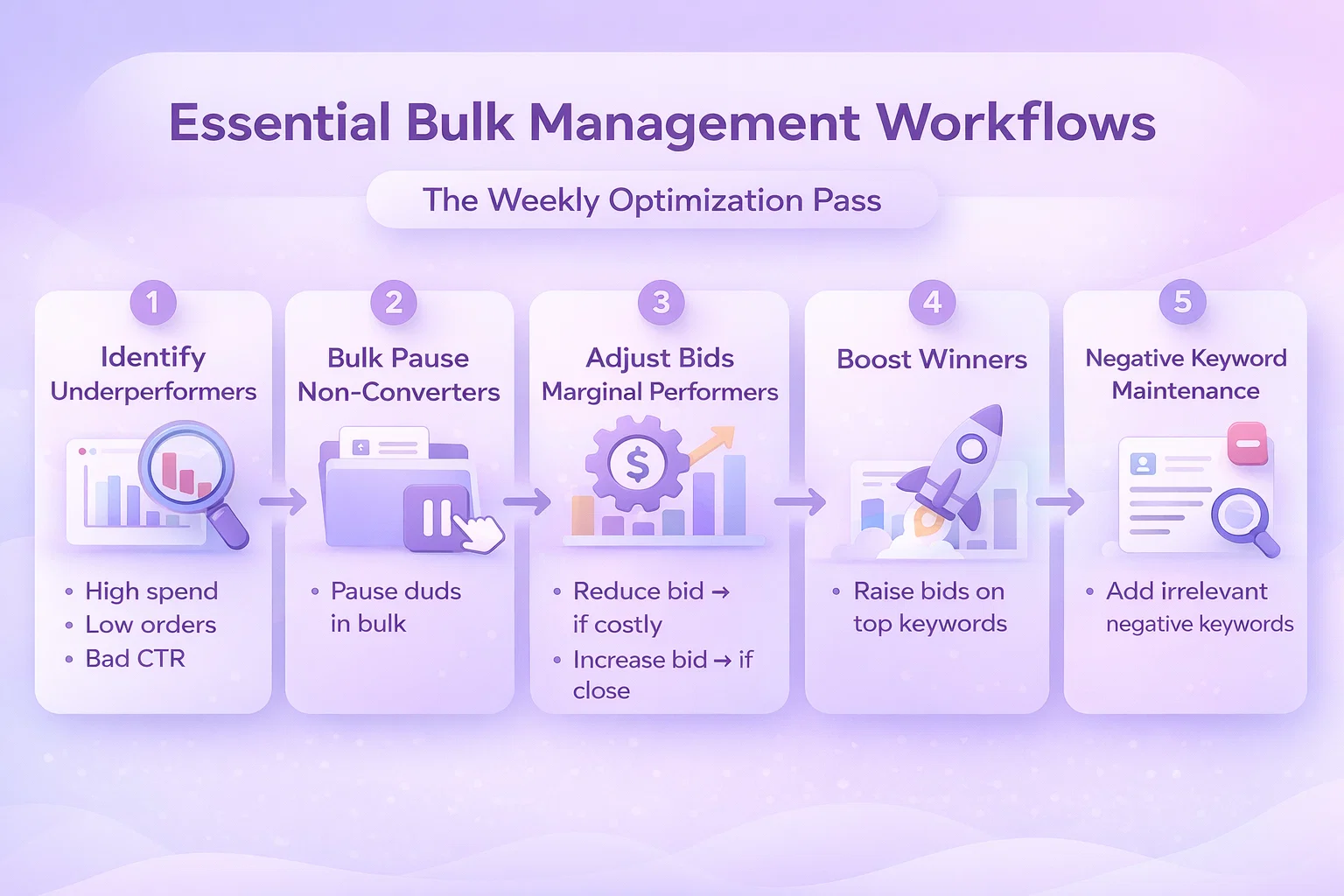
Workflow 1: The Weekly Optimization Pass

Most accounts need regular optimization to maintain performance. Here’s a bulk workflow that handles 90% of routine maintenance:

Step 1: Identify Underperformers

Pull a keyword/target report for the last 30 days. Filter for:

  • Spend > $20 (statistically significant)
  • Orders = 0 (no conversions)
  • Click-through rate < 0.3% (poor relevance)

Step 2: Bulk Pause Non-Converters

Export the underperformer list. Use bulk operations to pause keywords meeting your criteria. With a tool like WisePPC, this takes one filter and a click. In native Amazon, you’ll need bulk files or manual selection.

Step 3: Adjust Bids on Marginal Performers

Filter for keywords with ACOS near your target (within 10%). These are close to profitable but need bid refinement. Apply a percentage-based bid adjustment:

  • ACOS 10% above target → reduce bid 15%
  • ACOS 10% below target → increase bid 10%

Step 4: Boost Winners

Identify top performers (low ACOS, high conversion rate). Increase bids 20-30% to capture more volume. Add these keywords to your “monitor closely” list for next week.

Step 5: Negative Keyword Maintenance

Review search term reports. Identify irrelevant queries driving clicks without conversions. Add these as negative keywords across relevant campaigns.

Time Investment: 30-45 minutes weekly with bulk tools vs. 4-6 hours manually.

Workflow 2: Seasonal Campaign Scaling

Prime Day, Black Friday, Q4—seasonal events require rapid campaign adjustments:

Pre-Event (2 Weeks Before)

  1. Duplicate top-performing campaigns with “Seasonal” naming
  2. Increase budgets 50-100% on seasonal campaigns
  3. Raise bids 20% on high-converting keywords
  4. Add seasonal negative keywords (outdated terms, last year’s models)

During Event (Daily)

  1. Monitor spend pacing—bulk adjust budgets if hitting caps
  2. Pause underperforming seasonal keywords quickly
  3. Shift budget to highest-converting campaigns in real-time

Post-Event (1 Week After)

  1. Bulk reduce bids to pre-event levels
  2. Pause seasonal-specific campaigns
  3. Transfer winning keywords from seasonal campaigns to evergreen ones
  4. Document learnings for next year

Bulk operations make this manageable. Without them, seasonal events become chaos.

Workflow 3: Account Restructuring

As accounts mature, structure often needs overhaul:

The Single Keyword Ad Group (SKAG) Migration

Many advertisers move from multi-keyword ad groups to SKAGs for better control and Quality Score optimization:

  1. Export all keywords from existing campaigns
  2. Create new campaign structure with one keyword per ad group
  3. Generate ad copy variations for each keyword
  4. Set initial bids based on historical performance
  5. Bulk upload new structure
  6. Run parallel for 2 weeks, then pause old campaigns

This would be impossible without bulk tools—thousands of individual ad group and ad creations.

The Portfolio Consolidation

When merging multiple seller accounts or brands:

  1. Export all campaigns from source accounts
  2. Modify campaign names for brand identification
  3. Adjust budgets for combined portfolio strategy
  4. Bulk upload to destination account
  5. Implement shared negative keyword lists
  6. Set up portfolio-level rules and automation


Advanced Bulk Strategies

Dynamic Bid Adjustments

Static bid management wastes money. These bulk strategies respond to performance signals:

Dayparting at Scale

Analyze performance by hour of day. Create bulk rules:

  • Increase bids 15% during high-converting hours (9 AM – 12 PM, 7 PM – 10 PM)
  • Decrease bids 20% during low-converting hours (12 AM – 6 AM)
  • Apply across all campaigns with single bulk operation

Position-Based Bidding

Some keywords perform best in specific ad positions:

  • Brand defense: Maintain top of search position 1
  • Category keywords: Target top of search position 2-3 for efficiency
  • Long-tail keywords: Accept lower positions for profitability

Bulk adjust bids based on placement reports to hit position targets without overspending.

Inventory-Aware Bidding

Connect ad spend to inventory levels:

  • Low stock (< 30 days): Reduce bids 40% to slow velocity
  • Well-stocked: Maintain normal bids
  • Overstock: Increase bids 25% to drive movement
  • Out of stock: Pause campaigns immediately

WisePPC’s inventory integration automates this, but you can approximate with weekly bulk updates based on inventory reports.

Bulk Negative Keyword Management

Negative keywords are as important as positive ones. Systematic bulk approaches:

The Universal Negative List

Maintain account-wide negative keywords applying to all campaigns:

  • Job seekers: “careers”, “jobs”, “employment”, “hiring”
  • Free seekers: “free”, “giveaway”, “sample”, “trial”
  • DIY types: “diy”, “homemade”, “how to make”, “build your own”
  • Information seekers: “wikipedia”, “what is”, “vs”, “compare”

Bulk apply these to new campaigns automatically.

Search Term Mining

Weekly bulk workflow:

  1. Download search term report
  2. Filter for terms with > $15 spend, 0 orders
  3. Copy to negative keyword list
  4. Bulk upload to relevant campaigns

Competitor Exclusions

For brand campaigns, bulk exclude competitor ASINs that consistently drive clicks without conversion from your product targeting.


Common Bulk Management Pitfalls

Pitfall 1: The Overcorrection

Bulk tools make big changes easy—sometimes too easy. Common mistakes:

  • Bid changes too aggressive: Dropping bids 50% instead of 15% kills volume
  • Pausing too broadly: Filtering error pauses winners along with losers
  • Budget reductions: Slashing budgets during low periods hurts algorithm learning

Prevention: Always preview changes. Start conservative. Implement in phases (25% of campaigns first, then expand).

Pitfall 2: Lost in Translation

Bulk file uploads fail constantly due to:

  • Incorrect column headers
  • Date format mismatches (MM/DD/YYYY vs. DD/MM/YYYY)
  • Encoding issues with special characters
  • Required field omissions
  • Campaign ID mismatches

Prevention: Use validation tools. Keep backup files. Test with small batches first. Document your exact file format that works.

Pitfall 3: Blind Automation

Automated bulk rules without oversight cause disasters:

  • Bid algorithms bid against each other
  • Seasonal trends ignored (low winter ACOS triggers bid reductions for summer products)
  • New products starved because they lack conversion history
  • Competitor actions not accounted for

Prevention: Set guardrails (max bid changes, minimum data thresholds). Review automated actions weekly. Maintain manual override capability.

Pitfall 4: Structural Debt

Bulk operations on poorly structured accounts amplify problems:

  • Duplicating broken campaign structures
  • Copying ineffective keyword sets
  • Scaling unoptimized targeting

Prevention: Fix structure before scaling. Audit campaigns quarterly. Archive rather than pause old campaigns to prevent confusion.


Tools for Bulk Management

Option 1: Native Amazon (Free, Limited)

Best for advertisers with:

  • Simple account structures
  • Budget constraints
  • Patience for manual processes
  • Tolerance for slower workflows

Cost: Free Best Feature: No additional learning curve Limitation: Time investment scales linearly with account size

Option 2: WisePPC (Advanced Bulk Operations)

WisePPC was built specifically for the scale problem in Amazon advertising:

Bulk Campaign Management:

  • Edit thousands of campaigns simultaneously
  • Advanced filtering (performance, structure, status)
  • Formula-based bid adjustments
  • Bulk copy/paste between campaigns
  • One-click status changes

Advanced Features:

  • Historical charts for any metric combination
  • Multi-dimensional analysis (see keyword × placement × time performance)
  • Inventory-aware automation
  • Portfolio-level reporting

Workflow Acceleration:

  • What takes 4 hours in native Amazon takes 20 minutes in WisePPC
  • Weekly optimization passes complete in one session
  • Seasonal scaling happens in real-time

Cost: Subscription-based (see wiseppc.com/pricing) Best For: Serious sellers, agencies, anyone managing 10+ campaigns Unique Advantage: Built by Amazon advertisers who experienced the pain firsthand

Option 3: Custom API Solutions

For enterprises with development resources:

Advantages:

  • Fully customized workflows
  • Integration with internal systems
  • Proprietary optimization algorithms

Disadvantages:

  • High development cost
  • Ongoing maintenance burden
  • API dependency and change management


Building Your Bulk Management System

Step 1: Audit Current State

Document your current workflow:

  • How many campaigns/ad groups/keywords do you manage?
  • How long does weekly optimization take?
  • Which tasks consume most time?
  • Where do errors typically occur?

Step 2: Prioritize Workflows

Identify highest-impact bulk operations:

  • Weekly optimization (immediate time savings)
  • Seasonal scaling (event readiness)
  • New product launches (growth enablement)
  • Account restructuring (long-term efficiency)

Step 3: Select Your Tool Stack

Match tools to needs:

  • Simple accounts: Native Amazon bulk operations
  • Growing accounts: WisePPC for efficiency
  • Enterprise: Custom API solutions or WisePPC with advanced integrations

Step 4: Build SOPs

Create standard operating procedures:

  • Weekly optimization checklist
  • Seasonal campaign templates
  • Negative keyword rules
  • Bid adjustment formulas

Step 5: Train and Document

Ensure team consistency:

  • Document exact processes
  • Create video walkthroughs
  • Maintain change logs
  • Establish review checkpoints


Measuring Bulk Management ROI

Time Savings

Track before and after:

  • Weekly optimization time
  • Seasonal preparation time
  • New campaign setup time
  • Error correction time

Typical improvement: 70-90% time reduction on mechanical tasks.

Performance Impact

Monitor account health:

  • Percentage of campaigns optimized weekly (target: 100%)
  • Time to market for new products
  • Response speed to performance changes
  • Optimization consistency across portfolio

Error Reduction

Count mistakes:

  • Accidental campaign pauses
  • Incorrect bid changes
  • Missing negative keywords
  • Duplicate targeting

Bulk tools with preview and validation reduce errors 60-80%.


Conclusion

Bulk campaign management isn’t a luxury for large advertisers—it’s a necessity for anyone serious about Amazon PPC performance. The platform’s complexity has outpaced manual management capabilities. Without bulk operations, you’re optimizing a fraction of your account while the majority runs on autopilot.

The question isn’t whether to adopt bulk management, but how quickly you can implement it. Every week of delay means wasted spend on underperformers, missed opportunities on winners, and competitive disadvantage against more agile advertisers.

Start with your highest-volume workflow. Build systematic approaches. Leverage tools like WisePPC designed for scale. Transform Amazon PPC from a time-consuming chore into a strategic competitive advantage.

Your campaigns—and your sanity—will thank you.


FAQ

Q: Can I use bulk operations without technical skills?

A: Yes. Tools like WisePPC provide intuitive interfaces for complex bulk actions. Native Amazon bulk files require more learning but are manageable with practice.

Q: What’s the risk of making bulk mistakes?

A: Significant, but manageable. Always preview changes. Start with small batches. Maintain backups. Most bulk tools have undo capabilities.

Q: How often should I run bulk optimizations?

A: Weekly for active accounts. High-spend campaigns may need daily monitoring. Seasonal periods require more frequent adjustments.

Q: Can bulk management hurt campaign performance?

A: Poorly executed bulk changes can. Well-planned bulk optimizations improve performance by ensuring consistent application of best practices across your entire account.

Q: Is WisePPC’s bulk management better than native Amazon?

A: For accounts with 10+ campaigns, typically yes. WisePPC offers faster workflows, better visualization, historical analysis, and automation that native tools lack.

Ready to transform your Amazon PPC workflow? Get started with WisePPC and complete your weekly optimization in minutes, not hours.

Amazon Analytics for Sellers: The Complete Guide to PPC Data, Reporting & Dashboards

Understanding your Amazon data isn’t just about knowing your sales numbers—it’s about uncovering the insights that drive profitable advertising decisions. With Amazon’s advertising ecosystem becoming increasingly complex, sellers who master analytics gain a significant competitive advantage.

This comprehensive guide breaks down everything you need to know about Amazon analytics, from essential metrics to advanced reporting techniques that can transform your PPC performance.


Why Amazon Analytics Matter More Than Ever

Amazon’s advertising platform has evolved dramatically over the past few years. What started as a simple sponsored products system has expanded into a sophisticated ecosystem spanning Sponsored Products, Sponsored Brands, Sponsored Display, and DSP.

The challenge? More ad types mean more data points. More data points mean more opportunities to optimize—or more chances to get lost in the noise.

Consider these numbers:

  • The average Amazon seller manages 8-12 campaigns simultaneously
  • Top-performing sellers review their analytics at least 3 times per week
  • Sellers who use dedicated analytics tools see 23% lower ACoS on average

Without a systematic approach to Amazon analytics, you’re essentially flying blind while your competitors navigate with precision instruments.


Essential Amazon PPC Metrics Every Seller Must Track

Not all metrics are created equal. Here’s how to prioritize what actually matters for your bottom line.

1. Advertising Cost of Sale (ACoS)

ACoS remains the north star metric for Amazon PPC. Calculated as:

ACoS = (Ad Spend / Ad Revenue) × 100

Why it matters: ACoS tells you directly whether your advertising is profitable. A 25% ACoS on a product with 30% margins means you’re losing money on every advertising-driven sale.

Benchmark targets:

  • Launch phase: 50-70% ACoS (acceptable for ranking new products)
  • Growth phase: 25-35% ACoS (sustainable for established products)
  • Profit phase: 15-25% ACoS (optimized for margin protection)

2. Total Advertising Cost of Sale (TACoS)

TACoS expands your view beyond direct ad-attributed sales:

TACoS = (Ad Spend / Total Revenue) × 100

Why it matters: Amazon advertising creates halo effects. A customer might click your ad for Product A but end up buying Product B—or return later to purchase without clicking an ad. TACoS captures this broader impact.

Red flag: If your ACoS is stable but TACoS is climbing, your organic sales are declining while ad dependency grows.

3. Return on Ad Spend (ROAS)

ROAS is simply the inverse of ACoS, expressed as a ratio:

ROAS = Ad Revenue / Ad Spend

Why it matters: Some sellers find ROAS more intuitive. A 4:1 ROAS means every $1 in ad spend generates $4 in revenue—the equivalent of a 25% ACoS.

4. Conversion Rate (CVR)

CVR = (Orders / Clicks) × 100

Why it matters: CVR reveals whether your listing converts browsers into buyers. A high click-through rate with low conversion usually indicates listing issues—poor images, uncompetitive pricing, or weak bullet points.

Industry benchmarks:

  • Average Amazon PPC CVR: 10-15%
  • Strong performing listings: 20-30%+
  • Listing optimization needed: Below 8%

5. Cost Per Click (CPC)

CPC trends reveal competitive dynamics in your category:

Why it matters: Rising CPCs indicate increasing competition. If your CPC climbs 20% while conversion rates stay flat, you’ll need to either improve your listing or accept lower margins.

6. Click-Through Rate (CTR)

CTR = (Clicks / Impressions) × 100

Why it matters: CTR measures your ad’s relevance and appeal. Low CTR suggests your targeting is off—or your creative needs work.

Benchmarks by ad type:

  • Sponsored Products: 0.3-0.5%
  • Sponsored Brands: 0.2-0.4%
  • Sponsored Display: 0.1-0.3%


Building Your Amazon Analytics Dashboard

Raw data becomes actionable through visualization. Here’s how to structure a dashboard that drives decisions.

Tier 1: Daily Pulse Check (5 Minutes)

Your daily dashboard should answer: “Is everything running normally?”

Essential widgets:

  • Total ad spend vs. daily budget
  • Overall ACoS vs. target
  • Top 5 campaigns by spend
  • Any campaigns with zero impressions (indicating issues)

Tier 2: Weekly Performance Review (30 Minutes)

Dig deeper into trends and patterns:

Key sections:

  • Week-over-week ACoS and ROAS comparison
  • Search term report analysis (top spenders, negative keyword opportunities)
  • Placement performance (top of search vs. product pages vs. rest of search)
  • ASIN-level profitability

Tier 3: Monthly Strategic Analysis (2 Hours)

Monthly reviews focus on strategic adjustments:

Focus areas:

  • Category benchmark comparisons
  • Seasonal trend identification
  • Budget reallocation opportunities
  • New keyword expansion opportunities
  • Campaign structure optimization


Amazon Analytics Tools: Build vs. Buy

Sellers face a choice: piece together native Amazon reporting or invest in third-party tools. Here’s how to evaluate your options.

Native Amazon Tools (Free)

Campaign Manager:

  • Real-time spend and performance data
  • Basic search term reports
  • Placement modifiers
  • Dayparting controls

Amazon Attribution:

  • Track off-Amazon traffic impact
  • Understand full-funnel customer journeys
  • Available at no cost for brand registered sellers

Limitations:

  • Data retention limited to 60 days for detailed reports
  • No automated reporting or alerts
  • Time-consuming manual analysis
  • Difficult to compare historical trends

Third-Party Amazon Analytics Tools

Benefits of dedicated tools:

  • Historical data storage beyond Amazon’s limits
  • Automated alerts for performance changes
  • Cross-account/cross-marketplace views
  • Advanced visualization and reporting
  • Time savings through automation

What to look for in an analytics tool:

  1. Data freshness: Real-time or near real-time updates
  2. Customization: Ability to create custom metrics and dashboards
  3. Integration: Connects with other tools in your stack
  4. Alerting: Proactive notifications for unusual patterns
  5. Export capabilities: Easy data extraction for further analysis


Advanced Amazon Analytics Techniques

Once you’ve mastered the basics, these advanced techniques can unlock additional performance gains.

Dayparting Analysis

Amazon’s native dayparting has limitations, but understanding hourly performance patterns still matters.

How to analyze:

  1. Download placement reports with hourly data
  2. Map conversion rates and ACoS by hour of day
  3. Identify high-performing time windows
  4. Adjust bids accordingly

Most sellers find their optimal hours cluster around:

  • Morning browsing (7-9 AM)
  • Lunch break shopping (12-2 PM)
  • Evening prime time (7-10 PM)

Placement Performance Optimization

Not all placements convert equally. Amazon offers three placement types:

Top of Search (First Page):

  • Highest visibility and CTR
  • Premium CPCs
  • Often worth the premium for brand visibility

Product Pages:

  • Defensive placement (protecting your listings from competitors)
  • Often lower CPCs
  • Conversion rates vary significantly by product

Rest of Search:

  • Remaining placements throughout Amazon
  • Volume play with potentially lower efficiency

Search Term Analysis at Scale

The search term report is gold—but mining it manually takes forever.

Effective process:

  1. Aggregate search terms across 30-90 days
  2. Identify high-spend, low-converting terms for negative keyword additions
  3. Find converting search terms not explicitly targeted for keyword expansion
  4. Calculate search term-level profitability to optimize bids

Portfolio-Level Optimization

Sophisticated sellers think beyond individual campaigns to portfolio performance:

Portfolio approach:

  • Group campaigns by product category, margin structure, or strategic priority
  • Set portfolio-level ACoS targets that balance profitability with growth
  • Use portfolio budgets to shift spend toward highest-opportunity areas


Common Amazon Analytics Mistakes (And How to Avoid Them)

Mistake #1: Focusing Only on ACoS

The problem: ACoS obsession can stunt growth. A product with 40% ACoS might be unprofitable now but building ranking that delivers organic sales later.

The solution: Track TACoS alongside ACoS to understand the full picture. Accept higher ACoS during launch phases with clear plans to optimize downward.

Mistake #2: Ignoring Attribution Windows

The problem: Amazon’s default reporting shows same-click attribution, but the advertising console offers 7-day, 14-day, and 30-day views.

The solution: Analyze trends across attribution windows. If 30-day ACoS is significantly lower than 7-day, your ads are driving consideration that converts later.

Mistake #3: Overlooking Organic Impact

The problem: Advertising affects organic ranking. Killing an “unprofitable” campaign might crater your organic sales.

The solution: Measure organic sales velocity before, during, and after significant campaign changes. Use holdout tests when possible.

Mistake #4: Analysis Paralysis

The problem: Spending more time analyzing than acting. Perfect analysis with no optimization wastes opportunity.

The solution: Set clear thresholds for action. If a keyword has spent 2x your target ACoS without conversion after 1,000 impressions, pause or negative it. Don’t overthink.


Amazon Analytics Checklist for Sellers

Use this checklist to audit your current analytics approach:

  • I review my Amazon advertising dashboard at least twice weekly
  • I track ACoS, TACoS, and ROAS consistently
  • I analyze search term reports for negative keyword opportunities monthly
  • I understand my conversion rates by placement type
  • I have a documented process for bid optimization decisions
  • I retain historical performance data beyond Amazon’s 60-day limit
  • I benchmark my metrics against category standards
  • I analyze hourly performance patterns for dayparting opportunities
  • I track organic sales velocity alongside advertising metrics
  • I have automated alerts set up for performance anomalies


Conclusion: Data-Driven Amazon Success

Amazon analytics mastery separates thriving sellers from those struggling to compete. The sellers winning in 2025 aren’t guessing—they’re measuring, analyzing, and optimizing systematically.

Start with the fundamentals: understand your ACoS, TACoS, and conversion rates. Build a consistent reporting rhythm. Then layer in advanced techniques as your sophistication grows.

Remember: analytics exist to drive action. The best dashboard in the world delivers zero value if you don’t use it to make better decisions about your Amazon advertising.

Ready to take your Amazon analytics to the next level? WisePPC helps sellers track metrics, identify optimization opportunities, and automate reporting—all in one intuitive dashboard. Learn more about WisePPC’s analytics capabilities or start your free trial today.

Last updated: March 2026

Amazon PPC Automation vs Manual Management: Finding the Right Balance

If you spend enough time inside Amazon Ads, you eventually run into the same question: should campaigns be automated or managed manually? On paper, automation promises efficiency and scale. Manual management promises control and precision. In reality, most accounts struggle not because they chose the wrong approach, but because they leaned too far in one direction.

Amazon advertising has simply become too complex to handle entirely by hand, yet too connected to real business decisions to leave fully to algorithms. Bids, budgets, inventory pressure, launches, margins, brand positioning – none of these exist in isolation. Good performance usually comes from knowing when to let systems handle repetitive work and when to step in and make deliberate choices.

This article looks at both sides without trying to crown a winner. The goal is to understand what automation actually does well, where manual management still matters, and how experienced advertisers combine both without losing control of the account.


Why This Debate Exists In The First Place

The automation versus manual argument exists because Amazon PPC sits at the intersection of data and judgment. Some decisions are purely numerical. Others depend on context that software cannot fully understand.

Automation thrives on repetition. Bid adjustments, budget pacing, keyword harvesting, and performance monitoring all follow patterns that machines can execute faster and more consistently than humans. When campaigns scale into thousands of keywords, manual management alone becomes unrealistic.

At the same time, Amazon advertising is not just a math problem. Inventory levels change. Margins shift. Product launches require temporary inefficiency. Competitor behavior alters strategy overnight. These are business decisions, not optimization problems. Algorithms respond to metrics, not intent.

Most frustrations with automation come from expecting it to solve strategic problems. Most frustrations with manual management come from trying to handle operational volume without tools. The tension between the two approaches comes from misunderstanding their roles.


What Automation Actually Does Well

Automation works best when the task is frequent, rule-based, and does not require interpretation beyond predefined thresholds. In other words, when consistency matters more than creativity.


Bid Adjustments at Scale

Bid management is the most obvious example. Performance changes constantly across keywords and placements. A human cannot realistically monitor every change in real time, especially in large accounts. Automation can apply consistent logic around the clock, adjusting bids based on performance signals without fatigue or delay.

This is not about replacing judgment. It is about executing decisions faster once the rules are defined. A well-configured system follows the logic you set, not its own agenda.


Budget Pacing and Allocation

Manual budget management often creates inefficiency without anyone noticing. Strong campaigns run out of budget early while weaker campaigns continue spending. Automation can rebalance spend within defined limits, keeping total budgets intact while directing spend toward better performers.

The key detail here is guardrails. Automation works when limits are clear. Without them, it can optimize toward short-term metrics that do not reflect business goals.


Search Term Harvesting and Negatives

Moving converting search terms into structured campaigns and filtering out poor performers is repetitive work. It follows clear logic and happens continuously. Automation handles this well because the decision criteria rarely change. Humans still review results, but the sorting itself does not require daily attention.


Maintenance of Mature Campaigns

Once campaigns reach stability, most work becomes incremental. Small bid adjustments, minor budget shifts, and routine optimization dominate. This is maintenance, not strategy. Automation frees time that would otherwise be spent on low-impact tasks.

The common thread across these examples is simple. Automation excels when the question is “how often” rather than “why.”


Ad Impact and Revenue Attribution Control With WisePPC

At WisePPC, we see automation as support, not replacement. The goal is to make campaign management faster and clearer without taking decisions away from the people running the business. Amazon advertising moves quickly, and without reliable data it becomes easy to react instead of act with intention. Our approach focuses on giving teams visibility first, then automation second.

We built WisePPC around clear analytics and practical execution. Real-time performance tracking, advanced filtering, and long-term historical data help teams understand what is actually driving results across ads and sales. Instead of relying on assumptions, advertisers can see trends, compare performance over time, and make decisions based on context rather than short-term fluctuations.

Automation then handles the repetitive side of campaign management. Bulk updates, bid adjustments, and performance monitoring reduce manual workload while keeping control in human hands. The idea is simple – remove complexity where it slows teams down, so they can spend more time on strategy, growth, and the decisions that actually move the business forward.


Where Manual Management Still Matters

Despite improvements in automation tools, some areas remain firmly human-led. These are the places where context matters more than speed.


Campaign Architecture and Targeting Logic

How campaigns are structured determines everything that happens later. Product grouping, match type segmentation, branded versus non-branded separation, and competitor targeting approaches shape data quality and control.

Automation cannot design architecture. It can only operate within it. Poor structure leads to poor automation outcomes, no matter how advanced the tool.


Product Launches and Ranking Phases

Launch periods break most automated logic. Early campaigns often run inefficiently on purpose to build visibility and momentum. Automation typically interprets this as poor performance and reduces bids or spend, undermining the strategy.

Humans understand phases. A launch has different goals in week one than in week six. Automation does not recognize intent unless someone actively adjusts the rules.


Creative Direction and Messaging

Automation can test variations, measure click-through rates, and identify winners. It cannot decide what story a brand should tell or why a message resonates. Creative decisions depend on positioning, audience understanding, and brand consistency across channels.

The testing framework can be automated. The thinking behind what to test cannot.


Business-Level Decisions

Advertising performance rarely exists in isolation. Inventory shortages, cash flow considerations, pricing changes, or broader brand strategy all influence how aggressively ads should run. These decisions involve trade-offs beyond campaign metrics.

An algorithm sees performance data. A human sees the business behind it.


Amazon PPC Automation Vs Manual Management: Pros and Cons

Looking at automation and manual management side by side makes the trade-offs easier to understand. Neither approach is universally better. Each solves a different problem, and most successful accounts rely on both depending on the task and stage of growth.

Approach Pros Cons
Automation Handles large data volumes efficiently Can optimize for the wrong metric if rules are poorly set
Applies changes consistently without fatigue May react poorly to unusual situations like stockouts or launches
Saves time on repetitive tasks Requires ongoing supervision and rule adjustments
Faster reaction to performance changes Less awareness of business context or strategy
Scales easily across large catalogs Can reduce visibility into why changes happen
Manual Management Full control over bids, structure, and targeting Difficult to scale across large accounts
Easier to apply business context and judgment Slower reaction to performance shifts
Greater flexibility for testing and experimentation Time-intensive and operationally heavy
Better suited for launches and strategic phases Higher risk of inconsistency or missed signals
Deeper understanding of account behavior over time Can limit strategic work if too much time is spent on execution


The table makes one thing clear. Automation improves execution speed and consistency, while manual management improves decision quality. The balance comes from letting each do what it does best rather than forcing one approach to handle everything.


The Hybrid Approach Most Experienced Teams Use

The strongest Amazon advertisers rarely choose sides. Instead, they divide responsibilities.

Machines handle execution. Humans handle direction.

A practical way to think about this is in three layers:

  • Automate repetitive execution such as bid adjustments, harvesting, and budget pacing.
  • Supervise performance at the portfolio level to ensure automation aligns with business goals.
  • Own strategic decisions like launches, structure, and creative direction.

This structure reduces workload without removing accountability. Automation becomes an extension of strategy rather than a replacement for it.

The difference is subtle but important. Automation should follow strategy, not define it.


How to Decide What to Automate In Your Own Account

There is no universal setup because every account differs in scale, margins, and goals. Still, a simple exercise helps clarify decisions.

Start by listing recurring tasks performed weekly or monthly. Bid updates, search term analysis, campaign creation, reporting, budget allocation, creative testing. Then ask a straightforward question for each task: does this require judgment every time?

A practical way to work through this looks like this:

  1. List all recurring PPC tasks. Include everything your team touches regularly, from bid adjustments and keyword harvesting to reporting and campaign setup.
  2. Evaluate decision complexity. Ask whether the task follows clear rules or requires interpretation and business context.
  3. Assign ownership. Tasks that rarely need judgment belong in automation. Tasks that occasionally require intervention should be supervised. Tasks driven by strategy should remain human-led.
  4. Consider reaction speed. If performance improves when changes happen quickly and consistently, automation usually makes sense. If timing and context matter more, manual control is safer.
  5. Review outcomes regularly. Automation decisions are not permanent. Revisit them as campaigns scale, margins change, or business priorities shift.

This process shifts the conversation away from tools and toward ownership, which is usually where better decisions start.


Finding the Right Balance Over Time

Balance is not static. Accounts evolve.

Early-stage sellers often rely more on manual control while learning what drives performance. As catalogs grow and data becomes cleaner, automation gradually takes over repetitive tasks. During launches or strategic shifts, manual involvement increases again.

The balance moves with the business. What worked six months ago may not make sense today. Periodic reviews of automation rules and manual workflows prevent drift.

This is where many accounts quietly lose efficiency. Automation is set once and forgotten, or manual habits persist long after they stop adding value.


Conclusion

Amazon PPC automation versus manual management is not a competition with a clear winner. Both exist because Amazon advertising demands different types of decisions at different moments. Automation brings speed, consistency, and scale. Manual management brings judgment, context, and strategic intent.

Accounts struggle when one replaces the other entirely. They improve when responsibilities are clear. Let machines handle the repetitive work that drains time and attention. Keep humans focused on decisions that shape direction and risk.

In the end, the goal is not to automate more or manage more manually. It is to make sure every decision in the account is owned by the right layer. When that happens, automation stops feeling risky and manual work stops feeling overwhelming. The system simply works the way it should.


Frequently Asked Questions

Is Amazon PPC automation better than manual management?

Neither approach is universally better. Automation works well for repetitive, data-heavy tasks that require speed and consistency, while manual management is stronger when decisions involve strategy, launches, or business context. Most successful accounts use a combination of both rather than choosing one exclusively.

Can automation fully manage an Amazon PPC account?

In practice, no. Automation can handle execution such as bid adjustments or budget pacing, but it cannot understand inventory constraints, profit goals, or brand positioning. Human supervision is still necessary to ensure automated decisions align with overall business objectives.

When should campaigns be managed manually?

Manual management makes the most sense during product launches, major strategy shifts, creative testing, or when restructuring campaigns. These situations require judgment and flexibility that automation cannot reliably provide on its own.

Does automation always improve performance?

Not automatically. Automation improves efficiency when rules and goals are set correctly. Poorly configured automation can optimize toward the wrong metrics or react too aggressively to short-term changes, which may hurt long-term growth.

How often should automated rules be reviewed?

A light review once a month is usually enough to catch unexpected behavior, while a deeper review every quarter helps ensure thresholds and goals still match margins, competition, and business priorities.

How to Optimize Sponsored Products Campaigns Without Wasting Budget

Running Sponsored Products is easy. Running them profitably is not.

Most campaigns don’t fail because of bad products. They fail because no one is really steering them. Keywords pile up. Bids drift. Budgets get spread thin. And suddenly ACoS climbs without a clear reason.

Optimization is not about constant tinkering. It’s about knowing what to measure, what to cut, and what to scale. When you focus on the right signals, small adjustments can change the direction of an entire account. Let’s break down how to do it properly.


The Core Framework for Efficient Sponsored Products Optimization

Optimizing Sponsored Products is not about chasing every fluctuation in your dashboard. It is about building a system that makes smart decisions predictable.

Most wasted budget does not disappear in one dramatic mistake. It leaks through small gaps – broad keywords left unchecked, bids that were never revisited, budgets spread too thin across too many campaigns. Over time, those gaps compound.

The framework below focuses on control. Not hacks. Not shortcuts. Just the areas that consistently separate profitable accounts from unstable ones. If you work through these methodically, you stop reacting to performance and start steering it.


1. Define the Role of Each Campaign Before You Touch Anything

Before adjusting bids or pausing keywords, ask one simple question: what is this campaign meant to achieve?

Sponsored Products Can Serve Different Goals

  • Launching new products
  • Protecting branded traffic
  • Scaling top sellers
  • Clearing inventory
  • Improving organic ranking

Each goal justifies a different tolerance for ACoS.

A launch campaign might accept aggressive spending. A mature product should operate closer to target profitability. If you optimize everything toward the same metric, you lose strategic control.

Clarity comes first. Adjustments come second.


2. Make Sure the Product Page Can Convert

If your conversion rate is low, the issue is not bidding. It is the product page.

Sponsored Products amplify what already exists. If your listing converts well, ads accelerate growth. If it does not, you are simply paying to send traffic into friction.

Before increasing spend, review:

  • Main image clarity. Your main image competes directly on the search results page. If it looks dull, cropped poorly, low contrast, or weaker than competitors, your click-through rate will suffer before the shopper even reaches your listing.
  • Title relevance. The title must clearly match the keywords you are targeting. If you are bidding on specific features or variations, those should be visible immediately. Relevance improves both CTR and conversion.
  • Bullet point structure. Bullet points should remove hesitation. They need to explain benefits, use cases, and key differentiators. Vague or generic bullets increase bounce rate.
  • Review volume and rating. Social proof drives paid performance. Low ratings or very few reviews make ads less efficient because trust is missing.
  • Pricing competitiveness. Price must align with positioning. If you are premium, the listing must justify it. If you compete on value, that advantage should be obvious.
  • Stock availability. Running ads on unstable inventory leads to wasted budget and ranking volatility. You cannot scale what you cannot consistently ship.

Higher conversion rate lowers effective ACoS without touching your bids. That is the cleanest form of optimization. It happens before the click.


3. Clean Up Your Campaign Structure

Messy structures hide waste.

Avoid Mixing

  • Automatic and manual targeting
  • Broad, phrase, and exact match
  • Branded and non-branded traffic
  • Experimental and proven ASINs

Instead, separate them. When match types are isolated, performance becomes visible. You can scale exact without overfeeding broad. You can cut waste without damaging winners.

Structure reduces confusion. Confusion causes overspending.


4. Turn Automatic Campaigns Into Research Machines

Automatic campaigns are not meant to sit untouched.

Their real value is not automation. It is discovery. They reveal how shoppers actually search, which variations convert, and which assumptions were wrong. Let them collect enough search term data before making decisions. Once meaningful data accumulates, review it carefully. Identify search terms that generated real conversions. These are strong candidates to move into manual exact campaigns, where you gain tighter control and better scaling potential.

At the same time, look for terms that consumed spend but produced no sales. Patterns matter here. One click is noise. Repeated wasted spend is a signal. Those terms either need lower bids or should be added as negative keywords.

Also pay attention to ASIN targets inside automatic campaigns. Sometimes product targeting opportunities appear unexpectedly. Strong-performing ASINs can be isolated into dedicated manual campaigns for more strategic control.

Automatic targeting should continuously feed your manual structure. If you let it run without review, wasted budget does not disappear dramatically. It simply drains quietly in the background.


5. Aggressively Remove Irrelevant Traffic

Wasted clicks are rarely dramatic. They accumulate quietly over time.

Search term reports often reveal patterns that explain where budget disappears. Broad keywords may pull in loosely related traffic that looks relevant on the surface but does not match buyer intent. Informational queries can generate impressions and clicks from shoppers who are still researching rather than ready to purchase. And sometimes you will find completely irrelevant variations that simply slipped through automated targeting.

These are not catastrophic mistakes. They are small leaks. But left unchecked, they slowly erode efficiency and inflate ACoS without obvious warning signs.

Add clear mismatches as negative exact or phrase. This improves:

  • CTR
  • Conversion rate
  • Overall ACoS

Be precise, not reckless. Only block what clearly will not convert.


6. Manage Bids With Thresholds, Not Emotion

Do not increase bids because of one good day. Do not pause a keyword after two bad clicks. Short-term fluctuations are normal. Emotional reactions create instability.

Follow Clear Rules

  1. Reduce bids when spend exceeds your acceptable CPA without conversions. If a keyword consistently burns budget past your target threshold, lower the bid in controlled steps rather than cutting it entirely.
  2. Increase bids gradually for profitable keywords. When a keyword performs below your target ACoS and drives steady sales, scale it slowly. Small increases protect efficiency while expanding volume.
  3. Pause only after meaningful data. A few clicks mean nothing. Wait until the keyword has generated enough spend to make a statistically reasonable decision.

Bid decisions should reflect product margin and long-term goals, not frustration from a single data point.


7. Optimize Placements Intentionally

Sponsored Products allow you to adjust placements, including top of search, product pages, and rest of search. Each of these positions behaves differently, and they rarely perform at the same level.

Instead of treating them equally, pull placement reports and analyze the differences. Compare conversion rate, ACoS, and revenue concentration across placements. Sometimes top of search drives higher CPC but significantly stronger conversion. In other cases, product page placements may generate lower volume but better efficiency.

If top of search converts substantially better, increasing its placement multiplier can improve overall campaign performance, even if CPC rises slightly. The key is to evaluate results based on profit impact, not just click cost.

Placement strategy is often underused. Yet it has a direct influence on profitability and deserves the same level of attention as keyword bidding.


8. Control Budget Allocation Strategically

Daily budget is not just a cap. It is a lever.

If profitable campaigns run out of budget early, you miss high-intent traffic. If weak campaigns have unlimited room, they burn spend.

Reallocate

  • Increase budget on stable, profitable campaigns
  • Limit budget on volatile or testing campaigns
  • Avoid spreading small budgets across too many experiments

Concentrated spend often performs better than diluted spend.


9. Separate Top Sellers From Experimental Products

Scale What Already Works

Top sellers convert better. They already have reviews, stronger ranking signals, and buyer trust. They generate momentum naturally, which means paid traffic works more efficiently for them.

Instead of mixing these products with experimental or underperforming ASINs, isolate them.

Create Dedicated Campaigns for Proven Winners

Top sellers deserve their own structure. That typically means:

  • Dedicated exact match campaigns focused on high-intent keywords
  • Higher budget ceilings so they do not run out of spend early in the day
  • More aggressive placement adjustments, especially for top of search

When you isolate strong performers, you can scale them confidently without inflating costs for weaker products.

Do Not Overfeed Weak ASINs

Underperforming or experimental products should not consume the same share of budget as proven winners. Testing is important, but it must be controlled.

Protect and scale what already works first. Let strength dictate growth. When budget follows performance, efficiency improves naturally.

Growth should follow strength, not hope.


10. Monitor Conversion Delay Before Cutting Spend

Not every click turns into a purchase within minutes. In many categories, especially higher-priced or more considered products, shoppers compare options, read reviews, and come back later.

Higher-priced products often convert days after the initial click. This delay is completely normal.

Amazon attributes conversions within a defined window, which means sales may appear several days after the original ad interaction. If you evaluate performance based only on same-day results, you risk misreading the data. A keyword may look unprofitable today but convert tomorrow.

Aggressively reducing bids or pausing keywords too quickly can eliminate traffic that is actually working on a delayed cycle. This creates unnecessary volatility in your campaigns.

Instead, evaluate performance over appropriate time frames. Give campaigns enough data before making structural changes. Look at trends over several days or weeks rather than reacting to daily swings.

Optimization without patience creates instability. Smart optimization balances responsiveness with perspective.


11. Build a Consistent Optimization Routine

Optimization works best as a rhythm, not a reaction.

Constantly changing bids every few hours usually creates instability. Ignoring campaigns for weeks creates waste. The middle ground is structured consistency.

Below is a practical review framework you can follow:

Frequency What to Focus On Why It Matters
Daily Check for anomalies or extreme overspend Prevents runaway spend and catches sudden performance drops early
Weekly Review search term reports Identifies new converting terms and wasted spend patterns
Adjust bids logically Keeps performance aligned with target ACoS or ROAS
Expand negative keyword lists Reduces irrelevant traffic and protects budget
Monthly Reevaluate campaign structure Ensures campaigns remain organized and scalable
Reallocate budgets Shifts spend toward profitable campaigns
Analyze placement trends Optimizes top of search and product page performance strategically


Consistency prevents budget waste from creeping back in. Small, disciplined reviews are far more effective than large, reactive overhauls.


Turning Strategy Into Action With WisePPC

All the principles above sound simple on paper. In reality, managing them across dozens of campaigns and thousands of keywords can get overwhelming fast.

That is exactly why we built WisePPC.

As an Amazon Ads Verified Partner, WisePPC uses official integrations to pull advertising and sales data into one structured environment. Instead of switching between fragmented reports and short data windows, the platform provides long-term historical performance, real-time metrics, and placement-level insights in one clean dashboard.

WisePPC removes guesswork from optimization by turning raw data into actionable clarity. Bulk actions allow bids and budgets to be adjusted in seconds. Advanced filtering isolates high-spend, low-return targets instantly. Visual performance highlights make anomalies easy to spot. And because data is stored for years rather than weeks, seasonality, long-term trends, and structural shifts remain visible.

It is not about adding more data. It is about making decisions clearer.

When revenue drivers, wasted spend, and the relationship between ads and organic sales become transparent, optimization stops being reactive. It becomes intentional.

That is how scaling should feel.


Final Thoughts

Sponsored Products do not need constant dramatic changes. They need structured oversight.

When campaigns have clear goals, clean architecture, controlled bidding, and disciplined review cycles, wasted budget becomes easier to spot. Profitability becomes easier to scale.

Optimization is not about squeezing every cent today. It is about building a system that stays efficient tomorrow.

And once you reach that point, Sponsored Products stop feeling unpredictable. They start feeling intentional.


Frequently Asked Questions

How often should I optimize Sponsored Products campaigns?

Light monitoring should happen daily to catch anomalies or sudden overspend. Structural optimization, such as reviewing search terms and adjusting bids, works best on a weekly basis. Larger decisions like restructuring campaigns or reallocating budgets should be done monthly. Constant tinkering creates instability, while structured reviews create control.

What is the biggest cause of wasted budget in Sponsored Products?

The most common cause is unreviewed search terms. Broad or automatic targeting often pulls in loosely related traffic that consumes spend without converting. Over time, these small leaks compound. Regular negative keyword management and search term analysis prevent most unnecessary spend.

Should I use automatic or manual campaigns for optimization?

Both serve different purposes. Automatic campaigns are valuable for discovery and keyword harvesting. Manual campaigns give you precision and control. The most efficient accounts use automatic campaigns to gather data and manual campaigns to scale proven keywords.

When should I pause a keyword?

Pause a keyword only after it has accumulated meaningful data. A few clicks without conversions do not justify removal. If spend consistently exceeds your acceptable cost per acquisition without results, reduce bids first. Pause only when performance clearly indicates long-term inefficiency.

How long should I wait before making changes to a new campaign?

Allow enough time for data to stabilize. For most products, that means at least several days to a couple of weeks depending on traffic volume. Also consider conversion delay, especially for higher-priced products. Optimizing too early can eliminate keywords that would have converted later.

How to Lower ACoS on Amazon and Keep Your Growth Intact

Lowering ACoS sounds simple. Spend less, earn more. In reality, it’s rarely that clean.

Most sellers try to fix ACoS by cutting bids or pausing keywords. Sometimes it works. Often, it just slows everything down. Sales drop, ranking slips, and now you’re fixing two problems instead of one.

ACoS is not the enemy. It’s a signal. When it’s high, something underneath is off. Maybe traffic quality. Maybe conversion. Maybe structure. The goal isn’t to chase a lower percentage. The goal is to make your ad spend work harder without shrinking your growth.

Let’s break down how to do that properly.


A Practical Guide to Lower ACoS Without Slowing Growth

Lowering ACoS is not one action. It is a sequence of decisions. If you jump straight to cutting bids, you usually fix the symptom and damage the system.

This guide walks through the right order of operations.


1. Set the Right Baseline Before You Optimize

Before touching bids or keywords, step back.

There is no universal good ACoS.

A 15 percent ACoS can be terrible if your margin is 12 percent. A 45 percent ACoS can be completely acceptable during a launch if it fuels organic ranking and repeat purchases.

Instead of chasing benchmarks, calculate your break-even ACoS.

Break-even ACoS formula

Break-even ACoS = Profit margin before ads

If your product sells for $40 and your total landed cost including Amazon fees is $28, your pre-ad profit is $12. That is a 30 percent margin. That means 30 percent is your break-even ACoS.

Anything under 30 percent is profitable. Anything above that requires a strategic reason.

Without this number, every optimization decision is guesswork.


2. Diagnose the Real Cause of High ACoS

When ACoS rises, the instinct is to lower bids. It feels like the quickest fix. Sometimes it works. More often, it just hides the real issue and slows down sales without solving anything underneath.

High ACoS usually comes from one of three sources: expensive traffic, poor conversion, or structural inefficiency. The problem is not the percentage itself. The problem is what is driving it. If CPC remains stable but your conversion rate drops, your listing likely needs attention. 

Lowering bids in that situation only reduces traffic to an already underperforming page. If conversion is strong but CPC suddenly increases, you may be dealing with competitive pressure or an aggressive bidding strategy. And if some campaigns are consistently profitable while others bleed spend, the issue is probably budget distribution rather than keyword quality.

The key is to analyze ACoS in context. Look at CPC trends, conversion rate shifts, placement performance, and campaign segmentation together. When you understand what changed, the right adjustment becomes obvious. When you react only to the percentage, you risk fixing the wrong thing.


3. Reallocate Spend Instead of Cutting Everything

One of the biggest mistakes sellers make is broad optimization.

They reduce bids across all campaigns or slash budgets account-wide. It feels decisive. It is usually destructive.

Instead, split campaigns into three buckets:

  • Profitable and scaling
  • Break-even but stable
  • Over target and inefficient

Your goal is not to reduce ACoS everywhere. Your goal is to redirect spend.

ACoS improves faster when you reallocate spend rather than restrict it.


4. Eliminate Search Term Waste

Keywords do not spend money. Search terms do. That distinction matters more than most sellers realize.

Every week, pull your search term report and look at what shoppers actually typed before clicking your ad. Patterns start to appear quickly. Some queries generate spend without producing a single sale. Others attract clicks but fail to convert. In some cases, impressions pile up while click-through rate remains weak, which usually signals a relevance issue.

If a search term spends more than 1.5 times your target CPA without generating revenue, it is usually a candidate for negation. When CTR is strong but conversion is low, the issue may not be the keyword itself but a mismatch between the search intent and your listing. And when impressions are high but CTR remains weak, the ad is likely showing for traffic that is not truly aligned with your product.

Negation is one of the fastest ways to improve efficiency without sacrificing scale. Just be careful not to move too quickly. Decisions based on limited data can remove potential winners before they have enough time to prove themselves.


5. Improve Conversion Before Lowering Bids

ACoS is driven by two variables: cost per click and revenue per click. You can lower CPC or increase revenue per click. Increasing conversion rate is often the cleaner and more sustainable solution.

Listing Upgrades That Consistently Move Performance

  • Main image optimized for mobile clarity
  • First two bullet points focused on benefits, not features
  • A+ content that addresses objections directly
  • Pricing aligned with perceived value
  • Clear differentiation from competitors

A 15 percent lift in conversion rate can drop ACoS significantly without touching bids.

Ads amplify listing strength. They also amplify listing weakness.


6. Separate High Intent from Discovery Traffic

When campaigns mix high intent and exploratory traffic, budgets get distorted. Amazon’s algorithm does not automatically prioritize what is most profitable for you. If both types compete inside the same campaign, exploratory traffic often absorbs spend before high converting queries get the chance.

The solution is to clearly separate intent levels and manage them differently.

Traffic Type Examples Budget & Bidding Approach
High Intent Exact product name, brand plus product type, competitor ASIN targeting, strong purchase intent phrases Higher bids, consistent funding, performance monitored closely for scaling
Discovery Traffic Broad match terms, auto campaigns, category-level phrases Controlled budgets, cautious bidding, longer data evaluation before scaling


High intent campaigns typically justify stronger bids because the likelihood of conversion is higher. Discovery campaigns, on the other hand, should be treated as testing environments. They require tighter cost control and more patience while gathering data.

Separating intent ensures your most valuable traffic does not lose budget to low converting exploratory clicks. Over time, this structure protects efficiency while still allowing room for expansion.


7. Use Match Types as a Funnel

Each match type has a specific role in a well structured account. Auto and broad campaigns act as discovery engines. Phrase helps refine intent. Exact match is where controlled scaling and consistent profitability usually happen.

A strong system follows this progression:

  • Harvest winning search terms from auto and broad campaigns
  • Move those proven terms into exact match campaigns
  • Adjust bids based on profitability and conversion data
  • Add negatives in discovery campaigns to prevent duplication and budget overlap

Over time, this funnel shifts more spend toward controlled, high intent traffic. As more budget flows into proven exact terms, efficiency improves naturally without sacrificing scale.


8. Optimize Placement, Not Just Base Bids

Top of Search, Rest of Search, and Product Pages do not perform equally. Treating them as if they do leaves efficiency on the table.

If Top of Search converts twice as well as other placements, increasing the placement adjustment there can actually improve overall performance, even if your average CPC rises slightly. What matters is revenue per click, not just cost per click. Paying a bit more for traffic that converts significantly better often results in stronger overall efficiency.

Pull your placement reports and study them carefully. Compare conversion rates by placement, examine performance differences, and look at where revenue is truly concentrated. When you shift more spend toward placements where buyers are decisive, performance stabilizes.

Placement optimization is often overlooked because it feels secondary to bidding. In reality, it can be one of the most controlled ways to improve results without cutting traffic.


9. Adjust Bidding Strategy With Intention

Amazon gives you three primary bidding strategies, and each one changes how aggressively your ads compete in auctions. Understanding how they behave is critical before making adjustments.

  • Fixed bidding. Amazon uses your exact bid without raising or lowering it. This gives you full control and predictable CPC behavior. It is often useful when you want stability or when you are testing profitability at specific bid levels.
  • Dynamic down only. Amazon can lower your bid in auctions where conversion likelihood appears weaker, but it will never raise it above your base bid. This approach is typically safer for efficiency-focused campaigns and can reduce wasted spend without aggressively limiting traffic.
  • Dynamic up and down. Amazon can both increase and decrease your bid, sometimes by a significant percentage, depending on perceived conversion potential. This strategy can help capture high intent traffic more aggressively, but it can also push CPC higher than expected if left unchecked.

If performance declines unexpectedly, review which strategy is active. Dynamic up and down can quietly inflate CPC during competitive periods. Switching to fixed or down only may stabilize costs quickly.

However, bidding strategy changes should not be emotional reactions. Lowering aggressiveness can reduce CPC, but it can also slow traffic and ranking momentum. Treat bidding strategy as a precision lever, not a panic button.


10. Optimize Budgets Without Strangling Growth

Budgets influence performance more than most sellers realize. Sometimes ACoS looks inflated not because bids are wrong, but because too much spend is flowing into the wrong campaigns.

If a campaign is significantly over target and consuming a large share of daily spend, reducing its budget can quickly stabilize overall performance. This is especially useful when you need breathing room while you fix keywords, placements, or conversion issues in the background.

At the same time, avoid overcorrecting. Campaigns that are only slightly above target often improve with small bid adjustments, better negation, or listing refinements. Cutting their budget too aggressively can slow sales velocity and hurt ranking.

Reserve firm budget cuts for clear underperformers with consistent data. Meanwhile, increase budgets on strong performers to protect revenue momentum. Budget optimization should redirect growth, not restrict it.


11. Use Dayparting Only When Data Supports It

Dayparting can work, but not universally.

Some niches show strong hourly or weekday performance differences. Others remain consistent throughout the week.

If your data shows weak weekend performance or low converting late night traffic, adjusting bids during those windows can improve efficiency.

Just do not implement dayparting blindly. Review at least 30 days of hourly performance before making changes.


12. Think Beyond ACoS Before You Cut

Lower ACoS is not always the right objective in the short term. If you focus only on the percentage, you risk making decisions that look efficient but damage long term growth.

This is where context matters.

Monitor TACoS to See the Full Impact

ACoS measures ad efficiency. TACoS measures overall business impact.

TACoS formula: TACoS = Ad Spend / Total Sales

ACoS tells you how efficiently ads convert into attributed sales. TACoS shows how ads affect total revenue, including organic sales.

The difference is important.

If ACoS is high but TACoS is declining, your ads may be improving organic ranking and increasing overall revenue. That is often a healthy pattern. It means paid traffic is strengthening your position instead of just buying isolated sales.

If both ACoS and TACoS are high, ads are not supporting long term growth effectively. In that case, something deeper needs fixing.

Healthy accounts typically show:

  • Stable or gradually declining TACoS over time
  • Increasing organic share of total sales
  • Profitable exact campaigns driving consistent revenue

Looking at TACoS keeps you from making short sighted cuts that hurt momentum.

Know When Higher ACoS Is Strategic

This is where many sellers get too aggressive.

There are moments when accepting a higher ACoS makes sense:

  • New product launches
  • Ranking pushes for competitive keywords
  • Competitive brand defense
  • Seasonal demand spikes

If a temporary increase in ACoS improves organic rank, review velocity, or brand visibility, it can pay off later.

The mistake is not running high ACoS campaigns. The mistake is running them without a clear objective.

Temporary investment is strategic. Permanent inefficiency is not.

When you understand the difference, you stop reacting to ACoS emotionally and start using it as a controlled growth lever.


How WisePPC Helps You Scale With Control

At WisePPC, we built the platform around one simple idea – growth should be driven by clarity, not guesswork.

As an Amazon Ads Verified Partner, WisePPC connects through official integrations and provides full visibility into what is actually driving performance. The platform tracks more than 30 key metrics in real time, stores long term historical data far beyond Amazon’s limited retention window, and separates paid impact from organic revenue so the full business picture is always clear.

Instead of switching between disconnected reports, everything is centralized in one structured dashboard. Campaigns can be filtered instantly. Bids and budgets can be edited directly inside the table. Up to six KPIs can be compared on a single chart. Smart visual highlights make inefficiencies obvious without digging through spreadsheets. Bulk actions allow thousands of targets to be adjusted in seconds, and placement level analysis shows exactly where profit is generated.

Built for sellers managing growth at any scale, WisePPC supports both smaller catalogs and complex multi account operations. Automated optimization features, AI driven bid adjustments, advanced segmentation, and long term trend tracking create a more structured decision making process.

Scaling does not have to mean losing efficiency. With clear data and actionable insights in one place, growth becomes intentional rather than reactive.


Build a Monthly Optimization Rhythm

Daily emotional adjustments destroy performance. Small fluctuations are normal. Reacting to every dip is not.

Instead of constant tweaking, build a structured rhythm. This keeps decisions data-driven and prevents overcorrection.

Timeframe Focus Area Key Actions
Weekly Search term efficiency Review search term reports, add negative keywords, adjust obvious bid outliers that clearly exceed targets
Bi-weekly Budget and placement control Rebalance budgets between profitable and underperforming campaigns, review placement data to shift spend toward stronger converting positions
Monthly Strategic performance review Evaluate TACoS trends, assess listing conversion improvements, recalculate break-even margins if costs or pricing have changed


This structured cadence stabilizes performance.

Instead of reacting to noise, you respond to patterns. And over time, that consistency compounds.


Conclusion

Lowering ACoS is rarely about one adjustment or a single trick. Most of the time, it comes down to understanding what the numbers are actually telling you and resisting the urge to react too quickly. When sellers chase a lower percentage without context, they often end up reducing visibility, slowing sales, and creating new problems that take longer to fix than the original one.

The accounts that improve consistently tend to follow a different pattern. They focus on structure first, conversion second, and bidding last. Spend moves toward what already works, waste is removed gradually, and decisions are made with enough data behind them. Over time, ACoS improves not because traffic was cut, but because efficiency increased naturally.

In the end, ACoS works best as a guide rather than a target. When campaigns are built around clear intent, strong listings, and controlled testing, performance becomes more predictable. Growth and efficiency stop competing with each other, and optimization turns into a steady process instead of a constant reset.


FAQ

What is a good ACoS on Amazon?

There is no universal number that works for every seller. ACoS only makes sense when compared to your margins and your current growth stage. A profitable ACoS for one product may be unsustainable for another. The more useful reference point is your break-even ACoS, because it tells you how much advertising you can afford before profitability disappears.

Why does my ACoS increase even when sales stay stable?

This usually happens when click costs rise or conversion rate drops slightly. Competition, seasonal demand shifts, or listing changes can all influence performance without immediately affecting sales volume. Looking at CPC trends and conversion data together usually reveals what changed.

Should I lower bids immediately when ACoS goes up?

Not always. Lowering bids can reduce spend quickly, but it can also slow traffic and hurt ranking if the real issue sits elsewhere. It is usually better to first understand whether the problem comes from traffic quality, conversion issues, or campaign structure before adjusting bids.

How long should I wait before optimizing a campaign?

Most campaigns need enough data before decisions make sense. For many sellers, that means waiting until a keyword or search term has generated meaningful clicks or spend relative to your target CPA. Optimizing too early often removes potential winners before they have time to perform.

Is a high ACoS ever acceptable?

Yes, in certain situations. Launch phases, ranking pushes, or competitive periods sometimes require higher ad spend to build visibility and organic momentum. The important part is having a clear reason behind it and knowing when that higher ACoS should return to normal levels.

What Is the Amazon Service Provider Network and How Can It Help Your Business?

Running an Amazon business sounds simple on paper. List products. Drive traffic. Ship orders. Repeat.

In reality, things get complicated fast. Inventory forecasting, compliance rules, advertising strategy, catalog errors, tax filings, translations for global stores. At some point, most sellers realize they can’t do everything alone.

That’s where third-party service providers come in. And if you sell on Amazon, there’s a built-in way to find them.

Let’s walk through how it works and whether it makes sense for your business.


What Are Third-Party Service Providers?

Third-party service providers are independent professionals or companies that support sellers with specific business tasks.

Some are specialists. Others operate as full-service agencies. You can hire them for one small project, like updating listings, or bring them on for ongoing support across advertising, logistics, or expansion planning.

Think of them as an extension of your team. You stay focused on product and strategy. They handle the technical or operational side that slows you down.


Why Sellers Work With Service Providers

Most sellers reach a point where time becomes the bottleneck. Or expertise does.

Working with a service provider can help you:


1. Improve Listings and Visibility

Strong listings matter more than ever in 2026. From keyword optimization to structured attributes and A+ Content, specialists can refine your catalog so products show up correctly and convert better.


2. Stay Compliant

Regulatory requirements keep evolving, especially in international markets. Service providers can help with testing, certifications, labeling standards, and marketplace compliance.


3. Strengthen Advertising Performance

Managing Sponsored Products, Sponsored Brands, and Sponsored Display campaigns takes consistent optimization. Agencies and consultants can structure campaigns, adjust bids, and improve efficiency.


4. Plan for Global Expansion

Selling across North America, Europe, the Middle East, or Asia requires local knowledge. Providers can help navigate VAT registration, translations, fulfillment routes, and regional rules.


5. Manage Inventory and Avoid Stockouts

Forecasting mistakes cost money. Stockouts hurt ranking. And unprepared shipments can lead to delays or refused inventory. Since January 1, 2026, Amazon no longer offers in-house FBA prep for new shipments. Sellers must ensure every unit is fully labeled, poly-bagged, and compliant before it reaches the fulfillment center. 

Because of this, many rely on third-party providers for FBA prep, storage, liquidation, and international shipping support to keep inventory flowing without disruption.


6. Handle Accounting and Taxes

As revenue grows, bookkeeping and tax compliance become more complex. Dedicated accounting providers can manage filings, reporting, and financial systems so you stay organized.

In short, service providers allow you to move faster without stretching yourself too thin.


What Is the Amazon Service Provider Network?

The Amazon Service Provider Network is a directory inside Seller Central that connects sellers with vetted third-party providers.

It functions like a marketplace for business services.

You can search by:

  • Type of service
  • Location
  • Language
  • Ratings and reviews

Each provider has a profile with details about their specialties, reference pricing, completed service requests, and seller feedback.

The goal is simple. Make it easier to find reliable help without leaving the Amazon ecosystem.


Types of Services Available

The range is broader than most sellers expect. Some providers focus on one narrow area. Others operate as full-service partners. Either way, the network covers most of the pressure points sellers run into as they grow.


Common Categories

  • Account management and operational support. Ongoing help with day-to-day Seller Central tasks, performance monitoring, troubleshooting, and strategic planning.
  • Advertising optimization. Campaign setup, bid management, structure refinement, and performance analysis across Sponsored Products, Sponsored Brands, and Sponsored Display.
  • Listing creation and catalog management. New listing setup, keyword optimization, A+ Content support, variation management, and catalog cleanup to reduce errors.
  • Compliance and regulatory services. Product testing, certification guidance, labeling checks, and support with regional requirements across different marketplaces.
  • Product photography and creative assets. Studio photography, infographics, enhanced images, and video content designed to improve conversion rates.
  • International shipping and returns handling. Cross-border shipping solutions, returns consolidation, and support for sellers expanding into new regions.
  • Storage solutions. Third-party warehousing options that help manage overflow inventory or support faster delivery.
  • Tax registration and filing. VAT registration, sales tax compliance, and recurring tax filings based on marketplace activity.
  • Training and onboarding support. Structured guidance for new sellers or teams learning how to navigate Seller Central and Amazon policies.
  • Translation services. Professional translation of listings and brand content to help products resonate in global stores.

Whether you’re launching your first ASIN or managing a multi-country catalog, there are providers who understand the specific stage you’re in. Some sellers need help getting started. Others need systems that scale. The right support depends on where you are, not just where you want to go.


Special Programs: IP Accelerator

If protecting your brand is on the agenda, Amazon offers the IP Accelerator program.

It connects sellers with vetted legal firms that handle trademark registration and intellectual property matters. The benefit is not speed anymore, but structure. You work with attorneys who already understand Amazon’s ecosystem, documentation standards, and marketplace requirements.

It’s important to note that as of 2026, IP Accelerator is no longer the only path to Brand Registry access. Amazon updated its policy. Sellers who have a valid serial number for a pending trademark application can now access key brand tools, including A+ Content and Stores, without going through the IP Accelerator network. That means the program does not automatically “save months” compared to filing independently.

Where IP Accelerator still adds value is guidance. If you are expanding internationally or unsure how to structure your filings, experienced legal partners can help you navigate country-specific requirements and avoid mistakes that could delay approval later.

For brands thinking long term, the focus is less about shortcuts and more about getting protection right from the start.


How Amazon Screens Providers

Amazon does not simply open the directory to anyone.

Service providers must meet specific eligibility standards before joining the network. They submit business documentation and go through a review process. After joining, their performance is monitored.

Sellers can also leave verified ratings and reviews. This transparency helps maintain accountability and gives you more context before hiring.

That said, it’s still important to do your own evaluation. Reviews are helpful, but alignment with your business goals matters just as much.


How to Find and Hire a Provider

To access the Service Provider Network, you need an Amazon Professional selling account. As of 2026, the Professional plan remains $39.99 per month, plus selling fees.

Here’s how to get started:

  1. Log in to Seller Central.
  2. Go to Apps and Services, then select Explore Services.
  3. Choose your marketplace and service category.
  4. Filter by location, language, or rating if needed.
  5. Review provider profiles carefully.
  6. Click Contact Provider, describe your request, and submit.

From there, communication happens directly between you and the provider. You can manage requests and messages through the Service Provider Network dashboard.


Working With Multiple Providers and Becoming One

Yes, you can work with more than one provider at the same time.

In fact, many growing sellers do. You might hire an advertising agency to manage campaigns, a compliance partner to handle certifications, and a tax specialist to manage VAT filings. Each provider focuses on their lane, which can make your overall operation stronger.

The key is clarity. Define responsibilities upfront. Make sure everyone understands their scope of work and how success is measured. When roles overlap or communication is unclear, small issues can turn into bigger ones. A simple structure avoids that.

If you’re on the other side and interested in offering services to Amazon sellers, there’s a path for that too. You can apply through Service Provider Central to join the network. Applicants must meet Amazon’s eligibility standards and submit required documentation before approval. Once accepted, providers are listed in the directory and can begin connecting with sellers who need their expertise.


Turn Amazon Ad Data Into Clear Decisions with WisePPC

When ad spend grows, so does complexity. Campaigns multiply. Reports pile up. It becomes harder to see what’s actually driving profit.

We built WisePPC to simplify that. As an Amazon Ads Verified Partner, WisePPC uses official integrations to pull advertising and sales data into one structured dashboard. The platform tracks more than thirty key metrics, breaks performance down by placement and target, and allows multiple KPIs to be compared on a single chart without jumping between reports.

Bulk actions make it possible to adjust bids, budgets, or pause campaigns in seconds. Visual highlights help surface wasted spend quickly. And because WisePPC stores long-term historical data, trends can be analyzed over months or even years, not just within a short reporting window.

The idea is straightforward. Replace guesswork with clear signals. See what works, fix what doesn’t, and scale with more confidence.


Final Thoughts

Building an Amazon business in 2026 requires more than just listing products.

Competition is stronger. Regulations are stricter. Global expansion is more common. Advertising is more data-driven.

You don’t have to manage all of it alone.

The Amazon Service Provider Network gives sellers a structured way to find help when they need it. Whether you’re solving a short-term issue or planning long-term growth, the right partner can save time, reduce risk, and help you move forward with more clarity.

And sometimes, that’s exactly what growing businesses need.


Frequently Asked Questions

What is the Amazon Service Provider Network?

The Amazon Service Provider Network is a directory inside Seller Central that connects sellers with vetted third-party professionals. These providers offer services such as advertising management, compliance support, logistics, tax filing, listing optimization, and more.

Do I have to use providers from the network?

No. You are free to work with any external partner you choose. The network simply offers a centralized place to find providers who have been reviewed and approved to participate.

How do I choose the right provider?

Start by identifying your exact need. Are you trying to improve ad performance, fix catalog issues, or expand into a new country? Once your goal is clear, review provider experience, specialties, completed projects, and seller feedback. It also helps to speak directly with the provider before committing to make sure expectations align.

How much does it cost to hire a provider?

Pricing varies by provider and depends on the scope of work. Some offer fixed packages, while others create custom quotes. You’ll typically see reference pricing on their profile, but final costs are discussed directly with them.

Does Amazon manage the work between me and the provider?

No. Once you connect with a provider, the working relationship is handled directly between you and them. Amazon facilitates the connection but does not manage project delivery or contracts.

Amazon Accelerate 2026: The Seller Conference That Sets the Tone

Amazon Accelerate isn’t just another ecommerce event. It’s the conference where Amazon lays out what’s changing, what’s coming next, and where sellers should be paying attention.

Held annually in Seattle, Accelerate brings together brand owners, operators, agencies, and Amazon teams for a few focused days of strategy and straight answers. If you’re serious about selling on Amazon in 2026, this is where many of the important conversations start.


Amazon Accelerate 2026: The Flagship Seller Conference

One of the most anticipated events on the calendar is Amazon Accelerate 2026, happening September 22–24, 2026, at the Seattle Convention Center.

Accelerate is Amazon’s annual conference for selling partners. It brings together brand owners, private label sellers, agencies, service providers, and Amazon teams under one roof for three days of sessions, workshops, and networking.


The Event Typically Includes

  • Main stage announcements from Amazon leadership
  • Deep-dive breakout sessions on advertising, logistics, and product strategy
  • Live demos of new tools and features
  • Direct access to Amazon representatives at Seller Café and Partner Connect

For sellers trying to stay ahead of platform changes, this is where many updates are first explained in detail.


What Sellers Actually Get From These Events

It’s easy to think conferences are just about announcements. In reality, the biggest value often comes from clarity.

You hear how Amazon’s roadmap is evolving. You see which tools are getting prioritized. And you start to understand how updates connect across advertising, fulfillment, AI, and global expansion.

At recent Accelerate events, major themes have included:

  • AI-powered listing and creative tools
  • Expanded analytics and profitability tracking
  • Smarter FBA inventory optimization
  • Global warehousing and cross-border logistics improvements
  • Multi-channel fulfillment integration

For many sellers, that context alone helps shape their strategy for the next 12 months.


Beyond Accelerate: Local Amazon Seller Meetups

Not every seller can travel to Seattle. That’s where local meetups and regional summits come in.

Across the United States and internationally, Amazon-focused communities host smaller gatherings. These range from casual networking dinners to structured workshop-style events with speakers and panel discussions.

Local meetups are often more tactical. Sellers share what’s working right now. PPC experiments. Inventory mistakes. Listing tests. Funding strategies. Real numbers, not theory.

And because the groups are smaller, conversations tend to be more direct and practical.


Who Attends These Events?

Seller summits draw a mix of participants:

  • Founders and brand owners
  • Professional sellers scaling multiple SKUs
  • Agencies and Amazon consultants
  • Software companies focused on analytics and automation
  • Logistics providers and sourcing partners

At larger events like Accelerate, attendance includes professionals from software, retail, marketing, finance, and operations roles. Senior leadership is typically well represented, including founders, directors, and C-suite executives.

The networking opportunities reflect that diversity. You might walk in looking for ad insights and leave with a new 3PL contact.


In-Person vs Virtual: What to Expect in 2026

Most major Amazon conferences now offer both in-person attendance and virtual access. The format you choose depends on what you need right now: relationships, hands-on learning, or flexible access to content.


In-Person Experience

Attending live gives you something screens can’t replicate. Conversations happen naturally. Questions get answered in real time. You feel the pace of where the ecosystem is heading.

In-Person Events Typically Include:

  • Direct networking with sellers, partners, and Amazon teams
  • Live Q&A sessions with product leaders and specialists
  • Hands-on workshops with practical walkthroughs
  • On-site coaching and structured partner meetings

For sellers focused on expansion, partnerships, or deeper operational clarity, being there physically often makes a difference.


Virtual Access

Virtual options have become far more robust over the past few years. They’re no longer just a camera pointed at a stage.

Virtual Access Usually Offers

  • Full session recordings
  • Flexible viewing on your own schedule
  • Broader accessibility for international sellers
  • Easier content replay for note-taking and team sharing

If travel isn’t practical, virtual attendance still delivers strong strategic insight.


Key Themes Shaping 2026 Events

If you look at recent product releases, roadmap discussions, and what’s being highlighted at major conferences, a few clear themes are shaping seller conversations in 2026.

These aren’t surface-level trends. They directly affect how you run your account day to day — especially heading into Q4.


1. AI as an Operational Assistant

AI is no longer just a tool for writing product descriptions.

In 2026, the focus has shifted toward AI acting as a behind-the-scenes operator. That includes automated listing improvements, proactive compliance checks, performance alerts, and smart recommendations based on live data.

Instead of reacting to problems, sellers are being pushed toward predictive workflows. Low inventory warnings. Margin alerts. Policy risk detection. The goal is fewer surprises and faster decisions.

Events are diving deeper into how to actually use these systems, not just what they’re called.


2. Profit Visibility, Not Just Revenue

Revenue screenshots don’t tell the whole story anymore.

Conferences are emphasizing SKU-level profitability tracking, blended ad impact, storage costs, returns, and hidden fees that quietly eat into margins. Sellers are being encouraged to understand true contribution profit, not just top-line sales.

More sessions now focus on connecting ads, fees, logistics, and pricing into one financial picture. Because scaling without margin clarity is risky, especially during peak seasons.


3. Supply Chain Control

Logistics has become strategic.

From the end of inventory commingling to smarter FBA placement optimization and regional launches, supply chain structure is evolving. Global inventory pooling and cross-border fulfillment options are also changing how sellers think about expansion.

Event sessions increasingly focus on inventory forecasting, reducing long-term storage fees, and preparing for demand spikes without overstocking.

It’s less about just sending products in. It’s about sending them intelligently.


4. Multi-Channel Expansion

Amazon is no longer operating in isolation.

With centralized order management, Multi-Channel Fulfillment improvements, and integrations across platforms like Walmart and Shopify, sellers are building more diversified ecosystems.

Events are addressing how to manage inventory across channels without overselling, how to unify reporting, and how to protect margins while expanding reach.

For many brands, 2026 isn’t about choosing one platform. It’s about managing several without creating operational chaos.

These themes aren’t theoretical. They reflect real structural changes happening inside Seller Central, advertising systems, and fulfillment networks.

Understanding them before Q4 isn’t optional. It’s preparation.


Why Networking Still Wins

Data is important. Dashboards are important. But real conversations still move businesses forward faster. At seller summits and meetups, people talk differently than they do online. The tone is less polished. The answers are more direct. Sellers openly share what’s actually working, what failed quietly, and what they wish they had done sooner.

You’ll hear honest discussions about ad spend efficiency, supplier negotiations, unexpected fee increases, inventory mistakes, and what truly shifted margins this year. That kind of transparency rarely makes it into blog posts or LinkedIn threads.

There’s also something valuable about context. When someone explains how they scaled from 50 to 500 SKUs, you can ask follow-up questions. You can understand their category, their price point, their ad structure. That nuance matters.

A 20-minute hallway conversation can save months of trial and error. Sometimes it changes your entire approach to launches, pricing, or expansion. Tools evolve every year. Algorithms shift. Policies update.But relationships still compound.


How to Find the Right Event

If you’re considering attending:

  1. Decide whether you want strategic direction or tactical skill-building.
  2. Check whether the event focuses on beginners, advanced sellers, or mixed levels.
  3. Review session tracks in advance to match your current challenges.
  4. Consider whether virtual access is enough or if networking matters for your stage.

Large conferences like Amazon Accelerate are ideal for big-picture updates. Local meetups are better for practical peer learning.


Turn Event Insights Into Measurable Growth – WisePPC

Seller events give you strategy. WisePPC helps you execute it.

As an Amazon Ads Verified Partner, WisePPC works through official integrations and focuses on performance clarity. The platform tracks 30+ key metrics, stores long-term historical data far beyond Amazon’s 60–90 day window, and clearly separates ad-driven revenue from organic sales so budget decisions are grounded in reality.

Bulk actions allow thousands of campaigns or targets to be edited in seconds. Advanced filtering, placement-level analysis, and multi-metric charts make it easy to connect ACOS, TACOS, profit, and trends in one view. Gradient highlights surface wasted spend and underperforming keywords instantly, without digging through spreadsheets.

We built it for sellers who want control at scale. When insights are centralized and actionable, growth stops feeling chaotic and starts feeling structured.


Final Thoughts

Amazon Seller Summits and Meetups aren’t just industry events. They’re checkpoints.

They help you pause, reassess, and see where the platform is heading before you commit budget and inventory for the next cycle.

In 2026, with AI, logistics restructuring, and global expansion accelerating at once, staying informed is less optional than it used to be.

Whether you attend Amazon Accelerate in Seattle or join a smaller local meetup, the goal is the same: clarity, connection, and smarter decisions for the year ahead.


Frequently Asked Questions

What are Amazon Seller Summits and Meetups?

Amazon Seller Summits and Meetups are events designed for sellers who operate on Amazon and other ecommerce platforms. Some are large-scale conferences like Amazon Accelerate, while others are smaller, community-led gatherings. They focus on education, networking, and sharing practical strategies for growth.

What is Amazon Accelerate?

Amazon Accelerate is Amazon’s official annual conference for selling partners. It typically takes place in Seattle and includes keynote sessions, breakout workshops, networking opportunities, and direct access to Amazon teams. The event covers advertising, logistics, AI tools, global expansion, and marketplace updates.

Are these events only for large sellers?

No. While larger brands attend, many sessions are designed for sellers at different stages. Some tracks focus on fundamentals, while others go deeper into advanced advertising, analytics, or international expansion. Local meetups, in particular, tend to be accessible and practical for smaller or mid-sized sellers.

Is it better to attend in person or virtually?

It depends on your goals. In-person attendance is stronger for networking, direct conversations, and live interaction. Virtual access is more flexible and allows you to watch sessions on your own schedule. Many sellers alternate between formats depending on the year and their priorities.

success icon

Thank you for submitting request.

We will get back to you ASAP.