
 EN
EN  ES
ES  FR
FR  DE
DE  IT
IT  KO
KO  JA
JA  ZH
ZH  AR
AR  PT
PT  TR
TR PL
PL
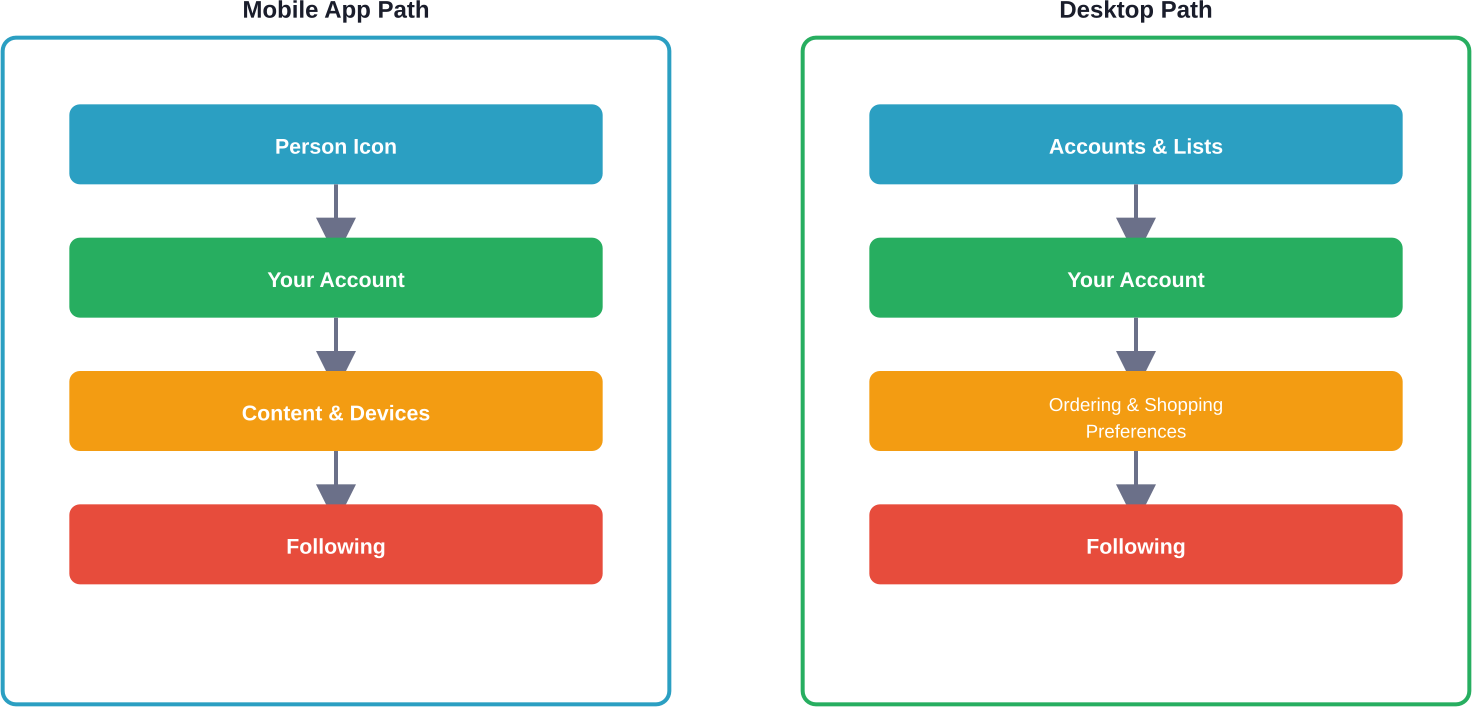
Quick Summary: To see who you follow on Amazon, open the Amazon app or website, tap the person icon, select ‘Your Account,’ then ‘Content & Devices,’ and click ‘Following.’ This displays authors, brands, or influencers you’re following. You can unfollow anyone directly from this list.
Amazon’s Follow feature lets shoppers stay connected with favorite authors, brands, and influencers. But finding that list? Not exactly intuitive.
According to Amazon’s official documentation, the Follow feature enables you to stay up to date with authors you care about on Amazon, receiving email updates about new releases and other interesting content. The challenge is that Amazon doesn’t prominently display your following list—it’s tucked away in account settings.
How to View Your Amazon Following List
The process differs slightly between mobile and desktop, but both are straightforward once you know where to look.
On the Amazon Mobile App
Open the Amazon shopping app and tap the person icon at the bottom right. Select ‘Your Account’ from the menu, scroll down to ‘Content & Devices,’ then tap ‘Following.’ Your complete list appears here, showing profile pictures and names of everyone you follow.
On Desktop Browser
Navigate to Amazon.com and hover over ‘Accounts & Lists’ at the top right. Click ‘Your Account,’ scroll to the ‘Ordering and shopping preferences’ section, and select ‘Following.’ The same list displays with options to manage each connection.
Get Clear Amazon Performance Data

WisePPC combines advertising and sales data from Amazon into one view, making it easier to understand overall performance. It separates paid and organic sales, which helps show what is actually driving growth. It also allows deeper filtering and comparison across campaigns, products, and time periods.
Want a Better View of Performance?
Use WisePPC to:
- review campaign, keyword, and product data together
- track long-term performance trends
- see paid and organic sales separately
👉 Explore WisePPC to understand your Amazon advertising data.

What You Can Follow on Amazon
Amazon’s Follow functionality extends beyond just authors. Community discussions indicate users can follow multiple entity types.
| Follow Type | What You’ll See | Update Frequency |
|---|---|---|
| Authors | New book releases, pre-orders | When published |
| Brands | Product launches, deals | Varies by brand |
| Influencers | Storefronts, recommendations | When posted |
According to Amazon’s official documentation, you may receive relevant email updates about followed authors, including alerts about their new releases and other interesting content.
Managing Your Following List
Once you’ve located the Following page, management is simple. Each followed profile displays an ‘Unfollow’ button directly next to the name. Click or tap it to remove them immediately—no confirmation required.
The list doesn’t show follow dates or interaction history, just current connections. There’s no bulk unfollow option, so each must be removed individually.
Why Your Following List Matters
Actively managing follows prevents notification overload. Many shoppers follow authors or brands impulsively during purchases, then forget about them. That cluttered list means irrelevant emails and diluted recommendations.
Amazon’s algorithm uses following data to personalize the shopping experience. A curated list ensures the content and deals you see actually match current interests.
Frequently Asked Questions
Can other people see who I follow on Amazon?
Your follows can appear on your public profile feed, but you can hide them through your profile settings.
Do I get notified when I start following someone on Amazon?
Amazon doesn’t clearly state this, but you may receive email updates about authors or influencers you follow.
How do I follow an author on Amazon?
Go to a book page, click the author’s name, then select the “Follow” button on their profile.
Does Amazon have a Follow Recommendations page?
Yes, Amazon offers a recommendations section where you can discover authors and creators to follow.
Can I follow Amazon influencers?
Yes, influencers have storefronts with a Follow button. Their updates appear in your feed.
Why can’t I find the Following option on my Amazon account?
Make sure you’re logged in and using the latest app version. Some regions may not fully support this feature.
How many people can I follow on Amazon?
Amazon does not specify a limit, but it is generally high enough that most users won’t reach it.
Final Thoughts
Finding your Amazon following list takes just four clicks once you know the path. Regular cleanup keeps notifications relevant and recommendations sharp.
Check your Following list quarterly to remove outdated connections. Your Amazon experience becomes more personalized when follows reflect current interests, not impulse clicks from years ago.
 No credit card required