111222

What Ecommerce Shipping Means Today

Shipping plays a huge role in how well an ecommerce business runs. It affects what customers think of your brand and how much it costs you to get each order out the door. As online competition grows, a shipping process that’s quick, dependable, and easy to manage can give you an edge when you’re trying to win new customers or keep existing ones coming back.

This guide walks through the essentials of ecommerce shipping, including different shipping methods, timelines, carriers, and practical tips you can use as your store grows.


What Ecommerce Shipping Includes

Once a customer places an order, a whole series of steps follow before the package arrives on their doorstep. In most ecommerce businesses, the process looks something like this:

  1. A customer submits an order.
  2. You verify inventory.
  3. Order details are checked for accuracy.
  4. The product is picked, packed, and made ready for shipment.
  5. The carrier receives the package and handles the delivery.

If you’re just starting out, you might be packaging orders in your living room and dropping them at your local carrier. But as sales increase – especially if you sell multiple product types, you’ll likely outgrow that setup. At some point, reviewing and improving your shipping workflow becomes essential. If you’re spending more time packing boxes than growing the business, it may be time to bring in extra help or explore outsourcing fulfillment.

Fulfillment vs. Shipping

People often mix these two terms up, so here’s a simple way to think about them:

  • Fulfillment includes everything that happens after an order is placed: picking, packing, labeling, and preparing shipments.
  • Shipping begins only when the packaged order is officially passed to a carrier.

 

Where WisePPC Fits Into Your Shipping Strategy

At WisePPC, we know that shipping isn’t just an operational step – it’s a major part of how customers experience your brand and how efficiently your business runs. When delivery times slip or costs start rising, it affects everything from conversion rates to repeat purchases. That’s why we built our analytics platform to give you a complete, real-time view of the factors that shape your shipping performance. We pull together your advertising, sales, and operational data so you can see exactly what’s working, where money is being wasted, and how changes in shipping impact your bottom line.

As your business scales, having this level of visibility becomes even more important. With WisePPC, you can track long-term trends, compare performance across marketplaces, and identify issues before they affect customer satisfaction. Whether you manage a small catalog or thousands of SKUs, our tools help you make confident, data-backed decisions that support growth. The result is a smarter, more predictable shipping strategy, and a stronger marketplace presence powered by real insights instead of guesswork.


Understanding Ecommerce Shipping Timelines

Online shoppers expect to know how long delivery will take, and they often choose sellers based on whether the timing matches their needs. Here are some of the most common delivery speeds:

  • Standard (3–7 days): The most budget-friendly option. Good for customers who don’t mind waiting a few extra days.
  • Two-day delivery: Now considered a baseline expectation for many shoppers who want fast delivery without paying for overnight service.
  • Same-day delivery: Useful for items like groceries or essentials. This requires inventory to be held close to the customer or a highly efficient local operation.
  • Overnight delivery: Often used for last-minute gifts or urgent purchases. Usually the most expensive option.
  • Expedited shipping: Any delivery faster than standard but not necessarily tied to a strict timeline. Depends on the service level offered by your carrier.


Which Shipping Company Works Best for Ecommerce?

There’s no universal “best” carrier – the right choice depends on your budget, product weight and size, destination, and how quickly packages need to arrive. Some commonly used shipping partners include:

  • UPS: Covers more than 200 countries and offers options ranging from UPS Ground (1–5 days) to UPS Next Day Air.
  • Amazon Shipping: Lets you use Amazon’s transportation network to deliver orders from Amazon or other sales channels. They pick up and deliver seven days a week, with no extra weekend or residential fees.
  • FedEx: Known for flexible delivery timelines and strong international coverage across 220+ countries and territories.
  • USPS: A cost-effective option for domestic and international shipping, with perks like flat-rate boxes and free package pickup.


Shipping Through Amazon

Amazon offers several delivery options for both shoppers and sellers. Some are exclusive to Prime members, while others apply to all buyers. These include:

  • Two-Day Delivery: Fast, free shipping on millions of Prime-eligible items.
  • One-Day Delivery: More than 15 million items available in just one day for Prime members.
  • Same-Day Delivery: Offered in select areas for eligible items; availability may tighten during peak seasons.
  • No-Rush Shipping: Slower delivery in exchange for rewards.
  • Subscribe & Save: Automatic recurring deliveries with flexible scheduling and discounts.
  • Free Shipping by Amazon: Available when customers meet minimum purchase requirements.
  • Domestic Expedited Shipping: Faster delivery for an added fee.
  • Standard Delivery: Arrives within 4–5 business days.


Shipping Methods for Ecommerce Businesses

There are several ways to get your products to customers, and each method has benefits depending on your setup:

There’s no single “best” way to ship products – most ecommerce brands end up using a mix of methods as they grow, test new product lines, or expand into new regions. Below are the most common approaches, along with what makes each one helpful (or challenging) depending on your setup.

1. Dropshipping

Dropshipping transfers almost the entire fulfillment workload to a supplier. They store the inventory, pack each order, and ship directly to your customer. It’s appealing for newer sellers because it removes the need for warehousing or upfront bulk inventory purchases.

The trade-off is control, since you don’t physically handle the product, you’re relying on the supplier to pack carefully, ship on time, and maintain quality standards. If they slip up, you’re the one dealing with unhappy customers.

2. Direct-from-Warehouse Shipping

Sometimes called “direct shipping,” this method sends products straight from the supplier or manufacturer to the customer. It’s similar to dropshipping, but usually used when you already have a strong relationship with your supplier or a predictable product lineup.
It can reduce handling time and storage costs, though you’ll still need to coordinate inventory levels and make sure your supplier is prepared to fulfill consistently.

3. Third-Party Shipping (3PL)

A third-party logistics provider manages storage, packing, and shipping for you. It’s a popular choice for ecommerce sellers who want to scale without running a warehouse.

You pay for the service, but you gain professional handling, faster turnaround times, and predictable workflows. The downside is that pricing structures vary, so you’ll want to compare storage, pick-and-pack, and shipping fees before committing.

4. Last-Mile Carriers

In this approach, one carrier (like FedEx or UPS) picks up your package and hands it off to another carrier,  often USPS, for the final leg of delivery. It’s a cost-saving strategy for lightweight or low-margin items. The drawback is speed; because more parties are involved, delivery timelines can stretch out, especially in rural areas.

5. Automated Shipping

Automation systems create labels, assign carriers, and in some cases even trigger fulfillment without any manual input. This reduces errors, keeps orders moving during peak seasons, and shrinks the time between receiving an order and getting it out the door.
Automation doesn’t replace carriers, but it simplifies the logistical part of the workflow. It works particularly well for shops with steady order volume or multiple sales channels.

6. Eco-Friendly Shipping

More brands are turning to sustainable shipping options – recycled boxes, biodegradable packing materials, and optimized delivery routes. Customers increasingly appreciate environmentally responsible choices, and in some cases, eco-friendly packaging can even reduce costs by using lighter or more efficient materials. The challenge is balancing sustainability with durability so products still arrive safely.

7. Hybrid Shipping

Most ecommerce businesses end up here. You might handle some orders internally, outsource others to a fulfillment partner, use dropshipping for certain product lines, or rely on different carriers for domestic vs. international shipments. A hybrid approach lets you adapt as your business grows, but it also requires clear tracking and good communication so nothing slips through the cracks.

8. Freight Shipping

Freight is the go-to option for anything oversized or heavy – usually anything over 150 pounds or products with large dimensions.

It’s commonly used by brands shipping bulk inventory to warehouses, or by sellers whose items simply can’t ship through standard parcel carriers. Freight requires more planning, but it often ends up being more cost-effective for large shipments.

Cost-Based Shipping Approaches

You can also organize your shipping options around pricing:

  • Flat-rate shipping: One fixed fee, or tiered fixed fees based on weight or price brackets.
  • Free shipping: Costs are rolled into product pricing or conditional (“free shipping over $X”).
  • Real-time carrier rates: Customers see exact shipping prices based on live data from the carrier.


Why Work With a Fulfillment Provider?

Working with a fulfillment provider can take a significant amount of pressure off your day-to-day operations. Instead of managing inventory, printing labels, and dropping off packages yourself, you send your products to a dedicated warehouse and let their team handle the packing and shipping whenever an order comes in. Providers like Fulfillment by Amazon (FBA) are built to manage these processes at scale, which means they can often move orders faster and more efficiently than an individual seller could on their own.

Because fulfillment providers ship such high volumes, they typically secure better carrier rates, which can bring your shipping costs down. Their established workflows also reduce the likelihood of delays or missed shipments, and many offer multiple warehouse locations so inventory is stored closer to customers. This cuts delivery timelines and makes fast shipping more realistic, even if you’re a smaller brand. Offloading fulfillment also gives you back hours of time to focus on tasks that actually grow your business, like product development, marketing, or improving customer experience.

For businesses planning to expand into new regions, fulfillment partners can make that transition smoother. With products stored across different facilities, you can reach customers in new areas without setting up your own physical infrastructure. The trade-off is cost: storage, handling, and service fees vary by provider, so it’s important to understand how those expenses fit into your overall budget before committing.


Domestic vs. International Shipping

Shipping within your own country is simpler and generally cheaper. International shipping introduces more variables: customs forms, fees, taxes, and regulations.

If you plan to ship internationally, here’s what to keep in mind:

  • Identify key countries: Knowing where you expect to ship helps you choose the right carrier.
  • Pick a reliable international carrier: Look for tracking, multiple shipping speeds, and strong customer feedback.
  • Understand fees: Costs vary widely depending on weight, size, speed, and destination.
  • Know the taxes: Duties, VAT, GST – these charges vary by country and can change the total cost significantly.
  • Fill out customs paperwork correctly: Missing or inaccurate information can delay or block shipments.
  • Follow restrictions: Some countries ban certain items, and ignoring those rules can result in fines.


Shipping Costs to Include in Your Budget

Before you map out your shipping strategy, it helps to understand the different costs that shape the final price of getting an order to a customer. Here’s a simple breakdown:

Cost Category What It Covers
Carrier fees Postage, delivery charges, and any rates tied to weight, size, or destination.
Packaging materials Boxes, mailers, tape, protective fillers, and any custom or branded packaging you use.
Fulfillment Labor or service fees for picking, packing, and preparing orders, whether in-house or through a provider.
Overhead Warehouse rent, shipping software, tools, equipment, and other operational expenses.
Insurance Protection against lost, stolen, or damaged packages during transit.
Extras Add-ons like signature confirmation, advanced tracking, or photographic proof of delivery.


If you’re planning to ship a large number of packages, it’s worth asking carriers about bulk pricing. Many are willing to offer better rates when you commit to consistent volume, which can help reduce overall shipping costs as you scale.


How to Ship Orders in Simple Steps

Once you’re set up to start shipping consistently, the process becomes a routine you can refine over time. Here’s a closer look at each step.

1. Choose the Right Packaging

Good packaging does two jobs: it protects your product and keeps shipping costs reasonable. Too much padding or an oversized box can push the package into a higher price category, but too little protection risks damage. Try out a few combinations of boxes, inserts, and materials to see what holds up best during transit. It’s worth treating this as testing rather than guessing.

2. Add Any Extras

Small touches can go a long way toward building customer loyalty. A thank-you card, a business card, or even a simple note with care instructions helps the order feel more personal. If you offer promotions or discount codes, slipping one into the package can also encourage customers to come back for another purchase.

3. Pack the Order Securely

Once everything is ready to go inside the box, place your items so they can’t shift around. Use enough filler to cushion the product but avoid overpacking. The goal is a tight, tidy fit that keeps the contents stable even if the package gets jostled during shipping. If you’re sending fragile items, consider doing a few “shake tests” to make sure nothing rattles.

4. Print and Attach the Shipping Label

Your shipping label should be clear, easy to scan, and placed on the top panel of the package. Double-check that both the sender and recipient information are correct – small typos can lead to unnecessary delays. If you’re working with a fulfillment provider, they’ll apply labels for you, but it’s still a good idea to understand what the process looks like.

5. Hand Off the Package to Your Carrier

You can drop your package off at a local carrier location or schedule a pickup if your carrier offers that service. Pickup can be a major time-saver once order volume increases. Make sure you keep your tracking number handy; customers almost always want updates, and tracking helps you stay aware of any delays or issues.

6. Notify Your Customer

As soon as the package is on its way, send the tracking information to your customer. Most ecommerce platforms automate these notifications, but even an automated message adds transparency and reduces the chances of support inquiries. Customers appreciate updates – it reassures them that their order is moving and gives them a clearer idea of when it will arrive.


Final Thoughts

Shipping evolves as your business grows. What works when you’re processing a few orders a week may not work when you’re handling dozens or hundreds per day. The key is to stay flexible and adjust your process as you learn what works best for your products, customers, and budget.

Once you’re familiar with the basics, you’ll be able to anticipate your shipping needs, streamline your operations, and create a smoother experience from checkout to delivery. A thoughtful shipping strategy can help you keep customers happy and support steady growth over time.


FAQ

What exactly does ecommerce shipping include?

Ecommerce shipping covers everything involved in getting a product from your business to your customer. That includes packing the order, choosing a carrier, labeling the box, transferring it to the carrier, and making sure it arrives on time. It’s one part of the broader fulfillment process, which also includes picking and preparing orders before they leave the warehouse.

How do I choose the right shipping carrier?

The best carrier for you depends on your product size, delivery speed, destination, and budget. Some businesses prioritize cost, while others need faster delivery or strong international options. Many sellers test a few carriers before settling on the one that consistently delivers the right mix of price and reliability.

Is two-day shipping required to stay competitive?

Not always, but it can make a noticeable difference. Customers increasingly expect fast delivery, especially for everyday products. If two-day shipping isn’t realistic for your business, look for ways to speed up processing times or store inventory closer to customers to shorten transit distances.

What’s the difference between fulfillment and shipping?

Fulfillment includes everything that happens after an order is placed – picking the product, packing it, labeling it, and preparing it for shipment. Shipping is the final handoff to a carrier, who then transports and delivers the package.

Should I offer free shipping to customers?

Free shipping can increase conversions, but it isn’t free for your business. Some sellers build the cost into product pricing, while others offer free shipping only after customers reach a certain order value. The best approach depends on your margins and how sensitive your audience is to shipping fees.

B2B Ecommerce: What It Is, Why It Matters, and How to Build Your Strategy in 2026

B2B ecommerce has grown into a core channel for companies that sell products or services to other businesses. What used to rely heavily on calls, catalogs, and in-person orders has shifted toward online stores, self-service portals, and automated systems. The change hasn’t been overnight, but it’s reshaped how many organizations buy, plan, and restock.

This guide breaks down the main concepts, different models, and the practical steps companies take when they start selling B2B online. You’ll also find strategies you can use to attract business buyers and improve the entire purchasing experience.


What B2B Ecommerce Means Today

At its simplest, B2B ecommerce refers to selling goods or services from one business to another through digital channels. Instead of placing orders by phone or email, buyers use online catalogs, pricing pages, or custom portals to browse, compare, and buy.

The idea is the same as traditional B2B sales, but the tools and expectations have changed. Businesses want faster ordering, clearer information, and the ability to purchase anytime – not only during office hours.


Types of B2B Ecommerce

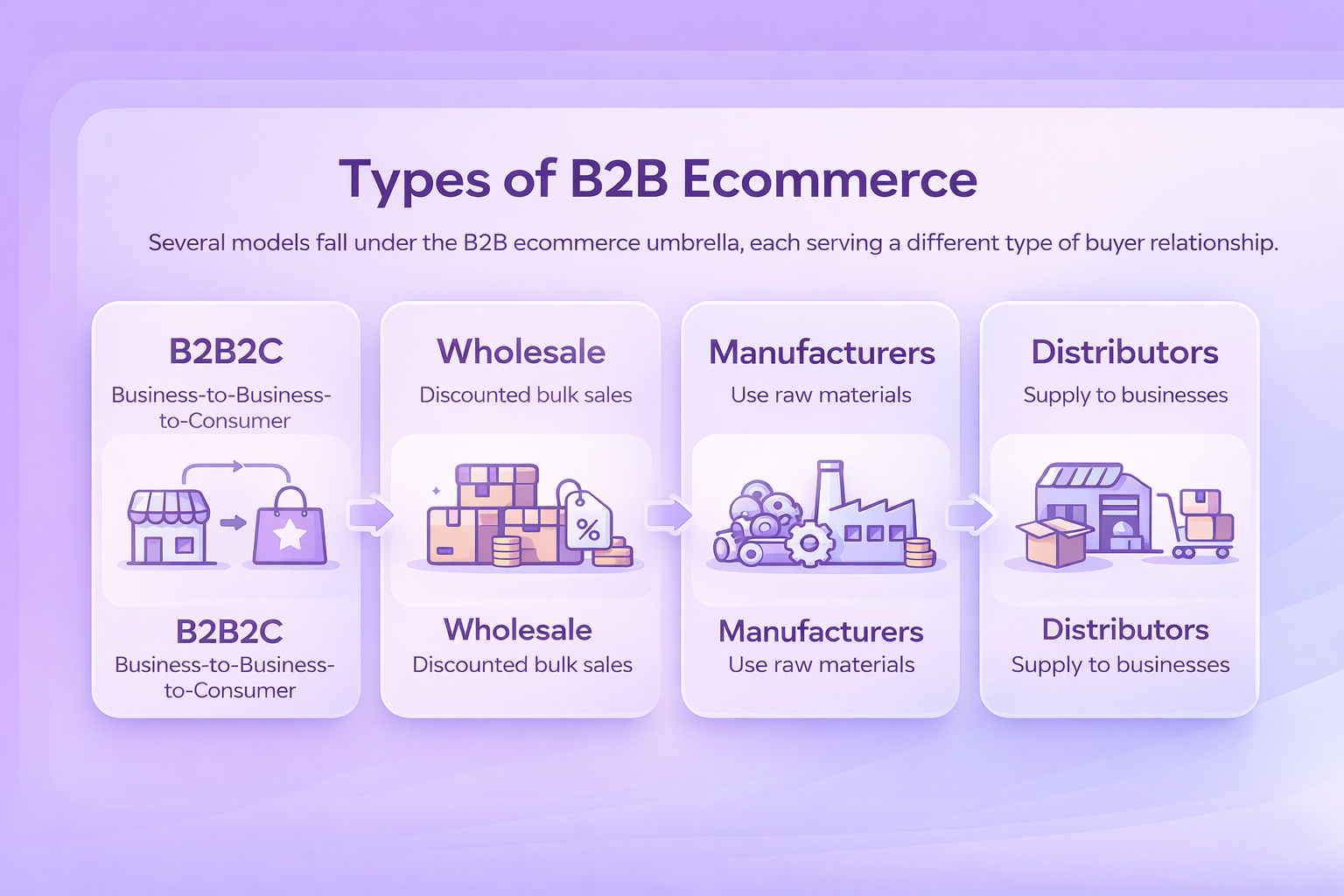
Several models fall under the B2B ecommerce umbrella, each serving a different type of buyer relationship.

  1. Business-to-Business-to-Consumer (B2B2C): A hybrid model where two companies work together to deliver goods or services to the end consumer. One might produce the item while the other handles fulfillment or customer-facing operations.
  2. Wholesale: A wholesaler buys or produces items in bulk and sells them to retailers at discounted rates. The retailer then sells those same products to consumers at standard retail pricing.
  3. Manufacturers: Manufacturers use raw materials and machinery to create products that are sold in large quantities to wholesalers, distributors, or other manufacturers.
  4. Distributors: Distributors serve as the link between product makers and the businesses that need those products for resale or operations.


Common Examples of B2B Ecommerce

Many industries use online storefronts or purchasing systems to simplify how businesses place orders. A few everyday examples include:

  • An office supply company offering corporate accounts so teams can reorder essentials whenever needed
  • An equipment manufacturer with an online portal where maintenance departments schedule part replacements
  • A furniture wholesaler giving design studios access to product customization and volume ordering
  • A software provider offering self-service licensing and subscription management for business clients
  • A commercial cleaning supplier selling directly to hotels, clinics, and gyms through a simple online catalog

The common thread is convenience. These companies use digital tools to make ordering faster, information easier to find, and repeat purchasing nearly effortless.


Where WisePPC Helps B2B Teams Work Smarter

When we talk to teams exploring B2B ecommerce, one theme comes up again and again – the data behind their decisions is often scattered, delayed, or difficult to translate into clear next steps. At WisePPC, we built our toolkit to take some of that weight off their shoulders. Instead of juggling spreadsheets, ad dashboards, and marketplace reports, sellers get one place where their performance actually makes sense. It lets them see how their products move, where demand is shifting, and which campaigns are quietly shaping their B2B sales pipeline.

We also try to simplify the routine work that eats up hours each week. Bulk updates, real-time filtering, historical trend charts, and on-the-spot editing were added because teams kept telling us how much time disappears into the small tasks. Our goal isn’t to replace anyone’s workflow – it’s to make the everyday steps quicker, clearer, and less frustrating. When sellers can track what’s happening across marketplaces and react without digging through multiple tools, their B2B strategies usually start falling into place on their own.


6 Benefits of B2B Ecommerce

Whether you already serve business buyers or you’re shifting from consumer-focused sales, moving B2B transactions online brings noticeable advantages.

1. Access to New Business Customers

Traditional B2B selling tends to rely on existing relationships, trade shows, and outreach. Ecommerce widens that circle. Buyers searching online can discover your products even if they’re across the country – or across the world. If you already sell B2C, your infrastructure may only need a few adjustments to support business orders as well.

2. Smoother and More Efficient Operations

Digitizing B2B sales often removes the most time-consuming parts of the process:

  • Orders enter automatically instead of through calls or emails
  • Inventory updates in real time, reducing manual adjustments
  • Billing and invoicing run on their own, especially when connected to accounting tools
  • Buyers manage their accounts, reorders, and documentation without waiting on a representative

The result is a shorter sales cycle and fewer administrative bottlenecks.

3. A More Convenient Purchasing Experience

Business buyers want the same ease they experience when shopping personally: quick search, clear details, easy checkout, and reliable delivery.

A B2B ecommerce store lets them:

  • Search for exact items
  • View specifications, pricing, and availability
  • Place orders anytime
  • Reorder in one click or set subscription deliveries
  • Track shipments and download invoices as needed

You can also offer features tailored for business needs, like custom pricing, quantity breaks, credit-based payments, and procurement approvals.

4. More Insight into Buying Behavior

Selling online gives you visibility into what your customers browse, how often they order, and which items generate the most interest. These insights help refine product planning, marketing efforts, inventory management, and even pricing.

5. Lower Costs Across the Business

Moving B2B sales online can reduce expenses in several ways:

  • Less manual order entry
  • Fewer errors and returns
  • Less time spent on repetitive customer service tasks
  • Lower printing and mailing costs
  • Better inventory control that reduces stockouts and excess storage
  • Sales teams free to focus on large accounts rather than routine ordering

6. Better Collaboration Between Teams

When your sales happen online, different teams inside your company gain access to the same real-time information. Sales, operations, finance, and customer support all see the same order history, stock levels, and delivery updates. It cuts down on miscommunication and makes it easier to resolve issues quickly.

A shared system also helps everyone understand customer patterns. Sales can spot opportunities, marketing can refine messaging, and operations can prepare for demand. Instead of running separate spreadsheets or chasing answers through email threads, everyone works from one reliable source of truth.


Before You Get Started: A Quick Self-Check

Before stepping into B2B ecommerce, it’s worth taking a moment to look at how your business currently operates. Think about your catalog, how complex your pricing is, and how often customers come back with the same types of orders. If you’re already spending a lot of time answering repeat questions, sending quotes, or processing manual purchases, that’s usually a sign your buyers would appreciate a more streamlined way to order.

A quick readiness check doesn’t need to be formal. It simply helps you understand what your B2B setup should actually support and where you might need small adjustments before launching. Going in with a clear picture of your starting point makes the rest of the process easier and prevents issues later on.


Three Steps to Start Selling B2B Online

Ready to build a B2B ecommerce presence? The process is usually more straightforward than it seems.

Step 1: Shape Your B2B Ecommerce Approach

Start by clarifying:

  • Who your business buyers are: Understand their industries, order sizes, needs, and decision processes.
  • How you plan to sell: You can use your own website, join a marketplace, or combine both. Each option has different strengths – your audience and product type usually guide the decision.

Step 2: Build Your Online Store or Portal

A simple setup checklist might look like this:

  1. Choose an ecommerce platform that supports B2B features such as custom pricing, bulk discounts, and invoicing.
  2. Prepare your product catalog with strong descriptions, clear images, and accurate data.
  3. Design the storefront in a way that feels intuitive and aligns with your brand.
  4. Set up payments, tax settings, and shipping rules.
  5. Run test orders to make sure everything works the way customers expect.

Launching is just the beginning – most businesses refine their store continuously as they learn how buyers interact with it.

Quick Tip: Detailed product specs and volume pricing make a big difference for business buyers who need clarity before placing bulk orders.

Step 3: Promote Your B2B Offering

Once your store is live, focus on visibility.

  • Share industry-specific tips and content on social platforms
  • Build segmented email lists for targeted outreach
  • Use paid ads to reach specific business audiences
  • Publish useful resources that draw the right customers to your store

The goal is not only to attract new buyers, but also to remind existing ones that ordering from you is now easier and faster.


B2B Ecommerce Strategies for Sustainable Growth

A strong B2B operation doesn’t run on a store alone. Even with a solid platform in place, you still need habits and processes that keep your momentum going. These strategies help you stay focused on what actually moves the needle.

Identify Trends and Opportunities

Spend some time with your long-term data instead of only reacting to what happened this week. Patterns usually don’t show up overnight, but when they do, they reveal which products are picking up interest and which customer groups might be worth nurturing. It’s a simple way to spot opportunities before they turn into crowded markets.

Understand Your Audience

Getting to know your buyers isn’t a one-time task. Their goals shift, their workloads change, and the problems they’re trying to solve evolve over time. The clearer you are about what they’re dealing with, the easier it becomes to shape your messaging, choose the right features to highlight, and avoid offering things they don’t actually need.

Offer Incentives

Business buyers appreciate a good deal just as much as consumers, especially when the purchase involves volume or frequent reorders. Small nudges like bulk discounts, first-order perks, or free shipping above a certain amount can help hesitant buyers commit. It’s not about running constant promotions – just giving people a little extra reason to try you out.

Refine Your Marketing

Your campaigns will rarely be perfect on the first try. Look at what’s working, what’s costing too much, and what’s getting ignored altogether. Performance data helps you shift budget to the channels that actually bring in steady business buyers. Over time, this makes your marketing feel less like guesswork and more like a well-tuned system.

Optimize for Search Engines

When businesses search for products in your category, you want to show up where they’ll actually see you. Clear descriptions, relevant keywords, and useful content help search engines understand who you serve. SEO takes some patience, but it’s one of the most reliable ways to attract steady B2B traffic without paying for every click.


Building a Smooth Post-Purchase Experience

A lot of attention goes into attracting business buyers and helping them place that first order, but what happens afterward often matters just as much. The post-purchase stage is where buyers decide whether your store is a one-time stop or a dependable partner they can rely on. When this part feels simple and predictable, it builds trust without you having to push for it.

Clear communication makes the biggest difference. Buyers want to know where their order stands, when it will arrive, and what to expect if anything changes. Straightforward tracking updates, easy access to order history, and well-organized invoices can save everyone from unnecessary back-and-forth emails. The same goes for returns and replacements – the smoother you make those moments, the more confident buyers feel ordering from you again.

Repeat purchases are another part of the equation. Many B2B orders follow patterns, so giving buyers quick reorder tools or letting them save their preferred items helps them move through the process without thinking twice. When routine tasks feel effortless, the relationship grows naturally. The goal isn’t to impress buyers with big gestures, it’s to make the everyday steps so simple that they barely notice the work happening behind the scenes.


Wrapping It Up

B2B ecommerce has become one of the most reliable ways for companies to reach business buyers, simplify operations, and build a more predictable sales engine. What used to require long email chains or repeated phone calls now happens through clear product pages, real-time inventory, and ordering systems that run day and night. The shift isn’t just about convenience – it changes how teams work, how relationships grow, and how businesses plan for the future.

If you’re exploring B2B ecommerce in 2026, the path forward doesn’t have to feel overwhelming. Start by understanding what your buyers expect, build a store that supports how they already prefer to purchase, and adjust as you learn. With the right pieces in place, online buying becomes more than a channel, it becomes the dependable backbone of your business. Most companies discover that once the system is up and running, the real work is simply fine-tuning it and letting it scale.


FAQs

What exactly counts as B2B ecommerce?

B2B ecommerce refers to businesses selling goods or services to other businesses through online stores, portals, or digital marketplaces. Buyers can browse, compare, and purchase without relying on manual order-taking.

Is B2B ecommerce only for large companies?

Not at all. Small and mid-sized businesses are often the ones who benefit most, since ecommerce reduces time spent on manual tasks and makes it easier to reach new customers without expanding a full sales team.

Do I need a complex website to sell B2B online?

No. You can start with a straightforward store that includes clear product information, accurate pricing, and reliable ordering. You can always add advanced features, like custom catalogs or approval workflows, as you grow.

How is B2B ecommerce different from B2C ecommerce?

The buying process is more structured. Business customers often need quotes, bulk pricing, account-level history, or payment terms. The experience is more functional than emotional, and consistency matters more than impulse.

What features do business buyers expect?

They typically look for real-time availability, transparent pricing, simple reordering, clear delivery timelines, and the ability to manage their account without waiting for someone to respond manually.

Make Your Products the First Choice With the Amazon Featured Offer

When several sellers list the same item in the Amazon store, all of those offers get grouped on one product page. It keeps things simpler for shoppers and helps them compare without bouncing between multiple listings. On many of these pages, one offer gets highlighted – the one sitting next to the Buy Now and Add to Cart buttons. That’s the Featured Offer, previously known as the Buy Box.

Landing in that spot often gives a product a noticeable lift. Customers naturally gravitate toward the option that’s already positioned as the primary choice. If they want to explore alternatives, they still can, but the Featured Offer usually gets the first click.


Why Amazon Uses the Term “Featured Offer”

For longtime sellers, the Featured Offer may feel like a rebrand of the Buy Box – and that’s essentially what it is. Amazon has experimented with different labeling to make the concept more intuitive for sellers who aren’t familiar with older terminology.

The idea is the same: one offer gets highlighted based on price, delivery speed, customer experience, and account health. Using “Featured Offer” simply communicates to newer sellers that Amazon is spotlighting one option because it offers the best overall buying experience at that moment.


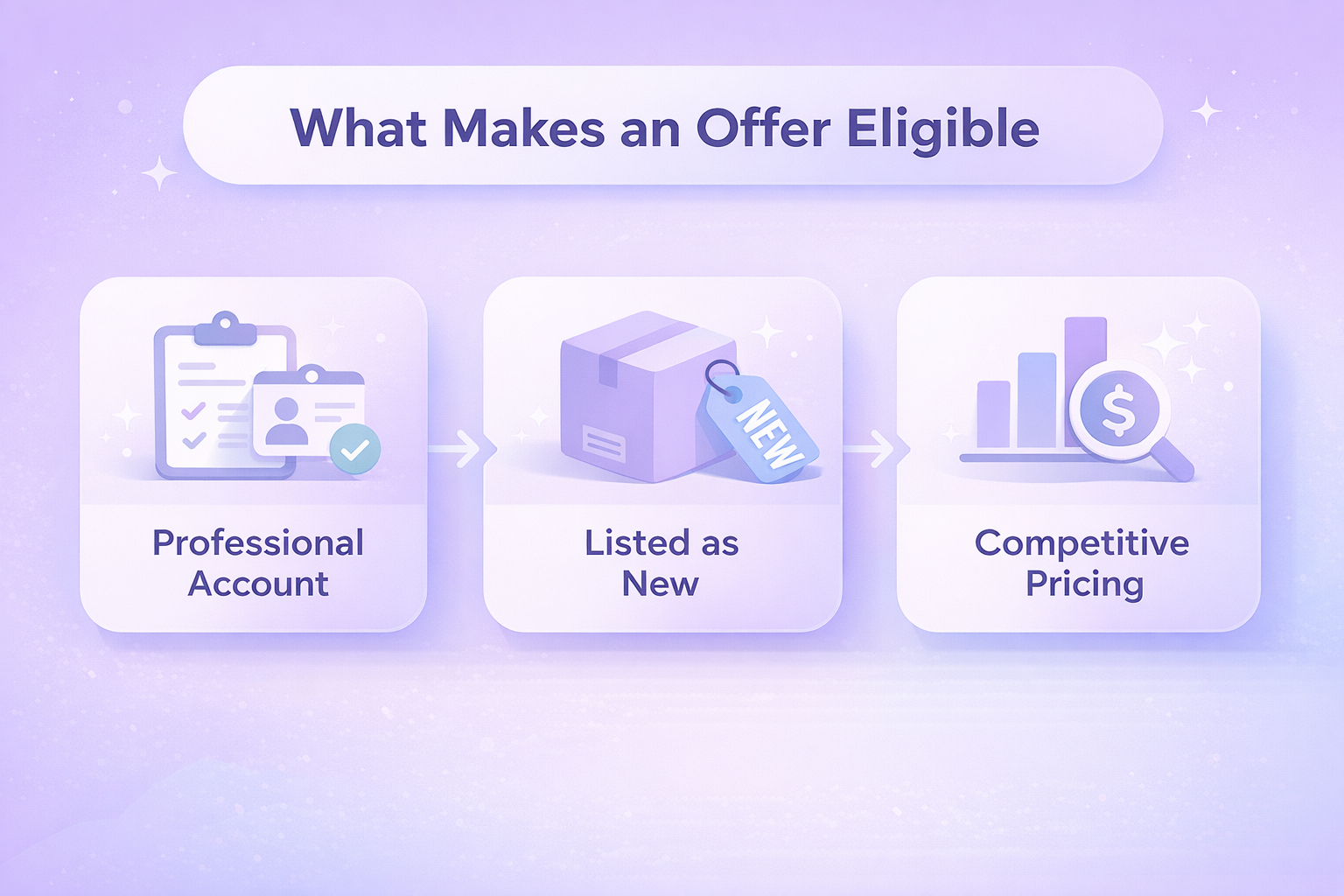
What Makes an Offer Eligible

Eligibility varies a bit by category, but most sellers need to meet the same core requirements:

  • A Professional selling account in good standing
  • Products listed as “New”
  • Pricing that remains competitive with major retailers outside Amazon

These set the foundation. But eligibility alone doesn’t guarantee that your offer will appear in that top placement.


How We Help Sellers Compete for the Featured Offer

At WisePPC, we’ve seen how quickly the Featured Offer can shift, sometimes hour by hour, and how hard it is for sellers to keep up without clear, dependable data. That’s why we built a platform that gives you real visibility into the signals Amazon pays attention to, from pricing movements to delivery promises to sudden changes in competitive pressure. Instead of digging through scattered reports, you get a clean, real-time view of what’s helping your offer rise and what’s holding it back, supported by years of historical data Amazon doesn’t store.

We also designed our tools to move just as fast as the marketplace. With automated insights, advanced filtering, bulk updates, and AI-assisted campaign adjustments, you can react before a missed opportunity turns into a lost Featured Offer slot. And because we’re an Amazon Ads Verified Partner, everything we build follows Amazon’s best practices from the inside out. Our goal is simple: help sellers stay competitive, scale with confidence, and win the placement that drives the majority of conversions on every product detail page.


How To Increase Your Chances of Becoming the Featured Offer

There isn’t a single formula, but several factors consistently help sellers move closer to that placement.

1. Price Products Competitively

Pricing carries a lot of weight, and Amazon compares yours to similar listings both inside and outside the platform. To stay competitive without constantly checking manually, sellers often lean on built-in tools:

  • Manage All Inventory: Helps you see if your offer currently holds the Featured Offer spot. It also shows external reference prices and the lowest price inside the Amazon store.
  • Pricing Health: Lists offers that aren’t eligible and explains why. It’s a quick way to identify where a price adjustment might help.
  • Automate Pricing: Lets you set rules that adjust prices automatically, keeping your offer competitive any time of day.

Remember, Amazon evaluates the total price – item plus shipping.

2. Offer Fast and Affordable Shipping

Faster or free shipping tends to improve your chances immediately. Some sellers handle this through their own fulfillment process, while others rely on Amazon’s network. Either option can work as long as the delivery experience is strong.

3. Maintain Excellent Customer Service Metrics

If you fulfill orders yourself, Amazon pays close attention to how reliably you handle them. A few key metrics matter most:

  • Order Defect Rate: target under 1 percent
  • Late Shipment Rate: keep under 4 percent
  • Cancellation Rate: stay below 2.5 percent
  • Valid Tracking Rate: above 95 percent

You can keep an eye on all of these in your Account Health dashboard. If managing service becomes too demanding, some sellers switch part or all of their fulfillment to Amazon to help keep metrics stable.

4. Keep Inventory Levels Steady

Running out of stock is one of the fastest ways to lose Featured Offer visibility. If you anticipate higher demand: seasonal spikes, promotions, or trending products, make sure you have enough on hand. Inventory levels can be tracked anytime in Seller Central under Manage All Inventory.

5. Optimize Your Product Listings

Even strong offers get lost if the listing itself isn’t clear. Clean titles, accurate descriptions, and helpful details can improve visibility in search results and indirectly support your chances of being selected as the Featured Offer.


When the Featured Offer Is Suppressed

Sometimes there’s no Featured Offer at all. Instead of the Buy Now button, the page shows “See All Buying Options.” That usually means:

  • The product’s price is considered too high
  • Amazon can’t determine a “fair” price for the category
  • Sellers have inconsistent delivery performance
  • Inventory is too low
  • Amazon’s algorithm is withholding the Buy Box due to product or policy concerns

Suppression can impact visibility dramatically since many shoppers won’t click through additional screens to find the price. This is why sellers pay close attention to the Featured Offer Percentage – the percentage of page views where their offer is the one customers actually see.


Why Different Customers See Different Featured Offers

A common point of confusion is thinking the Featured Offer is fixed. It’s not. Two shoppers looking at the same product may see entirely different sellers featured.

That’s because Amazon tailors the Featured Offer based on variables like:

  • Buyer location
  • Delivery speed to that specific address
  • Whether the buyer is a Prime member
  • Past browsing or purchasing behavior
  • Account type (Business vs personal)
  • Real-time inventory levels in nearby fulfillment centers

For example, a merchant-fulfilled seller in Ohio might win the Featured Offer for customers in surrounding states because they can deliver faster locally. But that same listing may show a different Featured Offer for customers on the West Coast.

This dynamic nature explains why Seller Central may show you as the Featured Offer, but browsing the product page from another address reveals a different seller in the Buy Box.


Conclusion

The featured offer isn’t something you win once and forget about. It shifts with pricing, delivery speed, and how reliable your account looks over time. When those pieces stay steady, your offer becomes the one customers reach for first. Even small improvements in stock levels, listing quality, or fulfillment speed can move you closer to that spot. It’s competitive, but once you understand how it works, you can adjust your approach and earn that visibility more consistently.


Frequently Asked Questions

What is the Amazon Featured Offer?

It’s the main offer shown on a product page next to the Buy Now and Add to Cart buttons. Amazon surfaces the option that provides the best overall value and delivery promise at that moment.

Is the Featured Offer the same as the Buy Box?

Yes. It’s essentially a newer label for the same placement sellers used to call the Buy Box.

Why does the Featured Offer change from one shopper to another?

Amazon personalizes it based on the customer’s location, delivery speed, account type, and sometimes browsing behavior. Two people can see different sellers featured on the same item.

Why is the Featured Offer missing from my listing?

If Amazon suppresses it, shoppers will only see “See all buying options.” This can happen due to high pricing, low stock, weak metrics, or category rules.

Does it cost money to win the Featured Offer?

No. You just need a professional selling plan and performance metrics that meet Amazon’s eligibility standards.

Ecommerce Automation: 12 Tasks You Can Hand Off to Technology

Running an online store usually starts with excitement, but it doesn’t take long before the repetitive work piles up. Updating listings, checking stock, replying to questions, adjusting prices, sending order updates, trying to keep track of what’s selling and what isn’t – it can easily eat an entire day before you even look at bigger strategy work.

That’s where automation becomes less of a nice idea and more of a relief. With the right setup, many of the tasks you handle manually can run quietly in the background, giving you both time and cleaner workflows. Below is a breakdown of common ecommerce tasks you can automate, along with examples of tools inside the Amazon ecosystem that can help.


WisePPC: Automating the Insights and Decisions Behind Marketplace Growth

At WisePPC, we built our platform around one idea: most ecommerce teams spend too much time wrestling with data instead of using it. Manual reporting, scattered dashboards, and guesswork slow everything down. By automating analytics and key parts of campaign management, we help sellers move faster and understand their performance without digging through spreadsheets.

Our system pulls sales and advertising data into one place, refreshes it in real time, and highlights anything that needs attention. You can spot shifts in demand, review long-term trends, adjust bids or budgets in bulk, and see how ads influence organic sales. Instead of micromanaging campaigns, you get clear signals about opportunities, wasted spend, and areas worth scaling.

Automation is what makes the entire workflow feel lighter. We store years of historical data automatically, so seasonality and performance patterns are easy to track. Whether you manage a small catalog or thousands of SKUs, our goal is to handle the heavy analytical work behind the scenes so your team can focus on growth, not maintenance.


1. Generate Product Listing Content

Good product listings work like your digital storefront. Descriptions, titles, and attributes shape how customers understand what you sell. Writing everything from scratch, though, can be exhausting if you publish often.

If you sell in the Amazon store, you can use built-in generative AI tools to produce titles, descriptions, and even structured attributes from a few words or an image. You still guide the content, but the heavy lifting happens automatically.


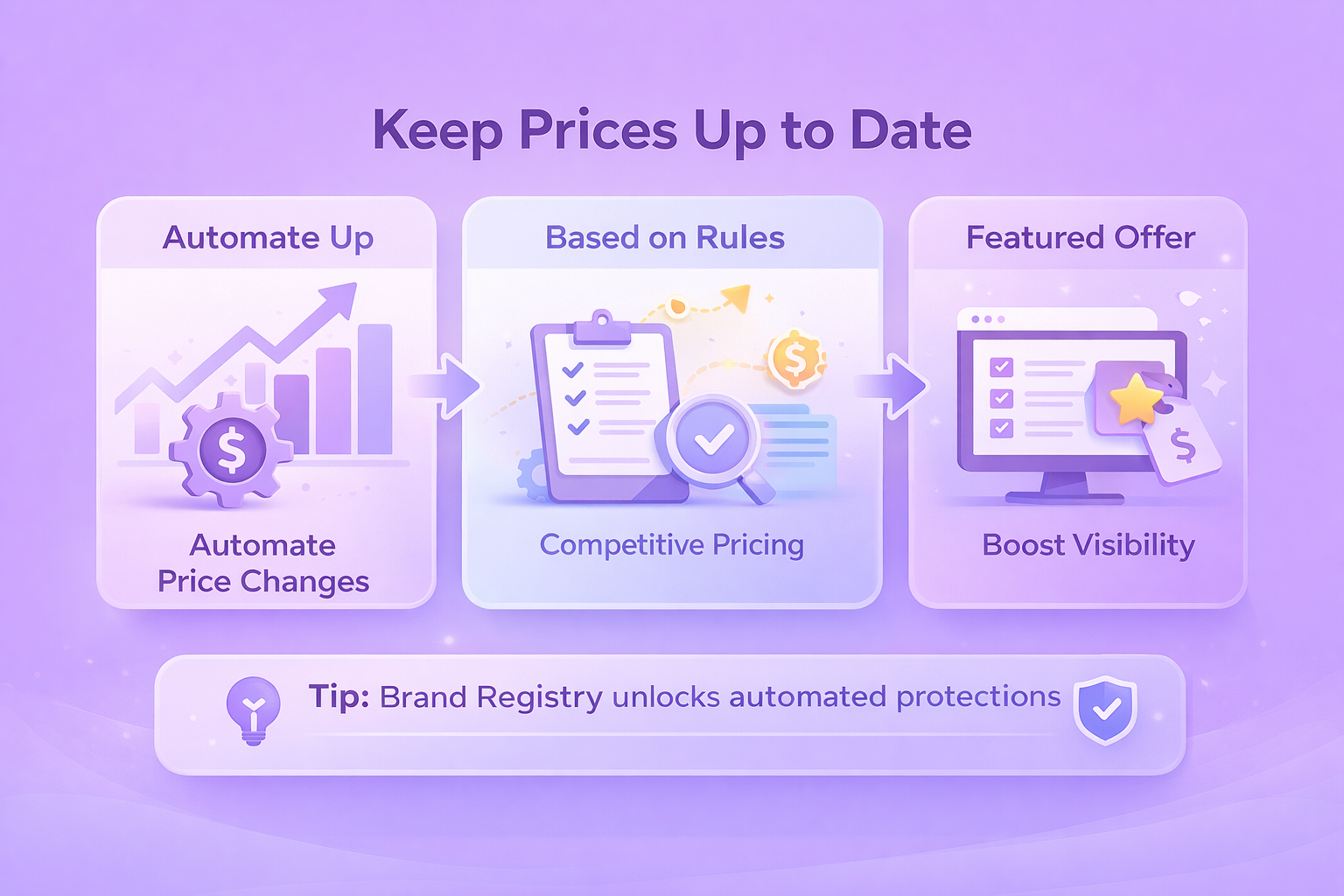
2. Keep Prices Up to Date

Manually tracking competitors and adjusting prices can pull your attention away from everything else. Automated pricing tools solve this by updating prices around the clock, based on rules you set.

Amazon’s Automate Pricing helps sellers keep listings competitive without constant monitoring, increasing the chances of appearing as the Featured Offer.

Tip: Brand Registry unlocks automated protections and additional tools if you’re building a brand inside the Amazon store.


3. Tighten Up Shipping and Delivery Times

Shipping often hides a lot of tiny decisions that slow teams down. If you fulfill your own Amazon orders, Shipping Settings Automation can calculate realistic transit times using your location, preferred carriers, and customer delivery zones. Thanks to more accurate delivery estimates, you avoid disappointing customers and guessing delivery windows.


4. Run Fulfillment Tasks Automatically

Order updates, label printing, customer notifications – these are all small but necessary steps. A simple automation system can send order confirmations, shipping notices, and delivery updates without you lifting a finger. It seems minor until you realize how much time it frees each day.

If you’d rather outsource fulfillment entirely, Fulfillment by Amazon (FBA) bundles packing, shipping, returns, and customer support into one service. It becomes even more powerful when used as part of Supply Chain by Amazon.


5. Keep an Eye on Inventory

Inventory management walks a fine line. Run out of stock and sales stop; overstock and storage costs climb. Automation helps spot low inventory and plan replenishment before issues appear. Amazon Warehousing and Distribution offers bulk storage and restocking support for sellers who want a smoother, low-cost way to stay stocked.


6. Bring Automation Into Your Marketing Workflows

Staying in touch with your audience takes effort. Email sequences, social posts, promos – they all need timing and consistency. A good marketing automation platform can segment audiences, send campaigns at the right moment, and keep communication steady without the daily manual hustle.

This applies to everything from newsletters to social ad reminders.


7. Improve Customer Service Without Slowing Down

A growing store means more questions to answer. AI chat tools and simple automated responses can step in to reply to common questions, guide customers, assist with returns, or confirm that support has received their message.

Even a warm auto-reply helps customers feel acknowledged until someone can dig into the full request.


8. Manage Customer Reviews More Efficiently

Reviews shape trust, and managing them manually becomes difficult as your catalog grows. Brands enrolled in Brand Registry can use the Customer Reviews tool to track lower-rated reviews quickly and send courtesy messages or requests for additional details using built-in templates.

The Voice of the Customer dashboard in Seller Central also helps highlight trends, potential product issues, and places where listings might need improvement.


9. Strengthen Your Risk Management

Fraud detection is one area where automation truly shines. AI tools can flag unusual orders, risky IP addresses, suspicious payment activity, and other signs of fraud before they become bigger problems.

Amazon sellers can also use Report a Violation to monitor potential misuse of trademarks, copyrights, or patents. Project Zero combines automated protections with serialization tools and lets eligible sellers remove counterfeit listings immediately.


10. Automate Your Advertising Work

Running ads by hand can become overwhelming as your catalog grows. Sponsored Products ads use a cost-per-click model to place products in relevant search results. You can pick keywords manually or let Amazon handle targeting based on your goals.

Brand Registry unlocks Sponsored Display, which uses machine learning to show ads across Amazon and a wider network of sites and apps.

Tip: If customers reorder the same items regularly, programs like Subscribe and Save can automate future purchases and give shoppers predictable discounts.


11. Get Clearer Insights Without Manual Reporting

Metrics like clicks, conversions, revenue, and cart-adds matter, but generating reports manually takes time. Automated reporting tools help surface trends early, highlight performance shifts, and reveal what’s working and what isn’t.

Brands enrolled in Brand Registry have access to Amazon Brand Analytics, a set of dashboards that explore customer search behavior and aggregated brand performance.


12. Automate Returns and Exchanges

Returns are an unavoidable part of ecommerce, but the back-and-forth can quickly drain time if every request needs manual attention. Many modern platforms let you automate the routine parts of the process so customers can resolve simple issues on their own.

Automation tools can generate prepaid return labels, update order statuses, and trigger refund workflows without you stepping in. If you sell in the Amazon store, built-in return settings allow eligible orders to go through an automated approval process. Customers get instructions instantly, and you stay focused on more important tasks instead of emailing label PDFs all day.

When set up correctly, automated returns don’t just save time. They also reduce friction for customers who just want a straightforward solution.


Bringing Automation Into Your Daily Workflow

Once you start automating more of your operations, the next step is weaving those tools into your everyday routine so they actually support the way you work. Most sellers don’t need a complete overhaul. A few small adjustments usually make a noticeable difference, especially when you’re trying to keep processes consistent without adding more noise to your day.

Here are a few practical habits that help automation run smoothly:

  • Review automated alerts once or twice a week instead of checking data constantly.
  • Decide which tasks belong to software and which still need a human decision, so your team isn’t duplicating work.
  • Update automation rules every so often, especially when your product line, pricing, or advertising strategy changes.
  • Keep a simple internal note or shared doc that outlines what is automated, so everyone stays aligned.
  • Use dashboards that highlight anomalies or slowdowns, not ones that force you to dig for information.

It helps to think about automation as something that grows with your business rather than a one-time setup. As your catalog expands and your data becomes more complex, refreshing your rules and dashboards keeps everything sharp. The goal isn’t to replace your judgment – it’s to give you cleaner signals so every decision feels a little easier and a lot faster.


Conclusion

The real value of ecommerce automation shows up in the day-to-day rhythm of your work. Tasks that used to slow you down start running quietly in the background, decisions come a little faster, and your team finally has space to focus on ideas instead of maintenance. Whether you’re improving product listings, tightening up fulfillment, refining your ad strategy, or tracking performance with tools like WisePPC, each layer of automation removes a bit of friction.

No system replaces your judgment, but the right automations give you cleaner signals and more time to act on them. And that’s ultimately how ecommerce businesses grow – not by working longer hours, but by freeing up the hours that matter. Once you see how much smoother operations can feel, it becomes easier to expand, experiment, and build processes that actually scale with you.


Frequently Asked Questions

What exactly counts as ecommerce automation?

Ecommerce automation is any tool or system that takes over a task you’d normally do by hand. That can be something simple, like sending order updates automatically, or something more involved, like adjusting ad bids, predicting inventory needs, or analyzing performance without you digging through reports.

Do small sellers actually need automation, or is it more for larger teams?

Smaller sellers often feel the benefits first. When you’re running everything yourself, even a few automated tasks can free up hours. Larger teams usually adopt automation to keep processes clean and avoid mistakes as complexity grows.

How much time does automation really save?

It depends on how many tasks you hand off, but most sellers notice reduced manual work within the first week. Pricing checks, data analysis, campaign updates, and customer notifications tend to save the most time because they happen so often.

Is it difficult to set up automation tools?

Most modern tools are designed to be straightforward. Many come with templates or default settings you can adjust. You don’t need to build scripts or know how to code unless you’re creating something highly custom.

Can automation replace a full team?

No. Automation handles repetition and pattern-based decisions, but it doesn’t replace strategic thinking, creative work, or customer understanding. The real goal is to free your team from busywork so they can focus on the parts of the business that actually move revenue.

Best Tips to Improve Your Product Photos

Good product photos used to be a nice bonus. Now they sit right at the center of the buying decision. When shoppers scroll through pages of similar items, they rely on visuals to judge trust, quality, and whether a listing is worth clicking at all. A clear image can communicate texture, size, and detail faster than any block of text.

The opposite is also true. Poor lighting or misleading photos push people away and often lead to returns when the product doesn’t match expectations. Anyone who has unboxed something that looked different from the listing knows how fast that breaks trust. Strong photography isn’t just creative polish anymore. It’s a core part of ecommerce. Better images help customers understand what they’re buying, reduce hesitation, and prevent avoidable frustration down the line.


Setting Up Your Toolkit: What You Actually Need

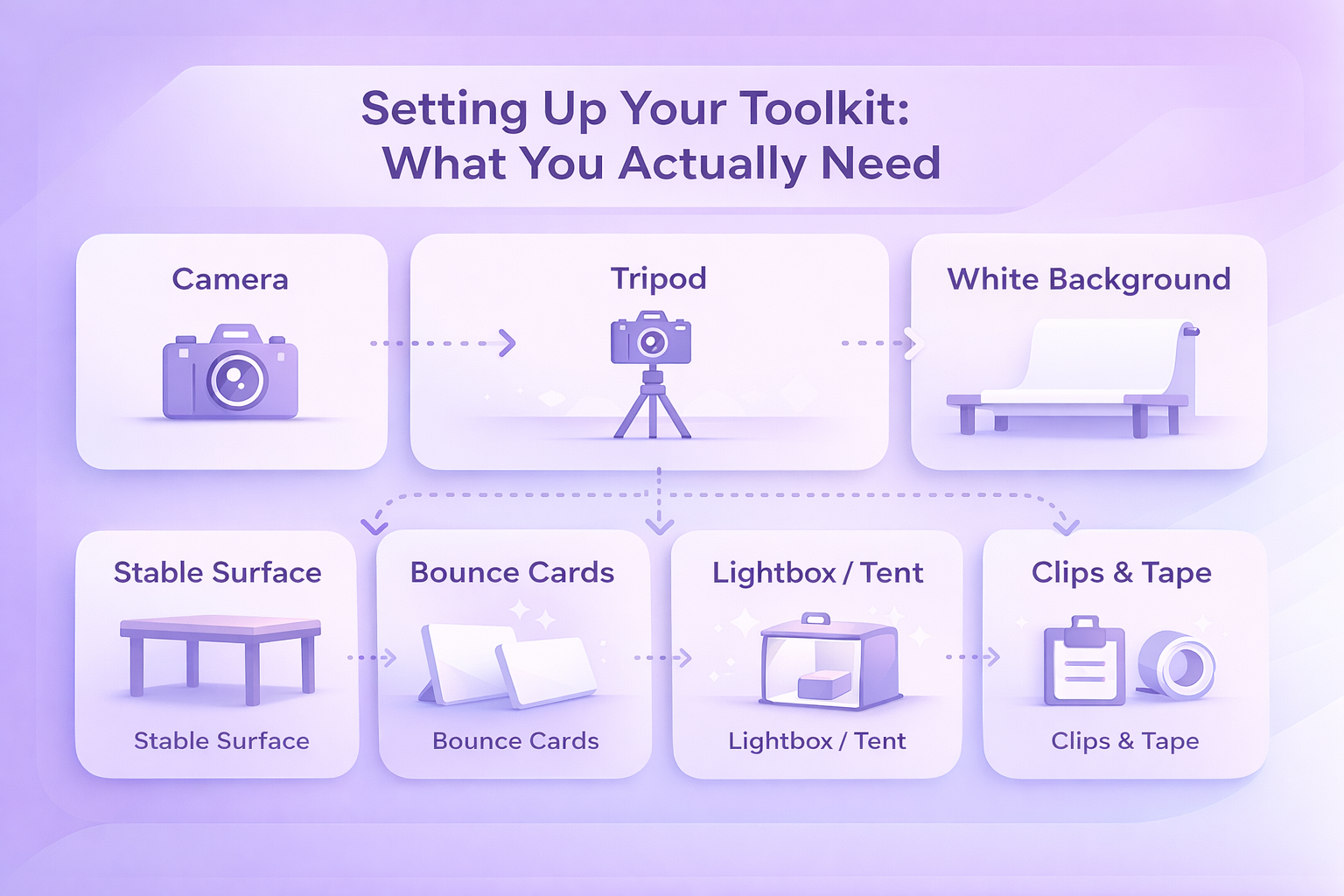
You don’t need a studio full of fancy gear to take strong product photos. Most sellers get great results with a small setup that’s easy to assemble and doesn’t cost much. The trick is choosing tools you understand well enough to use consistently.

  1. Camera: A good camera helps, but it doesn’t have to be top shelf. A DSLR, a point-and-shoot, or even a newer smartphone will all work as long as the images look sharp and natural. Many people end up using their phones because they already know how to operate them and don’t need to navigate ten different menus.
  2. Tripod: This is worth every penny. A tripod keeps the camera steady and prevents the slight hand shake that leads to blurry details. Many affordable ones do the job perfectly fine.
  3. White background: A plain white background keeps the viewer’s attention on the product. Something simple like a roll of white craft paper or a bendable white sheet attached to a table creates that smooth, seamless backdrop most marketplaces expect.
  4. Bounce cards: White foam boards help soften shadows and brighten dark patches without adding extra lights. They’re one of the easiest ways to make a shot look more balanced.
  5. Lightbox or light tent: For smaller items, a lightbox creates an even, soft glow around the product so you don’t have to fight with harsh light or awkward shadows. It’s not essential, but it helps if you shoot often.
  6. A stable surface: A simple table is usually enough. For tiny items, people sometimes use the back of a chair against the wall to create a vertical-to-horizontal sweep.
  7. Clips, tape, or glue dots: Small tools that save you from frustration. They keep backgrounds from sliding and stop lightweight items from rolling around while you’re trying to get the perfect angle.

Once you’ve gathered these basics, you’re already most of the way toward producing photos that look clean, intentional, and consistent from shoot to shoot.


Connect Your Product Photos to Real Performance With WisePPC

At WisePPC, we know great product photos do more than make a listing look polished – they shape how customers interact with your ads and detail pages. Our analytics platform lets you see that impact clearly. You can track changes in CTR, conversion rate, and ad efficiency right after updating your images, instead of guessing whether your creative work made a difference. With long-term historical data, multi-metric charts, and placement-level performance insights, it becomes easier to understand how visuals influence real shopper behavior over time.

We also help you connect the dots across marketplaces. Whether you sell on Amazon, Shopify, or both, our tools show how each listing responds to new photos, which products benefit most, and where your team should focus next. Real-time metrics, automated optimization suggestions, and granular filtering give you a complete picture of how your creative decisions play out in the numbers. Better images drive better results, and we make those results easier to measure, compare, and scale.


Building the Shot: Composition, Style, and Picking the Right Angles

Once your setup is ready, the next step is shaping the actual image. Composition and styling decide what the customer pays attention to, how they interpret your product, and whether the photo feels believable.

Show the Product Clearly, From Helpful Angles

A single straight-on shot rarely tells the whole story. Try mixing angles that highlight different parts of the item:

  • Front or head-on for the straightforward view.
  • Three-quarter angle to show depth and shape.
  • Overhead for items that lay flat or come as sets.
  • Closeups for textures, finishes, or small functional details.

Placing the product in the center usually keeps things clean, but some sellers experiment lightly with the rule of thirds to create space and balance. As long as the item stays easy to understand, a bit of variation can make the shot feel more natural.

Use Styling Thoughtfully

Styling isn’t about decorating the photo. It’s about giving customers a sense of how the product fits into real life. A lifestyle shot of kitchen tools, for instance, might include a cutting board or a soft hint of ingredients in the background. Just keep the extra elements subtle so they don’t steal attention away.

Different shot styles can help you cover a wider set of customer questions:

  • Individual shot: A clean, simple image of one item.
  • Group shot: Useful for bundles or collections where customers need to compare variations.
  • Lifestyle shot: Shows the product in context, helping people imagine how they’ll use it.
  • Scale shot: Puts the size into perspective by showing the object next to something familiar.
  • Detail shot: Ideal for jewelry, intricate patterns, or parts that matter to the buying decision.
  • Packaging shot: For customers who care about presentation and the unboxing experience.
  • 360-degree or rotational set: More advanced, but great for transparency and engagement.

If you sell, say, a ceramic planter, you might shoot it alone; then a group showcasing multiple colors; then a lifestyle moment where someone places a plant into it; and finally a closeup on texture or drainage holes. Together, these images build a rounded understanding of what the buyer is actually getting.


Lighting and Backgrounds: Creating Clarity Without Overcomplication

Lighting can make an average photo look polished, and it can also ruin a great product if it’s too harsh or uneven. Fortunately, you don’t need a studio setup to get lighting right. A bit of patience and a consistent routine usually do the job.

Keep the Background Simple

A white background remains the safest and most reliable choice. It keeps the focus where it should be and makes colors look cleaner. Most marketplaces expect at least one image on plain white, so it’s worth mastering that look.

For lifestyle photos, you can loosen things up. Introduce a bit of color, texture, or setting to signal your brand’s mood. A skincare brand might use soft beige tones; a tech accessory could sit on a modern desk surface. The goal isn’t decoration, it’s clarity. Let the background support the story, not overshadow it.

Use Light to Show the Product Honestly

Natural light works surprisingly well for many products. The sweet spot is often near a window where the light feels soft rather than direct. Morning or late afternoon light can create a more even, gentle tone.

If natural light isn’t dependable, artificial lighting gives you consistency. You can shoot whenever you need to, adjust warmth, and control where shadows fall. Even inexpensive LED panels can provide a steady, predictable result.

Bounce cards help more than people expect. A simple foam board can brighten a shadowy side or soften harsh light from a single-source setup. The small adjustments they make often go a long way in bringing out texture and detail without overexposing anything.

The main thing is to avoid lighting that distorts the product. If a shirt looks more vibrant under your lights than it does in person, customers will feel misled. Aim for accuracy first, enhancement second.


Preparing the Shot: A Practical Step-by-Step Workflow

Once you’ve set your lighting and backdrop, it’s time to bring the whole setup together. A little preparation goes a long way in preventing retakes later.

1. Position the Product Cleanly

Place the item on your chosen background and make sure it sits flat, straight, and centered. Tiny props like glue dots or small clips can stop objects from sliding or tilting. Clothing or accessories may need extra help from mannequins, hangers, or a simple stand.

2. Adjust Your Lighting

If you’re using natural light, move your table closer to a window and soften harsh sunlight with a thin sheet or piece of paper. For artificial light, set your primary light in front of the product and add a second light above or behind it to smooth out shadows. Bounce cards can brighten darker corners and reduce contrast.

It helps to take a quick test photo and adjust based on what you see rather than guessing. When you find a setup you like, jot down notes or take a photo of your lighting arrangement. You’ll thank yourself later when you want consistent shots across a new batch of products.

3. Set Up the Tripod

Place your tripod directly in front of the product and lock it in. This keeps your angles steady and helps maintain consistency across your images. Keeping the camera in the same position also makes retakes easier if you need them.

4. Dial In Camera Settings

Attach your camera or smartphone to the tripod and adjust basic settings so they match your lighting.

  • Match the white balance to your light source so the colors stay true.
  • Use a small aperture if possible to keep more of the product in focus.
  • Turn flash off to avoid sharp, unrealistic reflections.
  • If your camera allows it, shoot in RAW. If not, choose the highest-quality JPEG setting.

Aim for the product to fill at least 80 to 85 percent of the frame. Too much empty space weakens the image, but being too close can cut off essential details unless the shot is meant to be a closeup.

5. Take Multiple Angles

Even if you think you have the perfect shot, take several more from slightly different angles and distances. A small adjustment can uncover a more flattering perspective or reveal a detail that you missed earlier. Shooting extra now is easier than setting up everything again later.


Editing and Enhancing Your Photos Without Overdoing It

Editing isn’t about transforming your product into something it’s not. It’s about presenting it clearly, removing distractions, and making sure the colors and details match what buyers will receive. A light, steady hand usually gives the best results.

Adjust the Basics First

Start with simple corrections.

  • Brightness and exposure: Bring up shadows if they swallowed important details, or lower highlights if the photo looks washed out.
  • Contrast: Add a little definition to separate the product from the background.
  • White balance: Make sure the background actually looks white and the product’s colors appear natural.

These small tweaks often fix 80 percent of issues.

Correct Colors When Needed

Sometimes the background or lighting adds a tint that wasn’t meant to be there. A shirt might lean too blue, or a wooden texture might appear dull. Adjust saturation and hue gently until the item resembles what you see in person. The key is to avoid pushing colors so far that the product looks unrealistic.

Sharpen Selectively

A touch of sharpening can help emphasize texture or edges, especially on jewelry, tools, or fabric. Too much sharpening, though, makes the image look brittle or noisy. Use just enough to give the photo a clean finish.

Crop With Intention

Cropping helps you create consistent shapes across all your photos and guides the viewer’s attention. Trim out empty space, stray styling elements, or anything that distracts from the product. Keep the item centered unless you deliberately want a different composition.

Remove Unwanted Artifacts

Even with good planning, small issues can sneak into the frame. Dust specks, a crease in a backdrop, a glare on sunglasses, these are the kinds of distractions that editing tools can remove. Masking and selection tools in most photo software make these cleanups quick.

Know When to Bring in a Professional

If editing isn’t your strong suit, it can be worth outsourcing final retouching. Over-edited or poorly retouched images can hurt your listing. A professional can clean things up without crossing into artificial territory.

Follow Marketplace Requirements

Every platform has image guidelines. For Amazon, photos must meet certain size, clarity, and file format standards. Larger images (1,000 pixels or more on the longest side) allow for zoom, which helps buyers inspect details and can improve conversions. Stick with JPEG whenever possible, since it balances quality and file size well.


Optimizing Images for Faster Loading and Better Search Visibility

You can take amazing product photos, but if they take too long to load or search engines can’t make sense of them, customers might never reach your listing. A bit of image optimization helps your photos perform well across devices and improves discoverability.

  • Keep file sizes manageable: Large images slow down pages, especially on mobile. Compress your photos just enough to make them lighter while still looking sharp. Many editing programs and online tools handle this well.
  • Choose the right file format: JPEG works for most product shots because it handles color well and stays small when compressed. PNG helps when you need transparency or super crisp edges, though the files are heavier. GIF is limited in color but useful for simple graphics or small animations. In practice, most sellers stick with JPEG for their main photos.
  • Use clear, descriptive file names: Replace generic names like “IMG_3098.jpg” with something more meaningful, such as “stainless-steel-water-bottle-20oz.jpg.” Search engines pick up on these cues, and it helps your content get indexed correctly.
  • Write helpful alt text: Alt text isn’t visible to shoppers, but it supports accessibility and SEO. Keep it brief and accurate, for example: “Blue ceramic planter with drainage tray.” A keyword or two is fine, but the goal is clarity, not stuffing.
  • Use thumbnails wisely: Thumbnails help shoppers skim through colors, angles, or variations quickly. They also give search engines a better idea of the range of content on your product page.
  • Add images to your sitemap: If you run your own ecommerce site, including images in your sitemap helps search engines discover them more easily. This can improve your presence in image search results.
  • Make images responsive: A lot of browsing happens on phones. Responsive images ensure your photos load properly and display cleanly across desktop, tablet, and mobile without weird cropping or delays.


Common Mistakes to Avoid

Even a solid setup can fall apart if a few small details slip by unnoticed. These are the issues that quietly weaken the overall quality of product photos.

1. Skipping the White Background for Core Shots

Creative backgrounds are great for lifestyle images, but your primary photos should almost always use a clean white backdrop. It keeps attention on the product and aligns with marketplace expectations.

2. Letting Props or Models Steal the Spotlight

Styling can add context, but it shouldn’t overshadow the item you’re actually selling. If the viewer notices the props first, it’s a sign the composition needs adjusting.

3. Using Angles That Confuse Rather Than Clarify

Overly dramatic or artistic angles might look interesting, but buyers usually want simple, predictable views. Stick to clear angles like front, side, overhead, closeups, and soft 45-degree shots unless you have a strong reason to do otherwise.

4. Uploading Low-Resolution Images

Blurry or pixelated photos quickly turn shoppers away. High-resolution shots allow zooming and give customers confidence in the product’s details.

5. Ignoring Lighting Problems

Poor lighting leads to inaccurate colors and flattened textures. If something looks off, fix the exposure in editing instead of hoping it goes unnoticed.

6. Skipping the Tripod

Even small hand movements can add blur. A basic tripod removes that risk and helps you maintain consistent framing across shoots.

7. Forgetting SEO Basics

After all the effort of shooting and editing, it’s surprisingly easy to skip alt text or descriptive file names. These small SEO steps help search engines read your images and improve discoverability.


Final Word

Strong product photos aren’t just a final polish on your listing. They shape how shoppers understand your product, influence whether they click “add to cart,” and set honest expectations about what arrives at their doorstep. When your images are clear, well-lit, and consistent, customers feel more confident in what they’re buying. When they’re confusing or low-quality, you lose that trust before the conversation even begins.

As online shopping grows and the competition tightens, visuals become one of the simplest ways to stand out. You don’t need a huge studio or expensive gear to get there. What matters most is a thoughtful setup, accurate lighting, and a handful of images that show the product from angles and contexts that actually help the buyer.

If you treat photography as a core part of your ecommerce workflow rather than a last-minute task, you’ll see the difference – not only in how your listings look, but in how your customers respond.


FAQs

Do good product photos really increase sales?

Yes. Clear, accurate images help shoppers understand shape, texture, size, and overall quality. When people can evaluate a product visually, they feel more confident buying it, which usually leads to higher conversions and fewer returns.

Can I take product photos with a smartphone?

You can. Many recent smartphones have excellent cameras. Pair the phone with a small tripod, use even lighting, and adjust basic settings like white balance and focus. The quality difference between a phone and a DSLR is often smaller than people expect when the setup is done correctly.

How many photos should a product listing include?

Most listings benefit from at least six images. A solid mix might include a front view, an angled view, a few closeups, a scale shot, and a lifestyle or contextual photo that shows the product in use.

What background works best for product photography?

A clean white background is the safest choice for core images. It keeps the attention on the product and aligns with most marketplace requirements. Lifestyle images can use more creative backgrounds, as long as they don’t distract from the item.

What lighting should I use for product photos?

Soft, diffused light: natural or artificial, usually produces the most accurate results. Bright, direct light tends to create harsh shadows and uneven highlights. A simple diffuser or bounce card can help even everything out and show the product honestly.

success icon

Thank you for submitting request.

We will get back to you ASAP.