
 EN
EN  ES
ES  FR
FR  DE
DE  IT
IT  KO
KO  JA
JA  ZH
ZH  AR
AR  PT
PT  TR
TR PL
PL
Quick Summary: An Amazon digital charge is a billing entry that appears on bank or credit card statements for purchases of Amazon’s digital products and services. These charges include subscriptions like Amazon Prime, Kindle Unlimited, Prime Video channels, Amazon Music Unlimited, Audible, digital book purchases, app downloads, in-game purchases, and cloud storage fees. The charge descriptor typically reads as ‘AMAZON DIGITAL’ or ‘Amazon Digital Services’ followed by the transaction location.
Spotted an unfamiliar ‘Amazon Digital’ charge on your credit card statement? You’re not alone. Thousands of people search for answers about these mysterious charges every month, often concerned they’ve been billed for something they didn’t purchase.
Here’s the thing though—Amazon digital charges aren’t usually fraudulent. They represent a wide range of digital products and services that Amazon offers beyond physical goods. But that doesn’t mean every charge is legitimate or that managing these subscriptions is straightforward.
This guide breaks down everything about Amazon digital charges: what they are, why they appear on statements, which services typically generate them, and most importantly, how to track them down and cancel unwanted subscriptions.
Understanding Amazon Digital Charges
Amazon digital charges represent payments for non-physical products delivered electronically through Amazon’s digital ecosystem. Unlike physical product purchases that ship to an address, digital charges cover content and services accessed instantly through devices or browsers.
The charge descriptor on bank statements typically appears as:
- AMAZON DIGITAL
- Amazon Digital Services
- AMZN Digital
- Amazon.com AMZN.COM/BILL
These charges can range from a few dollars for individual content purchases to monthly or annual subscription fees. The timing depends on when subscriptions renew or when one-time digital purchases occur.
According to the Federal Trade Commission, Amazon faced legal action in 2023 regarding enrollment practices for Prime subscriptions, with concerns about consumers being charged without full consent. The FTC secured a historic $2.5 billion settlement in September 2025 over allegations that Amazon used deceptive methods to sign up consumers and made cancellation difficult.

See What Your Amazon Ads Are Driving
WisePPC focuses on showing what advertising is actually doing. It connects campaign performance, keyword data, and product metrics so it is easier to understand which ads lead to sales and which ones do not. This makes it easier to identify underperforming campaigns and adjust them before they waste more budget.
Trying to Understand Ad Results?
Use WisePPC to:
- connect ad performance with product sales
- analyze campaigns and keyword-level results
- identify which ads are working
👉 Explore WisePPC to understand your Amazon advertising data.

Common Types of Amazon Digital Charges
Amazon’s digital service portfolio has expanded significantly. Understanding which services generate charges helps identify unexpected billing entries.
Amazon Prime Membership
Prime memberships currently cost around $14.99 monthly or $139 annually in the US. This subscription bundles multiple digital services including Prime Video streaming, Prime Music, Prime Reading, and free shipping benefits. Many users don’t realize Prime includes automatic renewal unless manually disabled.
Prime Video Channels and Rentals
Beyond the base Prime Video library, Amazon offers premium channel subscriptions like HBO Max, Showtime, Paramount+, and others ranging from $5.99 to $14.99 monthly. Movie and TV show rentals typically cost $3.99 to $6.99, while purchases range from $9.99 to $24.99.
Kindle Unlimited and Digital Books
Kindle Unlimited provides unlimited access to over a million ebooks and audiobooks. Individual Kindle book purchases vary widely in price, from $0.99 promotional titles to $15.99 or more for new releases and professional books.
Amazon Music Unlimited
This streaming service offers access to millions of songs beyond what Prime Music includes. Pricing varies based on plan type—individual, family, or single-device subscriptions each carry different monthly fees.
Audible Subscriptions
Audible operates as a separate subscription service owned by Amazon. Standard plans provide monthly credits for audiobook purchases, with charges appearing as Amazon digital transactions on many statements.
Apps, Games, and In-App Purchases
The Amazon Appstore for Android devices processes charges for paid apps, games, and in-app purchases. These can range from $0.99 to $99.99 or more for game currency, premium features, or content packs.
Cloud Storage and Other Services
Amazon Photos storage expansion, Amazon Drive subscriptions, and other digital services round out the ecosystem. These typically charge monthly fees based on storage tiers selected.
Why Amazon Digital Charges Appear Unrecognized
Several factors contribute to confusion when these charges appear on statements.
- Free Trial Conversions: Many Amazon services offer free trials that automatically convert to paid subscriptions. Users often forget about trials started weeks or months earlier. Free trial conversions represent a common source of unexpected charges.
- Family Sharing and Household Accounts: Amazon Household allows sharing benefits with family members. Sometimes household members initiate subscriptions or purchases without other members knowing, causing confusion when charges appear.
- Vague Statement Descriptors: The generic ‘Amazon Digital’ descriptor doesn’t specify which service caused the charge. A $9.99 charge could be Kindle Unlimited, a Prime Video channel, or a music subscription.
- Accidental Sign-ups: The FTC’s June 2023 lawsuit alleged that Amazon enrolled tens of millions of customers in Prime subscriptions without their knowledge or consent and made it difficult to cancel. Similar issues can occur with other services when users navigate through purchase flows.
- Multiple Payment Methods: Charges may hit different cards than expected if Amazon automatically switches to backup payment methods when primary cards decline or expire.
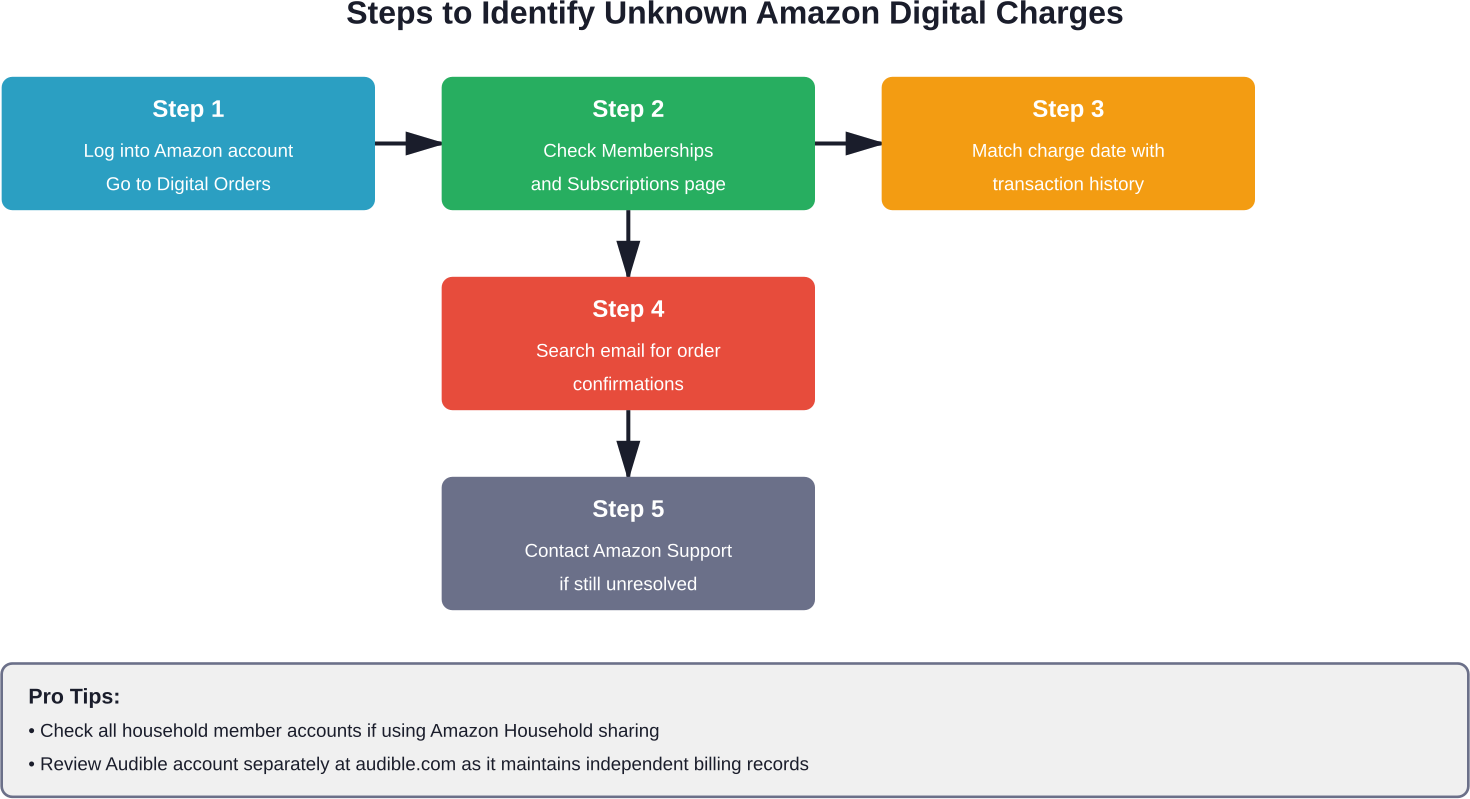
How to Identify Amazon Digital Charges
Tracking down the specific service behind a charge requires checking multiple locations within Amazon’s account system.
Check Your Amazon Account Order History
Start with the Digital Orders section, separate from physical product orders. Navigate to ‘Returns & Orders’ then filter by ‘Digital Orders’ to view all digital content purchases including ebooks, videos, apps, and music.
Review Memberships and Subscriptions
The ‘Memberships & Subscriptions’ page consolidates active subscriptions across services. Access this through Account Settings to see Prime, Prime Video Channels, Kindle Unlimited, Amazon Music, and third-party subscriptions managed through Amazon.
Examine Payment Transaction Details
Match statement charge dates with transaction dates in Amazon’s system. Each digital purchase or subscription renewal generates a detailed invoice accessible through the account’s order history or email notifications.
Search Email for Order Confirmations
Amazon sends email confirmations for every transaction. Search email for ‘Amazon’ or ‘order confirmation’ around the date of the unknown charge. These emails specify exactly what was purchased or which subscription renewed.
How to Cancel Amazon Digital Subscriptions
Stopping unwanted charges requires canceling the specific subscription or service generating them.
Canceling Through Memberships and Subscriptions
Navigate to ‘Memberships & Subscriptions’ in account settings. Each active subscription displays with a ‘Manage Subscription’ or ‘Cancel Subscription’ option. Click the appropriate option and follow prompts to complete cancellation.
Most subscriptions allow continued access until the current billing period ends, meaning canceling immediately doesn’t forfeit already-paid time.
Canceling Prime Membership
Prime cancellation follows a specific process. Go to ‘Manage Prime Membership’ in account settings, select ‘End Membership,’ and confirm through multiple prompts. Amazon typically offers alternative options like pausing membership before finalizing cancellation.
Canceling Prime Video Channels
Prime Video Channels require separate cancellation from Prime membership. Access the Prime Video website or app, go to ‘Channels’ under account settings, and manage each channel subscription individually.
Canceling Kindle Unlimited
Kindle Unlimited cancellation occurs through the ‘Manage Your Kindle Unlimited Membership’ page. Select ‘Cancel Kindle Unlimited Membership’ and follow confirmation steps. Borrowed books become inaccessible after the current billing period expires.
Canceling Audible
Audible requires cancellation through the Audible website rather than Amazon’s main site. Log into audible.com, navigate to account details, and select ‘Cancel membership.’ Unused credits typically remain available for a period after cancellation.
Requesting Refunds for Unwanted Charges
Amazon offers refund options for certain digital purchases and recently charged subscriptions. For one-time digital content purchases, refund eligibility depends on whether the content has been accessed or downloaded. Subscription refunds are more likely if cancellation occurs shortly after an unexpected charge.
Contact Amazon customer service through the ‘Contact Us’ page, explain the situation, and request a refund. According to Amazon Pay’s support resources, customers should report unauthorized charges immediately through both Amazon and the credit card provider.
Managing Digital Services for Sellers
Amazon sellers face an additional layer of digital charges related to selling fees and services.
Digital Services Fee for Sellers
Starting October 1, 2024, Amazon introduced a digital services fee to account for digital services taxes implemented by governments in the UK, France, Italy, Spain, and Canada. According to official Amazon Seller Central announcements published August 2024, the typical digital services tax rate is 2% in the UK and 3% in France, Italy, Spain and Canada.
The fee applies based on where the seller’s business is established and which store they sell in. For example, if a business is established in Canada and sells a $15 item in the US store, a 3% digital services fee ($0.07) applies on Selling on Amazon fees ($2.25) for sales starting October 1, 2024.
This fee doesn’t apply to domestic sales if established in the US and selling in the US store. Sellers can preview fees in the Revenue Calculator starting September 1 and track digital services fees via Transaction View in payment reports from October 1.
Seller Central Subscription Fees
Professional selling plans charge monthly subscription fees regardless of sales volume. These appear as Amazon digital charges on the business payment methods connected to seller accounts.
| Fee Type | Who It Applies To | Rate/Amount | When Charged |
|---|---|---|---|
| Digital Services Fee (Seller) | Sellers in UK, France, Italy, Spain, Canada selling in other stores | 2-3% of certain fees | Per transaction (from Oct 2024) |
| Professional Selling Plan | Sellers with high volume | Monthly subscription | Monthly recurring |
| Individual Selling Fees | Sellers with low volume | Per-item charge | Per sale |
| Referral Fees | All sellers | Percentage of sale price | Per transaction |
Preventing Unwanted Amazon Digital Charges
Proactive measures help avoid surprise charges and maintain control over digital spending.
Disable One-Click Ordering
One-Click ordering enables instant purchases without confirmation screens. Disabling this feature adds a review step before completing digital purchases, reducing accidental transactions.
Set Purchase PINs for Shared Devices
Devices used by multiple family members should require PIN authentication before purchases. Enable this in device settings for Fire tablets, Prime Video apps, and Kindle devices to prevent unauthorized purchases.
Review Subscriptions Quarterly
Schedule regular reviews of active subscriptions every three months. Cancel services no longer actively used to prevent ongoing charges for forgotten subscriptions.
Turn Off Auto-Renewal
Most Amazon subscriptions allow disabling auto-renewal while maintaining current access. This forces an active decision to continue service rather than passive automatic renewal.
Monitor Free Trial Expiration Dates
Calendar reminders for trial expiration dates help catch conversions to paid subscriptions. Set reminders for 2-3 days before trial periods end to cancel if not planning to continue.
Use Virtual Card Numbers
Some credit cards offer virtual card numbers for subscriptions. These can be paused or deleted instantly if disputes arise, stopping charges without affecting the primary card.
Is Amazon Digital Charge a Scam?
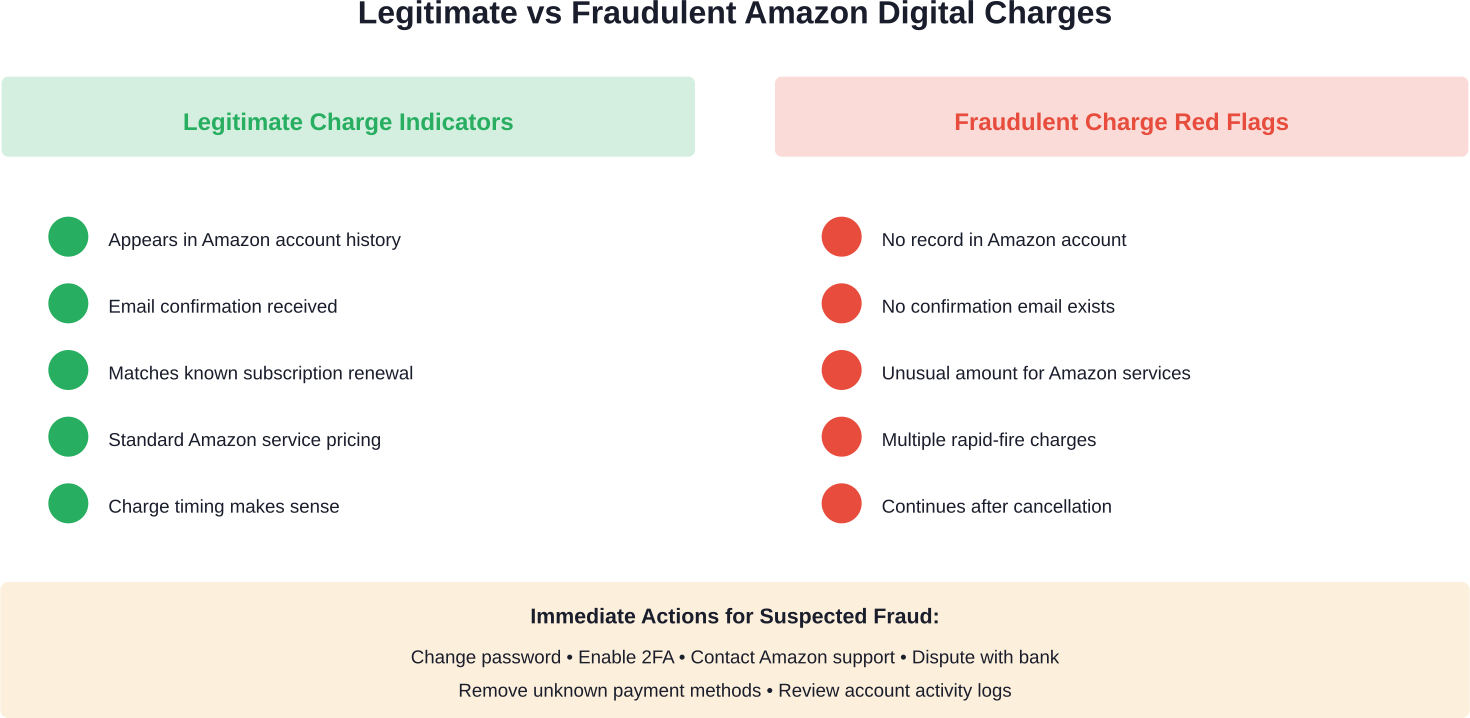
Legitimate Amazon digital charges aren’t scams, but fraudulent charges do occur. Distinguishing between the two requires verification.
Signs of Legitimate Charges:
- Charges match amounts listed in Amazon account history
- Email confirmations exist for the transaction
- The charge date aligns with subscription renewal dates
- Amounts correspond to known Amazon service pricing
Red Flags for Fraudulent Charges:
- No corresponding transaction appears in Amazon account
- Charge amounts don’t match standard Amazon pricing
- Multiple charges occur in short timeframes
- Charges continue after subscriptions were canceled
According to Amazon Pay’s support resources, customers should report unauthorized charges immediately. The FTC warns that the FTC is not contacting people about refunds in the Amazon matter. If someone claims to be from the FTC regarding refunds, it’s a scam, as the FTC never demands money, makes threats, or promises guaranteed refunds. No one from Amazon will ever ask you for money to get a refund.
What to Do About Fraudulent Charges
If charges appear fraudulent after verification, take immediate action:
- Change Amazon account password immediately
- Enable two-factor authentication if not already active
- Contact Amazon customer service to report unauthorized activity
- Dispute charges with the credit card company or bank
- Review and remove unfamiliar payment methods from the Amazon account
- Check for unauthorized account access in account activity logs
The credit card company can issue chargebacks for verified fraudulent transactions while investigations proceed.
Amazon Digital Charges and Tax Implications
Digital purchases and subscriptions carry different tax treatment depending on jurisdiction and service type.
Most Amazon digital services charge applicable sales tax, VAT, or other consumption taxes based on billing address. These taxes appear separately on invoices and increase the total charge beyond the base service price.
For sellers, the digital services fee introduced in October 2024 specifically addresses digital services taxes implemented by certain governments. These taxes apply to businesses providing digital services, and Amazon’s fee structure passes portions of this cost to sellers in affected regions.
Businesses purchasing digital services for work purposes may be able to deduct these expenses. Consult tax professionals regarding specific deductibility of Amazon digital services for business use.
Comparing Amazon Digital Services to Competitors
Understanding how Amazon’s digital ecosystem compares to alternatives helps evaluate value.
| Service Type | Amazon Option | Main Competitors | Key Differences |
|---|---|---|---|
| Streaming Video | Prime Video | Netflix, Disney+, Hulu | Bundled with Prime; add-on channels available |
| Music Streaming | Amazon Music Unlimited | Spotify, Apple Music | Integrated with Echo devices; Prime includes limited library |
| Ebooks | Kindle, Kindle Unlimited | Apple Books, Google Play Books | Largest selection; subscription option available |
| Audiobooks | Audible | Audiobooks.com, Libro.fm | Credit system; largest audiobook library |
| Cloud Storage | Amazon Photos, Amazon Drive | Google Drive, iCloud, Dropbox | Unlimited photo storage for Prime members |
Amazon’s bundling strategy with Prime creates value for consumers using multiple services. However, this bundling also contributes to confusion about charges, as multiple services appear under generic ‘Amazon Digital’ descriptors.
Future of Amazon Digital Services
Amazon continues expanding its digital service portfolio, which affects future charge patterns.
Recent developments include enhanced advertising tiers for Prime Video, expanded gaming services through Luna cloud gaming, and growing integration of AI services. Each new service introduction potentially creates additional charge types appearing on customer statements.
Regulatory scrutiny continues evolving. The FTC’s 2025 settlement demonstrates increased government oversight of subscription practices. This pressure may lead to clearer billing descriptors, easier cancellation processes, and more transparent trial-to-paid conversions.
The digital services tax landscape affects international sellers. As more countries implement digital services taxes, Amazon’s fee structure for sellers will likely expand to additional regions beyond the current UK, France, Italy, Spain, and Canada.
Frequently Asked Questions
What does Amazon Digital charge mean on my bank statement?
It refers to purchases or subscriptions for Amazon digital services like Prime, Kindle books, Prime Video, Amazon Music, Audible, apps, or cloud storage. Check your Amazon order history for details.
How do I stop recurring Amazon digital charges?
Go to “Memberships & Subscriptions” in your Amazon account, find the service, and cancel it. Access usually continues until the end of the billing period.
Can I get a refund for Amazon digital charges I didn’t authorize?
Possibly. Refunds may be issued if the service wasn’t used or the charge was recent. Contact Amazon support and, if necessary, your bank to dispute unauthorized charges.
Why was I charged for Amazon Prime when I didn’t sign up?
This may happen if a free trial converted to a paid plan. Check your membership settings and contact Amazon to cancel and request a refund if needed.
What is the Amazon digital services fee for sellers?
This fee applies to sellers in certain countries to cover digital services taxes. It’s typically 2–3% of specific selling and fulfillment fees.
How do I check what Amazon digital services I’m subscribed to?
Visit “Memberships & Subscriptions” in your account. For Audible, check subscriptions directly on audible.com.
Are Amazon digital charges safe and legitimate?
Most charges are legitimate, but if you don’t recognize one, check your account activity. If needed, secure your account and contact Amazon or your bank.
Conclusion
Amazon digital charges represent a diverse ecosystem of digital products and services extending far beyond physical product purchases. Understanding these charges requires familiarity with Amazon’s subscription offerings, billing practices, and account management tools.
Most unexpected charges result from forgotten free trials, family member purchases, or confusing enrollment processes rather than fraud. But that doesn’t make them any less frustrating when they appear unexpectedly on bank statements.
The key to managing Amazon digital charges lies in proactive monitoring. Regular subscription reviews, careful attention to free trial periods, and understanding how to navigate Amazon’s account settings prevent surprise charges and maintain control over digital spending.
For sellers, the introduction of digital services fees adds complexity to financial planning. Understanding how these fees apply based on business location and selling markets helps accurately project costs and set appropriate pricing.
Take control of your Amazon digital charges today. Log into your Amazon account, review active subscriptions under ‘Memberships & Subscriptions,’ and cancel any services no longer providing value. Set calendar reminders for remaining subscription renewal dates, and enable two-factor authentication to protect against unauthorized account access. Your bank statement will thank you.
 No credit card required