
 EN
EN  ES
ES  FR
FR  DE
DE  IT
IT  KO
KO  JA
JA  ZH
ZH  AR
AR  PT
PT  TR
TR PL
PL
Quick Summary: On Amazon, ‘Sponsored’ means the product listing is a paid advertisement. Sellers pay Amazon to display their products more prominently in search results and on product pages using cost-per-click (CPC) advertising. These sponsored listings help products gain visibility in a crowded marketplace, though they’re clearly labeled to distinguish them from organic search results.
Ever noticed product listings with a small “Sponsored” label while browsing Amazon? Those aren’t there by accident.
Understanding what sponsored means on Amazon matters whether browsing as a shopper or selling products on the platform. These paid placements represent a massive advertising ecosystem that influences what products surface first in search results.
This guide breaks down everything about Amazon sponsored listings—how they work, why sellers use them, and what they mean for shoppers navigating the world’s largest online marketplace.
What Does Sponsored Mean on Amazon?
The “Sponsored” tag on Amazon indicates a paid advertisement. Sellers pay Amazon to display their products in prominent positions throughout the marketplace.
According to Amazon’s official advertising platform, Sponsored Products are cost-per-click (CPC) ads that promote individual product listings on Amazon and select premium apps and websites. Sellers only pay when shoppers actually click on their sponsored listings.
These aren’t random placements. Amazon’s system uses an auction-based model where sellers bid on keywords and product targets, similar to how Google Ads operates but specifically tailored to shopping behavior.
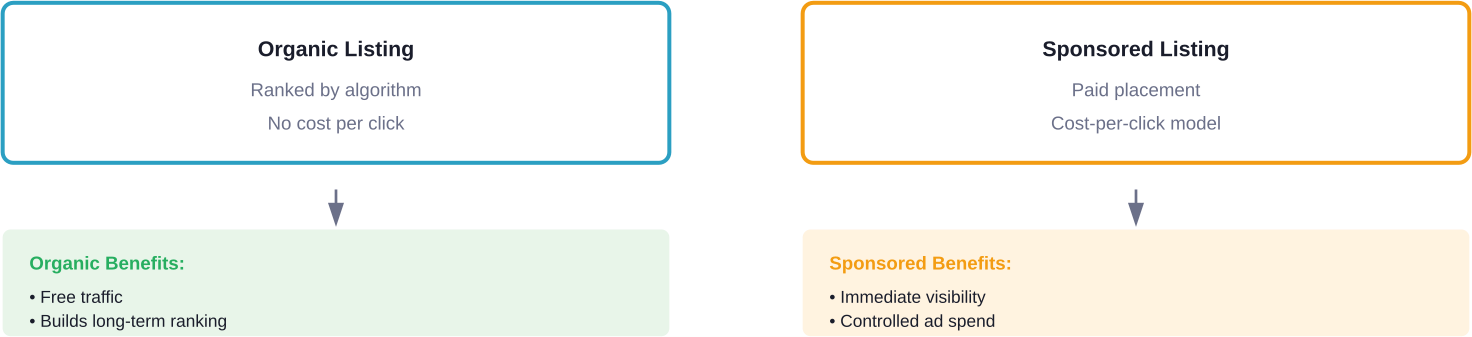
How Sponsored Listings Differ from Organic Results
Organic listings appear based on Amazon’s search algorithm—factors like relevance, sales history, reviews, and conversion rates determine ranking. Sponsored listings bypass some of these organic ranking challenges through paid promotion.
But here’s the thing—sponsored products must still be relevant to the search query. Amazon won’t show a sponsored dog toy when someone searches for laptop chargers, regardless of how much the seller bids.
The Federal Trade Commission requires clear disclosure of paid advertising relationships. That’s why Amazon prominently displays the “Sponsored” label on these placements, ensuring shoppers can distinguish paid promotions from organic results.
Focus On What’s Actually Profitable With WisePPC
Some ideas look good but don’t deliver. WisePPC shows what’s really generating results by connecting performance data in one place. You can focus on what scales instead of guessing.
Want to Know What’s Working?
Use WisePPC to:
- analyze performance across campaigns and products
- connect activity with real results
- identify what’s worth expanding
👉 Explore WisePPC to understand your performance data.

Types of Amazon Sponsored Ads
Amazon offers three main sponsored advertising formats, each serving different promotional goals.
Sponsored Products
These are the most common sponsored listings on Amazon. Sponsored Products promote individual product listings and appear throughout the marketplace.
According to Amazon’s official documentation, these ads can appear in relevant search results, on product detail pages, in the cart area, and in the highly-rated products section. They display as either image ads or the newer Sponsored Products video format.
Sellers select products to advertise, choose target keywords, set bids, and establish daily budgets. Amazon’s system can also target relevant keywords automatically for sellers new to advertising.
Sponsored Brands
Sponsored Brands showcase a seller’s brand logo, custom headline, and multiple products in a single ad unit. These creative-rich ads help introduce customers to a brand and product selection.
These ads typically appear at the top of search results and feature three product images alongside brand messaging. Sponsored Brands include collection ad formats, Brand Store spotlight placements, and video ad formats.
For Sponsored Brands, Amazon recommends budgeting at least $10 daily to help keep ads showing throughout the day.
Sponsored Display
Sponsored Display ads reach customers both on and off Amazon, appearing on product detail pages, customer review pages, and even external websites and apps that are part of Amazon’s advertising network.
These display ads help advertisers stay top of mind with audiences across the buying journey, from initial research to post-purchase engagement.
How Amazon Sponsored Ads Work
The mechanics behind sponsored listings combine auction bidding, relevance scoring, and performance tracking.
The Auction System
When a shopper searches for a product, Amazon runs an instant auction among sellers bidding on related keywords. The auction considers both the bid amount and the ad’s relevance to the search query.
Multiple sellers might target the same keywords. The author’s guide to Sponsored Products explains that if one seller bids $0.75 on “war novels” and another bids $0.80, the higher bid doesn’t automatically win—ad relevance factors into placement decisions too.
Sellers choose from three bidding strategies. Dynamic bids (up and down) let Amazon adjust bids by up to 100% for placements at the top of the first page of shopping results and by up to 50% for all other placements when conversions seem likely. Dynamic bids (down only) reduce spend on less promising clicks. Fixed bids maintain the exact bid amount regardless of conversion probability.
Amazon now offers advanced AI-powered bidding strategies where dynamic bids (up and down) can increase by up to 150% for top-of-search placements and up to 100% for other placements in highly competitive categories as of 2026.
Keyword and Product Targeting
Sellers can target their ads two ways: keyword targeting or product targeting.
Keyword targeting shows ads when shoppers search specific terms. Sellers choose between automatic targeting (Amazon selects relevant keywords) or manual targeting (sellers specify exact keywords).
Product targeting displays ads on specific product detail pages or for products in certain categories. This strategy helps sellers reach shoppers already viewing similar or complementary products.
Cost Structure
Sponsored Products operate on a cost-per-click model. Sellers set a maximum bid—the most they’ll pay when someone clicks their ad. The actual cost per click often runs lower than the maximum bid.
Sellers control spending through daily budgets and maximum bid limits. Campaigns can start, pause, or adjust at any time without long-term commitments.
For Sponsored Brands, Amazon recommends budgeting at least $10 daily to help keep ads showing throughout the day. For Sponsored Products, sellers can begin with modest daily budgets and scale based on performance.
Why Sellers Use Sponsored Ads
The competition on Amazon is intense. Millions of products compete for shopper attention.
Sponsored ads solve the visibility problem. New products lack the sales history and reviews needed to rank organically. Established products face constant competition from new entrants.
According to Amazon’s official advertising site, small businesses using Amazon Ads attributed 30% of their sales to our ads. That’s a significant chunk of revenue driven by paid promotion.
Key Benefits for Sellers
Sponsored Products increase visibility immediately. A new product can appear at the top of search results on day one with the right ad strategy.
The pay-per-click model means sellers only pay for engaged shoppers who actually click listings. Impressions (times the ad displays) cost nothing—payment happens only when someone shows interest by clicking.
Campaign performance data provides insights into which keywords drive conversions. Sellers learn what search terms customers use and which ones lead to purchases.
Sponsored ads can also protect branded terms. Competitors might bid on a brand name, so sellers often run defensive campaigns on their own brand keywords to maintain top positioning.
What Sponsored Means for Shoppers
For shoppers, the “Sponsored” label signals that a seller paid for prominent placement. It doesn’t mean the product is inferior or misleading.
Amazon’s relevance requirements ensure sponsored products relate to search queries. Shoppers shouldn’t see completely irrelevant sponsored items just because a seller bid aggressively.
That said, sponsored products appear before some organic results that might be better matches. The top listing isn’t always the most popular or best-reviewed—sometimes it’s just the one with the highest-performing ad campaign.
The Federal Trade Commission’s guidelines on online advertising require clear disclosure of sponsored content, which is why Amazon prominently labels these placements. This transparency helps shoppers make informed decisions.
Evaluating Sponsored vs. Organic Products
Smart shoppers check both sponsored and organic results. The best product for specific needs might appear in either category.
Reviews, ratings, price, and product features matter more than whether a listing is sponsored. A sponsored product with 4.8 stars and thousands of reviews might be a better choice than an organic result with 3.9 stars and 50 reviews.
Scrolling past the first few sponsored results often reveals organic listings that rank high based on genuine popularity and sales performance rather than advertising spend.
Setting Up Amazon Sponsored Campaigns
Sellers with active Amazon seller accounts can access Campaign Manager through Seller Central. The setup process takes just minutes for basic campaigns.
The first step involves selecting products to advertise. Amazon recommends choosing items with good inventory levels, competitive pricing, and quality product detail pages with clear images and descriptions.
Next, sellers choose between automatic and manual targeting. Automatic targeting lets Amazon’s algorithms select relevant keywords and products to target. Manual targeting gives sellers complete control over keyword and product selections.
Budget and bid settings come next. Sellers set daily budgets and maximum bids for clicks. Amazon’s system provides bid suggestions based on competitive auction data for specific keywords.
Finally, the campaign launches and enters Amazon’s ad review process (typically completed within 72 hours). Once approved, ads begin appearing in auctions for targeted keywords or products.
| Campaign Setting | Beginner Recommendation | Advanced Strategy |
|---|---|---|
| Targeting Type | Automatic targeting | Mix of automatic and manual campaigns |
| Daily Budget | Start with modest budget | Scale based on performance data |
| Bidding Strategy | Dynamic bids (down only) | Test all three bidding strategies |
| Campaign Duration | Run continuously | Run continuously with regular optimization |
| Performance Review | Check weekly | Monitor daily, optimize weekly |
Measuring Sponsored Ad Performance
Amazon provides detailed performance metrics for sponsored campaigns through the Campaign Manager dashboard.
Key metrics include impressions (how many times ads displayed), clicks (how many shoppers clicked ads), click-through rate (percentage of impressions that generated clicks), and cost-per-click (average amount paid per click).
But the most important metrics tie to actual business outcomes. Total sales attributed to ads, advertising cost of sales (ACoS—ad spend divided by ad revenue), and return on ad spend (RoAS—revenue divided by ad spend) show whether campaigns generate profitable results.
Amazon also tracks conversion rates—the percentage of clicks that result in purchases. High conversion rates indicate strong ad relevance and product appeal.
According to Amazon’s guide for authors using Sponsored Products, reviewing campaign metrics after seven days provides enough data to identify trends and make initial optimization decisions.
Common Sponsored Ad Strategies
Successful sellers employ various strategies depending on their goals.
Product launch campaigns focus on new items that need visibility. These campaigns often use automatic targeting to discover which keywords generate interest, with higher initial bids to secure prominent placement.
Branded defense campaigns protect a seller’s brand name from competitor ads. Sellers bid on their own brand keywords to ensure their products appear first when shoppers search specifically for their brand.
Competitor targeting places ads on competitor product detail pages or targets competitor brand keywords. This strategy captures shoppers actively considering alternative products.
Promotional campaigns support sales events, seasonal promotions, or inventory liquidation. These often feature higher bids and budgets for short periods to maximize visibility during key selling windows.
Frequently Asked Questions
Do sponsored products cost more for shoppers?
No, sponsored listings display the same price as organic listings. Sellers pay the advertising costs, not customers.
Are sponsored products lower quality?
No, “sponsored” only means the seller paid for additional visibility. Product quality depends on the item and seller.
Can any seller create sponsored ads on Amazon?
Most professional sellers can use Sponsored Products, while some ad types require Brand Registry enrollment.
How much do Amazon sponsored ads cost?
Costs vary by competition and keyword demand. Sellers control their own bids and daily budgets.
Where do sponsored ads appear on Amazon?
Sponsored ads can appear in search results, product pages, shopping cart sections, and other placements across Amazon.
Can shoppers filter out sponsored results?
No, Amazon does not offer a built-in option to hide sponsored listings.
Do sponsored ads guarantee sales?
No, advertising increases visibility but does not guarantee conversions or sales.
The Bottom Line on Amazon Sponsored Listings
The “Sponsored” label on Amazon represents paid advertising that helps sellers cut through the noise of millions of competing products.
For sellers, sponsored ads offer controlled, measurable promotion with flexible budgets and targeting options. The cost-per-click model ensures advertising spend goes toward engaged shoppers rather than passive impressions.
For shoppers, sponsored listings provide relevant product suggestions but shouldn’t be the only results considered. The best purchasing decisions consider sponsored and organic results equally, focusing on reviews, features, and pricing rather than placement alone.
Understanding what sponsored means empowers both sellers to advertise effectively and shoppers to navigate Amazon’s marketplace with informed awareness. The system works when sellers provide genuine value and shoppers evaluate products critically regardless of their sponsored status.
Ready to see how sponsored ads could boost visibility for products on Amazon? Check Campaign Manager in Seller Central to explore advertising options and set up a first campaign.
 No credit card required