
 EN
EN  ES
ES  FR
FR  DE
DE  IT
IT  KO
KO  JA
JA  ZH
ZH  AR
AR  PT
PT  TR
TR PL
PL
Quick Summary: Amazon doesn’t directly accept PayPal as a payment method, but several workarounds exist. The most reliable option is using a PayPal Debit Card or PayPal Business Debit Mastercard, both of which Amazon accepts like any standard debit card. Alternative methods include purchasing Amazon gift cards through PayPal or using third-party services like Curve that link your PayPal account to a virtual card.
Here’s the frustrating truth: Amazon and PayPal don’t play nice together. Despite both being retail and payment giants, Amazon doesn’t accept PayPal as a direct payment option at checkout.
But that doesn’t mean shoppers are out of luck. Several legitimate workarounds exist that let customers tap into their PayPal balance when shopping on Amazon. Some methods are straightforward, while others require a bit more setup.
Why Doesn’t Amazon Accept PayPal?
Amazon has its own payment ecosystem, anchored by Amazon Pay and its credit card partnerships. Adding PayPal would mean sharing customer data and transaction fees with a competitor that also operates in the digital wallet space.
According to PayPal’s official help documentation, the company acknowledges this limitation directly. As stated on PayPal’s website, “While Amazon doesn’t directly accept PayPal as a payment option, you can use your PayPal Debit Card or PayPal Business Debit Mastercard to make payments on its platform.”
The rivalry between these payment platforms means customers need to get creative. Real talk: these workarounds aren’t difficult, but they do require an extra step or two.

WisePPC – See What’s Behind The Numbers
Big numbers don’t tell you much on their own. WisePPC shows what’s actually happening at the campaign and product level, so you’re not relying on surface metrics.
You get a clearer view of performance without digging through multiple reports.
Trying to Understand Ad Results?
Use WisePPC to:
- analyze campaign and keyword performance
- connect activity with real outcomes
- identify what’s driving results
👉 Explore WisePPC to understand your performance data.

Method 1: Use a PayPal Debit Card (Most Reliable)
The simplest and most direct solution comes straight from PayPal itself. Both personal and business account holders can request physical debit cards linked to their PayPal balance.
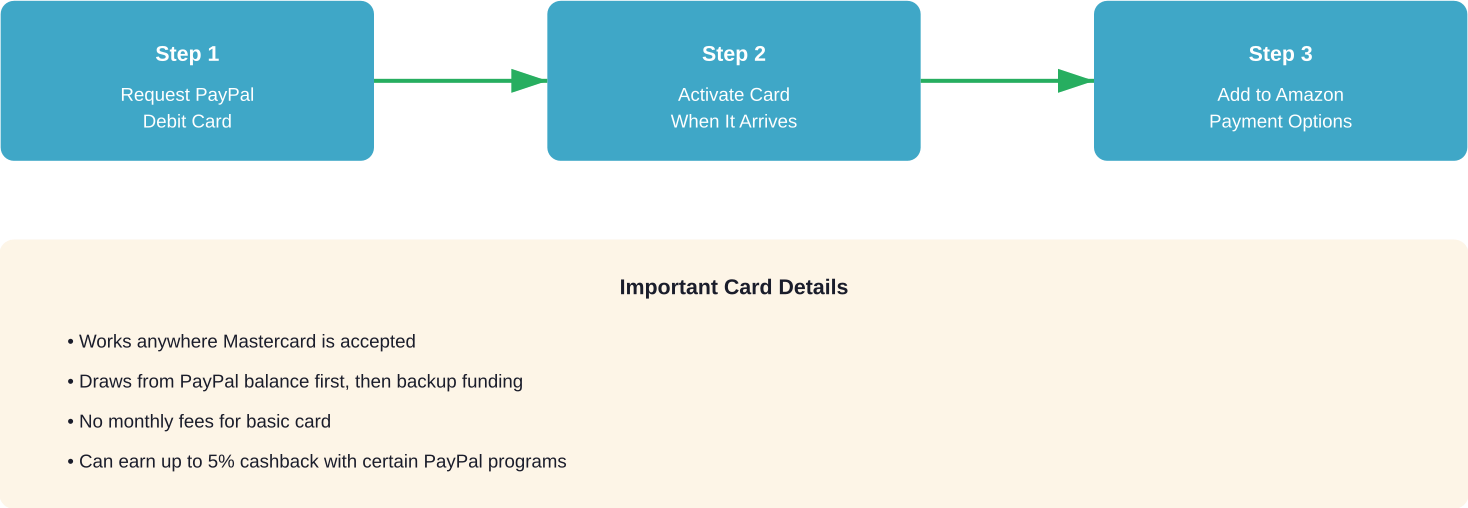
For personal accounts, PayPal offers the PayPal Debit Card. Business accounts can apply for the PayPal Business Debit Mastercard. Both cards function like standard debit cards and are accepted wherever Mastercard is accepted—including Amazon.
How to Get Your PayPal Debit Card
Request a card through your PayPal account dashboard. Personal account holders can find the debit card option under “Wallet,” while business accounts have a dedicated application process.
Once approved and activated, the card draws directly from your PayPal balance. No balance? It can pull from your linked bank account or backup funding source, just like regular PayPal transactions.
Add the card to your Amazon account like any other payment method. Navigate to “Your Account” → “Payment options” → “Add a credit or debit card” and enter the card details.
Benefits of This Method
This approach offers the cleanest integration. Once set up, shopping on Amazon feels no different than using any other card. The transaction appears in your PayPal account history, and all PayPal’s buyer protections still apply.
According to PayPal’s official website, the PayPal Debit Card offers cashback rewards. You can earn up to 5% cash back on up to $1,000 spent in the monthly category you choose.
Method 2: Buy Amazon Gift Cards With PayPal
Another popular workaround involves purchasing Amazon gift cards using PayPal balance, then redeeming those gift cards on Amazon. While this adds an extra step, it works reliably.
Several third-party retailers sell Amazon gift cards and accept PayPal as payment. These include digital gift card marketplaces and authorized resellers.
Where to Buy Amazon Gift Cards With PayPal
Look for reputable digital gift card retailers that explicitly list PayPal as an accepted payment method. During checkout, select PayPal and complete the transaction using your balance.
Once purchased, the gift card code typically arrives via email within minutes for digital delivery. Copy the code and head to Amazon.
On Amazon, navigate to “Your Account” → “Gift cards” → “Redeem a Gift Card.” Enter the code, and the balance loads immediately onto your Amazon account. Use it like store credit on future purchases.
But here’s the catch: this method requires planning ahead. Gift cards can’t be used to purchase other gift cards, and any unused balance stays locked in your Amazon account.
Method 3: Use Curve Wallet (International Option)
Curve is a financial technology service available in certain markets that consolidates multiple payment cards into a single Curve card. When linking PayPal to Curve, the service generates virtual card details that can be used anywhere.
According to information from Curve’s website, linking a PayPal account to Curve Wallet creates a 16-digit card number, expiry date, and CVV that can be added to Amazon as a payment method.
How Curve Works With PayPal and Amazon
Download the Curve app and create an account. Link your PayPal account or PayPal-linked cards to the Curve Wallet.
Curve generates virtual card details that route transactions through your selected funding source. Add these details to Amazon, and charges process through Curve, which then draws from your PayPal account.
According to Curve’s website, the service offers cashback rewards from partner brands. Regular promotions have included 15% cashback at Amazon Fresh, 25% cashback at Amazon Kindle, and 10% cashback at Morrisons on Amazon.
The downside? Curve isn’t available in all countries, and the service adds another middleman to the transaction chain.
Important Security Considerations
When using any workaround to connect PayPal and Amazon, security matters. The Federal Trade Commission has issued warnings about scammers spoofing PayPal communications, particularly targeting online sellers.
According to a consumer alert published by the FTC, scammers create fake PayPal emails and payment confirmations to trick sellers. When adding payment methods to Amazon, always verify card details through official PayPal channels, never through email links.
It is important to monitor transaction histories across both PayPal and Amazon. Check both PayPal and Amazon records to ensure charges match expected amounts.
Which Method Works Best?
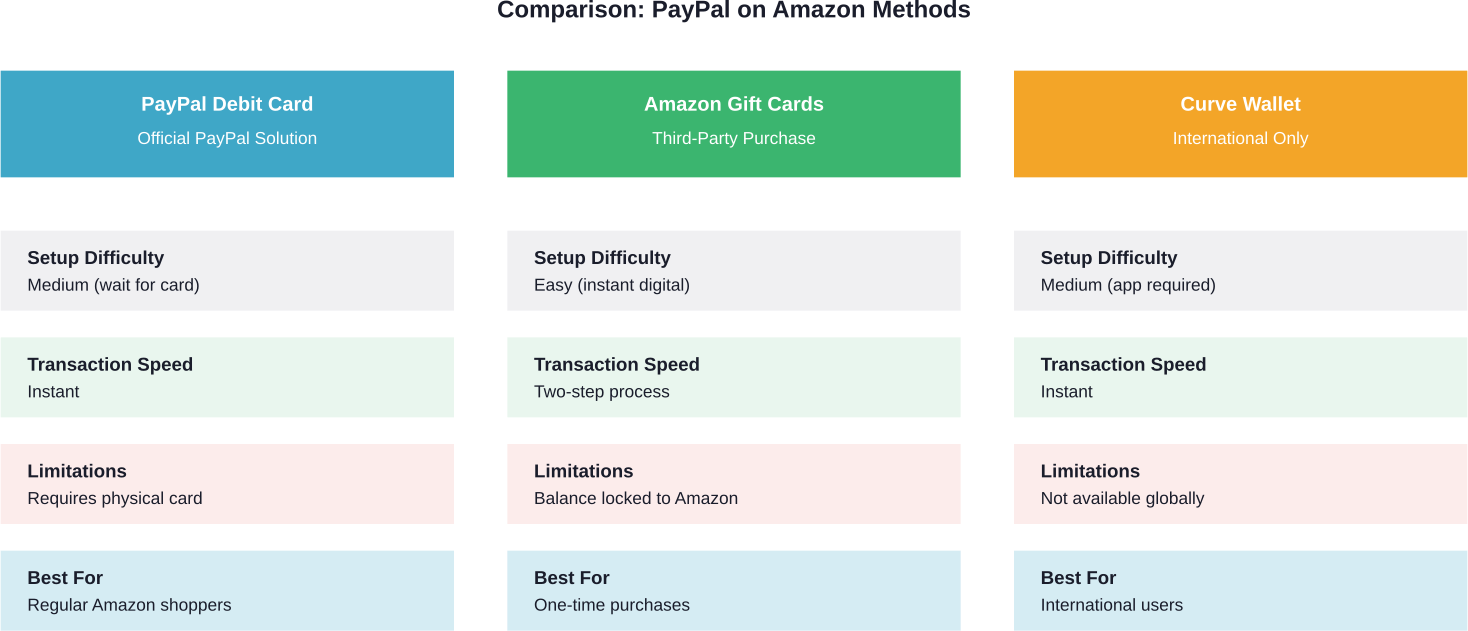
For regular Amazon shoppers who frequently use PayPal, the debit card route offers the smoothest long-term solution. The initial setup takes time, but daily usage becomes seamless.
One-time buyers or those who want to spend a specific PayPal balance should consider the gift card method. It’s quick, requires no new accounts, and keeps spending contained.
International users in supported regions might find Curve appealing, especially if they already consolidate multiple payment sources.
| Method | Setup Time | Ongoing Effort | Fees |
|---|---|---|---|
| PayPal Debit Card | Varies by account type and region | None | No monthly fee |
| Amazon Gift Cards | Immediate | Required each time | Varies by retailer |
| Curve Wallet | 1-2 days | Minimal | Free tier available |
Frequently Asked Questions
Does Amazon accept PayPal directly in 2026?
No, Amazon still does not support PayPal directly at checkout. Customers must use alternative methods like PayPal debit cards or gift cards.
Can I use PayPal Credit on Amazon purchases?
No, PayPal Credit is not directly supported on Amazon purchases.
How long does it take to receive a PayPal Debit Card?
Delivery times depend on your region and account type. Check your PayPal account for the latest estimates.
Are there fees for using PayPal Debit Card on Amazon?
The standard PayPal Debit Card generally has no monthly fee, though other PayPal transaction terms may apply.
Can I return Amazon items purchased with PayPal methods?
Yes, Amazon’s regular return policies still apply. Refunds typically go back to the original payment source.
Is Curve available in the United States?
Availability varies by region, so check the official Curve website for current support details.
Why do Amazon and PayPal remain competitors?
Both companies compete in digital payments, and Amazon continues prioritizing its own payment ecosystem.
Final Thoughts
While Amazon and PayPal haven’t joined forces, that doesn’t mean shoppers are stuck. The PayPal Debit Card offers the most straightforward permanent solution for frequent buyers. Gift cards work well for occasional purchases or spending specific amounts. And international customers have Curve as a backup option.
Each method has trade-offs in setup time, ongoing effort, and flexibility. But all three deliver the same end result: using PayPal funds to shop on Amazon.
Ready to start? Request your PayPal Debit Card through your account dashboard, or grab an Amazon gift card from a PayPal-accepting retailer. Either way, that PayPal balance becomes Amazon-ready with just a bit of extra setup.
 No credit card required