
 EN
EN  ES
ES  FR
FR  DE
DE  IT
IT  KO
KO  JA
JA  ZH
ZH  AR
AR  PT
PT  TR
TR PL
PL
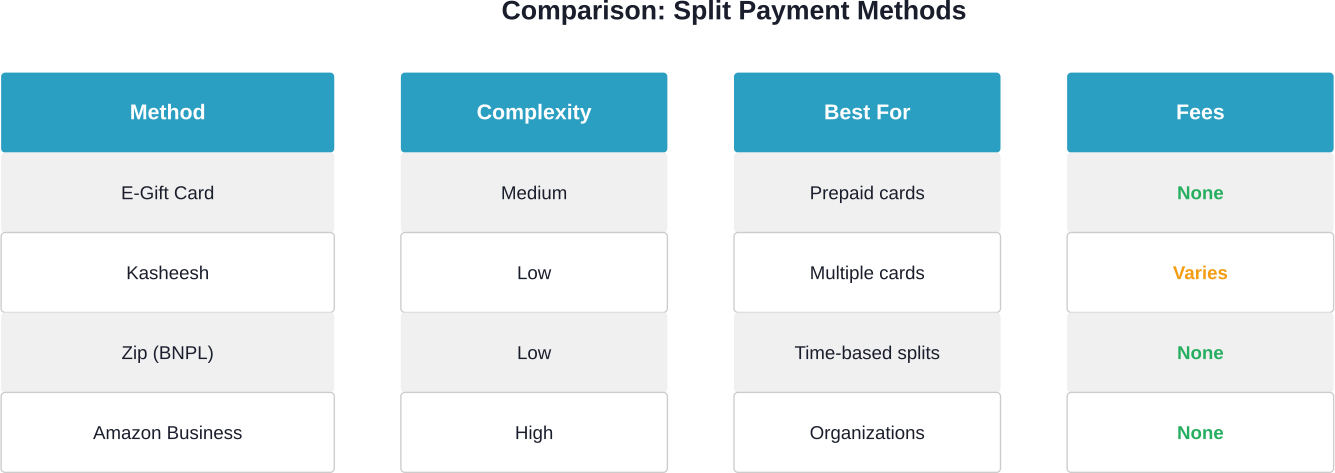
Quick Summary: Amazon doesn’t natively support splitting a single payment between multiple credit or debit cards. However, shoppers can work around this by purchasing Amazon e-gift cards with prepaid Visa or Mastercard gift cards to drain their balances, using third-party services like Kasheesh or Zip for split payments, or leveraging Amazon Business group payment settings for organizational purchases.
Here’s the thing—Amazon’s checkout doesn’t let shoppers split a single transaction across two credit cards. No toggle, no option at checkout. For customers holding prepaid gift cards or those wanting to divide costs across multiple payment methods, this limitation creates a real headache.
But there are workarounds. Some take a few extra steps. Others rely on third-party tools. The approach depends on whether someone’s using prepaid cards, sharing costs with others, or managing business purchases.
Why Amazon Doesn’t Allow Split Payments
Amazon’s payment system accepts one primary payment method per order. Customers can use credit cards, debit cards, Amazon gift cards, or prepaid Visa and Mastercard cards—but only one bank card at checkout.
The platform does allow combining an Amazon gift card balance with a single credit or debit card. So if an order costs $50 and someone has $20 in Amazon gift card balance, the remaining $30 automatically charges to their card. That’s the only native split payment Amazon supports.
According to the Federal Trade Commission’s online shopping guidance, consumers should always understand payment terms before completing purchases. Amazon’s single-payment-method policy stays consistent across its marketplace, though exceptions exist for Amazon Business accounts.
The Amazon E-Gift Card Method
This workaround turns prepaid gift cards into Amazon gift card balance. It works particularly well for those odd Visa or Mastercard gift card balances—$6.23, $14.87, whatever’s left.
Here’s how it works:
- Check the exact balance on the Visa or Mastercard gift card
- Search for “Amazon e-gift card” on Amazon
- Select the email delivery option
- Under amount, choose “Other” and enter the precise gift card balance
- Send the e-gift card to a personal email address
- At checkout, use the prepaid card as payment
- Once received, redeem the Amazon gift card code
- The balance now sits in the Amazon account, ready to combine with another payment method
The minimum Amazon e-gift card amount is $5.00. For balances under that threshold, this method won’t work. But for anything above, it effectively converts prepaid balances into spendable Amazon credit.
Community discussions on platforms like Reddit confirm this approach still functions. Users report clearing out prepaid cards this way, consolidating scattered balances into single Amazon purchases.

Third-Party Split Payment Services
Services like Kasheesh offer a different approach. These platforms create virtual cards that aggregate multiple funding sources behind a single card number.
Kasheesh allows users to split a purchase across up to five debit or credit cards. At checkout on Amazon, shoppers use the Kasheesh virtual card number. Behind the scenes, Kasheesh charges the specified percentages or amounts to each linked card.
The service works anywhere Mastercard is accepted, making it useful beyond just Amazon. For shared purchases—splitting the cost of a group gift, for instance—this eliminates the gift card conversion step entirely.
Another option is buy-now-pay-later services. Zip allows Amazon shoppers to split payments into four installments over six weeks. After adding items to cart, customers select Zip at checkout, then payments automatically process from a linked debit or credit card every two weeks.
These services don’t technically split payment between multiple cards in a single transaction. Instead, they either virtualize the split (Kasheesh) or extend payment over time (Zip). Both require account setup and linking payment methods before checkout.
Amazon Business Group Payments
According to Amazon Business official documentation, group administrators can enable both individual and shared payment methods within a single group. This functionality launched on 23 July 2020.
For organizations using Amazon Business accounts, administrators set payment controls at the group level. Members can then choose from available shared payment options or their own individual payment methods at checkout.
This doesn’t help individual consumers, but for businesses, nonprofits, or educational institutions, it provides legitimate split payment capabilities. Group buyers see multiple payment options during checkout, allowing departmental purchases to route through appropriate accounts.
What Doesn’t Work
Some methods circulating online simply don’t function:
- Adding multiple cards at checkout: Amazon’s interface doesn’t provide this option. Only one primary payment method processes per order.
- Partial authorization: Some retailers allow cards to decline for partial amounts, then charge the remainder to a second card. Amazon doesn’t support this.
- Gift card balances under $5: The e-gift card workaround fails for very small prepaid balances since Amazon’s minimum e-gift card amount is $5.00.
The Federal Trade Commission advises consumers to understand refund and return policies before purchasing from online marketplaces. Split payment methods—especially those involving gift cards or third-party services—can complicate returns. If a purchase requires a refund, Amazon typically credits the original payment method, which may create issues if that method involves converted gift cards.
Sharing Purchase Costs
When multiple people contribute to a shared purchase, the e-gift card method actually works well. Contributors purchase Amazon e-gift cards for their portion of the cost, then email all codes to the person making the purchase. That buyer redeems all codes, accumulating the full amount in their Amazon balance, then completes checkout.
For a shared gift with multiple contributors, each person can buy an Amazon e-gift card for their portion and send it to one email address. Once all codes are redeemed, the account has the full amount in gift card balance ready to use.
Don’t Stop At Payment Workarounds, Look Where The Money Goes

Splitting a payment on Amazon isn’t always straightforward, so people look for ways around it. But once the order is placed, the focus shifts from how you pay to what happens next with that money inside the platform.
With WisePPC, you’re working with the full picture, not just isolated metrics. It brings together Amazon Ads and Seller Central data, keeps historical performance available, and shows how spend, clicks, and sales interact over time. Instead of exporting reports or rebuilding the same view in spreadsheets, you get a consistent dataset that helps you review campaigns, compare periods, and make adjustments without losing context.
Sign up for WisePPC to start tracking how your Amazon spend and sales data actually connect.

Frequently Asked Questions
Can I use two credit cards for one Amazon purchase?
No, Amazon does not support splitting a single purchase across multiple credit or debit cards. Only one card can be used per order.
What’s the minimum amount for an Amazon e-gift card?
The minimum amount for an Amazon e-gift card is $5.00.
Does Kasheesh charge fees for splitting payments?
Kasheesh states there are no sign-up or hidden fees, but you should check their official website for current terms.
Can Amazon gift card balance combine with a credit card?
Yes, Amazon allows combining gift card balance with one credit or debit card to cover the remaining amount.
How does Zip work for Amazon purchases?
Zip splits purchases into four payments over six weeks, automatically charging a linked card every two weeks.
Will Amazon add split payment functionality?
Amazon has not announced plans to support splitting payments across multiple cards at checkout.
What happens to refunds when using converted gift cards?
Refunds are usually returned to your Amazon gift card balance rather than the original payment source.
Making Split Payments Work
Amazon’s limitation on split payments between multiple bank cards remains unchanged in 2026. But the workarounds—converting prepaid balances to Amazon credit, using virtual card services, or leveraging buy-now-pay-later options—provide functional alternatives.
The e-gift card method takes a few extra minutes but costs nothing and works reliably for balances of $5.00 or more. Third-party services offer convenience at the potential cost of fees or account setup requirements. Amazon Business group payments serve organizational needs but don’t apply to individual consumer accounts.
For those managing prepaid gift cards or coordinating shared purchases, these methods successfully navigate Amazon’s single-payment-method checkout. Check official websites for current terms and pricing before committing to any third-party service.
 No credit card required