
 EN
EN  ES
ES  FR
FR  DE
DE  IT
IT  KO
KO  JA
JA  ZH
ZH  AR
AR  PT
PT  TR
TR PL
PL
You’d think Amazon would make it easy to share your shopping cart, but nope. There’s no “send to a friend” button or built-in share feature. And if you try copying the URL? Doesn’t work.
That said, there are workarounds. Whether you’re coordinating gift ideas, splitting costs, or just need a second opinion before you hit “Buy Now,” this guide walks you through the simplest, most reliable ways to share your Amazon cart – without giving someone full access to your account.
Let’s break down what works, what’s secure, and how to actually make it useful.
Why You Can’t Share Your Cart the Obvious Way
Before we get into how to share your cart, let’s clear something up: Amazon doesn’t allow cart sharing by default. The reason comes down to privacy and security.
Your shopping cart is tied directly to your account. That means it includes:
- Items you’re considering buying.
- Your shipping address.
- Payment preferences.
- Sometimes even pricing based on your history.
So yeah, it makes sense Amazon doesn’t want people casually sharing cart URLs.
But that doesn’t mean you’re stuck. Amazon just prefers that you use their Wish List system, or one of several third-party tools that make sharing your cart a whole lot easier.
The Three Smartest Ways to Share Your Amazon Cart: Without Giving Away Your Login
Let’s be honest: Amazon doesn’t make it easy to send someone your shopping cart. But if you know where to look and you’re willing to spend a minute setting things up, there are three solid ways to get it done. Each one works a little differently depending on what you need, whether you’re keeping it in the Amazon ecosystem or using outside tools to save time.
Here’s how to share your Amazon cart like a pro.
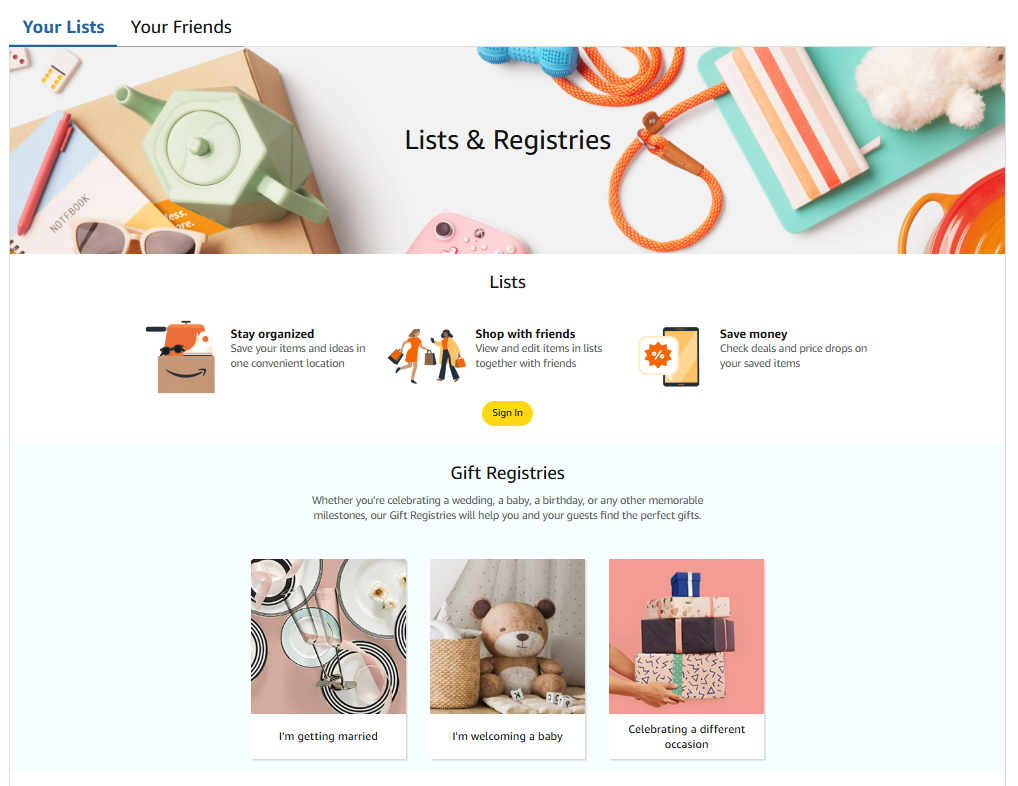
Option 1: Use an Amazon Wish List (Best for Most People)
If you’re just trying to let someone see what you’re thinking of buying or what you want them to buy for you, the Amazon Wish List is your safest bet.
You can create a Wish List in a few clicks, toss in the items from your cart, and send it off. Plus, it’s built into Amazon, so there’s no need to download anything extra.
How to Set It Up:
- Go to your Cart and click on each item individually to open the product page.
- Click the “Add to List” button (usually near “Add to Cart”).
- Choose an existing list or create a new one.
- Once all items are added, go to Account & Lists > Your Lists.
- Select your list, then click “Send list to others.”
From there, you can copy a shareable link, send it via email, or choose between “View only” or “View and edit” access.
When a Wish List Makes Sense:
- You’re building a gift registry.
- You don’t need someone to edit or purchase the items for you directly.
- You want a secure, native Amazon feature without browser add-ons.
It’s not as fast as sending your actual cart, but it’s simple, safe, and doesn’t require anyone to install anything.
Option 2: Share-A-Cart (Most Flexible Method)
If you want to send your actual Amazon cart, not just a list of items, Share-A-Cart is probably your best friend here. It’s a free browser extension available for Chrome, Firefox, Safari, and Edge.
Once installed, it lets you generate a unique Cart ID that someone else can open – no logins or personal data required.
How It Works:
- Add items to your Amazon cart as usual.
- Click the Share-A-Cart extension in your browser.
- Choose “Create Cart ID”.
- Copy the ID or share it via email, message, or social apps.
- The recipient installs the same extension and selects “Receive Cart” to see your shared items.
What Makes Share-A-Cart Useful:
- It copies your full cart, including quantities and variants.
- You can share it with anyone – no need for them to log into your account.
- You stay in control of your Amazon profile and data.
Just keep in mind: both people need the extension installed. If someone doesn’t like browser add-ons, this method might not work for them.
Option 3: Shopping Cart Share (Simple and Visual)
Shopping Cart Share is another browser extension, available on Chrome and a limited number of Android devices. It’s a bit more straightforward than Share-A-Cart, and it doesn’t use ID codes. Instead, it generates a direct link you can send.
Steps to Use It:
- Install the Shopping Cart Share extension from the Chrome Web Store.
- Load your cart on Amazon.
- Click the extension icon and select “Capture Cart”.
- Choose to share via link or email.
- You can also set permissions and titles for your cart (e.g., “Birthday Gifts for Sarah”).
Bonus: You can set the cart as public or restricted and even create a PIN if you want to control who can change it.
Great For:
- Group gifts.
- Event planning (like weddings or baby showers).
- Sending a curated cart to a client or customer.
This tool is especially nice if you want to make the cart feel like a presentation – not just a list of items.
Each of these options solves a slightly different problem. Some are better for long-term lists, others are perfect for real-time collaboration. But none of them require sharing your Amazon password or crossing your fingers that the recipient knows what to do.

Sharing on Mobile? Here’s What Works
If you’re on your phone, the process is a little trickier, especially on iOS. But Share-A-Cart has a mobile app called “Share-A-Cart for Everything” that gets the job done.
On iPhone or iPad:
- Download the app from the App Store.
- Open Safari, tap the puzzle icon (extensions), and enable Share-A-Cart.
- Go to Amazon in Safari, add your items, and use the extension to generate a cart ID.
On Android:
- The Shopping Cart Share app may work, but it depends on your device and OS version.
- Alternatively, try using Amazon’s mobile browser in desktop mode and install the extension via Chrome.
If mobile feels too clunky, it’s often easier to build your cart on a desktop and send it from there. Once shared, the recipient can open the cart on any device.
Why Sharing Your Amazon Login Isn’t the Move
Look, technically you could just hand over your Amazon login if you’re desperate to let someone see your cart. But unless you’re 100% okay with that person poking around in your order history, your saved addresses, and every credit card you’ve ever used, it’s probably not the best idea.
Even if you trust them, you’re still putting your entire account at risk. One wrong click or accidental purchase, and you’re the one explaining why 10 pounds of dog treats are headed to the wrong address. Not to mention, Amazon tends to frown on account sharing. If it detects something fishy, like logins from different locations or weird behavior, it might flag your account or lock you out entirely.
Unless you already share an account with this person (like a spouse or close family member) and you’re used to that setup, just don’t do it. There are cleaner, safer ways to share your cart that don’t involve giving someone the keys to your entire Amazon life.
When Cart Sharing Hits a Wall
Cart-sharing tools usually work fine, until they don’t. Maybe the extension doesn’t load, or your cart won’t sync. It happens. Before you toss your laptop or resort to plan B, here’s what to keep in mind.
Don’t Share Your Login. Seriously.
It might feel like the fastest fix, but giving someone your Amazon login is a bad idea. You’re not just sharing your cart – you’re handing over your full account. That includes order history, saved addresses, payment methods, even your returns and gift cards. And once someone’s in, they’re in.
Amazon doesn’t love that kind of behavior, either. Logins from unfamiliar devices or locations can flag your account, freeze your access, or mess with your purchase history. Unless you’re already sharing the account with a spouse or family member, skip it.
Start With the Basics
If the extension isn’t working, don’t overthink it. Make sure it’s turned on in your browser. Refresh the page. Check that your cart isn’t overloaded – Amazon cuts you off after 50 unique items.
Still nothing? Make sure both you and the person you’re sharing with are using the same tool. Share-A-Cart links won’t work with Shopping Cart Share, and vice versa. That mismatch trips people up more than you’d expect.
Still Not Working? Reset and Try Again
Sometimes the fix is as simple as clearing your browser’s cache or reinstalling the extension. A fresh start often kicks things back into gear. If you’re using an older browser version, it might be worth updating, too – some tools just don’t play nice with outdated software.
And if you’ve tried everything? Most of these tools have support teams. Reach out. They’re usually quick to respond, and it’s better than burning another half hour trying to guess what went wrong.
Cart sharing should make life easier, not harder. A few quick checks, and you’ll usually be back on track.
Smarter Cart Sharing Starts with Smarter Amazon Insights
At WisePPC, we know that sharing a cart is often just one piece of a much bigger picture, especially if you’re managing multiple products, accounts, or campaigns across Amazon. While cart-sharing tools help with day-to-day collaboration, the real growth happens when you can see the full impact of every item, every ad, and every decision behind the scenes.

That’s where we come in. As an Amazon Ads Verified Partner, we give marketplace sellers the tools to go deeper than just what’s in the cart. From campaign-level performance tracking to real-time analytics and long-term trend analysis, we help you make smarter, faster calls with your data. Whether you’re optimizing ad spend, testing new strategies, or managing thousands of SKUs, we’ve built WisePPC to simplify the complex, so you can scale without losing control.
Final Thoughts: Sharing Doesn’t Have to Be a Headache
Amazon doesn’t make cart sharing obvious, but with a little help from extensions or the built-in Wish List feature, it’s totally doable.
If you’re someone who shops for others, plans events, or just wants input before checking out, these tools can save time, avoid miscommunication, and make the whole process a lot smoother.
Try them out, find what fits your style, and make Amazon work a little better for how you actually shop.
FAQ
1. Can I send someone a direct link to my Amazon cart?
Unfortunately, not in the way you’d hope. If you copy and paste your cart URL and send it to someone else, it won’t work unless they’re logged into your account – which, for obvious reasons, isn’t ideal. Amazon ties your cart to your personal session, so you’ll need to use a tool like Share-A-Cart or create a Wish List instead.
2. What’s the difference between sharing a cart and sharing a Wish List?
Sharing your cart means someone gets the actual contents of what you’re about to buy, with the correct quantities and variations. A Wish List is more like a saved shelf of items you’re interested in – it’s great for birthdays or group gifting, but not quite the same as sending a ready-to-checkout cart. That said, Wish Lists are built into Amazon and don’t require any add-ons, so they’re often the easiest option.
3. Do cart-sharing extensions work on mobile?
Some do, but it depends on the platform. Share-A-Cart has a mobile app that works with Safari on iOS, but it’s not as seamless as using the browser extension on a desktop. Shopping Cart Share has limited support for Android, but it’s hit-or-miss depending on your phone. If you’re planning to share a cart from your phone, expect a few extra steps or consider switching to a desktop if you can.
4. Is it safe to use third-party extensions for sharing my Amazon cart?
Generally, yes, but only if you’re sticking with well-known tools like Share-A-Cart or Shopping Cart Share. These extensions don’t access your payment information or account details. Still, like with any browser add-on, it’s smart to double-check permissions and read reviews before installing anything new.
5. Can I share a cart with multiple people at once?
You can, but the method depends on the tool you’re using. Share-A-Cart gives you a Cart ID you can send to as many people as you like. Shopping Cart Share lets you generate a link, and you can email or message it to a group. Just remember: what you’re sharing is a copy of your cart. If someone else makes changes or checks out, it won’t affect your original cart unless you shared your actual account, which, again, please don’t.
 No credit card required