
 EN
EN  ES
ES  FR
FR  DE
DE  IT
IT  KO
KO  JA
JA  ZH
ZH  AR
AR  PT
PT  TR
TR PL
PL
Quick Summary: Selling on Amazon for free is possible through the Individual selling plan, which charges $0.99 per item sold with no monthly subscription fee. New Seller Incentives include 10% back on the first $50,000 in branded sales for those who register for Brand Register, plus access to free training through Amazon Seller University and various seller tools included with any account type.
More than 60% of sales in the Amazon store come from independent sellers—most of which are small and medium-sized businesses. And here’s the thing: you don’t need thousands of dollars to join them.
Starting an Amazon business without upfront investment is entirely realistic. The platform offers a fee structure designed specifically for sellers testing the waters or operating with low volume. But navigating which plan actually keeps costs down requires understanding what “free” really means in Amazon’s ecosystem.
This guide breaks down exactly how to launch your Amazon selling journey without a monthly subscription, which tools cost nothing, and where the actual expenses hide.
Understanding Amazon’s Individual Selling Plan
The Individual selling plan is Amazon’s no-subscription option. According to official Amazon Seller Central documentation, this plan charges $0.99 per item sold plus additional fees, with no monthly subscription cost.
Compare that to the Professional plan at $39.99 per month flat fee. The math is straightforward: if you’re selling fewer than 40 items monthly, the Individual plan keeps more money in your pocket.
What the Individual Plan Includes
The Individual plan isn’t a stripped-down version. Sellers get access to core selling features:
- Ability to list products in most categories
- Basic reporting and order management
- Customer messaging tools
- Mobile seller app access
- Fulfillment options including FBA
That said, some advanced features remain locked. You won’t get bulk listing tools, advertising API access, or advanced reporting that Professional sellers use. But for someone launching their first products? Those limitations rarely matter.
Fee Structure Breakdown
Let’s talk about real numbers. The $0.99 per-item fee isn’t the only cost. Amazon charges referral fees (typically 8-15% depending on category) and fulfillment fees if using FBA. For media items (Books, DVDs, Music, Video Games, etc.), Amazon applies a fixed closing fee of $1.80 per unit sold, in addition to the referral fee.
| Fee Type | Individual Plan | Professional Plan |
|---|---|---|
| Monthly Subscription | $0 | $39.99 |
| Per-Item Fee | $0.99 | $0 |
| Referral Fee | 8-15% (category dependent) | 8-15% (category dependent) |
| FBA Fees | Same as Professional | Standard rates apply |
According to community discussions on Seller Central forums, some sellers report total fees of approximately $20 per sale, though actual costs vary significantly by product category and fulfillment method.
Step-by-Step: Creating Your Free Amazon Seller Account
Setting up takes less than 30 minutes if you have the right information ready.
What You’ll Need
Before starting, gather these essentials:
- Valid government-issued ID
- Tax identification number (SSN or EIN)
- Bank account for deposits
- Chargeable credit card
- Phone number for verification
The credit card requirement surprises some sellers looking for a “free” option. Amazon requires it for identity verification and to charge fees, but you won’t face upfront charges for account creation; however, debit cards are generally not accepted for this purpose in many regions.
Registration Process
Navigate to sellercentral.amazon.com and click the signup option. You’ll select between Individual and Professional plans—choose Individual to avoid monthly fees.
Walk through identity verification, which now includes selfie verification in most regions. Amazon has tightened security following FTC regulatory pressure around marketplace transparency.
Once verified, you’ll link your bank account for payments. Amazon typically deposits funds every two weeks, though new accounts may face a reserve period initially.
Finding Products to Sell Without Inventory Investment
Here’s where many guides gloss over reality: even “free” selling often requires some capital for inventory. But several approaches minimize or eliminate that barrier.
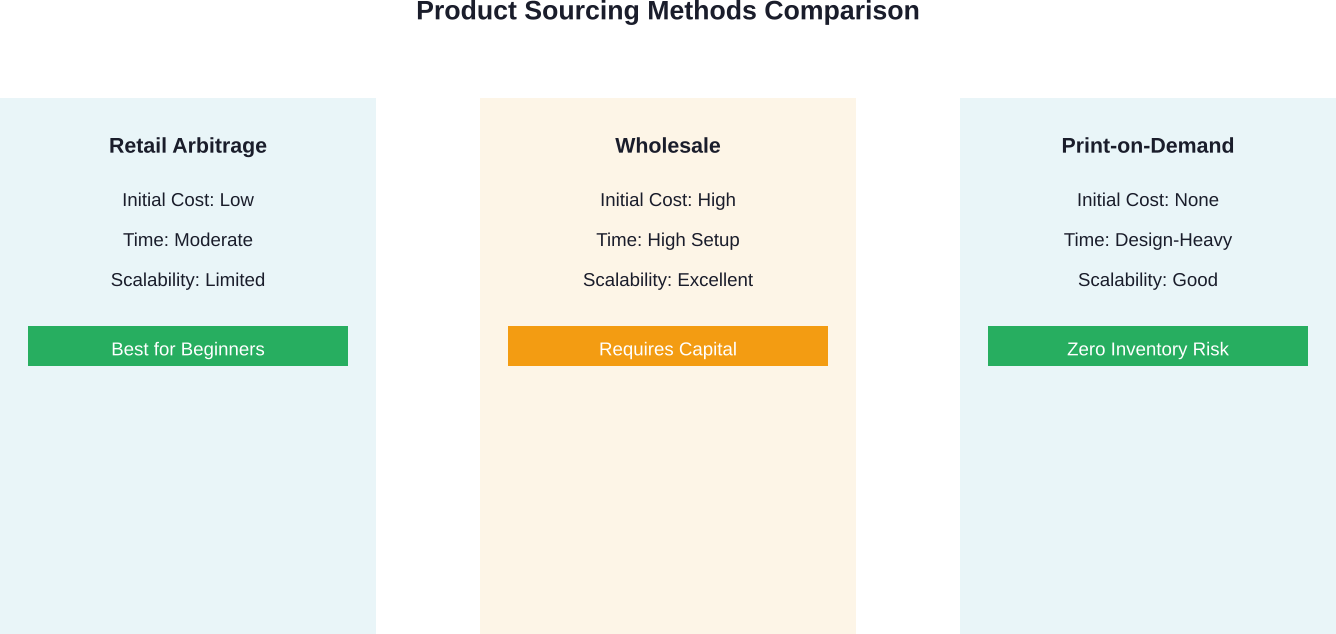
Retail Arbitrage on a Budget
Retail arbitrage means buying discounted products from retail stores and reselling them on Amazon. Start with items you already own that have resale value—books, electronics, or collectibles gathering dust.
Scan items using Amazon’s free seller app to check current prices and competition. Look for products with good sales rank (lower numbers indicate faster sales) and sufficient margin after fees.
Online Arbitrage and Wholesale
Online arbitrage works similarly but sources products from online retailers during sales. This requires upfront capital but can start small—even $50-100 can launch your first few listings.
Wholesale requires larger investment but offers better margins. Most wholesalers require business credentials and minimum orders, making this better suited for sellers who’ve validated their model.
Print-on-Demand and Merch Options
Print-on-demand eliminates inventory entirely. You create designs, list products, and Amazon prints and ships only when customers order. However, Amazon Merch requires application approval and has specific requirements.
Third-party print-on-demand integrations exist but may involve fees outside Amazon’s ecosystem, so research thoroughly.
Listing Your First Products
Product listings make or break sales. Amazon provides tools to create them, but quality matters more than speed.
Creating Product Detail Pages
For existing products in Amazon’s catalog, you’ll match your offer to the existing listing. Search for the product, click “Sell Yours,” and add your offer details including condition, price, and quantity.
For new products not in the catalog, you’ll create the entire product detail page. This requires more information: title, brand, category, product identifiers (UPC, ISBN, etc.), images, and description.
Writing Effective Product Titles and Descriptions
Amazon’s search algorithm prioritizes certain information. Titles should include brand, key features, size, color, and quantity—in that order. Keep titles under 200 characters for most categories.
Bullet points highlight key features. Focus on benefits, not just specifications. Answer the question: why should someone buy this?
Product descriptions provide additional detail. Use natural language, break up text for readability, and address common questions or objections.
Free Amazon Seller Tools You Should Use
Amazon includes several tools with every account that many new sellers overlook.
Amazon Seller University
This comprehensive, completely free training platform covers everything from listing basics to advanced advertising strategies. Amazon moderators have noted that many sellers invest in third-party courses when Seller University provides official, up-to-date guidance at no cost.
The platform includes video tutorials, step-by-step guides, and policy documentation. It’s available 24/7 and constantly updated to reflect platform changes.
Mobile Seller App
The Amazon Seller app turns your phone into a mobile command center. Scan products to check profitability, manage orders, respond to customers, and monitor sales—all from anywhere.
The app’s product research features are particularly valuable for retail arbitrage. Point your camera at any barcode and instantly see Amazon pricing, sales rank, and competition level.
Inventory Management and Reporting
Basic reporting tools show sales trends, traffic sources, and conversion rates. While not as robust as Professional-level analytics, Individual sellers still get enough data to make informed decisions about pricing and inventory.
Fulfillment Options: FBA vs. FBM
How you fulfill orders significantly impacts costs and customer experience.
Fulfillment by Amazon (FBA)
FBA means sending inventory to Amazon’s warehouses. They handle storage, packing, shipping, and customer service. Products become Prime-eligible, which typically increases sales velocity.
But FBA isn’t free. Storage fees run monthly, and fulfillment fees apply per unit. For Individual sellers, these fees are identical to Professional sellers—the per-item $0.99 fee is separate.
FBA makes sense when product margins support the fees and when Prime eligibility provides competitive advantage.
Fulfillment by Merchant (FBM)
FBM means you handle everything. When orders arrive, you pack and ship them yourself. This keeps costs lower but requires more time and organization.
Customer service also falls on you, including returns and refunds. For sellers with limited inventory or just starting out, FBM offers better control and lower overhead.
| Consideration | FBA | FBM |
|---|---|---|
| Shipping Speed | Fast (Prime eligible) | Varies by seller |
| Storage Costs | Monthly fees apply | You control storage |
| Time Investment | Low (Amazon handles) | High (you handle all) |
| Best For | High volume, established products | Low volume, testing products |
Pricing Strategies That Work
Pricing determines profitability and competitiveness. Too high and you don’t sell. Too low and fees eat your margin.
Competitive Analysis
Research what competitors charge for identical or similar products. Look beyond just the listing price—check if they’re FBA or FBM, their seller rating, and fulfillment speed.
Price slightly below established sellers when starting to gain initial traction. Once you’ve built reviews and credibility, you can test higher price points.
Calculating True Profitability
Always calculate net profit after all fees. Include the $0.99 per-item fee, referral fees, FBA fees (if applicable), shipping costs (if FBM), and cost of goods.
Many sellers use the Amazon FBA calculator (free tool) to estimate fees before committing to products. It’s not perfectly accurate but provides solid estimates.
Getting Your First Sales and Reviews
New listings face a cold-start problem: no reviews means fewer sales, but you need sales to get reviews.
Product Inserts and Follow-Up
Including inserts with products (especially FBM) that encourage reviews can help. Keep these policy-compliant—never offer incentives for positive reviews specifically. Simply request honest feedback.
Amazon’s messaging system allows follow-up with buyers. A polite message thanking them and requesting feedback (if satisfied) can boost review rates.

Once You Start Selling, Know What’s Actually Driving Sales
At some point, guessing stops working and you need clearer data.
WisePPC focuses on what happens after your listings and ads are already live. It doesn’t replace Amazon tools – it organizes the data they generate so you can actually use it. Instead of switching between reports, you see how ad spend connects to real sales performance in one place, with enough detail to adjust things without overcomplicating the process.
With WisePPC, you can:
- See ads and sales data together, not in separate dashboards
- Track performance over time, including historical data Amazon doesn’t keep for long
- Adjust bids and budgets across campaigns without manual repetition
- Spot where spend is going without guessing from partial numbers
Explore and sign up for WisePPC to better understand and manage your Amazon ads and sales performance.

When to Upgrade to Professional
The Individual plan works until it doesn’t. Certain signals indicate it’s time to upgrade.
If you’re consistently selling more than 40 items monthly, the math flips. At 40+ sales, you’d pay $40 in per-item fees versus the $39.99 flat Professional fee. Plus you’d gain bulk tools, advertising access, and advanced reporting.
Some product categories require Professional accounts. Restricted categories like grocery or jewelry won’t accept Individual seller applications.
When scaling becomes the priority—not just testing—Professional features become essential. Bulk upload tools alone save hours when managing larger catalogs.
Common Pitfalls to Avoid
New sellers make predictable mistakes that drain time and money.
Underestimating Total Fees
That $0.99 per-item fee seems small until you add referral fees, shipping, and cost of goods. Community discussions on seller forums reveal cases where sellers’ projected profits of $15 per item were reduced to approximately $3 after accounting for all fees and costs.
Calculate everything before listing. Use fee calculators obsessively.
Ignoring Amazon’s Policies
Amazon’s terms of service aren’t optional reading. Policy violations lead to account suspensions, which can be permanent. The FTC has increased scrutiny on marketplace sellers, particularly around product authenticity and consumer protection.
Read policies specific to your category. Understand restrictions on what you can sell and how you can market products.
Poor Product Research
Listing products without researching demand is gambling. Check sales rank, competition level, and price history before committing capital to inventory.
Tools exist to analyze historical data, though many require subscriptions. Start with free methods: manually checking rankings over several days and reading through competitor reviews to spot complaints or gaps.
Taking Action: Your First Week Timeline
Break down your launch into manageable steps:
- Day 1-2: Research products you already own that might have resale value. Use the Amazon app to scan barcodes and check prices. Identify 3-5 items worth listing.
- Day 3: Create your seller account. Gather required documents beforehand to streamline the process. Complete identity verification.
- Day 4-5: Create your first listings. Take quality photos if listing new products. Write clear, benefit-focused descriptions.
- Day 6: Set up your fulfillment process. If doing FBM, organize packaging materials and establish a workflow for processing orders quickly.
- Day 7: Explore Amazon Seller University. Watch tutorials on pricing strategies and customer communication. Familiarize yourself with seller policies.
The goal isn’t perfection—it’s momentum. Launch with a few products, learn from real transactions, and adjust based on data.
Frequently Asked Questions
Is the Amazon Individual selling plan really free?
The plan has no monthly fee, but you pay $0.99 per item sold plus referral and other applicable fees.
Can I use FBA with the Individual selling plan?
Yes, Individual sellers can use FBA, but still pay the $0.99 per-item fee in addition to FBA costs.
How many products can I list as an Individual seller?
There’s no listing limit, but the plan is most cost-effective for sellers with fewer than 40 sales per month.
What’s the catch with selling on Amazon for free?
There’s no subscription fee, but costs include per-sale fees, inventory, shipping, and optional advertising.
Can I switch from Individual to Professional plan later?
Yes, you can upgrade or downgrade at any time through your account settings.
Do I need a business license to sell on Amazon?
Requirements vary by location and product type. Amazon requires tax identification, and some sellers may need a business license.
Are there product categories I can’t access with an Individual plan?
Some restricted categories require a Professional plan or additional approval.
Conclusion
Selling on Amazon without a monthly subscription is absolutely viable through the Individual selling plan. The $0.99 per-item fee keeps barriers low for sellers testing products or operating with limited volume.
But “free” doesn’t mean without cost. Factor in all fees, understand your true margins, and approach product selection strategically. Amazon provides substantial free resources—Seller University, mobile tools, and basic reporting—that give new sellers everything needed to launch.
Start small, focus on profitability over volume initially, and upgrade to Professional when the numbers justify it. The platform’s reach is unmatched, but success requires realistic expectations about costs and consistent effort in product research, listing quality, and customer service.
Ready to launch? Create your seller account today and list your first product this week. The sooner you start, the sooner you’ll gain the experience that turns beginners into successful Amazon sellers.
 No credit card required