
 EN
EN  ES
ES  FR
FR  DE
DE  IT
IT  KO
KO  JA
JA  ZH
ZH  AR
AR  PT
PT  TR
TR PL
PL
Quick Summary: Self-publishing on Amazon through Kindle Direct Publishing (KDP) is a free platform that allows authors to publish eBooks, paperbacks, and hardcovers without upfront costs. Authors earn 35% or 70% royalties on eBooks depending on pricing, with books available to millions of readers worldwide. The process involves creating a KDP account, uploading your manuscript and cover, setting pricing, and publishing in as little as 24-72 hours.
Amazon’s Kindle Direct Publishing platform has transformed how writers bring their books to market. No traditional publisher needed. No upfront fees. Just you, your manuscript, and access to millions of potential readers across more than 10 countries.
But here’s the thing—knowing where to start can feel overwhelming.
This guide walks through exactly what self-publishing on Amazon involves, from account setup to understanding royalties. Whether you’re publishing your first novel or creating journals and notebooks, KDP provides the tools to make it happen.
Understanding Amazon KDP and What You Can Publish
Kindle Direct Publishing is Amazon’s self-publishing platform. It’s completely free to use, and there’s no inventory to manage. KDP handles printing on demand for physical books and distribution for digital titles.
Authors can publish three formats: eBooks for Kindle devices and apps, paperbacks with various trim sizes, and hardcover books (fully available to all eligible authors and publishers). Each format has different specifications and royalty structures.
The platform supports over 45 languages and distributes to Amazon marketplaces worldwide. Your book can reach readers in the US, UK, Germany, Japan, and beyond—all from a single upload.
Setting Up Your KDP Account
Creating a KDP account is straightforward. Visit kdp.amazon.com and sign in with your existing Amazon account or create a new one. You’ll need to provide basic information, tax details, and banking information for royalty payments.
Tax information matters because Amazon must comply with international tax regulations. US authors complete a W-9 form, while international authors typically fill out a W-8BEN. Getting this right from the start prevents payment delays later.
For banking, add an account where you want royalties deposited. KDP offers direct deposit for many countries or payment through services like Payoneer for regions where direct deposit isn’t available. According to the official KDP help pages, payment thresholds and schedules vary by marketplace.
Understanding KDP Royalty Options
Royalties are where things get interesting. For eBooks, Amazon offers two royalty plans with different requirements and earning potential.
| Royalty Plan | Rate | Price Range (USD) | Delivery Costs |
|---|---|---|---|
| 35% Royalty | 35% of list price | $0.99 – $200.00 | None |
| 70% Royalty | 70% of list price | $2.99 – $9.99 | Yes (varies by file size) |
The 70% royalty option seems like the obvious choice, but it comes with restrictions. Your book must be priced between $2.99 and $9.99, and Amazon deducts delivery costs based on file size. According to KDP’s digital book pricing documentation, delivery costs are $0.15/MB in the US and vary by marketplace elsewhere.
For a 2MB eBook priced at $4.99, here’s the math: 0.70 × ($4.99 – $0.30 delivery) = $3.28 royalty per sale. Compare that to the 35% option: 0.35 × $4.99 = $1.75 per sale. That’s a significant difference.
Paperback and hardcover royalties work differently. KDP offers 50% or 60% royalty rates on paperbacks depending on list price, minus printing costs. As listed on the official paperback royalty page, printing costs depend on page count, ink type (black or color), and trim size.
The Step-by-Step Publishing Process
Ready to publish? Here’s how it actually works.
First, prepare your manuscript. For eBooks, KDP accepts DOC, DOCX, KPF, EPUB, and HTML. MOBI files are no longer supported for reflowable eBooks. Paperbacks and hardcovers require PDFs or properly formatted DOC/DOCX files. Amazon provides free formatting tools, but many authors use software like Vellum, Atticus, or professional formatters.
Your cover matters enormously. KDP’s Cover Creator tool is free and functional for simple designs, but most successful self-published books invest in professional cover design. The cover must meet specific dimension requirements that vary by trim size and format.
Now for the actual upload process. Sign into your KDP account and click “Create New Title.” You’ll choose between Kindle eBook, Paperback, or Hardcover. Each format requires separate entries, even for the same book.
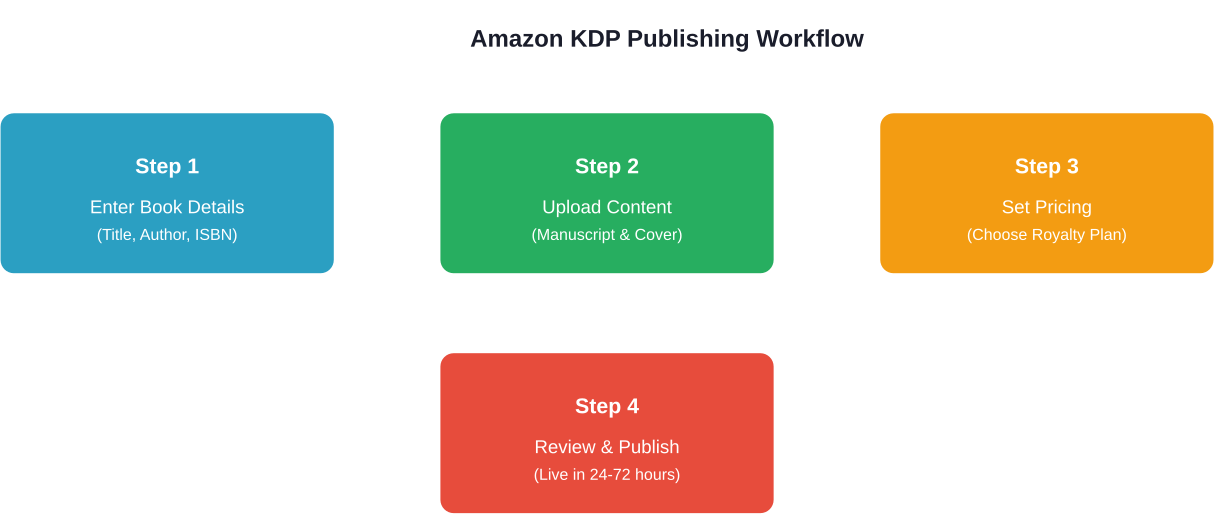
Fill in your book details: title, subtitle, author name, description, keywords, and categories. Keywords and categories are crucial for discoverability. Choose terms readers actually search for, not just what describes your book poetically.
Upload your manuscript and cover files. KDP runs a preview tool showing how your book will look on different devices. Check this carefully—formatting issues become obvious here.
Set your pricing and royalty options. Remember those royalty tiers discussed earlier. You can also enroll in KDP Select, which makes your eBook exclusive to Amazon for 90 days but provides access to promotional tools and Kindle Unlimited earnings.
Review everything and click publish. Amazon’s review process typically takes 24-72 hours. Once approved, your book goes live on Amazon marketplaces.
Optional But Important: ISBNs and Copyrights
Amazon provides free ISBNs for paperbacks and hardcovers, but these identify Amazon as the publisher. Authors wanting their own imprint should purchase ISBNs from Bowker (the official ISBN agency in the US) or their country’s designated agency.
According to ISBN.org, ISBNs uniquely identify your book and facilitate sales through multiple channels. Once assigned, an ISBN cannot be reused, even if the title goes out of print.
Copyright is automatic when you create original work, but copyright registration provides legal advantages for enforcing rights.
What Happens After Publishing
Publishing is the beginning, not the end. Marketing becomes the next challenge. Amazon provides tools like A+ Content, Amazon Ads, and promotional pricing options, but success typically requires effort beyond just uploading a book.
Community discussions frequently mention that first-time authors often underestimate marketing needs. Building a reader base takes time, strategy, and often multiple published works.
KDP reports show sales data, page reads (for Kindle Unlimited), and royalties earned. Payments are issued according to KDP’s payment schedule, with minimum thresholds varying by payment method.
Make Your KDP Ads And Sales Data Easier To Manage
Once your book is live on KDP, the focus shifts pretty quickly from publishing to understanding what actually drives sales. Ads are part of it, but not the whole picture. You also need to see how campaigns connect to real orders, how different keywords perform over time, and where budget is being wasted.
That’s where WisePPC fits in. It brings together your Amazon ads data and sales performance so you can look at everything in one place instead of piecing it together manually. You get a clearer view of how campaigns impact actual results, not just clicks, and tools to manage bids, budgets, and performance without digging through multiple dashboards. It’s less about running ads for you, more about helping you understand and control what’s already happening.
Explore and sign up for WisePPC to better understand and manage your Amazon ads and sales data.

Common Questions Answered
Is Amazon KDP Really Free?
Yes. There are zero upfront costs to publish on KDP. Amazon takes a percentage of each sale through their royalty structure, but there’s no fee to create an account or upload books.
How Long Does Publishing Take?
The actual upload process takes 30-60 minutes. Amazon’s review and approval typically runs 24-72 hours. So from clicking “Publish” to seeing your book live on Amazon, expect 1-3 days under normal circumstances.
Can Books Be Updated After Publishing?
Absolutely. Authors can update manuscripts, covers, pricing, and book details anytime through the KDP dashboard. Changes go through the same review process and typically take 24-72 hours to reflect on Amazon.
Final Thoughts on Self-Publishing Success
Self-publishing on Amazon has democratized book publishing in ways that seemed impossible two decades ago. Any author with a finished manuscript and determination can reach a global audience without gatekeepers or upfront investment.
Success isn’t guaranteed, though. The barrier to entry being low means competition is fierce. Quality writing, professional presentation, and strategic marketing separate books that find audiences from those that languish in obscurity.
Start with your best work. Invest in editing and cover design if possible. Learn Amazon’s ecosystem. And remember—many self-published authors build careers through consistent publishing and learning what works.
Ready to publish your book? Head to kdp.amazon.com and start the process today. Your readers are waiting.
Frequently Asked Questions
Do I need an ISBN to publish on Amazon KDP?
No, ISBNs are not required for Kindle eBooks. For print books, Amazon can provide a free ISBN, or you can purchase your own.
What’s the difference between the 35% and 70% royalty options?
The 70% option offers higher earnings but requires pricing between $2.99–$9.99 and includes delivery fees. The 35% option allows wider pricing with no delivery costs.
How much money can I realistically make self-publishing on Amazon?
Earnings vary widely. Some authors earn significant income, but many earn modest amounts depending on factors like marketing and genre.
Should I enroll in KDP Select and Kindle Unlimited?
KDP Select offers benefits like Kindle Unlimited earnings and promotions but requires 90-day exclusivity for your eBook.
What file formats does Amazon KDP accept?
KDP accepts formats like DOC, DOCX, EPUB, HTML, and KPF for eBooks. PDF is recommended for print books.
Can I publish the same book in multiple formats?
Yes, you can publish eBook, paperback, and hardcover versions, and link them on one product page.
How do I get paid from Amazon KDP?
KDP pays royalties via direct deposit or supported payment services, depending on your country and payment method.
 No credit card required