
 EN
EN  ES
ES  FR
FR  DE
DE  IT
IT  KO
KO  JA
JA  ZH
ZH  AR
AR  PT
PT  TR
TR PL
PL
Quick Summary: Publishing a book on Amazon through Kindle Direct Publishing (KDP) is a straightforward process that allows authors to self-publish both eBooks and print books. The platform is free to use, offers up to 70% royalty rates on eBooks and up to 60% on paperbacks, and handles printing and distribution globally. Authors maintain full control of their content and rights while reaching millions of readers worldwide.
Amazon’s Kindle Direct Publishing has democratized book publishing in ways traditional gatekeepers never imagined. Authors no longer need literary agents or publishing house approval to share their stories with the world.
The platform handles everything from printing to global distribution. And the best part? It’s completely free to use.
But wait—free doesn’t mean simple. The process involves multiple steps, formatting requirements, and strategic decisions about pricing and royalties. This guide breaks down exactly how to navigate Amazon’s publishing platform from manuscript to published book.
Understanding Amazon Kindle Direct Publishing
Kindle Direct Publishing is Amazon’s self-publishing platform that enables authors to publish both digital and physical books. The service operates across more than 10 countries and supports over 45 languages.
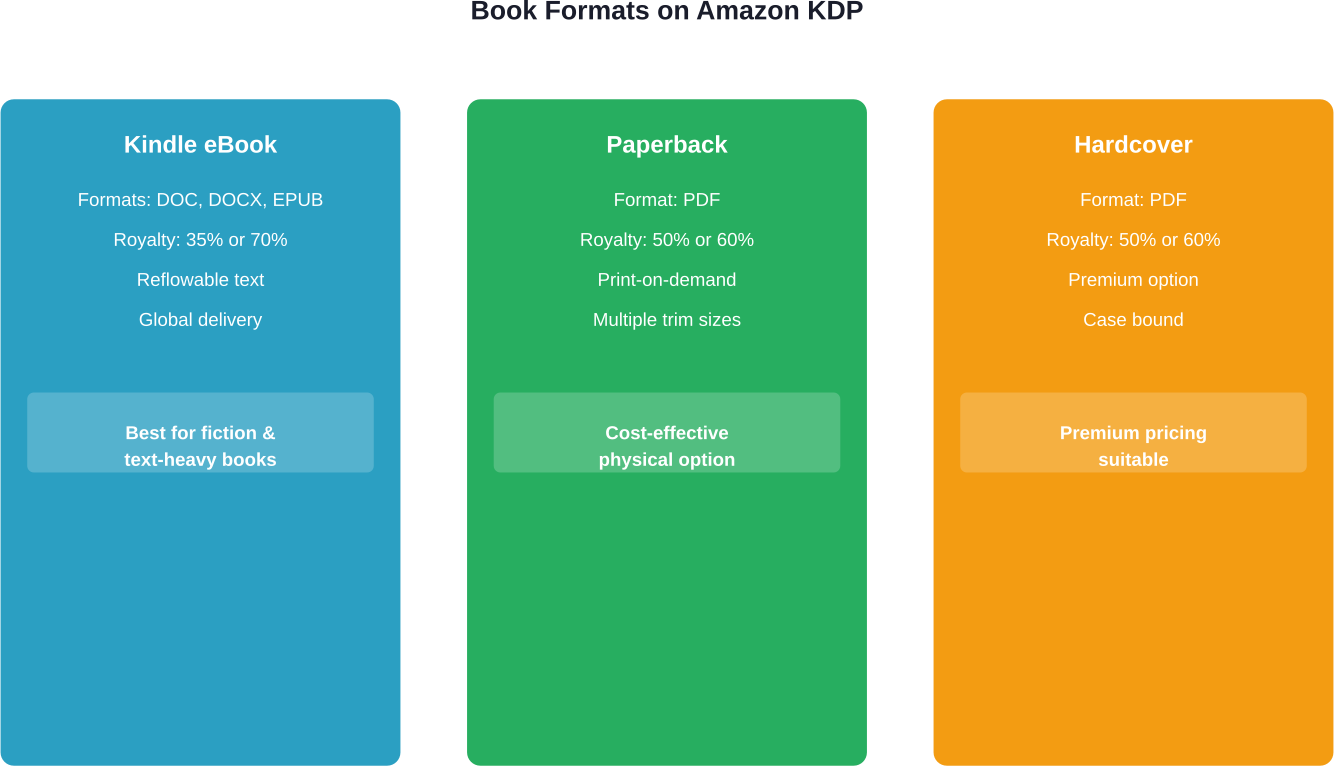
Here’s the thing though—KDP isn’t just one platform. It handles three distinct formats: Kindle eBooks, paperbacks, and hardcover books. Each format requires its own setup process, though the core account and book details remain the same.
The platform operates on a print-on-demand model for physical books. Amazon prints copies only when customers order them, eliminating inventory costs and storage headaches. For eBooks, files are delivered digitally to Kindle devices and apps worldwide.
What Makes KDP Different
Traditional publishing typically offers authors lower royalty rates than KDP. KDP flips that model entirely. According to the official KDP website, authors can earn up to 70% royalties on eBooks and up to 60% on paperbacks sold through Amazon marketplaces.
Authors retain all rights to their work. There are no exclusive contracts required, though enrolling in KDP Select (which requires 90-day exclusivity) unlocks additional promotional tools and Kindle Unlimited earnings.
Publishing happens fast. Once a book passes Amazon’s review process, it goes live within 72 hours. Changes and updates can be made anytime through the KDP dashboard.
Preparing Your Manuscript Before Upload
Amazon accepts multiple file formats, but not all formats work equally well. For eBooks, DOC, DOCX, and EPUB files are most common. For print books, PDF is the standard.
The formatting process differs dramatically between eBooks and print. eBooks are reflowable—text adjusts to screen size and reader preferences. Print books have fixed layouts with specific margins, bleeds, and trim sizes.
eBook Formatting Requirements
According to Amazon’s eBook Manuscript Formatting Guide, certain elements are not recommended or should not appear in eBook files. Page numbers, headers, and footers are unnecessary in reflowable formats. The cover image should never be embedded in the manuscript file—it uploads separately during the publishing process.
Track Changes in Word documents must be turned off. Hidden formatting can cause conversion errors that make books look unprofessional on Kindle devices.
Font choices matter less than structure. Use heading styles (Heading 1, Heading 2) to create a functional table of contents. Amazon’s conversion process recognizes these styles and generates clickable navigation automatically.
Print Book Formatting Specifics
Print books require precise specifications. Trim size, interior type (black ink or color), and page count all affect printing costs and minimum list prices.
Margins must accommodate binding. Amazon provides templates for various trim sizes that include proper margin settings. Using these templates prevents text from disappearing into the book’s spine.
Bleed settings determine whether images extend to page edges. Books with images that touch the edges need bleed enabled—and those images must extend 0.125 inches beyond the trim line.
Creating Your KDP Account
Setting up a KDP account requires an Amazon account. If there’s already a customer account for shopping, that same login works for KDP.
The registration process collects tax information and payment details. For U.S. authors, this means providing a Social Security Number or Employer Identification Number. International authors complete a W-8 form to establish tax treaty benefits.
Bank account information determines where royalties get deposited. Amazon pays royalties approximately 60 days after the end of the month in which the sale occurred. Amazon KDP does not have a minimum payment threshold for direct deposit (EFT). Payment thresholds for checks vary by currency—$100 for USD, £100 for GBP, and €100 for EUR.
The Payment Service Provider Program offers an alternative for authors in certain countries where direct bank transfers aren’t available. This program routes payments through third-party providers that support local banking systems.
The Book Publishing Process Step by Step
Once the KDP account is active, publishing begins from the Bookshelf dashboard. The interface separates eBook creation from paperback and hardcover creation, though all formats link to the same title.
Book Details Section
This section captures metadata that helps readers discover the book. The book title appears exactly as entered in search results and on the product page. Subtle differences exist between print and eBook title requirements, but consistency across formats improves discoverability.
Authors and contributors must be listed accurately. KDP distinguishes between authors, editors, illustrators, and other roles. These attributions appear on the book’s Amazon page and affect Author Central profiles.
Book descriptions support limited HTML formatting. According to Amazon’s guidelines, bold, italics, headings, and line breaks can enhance readability. The description should hook readers quickly—the first 150 characters appear in mobile search results before the “read more” link.
Keywords and Categories
Amazon allows up to seven keywords per book. These don’t need to be single words—phrases work too. Effective keywords target specific niches rather than broad terms like “fiction” or “business.”
Categories place books into Amazon’s browse structure. Each book can be listed in two categories during setup, though contacting KDP support can add up to eight additional categories. Specific subcategories often lead to better visibility than top-level categories.
Content and Copyright
The publishing rights section requires confirmation that the author owns the content or has permission to publish it. Public domain works can be published, but certain restrictions apply. According to U.S. Copyright Office guidelines, most works published before 1928 are in the public domain, but works published outside the U.S. follow different rules.
Amazon’s Content Guidelines prohibit certain types of content. Hate speech, content exploiting children, and works that primarily consist of material freely available elsewhere (like Wikipedia articles) won’t pass review. AI-generated content must be disclosed during the publishing process.
ISBN Assignment
For eBooks, ISBNs are optional. Amazon assigns a free ASIN (Amazon Standard Identification Number) to every book.
Print books can use Amazon’s free ISBN or an author-purchased ISBN. Books with Amazon’s free ISBN list Amazon as the publisher. Authors who want their own imprint listed as publisher must provide their own ISBN from an authorized agency.
Pricing Your Book and Understanding Royalties
Pricing strategy directly impacts royalty earnings. Amazon offers different royalty structures for eBooks versus print books.
eBook Royalty Options
The 35% royalty plan applies to all eBooks regardless of price. According to the official KDP royalty page, this plan is calculated as: 35% × (List Price – applicable VAT) = Royalty per sale.
The 70% royalty plan comes with specific requirements. The 70% royalty option is available for books priced between $2.99 and $9.99 in eligible territories. When using the 70% option, Amazon deducts a delivery fee (approximately $0.15 per MB in the US). Sales to customers in territories outside the standard 70% list (such as Brazil, Japan, Mexico, and India) normally earn 35% royalty, unless the book is enrolled in KDP Select, which extends 70% eligibility to those markets as well.
| Royalty Plan | Rate | Price Requirements | Key Considerations |
|---|---|---|---|
| 35% Royalty | 35% of list price | $0.99 – $200 | No delivery fees, available all territories |
| 70% Royalty | 70% of list price | $2.99 – $9.99 | Delivery fees apply, territory restrictions |
Paperback and Hardcover Royalties
Print book royalties depend on list price minus printing costs. KDP offers either 50% or 60% royalty rates based on the list price set. According to the official paperback royalty page, the calculation works as: (Royalty rate × list price) – printing costs = royalty.
Printing costs vary by page count, ink type, and marketplace. A 333-page paperback with black ink and regular trim size costs approximately $5.00 to print. If the list price is $15.00 and the 60% royalty rate applies, the calculation becomes: (0.60 × $15) – $5.00 = $4.00 royalty per sale.
The official KDP Printing Cost & Royalty Calculator provides exact figures for any book configuration. Page count, color versus black-and-white interior, and trim size all adjust the final printing cost.
Expanded Distribution
For Expanded Distribution, the royalty rate is 40% of the list price effective in the distribution channel at the time of purchase, minus printing costs.
For the same 333-page book example with a $15 list price, Expanded Distribution royalty would calculate as: (0.40 × $15) – $5.00 = $1.00 per sale through distribution channels.
Uploading Your Book Files
The manuscript upload section accepts files directly or through Amazon’s Kindle Create tool. Kindle Create is a free desktop application that formats books with preset templates and generates a KPF file optimized for Kindle.
For eBooks, uploading a DOC or DOCX file triggers Amazon’s automatic conversion process. A preview becomes available within minutes, showing how the book will render on different devices. This preview step is critical—it catches formatting issues before publication.
Print books require a cover file in addition to the interior file. The cover must be a single PDF with front cover, spine, and back cover in the correct dimensions. Amazon provides a Cover Calculator that determines exact specifications based on page count and paper type.
The Preview Process
Amazon’s online previewer simulates various devices and screen sizes. For eBooks, check how chapter breaks appear, whether images display correctly, and if the table of contents functions properly.
For print books, the previewer shows how pages will look in the finished product. Check margins, page numbering, and whether any text appears too close to the spine. Ordering a proof copy provides the most accurate assessment but delays publication by several days.
Making Your Book Live
After completing all sections and reviewing the preview, the final step is clicking “Publish Your Kindle eBook” or “Publish Your Paperback Book.”
Amazon’s review process typically takes 24-72 hours. The review checks for technical issues, content policy compliance, and metadata accuracy. Most books pass on the first attempt, though issues can arise with cover images, content quality, or rights verification.
Once approved, the book appears in Amazon’s catalog within hours. The product page becomes searchable, and purchases can begin immediately.
Post-Publication Updates
Changes to price, book description, and keywords can be made anytime through the KDP dashboard. These updates typically go live within 24 hours.
Manuscript or cover changes require re-uploading files and passing through review again. Amazon recommends waiting at least 5 days after publication before making content changes to allow all systems to fully propagate the original version.
KDP Select Enrollment
KDP Select is an optional program available only for eBooks. Enrollment requires 90-day exclusivity—the book can’t be available in digital format anywhere else during that period.
The benefits include access to Kindle Unlimited and Kindle Owners’ Lending Library. Readers in these programs can read enrolled books at no additional cost. Authors earn from a global fund based on pages read. According to the official KDP site, total KDP Select author earnings for February 2026 reached $61.7 million.
Five Kindle Countdown Deals and five Free Book Promotions become available during each 90-day term. These promotional tools can boost visibility significantly, especially for new releases.
| Feature | Without KDP Select | With KDP Select |
|---|---|---|
| Exclusivity | None required | 90-day Amazon exclusive |
| Kindle Unlimited | Not available | Earn per page read |
| Countdown Deals | Not available | 5 per enrollment period |
| Free Promotions | Not available | 5 days per enrollment period |
| Distribution | Sell anywhere | Amazon only for digital |
Marketing Your Published Book
Publication is just the beginning. Amazon’s algorithm prioritizes books with sales momentum and positive reviews.
Amazon Advertising allows authors to create sponsored product ads that appear in search results and on competitor book pages. Campaigns run on a cost-per-click model, with authors setting daily budgets and target keywords.
Author Central provides tools to enhance the author profile, including biography, photos, blog feeds, and links to social media. A complete Author Central profile makes books appear more professional and trustworthy.
Early reviews matter tremendously. Books with 10-25 reviews see significantly higher conversion rates than books with fewer than 5 reviews. The review request button in KDP allows authors to contact recent purchasers with a one-time review request.
See What Actually Drives Your KDP Sales
After publishing on KDP, most of the work shifts to visibility — ads, keywords, and how your book shows up in search. The challenge is that Amazon’s native reports don’t always give a complete or long-term view, which makes it harder to understand what’s influencing your results. This is where WisePPC fits in.
The tool aggregates Amazon Ads and Seller data into a single interface, letting you review search term performance, track campaign results, and analyze changes over time without relying on multiple reports. It also stores historical data beyond standard limits, so you can evaluate launches, promotions, or keyword tests with more context. Instead of relying on short-term snapshots, you can look at how your book performs over time and adjust based on actual data.
👉 Take a closer look at WisePPC and see how your KDP performance evolves beyond Amazon’s default reporting.

Common Publishing Mistakes to Avoid
Poor cover design kills sales before readers even see the description. Professional covers aren’t optional—they’re essential. Community discussions across self-publishing forums consistently cite cover quality as the biggest factor in browsing decisions.
Incorrect categories reduce discoverability. Research which categories competitors use, especially successful books in the same niche. Obscure subcategories often provide easier paths to bestseller badges than competitive top-level categories.
Inadequate editing damages credibility. Multiple typos in the “Look Inside” sample cause readers to abandon the book immediately. At minimum, manuscripts need thorough proofreading by someone other than the author.
Unrealistic pricing either undervalues quality work or prices books out of competitive range. Research comparable titles in the same genre and length. Price positioning signals quality level to potential readers.
Frequently Asked Questions
How much does it cost to publish a book on Amazon KDP?
Publishing on Amazon KDP is completely free. There are no upfront costs or setup fees. Optional services like editing, cover design, or marketing are up to the author.
How long does it take for a book to go live on Amazon after publishing?
The review process typically takes 24–72 hours. After approval, the book usually appears in the catalog within a few hours, making the full process about 2–3 days.
Can I publish the same book in both eBook and paperback formats?
Yes, KDP allows publishing in multiple formats including Kindle eBook, paperback, and hardcover. These are linked together on one product page.
What royalty rate should I choose for my eBook?
You can choose between 35% and 70% royalties. The 70% option applies to books priced between $2.99 and $9.99 in eligible regions, with delivery fees deducted.
Do I need an ISBN to publish on Amazon?
eBooks do not require an ISBN. For print books, you can use a free Amazon ISBN or purchase your own if you want your imprint listed as the publisher.
Can I update my book after it’s published?
Yes, updates can be made anytime. Minor changes take effect quickly, while manuscript or cover updates require review again.
What’s the difference between KDP and KDP Select?
KDP is the standard publishing platform. KDP Select is optional and requires 90-day exclusivity for eBooks, offering benefits like Kindle Unlimited access and promotional tools.
Moving Forward With Your Publishing Journey
Publishing a book on Amazon KDP removes traditional barriers between authors and readers. The platform handles technical complexities like printing, distribution, and payment processing while authors maintain creative control.
Success on KDP isn’t automatic. It requires quality content, professional presentation, strategic pricing, and ongoing marketing effort. But the tools are accessible to anyone willing to learn the system.
The first book is always the hardest. Each subsequent publication becomes easier as familiarity with formatting requirements, metadata optimization, and Amazon’s ecosystem grows. Many successful self-published authors have built sustainable careers one book at a time.
So what’s stopping the next book from going live? The platform is ready. Millions of readers are browsing Amazon right now. The only remaining question is whether the story is ready to meet them.
 No credit card required