
 EN
EN  ES
ES  FR
FR  DE
DE  IT
IT  KO
KO  JA
JA  ZH
ZH  AR
AR  PT
PT  TR
TR PL
PL
Quick Summary: Amazon offers multiple contact methods depending on your needs: customers can reach support via the Help section in their Amazon account (phone, chat, or email), sellers access support through Seller Central, and AWS users have dedicated technical and billing support channels. The fastest route is logging into your account and using the automated help system to connect with the right department.
Getting in touch with Amazon isn’t always straightforward. The company handles millions of customer interactions daily across shopping, selling, and cloud services, which means the contact method depends entirely on what type of support is needed.
Here’s the thing though—Amazon deliberately steers users toward automated solutions first. That’s not necessarily a bad thing. The self-service tools often resolve issues faster than waiting for an agent.
But when a real person is needed, knowing the exact path matters.
Contact Methods for Amazon Customers
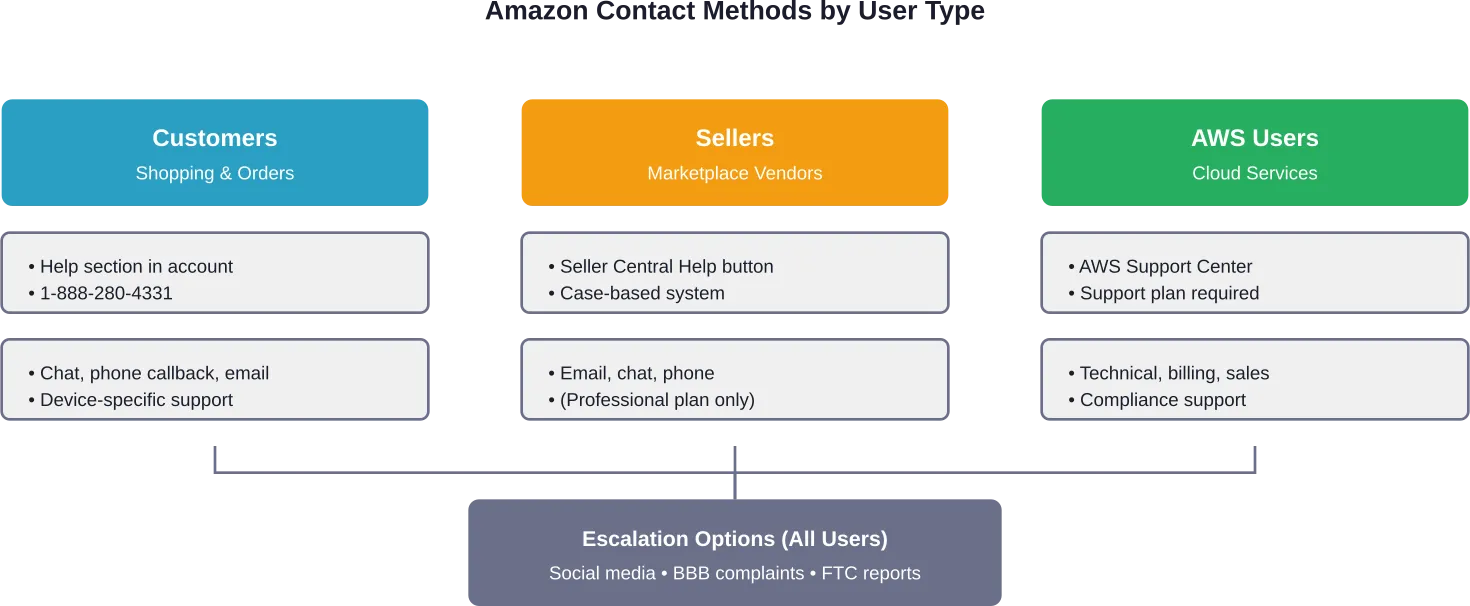
Amazon shoppers have several ways to reach customer service, though all routes start in the same place: the Help section of an Amazon account.
The Primary Contact Hub
The official Amazon Customer Service portal is accessible only after logging in. This isn’t accidental—Amazon uses account information to route inquiries to the right team and pull up order history automatically.
From the Help section, customers can choose between chat, phone callback requests, or email. The phone option typically provides a callback rather than a direct number to dial, though the customer service number 1-888-280-4331 (verified in BBB Business Profile) connects to Amazon’s main support line.
Phone support operates differently than traditional call centers. Amazon’s system asks for the issue type first, then either provides automated solutions or schedules a callback from an agent.
Chat vs Phone: Which Works Better?
Chat support launches directly from the Help pages and connects within minutes during business hours. Response times may vary depending on contact volume and time of day.
Phone callbacks usually happen within 5-10 minutes of the request. The system displays estimated wait times before confirming the callback.
For account-specific issues—locked accounts, payment problems, suspicious activity—phone support typically resolves matters faster. Chat handles routine questions about orders, returns, and product information effectively.
| Contact Method | Best For | Typical Response Time |
|---|---|---|
| Chat | Order tracking, returns, general questions | 2-5 minutes |
| Phone callback | Account issues, payment problems, disputes | 5-10 minutes |
| Non-urgent documentation requests | 12-24 hours |
Product-Specific Support
Amazon devices (Kindle, Echo, Fire tablets) have dedicated support channels separate from general customer service. These specialists handle technical troubleshooting for hardware and software issues.
The product support team is accessible through the same Help portal, but selecting “Device Support” routes inquiries to technicians trained specifically for Amazon hardware.
Contacting Amazon Seller Support
Sellers operate in a completely different support ecosystem. Seller Central—the dashboard for marketplace vendors—has its own contact system that varies based on account type.
How Seller Support Actually Works
According to official guidance published on Seller Central in January 2025, sellers access support by hovering over the Help button in the top right corner, then clicking “Get help and resources.” The direct link is sellercentral.amazon.com/cu/contact-us.
Professional sellers get three contact options: email, phone, and chat. Individual plan sellers can access support via email and, in some cases, chat, but do not have access to phone support (callback).
But wait. This is where seller frustration typically begins.
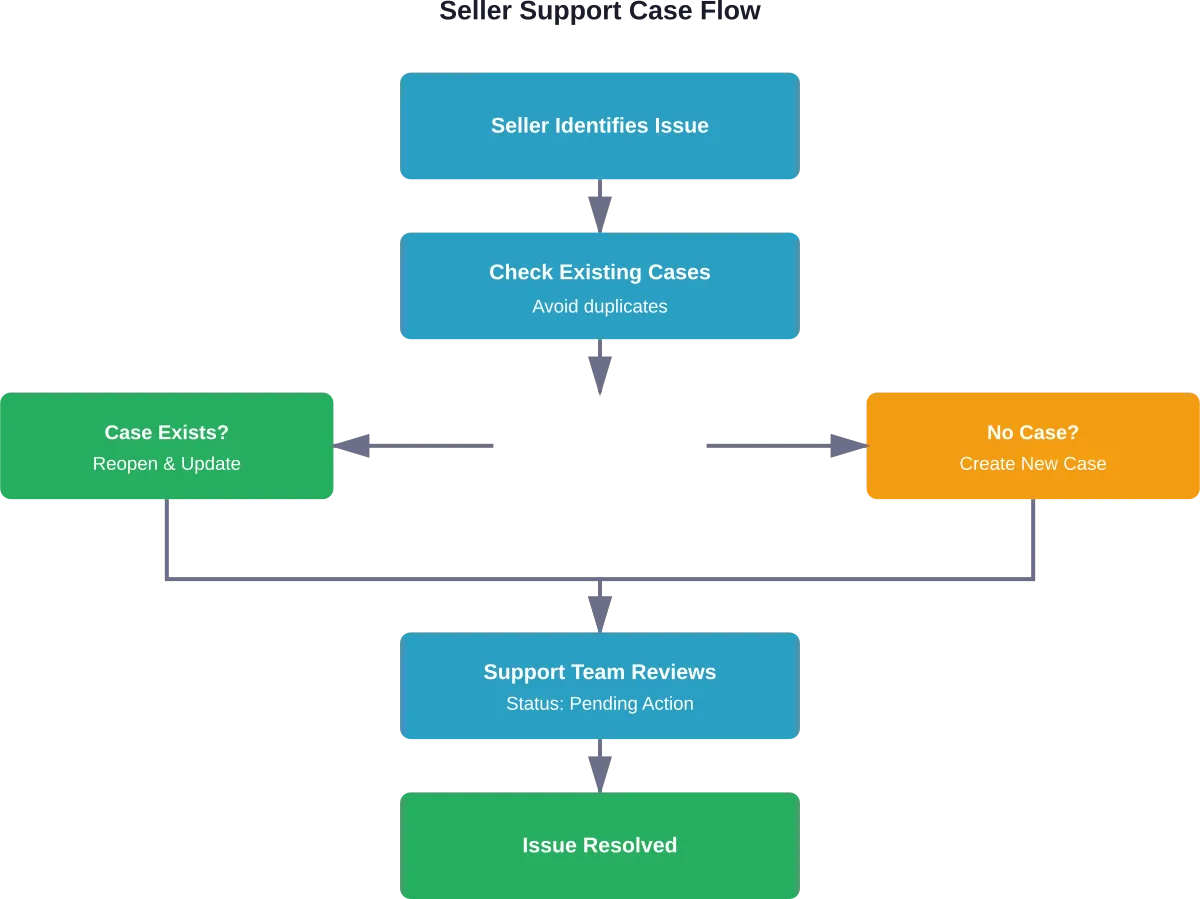
Seller Support operates on a case-based system. Each issue requires creating a separate case, and responses come via email notifications even when the initial contact was through phone or chat.
Best Practices for Seller Cases
Based on official Seller Central guidelines, these practices improve response quality and speed:
- One issue per case: Don’t bundle multiple problems into a single ticket
- Check existing cases first: Look for “Pending Amazon Action” or “Pending Merchant Action” labels before creating duplicates
- Reopen closed cases: Rather than starting fresh, reopen the original case if the issue persists
- Include case IDs: When escalating to forums or community support, always reference the existing case number
The case system tracks all interactions and allows different teams to collaborate on complex issues. Fighting it by creating multiple cases for the same problem typically slows resolution rather than speeding it up.
When Seller Support Doesn’t Help
Community discussions on Seller Central forums reveal consistent frustration with support quality. Sellers report receiving generic responses that don’t address specific issues, getting transferred between teams repeatedly, or having cases closed prematurely.
These aren’t isolated incidents. The Seller Central forum thread on contacting support includes sellers with 20+ years on the platform expressing difficulty getting substantive help.
For account suspensions, policy violations, or disputes that Seller Support can’t resolve, sellers sometimes escalate to the Better Business Bureau or report issues to the Federal Trade Commission. According to BBB’s business profile for Amazon.com, the platform maintains an A+ rating but has government actions on record related to marketplace conduct.
AWS Support Options
Amazon Web Services operates an entirely separate support infrastructure from retail and marketplace operations.
Support Tiers for AWS Customers
AWS support access depends on the support plan tier. The Basic Support Plan (free with all AWS accounts) provides access to account and billing support, but excludes technical support for service-related issues.
Higher tiers—Developer, Business, and Enterprise—include technical support with varying response times and support channels.
AWS customers can contact support for several specific needs:
- Sales inquiries: Chat online or request phone contact for pre-purchase questions
- Technical support: Submit requests through the AWS console (requires paid support plan)
- Account and billing support: Available to all customers including Basic plan users
- Compliance support: Dedicated channel for AWS compliance-related questions
- Wrongful charges: Special process for customers billed for AWS without having an active account
The AWS support contact page (aws.amazon.com/contact-us) provides direct access to these channels. Technical support operates Monday through Friday during business hours for lower-tier plans, with 24/7 availability for Business and Enterprise support customers.
The AWS Console Support Center
Customers with paid support plans submit technical cases through the AWS Support Center within the console. The system requires selecting the affected service, severity level, and providing detailed descriptions of the issue.
Response times vary by support plan and severity:
| Support Plan | Critical Issues | General Guidance | 24/7 Access |
|---|---|---|---|
| Basic | Not available | Not available | No |
| Developer | Not available | 24 hours | No |
| Business | 1 hour | 24 hours | Yes |
| Enterprise | 15 minutes | 24 hours | Yes |
For urgent production issues, Business and Enterprise customers can open cases marked as critical, which triggers immediate response from on-call engineers.
Alternative Contact Routes
When standard support channels fail or don’t apply, several alternative contact methods exist.
Social Media Escalation
Amazon maintains customer service accounts on Twitter (X) and Facebook. Tagging @AmazonHelp on Twitter sometimes produces faster responses for urgent issues, particularly when public visibility motivates priority handling.
This isn’t an official escalation path, but community experiences suggest social media teams occasionally have more authority to resolve edge cases.
Executive Customer Relations
For severe issues that normal support can’t resolve, customers sometimes send detailed letters to Amazon’s corporate headquarters. While Amazon doesn’t publicize executive email addresses, persistent issues documented in writing to the executive team occasionally receive special handling.
The official mailing address for customer correspondence is Amazon.com, Inc., P.O. Box 81226, Seattle, WA 98108-1226.
Reporting Fraud or Illegal Activity
The Federal Trade Commission maintains a fraud reporting portal at Reportfraud.ftc.gov. According to the FTC’s official contact page, the agency will never demand money, make threats, or tell consumers to transfer money.
For marketplace fraud, counterfeit products, or seller misconduct, reporting to the FTC creates an official record even if Amazon hasn’t resolved the issue internally. The Better Business Bureau also accepts complaints through bbb.org/file-a-complaint.
Common Contact Scenarios and Solutions
Certain issues appear repeatedly in Amazon support requests. Understanding the fastest resolution path saves time.
Order and Shipping Issues
For delayed orders, missing packages, or delivery problems, the “Where’s My Stuff?” section in the Amazon account provides automated tracking and resolution options. The system can immediately reissue or refund most orders without requiring agent contact.
Carrier-specific issues (damaged packages, delivery instructions, access problems) sometimes require contacting the shipping carrier directly. Amazon provides carrier contact information in the order details.
Returns and Refunds
Most returns initiate through the self-service Returns Center. Items shipped and sold by Amazon typically qualify for free returns within 30 days.
Third-party seller returns follow different policies. The marketplace seller handles the return, not Amazon customer service. Check the seller’s return policy on the product page before purchasing.
Account Access Problems
Locked accounts, forgotten passwords, or suspicious activity flags require verification processes that automated systems can’t bypass. These issues need agent assistance.
For account lockouts specifically, the recovery process often requires providing identity verification documents, payment method verification, or answering security questions.
Billing Disputes
Unauthorized charges, subscription billing issues, or payment method problems resolve fastest through the “Account & Billing” support option in the Help section.
For AWS wrongful charges—when someone receives an AWS bill but doesn’t have an AWS account—Amazon provides a specific support channel separate from normal billing support.
Tips for Faster Support Resolution
Regardless of which contact method is used, certain practices speed up resolution:
- Have account information ready: Order numbers, tracking numbers, case IDs, and account email addresses allow agents to pull up records immediately.
- Use specific language: “My order hasn’t arrived” works better than “I have a problem.” The more specific the initial description, the faster the routing to the right team.
- Screenshot everything: Error messages, policy violations, suspicious emails—visual documentation eliminates back-and-forth clarification.
- Check help documentation first: Amazon’s self-service knowledge base resolves common issues instantly. Agents often send links to the same articles.
- Be persistent but professional: If the first agent can’t help, politely asking to escalate or requesting a supervisor sometimes produces different results. Aggressive or abusive communication typically hardens positions rather than motivating extra effort.

Spend Less Time Contacting Amazon, Understand What’s Going On
Reaching out to Amazon support is sometimes unavoidable, but when it happens often, it usually points to gaps in visibility rather than isolated issues. If you don’t see the full picture of your ads and sales data, it’s harder to understand why something changed or stopped working. WisePPC helps you keep that context in one place.
It combines Amazon Ads and Seller data into a single dashboard, so you can review performance, dig into search terms, and follow trends over time without relying on limited native reports. With more complete data on hand, it’s easier to identify issues before they turn into repeated support requests.
👉 Sign up on WisePPC to get clearer insights into your account and handle fewer support cases.

What Not to Do When Contacting Amazon
Certain approaches consistently backfire:
- Don’t create multiple cases for the same issue: The case management system flags duplicates and can delay resolution while teams figure out which case owns the problem.
- Don’t demand immediate callbacks or chat connections outside business hours: Response times depend on support tier and time of day. Setting realistic expectations prevents frustration.
- Don’t threaten legal action in initial contacts: Mentioning lawyers or lawsuits often triggers legal department review processes that take weeks instead of hours.
- Don’t fall for phishing scams: Amazon will never ask for passwords via email, demand immediate payment through wire transfer, or threaten account closure without legitimate cause. When in doubt, log directly into the Amazon account rather than clicking email links.
The Reality of Amazon Support
Real talk: Amazon support quality varies wildly depending on the issue type, support tier, and which team handles the case.
For routine shopping issues—refunds, returns, tracking—the system works efficiently. Automated tools resolve most problems in minutes.
For complex account issues, policy disputes, or edge cases, the experience can be frustrating. Agents work from scripts and have limited authority to override system decisions.
Seller support receives particularly harsh criticism in community forums. Sellers report inconsistent policy interpretation, language barriers, and support responses that don’t address the actual question asked.
AWS support follows a completely different model. Paid support tiers provide guaranteed response times and access to engineers with deep technical expertise. The quality differential between free and paid AWS support is substantial.
Getting Help When Standard Channels Fail
Sometimes standard support genuinely can’t resolve an issue. Policy limitations, system constraints, or authority boundaries mean certain requests require escalation beyond front-line agents.
For customers, requesting supervisor escalation during chat or phone support sometimes produces different results. Supervisors have slightly more authority to override automated decisions or issue exceptions to standard policies.
For sellers, the Seller Central forums occasionally draw responses from Amazon moderators who can intervene in stuck cases. Posting in the forums with case IDs and detailed documentation sometimes triggers review by senior support teams.
For AWS customers on Enterprise support plans, Technical Account Managers serve as dedicated points of contact with authority to coordinate complex issues across multiple AWS teams.
And when internal escalation doesn’t work, external pressure through BBB complaints or FTC reports creates official records that force corporate-level review.
Frequently Asked Questions
What is Amazon’s main customer service phone number?
The main customer service number is 1-888-280-4331. Amazon typically encourages users to request a callback through the Help section, where agents call back within 5–10 minutes.
Can I contact Amazon without logging into my account?
Yes, but options are limited. Calling the main number is possible, though logging in allows faster resolution since agents can access your account details.
How do I contact a real person at Amazon instead of automated responses?
Log into your account, go to Help, select your issue, and choose Chat or Request phone call. Selecting options like “I need more help” usually connects you to a live agent quickly.
What’s the difference between Amazon customer service and seller support?
Customer service assists buyers with orders, returns, and account issues. Seller support helps marketplace vendors with listings, policies, and account management.
How quickly does Amazon typically respond to support requests?
Chat connects within 2–5 minutes, phone callbacks within 5–10 minutes, and email responses usually arrive within 12–24 hours.
Does Amazon have email addresses for customer service?
No public email addresses are provided. Email contact is available through the Help section after logging in and selecting an issue.
How do I report a problem with a third-party seller on Amazon?
Use the “Report a Problem” option in your order details. This notifies Amazon’s marketplace trust team and creates an official record of the issue.
Conclusion: Match the Contact Method to the Issue
The key to successfully contacting Amazon comes down to using the right channel for the specific issue type.
Shopping problems? Start with the self-service tools in the account. Most resolve automatically without needing an agent.
Complex account or payment issues? Request a phone callback through the Help system for direct conversation with an agent who can verify identity and make account changes.
Seller problems? Use the case system in Seller Central, follow best practices for one issue per case, and include all relevant documentation upfront.
AWS technical issues? Submit through the Support Center if you have a paid plan, or use the free account and billing support for non-technical questions.
The support infrastructure exists—it’s just fragmented across different systems. Understanding which system applies to your situation eliminates the frustration of bouncing between wrong departments.
Need help now? Log into your Amazon account, click Help in the top right corner, and let the routing system guide you to the right team. That remains the fastest path to resolution for most Amazon-related issues.
 No credit card required