
 EN
EN  ES
ES  FR
FR  DE
DE  IT
IT  KO
KO  JA
JA  ZH
ZH  AR
AR  PT
PT  TR
TR PL
PLHow to Contact Amazon Customer Service Quickly and Easily
Whether you’re missing a package, need a refund, or can’t sign in to your account, getting help from Amazon can be tricky. In this guide, we’ll walk you through every reliable method to reach Amazon customer service – from live chat to the “Call Me” feature – so you can resolve issues fast and get back to shopping worry-free.
Why It’s So Hard to Reach Amazon Support
Amazon has built its customer service system around automation. Bots, help articles, and automated chat tools handle most support issues before you ever talk to a real person. While this setup works for simple stuff like tracking packages or requesting returns, it often falls short when you’re dealing with more complicated situations.
But here’s the thing: if you know where to click, what to say, and how to navigate their system, you can absolutely get human help when you need it.
The Best Ways to Contact Amazon (Based on Real-World Experience)
Let’s break down the most effective methods, how to access them, and when each one makes the most sense.
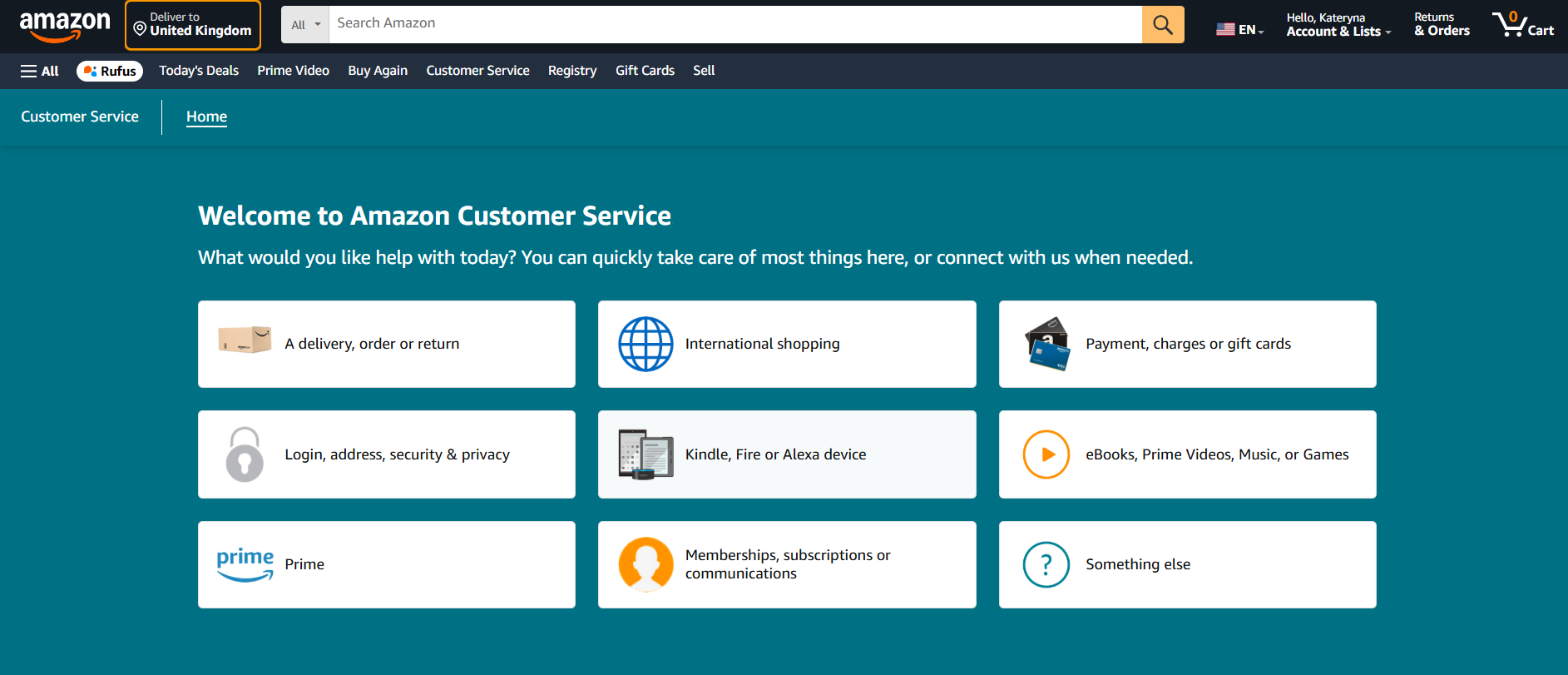
1. Start with the Amazon Help Page
Before you pick up the phone or open Twitter, try the official Amazon Help Page. It’s more useful than you might think—if you know how to use it properly.
Here’s how to get started:
- Visit: https://www.amazon.com/gp/help/customer/contact-us.
- Sign in to your account (this is required to access most support options).
- Select the issue you’re dealing with, such as delivery, order or return, prime membership questions, charges or payment problems, security, privacy or sign-in trouble.
Once you select a topic, Amazon offers automated solutions right away. These include refunds, replacement requests, tracking tools, and help articles tailored to your account.
Pro tip: If your issue is basic (like tracking a late order), the Help Page can solve it in under two minutes.
But if you still need human help, scroll down and look for the “Something else” option. That’s your gateway to chat or a callback.
2. Use the Live Chat (Yes, You Can Still Talk to a Human)
Amazon’s live chat is hidden behind a few steps, but it’s surprisingly effective once you get to the right spot.
To reach a real chat rep:
- Go to the Customer Service page.
- Choose “Something else”.
- Then “I need more help”.
- A chatbot will pop up – type “Talk to a representative” or just keep repeating it.
- Eventually, it will offer the option to chat with a real associate.
This route works well for:
- Canceling or editing orders
- Explaining account issues
- Resolving returns that weren’t processed correctly
You can usually get help within 2-3 minutes. No waiting on hold, no phone tree, just real-time chat. Keep in mind that you may still have to explain your problem to the bot before the human option appears.
3. Request a Call from Amazon (Don’t Just Call Yourself)
Many people don’t realize this, but Amazon prefers that you request a callback rather than calling them directly.
Here’s how to do it:
- Go to the same Help Page.
- Click through to “Something else” > “I need more help”.
- Once the bot appears, you’ll often see a “Request a call” option.
- Enter your phone number and click “Call me now”.
A rep will call you back, usually within a minute. This is much faster than calling the general number and wading through voice prompts.
That said, you can still call them directly…
4. Call Amazon Customer Service Directly (If You Have Patience)
Yes, you can call Amazon the old-fashioned way. But be warned: you’ll deal with voice recognition bots before reaching a person.
Amazon’s main customer service number: 1-888-280-4331 (USA)
This line is open 24/7.
You’ll need:
- A phone linked to your Amazon account.
- Access to your email or device for a verification code.
Customer service numbers for other countries:
- Canada: +1 877-586-3230
- UK: +44 800 279 7234
- India: +91 1800 3000 9009
- Australia: +61 1800 064 122
- Spain: +34 900 803 711
Calling can be effective, especially for:
- Fraud or identity concerns.
- Locked accounts.
- Complex billing problems.
Pro tip: Be prepared to confirm account details and verify your identity by phone or email.
5. Reach Out on Social Media (It Actually Works)
If you’re not getting the help you need through official channels, try going public.
Use these Amazon support handles:
- X (Twitter)
Tweeting at @AmazonHelp or sending a DM can trigger faster responses, especially if your message is polite but public. Their team handles support in multiple languages and usually replies quickly.
Social support is best for:
- Escalating existing issues
- Getting help when you can’t log in
- Asking about suspicious emails or unauthorized charges
6. Explore Amazon Forums (Helpful for Device and Digital Issues)
If you’re trying to fix a problem with an Amazon device like a Kindle, Fire TV, or Alexa, or have questions about software and digital services, the Amazon Digital and Device Forum can be a goldmine.
You’ll find answers from Amazon experts and fellow users. While you won’t speak directly with customer service, it’s a great place to troubleshoot technical issues or get clarification on how Amazon products work.

What About Email?
In the past, Amazon accepted customer service inquiries via email, commonly through addresses like cs-reply@amazon.com. But that’s no longer the case.
Email support has quietly been phased out. If you try using it now, you’ll either get a boilerplate response or nothing at all. Your best bet is still chat or callback.
Tips to Get Better Support from Amazon
Reaching Amazon is one thing. Getting your issue resolved efficiently is another. Here are a few tips that make a big difference:
- Be specific: Explain your issue clearly and concisely.
- Use the account linked to your order: That makes it easier for reps to find the problem.
- Provide order numbers: Always include this if you’re asking about a specific item.
- Stay calm: Amazon reps are generally helpful, but being rude or impatient can slow things down.
- Follow up if needed: If one method fails, try another (e.g., chat first, then social if unresolved).
What You Can (and Can’t) Expect from Amazon Support
Let’s manage expectations. Most basic problems get resolved quickly. Amazon is good at refunds, replacements, and order tracking. But if you’re dealing with:
- Multiple returns on one item;
- Lost gift card balances;
- Disputes over third-party seller issues;
- Account recovery without access to old phone/email
…you might need to push harder, escalate, or try multiple channels.
The system is designed to handle scale, not personal nuance. That means persistence often wins.

WisePPC: A Smarter Way to Take Control of Your Amazon Performance
While getting help from Amazon’s customer service is essential when things go wrong, managing your business on the platform shouldn’t always require firefighting. That’s where we come in.
At WisePPC, we help sellers like you cut through the guesswork and make better, faster decisions with real-time analytics and automation tools built for marketplace success. As an Amazon Ads Verified Partner, we offer deep data insights, multi-account reporting, and campaign optimization tools that go far beyond what Amazon’s default dashboards provide. Whether you’re running a few sponsored products or managing an entire brand catalog, our platform helps you stay ahead, reduce wasted ad spend, and grow with confidence.
Final Thoughts
Amazon is built to help the majority of people through automation. That’s fine when you’re dealing with a late package, but it can be maddening when you need real answers. Fortunately, with a few workarounds and a bit of patience, it’s totally possible to reach a real person and get actual support.
The key is knowing how to steer the system. Use chat and callback options when available, go social when needed, and don’t waste your time with outdated methods like email. Stick with the steps above, and you’ll get through.
FAQ
1. Can I talk to a real person at Amazon, or is it always a bot?
You can talk to a real person, but Amazon doesn’t make it easy. The trick is knowing where to click. If you go through the Help page, choose “Something else,” and keep pushing for “I need more help,” you’ll eventually get the option to chat with a live associate or request a call. It might take a few back-and-forths with the bot, but it’s doable.
2. What’s the fastest way to get help from Amazon?
If you’re in a hurry and don’t want to sit on hold, the live chat is usually your best bet. It’s available right from the Help page once you navigate past the chatbot. You’ll get responses quickly, and if the bot can’t solve your issue, a human usually steps in within minutes.
3. Is calling Amazon better than chatting with support online?
It depends on your issue. For complicated account problems or anything involving identity verification, a phone call might be smoother. But if you just need to fix a return, ask about a refund, or get clarity on a charge, the live chat tends to be faster and way less painful than waiting through voice menus.
4. What do I do if I can’t log into my Amazon account to contact support?
That’s a tough one, and a lot of people run into it – especially if their phone number or email has changed. In that case, head to the sign-in help page and use the “I can’t sign in” option. If that doesn’t work, reaching out on Twitter is surprisingly effective. They’ll usually DM you with next steps.
5. Is there any way to email Amazon customer service?
Not anymore. They used to respond to emails at cs-reply@amazon.com, but it’s pretty much a black hole now. You’re better off using chat, requesting a callback, or trying social media. Emailing them directly rarely leads to a real response these days.
Start Your Free 30-Day Trial Today
Start your 30-day free trial today. No credit card required. From an Amazon Ads Verified Partner you can trust.
 No credit card required
30-day free trial
Access metrics Amazon Ads won’t show you
No credit card required
30-day free trial
Access metrics Amazon Ads won’t show you