
 EN
EN  ES
ES  FR
FR  DE
DE  IT
IT  KO
KO  JA
JA  ZH
ZH  AR
AR  PT
PT  TR
TR PL
PL
Quick Summary: To speak to a live person at Amazon, sign in to your account and navigate to the Customer Service page. Select your order or issue, then choose “Request a Phone Call” or “Chat” as your contact method. Amazon’s main customer service number is 1-888-280-4331, available 24/7 for immediate assistance.
Getting help from Amazon shouldn’t feel like navigating a maze. Yet many shoppers find themselves frustrated, clicking through automated menus and chatbots when all they want is to speak with an actual human being.
The good news? Amazon does employ real customer service representatives, and they’re available around the clock. But here’s the thing—Amazon intentionally makes automated options more prominent to handle the massive volume of routine inquiries efficiently.
This guide cuts through the confusion and shows exactly how to bypass the automated systems and connect with a live Amazon representative in minutes. Whether dealing with a complicated return, a billing dispute, or an urgent delivery issue, these methods work.
The Fastest Way to Reach a Live Amazon Representative
Amazon operates customer service 24/7, and according to Business Insider, the primary contact number is 1-888-280-4331. But simply calling this number won’t guarantee immediate access to a representative.
The most effective approach combines account-specific navigation with strategic contact method selection. Here’s what actually works in practice.
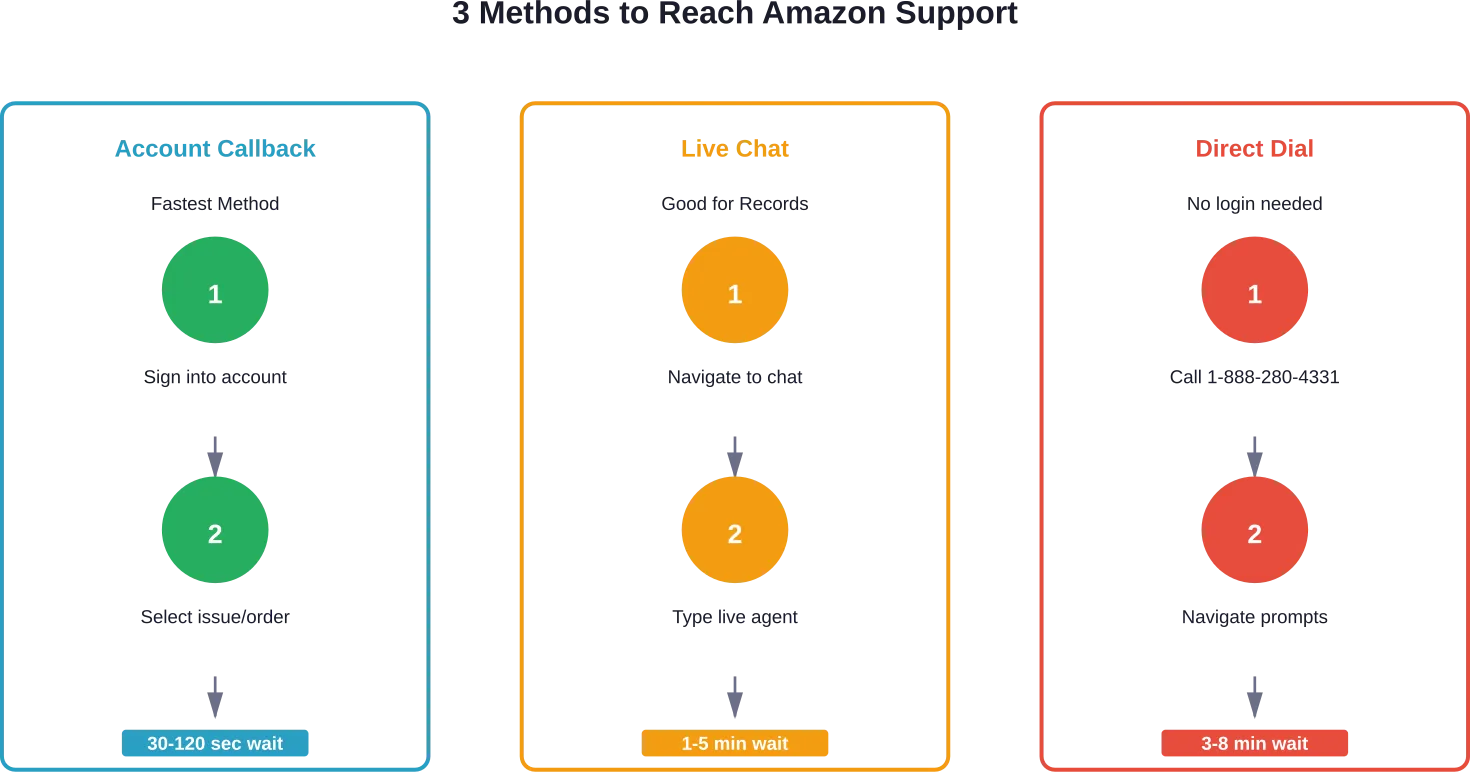
Method 1: Request a Phone Call Through Your Account
This approach consistently delivers the fastest connection times. Amazon’s system prioritizes callbacks because they’re initiated through your authenticated account.
Start by signing into your Amazon account on the desktop website or mobile app. Navigate to the Customer Service page by scrolling to the bottom of any Amazon page and clicking “Help.”
Select the order or issue requiring assistance. The system presents relevant help articles first, but ignore those. Look for contact options at the bottom of the page.
Choose “Request a Phone Call” when available. Enter your phone number, and Amazon typically calls within 30 seconds to two minutes. The representative already has your account information and order details loaded, which speeds resolution.
Method 2: Use the Live Chat Option Strategically
Live chat connects to real representatives, though it sometimes starts with an automated assistant. The key is persistence.
Access chat through the same Customer Service workflow. When the chat window opens, type “speak to representative” or “live agent” immediately. This often bypasses initial automation.
According to Lifehacker, chat representatives have access to the same tools and authority as phone agents. For non-urgent issues or situations where keeping a written record matters, chat works well.
That said, complex problems typically resolve faster over the phone where tone and nuance improve communication.
Method 3: Direct Dial the Customer Service Number
Calling 1-888-280-4331 directly works, but requires navigating voice prompts. Here’s how to optimize the process.
When the automated system answers, don’t select any menu options initially. Wait through the initial greeting, and the system often transfers to a representative after detecting no input.
Alternatively, saying “representative,” “agent,” or “customer service” repeatedly can trigger a transfer. Some users report that pressing 0 multiple times also works, though this varies.
The direct dial method takes longer on average—typically three to eight minutes—but doesn’t require being signed into an account first.
Understanding Amazon’s Customer Service Structure
Amazon handles an enormous volume of customer inquiries daily. The company intentionally funnels common issues through automated solutions to maintain response times for complex problems.
Amazon customer service operates 24/7 with representatives available at all hours. The service handles everything from order tracking to account security concerns.
But not all issues receive the same treatment. Simple queries like “Where’s my order?” get routed to automated systems first. Complex problems—refunds for defective items, account security issues, billing disputes—escalate to live agents more readily.
When You Actually Need a Live Person
Automated systems handle routine tasks efficiently. Before requesting human assistance, consider whether self-service tools might resolve the issue faster.
Situations that genuinely require a representative include:
- Disputing unauthorized charges or billing errors
- Resolving issues with damaged or defective items when standard return options don’t apply
- Account security concerns or unauthorized access
- Problems with Amazon Prime membership billing or benefits
- Issues involving third-party sellers where mediation is needed
- Requests for exceptions to standard policies
- Technical problems preventing account access
For straightforward tracking questions or simple returns, the automated systems typically provide faster answers.
Alternative Amazon Contact Numbers for Specific Issues
The main customer service line handles most issues, but Amazon maintains specialized numbers for specific situations. Using the right number routes inquiries more efficiently.
| Service/Issue | Phone Number | Best For |
|---|---|---|
| General Customer Service | 1-888-280-4331 | Orders, returns, account issues |
| Amazon Business | 1-833-674-7268 | Business account inquiries |
| Amazon Payments | 1-888-247-4080 | Payment processing issues |
| Amazon Rewards Visa (Chase) | 1-800-346-5538 | Credit card questions |
| Business Rewards Card (Chase) | 1-866-216-1075 | Business credit card issues |
These numbers, documented by consumer advocacy sites, connect to departments with specialized training for their respective areas. Using them saves time explaining the issue to generalist representatives.
International Amazon Customer Service
Amazon operates country-specific customer service lines. The 1-888-280-4331 number serves U.S. customers primarily.
International customers should access customer service through their local Amazon domain (amazon.co.uk, amazon.de, amazon.co.jp, etc.). Each regional site lists appropriate contact numbers and hours for that market.
Language support varies by region, with most sites offering service in the primary language of that country.
Step-by-Step: Getting a Callback from Amazon
The callback method consistently delivers the best experience. Here’s the detailed walkthrough.
- Access your account: Sign into your Amazon account on the website or mobile app. The callback feature requires authentication.
- Navigate to customer service: On desktop, scroll to the page footer and click “Help.” On mobile, tap the menu icon (three horizontal lines) and select “Customer Service.”
- Identify your issue: The system displays recent orders and common issue categories. Select the order or topic relevant to your situation. If your issue doesn’t fit the listed options, choose “Something Else.”
- Browse past automated options: Amazon presents self-service articles first. Scroll past these to the bottom of the page where contact options appear.
- Select phone contact: Click or tap “Request a Phone Call.” A form appears asking for your phone number.
- Enter your number: Provide a working phone number where Amazon can reach you. The system auto-fills the number associated with your account, but this can be changed.
- Submit and wait: Click “Call Me Now” or similar button. Amazon’s system typically initiates the call within 30 seconds to two minutes during normal volume periods.
The representative who calls already has your account details loaded. They see your order history, recent activity, and the issue category selected. This context speeds resolution significantly.
Using Amazon’s Live Chat Effectively
Chat works well for certain issue types, particularly those requiring documentation or when multitasking during the conversation.
Access chat through the same Customer Service navigation flow. After selecting your issue, look for “Chat” among the contact options.
The chat interface sometimes opens with an automated assistant asking preliminary questions. Be patient but persistent. If automated responses don’t address the issue, type “I need a human representative” or similar phrasing.
Real talk: chat representatives handle multiple conversations simultaneously. Response times average 30-90 seconds between messages. For urgent issues, phone contact resolves matters faster.
But chat offers advantages for specific situations. The conversation creates an automatic written record. For billing disputes or situations where documentation matters, this proves valuable.
Chat representatives also more readily provide written confirmations of resolutions, refund amounts, or policy exceptions granted.
Chat vs. Phone: Which to Choose
Phone calls suit complex problems requiring back-and-forth discussion, immediate resolution, or situations where emotion and tone matter. Returns involving judgment calls about item condition, disputes requiring persuasion, or account security emergencies all benefit from voice communication.
Chat works better when documenting the interaction matters, when dealing with technical issues where sharing screen information helps, or when unable to take a phone call due to the environment (work, public spaces, etc.).
Either method connects to representatives with similar authority and access to tools. The choice depends on the situation and preference.
What to Prepare Before Contacting Amazon
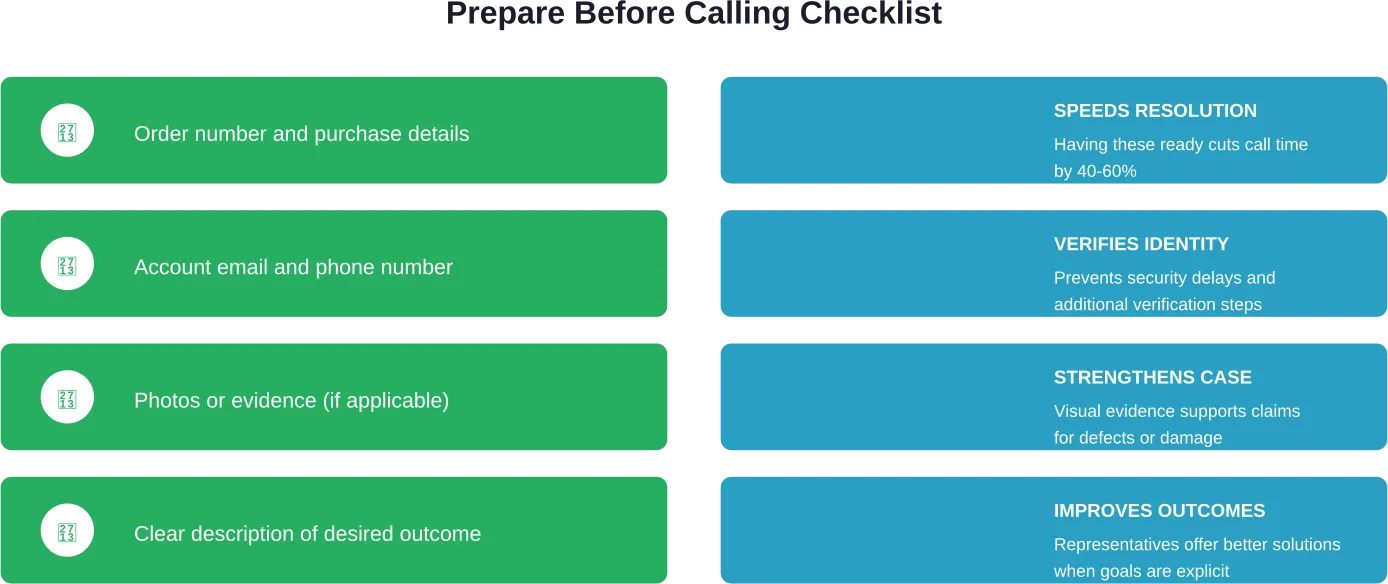
Representatives resolve issues faster when customers provide relevant information upfront. Gathering these details beforehand streamlines the conversation.
- Order information: Have the order number ready if the issue relates to a specific purchase. This appears in order confirmation emails and the “Your Orders” section of your account.
- Account details: Know the email address and phone number associated with the account. Representatives use these to verify identity.
- Documentation: For defective items, have photos ready to share. For billing disputes, note the charge amount and date. For delivery problems, check the tracking information first.
- Desired resolution: Decide what outcome would satisfy the concern. Refund? Replacement? Account credit? Having a clear request helps.
- Previous contact records: If this isn’t the first contact about the issue, note previous case numbers or representative names if available.
Representatives can access most account information themselves, but having details readily available eliminates hold time while they search.
Common Issues and How Amazon Typically Resolves Them
Understanding how Amazon handles specific issue types helps set realistic expectations and prepare appropriate requests.
Package Delivery Problems
For packages marked delivered but not received, Amazon typically investigates for 24-48 hours first. Representatives can issue immediate refunds or replacements for Amazon-fulfilled orders once this window passes.
Third-party seller items require contacting the seller first, though Amazon mediates if the seller doesn’t respond within 48 hours.
Damaged packages usually qualify for immediate replacement or refund upon reporting. Photo evidence strengthens these claims.
Defective or Wrong Items
Amazon-fulfilled returns for defective items almost always receive approval without argument. Representatives can process returns even outside standard return windows for manufacturing defects.
The company typically offers both refund and replacement options, with replacement shipping expedited at no charge.
Wrong items shipped face similar treatment. Amazon rarely requires returning incorrect items under $25 value and simply ships the correct product.
Billing and Subscription Issues
Unexpected charges often stem from Prime membership renewals, Subscribe & Save orders, or digital content purchases. Representatives can refund these when customers weren’t aware of pending charges.
Prime membership refunds follow a pro-rated policy if benefits were used. Full refunds apply if no Prime benefits were accessed since renewal.
Digital content purchases (Kindle books, Prime Video rentals) become non-refundable once consumed. Representatives may issue courtesy credits in some situations but can’t guarantee refunds.
Account Security Concerns
Unauthorized account access receives priority treatment. Representatives can immediately lock accounts, reset passwords, and investigate fraudulent orders.
Amazon refunds charges for orders placed through compromised accounts. The company investigates thoroughly and may require additional verification to restore account access.
These situations absolutely require speaking with a representative rather than using automated tools.
What Amazon Customer Service Can and Cannot Do
Representatives have considerable authority to resolve issues, but limits exist. Understanding these boundaries prevents frustration.
What Representatives Can Do:
- Issue refunds for most items within policy guidelines
- Process returns and generate return labels
- Extend return windows for unusual circumstances
- Apply account credits as gestures of goodwill
- Expedite replacement shipping at no charge
- Adjust Prime membership billing and refund fees in qualifying situations
- Investigate and refund unauthorized charges
- Make exceptions to policies on a case-by-case basis
What They Typically Cannot Do:
- Force third-party sellers to accept returns outside their stated policies
- Refund digital content after it’s been accessed or downloaded
- Override final decisions on account suspensions (these require specialized teams)
- Provide shipping discounts or negotiate shipping costs
- Price match or adjust prices after purchase (except for Prime member TV price guarantees)
- Provide direct contact information for third-party sellers (communication goes through Amazon’s messaging system)
When issues fall outside standard representative authority, they escalate to specialized teams. This process takes longer but handles complex situations the front-line team can’t resolve.
Tips for Getting Better Results from Amazon Customer Service
Approach and communication style significantly impact outcomes. These strategies improve resolution success rates:
- Be specific and concise: State the problem clearly in the first explanation. “My order #123-456 arrived damaged and I need a replacement” works better than a lengthy story about the entire ordering experience.
- Stay calm and professional: Representatives have more flexibility to offer solutions when interactions remain courteous. Anger or aggression typically reduces willingness to stretch policies.
- Know Amazon’s policies: Understanding return windows, Prime benefits, and guarantee programs helps make informed requests. The A-to-Z Guarantee, for instance, protects purchases from third-party sellers.
- Ask for escalation when needed: If a representative can’t resolve the issue satisfactorily, politely request escalation to a supervisor or specialized team. This isn’t always immediately available but can be arranged.
- Document everything: Note representative names, case numbers, and promises made. If calling back becomes necessary, this information helps.
- Use chat for complex issues requiring records: Written transcripts from chat sessions provide proof of what was offered or agreed upon.
Look, here’s the thing—representatives deal with hundreds of interactions daily. Making their job easier by being organized and clear often results in better outcomes.
When to Escalate Beyond Standard Customer Service
Most issues resolve through standard customer service channels. But some situations require escalation to specialized teams or external resources.
Amazon’s Executive Customer Relations
For serious issues that standard representatives can’t resolve, Amazon maintains an executive customer relations team. Access requires persistence.
Sending detailed, professional complaints to jeff@amazon.com (the historical CEO email address) still routes messages to customer relations teams that handle escalations. These teams have more authority and typically respond within 24-48 hours.
Use this channel sparingly and only for legitimate unresolved issues. Abuse of escalation channels can flag accounts.
Amazon Pay Dispute Resolution
For transactions using Amazon Pay on external websites, separate dispute processes apply. According to Amazon Pay’s official documentation, customers can file A-to-Z Guarantee claims for qualifying purchases.
This protection covers items that don’t arrive, arrive damaged, or differ materially from descriptions. Claims must be filed within 90 days of the estimated delivery date.
External Consumer Protection Resources
When Amazon’s internal processes fail to resolve issues satisfactorily, external resources exist.
Credit card chargebacks provide recourse for unauthorized charges or items not received. Use this as a last resort, as Amazon may suspend accounts that initiate chargebacks before attempting resolution through customer service.
State consumer protection agencies and the Better Business Bureau accept complaints about e-commerce issues. While they can’t force resolutions, official complaints sometimes prompt additional review.
The Federal Trade Commission accepts reports of unfair business practices, though they focus on pattern identification rather than individual case resolution.
Amazon Customer Service Hours and Best Times to Call
Amazon customer service operates 24 hours daily, every day of the year. But optimal contact times exist.
Wait times typically stay shortest during early morning hours (6-9 AM local time) and late evening (10 PM-midnight). Mid-afternoon (2-5 PM) and early evening (6-8 PM) see the highest volumes.
Mondays generate more contact volume than other weekdays as customers follow up on weekend deliveries. Fridays see increased volume from people addressing issues before the weekend.
Holiday periods—Black Friday through Cyber Monday, Prime Day events, and December—experience dramatically increased wait times. During peak shopping events, callback or chat methods often prove faster than direct dialing.
Account-based callback requests typically bypass queue-related delays regardless of timing, making them the most reliable option during high-volume periods.
Mobile App vs. Desktop for Contacting Support
Both the mobile app and desktop website provide access to customer service, but the experience differs slightly.
The mobile app streamlines navigation to customer service features. The prominent “Customer Service” option in the main menu requires fewer clicks than navigating the desktop footer.
Chat interfaces work better on desktop where typing longer explanations proves easier. Phone callback requests work equally well on either platform.
For issues requiring reference to order details while talking with representatives, desktop’s larger screen facilitates multitasking. Mobile works fine for straightforward issues.
The app also enables easier photo sharing for damaged item claims or product defects. This feature alone makes mobile preferable for those specific situations.
Avoiding the Need for Customer Service
Prevention beats resolution. Several practices reduce the likelihood of needing customer service assistance:
- Read product descriptions thoroughly: Most “wrong item” issues stem from misunderstanding what was ordered. Reviews often clarify aspects descriptions omit.
- Check seller ratings for third-party items: Amazon-fulfilled items carry standard return policies. Third-party shipped items follow seller-specific policies that vary widely. Checking seller ratings and return policies before purchase prevents issues.
- Monitor delivery progress: Tracking information shows delivery problems as they develop. Catching issues early (before items are marked delivered) simplifies resolution.
- Use Amazon lockers for package security: Delivery to secure lockers eliminates porch piracy and missed delivery issues entirely.
- Review subscriptions regularly: Subscribe & Save orders and Prime renewals surprise customers who forget about them. Reviewing subscriptions monthly prevents unexpected charges.
Self-service tools on Amazon’s website resolve many common issues without requiring representative contact. The “Your Orders” page provides tracking, return initiation, and digital receipt access. The “Manage Prime” section controls membership settings and billing.

Prevent Issues Before You Need to Contact Amazon Support
If you keep reaching out to Amazon support, the problem is often deeper than a single issue. Instead of reacting each time, it helps to see what’s happening across your account.
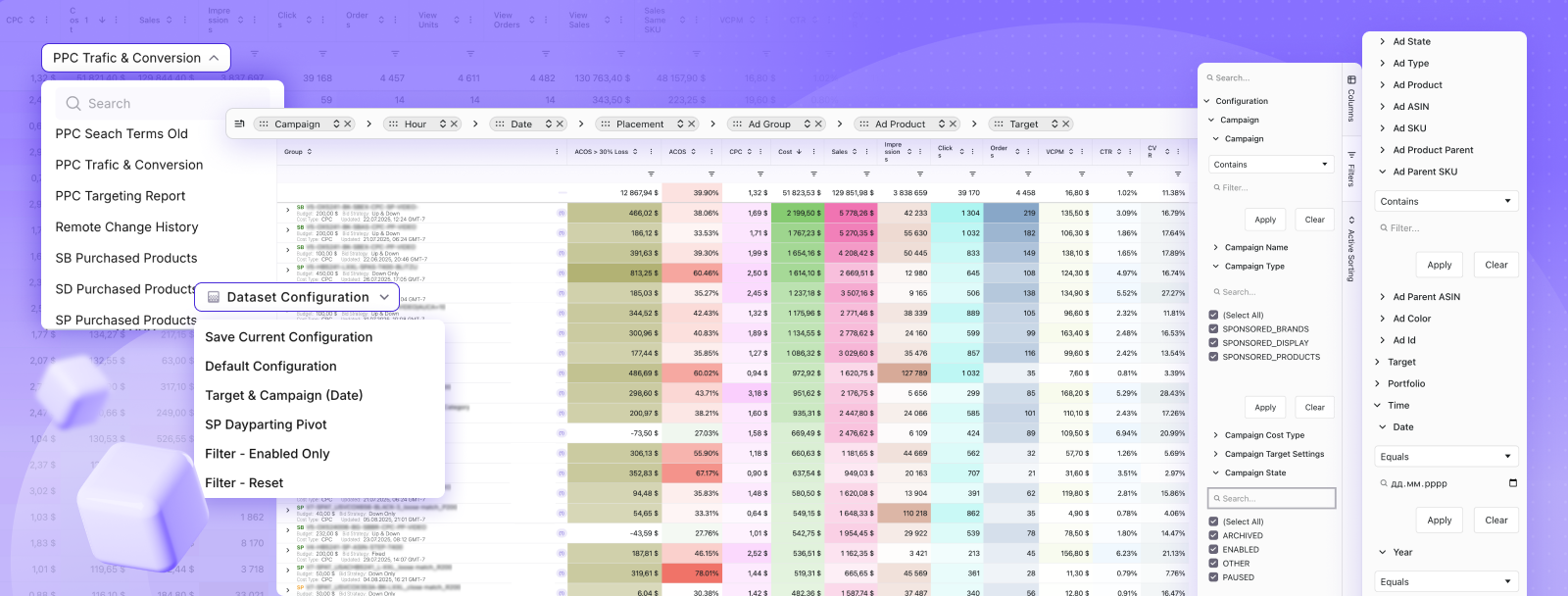
WisePPC connects your Amazon Seller and Ads data in one place, so you can track campaign performance, search terms, and trends over time. It also stores historical data beyond Amazon’s default limits, helping you spot issues earlier and make decisions based on full context.
👉 Explore WisePPC to better understand your data and reduce the need to contact Amazon support.
Understanding Amazon’s A-to-Z Guarantee
The A-to-Z Guarantee provides protection for third-party seller purchases. Understanding how it works helps when those transactions go wrong.
This guarantee covers two primary scenarios: items that don’t arrive by the guaranteed delivery date (plus three additional days), and items that differ significantly from their description or arrive damaged.
Filing claims requires attempting to resolve issues with the seller first. If the seller doesn’t respond within 48 hours or refuses reasonable resolution, claims can be filed.
Amazon investigates claims by reviewing seller communication, tracking information, and buyer documentation. Approved claims result in refunds processed to the original payment method.
The guarantee doesn’t cover buyer’s remorse, minor cosmetic issues, or situations where return shipping is offered but the buyer refuses to send items back.
Claims must be filed within 90 days of the estimated delivery date. After this window, Amazon’s system blocks claim submissions.
Dealing with Third-Party Sellers Through Amazon
Third-party sellers account for over half of items sold on Amazon, but customer service works differently for these purchases.
Amazon facilitates communication but doesn’t directly control third-party seller customer service. The messaging system in “Your Orders” connects buyers with sellers while keeping contact information private.
Third-party sellers set their own return policies, which may be more restrictive than Amazon’s standard 30-day window. These policies appear on product pages before purchase.
When issues arise, contact the seller first through the messaging system. Most sellers respond within 24-48 hours. If they don’t respond or refuse reasonable resolution, Amazon customer service can intervene.
Amazon representatives can’t force sellers to accept returns or provide refunds outside their stated policies. But they can file A-to-Z Guarantee claims on behalf of customers when sellers violate Amazon’s seller performance standards.
Items fulfilled by Amazon (even when sold by third parties) follow Amazon’s standard return policies regardless of seller-specific rules. The “Sold by [Seller] and Fulfilled by Amazon” distinction matters significantly.
Security Considerations When Contacting Amazon
Scammers impersonate Amazon customer service to steal account credentials and payment information. Knowing how legitimate contact works prevents falling victim.
Amazon Never Asks for These via Phone:
- Full credit card numbers (they’ll reference last four digits only)
- Remote computer access or software installation
- Payment through gift cards or prepaid cards
- Passwords or two-factor authentication codes
Legitimate Amazon representatives will never request account creation dates or ask customers to verify accounts through unsolicited phone calls.
If receiving unexpected calls claiming to be from Amazon, hang up and initiate contact through the official website or app. Scammers spoof caller ID to appear legitimate.
Email communications from Amazon come from @amazon.com addresses. Carefully check sender addresses, as scammers create similar-looking domains.
The Customer Service page accessed through a signed-in Amazon account always provides legitimate contact. Third-party websites listing Amazon numbers may be outdated or fraudulent.
Frequently Asked Questions
Can I call Amazon without an account or order number?
Yes, calling 1-888-280-4331 doesn’t require being signed in or having an order number. Representatives can look up accounts using the phone number or email address associated with them.
How long does Amazon customer service typically take to resolve issues?
Simple issues like returns or refunds often resolve during the initial contact, usually within 5-15 minutes. More complex issues may take 24-48 hours, while third-party seller problems can take 3-7 days.
Does Amazon customer service work on holidays?
Yes, Amazon customer service operates 24/7 every day of the year, including major holidays. Wait times may be longer during peak shopping periods.
What if I’m not satisfied with the customer service representative’s solution?
You can politely ask to speak with a supervisor or request escalation to a specialized team. Some issues may be reviewed by higher-level teams within 24-48 hours.
Can Amazon customer service help with Amazon Prime Video, Music, or other services?
Yes, the main customer service line handles Amazon services including Prime Video, Prime Music, Kindle, Audible, and Amazon Fresh. Technical issues may be transferred to specialized support teams.
Is there a way to contact Amazon customer service via email?
Amazon doesn’t provide a direct customer service email address for general inquiries. Order-specific messaging is available through “Your Orders,” while phone or chat is better for urgent matters.
Will contacting customer service affect my Amazon account status?
No, legitimate customer service contact does not negatively affect your account. However, repeated false claims, excessive returns, or misuse of goodwill gestures may trigger account reviews.
Conclusion
Reaching a live person at Amazon requires navigating systems designed to route simple issues through automation. But the methods outlined here—particularly the account-based callback feature—consistently connect to real representatives within minutes.
The key is understanding that Amazon customer service operates on a tiered system. Automated solutions handle routine tracking and straightforward returns. Live representatives resolve complex problems, billing disputes, and situations requiring human judgment.
Preparation matters. Having order numbers, account information, and clear desired outcomes ready speeds resolution significantly. Approaching interactions professionally, providing necessary documentation, and understanding what representatives can and cannot do improves success rates.
The 1-888-280-4331 number works, but account-based contact methods leverage your purchase history and authentication to bypass queues. For most situations, signing in and requesting a callback beats direct dialing every time.
Amazon’s customer service isn’t perfect, but it’s more accessible than the website’s design initially suggests. The tools exist to reach real people who can help—knowing which doors to open makes all the difference.
Need help with an Amazon issue right now? Sign into your account, navigate to Customer Service, select your issue, and request a callback. A representative will contact you within minutes to resolve the problem.
 No credit card required