
 EN
EN  ES
ES  FR
FR  DE
DE  IT
IT  KO
KO  JA
JA  ZH
ZH  AR
AR  PT
PT  TR
TR PL
PLWhen Does Amazon Charge You? A Real-World Guide to Understanding the Timing
Ever placed an Amazon order and noticed your card hasn’t been charged yet? Or maybe you saw a $1 hold and thought, “Wait, what’s this?” You’re not alone. Amazon’s payment system isn’t confusing on purpose, but it is built to work across millions of transactions, different sellers, and all kinds of shipping timelines. And that means the moment you hit “Buy Now” isn’t always the moment your card gets billed.
In this guide, we’ll break down when Amazon actually charges your card, why that timing matters, and what to expect if you’re pre-ordering, using gift cards, or buying from third-party sellers. It’s not just about knowing when money leaves your account – it’s about understanding the logic behind it so you can shop (or cancel) with a little more confidence.
Amazon Doesn’t Always Charge Right Away and That’s Intentional
Let’s start with the basics. In most cases, Amazon charges your card when the order is getting ready to ship. This means your payment method is checked and authorized when you place the order, but the actual charge is processed later – usually within a day or two of shipping.
But that’s not the whole story. Depending on what you’re buying, who you’re buying it from, and how you’re paying, the timing can shift.
The Logic Behind Delayed Charges
Why doesn’t Amazon just charge you instantly? There are a few practical reasons:
- Stock availability: If an item isn’t ready to ship yet, charging upfront could lead to refund headaches if it’s canceled or delayed.
- FTC rules: U.S. regulations say sellers must ship within the timeframe they promise, or they have to notify you and offer a refund. Charging too early makes this messy.
- Customer flexibility: Delayed charges allow buyers to cancel or modify their orders before they ship without needing a refund process.
So while it might feel inconsistent, the system is designed to keep things cleaner in the long run.
How Charges Work for Standard Amazon Orders
For most orders sold and shipped directly by Amazon, here’s how the process looks like:
Placing the Order: What Happens First
When you place an order on Amazon, the system runs a quick check to make sure your card is valid and has available funds. This part usually happens behind the scenes, but if you’re paying with a credit card, you might spot a temporary $1 authorization on your statement. That’s just Amazon confirming your payment method, not an actual charge. It usually disappears within a day or two.
When the Order Starts Moving
Amazon doesn’t charge you the moment you click the “Buy Now” button. Instead, they wait until your item moves into the shipping phase. That’s when your card is officially charged. So if an order is sitting in “Preparing for shipment” status, your payment hasn’t been processed yet. But the moment it’s boxed up and ready to go? That’s when you’ll see the charge hit.
What If Your Items Ship Separately?
Sometimes your order shows up in multiple boxes across different days, and your billing will reflect that. Rather than charging you one lump sum upfront, Amazon applies charges individually as each item ships. So if your order contains three items and they leave the warehouse on three different days, you’ll see three separate charges. It’s not a glitch, just how they structure the billing to match fulfillment.
Timing Depends on the Order Type
If you’re ordering something that qualifies for next-day or same-day delivery, the shipping process begins almost immediately, so the charge might show up within hours. But for backordered items or those with longer lead times, there can be a longer gap between placing the order and being charged. Amazon doesn’t charge until the item is getting ready to ship, even if that takes a few days (or more).
What Happens with Pre-Orders
Pre-ordering is common for things like new book releases, video games, or tech products that haven’t launched yet. Amazon lets you place the order early, but you won’t be charged right away.
Here’s how it works:
- Your card is authorized at the time of order to make sure it’s valid.
- The actual charge happens a few days before the item ships, usually right before the official release date.
- You’ll get an email notification when the charge is processed.
This system guarantees your spot in line without tying up funds too early.
How Amazon Handles Backorders
Backordered items are different from pre-orders. These are products that were in stock but sold out temporarily and are expected to be restocked soon.
For backorders:
- Your card isn’t charged right away.
- You’ll be notified when the item is back in stock and shipping.
- The charge is applied when the item is prepared for shipment.
Amazon generally won’t charge you until they can fulfill the order. If they can’t restock the item within a reasonable timeframe, they may cancel it or ask for confirmation before proceeding.
What About Third-Party Sellers?
This is where things get a little less predictable. While Amazon handles its own orders with a pretty consistent charge-when-shipping model, third-party sellers operating through the Marketplace don’t always follow the same playbook. They have a bit more flexibility, and that means you might get charged at a different time depending on who you’re buying from.
Some of these sellers process payment right at checkout. That’s especially common with custom-made products or items that are in short supply, basically anything where the seller wants a financial commitment upfront. Others stick with Amazon’s usual rhythm, charging you only when the product is packed and ready to ship.
The best way to know what to expect is to check the fine print on the product page. If it says something like “Sold by [Seller Name] and Fulfilled by Amazon,” chances are the timing will mirror Amazon’s own process, and you won’t see a charge until shipping kicks in. But if the listing reads “Ships from and sold by [Seller Name],” it’s likely you’ll be billed right away.
So while the general rule is that you’re charged when things ship, third-party sellers sometimes rewrite that rule. It’s not wrong – it’s just a different system within Amazon’s larger ecosystem.
Using a Gift Card? Expect Immediate Charges
Amazon gift cards are handled differently from credit or debit cards. When you use a gift card as your payment method:
- The amount is deducted immediately from your balance.
- This happens even if the order is set to ship later.
- If part of the order gets canceled, the unused funds are returned to your gift card balance.
There’s no waiting period here – the funds are considered spent the moment you click “Buy.”
How Debit and Credit Cards Are Charged
When you check out on Amazon, your payment method gets pinged right away. But whether you’re using a debit card or a credit card, what happens next isn’t always the same. The way the transaction plays out depends less on Amazon and more on how your bank handles things behind the scenes.
Credit Cards: Temporary Holds That Disappear
If you’re using a credit card, you might spot a small, temporary hold – usually a $1 authorization. It’s Amazon’s way of confirming that the card is active and that there’s credit available. But this hold isn’t a real charge, and it doesn’t stick around. Most of the time, it disappears after a day or two, and you won’t even remember it unless you’re watching your account closely.
Debit Cards: Faster Withdrawals, Less Wiggle Room
With debit cards, things can feel a bit more immediate. Depending on your bank’s policies, Amazon’s authorization may cause the funds to be placed on hold, or withdrawn from your account, even before the official charge goes through. You might see the money deducted right away, even though Amazon won’t finalize the transaction until the item is preparing to ship.
Bank Delays and Weekend Lag
It’s also worth noting that not all banks move at the same speed. Some are lightning fast at clearing authorizations, while others take their time. And if you’re placing an order on a Friday evening or during a holiday weekend, you might see a delay in how long it takes for that pending amount to update or disappear. That doesn’t mean anything’s wrong – it’s just your bank doing things at its own pace.
Understanding Those Weird $1 Charges
Ever spotted a $1 charge from Amazon that disappears later? That’s just a temporary authorization hold, not an actual transaction. It’s used to confirm that your card is valid and has available funds.
These holds are common:
- When adding a new card.
- When placing a high-value order.
- When placing a pre-order.
They drop off automatically, usually within a few days, and never become actual charges.

Subscription Services Like Prime and Kindle
Subscriptions work a little differently than standard Amazon orders. When you sign up for a service like Prime, Kindle Unlimited, or Amazon Music, the charge hits your account immediately – there’s no waiting until anything ships. If you’re on a monthly plan, you’re billed at the start of each month. If you’re paying annually, that full charge lands the day your subscription renews.
Amazon typically sends out a heads-up email before your next billing date, giving you a chance to review or cancel. But that notice can slip by if you’re not paying attention, so if you’re thinking about ending a subscription, it’s worth setting a reminder. Once the renewal date hits, the payment goes through automatically, and unless you cancel in advance, there’s not much you can do to reverse it after the fact.
Subscriptions are one of the few areas where Amazon doesn’t wait. The moment you confirm the service, the billing kicks in. Simple, but easy to overlook if you’re not keeping an eye on your renewal dates.
When You Cancel an Order
If you cancel before the item ships, you won’t be charged – simple as that. If there was a temporary hold, it’ll vanish shortly.
However:
- If you cancel after the charge has gone through, Amazon will refund your card within a few business days.
- For gift card payments, the refunded amount goes back to your gift card balance.
- With third-party sellers, refund timelines might vary slightly depending on how they handle cancellations.
Special Situations That Can Affect Timing
Sometimes things don’t follow the typical flow. Here are a few exceptions worth noting:
- Split shipments: Multiple charges may appear at different times.
- Delayed shipping: If Amazon extends your delivery window, the charge might not show up until closer to the new ship date.
- Weekend or holiday orders: Processing may take a bit longer due to banking delays.
- Failed payments: If your card is declined, Amazon will email you to update your payment info before proceeding.
How to Check Your Payment Status
If you’re wondering whether Amazon has actually charged you yet, there are a couple of quick ways to find out without playing guessing games with your bank statement. The first place to check is your “Orders” page. If an order shows as “Preparing for shipment,” that’s usually a sign your payment is about to go through, but hasn’t quite been finalized yet. On the other hand, if the item has already shipped, it’s safe to assume your card has been charged.
For a more detailed look, you can head to the Amazon Pay section under your account settings. That area gives you a clearer view of what’s pending, what’s been fully processed, and any activity tied to your payment methods.
It also helps to keep an eye on your email. Amazon typically sends out notifications at every stage – when your payment is authorized, when your item ships, and if there’s a problem with your card. These alerts might seem easy to overlook, but they often give you the clearest picture of where things stand with your order.
Quick Recap: When Charges Happen
Here’s a summary for quick reference:
- Standard Amazon orders: Charged at or just before shipping.
- Pre-orders: Charged a few days before release.
- Backorders: Charged when the item is restocked and ready to ship.
- Third-party sellers: Charged at purchase or shipping, depending on the seller.
- Gift cards: Charged immediately.
- Subscriptions: Charged at signup and on renewal.
- Cancellations before shipping: Not charged.
- Multiple shipments: Charged individually as items ship.

Need More Control Over What Happens After the Charge? That’s Where WisePPC Comes In
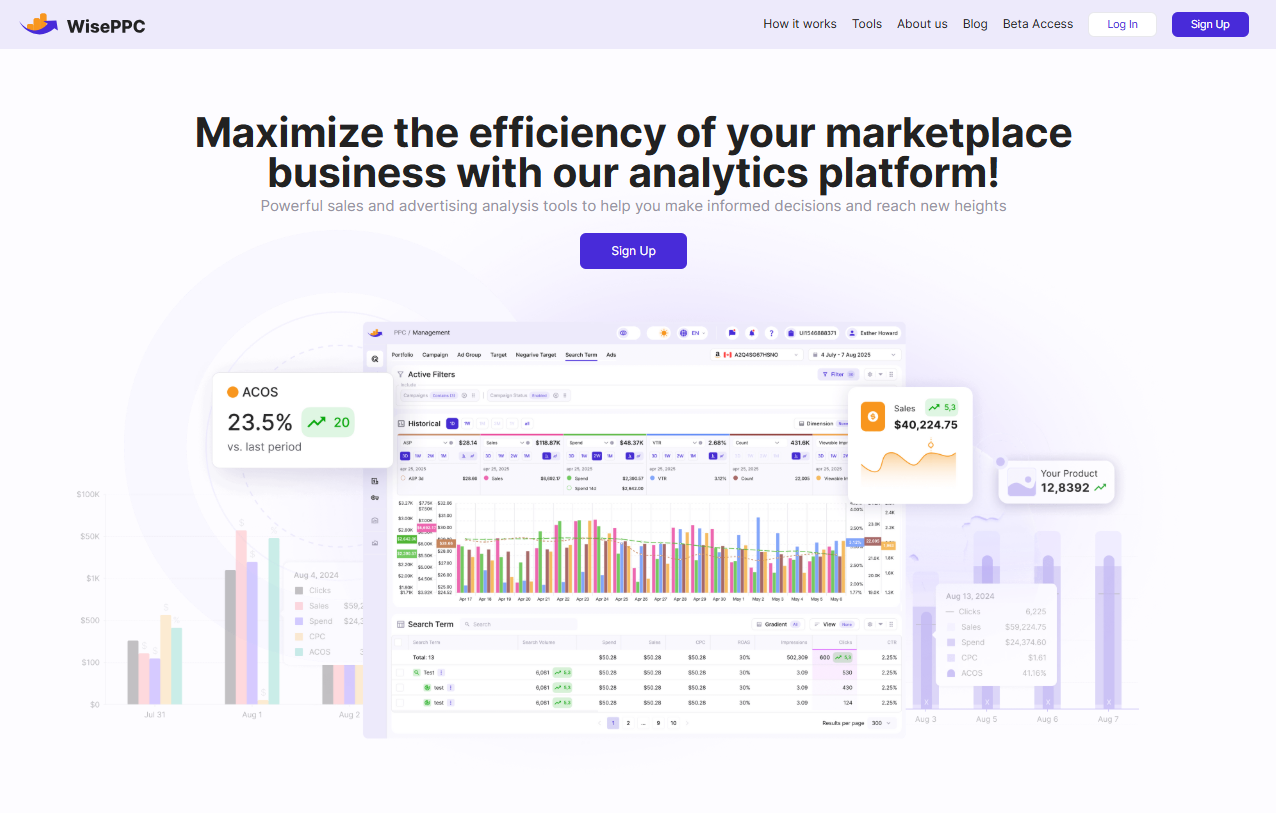
Understanding when Amazon charges your card is one part of the puzzle. But what happens after the charge – how those ads perform, where your spend goes, and whether you’re actually getting a return – that’s where we step in.
At WisePPC, we help Amazon sellers move from reactive to strategic. Our analytics platform was built for people who need real-time visibility, historical depth, and precise control over their campaigns. Whether you’re tracking how promotions impact performance or trying to cut back on wasted spend, we make it easier to connect the dots between what Amazon charges and what you’re getting in return. With tools for automated optimization, bulk edits, and granular targeting insights, we help you act faster and scale smarter, without the guesswork.
If you’re already managing a high volume of orders, knowing when you’re charged matters. But knowing why that spend succeeds or stalls? That’s how you grow.
Final Takeaway
Amazon’s charging process isn’t random – it’s built to align with shipping, inventory, and your flexibility as a buyer. Once you understand the reasoning behind delayed charges, the whole system starts to make a lot more sense.
Whether you’re pre-ordering the next big game, buying everyday essentials, or managing your Prime subscription, knowing when you’ll actually be charged can help you stay in control of your budget and avoid those “Wait, what’s this charge?” moments.
Keep an eye on your order status, check those emails, and don’t panic if a $1 hold shows up. It’s all part of the system working as it should.
FAQ
1. Why hasn’t Amazon charged me yet even though I placed an order?
In most cases, Amazon doesn’t charge your card until your order is preparing to ship. So if the status still says “Processing” or “Not yet shipped,” that’s normal. You might see a temporary authorization, but the actual charge usually happens when the box is ready to go.
2. Does Amazon charge right away for pre-orders?
Nope, not right away. When you pre-order something, Amazon verifies your card with a quick authorization, but they don’t take the money until the product is just about to ship. That’s usually a few days before the release date.
3. Why did I get multiple charges for one Amazon order?
That usually happens when your order ships in multiple packages. Amazon charges you for each shipment as it goes out, not for the full order upfront. It can look a little confusing on your statement, but it’s normal.
4. What’s the deal with the random $1 charge from Amazon?
That $1 isn’t a charge – it’s a temporary hold. Amazon does this sometimes to confirm your card is valid, especially if it’s new or you haven’t used it in a while. The hold disappears after a day or two and never actually leaves your account.
5. If I cancel my order, will I still get charged?
As long as you cancel before the item ships, you won’t be charged. If the order already moved into the shipping process and your card was charged, Amazon will issue a refund once the cancellation is confirmed. Gift card payments get returned to your balance.
6. Do third-party sellers charge differently than Amazon?
Yes, they can. Some third-party sellers charge at the time of purchase, especially if the product is made to order or in limited stock. Others wait until shipping. You can usually tell based on whether it’s fulfilled by Amazon or shipped directly by the seller.
7. Can I see the exact time my card will be charged?
Not down to the minute, no. But you can keep an eye on your “Orders” page. Once your order shows as “Preparing for shipment,” the charge usually hits soon after. You’ll also get an email confirmation when it goes through.
Start Your Free 30-Day Trial Today
Start your 30-day free trial today. No credit card required. From an Amazon Ads Verified Partner you can trust.
 No credit card required
30-day free trial
Access metrics Amazon Ads won’t show you
No credit card required
30-day free trial
Access metrics Amazon Ads won’t show you