
Amazon PPC software that shows where your ad budget goes
Stop guessing which ad spend earns its place. See every campaign, target and search term in one grid, next to your profit. Manage Amazon Ads rules, keep a history of every change, and let your own AI agent propose fixes. Gated changes wait for your approval.
- Free 30-day trial
- No credit card
- Needs Amazon Ads connected
PPC reports
Find the ad spend that never sells
Pick a marketplace and a date range, group by what matters and save the view. The reports cover Sponsored Products, Sponsored Brands and Sponsored Display.
PPC dashboard
A one-screen overview: spend, sales and ACoS against the previous period, spend by ad type, and cards that flag problems such as wasted spend and advertised products that are out of stock.
Try asking: “How are spend, sales and ACoS trending?”
Search Terms
The customer searches that triggered your ads, the target that matched each one, and the spend and sales it produced. Filter to zero orders to find wasted spend, then add negatives from the report.
Try asking: “Which search terms spend money and never sell?”
Converted Product
Which products shoppers bought after your ads: the advertised product, or another product from your catalog (halo sales).
Try asking: “Which of my products sell because of ads for a different product?”
Traffic & Conversion
Impressions, clicks, spend, orders and sales by campaign, target and placement, down to the hour. Every metric is there.
Try asking: “Which placements convert best?”
Advertised Product (formerly Unified Report)
See which ad spend earns its place
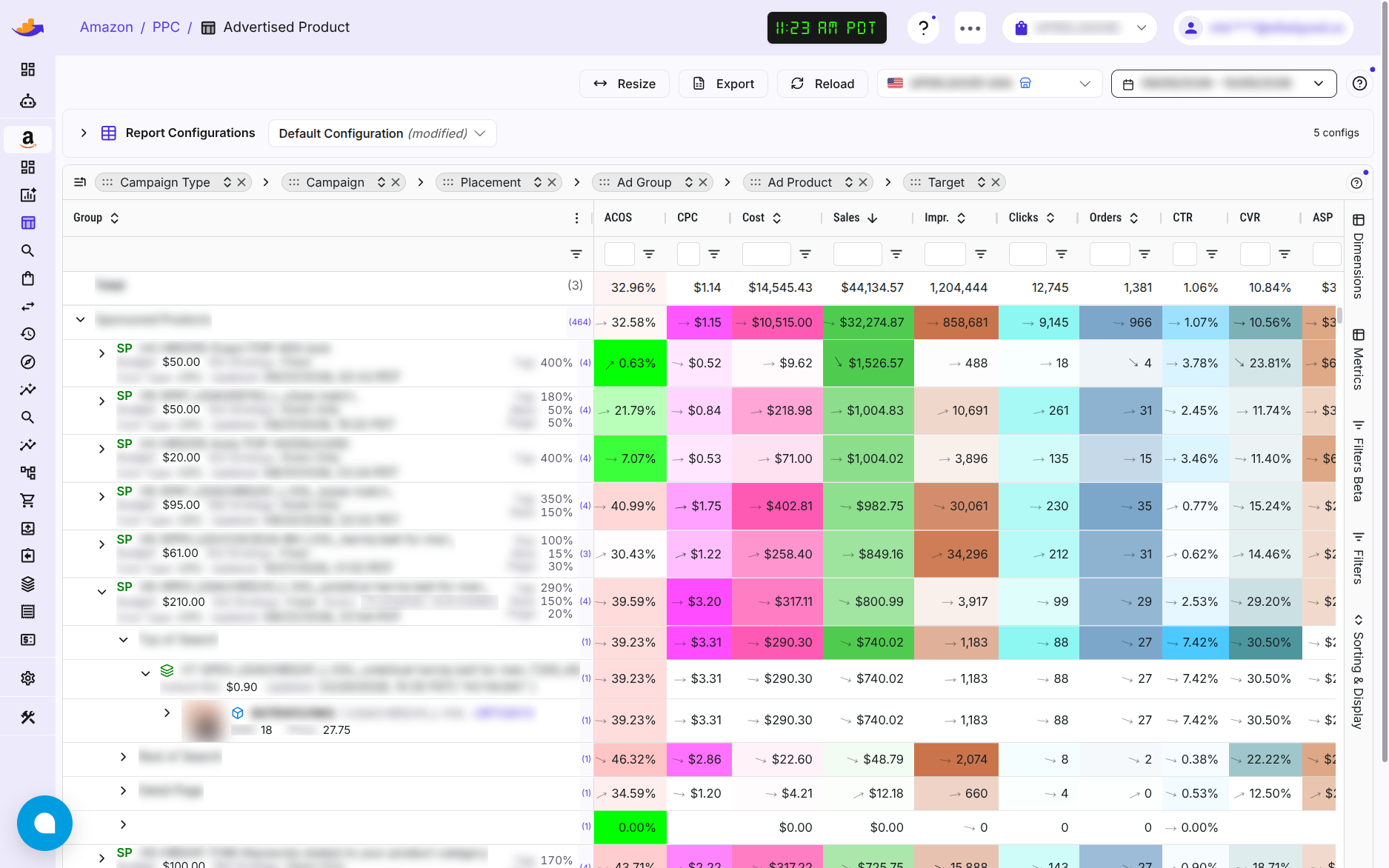
The report most sellers live in. Break your ad numbers down by anything and see where the money leaks.
- Campaigns, ad groups, targets, placements, devices and search terms, in one grid
- Sales of the advertised product kept apart from sales of your other products (halo)
- Hundreds of Amazon Ads metrics, grouped and explained, including ACoS > 30% Loss in dollars, so the biggest leaks come first
- 24 months of daily history, loaded when you connect Amazon Ads
- Ad numbers that run through today: the newest days come from Amazon's hourly numbers
- Save your own layouts and reuse them in one click
Amazon later replaces the newest days with its final numbers. Until then, view-through and new-to-brand numbers show 0.
Amazon Ads rules and effective bids
Manage Amazon's budget and bid rules without leaving your campaigns
See and manage your Amazon Ads rules without leaving the campaigns they apply to.
- Budget rules, bid schedules, ROAS bidding and cost targets
- A confirmation step before changes that can't be undone
- The effective bid after placement adjustments, and an estimate with bid schedules, before you change a target's bid
These are Amazon's rules. Amazon runs them; WisePPC shows and edits them.
Change history
Know what changed before performance moved
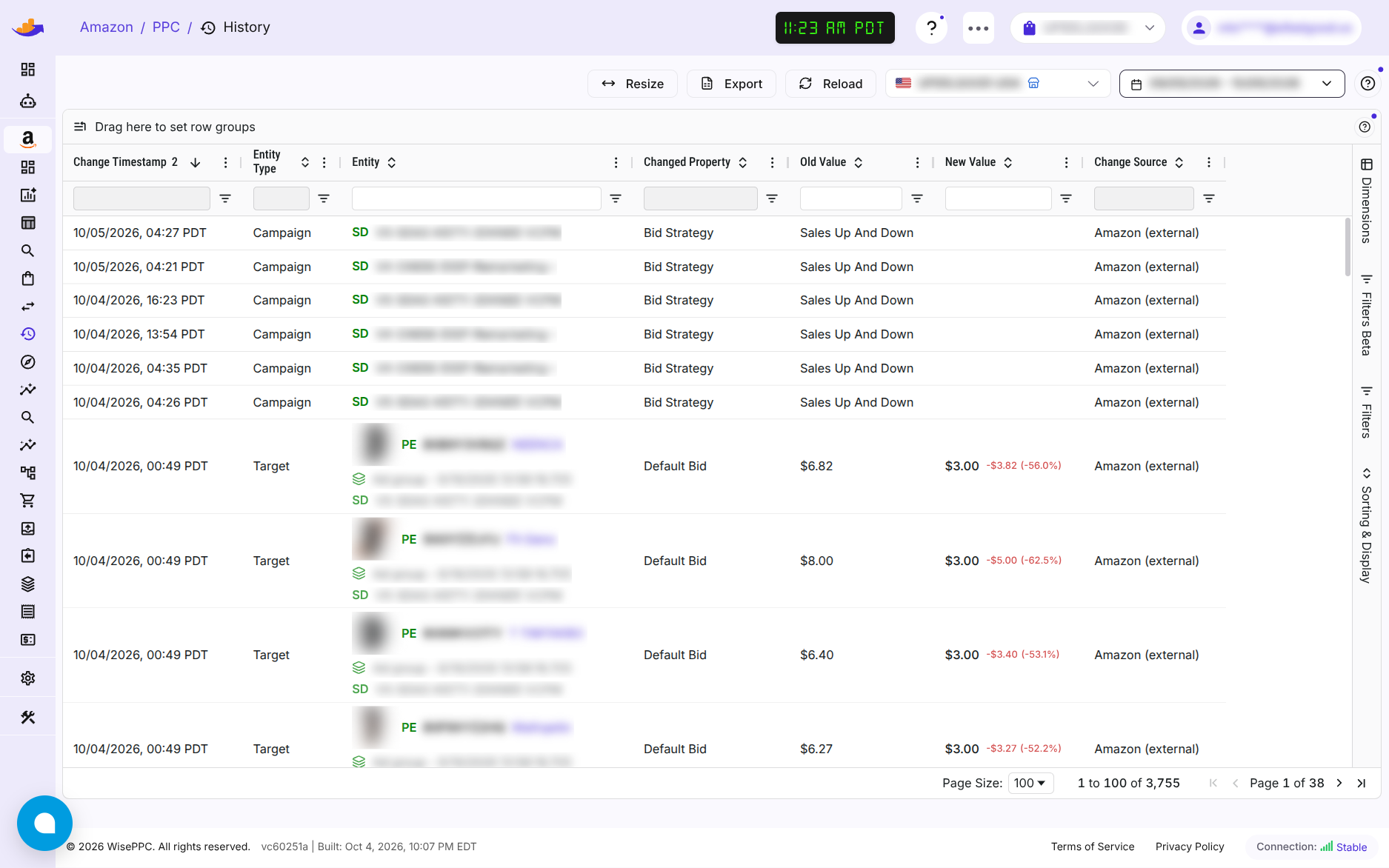
When a number jumps, the first question is what changed. The history answers it.
- Every change to your campaigns, ad groups, ads and targets: the old value, the new value and when
- Changes your AI agent made are labelled as AI changes
- Right-click a row in any report to jump to its history
Amazon Attribution
See what your off-Amazon traffic does on Amazon
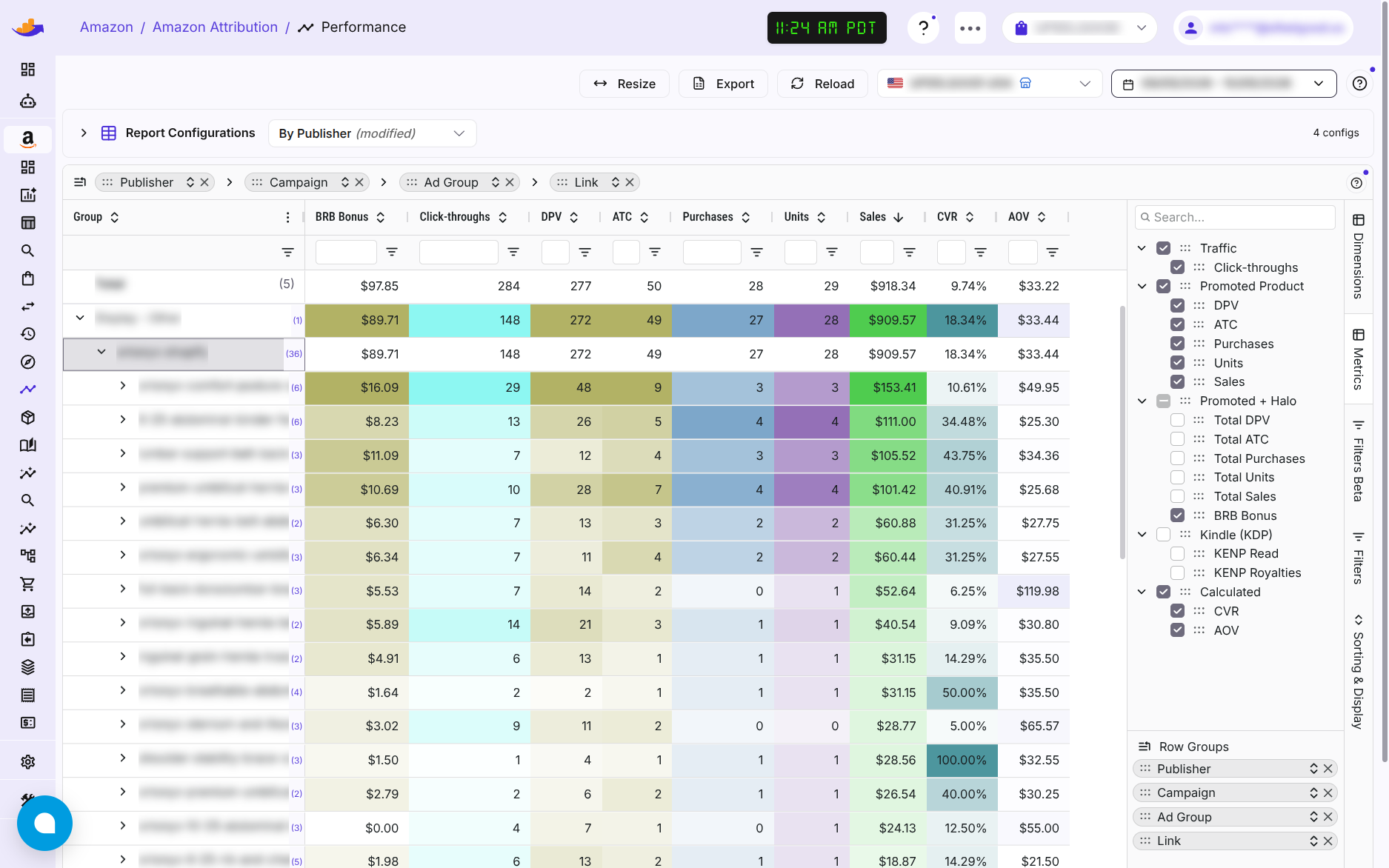
If you use Amazon Attribution, your tagged links now report in WisePPC: clicks, detail page views, add-to-carts, purchases and sales by campaign, publisher and product.
- Traffic from Google, Meta, Microsoft, Pinterest, email and blogs, through your tagged links
- Two reports: Performance and Products
- Refreshed every night from Amazon
- Tags are created in the Amazon Ads console; WisePPC reads the results
Attribution shows clicks and sales, not ad spend: there is no ACoS or ROAS, because the spend happens on Google or Meta. Clicks arrive after about a day and conversions after about two, and Amazon can change recent numbers for up to 28 days. For accounts that use Amazon Attribution.
Let your agent do the digging
Your own AI agent reads these reports and can propose changes to campaigns, ad groups, targets, budgets, bids, portfolios and Amazon Ads rules. For each kind of change you choose Off, Gated or Direct. Gated changes wait for your approval.
How AI agents workQuestions
Questions about Amazon PPC software
Is there a free trial?
Yes. The first 30 days are free with full access, and no credit card is needed to start.
What does it cost?
$45 a month plus 1% of your Amazon PPC ad spend. With no ad spend, it is $45 flat. You can cancel any time.
Which ad types does it cover?
Sponsored Products, Sponsored Brands and Sponsored Display.
Do I need to connect Seller Central?
No. Amazon Ads on its own gives you the PPC reports, rules and change history. Connect Seller Central as well to put your ad spend next to your profit.
Does WisePPC run my Amazon Ads rules?
No. They are Amazon's own rules. Amazon runs them, and WisePPC lets you see and edit them next to your campaigns.
Can I see what my off-Amazon traffic sells?
Yes, if you use Amazon Attribution. Your tagged links report in WisePPC: clicks, purchases and sales. Tags are created in the Amazon Ads console.
Is WisePPC an official Amazon partner?
WisePPC is an Amazon Ads Verified Partner.
See where your ad budget goes
Start the free trial and connect Amazon Ads. $45 a month plus 1% of your Amazon PPC ad spend after that.
Start free trial30 days, full access, no credit card.