
 EN
EN  ES
ES  FR
FR  DE
DE  IT
IT  KO
KO  JA
JA  ZH
ZH  AR
AR  PT
PT  TR
TR PL
PL
Introduction
You’ve hit the ceiling. Your Amazon PPC campaigns are profitable, but you can’t scale further without working 12-hour days. Every new product launch means more campaigns to monitor. Every bid adjustment means another spreadsheet. The growth is there, but your time isn’t.
This is the automation inflection point—and it’s where most sellers either break through or burn out.
Amazon PPC automation isn’t about setting campaigns on autopilot and hoping for the best. It’s about building systems that handle the repetitive, data-driven work while keeping you in control of strategy and exceptions. Done right, automation doesn’t replace your judgment—it amplifies it.
This guide walks you through the complete automation journey: from identifying when you’re ready, to choosing the right automation strategies, to implementing systems that scale profitably. Whether you’re managing 20 campaigns or 2,000, these principles will help you work smarter, not harder.
Are You Ready for Automation?
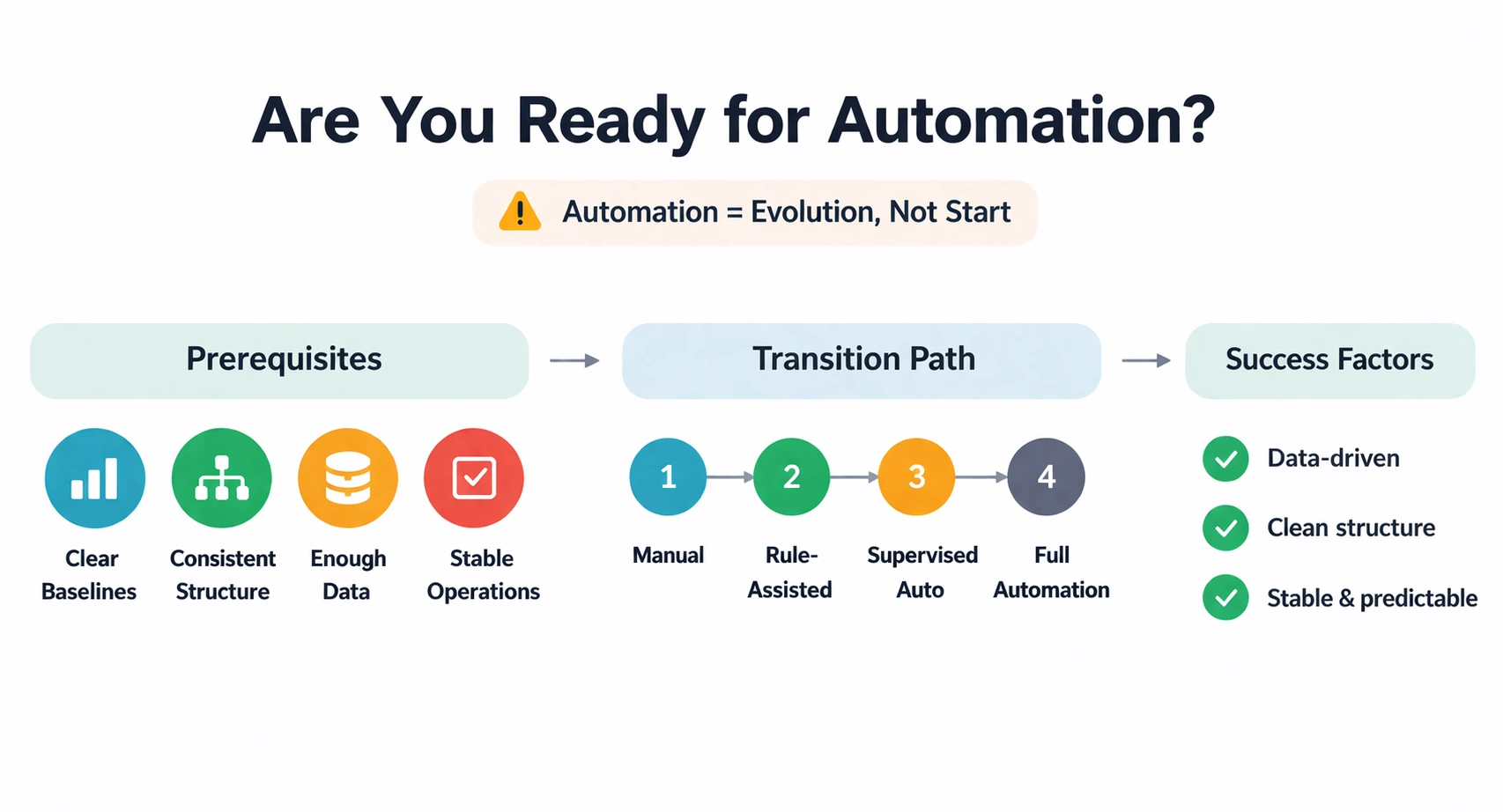
Automation isn’t the starting point—it’s an evolution. Attempting to automate before you understand your metrics is like putting a self-driving system in a car with no brakes. Let’s establish the foundations.
The Prerequisites Checklist
Before implementing automation, you should have:
Clear Performance Baselines
You need to know what “normal” looks like. What’s your average ACOS by campaign type? What’s your typical conversion rate range? What’s your CPC volatility? Automation makes decisions based on these baselines—if you don’t know them, your rules will be guessing.
Consistent Campaign Structure
Automation relies on patterns. If your campaigns are organized inconsistently—some using broad match, others phrase, with no naming conventions—automation will struggle. Clean house before you automate.
Sufficient Data Volume
Automation requires data to make good decisions. As a rule of thumb:
- Individual keywords: 10+ conversions for reliable automation
- Campaigns: 100+ conversions for algorithmic optimization
- Account level: 500+ conversions for portfolio-level automation
Below these thresholds, manual management with simple rules often outperforms complex automation.
Stable Offerings
Automating campaigns for products with frequent stockouts, listing changes, or price volatility is risky. Automation responds to ad metrics, not operational issues. Ensure your operations can support consistent advertising before automating.
The Manual-to-Automation Transition
If you’re not ready for full automation, that’s fine. There’s a progression:
Stage 1: Systematic Manual (Current State)
You have spreadsheets, checklists, and regular optimization schedules. You’re not winging it—you’re just doing it by hand.
Stage 2: Rule-Assisted Manual
You use tools that suggest changes or flag anomalies, but you approve every action. This builds trust in the data while keeping control.
Stage 3: Supervised Automation
Automation handles routine adjustments, but you review and override strategic decisions. Think of it as cruise control—you’re still steering.
Stage 4: Full Automation with Guardrails
Systems handle day-to-day optimization within defined parameters. You focus on exceptions, strategy, and expansion.
Most sellers should progress through these stages. Jumping from manual chaos to full automation rarely ends well.
Types of Amazon PPC Automation
Not all automation is created equal. Understanding the categories helps you choose the right approach for your situation.
Rule-Based Automation
Rule-based systems execute actions when conditions are met. They’re transparent, predictable, and easy to understand.
Example Rules:
- “If ACOS > 40% for 14 days, reduce bid by 20%”
- “If clicks > 20 and conversions = 0, pause keyword”
- “If ACOS < 15% and impressions < 1,000/day, increase bid by 15%”
Advantages:
- Complete transparency—you know exactly why changes happened
- Easy to audit and modify
- No black box—you control the logic
- Works well with limited data
Disadvantages:
- Can’t adapt to patterns outside defined rules
- Requires manual rule refinement as conditions change
- Can create conflicting rules if not carefully managed
Rule-based automation is ideal for sellers who want control and understand their metrics deeply. It’s the most common starting point for Amazon PPC automation.
Algorithmic/Machine Learning Automation
These systems use statistical models to predict outcomes and optimize bids dynamically. They’re more sophisticated but less transparent.
How They Work:
ML algorithms analyze historical performance—conversion rates by time, placement, device, and demographic signals—to predict the optimal bid for each auction. They adjust in real-time based on probability models.
Advantages:
- Can optimize for complex, multi-variable scenarios
- Improves over time as it collects more data
- Handles patterns humans might miss
- Scales efficiently to large accounts
Disadvantages:
- Requires significant data volume to perform well
- “Black box” nature—hard to understand why decisions are made
- Can optimize for wrong goals if not configured properly
- Expensive—often requires third-party tools or platform fees
Algorithmic automation suits high-volume sellers with stable patterns and sufficient data. It’s powerful but not a magic bullet.
Platform-Native Automation
Amazon offers built-in automation features that require no third-party tools, though dedicated Amazon PPC management software goes further than the native controls described below.
Dynamic Bidding:
Amazon adjusts your bids in real-time based on conversion probability. Down Only is conservative; Up and Down is aggressive. These aren’t full automation but provide algorithmic assistance.
Campaign Budget Rules:
Set rules to increase or decrease budgets based on performance criteria. Useful for pacing spend and capitalizing on high-performing periods.
Scheduled Rules:
Create automated actions triggered by performance metrics. Limited compared to third-party tools but native to the platform.
Advantages:
- No additional cost
- Native integration—no data delays or API issues
- Simple to set up
Disadvantages:
- Limited flexibility compared to third-party tools
- Fewer customization options
- Same rules for all sellers—no competitive advantage
Native automation is a good starting point for sellers dipping their toes into automation. It’s also useful for simple, high-impact rules even if you use third-party tools for complex automation.
Building Effective Automation Rules
Whether using rule-based systems or configuring algorithmic tools, the principles of effective automation are the same.
Start with Goals, Not Tactics
Before creating any rule, answer: What am I trying to achieve?
Common Goals:
- Maintain ACOS under 25% while maximizing sales volume
- Scale winning keywords aggressively while cutting waste
- Ensure daily budget utilization without overspending
- Protect brand terms from competitor encroachment
Your goals determine your rules. A rule that makes sense for cost control might be terrible for growth. Be explicit about objectives.
The Anatomy of a Good Rule
Effective rules have five components:
- Clear Trigger Conditions
“ACOS > 30%” is clear. “Poor performance” is not. Define metrics, thresholds, and time periods precisely. - Appropriate Lookback Windows
The time period for evaluation matters. A keyword with 40% ACOS over 7 days might have 20% ACOS over 30 days. Common lookback periods:
- High-volume campaigns: 7-14 days
- Medium-volume campaigns: 14-30 days
- Low-volume campaigns: 30-60 days
- Meaningful Minimum Thresholds
Don’t act on statistically insignificant data. A keyword with 2 clicks and 0 sales doesn’t need pausing—it needs more data. Set minimum click or impression thresholds:
- Minimum 10-20 clicks for bid adjustments
- Minimum 1,000 impressions for performance evaluation
- Minimum 30 days for strategic decisions
- Defined Actions
What happens when conditions are met? Be specific: “Reduce bid by 20%” not “adjust bid.” - Safety Limits
Prevent automation runaway. Maximum bid caps, minimum bid floors, and daily change limits protect against errors.
Example Rules That Work
Here are proven rule templates you can adapt:
The ACOS Control Rule:
- If: ACOS > Target + 10% for 14 days AND clicks > 20
- Then: Reduce bid by 15%
- Minimum bid: $0.30
The Winner Scaling Rule:
- If: ACOS < Target – 5% for 14 days AND clicks > 20
- Then: Increase bid by 10%
- Maximum bid: $5.00
The Keyword Pause Rule:
- If: Clicks > 30 AND Conversions = 0 for 30 days
- Then: Pause keyword
- Exception: Brand terms (never auto-pause)
The Budget Pacing Rule:
- If: Daily spend > 80% of budget by 2 PM
- Then: Increase budget by 20% for today only
Rule Conflicts and Priority
When running multiple rules, conflicts happen. A keyword might trigger both a “reduce bid” rule and an “increase for volume” rule.
Resolution Strategies:
Priority Ranking: Assign priorities to rules. High-priority rules (like safety limits) override lower-priority rules.
Sequential Execution: Run rules in a specific order. Evaluate cost-control rules before growth rules.
Conservative Defaults: When rules conflict, choose the more conservative action. It’s better to miss growth than burn budget.
Human Review Queue: Flag conflicts for human review rather than auto-resolving. This builds trust and catches edge cases.
Common Automation Traps (And How to Avoid Them)
Automation gone wrong is expensive. Here are the traps to watch for:
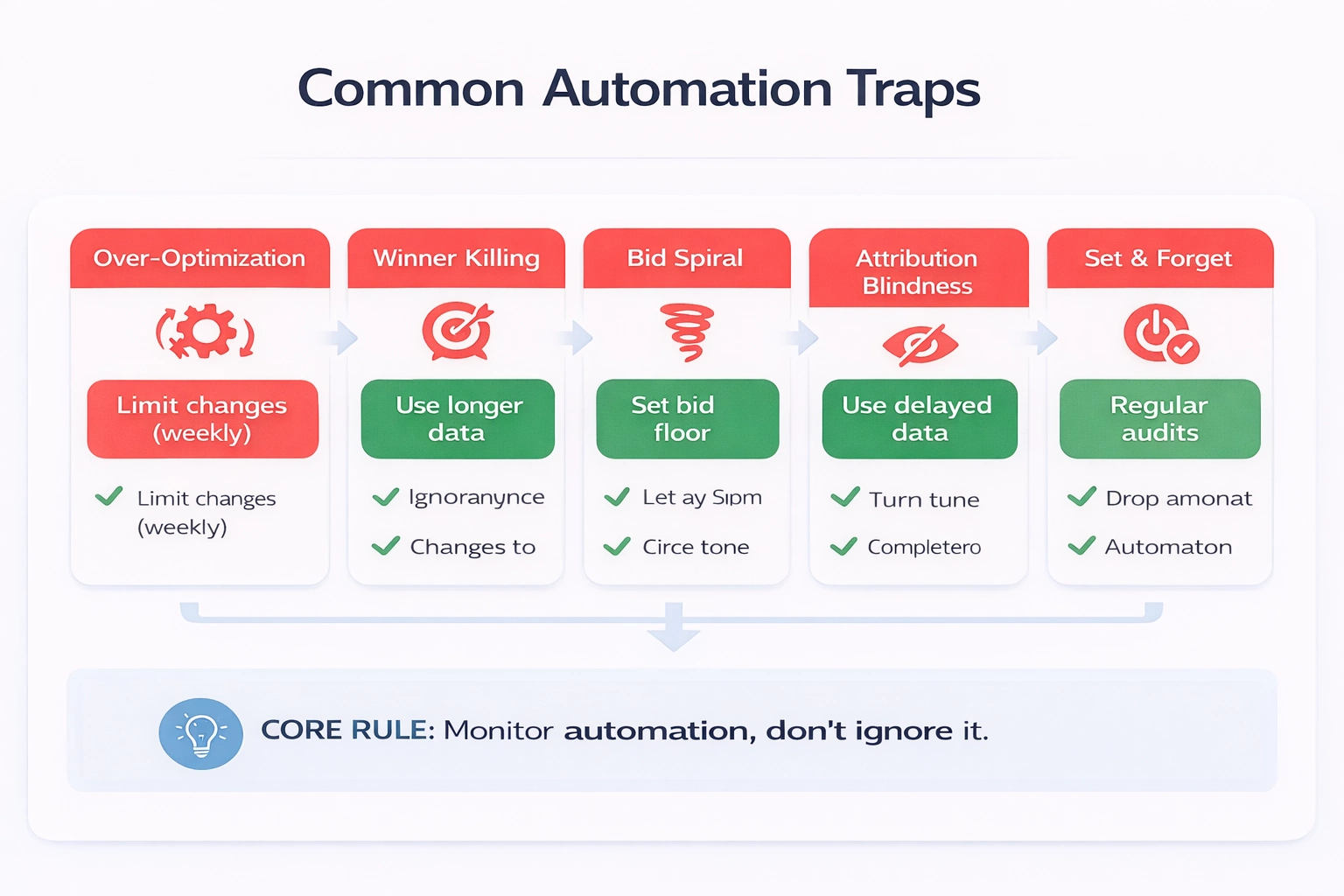
The Over-Optimization Trap
When automation makes too many changes too frequently, you lose signal in the noise. A keyword adjusted daily never accumulates stable data.
Solution: Limit change frequency. Most keywords don’t need daily adjustments. Set rules to run weekly or bi-weekly unless there’s an emergency threshold (like 200% ACOS spike).
The Winner-Killing Trap
Automation sees a keyword with rising ACOS and reduces bids. But the ACOS spike was due to a temporary factor—maybe a competitor ran out of stock and your ad showed to less-qualified traffic. The automated reduction kills a long-term winner.
Solution: Use longer lookback periods for negative actions than positive ones. Be slower to cut than to add. Consider seasonality and external factors before automated reductions.
The Bid Spiral Trap
Rule: “If no conversions, reduce bid 20%.” A keyword gets 10 clicks, no conversions, bid reduces. Gets 8 clicks at lower bid, no conversions, bid reduces again. Eventually, the bid is so low the keyword becomes inactive without ever getting fair traffic volume.
Solution: Set minimum bid thresholds and maximum reduction limits. Give keywords a “last chance” period at minimum viable bids before pausing.
The Attribution Blindness Trap
Amazon’s attribution window is 7 days for Sponsored Products, 14 days for Sponsored Brands. Automation evaluating yesterday’s clicks misses conversions that happen next week.
Solution: Build attribution delays into your rules. Evaluate performance based on data from 7-14 days ago, not yesterday. Some tools call this “mature data only” filtering.
The Set-and-Forget Trap
The biggest automation myth is that it eliminates management. It doesn’t—it changes the nature of management. Instead of adjusting bids, you’re monitoring automation health, refining rules, and handling exceptions.
Solution: Schedule regular automation audits. Review what automation did, why, and whether outcomes matched expectations. Automation requires ongoing supervision.
Implementing Automation: A Step-by-Step Framework
Ready to move forward? Here’s the implementation roadmap:
Step 1: Audit Current State (Week 1)
Before automating, document your current performance:
- Export all campaign data for the last 90 days
- Calculate baseline metrics: ACOS, conversion rate, CPC by campaign type
- Identify your top 20% of campaigns by spend and by revenue
- Document current optimization frequency and processes
This baseline lets you measure automation impact accurately.
Step 2: Clean Campaign Structure (Week 2)
Automation needs organization:
- Standardize naming conventions
- Ensure consistent match type usage
- Consolidate redundant campaigns
- Verify conversion tracking is accurate
- Set up proper negative keyword foundations
Garbage in, garbage out. Clean data produces clean automation.
Step 3: Start with Low-Risk Rules (Weeks 3-4)
Begin with rules that have limited downside:
- Budget pacing rules (increase daily caps when campaigns perform well)
- Search term harvesting (auto-add high-converting search terms as keywords)
- Negative keyword suggestions (flag, don’t auto-apply, until validated)
- Low-volume keyword pausing (pause keywords with 50+ clicks, 0 conversions)
These rules have clear, safe outcomes and let you build confidence in automation.
Step 4: Expand to Bid Management (Weeks 5-8)
Once basic rules work, add bid automation:
- Start with your highest-volume campaigns only
- Use conservative adjustment percentages (10-15% max)
- Implement bid caps and floors immediately
- Review weekly and adjust rule parameters based on results
Step 5: Portfolio-Level Automation (Weeks 9-12)
Advanced automation looks across campaigns:
- Shared budget optimization (shift budget to best-performing campaigns automatically)
- Portfolio ACOS targeting (optimize for account-level ACOS, not just campaign)
- Cross-campaign negative keyword syncing
- Automated reporting and anomaly detection
Step 6: Continuous Refinement (Ongoing)
Automation isn’t a setup-and-done project:
- Monthly rule performance reviews
- Quarterly goal reassessment
- Seasonal rule adjustments (Q4 requires different logic than Q1)
- Regular exception handling and edge case documentation
Choosing Automation Tools
The right tool depends on your needs, budget, and technical capability.
Option 1: Amazon Native Tools
Best For: Sellers just starting automation, simple rule needs, limited budgets
Pros: Free, native integration, simple setup
Cons: Limited functionality, no cross-account management, basic reporting
Cost: Included in Amazon advertising
Option 2: Spreadsheet + Bulk Operations
Best For: Data-savvy sellers who want control, limited campaign counts
Pros: Full control, no ongoing fees, customizable
Cons: Time-intensive, error-prone, doesn’t scale
Cost: Time only
Option 3: Third-Party Amazon PPC Tools
Best For: Growing sellers ready for serious automation, 20+ campaigns
Pros: Purpose-built for Amazon, rule libraries, advanced features
Cons: Monthly fees, learning curve, potential API limitations
Cost: $50-500+/month depending on spend
Option 4: Custom Development
Best For: Enterprise sellers with unique needs, technical resources
Pros: Perfect fit for specific requirements, full data ownership
Cons: High upfront cost, ongoing maintenance, technical risk
Cost: $10,000+ development, ongoing maintenance
Selection Criteria:
- Campaign volume (more campaigns = more need for tool)
- Budget size (tool cost should be <5% of ad spend)
- Team technical capability
- Required customization level
- Integration needs (other platforms, reporting, etc.)
The Human Role in Automated PPC
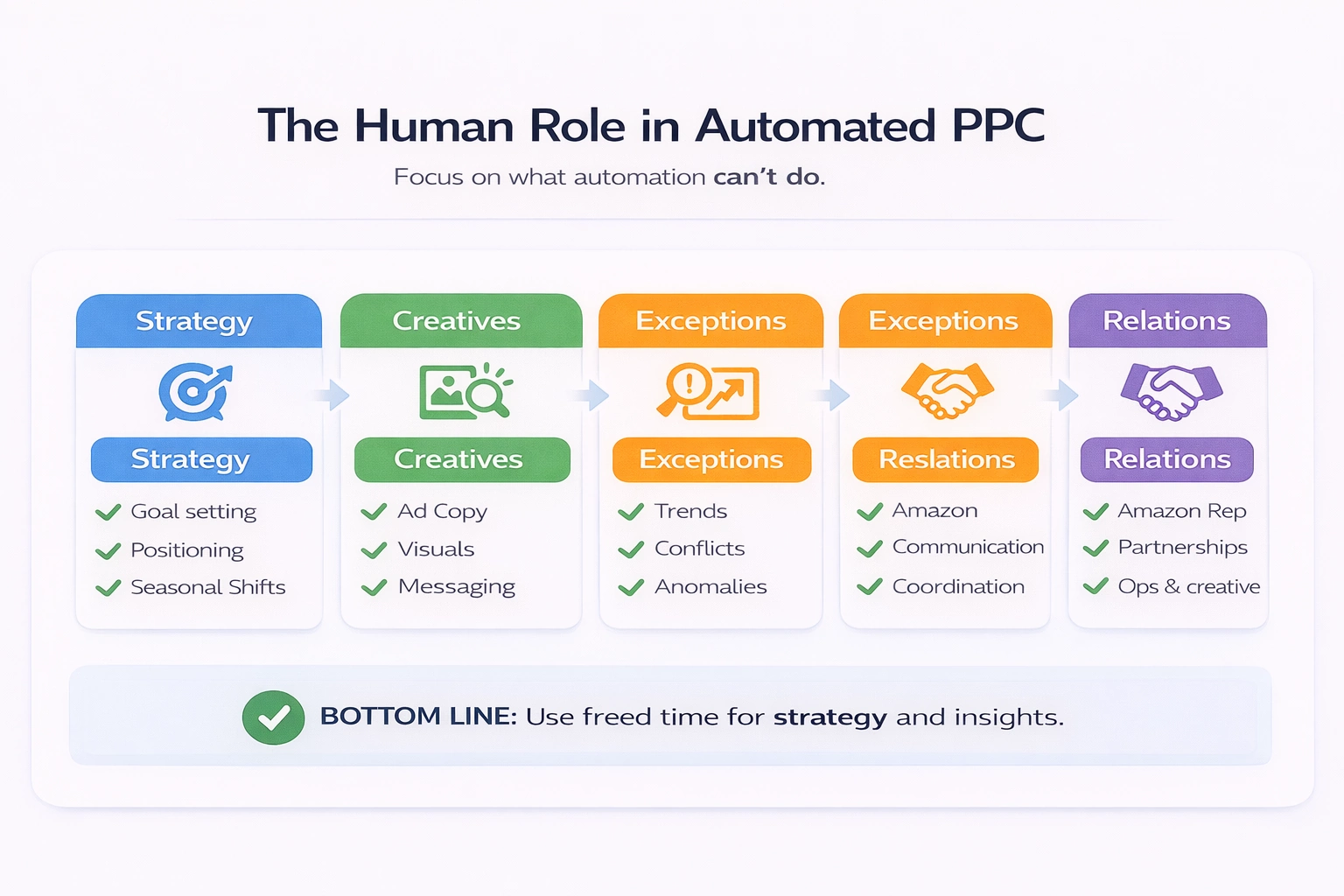
Automation doesn’t eliminate humans—it elevates their role. Here’s what humans should focus on when automation handles execution:
Strategy Development
- Goal setting and target adjustment
- New product launch planning
- Competitive positioning
- Seasonal strategy shifts
Creative Optimization
- Ad copy testing
- Image and video selection
- Landing page optimization
- Brand messaging
Exception Handling
- Anomaly investigation (why did ACOS spike 50%?)
- Rule conflict resolution
- New pattern identification (emerging keywords, competitor moves)
- System error correction
Relationship Management
- Amazon representative communication
- Strategic partnership discussions
- Cross-functional coordination (operations, creative, finance)
Continuous Learning
- New feature evaluation
- Industry trend monitoring
- Tool capability expansion
- Competitive intelligence
The sellers who thrive with automation are those who use their freed time strategically—not those who try to eliminate their involvement entirely.
Measuring Automation Success
How do you know if your automation is working?
Efficiency Metrics
- Time Saved: Hours per week no longer spent on manual bid adjustments
- Optimization Frequency: How often changes are made (daily vs. weekly vs. monthly)
- Reaction Speed: How quickly you respond to performance changes
Performance Metrics
- ACOS Stability: Is performance more consistent with automation?
- Scale Achieved: Can you manage more campaigns without proportional time increase?
- Opportunity Capture: Are you capitalizing on winners faster than manual management allowed?
Business Metrics
- ROAS Improvement: Return on ad spend trends
- Sales Growth: Total sales volume from advertising
- Profitability: Bottom-line advertising contribution
Health Metrics
- Error Rate: Frequency of automation mistakes requiring correction
- Override Rate: How often you’re manually overriding automated decisions
- Exception Volume: Number of cases requiring human attention
Success isn’t just better metrics—it’s better metrics with less time invested.
Conclusion
Amazon PPC automation is a force multiplier for sellers who approach it methodically. It won’t fix broken campaigns, compensate for poor products, or replace strategic thinking. But it will handle the repetitive optimization work that consumes your time, letting you focus on the high-level decisions that drive growth.
The key is progression: start with clear goals, implement simple rules, validate results, and expand gradually. The sellers who rush to full automation without building understanding first are the ones who share horror stories. The ones who build systematically are the ones scaling profitably with minimal daily involvement.
Your competition is automating. The question isn’t whether you should—it’s how fast you can do it well. Start with the fundamentals in this guide, measure your results rigorously, and build your automation muscle over time.
The future of Amazon advertising belongs to sellers who combine human strategic judgment with machine execution speed. That’s the automation advantage.
WisePPC provides advanced Amazon PPC automation for serious sellers. Our rule engine processes millions of bid adjustments daily while keeping you in control of strategy. From bulk operations to algorithmic optimization, we help you scale without the manual overhead.
 No credit card required