
 EN
EN  ES
ES  FR
FR  DE
DE  IT
IT  KO
KO  JA
JA  ZH
ZH  AR
AR  PT
PT  TR
TR  PL
PL  ID
ID  VI
VI Amazon Individual Seller Accounts: All You Need To Know

Key points:
- Amazon offers two types of accounts to its customers: Individual and Professional. The individual one allows users to sell on Amazon for free, and it offers access to all the necessary listings set and order management tools.
- A professional seller account requires its users to pay a $39.99 monthly fee even if they don’t sell anything. However, it offers more benefits when compared with the individual seller account.
- To create an individual seller account, the users should gather all the information, including their legal name, business name and address, government-issued ID, contact information, a ‘ship from’ address, bank account information, and tax identity information. Then go to the Amazon website and choose ‘Sign up for individual’ and proceed with the registration.
Amazon customers can create two types of accounts: Individual and Professional. Many Amazon users wonder whether they can sell with an individual account, and the answer is yes! Amazon is not only for big brands, and everyone can sell on this platform. Keep on reading and find out more about each account type, their perks and cons and learn how to set up an individual seller account.
Individual v.s. Professional Seller Account
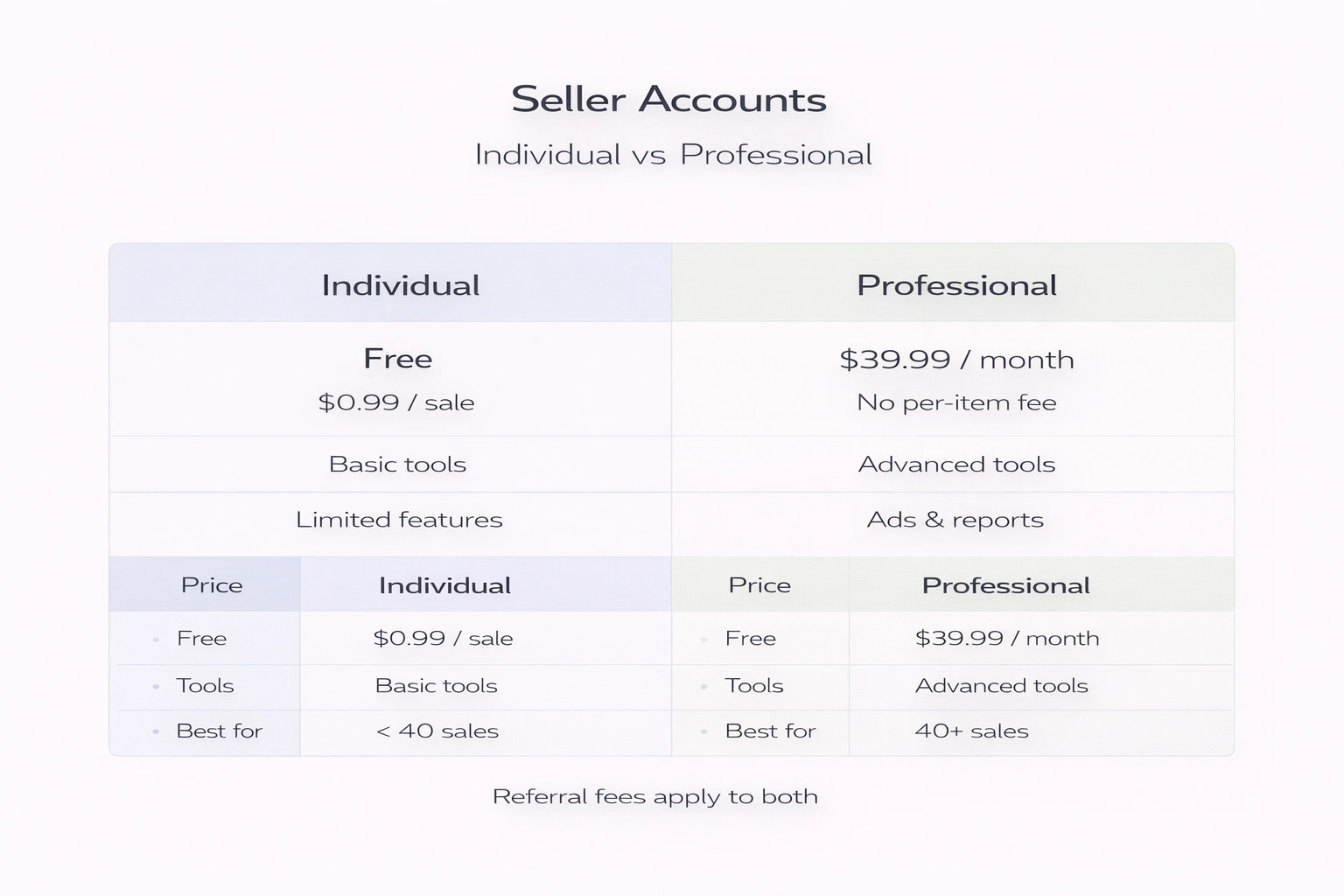
Individual account type allows users to sell on Amazon for free, but this account type has some limitations as compared to the Professional seller account, which has a monthly fee. It’s perfect for those who want to start selling without spending any money right away. Users can also upgrade or downgrade their accounts at any time.
Individual Seller Account
An individual account is free to make, but users only have to pay a fee of $0.99 on each sale they make, and there’s no monthly payment. When using this account type, users have access to a basic set of listing and order management tools. There are also other referral and closing fees that are part of every Amazon sale. Individual sellers don’t have access to or cannot do the following:
- Add multiple users to their account
- Get in-depth inventory reports
- Sell restricted products or products in restricted categories
- Run promotions
- Use Amazon’s advertising services
- Create listings in bulk
- Change or create product detail pages
- Set shipping rates
Individual seller accounts offer the basic selling plan, and it’s a perfect option if you’re selling less than 40 products per month. Once you start selling more than 40 products per month on a regular basis, you can switch from an individual to a professional account. Most sellers first start with an individual account, and as they expand their business, they switch to a professional seller account.
Professional seller account
A professional account requires users to pay a $39.99 monthly fee, along with some additional referral fees and variable closing fees for every sale. However, sellers with professional accounts are not charged an extra $0.99 per item sold. Professional seller accounts also have a lot of benefits, including access to some advertising features, receiving in-depth inventory reports, and running promotions.
Regardless of the account type, Amazon collects a referral fee on each sale. It is different for each product category, and it is a percentage of the total transaction.
How to Make an Amazon Individual Seller Account
Registering to sell on Amazon is an easy process that shouldn’t take more than an hour. Have this information ready when registering as an individual seller on Amazon:
- Your legal name, business name, and address. The customers will see only your business name and not a legal one when buying your products.
- Government-issued ID.
- Contact information: Create a separate email address for your Amazon business. That way, your customers will reach you directly, and the emails won’t be lost in the pile of others. Have a working phone number too. During the registration process, Amazon will verify your contact information.
- A ‘ship from’ address: In case you will ship your products from an address that is not your business address.
- Bank Account Information: This account is where Amazon will send you the proceeds of your sales. You will usually get the money every 14 days.
- Tax identity information: In the United States, you put your Social Security number or your company’s Federal Tax ID number. You have to submit your tax information, and it’ll be verified. Amazon does not pay the sellers’ taxes, it’s the seller’s responsibility. The company is required by law to collect the tax ID information so that relevant authorities know about taxable earnings you make as a seller.
Once you have all the necessary information, you can start creating your account. In order to do that, go to sell.amazon.com and check underselling plans. Choose the ‘Sign up for individual’ option, and you will be redirected to your seller central account if you have one. If you don’t, just click “Sign up” and enter the required details.
Once you log in, you will be redirected to a page where you can continue with the registration process. Remember that you can stop the registration process at any point and return where you left off.
List The First Product As an Amazon Individual Seller
Once the account is set up, the next step is to start listing products on Amazon. Amazon individual sellers can’t create listings for items that aren’t already on the platform, so when putting the products on the market, it’s easier to search for them on Amazon.
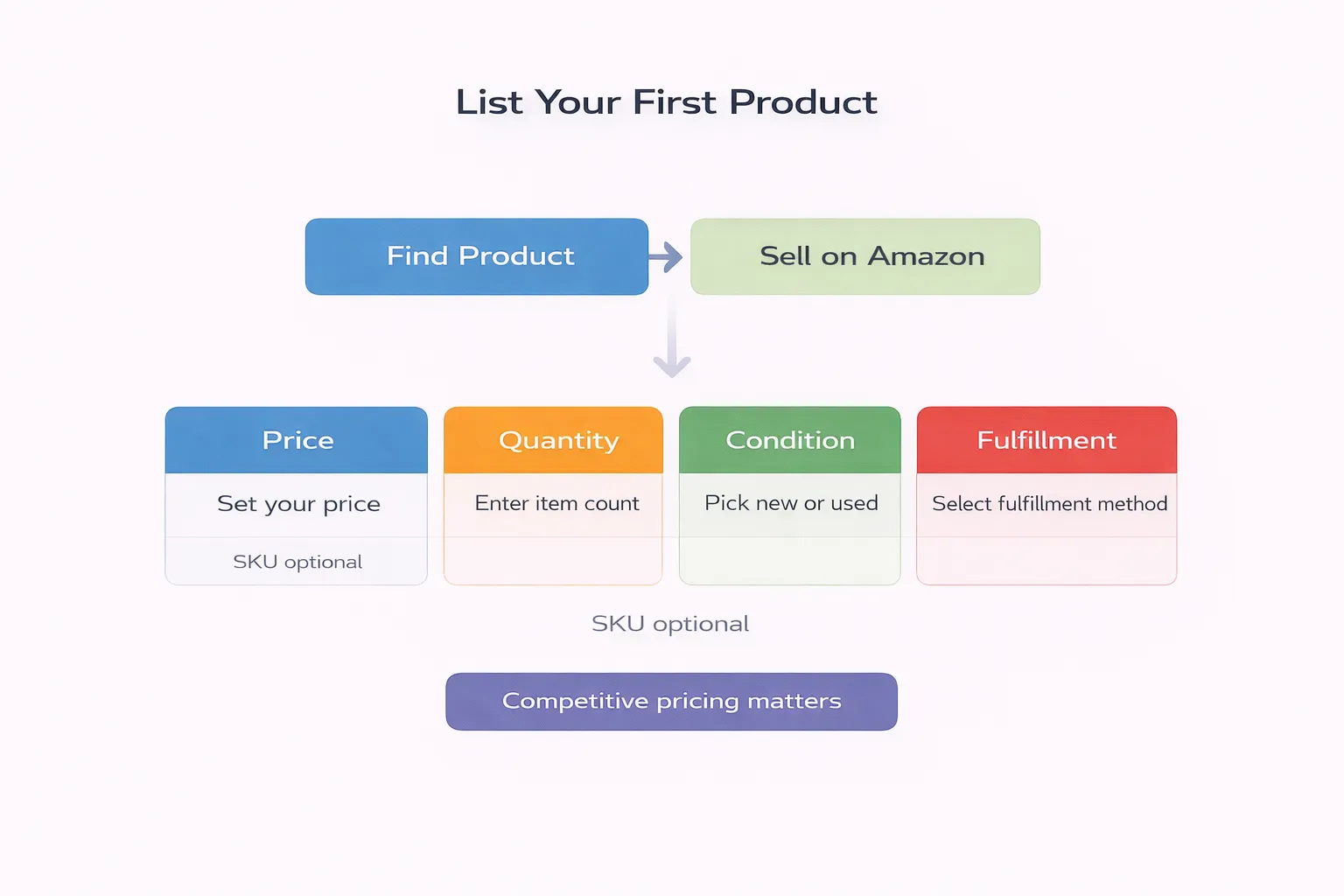
Find the product on Amazon, and open its product page. On the right side of the listing, you will see the Buy Box. Scroll down until the ‘Sell on Amazon’ option appears.
As you click on the button, you will be redirected to a page where you will need to add the information below.
- SKU: You can enter a code yourself or leave it blank, and Amazon will randomly generate an SKU for your inventory.
- Price: Set the selling price of the product, there will be a button that lets you match the lowest price.
- Quantity: The default quantity is one unit. Change the number depending on the number of products you have to sell.
- Condition: Most products only have two options – ‘Used’ or New’.
- Fulfilment method: Enter your preferred fulfilment method. You can choose from FBM (fulfilment by merchant) or SFP (seller fulfilled Prime), or FBA (fulfilment by Amazon).
As you list your product for sale, wait for the sales to roll in. Amazon individual sellers cannot win the Buy Box, which reduces the chances of making a sale, but if you price competitively and set cheaper prices, the customers will choose your product over the others.
When choosing the product price, there are a lot of factors to consider, including referral, closing, shipping, and FBA fees if you are fulfilling orders via FBA. Referral fees vary with the product category, the closing fee depends on the product’s price range, and the shipping fee is proportional to the size of the package and the distance of the delivery.
Manage Product Orders
For each new order, the sellers will be notified with an email saying “Sold, Ship Now.” This email will have a guide on how to complete the order. Merchants can also view orders by choosing Manage Orders in their seller account.
This page also allows the sellers to print a shipping label and packing slip, ship the product, and confirm your shipment. To manage existing listings, go to the Manage Inventory page of your seller account.
If, for some reason, the seller is unable to sell products for a short period of time, there’s an option of changing the status of the listings to Inactive. When changing the listings’ status, the listings will be removed from Amazon product detail pages and search results. And when the seller can sell again, they can change the status back to Active, and the listings will reappear shortly.
FAQ
Is the Amazon seller account free?
If you use an individual seller account, there’s no monthly subscription fee, but you’ll be charged $0.99 per each item you sell, in addition to referral fees and variable closing fees. So, it’s basically free to start selling on Amazon.
Can you sell on Amazon without a seller account?
No, if you want to sell on Amazon, you’ll need to create an Amazon seller account and fill out an application if you are creating a professional seller account. Once you submit your seller application, it takes a week or so for it to process.
Can you start Amazon FBA with no money?
You don’t have to pay a monthly fee while you start selling on Amazon FBA. However, there are several other Amazon fees, but if you sell less than 40 items per month and use an individual seller account, you don’t have to worry about these fees unless you become a professional seller.
How much does Amazon make per sale?
Individual sellers pay $0.99 for each item they sell, as well as other variable closing fees ranging from $0.45 to $1.35. Professional sellers pay variable closing fees and referral fee percentages that range from 6% to 25%.
Is there a monthly fee for Amazon individual sellers?
The Individual plan is free, but the sellers pay $0.99 per unit sold, and the Professional plan costs $39.99 per month no matter how many units you sell or if you sell them at all.
Join the WisePPC Beta and Get Exclusive Access Benefits
WisePPC is now in beta — and we’re inviting a limited number of early users to join. As a beta tester, you'll get free access, lifetime perks, and a chance to help shape the product — from an Amazon Ads Verified Partner you can trust.
 No credit card required
Free in beta and free extra month free after release
25% off for life — limited beta offer
Access metrics Amazon Ads won’t show you
Be part of shaping the product with your feedback
No credit card required
Free in beta and free extra month free after release
25% off for life — limited beta offer
Access metrics Amazon Ads won’t show you
Be part of shaping the product with your feedback
