
 EN
EN  ES
ES  FR
FR  DE
DE  IT
IT  KO
KO  JA
JA  ZH
ZH  AR
AR  PT
PT Build an Amazon Brand Store: 9 Steps (2026 Guide)

Quick Summary: Building an Amazon Brand Store requires enrollment in Amazon Brand Registry with a registered trademark, a Professional seller account, and then using the Store builder to design a multi-page storefront. The process involves planning your store structure, creating content with templates, adding products, and submitting for moderation review before publishing your free branded shopping destination.
An Amazon Brand Store transforms how customers discover and shop your products. Instead of scattered listings, you get a dedicated, multi-page shopping destination that tells your brand story and showcases your full catalog.
The best part? Brand Stores are completely free for eligible sellers. No advertising spend required, though promoting your store can amplify results.
But here’s the catch—you can’t just sign up and start building. Amazon has specific requirements that lock out casual sellers. This guide walks through everything needed to create a Brand Store that actually drives sales.
What Exactly Is an Amazon Brand Store?
An Amazon Brand Store is a free, customizable multi-page shopping experience hosted on Amazon’s platform. Think of it as your mini-website within Amazon’s ecosystem, complete with custom layouts, branded imagery, and curated product collections.
Each store gets a dedicated URL (amazon.com/brand-name) that shoppers can bookmark and share. The storefront features drag-and-drop design tools, analytics dashboards, and mobile optimization built in.
According to Amazon Ads, Brand Stores are available for free to sellers enrolled in Amazon Brand Registry, vendors, and agencies. The store builder provides templates and widgets that don’t require coding knowledge, making professional designs accessible even without technical skills.
Shoppers discover Brand Stores through multiple channels: clicking your brand name on product listings, following links in ads, searching for your brand directly, or through external marketing campaigns.
Why Building a Brand Store Actually Matters
Brand Stores solve a fundamental problem: scattered product listings don’t build brand equity. When customers land on a single product page, they rarely explore your other offerings organically.
A Brand Store changes this dynamic. Visitors can browse your full catalog, understand your brand positioning, and discover complementary products they didn’t know you offered.
The benefits extend beyond discovery. Brand Stores provide detailed analytics showing visitor behavior, traffic sources, and sales attribution. This data reveals which products attract attention and which marketing channels drive qualified traffic.
For brands running Amazon advertising, stores provide a destination for Sponsored Brands campaigns. Instead of sending clicks to a single product, ads can direct shoppers to themed landing pages within your store.
The immersive experience also builds trust. Professional store design signals legitimacy and investment in customer experience, separating established brands from fly-by-night sellers.
Prerequisites You Must Complete First
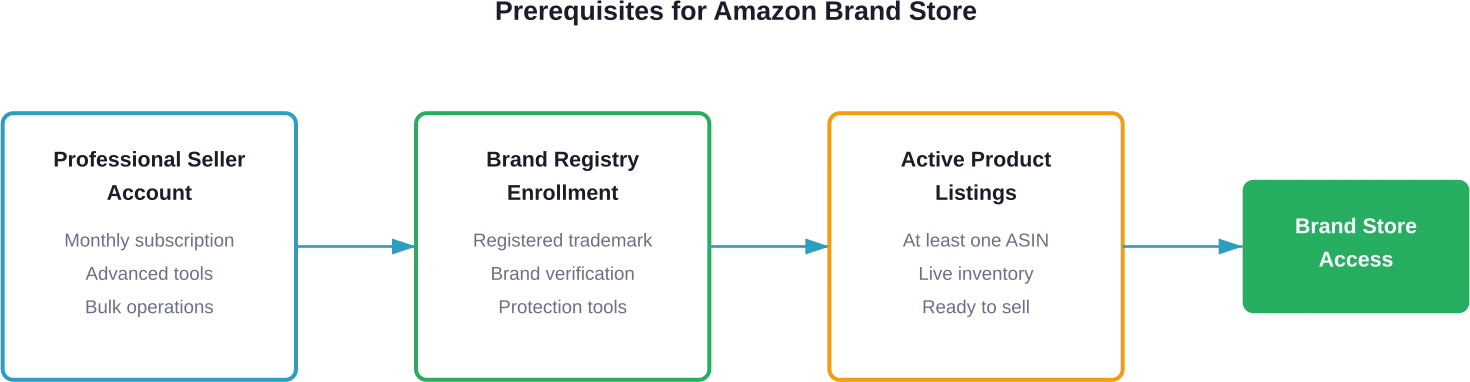
Amazon doesn’t hand out Brand Stores to everyone. The platform requires specific credentials proving you own the brand you’re selling.
Professional Seller Account Required
Individual seller accounts can’t access Brand Stores. A Professional selling plan is mandatory, which changes how Amazon bills monthly fees.
Professional accounts pay a flat monthly subscription plus per-item referral fees.This plan unlocks additional tools beyond Brand Stores, including bulk listing capabilities and advanced reporting.
Brand Registry Enrollment Is Non-Negotiable
Brand Registry acts as Amazon’s verification system. It confirms you legally own the trademark for the brand you’re representing.
According to Amazon Seller Central, Brand Registry enrollment requires a pending or registered trademark from a designated government trademark office. The trademark must appear permanently on your products or packaging.
The trademark requirement trips up many sellers. Generic product descriptions don’t count. Your actual brand name—the one customers recognize—needs official trademark protection.
Processing times vary by country. In some jurisdictions, trademark registration takes months. Plan accordingly before expecting immediate Brand Store access.
Active Product Listings
You need products to showcase. Brand Stores require at least one active ASIN (Amazon Standard Identification Number) under your registered brand.
The products must be live and available for purchase. Draft listings or out-of-stock inventory won’t satisfy the requirement.
Step-by-Step: Building Your Amazon Brand Store
Once prerequisites are satisfied, the actual store creation follows a structured process. Amazon’s Store builder guides the workflow, but understanding each stage prevents common mistakes.
Step 1: Access the Store Builder
Log into Amazon Seller Central using credentials for the Professional account. Navigate to the Stores section under the Stores menu in the main navigation.
If Brand Registry enrollment is complete and verified, a “Create Store” button appears prominently. Clicking this launches the Store builder interface.
Note: Some sellers report delays between Brand Registry approval and Store builder access appearing. According to Amazon Seller Central community discussions, the most common causes for missing Store creation options include not having a selling role (Brand Representative or Authorized Reseller) assigned.
Step 2: Choose Your Store Template
Amazon provides multiple template options, each offering different layout structures. Templates determine the overall design framework and available widgets.
The Marquee template works well for brands with hero products and strong visual storytelling. The Product Grid template suits catalogs with many similar items. The Store Spotlight template balances imagery with product focus.
Templates aren’t permanent decisions. The builder allows switching templates during creation, though extensive customization might not transfer cleanly between radically different layouts.
Step 3: Design Your Homepage
The homepage acts as your store’s front door. It should communicate brand identity immediately while guiding visitors toward key product categories.
Start with a compelling header image that reflects brand aesthetic. This banner spans the full width and sets the visual tone. High-quality lifestyle photography typically outperforms generic product shots.
Below the header, use text tiles to articulate brand value propositions. Keep copy concise—shoppers skim rather than read lengthy paragraphs.
Add product tiles showcasing bestsellers or featured items. Each tile links to either a product detail page or a deeper store page. Strategic linking keeps visitors exploring rather than bouncing.
Step 4: Create Additional Pages
Multi-page stores perform better than single-page layouts. Additional pages allow category segmentation and deeper product exploration.
Common page structures include category pages (organizing by product type), collection pages (grouping by theme or use case), and about pages (telling brand origin stories).
Each page supports the same drag-and-drop widgets as the homepage. Maintain visual consistency across pages by reusing color schemes and design patterns.
Navigation gets automatically generated based on page structure. The Store builder creates a menu bar pulling from page names, so descriptive page titles improve usability.
Step 5: Add Products Throughout the Store
Product widgets display actual listings with live pricing, images, and buy buttons. These widgets pull directly from your catalog based on ASIN selection.
Manually select specific products for curated experiences, or use automated widgets that populate based on criteria like “best sellers” or “new arrivals.” Automated widgets update dynamically as inventory changes.
Product placement strategy matters. Featured products should appear above the fold on relevant pages. Complementary items benefit from proximity—show related accessories near main products.
Step 6: Optimize for Mobile Experience
The Store builder automatically creates mobile-responsive layouts, but previewing mobile rendering is essential. Many shoppers browse exclusively on smartphones.
Use the preview toggle to switch between desktop and mobile views. Text that’s readable on desktop might become illegibly small on mobile. Images that look balanced on wide screens might get awkwardly cropped on narrow displays.
Mobile optimization extends to content strategy. Shorter text blocks work better on small screens. Prioritize visual storytelling over dense copy.
Step 7: Configure Store Settings
Store settings control metadata and technical configurations. Add a store meta description that summarizes brand offerings—this helps with discoverability in Amazon search.
Set a custom store URL if available. Amazon generates URLs based on brand names, but variations might be configurable if multiple formatting options exist.
Review language settings if selling in multiple regions. Stores can be created for different Amazon marketplaces, each requiring separate setup.
Step 8: Submit for Moderation
Before going live, stores undergo Amazon’s moderation review. This process checks for policy compliance, prohibited content, and design guidelines adherence.
According to Amazon Seller Central documentation, the moderation review can take up to 24 hours. Complex stores or those flagged for review might take longer.
Common rejection reasons include image quality issues, misleading claims, or trademark violations. The moderation team provides specific feedback when stores require revisions.
Step 9: Publish and Promote Your Store
Once approved, publishing makes the store live at its dedicated URL. The store immediately becomes accessible through brand name clicks on product listings.
But publication is just the beginning. Stores need traffic to generate results. Promote the store URL through external marketing channels: email campaigns, social media, influencer partnerships, and advertising.
Within Amazon’s ecosystem, Sponsored Brands campaigns can drive traffic directly to store pages. This strategy works particularly well for new product launches or seasonal promotions.
| Store Building Phase | Typical Time Required | Key Challenges |
|---|---|---|
| Prerequisites (Trademark + Registration) | 1-6 months | Trademark approval delays, documentation requirements |
| Store Design and Content Creation | 1-3 weeks | Content development, image quality, layout decisions |
| Product Selection and Organization | 2-5 days | Catalog curation, category structure, prioritization |
| Review and Moderation | 1-3 days | Policy compliance, potential revisions needed |
| Launch and Initial Optimization | Ongoing | Traffic generation, conversion optimization, analytics interpretation |

Use WisePPC to Track Store Performance
Building an Amazon Brand Store is only part of the process. To understand whether it actually drives sales, you need clear data on how advertising, listings, and store traffic work together. WisePPC helps sellers analyze Amazon advertising and performance data in one place. The platform provides detailed reporting on campaigns, keywords, placements, and product performance so brands can see how their ads and store pages contribute to overall results.
Running Ads to Your Brand Store?
Use WisePPC to:
- analyze campaign and keyword performance
- track how advertising affects product sales
- manage and adjust Amazon PPC campaigns more easily
Design Strategies That Drive Performance
Technical setup gets stores published, but design quality determines results. Certain strategies consistently improve engagement and conversion rates.
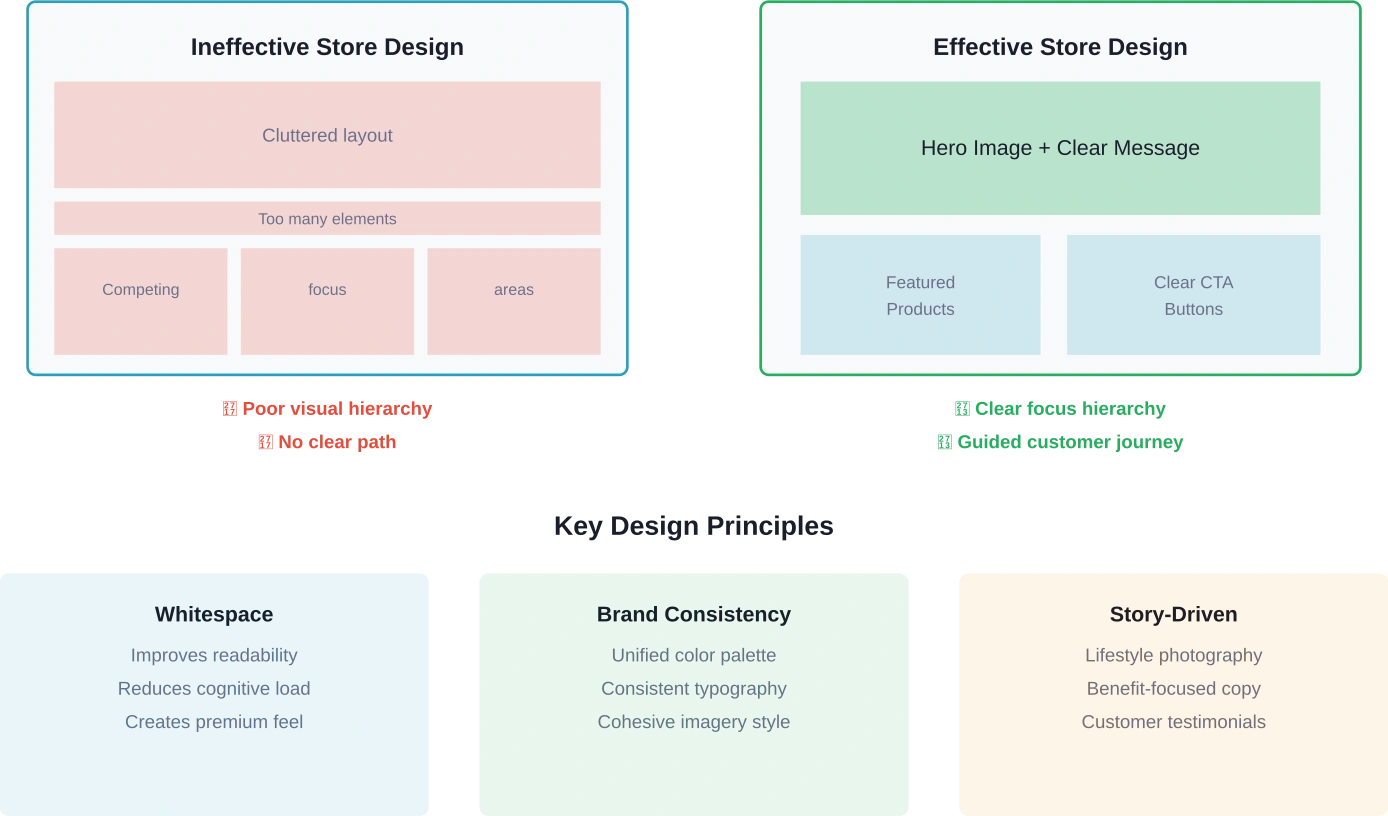
Visual Hierarchy Guides Attention
Shoppers scan pages in predictable patterns. Design should leverage these patterns by placing critical elements where eyes naturally land.
The upper-left quadrant gets viewed first in most cultures. Reserve this space for brand logos and primary messaging. High-priority calls-to-action belong in the upper-middle or center-right regions.
Size creates emphasis. Larger images and text draw more attention than smaller elements. Use size variation deliberately rather than making everything large.
Consistent Branding Builds Recognition
Brand colors, fonts, and imagery styles should remain consistent across all store pages. This consistency reinforces brand identity and creates a cohesive experience.
Inconsistency signals unprofessionalism. Mixing multiple font families or clashing color schemes distracts from products and erodes trust.
Develop a simple style guide before designing: primary and secondary brand colors, one or two font styles, and photography aesthetic rules. Apply these consistently throughout.
Whitespace Improves Comprehension
Cramming excessive content into limited space creates visual overwhelm. Generous spacing between elements improves readability and focus.
Whitespace doesn’t mean wasted space—it provides visual breathing room that makes designs feel premium rather than cluttered.
Let hero images stand alone rather than surrounding them with competing elements. Give text blocks adequate padding. Resist the temptation to fill every available pixel.
Compelling Storytelling Connects Emotionally
Product specifications alone rarely inspire purchases. Effective stores weave narratives that connect products to customer aspirations and pain points.
Lifestyle photography showing products in use context tells stories more effectively than isolated product shots. Accompanying copy should highlight benefits and transformations rather than merely listing features.
Customer testimonials and use cases add credibility to brand narratives. Real stories from actual customers resonate more than marketing hyperbole.
Driving Traffic to Your Brand Store
A beautifully designed store generates zero value without visitors. Traffic generation requires intentional strategy across multiple channels.
Leverage Amazon Advertising
Sponsored Brands campaigns allow advertisers to direct clicks to Brand Stores rather than individual product pages. These ads appear in search results with custom headlines and multiple product showcases.
Targeting strategy matters significantly. Broad keywords attract awareness-stage shoppers, while specific product terms capture high-intent buyers. Adjust bidding based on keyword performance and conversion data.
Sponsored Display ads can also drive store traffic through retargeting. These ads reach shoppers who previously viewed your products or similar items, reminding them to explore your full catalog.
Optimize Product Listings for Store Clicks
Every product listing displays the brand name as a clickable link directing to the Brand Store. This organic traffic source costs nothing but requires optimization.
Compelling product listings drive more clicks overall, including brand name clicks. High-quality images, detailed descriptions, and positive reviews increase listing engagement.
Amazon’s algorithm favors well-optimized listings in search results. Better rankings mean more visibility, which translates to more potential store visitors.
Promote Through External Channels
Brand Stores aren’t restricted to Amazon-only traffic. The dedicated URL works perfectly for external marketing campaigns.
Email newsletters can feature store links alongside product promotions. Social media posts can direct followers to new collections or seasonal offerings within the store.
Influencer partnerships benefit from store links by providing a curated shopping destination rather than scattered product links. This approach simplifies the path from discovery to purchase.
Use Amazon Posts and Brand Follow
Amazon Posts function similarly to social media feeds, displaying lifestyle images with tagged products. These posts can link to Brand Store pages, creating another discovery pathway.
The Brand Follow feature lets customers subscribe to updates from favorite brands. Followers receive notifications about new products and promotions, creating repeat traffic opportunities.
Analyzing Store Performance
Amazon provides detailed analytics for Brand Stores, revealing what works and what needs improvement. Understanding these metrics guides optimization decisions.
Key Metrics to Monitor
Visitors represent the total number of unique shoppers viewing the store within a selected timeframe. This top-line metric indicates overall reach.
Visits count individual sessions, including repeat visits from the same shopper. High visit counts relative to unique visitors suggest strong engagement or effective retargeting.
Page views show how many store pages visitors explore. Higher page views per visit indicate effective navigation and compelling content that encourages exploration.
Sales metrics reveal revenue attributed to store visits. This includes both immediate purchases during the session and attributed sales within the conversion window.
According to Amazon Ads documentation, store metrics also break down traffic sources. This shows which marketing channels drive qualified visitors versus low-intent browsers.
Traffic Source Analysis
Understanding where visitors originate helps optimize marketing spend. Traffic sources typically include Amazon ads, organic Amazon search, external referrals, and direct navigation.
High-converting traffic sources deserve increased investment. Low-converting channels might need messaging adjustments or audience refinement.
External traffic quality varies significantly by source. Social media might drive awareness visits, while email campaigns typically convert better due to established customer relationships.
Conversion Path Insights
Analytics reveal which store pages drive the most sales. This information identifies high-performing content and underutilized sections.
If certain product categories consistently convert while others languish, consider redesigning low-performing sections or featuring different products more prominently.
Page abandonment data shows where visitors exit without taking action. High abandonment on specific pages signals design issues or unclear value propositions.
| Store Metric | What It Measures | Optimization Signal |
|---|---|---|
| Visitors | Unique shoppers viewing store | Low numbers indicate traffic generation issues |
| Visits | Total sessions including repeats | High repeat visits suggest strong engagement |
| Page Views | Total pages viewed across visits | Low views per visit mean poor navigation or content |
| Sales | Revenue attributed to store traffic | Primary success metric for ROI calculation |
| Units Sold | Products purchased by store visitors | Reveals which products drive conversions |
| Traffic Sources | Where visitors originate | Shows which channels deliver best ROI |
Common Mistakes to Avoid
Even sellers who complete technical setup correctly often undermine results through preventable errors.
Launching Before Content Is Ready
The Store builder allows publishing with minimal content, but bare-bones stores create poor first impressions. Launching prematurely wastes initial traffic from promotional pushes.
Complete all pages, add comprehensive product selections, and refine copy before publishing. First impressions matter—shoppers rarely return after disappointing experiences.
Neglecting Mobile Optimization
Desktop preview mode feels more comfortable during design, but mobile devices drive substantial Amazon traffic. Stores that only work well on desktop alienate mobile shoppers.
Test every page on actual mobile devices before launching. Emulators help but don’t perfectly replicate real device behavior.
Ignoring Analytics
Publishing a store doesn’t complete the process. Ongoing optimization based on performance data separates successful stores from abandoned projects.
Review analytics weekly during initial months, then monthly once patterns stabilize. Look for declining metrics that signal needed adjustments.
Overcomplicated Navigation
Excessive pages and deep hierarchies confuse rather than organize. Shoppers want quick access to products, not maze-like category structures.
Limit top-level pages to five or fewer. Use descriptive, obvious page names. Test navigation with someone unfamiliar with your catalog to identify confusion points.
Static Content That Never Updates
Brands that launch stores and never refresh content miss opportunities for repeat engagement. Stale stores signal abandoned or defunct brands.
Update store content quarterly at minimum. Refresh featured products seasonally, update imagery to reflect new photography, and adjust messaging based on customer feedback.
Advanced Optimization Strategies
Once basics are mastered, advanced techniques can significantly amplify results.
Seasonal Store Updates
Major shopping periods—holiday seasons, Prime Day, back-to-school—present opportunities for themed store updates. Temporary homepage redesigns highlighting seasonal offerings capitalize on increased shopping activity.
These updates don’t require complete rebuilds. Swap hero images, adjust featured product tiles, and modify headlines to reflect seasonal themes.
A/B Testing Different Layouts
Amazon doesn’t provide built-in split testing for stores, but sellers can manually test variations. Run one layout for a month, switch to an alternative, then compare performance metrics.
Test one variable at time: homepage hero image, featured product selection, or call-to-action button placement. Changing multiple elements simultaneously makes attributing performance changes impossible.
Deep Linking to Specific Pages
Brand Store URLs support deep links to specific pages beyond the homepage. Use these in targeted campaigns to send traffic directly to relevant sections.
A campaign promoting a new product line should link to that collection’s page rather than the homepage. This reduces friction and improves conversion likelihood.
Integration with Amazon Live
Amazon Live streams can embed into Brand Stores, creating interactive shopping experiences. Live video showcases products while allowing real-time customer questions.
This strategy works particularly well for complex products benefiting from demonstrations or brands with strong personalities that translate to video.
Taking Your Brand Store Live
Building an Amazon Brand Store represents more than technical setup—it’s creating a dedicated space where brand identity and product offerings converge into a cohesive shopping experience.
The process requires patience through prerequisite phases, especially trademark registration. But once Brand Registry approval comes through, the actual store creation moves quickly using Amazon’s intuitive builder tools.
Success doesn’t end at publication. The most effective stores evolve continuously based on performance data, customer feedback, and catalog changes. Treat the store as a living marketing asset rather than a one-time project.
Start with the prerequisites today. If trademark registration is pending, use the waiting period to plan store structure, gather content assets, and develop design concepts. When access arrives, execution becomes straightforward.
The competitive advantage goes to brands that claim their dedicated Amazon real estate and optimize it relentlessly. A well-executed Brand Store doesn’t just showcase products—it builds lasting customer relationships that drive repeat purchases and brand loyalty.
Ready to establish your brand’s presence on Amazon? Begin the Brand Registry enrollment process and start planning the store that will differentiate your brand from countless competitors.
Frequently Asked Questions
How much does it cost to create an Amazon Brand Store?
Brand Stores are completely free to create and maintain. The only costs are the Professional seller account subscription (required for access) and any advertising spend used to drive traffic to the store. No design fees, hosting costs, or platform charges apply to the store itself.
Can I create a Brand Store without a registered trademark?
No. Amazon Brand Registry enrollment requires a pending or registered trademark from a designated government trademark office. This trademark must appear on products or packaging. Without Brand Registry enrollment, store builder access isn’t available.
How long does it take to get a Brand Store approved?
According to Amazon Seller Central documentation, the moderation review can take up to 24 hours after submission. Some stores receive approval faster, while complex stores or those requiring clarification might take slightly longer. Stores violating guidelines receive specific feedback about required changes.
Can I have multiple Brand Stores for different product lines?
Each registered brand can have one Brand Store per Amazon marketplace. If multiple brands are registered under the same seller account, each brand gets its own store. However, multiple stores for sub-brands or product lines under a single trademark aren’t supported—use separate pages within one store instead.
Do I need to advertise on Amazon to benefit from a Brand Store?
No. While advertising drives traffic effectively, stores generate value without ad spend. Organic traffic arrives through brand name clicks on product listings, external marketing, and direct URL navigation. The store provides value by converting traffic more effectively regardless of source.
How often should I update my Brand Store content?
Quarterly updates represent a practical minimum for most brands. Refresh featured products, update imagery to reflect new photography, and adjust messaging based on seasonal themes or customer feedback. Brands launching new products or running major campaigns should update stores more frequently to maintain relevance.
Can I see which products perform best in my Brand Store?
Yes. Amazon’s Brand Store analytics show which products generate the most units sold and revenue from store traffic. This data reveals which items drive conversions and which might need better positioning, updated content, or promotional support.
Join the WisePPC Beta and Get Exclusive Access Benefits
WisePPC is now in beta — and we’re inviting a limited number of early users to join. As a beta tester, you'll get free access, lifetime perks, and a chance to help shape the product — from an Amazon Ads Verified Partner you can trust.
 No credit card required
Free in beta and free extra month free after release
25% off for life — limited beta offer
Access metrics Amazon Ads won’t show you
Be part of shaping the product with your feedback
No credit card required
Free in beta and free extra month free after release
25% off for life — limited beta offer
Access metrics Amazon Ads won’t show you
Be part of shaping the product with your feedback
