
 EN
EN  ES
ES  FR
FR  DE
DE  IT
IT  KO
KO  JA
JA  ZH
ZH  AR
AR  PT
PT  TR
TR  PL
PL Managing B2B Pricing and Bulk Discounts on Amazon: A Complete Guide

Selling to businesses is different from selling to consumers. Orders are larger. Returns are lower. Expectations are clearer.
If you’re already selling in the Amazon store, tapping into Amazon Business isn’t just an add-on – it’s a shift in how you think about pricing.
Business buyers typically purchase more units per order and come back with fewer returns. That alone makes B2B pricing worth serious attention. But the real opportunity comes from structuring your prices correctly.
Let’s break down how to do that in a way that actually works.
What Makes B2B Pricing Different?
Amazon gives sellers two main ways to attract business customers:
- Business-only pricing
- Quantity discounts
Used together, they can increase average order value without hurting your margins.
Business Prices
A business price is a special per-unit price that’s visible only to verified Amazon Business customers. Regular shoppers never see it.
For example, you might list a product at $25 for consumer buyers, but offer it at $22 for business customers. That difference may seem small at first glance. But when someone orders 30, 50, or 100 units, the savings become meaningful.
Business buyers are usually less impulsive and more numbers-driven. They compare cost per unit, think in terms of procurement budgets, and often reorder consistently. A competitive business price signals that you understand that mindset.
It’s a simple adjustment, but it changes how your product is positioned in the B2B space.
Quantity Discounts
Quantity discounts reward bulk purchasing. You can structure them in two formats:
- Percentage discount: Offer a percentage off once a minimum quantity is reached.
- Fixed unit price: Set a new lower per-unit price when buyers purchase a specific volume.
Here’s a simplified example:
| Units Purchased | Discount | Final Price (based on $20 business price) |
| 5+ | 5% | $19.00 |
| 10+ | 10% | $18.00 |
| 25+ | 15% | $17.00 |
| 50+ | 20% | $16.00 |
Each tier should make financial sense – for you and for the buyer.
Static Pricing vs Automated Pricing
When it comes to managing B2B pricing, you have two main approaches. Both work. The right choice depends on how large and complex your catalog is.
Static Pricing
With static pricing, you manually set your business prices and quantity discount tiers. You decide the exact numbers for each SKU and adjust them when needed.
This approach gives you full control. You can fine-tune margins, test different discount levels, and react deliberately to cost changes or competitor moves. For sellers with a smaller catalog, or for high-value products that need close oversight, manual control often makes sense.
The tradeoff is time. The more SKUs you manage, the harder it becomes to keep everything aligned and competitive.
Automated Pricing
Automated pricing works differently. Instead of setting prices one by one, you create rules. Those rules adjust your business prices automatically based on conditions you define.
For example, you can set business prices to stay a fixed percentage below your standard price. Or you can build rules that react to changes in your main pricing strategy. When your base price updates, your business price adjusts with it.
If you manage dozens or hundreds of SKUs, automation quickly becomes less of a convenience and more of a necessity. It reduces manual errors, saves time, and keeps pricing consistent across your catalog.
That said, automation still needs oversight. Rules should be reviewed regularly to make sure they’re working the way you intended.
In most cases, the smartest setup is a mix: automation for scale, manual control for your top-performing or high-margin products.
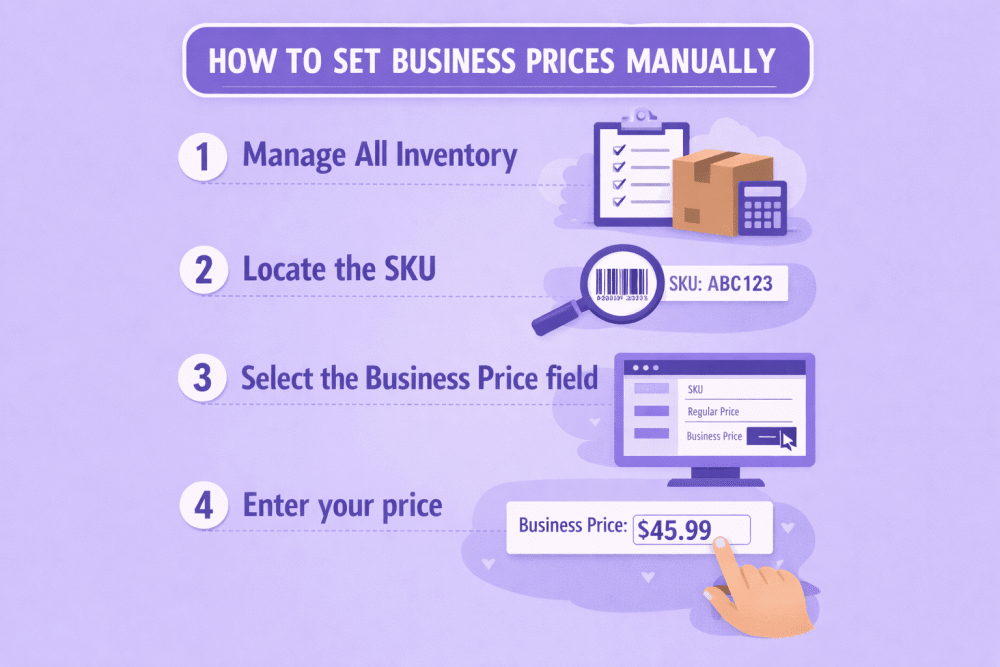
How to Set Business Prices Manually
You can adjust prices one SKU at a time directly inside Seller Central.
To Set a Business Price
- Go to Inventory → Manage All Inventory
- Locate the SKU
- Select the Business Price field
- Enter your price
- Save
You can return at any time to update it.
Adding Quantity Discounts to a Single Product
Once a business price is set, you can build tiers underneath it.
Inside the Business Price panel:
- Choose percentage or fixed price
- Enter minimum quantity
- Add additional tiers (up to five)
- Save changes
Each new tier must offer a better per-unit price than the previous one. If not, Amazon removes it automatically.
Bulk Upload for Larger Catalogs
If you’re managing dozens or hundreds of products, editing individually isn’t realistic.
Amazon allows bulk pricing updates using the Business Price/Quantity file:
- Download the template
- Enter SKUs and business pricing details
- Save as a tab-delimited file
- Upload via the Catalog section in Seller Central
Changes appear quickly in your dashboard and usually reflect to business buyers within minutes.
Using Automated Pricing Rules
Manual updates work well at first. But as your catalog grows, they become harder to manage. That’s where automated pricing comes in.
Amazon’s Automate Pricing tool allows you to set business prices as a percentage or fixed amount below your standard price. You can apply rules across your entire catalog or attach them to specific SKUs. Some rules are designed to help you compete for the Business Featured Offer position, while others focus on maintaining structured business pricing and quantity discounts at scale.
There are catalog-wide percentage rules that automatically apply discounts across all SKUs, SKU-level rules that combine business pricing with quantity tiers, and competitive rules that adjust pricing to improve Featured Offer eligibility. When you update a rule, every SKU connected to it adjusts automatically. That consistency is what makes automation powerful.
How Automation Interacts With Promotions
It’s important to understand how pricing layers work:
- Coupons on your standard price do not automatically affect business pricing.
- Deal pricing may temporarily influence percentage-based business discounts.
- If your standard price drops below your minimum threshold, the rule pauses.
Pricing logic matters. Review rule performance regularly.
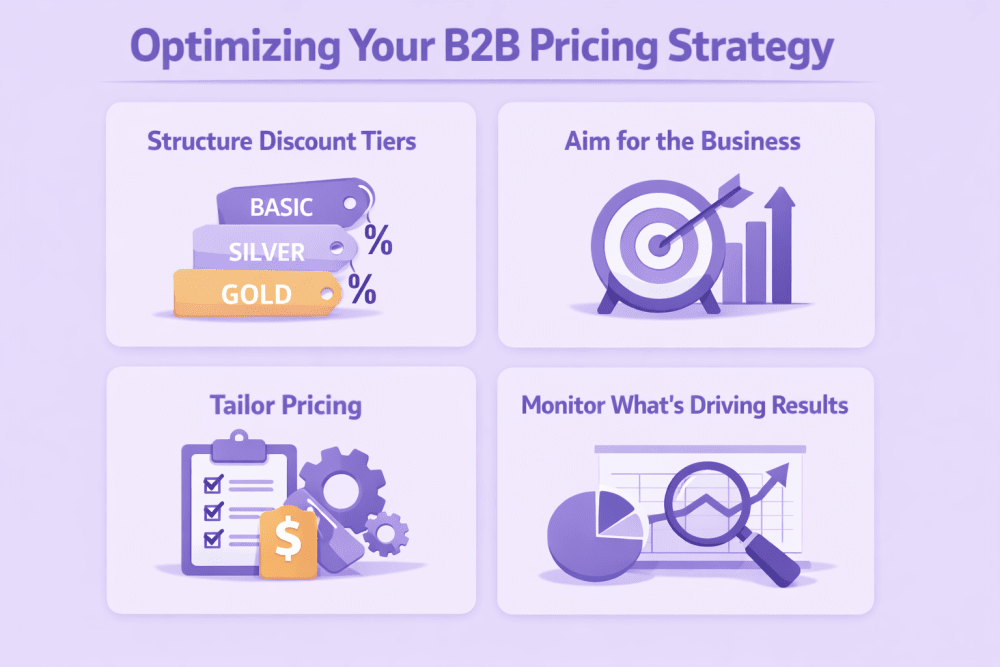
Optimizing Your B2B Pricing Strategy for Better Results
Setting business prices is only the first step. The real impact comes from how you structure, position, and monitor those prices over time.
1. Structure Discount Tiers with Purpose
More tiers don’t automatically mean more sales. In most cases, three to five tiers are enough to guide buyers toward larger orders without overwhelming them.
Discount jumps should feel meaningful. If the difference between tiers is too small, there’s little incentive to increase the order size. At the same time, minimum quantities should reflect actual buying behavior. If your typical business order averages 12 units, setting your first tier at 50 won’t move the needle.
Study your historical order data. Look at real purchasing patterns and build your tiers around them. Keep it practical. Keep it realistic.
2. Aim for the Business Savings Blue Badge
Well-structured discounts can also unlock additional visibility. When your pricing meets Amazon’s thresholds, your product may qualify for the Business Savings Blue Badge.
This badge appears in search results and business storefront placements, helping your offer stand out to professional buyers.
Generally, eligibility requires at least 5% off the standard price for a single-unit business price, or at least a 3% discount on your first quantity tier. Products also need a minimum 4-star rating.
It’s not guaranteed, but when your listing qualifies, visibility and click-through rates often improve.
3. Tailor Pricing to Business Segments
Not all business buyers behave the same way. Amazon Business groups customers by industry, and those industries purchase differently.
Some buy in predictable cycles. Some are highly price-sensitive. Others routinely purchase in large quantities. Understanding these patterns helps you move beyond one-size-fits-all pricing.
Review your reports in B2B Central. Identify which industries are already purchasing from you and consider adjusting pricing tiers or business discounts to better match their buying habits.
4. Monitor What’s Actually Driving Results
Pricing without measurement is guesswork.
Inside B2B Central, review business sales volume, average order value, repeat purchase rates, and how often each discount tier is used. Compare conversion rates between business and consumer buyers.
Look for patterns. Are most buyers stopping at the first tier? Are higher tiers rarely used? Are deeper discounts cutting into margins without increasing volume?
Small adjustments based on real data can make a noticeable difference over time. The key is staying attentive and responsive rather than setting pricing once and forgetting about it.

Smarter B2B Growth Starts with WisePPC
We built WisePPC for sellers who need clarity across advertising, pricing, and overall marketplace performance. As an Amazon Ads Verified Partner, the platform connects through official integrations and provides deeper visibility than Seller Central alone. It tracks more than 30 key metrics, stores long-term historical data well beyond Amazon’s standard 60–90 day window, and clearly separates ad-driven revenue from organic sales.
Instead of switching between multiple reports, WisePPC centralizes everything in one dashboard. Sellers can filter campaigns instantly, apply bulk bid and budget changes across thousands of targets, and compare up to six KPIs on a single chart. Placement-level performance analysis and gradient-based metric highlighting make it easier to detect wasted spend or underperforming keywords at a glance.
Designed to scale with growing catalogs, WisePPC supports advanced segmentation by campaign type, bid strategy, cost type, and match type. With AI-based bid adjustments, automated optimization features, and upcoming inventory forecasting tools, the platform helps sellers align pricing, advertising, and profitability in one structured system.
For sellers serious about improving B2B performance, WisePPC delivers the data control needed to make smarter decisions with confidence.

When Should You Revisit Your B2B Pricing?
B2B pricing is not something you set once and forget. Markets shift. Costs move. Competitors adjust. And business buyers change their purchasing patterns depending on the season.
The smartest sellers treat pricing as a living strategy. That doesn’t mean constant changes. It means knowing when to step in and make thoughtful adjustments.
Below are some of the most common situations that should prompt a pricing review:
| Situation | What to Do |
| Cost increases | Recalculate your margins and adjust business prices or discount tiers to protect profitability. |
| Competitor price drops | Review your positioning. You may need to adjust your business price or restructure tiers to remain competitive without over-discounting. |
| Slow business sales | Test a stronger first-tier discount or lower minimum quantity to stimulate larger orders. |
| Excess inventory | Increase bulk incentives temporarily to accelerate turnover and free up storage space. |
| Seasonal buying cycle | Introduce time-based stronger tiers during peak procurement periods or fiscal year-end buying windows. |
Not every trigger requires a dramatic change. Sometimes a small adjustment to the first tier or a slight repositioning of your base business price is enough.
The key is staying proactive. Waiting too long to react can cost visibility, conversions, or margin. Reviewing your B2B pricing at regular intervals keeps you competitive and aligned with how business customers actually buy.
Plan Around Business Buying Seasons
Business purchasing doesn’t happen randomly. Many organizations follow budget cycles and procurement schedules, which means demand often spikes during predictable windows.
Large orders frequently cluster around:
- Fiscal year-end, when departments use remaining budget
- Pre–Prime Day preparation, as sellers stock up for traffic surges
- Before Black Friday and Cyber Monday, when inventory planning becomes critical
- End-of-quarter inventory resets and budget reallocations
During these periods, buyers are often more open to placing bulk orders. They’re thinking ahead, securing stock, or closing out budgets before deadlines.
If you anticipate these demand spikes, consider temporarily strengthening your quantity tiers. That could mean slightly deeper first-tier discounts, adjusted minimum quantities, or limited-time bulk incentives. The goal isn’t permanent discounting. It’s strategic timing.
Aligning your pricing with real buying cycles can increase order size without changing your long-term structure. Timing, in many cases, matters just as much as how your tiers are built.
Balance Automation With Oversight
Automation saves time. It reduces manual updates and keeps your catalog aligned. But it doesn’t replace strategy.
The smartest approach is to use automation for broader catalog rules while maintaining closer control over your top-performing or highest-margin SKUs. High-volume products often deserve more attention, especially if small price adjustments can significantly affect revenue.
It’s also important to schedule regular pricing reviews. Even well-built rules need occasional evaluation to make sure they’re still aligned with your costs, competition, and overall goals.
That balance between efficiency and oversight is what keeps your pricing competitive without giving up control.
Final Thoughts: Building a Sustainable B2B Pricing Strategy
Selling to business customers isn’t about simply lowering prices. It’s about creating logical incentives that make bulk purchasing an easy decision. It’s about structuring quantity tiers in a way that feels fair and compelling, while still protecting your margins.
It also requires paying attention. Monitoring performance, reviewing which tiers actually get used, adjusting when costs shift, and aligning your pricing with real buying cycles across industries. None of it is complicated on its own, but it does require intention.
When done right, B2B pricing can increase average order size and create more stable revenue without pushing you into unnecessary discounting.
Start simple. Test carefully. Make adjustments based on what the numbers tell you. That’s how B2B pricing turns into steady, long-term growth.
Frequently Asked Questions
What is the difference between a business price and a quantity discount?
A business price is a lower per-unit price that only verified Amazon Business customers can see. It applies even if they purchase just one unit. A quantity discount, on the other hand, rewards buyers for purchasing in bulk. The price decreases further once they reach specific quantity thresholds. You can use both together to create stronger incentives for larger orders.
Do business prices affect my standard consumer pricing?
No. Business prices are separate from your standard price. Regular shoppers continue to see your normal listing price, while business buyers see the discounted business price. This allows you to target professional buyers without changing your consumer-facing strategy.
How many quantity tiers should I create?
In most cases, three to five tiers are enough. Too many tiers can create confusion, while too few may limit flexibility. The key is to build tiers around real purchasing behavior. Review your historical order data and set minimum quantities that reflect how business customers already buy.
Can I automate business pricing?
Yes. Amazon’s Automate Pricing tool allows you to create rules that adjust business prices automatically. You can set business prices as a percentage below your standard price or apply structured rules across multiple SKUs. Automation saves time, but it’s still important to review performance regularly.
What happens if I run a promotion on my standard price?
Coupons applied to your standard price do not automatically change your business price. However, deal pricing may temporarily influence percentage-based business discounts during the promotion window. Always review how different pricing layers interact to avoid unintended margin impact.
Join the WisePPC Beta and Get Exclusive Access Benefits
WisePPC is now in beta — and we’re inviting a limited number of early users to join. As a beta tester, you'll get free access, lifetime perks, and a chance to help shape the product — from an Amazon Ads Verified Partner you can trust.
 No credit card required
Free in beta and free extra month free after release
25% off for life — limited beta offer
Access metrics Amazon Ads won’t show you
Be part of shaping the product with your feedback
No credit card required
Free in beta and free extra month free after release
25% off for life — limited beta offer
Access metrics Amazon Ads won’t show you
Be part of shaping the product with your feedback
