
 EN
EN  ES
ES  FR
FR  DE
DE  IT
IT  KO
KO  JA
JA  ZH
ZH  AR
AR  PT
PT  TR
TR  PL
PL  ID
ID  VI
VI How to Cancel a Return on Amazon (2026 Guide)

Quick Summary: Canceling a return on Amazon is straightforward: navigate to Your Orders, locate the item with a pending return, and select ‘Cancel Return Request’ before the return window closes. If the option isn’t available, the return may have progressed too far in processing, requiring you to contact Amazon Customer Service directly. Once canceled, you’ll keep the item and won’t receive a refund for that return.
Changed your mind about returning something? Maybe the item started working again, or perhaps someone convinced you to give it another shot.
Whatever the reason, Amazon lets customers cancel returns—but there’s a catch. Timing matters, and the process isn’t always obvious.
This guide walks through exactly how to cancel a return on Amazon, what happens when the option disappears, and what alternatives exist when standard cancellation won’t work.
Understanding Amazon’s Return Cancellation Window
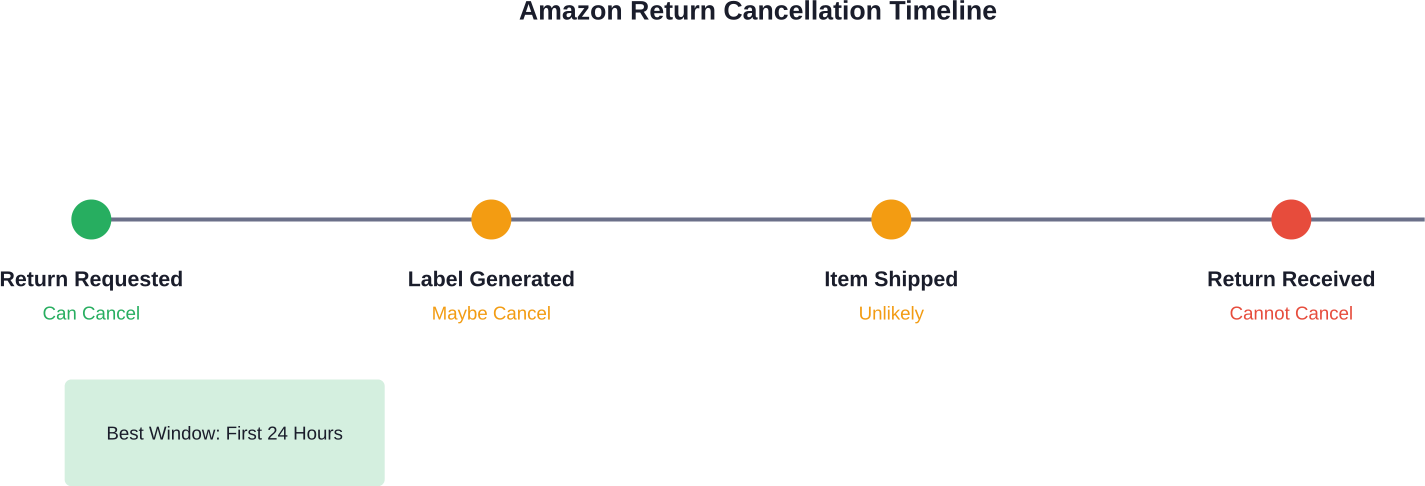
Amazon doesn’t advertise a specific timeframe for return cancellations. The option exists only while the return request remains in “pending” status.
Once a return label gets generated and the item ships back, or once Amazon’s system processes the return beyond a certain stage, the cancellation option vanishes. This typically happens within 24-48 hours of initiating the return, though sometimes sooner.
Here’s the thing though—if packaging materials haven’t been used and no shipping label has been scanned, chances are good that cancellation remains possible.
How to Cancel a Return on Amazon Using the Mobile App
The Amazon mobile app provides the quickest path to canceling returns. Most users find this method faster than the desktop version.
Step-by-Step Mobile Cancellation Process
Follow this:
- Open the Amazon app on iOS or Android: Tap the ‘You’ icon (person silhouette) in the bottom navigation bar to access the ‘Your Orders’ shortcut directly.
- Tap on the order to view details: Look for a button or link labeled “Cancel Return Request” or “Cancel This Return.”
- If the option appears, tap it: Amazon will display a confirmation message asking to verify the cancellation. Confirm the action.
The return status changes immediately. The item remains in possession, and no refund processes for that return.
What Happens If the Cancel Button Doesn’t Appear
No cancel button means the return has progressed beyond the cancelable stage. The system has already committed to processing the return.
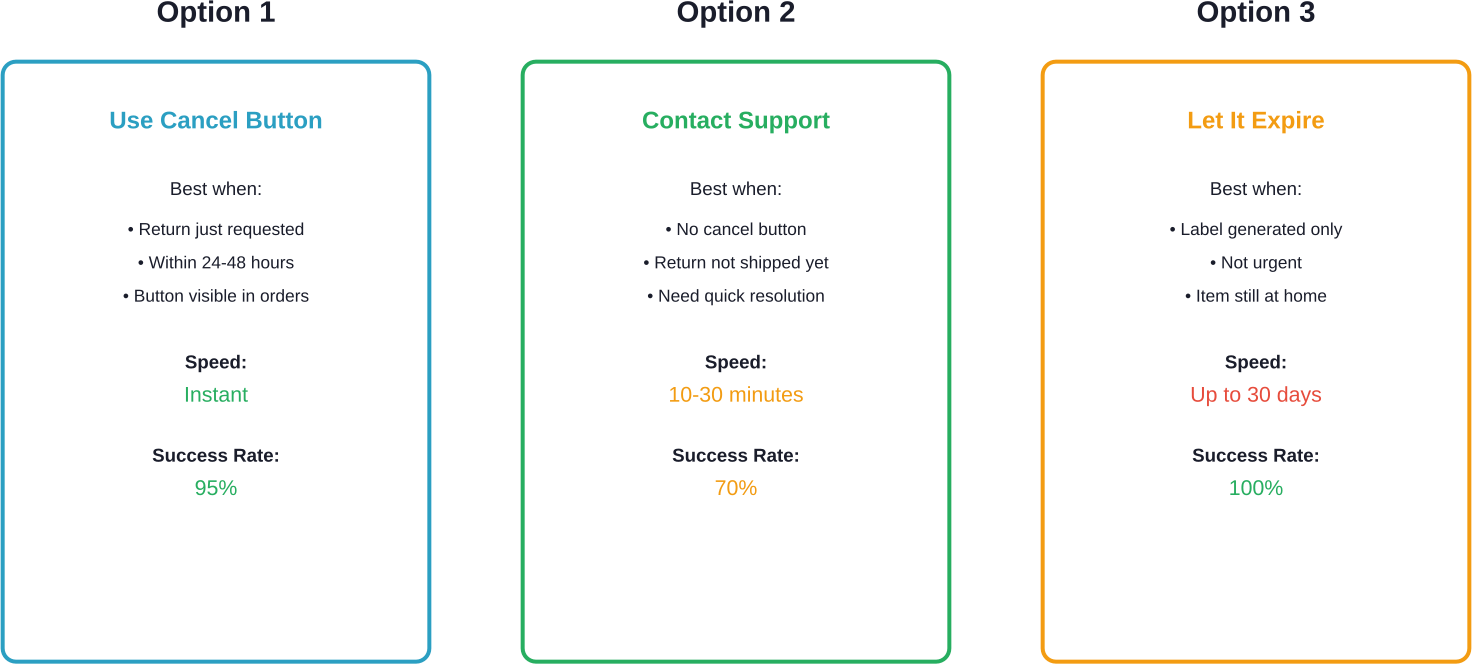
At this point, three options exist: contact Amazon Customer Service directly, let the return expire naturally (if the item hasn’t shipped back yet), or complete the return and repurchase the item.
How to Cancel a Return on Amazon Using a Desktop Computer
Desktop users follow a similar path with slightly different navigation.
Desktop Cancellation Walkthrough
Visit Amazon.com and sign into the account. Hover over “Returns & Orders” in the top-right corner, then click “Your Orders.”
Locate the order with the pending return. Click “View Return/Refund Status” or similar link next to the order.
On the return details page, look for “Cancel Return Request.” Click this option if available.
Confirm the cancellation when prompted. Amazon updates the order status immediately, and the return request disappears from active returns.
| Platform | Navigation Path | Cancel Button Location | Average Time |
|---|---|---|---|
| Mobile App | Menu → Your Orders → Order Details | Below return status | Under 1 minute |
| Desktop Browser | Returns & Orders → View Return Status | Return details page | 1-2 minutes |
| Mobile Browser | Menu → Your Orders → Order Details | Below return status | 1-2 minutes |
When Return Cancellation Isn’t Available
Sometimes the cancel option simply doesn’t exist. This happens for several reasons.
Return Already Processed
Once Amazon receives the returned item at their fulfillment center, cancellation becomes impossible. The refund has either been processed or sits in queue for processing.
According to Amazon’s official policies, refunds typically process within a few business days of receiving the return. After that point, the only option is repurchasing the item.
Third-Party Seller Returns
Items sold by third-party sellers follow different return rules. Some sellers don’t allow return cancellations at all.
For third-party returns, the “Cancel Return” option might never appear. Instead, contact the seller directly through Amazon’s messaging system or their provided contact information.
A-to-Z Guarantee Claims
Returns tied to A-to-Z Guarantee claims operate under different rules. Based on discussions in Amazon Seller Central forums, buyers who receive items after an A-to-Z claim may have limited options to reverse refunds.
Community discussions suggest some buyers find a “Reverse Refund” option in their account, though this isn’t universally available. The seller cannot initiate this—it requires buyer action.
Alternative Solutions When Cancellation Fails
No cancel button doesn’t mean no options. Several workarounds exist depending on the return’s current status.
Contact Amazon Customer Service
Amazon’s customer service team can sometimes intervene before a return is fully processed. Reach them through:
- Live chat in the app or website (fastest method)
- Phone support through Amazon Customer Service
- Email support through the “Contact Us” page
Real talk: Live chat typically resolves these issues in under 10 minutes. Phone support works too, but wait times vary.
Explain the situation clearly. Provide the order number and return request number. Many customer service representatives can cancel returns that no longer show the cancel button to customers.
Simply Don’t Ship the Return
Here’s something many people don’t realize: return requests expire.
If you have already received a ‘standard’ refund (Advanced Refund) before shipping the item and then fail to return it, Amazon will recharge your original payment method.
This passive approach works when the item hasn’t been packaged or dropped off yet. But wait—Amazon’s return policy varies by item category, so check the specific return window for that product.
Complete Return and Repurchase
When all else fails, complete the return process and buy the item again. Not ideal, but sometimes it’s the cleanest solution.
This approach makes sense when the item’s price hasn’t changed and inventory remains available. Some items become unavailable or increase in price, making this less attractive.
Understanding Amazon’s Return Policy Context
Knowing when returns can be canceled helps, but understanding the broader return policy prevents future headaches.
Standard Return Windows
Many items purchased on Amazon qualify for returns within standard return windows. Some categories extend this window during holiday periods or have longer standard windows.
Electronics often carry restocking fees. Opened software, certain health items, and digital products typically can’t be returned at all.
Consumer Rights and FTC Guidelines
According to the Federal Trade Commission, online retailers must clearly disclose return policies before purchase. Amazon complies by displaying return information on product pages.
The FTC’s Mail Order Rule requires companies to ship items within advertised timeframes or provide refund options. This doesn’t directly affect return cancellations but establishes consumer protection baselines.
Third-Party Seller Variations
Products marked “Sold by [Seller Name] and Fulfilled by Amazon” follow different return rules than items sold directly by Amazon.
Third-party sellers set their own return policies within Amazon’s framework. Some sellers offer more generous return windows, while others restrict returns entirely for certain product types.
Check the specific seller’s return policy before purchasing. It appears in the product listing under “Sold by” information.
Common Mistakes When Canceling Returns
Several errors trip up people attempting to cancel returns.
Waiting Too Long
The most common mistake? Procrastination. The cancel option disappears fast—sometimes within hours.
Changed minds about returns should be acted on immediately. Every hour that passes reduces the likelihood of successful cancellation.
Shipping the Item Before Deciding
Once a return package gets dropped off at UPS, FedEx, or the post office, cancellation becomes significantly harder. The item enters the carrier’s system, and Amazon’s logistics tracking updates accordingly.
Some users report success contacting carriers directly to intercept packages, but this rarely works and isn’t officially supported.
Assuming All Returns Work the Same
Different product categories, sellers, and purchase conditions create varying return scenarios. A return process that worked for one item might not apply to another.
Digital content, groceries, custom items, and hazardous materials each have unique return restrictions that affect cancellation options.
Tips for Smoother Return Management
A few proactive steps reduce the need for return cancellations altogether:
- Before initiating any return, take 24 hours to reconsider: This cooling-off period often prevents hasty decisions that require reversal.
- Read product reviews thoroughly before purchasing: Better pre-purchase research means fewer unwanted items arriving in the first place.
- Keep original packaging intact for at least a week after delivery: This buys time to evaluate products properly without rushed return decisions.
- Screenshot or save return confirmation emails: These contain return authorization numbers needed for cancellation requests.

Don’t Just Handle Returns – Understand Why They Happen
Canceling a return fixes one order, but patterns build quietly in the background. If the same products keep getting sent back, the reason usually shows up earlier – in how they’re presented, priced, or promoted.
WisePPC gives you a way to trace that back. You can line up campaigns, orders, and product performance in one timeline, see what was active before the purchase, and spot where things start to break. It’s easier to catch repeat issues when everything is visible together, not scattered across reports.
If you want to deal with returns at the source, not one by one, it’s worth looking at your data this way. Sign up to WisePPC, connect your account, and see what’s really happening before the return request appears.

Frequently Asked Questions
Can I cancel an Amazon return after printing the shipping label?
Yes, returns can usually be canceled if the package has not yet been shipped or scanned by the carrier.
How long does Amazon give to cancel a return request?
The cancellation option often remains available for 24–48 hours, though timing varies by order and seller.
Can sellers cancel returns on Amazon?
Sellers generally cannot directly cancel customer return requests through Amazon’s standard system.
Will canceling an Amazon return affect my account?
No, occasional return cancellations do not normally affect your account standing.
Can I cancel a return for only some items in a multi-item order?
Yes, each item in an order can usually be managed separately for returns and cancellations.
What should I do if the cancel button doesn’t appear but I haven’t shipped the item?
Contact Amazon Customer Service immediately. They may still be able to manually cancel the return request.
Taking Action on Your Amazon Return
Canceling an Amazon return comes down to timing and knowing where to look. The process takes less than two minutes when the cancel option appears in Your Orders.
When that button disappears, Amazon Customer Service provides the next best route. Live chat typically resolves these situations faster than waiting for email responses or dealing with phone queues.
For returns that have progressed too far, letting the unused return expire or completing the return and repurchasing offers practical alternatives.
Changed your mind about a return? Check Your Orders now—the sooner action gets taken, the more options remain available.
Join the WisePPC Beta and Get Exclusive Access Benefits
WisePPC is now in beta — and we’re inviting a limited number of early users to join. As a beta tester, you'll get free access, lifetime perks, and a chance to help shape the product — from an Amazon Ads Verified Partner you can trust.
 No credit card required
Free in beta and free extra month free after release
25% off for life — limited beta offer
Access metrics Amazon Ads won’t show you
Be part of shaping the product with your feedback
No credit card required
Free in beta and free extra month free after release
25% off for life — limited beta offer
Access metrics Amazon Ads won’t show you
Be part of shaping the product with your feedback
