
 EN
EN  ES
ES  FR
FR  DE
DE  IT
IT  KO
KO  JA
JA  ZH
ZH  AR
AR  PT
PT Amazon’s New FBA Capacity Management: 4 Key Features

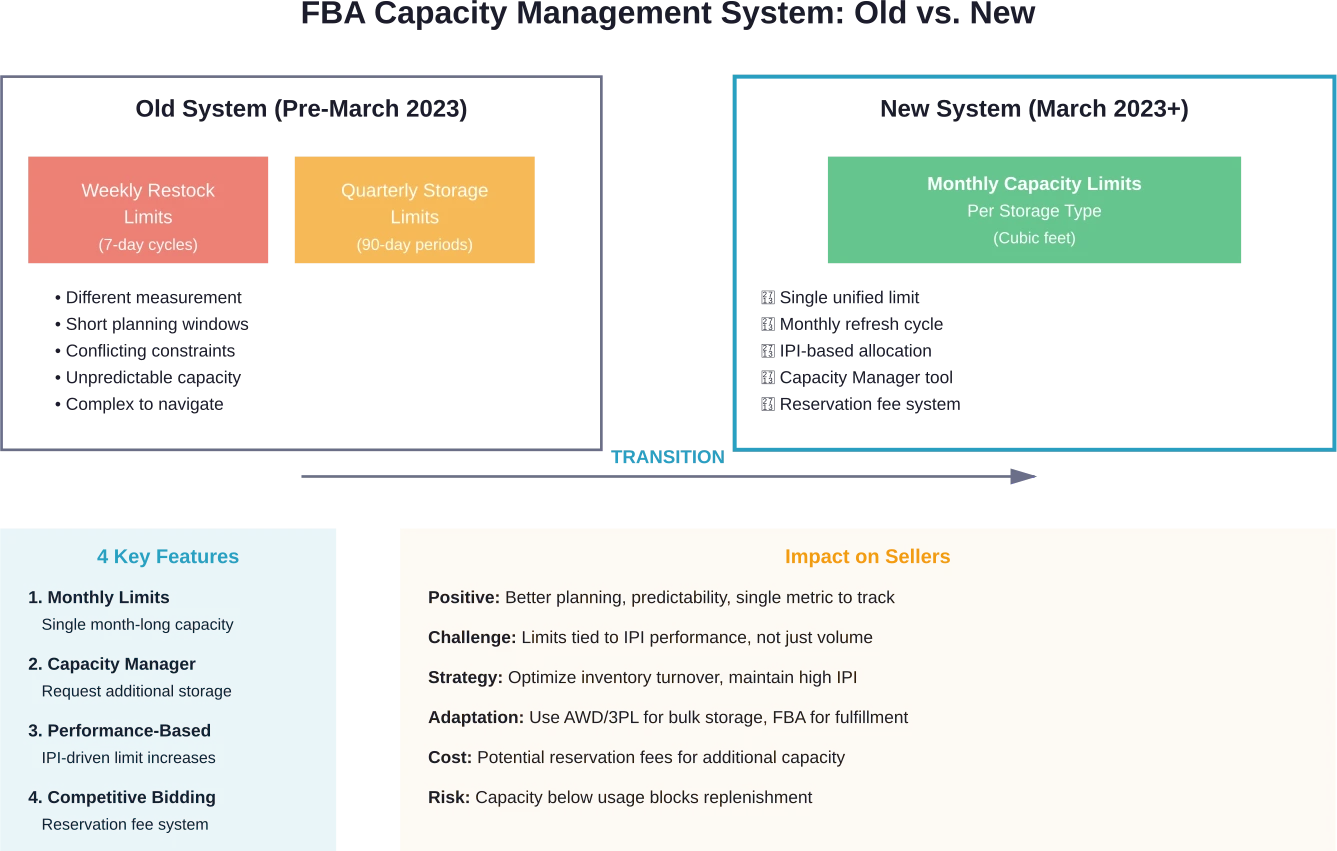
Quick Summary: Amazon announced a streamlined FBA capacity management system in 2023 that replaced separate weekly restock and quarterly storage limits with a unified monthly capacity limit per storage type. The four key features include: single month-long FBA capacity limits, Capacity Manager for requesting additional storage, performance-based limit increases tied to IPI scores, and capacity reservation through competitive bidding.
Amazon sellers faced a frustrating puzzle for years: juggling weekly restock limits alongside quarterly storage caps, each measured differently, each creating inventory headaches. That changed when Amazon rolled out a streamlined FBA capacity management system.
The announcement came in January 2023, effective March 1 of that year. According to Amazon’s official Seller Central announcement from January 17, 2023, the changes addressed direct seller feedback about the difficulty of planning inventory procurement and manufacturing around conflicting limit types.
This wasn’t just a minor tweak. The new system fundamentally changed how sellers approach FBA storage, replacing confusion with clarity—though not without creating new challenges sellers need to understand.
What Changed: From Dual Limits to Unified Capacity
Before March 2023, sellers navigated two separate constraint systems. Weekly restock limits controlled how much inventory could be shipped to FBA each week. Quarterly storage limits capped total volume stored across three-month periods.
The problem? These limits measured inventory differently and operated on different timescales. A seller might have available quarterly storage but hit their weekly restock cap, blocking replenishment of fast-moving products. Or they’d have restock capacity but approach their quarterly limit, forcing difficult decisions about which products to prioritize.
Amazon’s solution consolidated everything into monthly capacity limits per storage type. Instead of tracking two moving targets, sellers now work with a single number that refreshes monthly.
Here’s what that means in practice. Sellers receive a capacity limit measured in cubic feet for each storage category (standard-size, oversize, apparel, footwear, flammable, and aerosol). This limit covers all inventory—what’s currently stored at FBA plus what’s in transit in open shipments.
The monthly refresh gives sellers predictable planning windows. At the start of each month, limits reset based on performance metrics and forecasted sales. Sellers can see their capacity allocation weeks in advance through the Capacity Monitor in Seller Central’s FBA Dashboard.
Feature #1: Single Month-Long FBA Capacity Limits
The cornerstone of the new system is the unified monthly limit. According to Amazon’s official announcement from January 2023, this addresses the primary pain point sellers reported: difficulty planning procurement and manufacturing around short weekly windows.
Each seller receives a capacity allocation per storage type, measured in cubic feet. This represents the maximum volume allowed across all inventory—currently stored units plus shipments in transit to fulfillment centers.
The calculation updates throughout the month as inventory moves. When products sell and ship out, that freed capacity becomes immediately available for new shipments. When shipments arrive and check in at fulfillment centers, they count against the limit.
Monthly limits provide longer planning horizons than weekly caps. Sellers manufacturing overseas can better coordinate production runs with shipping timelines. Those working with 3PLs gain flexibility in scheduling inbound shipments without rushing to hit weekly deadlines.
But there’s a catch many sellers discovered quickly. Amazon assigns these limits based on performance metrics, particularly the Inventory Performance Index (IPI). A seller with lower IPI scores might receive capacity that covers only 60-70 days of inventory at current sales velocity—not enough buffer for long lead times from overseas suppliers.
The monthly structure also means sellers face capacity constraints differently than before. Community discussions on Seller Central forums show sellers struggling when their limit drops below their current usage, blocking all new shipments until inventory sells down. This happens when IPI scores decline or Amazon adjusts capacity allocations based on fulfillment center space availability.
How Monthly Limits Are Calculated
Amazon determines monthly capacity using multiple factors. The IPI score carries significant weight—sellers maintaining scores above 500 typically receive higher limits than those below 400. Sales volume and forecasted demand also influence allocations, with higher-velocity sellers generally earning more capacity.
Storage duration matters too. Inventory sitting in FBA for extended periods signals poor turnover, potentially reducing future capacity allocations. Amazon wants fulfillment centers functioning as active distribution hubs, not long-term warehouses.
Seasonal patterns affect limits as well. Sellers often see increased capacity heading into Q4 to accommodate holiday inventory, then reductions in Q1 as demand normalizes.
The system accounts for inventory already in the network. If a seller has 500 cubic feet stored and 200 cubic feet in shipments checking in, their total usage is 700 cubic feet. With a 1,000 cubic foot limit, they have 300 cubic feet available for new shipments.
Feature #2: Capacity Manager for Additional Storage Requests
Amazon introduced the Capacity Manager as a solution for sellers who need more space than their base allocation provides. This tool, accessible through Seller Central, lets sellers request additional capacity beyond their standard monthly limit.
The request process involves competitive bidding. Sellers specify how much additional capacity they want and what reservation fee per cubic foot they’re willing to pay. Amazon then grants requests objectively, starting with the highest reservation fee offers until available capacity runs out.
According to the official announcement, when a request is granted, the reservation fee gets offset by performance credits. This creates an interesting dynamic—sellers essentially pay for guaranteed access, but strong performance can reduce or eliminate the net cost.
The Capacity Manager updates regularly, showing sellers their current limit, usage, and available capacity. Sellers can submit requests for upcoming months, allowing advance planning for promotional events or seasonal peaks.
Not all requests get approved. During high-demand periods, particularly Q4, competition for extra capacity intensifies. Sellers willing to pay higher reservation fees get priority, creating a market-based allocation system.
This feature sparked mixed reactions in seller communities. Some appreciate the option to buy additional space when needed. Others criticize it as Amazon essentially charging for something that was previously included in FBA fees, especially when base allocations feel artificially constrained.
Strategic Use of Capacity Manager
Smart sellers approach Capacity Manager strategically rather than reactively. Waiting until inventory runs low to request additional capacity can backfire—requests aren’t instant, and competitive periods may leave sellers outbid.
Successful strategies include requesting extra capacity well ahead of anticipated needs, particularly before major selling events like Prime Day or Black Friday. Sellers also analyze their reservation fee tolerance by calculating the cost per cubic foot against potential lost sales from stockouts.
For products with high margins and fast turnover, paying reservation fees often makes financial sense compared to missing sales. For lower-margin items with slower velocity, the economics work differently.
Some sellers use Capacity Manager as insurance, requesting modest additional capacity even when current limits seem adequate. This buffer protects against unexpected demand spikes or shipping delays that could otherwise trigger stockouts.
Feature #3: Performance-Based Limit Increases
The new capacity system ties limits directly to seller performance, with the Inventory Performance Index (IPI) score as the primary metric. This represents a fundamental shift—capacity becomes a reward for efficient inventory management rather than a static entitlement.
IPI scores range from 0 to 1,000, calculated based on four key factors: excess inventory percentage, in-stock rate for popular products, stranded inventory percentage, and inventory age. Sellers with scores consistently above 500 typically maintain healthy capacity limits. Those dropping below 400 face restrictions.
According to a Seller Central forum discussion from August 2025, one seller reported their limit suddenly dropping to 186.90 cubic feet despite having 213.13 cubic feet already in use. This immediately blocked all replenishment, even for top-selling products, with an IPI of 616 and strong metrics across other dimensions.
These situations highlight how the system can malfunction or apply restrictions that don’t align with visible performance metrics. Seller support often struggles to explain sudden capacity drops or provide paths to resolution beyond generic advice to improve IPI scores.
The performance-based structure creates incentives for specific behaviors. Sellers focus more intensely on sell-through rates, removing slow-moving inventory to avoid excess inventory penalties. They monitor stranded listings aggressively, knowing that unfulfillable inventory counts against their score without generating sales.
Improving IPI for Better Capacity
Sellers can influence their IPI scores through concrete actions. Reducing excess inventory means identifying slow sellers and either running promotions to clear them, removing them from FBA, or liquidating through Amazon’s outlet programs.
Maintaining high in-stock rates on best sellers requires accurate demand forecasting and buffer inventory. But this creates tension with the monthly capacity system—carrying buffer stock consumes capacity that could go to other products.
Fixing stranded inventory provides quick IPI improvements. Stranded units sit in fulfillment centers without active listings, often due to listing errors, suppressed ASINs, or closed listings. The Stranded Inventory tool in Seller Central identifies these issues and guides resolution.
Managing inventory age means monitoring how long products remain at FBA. Items over 365 days incur long-term storage fees and hurt IPI scores. Sellers track aging inventory reports and take action before units hit these thresholds.
Some sellers game the system by removing inventory before it ages into penalty zones, then shipping it back later. This increases costs but may preserve capacity access worth more than the handling fees.
Feature #4: Capacity Reservation Through Competitive Bidding
The reservation fee system within Capacity Manager creates a marketplace for FBA space. Rather than administrative decisions determining who gets additional capacity, Amazon allocates it based on what sellers will pay.
Sellers submit reservation fee bids specifying dollars per cubic foot for the extra capacity they request. Amazon ranks these bids and grants requests from highest to lowest until available capacity exhausts. Sellers with winning bids see their capacity limits increase accordingly.
The official announcement notes that reservation fees get offset by performance credits. The exact mechanism for earning these credits ties to IPI scores and inventory efficiency metrics. High-performing sellers effectively pay less for additional capacity through credit offsets.
This creates a two-tier system. Sellers with strong performance metrics and willingness to pay reservation fees can secure ample capacity. Those with lower IPI scores or tighter margins face constrained access, potentially limiting growth.
The competitive dynamic intensifies seasonally. During Q4, when sellers need maximum capacity for holiday inventory, reservation fee bids spike as sellers compete for limited additional space. Off-peak months see less competition and lower clearing prices.
Economics of Capacity Reservation
Sellers evaluating reservation fees must calculate break-even points. The cost per cubic foot needs weighing against potential revenue from products that would otherwise face stockouts.
A simple formula helps: take product margin per unit, multiply by units per cubic foot, and compare against the reservation fee. If a cubic foot of product generates $50 in margin monthly and the reservation fee is $10, the economics favor requesting additional capacity.
This calculation shifts dramatically by product category. Small, high-margin items like jewelry or cosmetics may justify high reservation fees. Large, low-margin products like furniture or appliances rarely make economic sense for paid capacity increases.
Timing matters too. Reservation fees paid for capacity used during high-demand months yield better returns than off-peak periods. Sellers strategically time their additional capacity requests around promotional calendars.
Some sellers view reservation fees as simply another cost of doing business on FBA, incorporating them into landed cost calculations. Others see them as evidence of Amazon squeezing sellers, essentially charging for capacity that should be included in standard FBA fulfillment fees.
How the New System Affects Different Seller Types
The capacity management changes impact sellers differently based on business models, product categories, and operational sophistication.
High-volume sellers with strong IPI scores generally benefit from the new system. Monthly limits provide better visibility for planning large purchase orders and coordinating international shipments. The ability to request additional capacity through Capacity Manager gives these sellers tools to scale during peak periods.
Small sellers or those just starting with FBA often struggle more. Base capacity allocations for newer accounts start low, requiring time and sales history to build up. Without track records demonstrating strong inventory management, these sellers face tighter constraints.
Private label brands managing multiple SKUs encounter specific challenges. Capacity gets allocated as a total across all products, forcing difficult decisions about which items to prioritize. A brand with 50 SKUs might lack capacity to keep everything in stock simultaneously, requiring strategic choices about core versus secondary products.
Seasonal sellers face particular pain points. Those with concentrated sales periods need capacity precisely when competition for additional allocation peaks. A toy seller ramping up for Q4 or a graduation gift seller preparing for May need extra space during high-demand windows when reservation fees run highest.
International Sellers and Long Lead Times
Sellers sourcing from overseas manufacturers face mathematical problems with the capacity system. Products manufactured in Asia typically require 60-90 days from order to FBA check-in when using ocean freight.
Community discussions highlight the bind this creates. One seller noted their Canada FBA capacity covers only 70 days of inventory despite 60-day shipping times. Even with perfect efficiency, the math doesn’t allow maintaining continuous stock availability.
These sellers need capacity to cover goods in transit plus safety stock for demand variability plus buffer for manufacturing and shipping delays. When monthly limits provide barely enough for current inventory turnover, the system forces stockouts or expensive air freight to manage gaps.
The alternative many adopt: using Amazon Warehousing and Distribution (AWD) or third-party logistics providers (3PLs) as primary storage, with FBA serving as a just-in-time fulfillment layer. This hybrid approach addresses capacity constraints but adds complexity and cost.

Launching More Inventory Through FBA? Make Sure Your Ads Keep Up
New FBA capacity management features can make it easier to send more inventory into Amazon’s fulfillment network. But when stock levels increase, sellers often need better visibility into advertising performance to make sure those products actually move.
WisePPC helps sellers track the relationship between ads, sales, and inventory in one place. By connecting Amazon Ads and seller account data, the platform imports campaign metrics, keyword performance, and sales history into a single dashboard so you can see what is driving demand.
If you are scaling inventory through FBA, WisePPC can help you:
- monitor Amazon PPC performance across campaigns and products
- analyze historical advertising and sales data
- adjust bids, budgets, and campaigns from one interface
Integration with Amazon Warehousing and Distribution
Amazon Warehousing and Distribution emerged as a strategic complement to the tighter FBA capacity system. AWD offers bulk storage at rates that can provide substantially lower storage costs compared to FBA, with automatic replenishment to FBA as products sell.
According to information from seller resources, inventory routed through AWD to FBA via auto-replenishment doesn’t count against FBA capacity limits for the shipment itself. However, once units check into FBA fulfillment centers, they do count against capacity allocations.
This creates a powerful workflow for sellers with capacity constraints. Store months of inventory at AWD at low cost, then let Amazon’s system automatically push units to FBA in quantities matched to sales velocity and available capacity.
The economics work especially well for sellers with product catalogs mixing fast and slow movers. Store everything at AWD, let high-velocity items flow continuously to FBA, and keep slower SKUs in cheap storage until demand justifies FBA placement.
Community questions reveal confusion about the interaction between AWD and FBA limits. One seller with footwear capacity issues questioned whether AWD auto-replenishments filling their footwear capacity would block direct shipments of other footwear from their own warehouse to FBA.
The answer highlights system complexity: AWD shipments don’t consume capacity when initiated, but they do once inventory checks in. Sellers need to account for AWD auto-replenishment volumes when planning direct shipments to avoid exceeding limits.
Capacity Monitor and Dashboard Tools
Amazon provides the Capacity Monitor as the primary interface for tracking limits and usage. Located on the FBA Dashboard in Seller Central, it displays current capacity by storage type, usage levels, and available space.
The monitor updates throughout the month as inventory dynamics change. Sales that ship out immediately free capacity for new shipments. Shipments checking in at fulfillment centers consume available capacity.
Sellers can view future capacity allocations, typically seeing projections for upcoming months. This advance visibility enables planning for procurement and marketing initiatives.
The Capacity Monitor also provides the entry point for Capacity Manager requests. Sellers can submit requests for additional capacity directly from the dashboard, specifying amounts and reservation fees.
According to the official refresher post from March 2024, sellers should regularly check the Capacity Monitor to understand their limits and plan accordingly. The post emphasizes using the tool to track capacity usage and identify when requests for additional space make sense.
Storage Type Categories
FBA capacity divides into separate categories: standard-size, oversize, apparel, footwear, flammable, and aerosol. Each category receives its own capacity limit, with usage in one category not affecting availability in others.
This segmentation helps and hinders different sellers. A footwear brand benefits from having dedicated footwear capacity that doesn’t compete with standard inventory. But the same seller can’t reallocate unused standard capacity to footwear when footwear limits constrain their primary business.
Product classification determines which capacity bucket inventory consumes. Sellers need accurate product dimensions and attributes to ensure proper categorization. Misclassified products may get assigned to wrong capacity types, creating unexpected constraint issues.
Some categories face tighter limits than others based on fulfillment center capacity and demand patterns. Footwear and apparel sellers particularly report capacity challenges, with community discussions showing sellers hitting category limits while having unused capacity in other types.
Common Capacity Management Challenges
Sellers encounter recurring issues with the capacity system. Understanding these challenges helps develop strategies to minimize their impact.
ASIN-level restock limits represent a particularly frustrating constraint. A seller might have overall category capacity available but face blocks on specific ASINs. According to community discussions, this isn’t a bug but a deliberate feature—Amazon managing FBA as a just-in-time network rather than long-term storage.
These ASIN limits can throttle best-sellers unpredictably. A top-performing product might suddenly show restricted restocking capacity despite healthy overall limits. Sellers report situations where their #1 SKU by revenue gets blocked from replenishment while slower products have open capacity.
Capacity reductions below current usage create immediate crises. When limits drop beneath inventory already in the system, sellers face complete blocks on new shipments until usage falls back below limits. This happens through IPI score declines, Amazon capacity adjustments, or category rebalancing.
One seller recounted their limit suddenly dropping to 186.90 cubic feet with 213.13 cubic feet already in use. Despite an IPI of 616 and strong metrics, the reduction blocked all replenishment. Seller Support couldn’t resolve the issue or escalate properly, leaving the seller unable to restock even top performers.
System Inconsistencies and Support Gaps
Sellers report capacity system behaviors that don’t align with stated policies or visible metrics. Limits might decrease despite improving IPI scores. Capacity allocations can vary dramatically between similar sellers with comparable performance.
Seller Support frequently struggles to explain capacity issues or provide actionable solutions. Representatives often fall back on generic advice—improve your IPI score, remove excess inventory—without addressing specific situations where metrics already look strong.
The lack of transparency around capacity calculation formulas frustrates sellers trying to optimize their approach. Amazon doesn’t publish the exact algorithm determining limits, making it difficult to diagnose why capacity decreased or predict future allocations.
Some sellers suspect capacity reductions relate to overall fulfillment center space constraints rather than individual performance. When Amazon needs to free warehouse space, they may reduce seller limits regardless of IPI scores, using performance metrics as convenient justification.
| Challenge | Impact | Mitigation Strategy |
|---|---|---|
| ASIN-level restock limits | Best-sellers blocked despite overall capacity | Diversify product mix, use AWD buffer storage |
| Capacity below current usage | All shipments blocked until inventory sells down | Maintain IPI above 500, monitor limits weekly |
| Category-specific constraints | Can’t reallocate unused capacity between types | Balance catalog across categories, optimize mix |
| Unpredictable limit changes | Planning disrupted by sudden reductions | Build external safety stock, use 3PL backup |
| Long manufacturing lead times | Math doesn’t support continuous availability | Hybrid model with AWD or 3PL primary storage |
| Seasonal capacity competition | High reservation fees during Q4 peaks | Request additional capacity early, lock in space |
Strategic Adaptations Sellers Are Making
Successful sellers adapted their operations to work within the new capacity constraints. Several strategies emerged as best practices.
The hybrid storage model became standard for many sellers. Rather than sending all inventory to FBA, they use AWD or 3PLs as primary storage buffers. FBA receives frequent smaller shipments timed to sales velocity and available capacity.
This approach requires more logistics coordination but solves the capacity math problem. A seller can store 120 days of inventory externally while maintaining only 45-60 days at FBA. As products sell, new shipments flow from buffer storage to FBA in quantities matching consumption and available capacity.
Inventory turnover optimization climbed to top priority. Sellers analyze product velocity more rigorously, removing or liquidating slow movers to free capacity for high performers. The focus shifts from maximizing SKU count to maximizing revenue per cubic foot of capacity.
Some sellers consolidated SKUs, discontinuing marginal products to concentrate capacity on proven winners. Others adjusted their product development approach, favoring smaller, higher-margin items that generate more revenue per unit of capacity consumed.
IPI Management as Core Competency
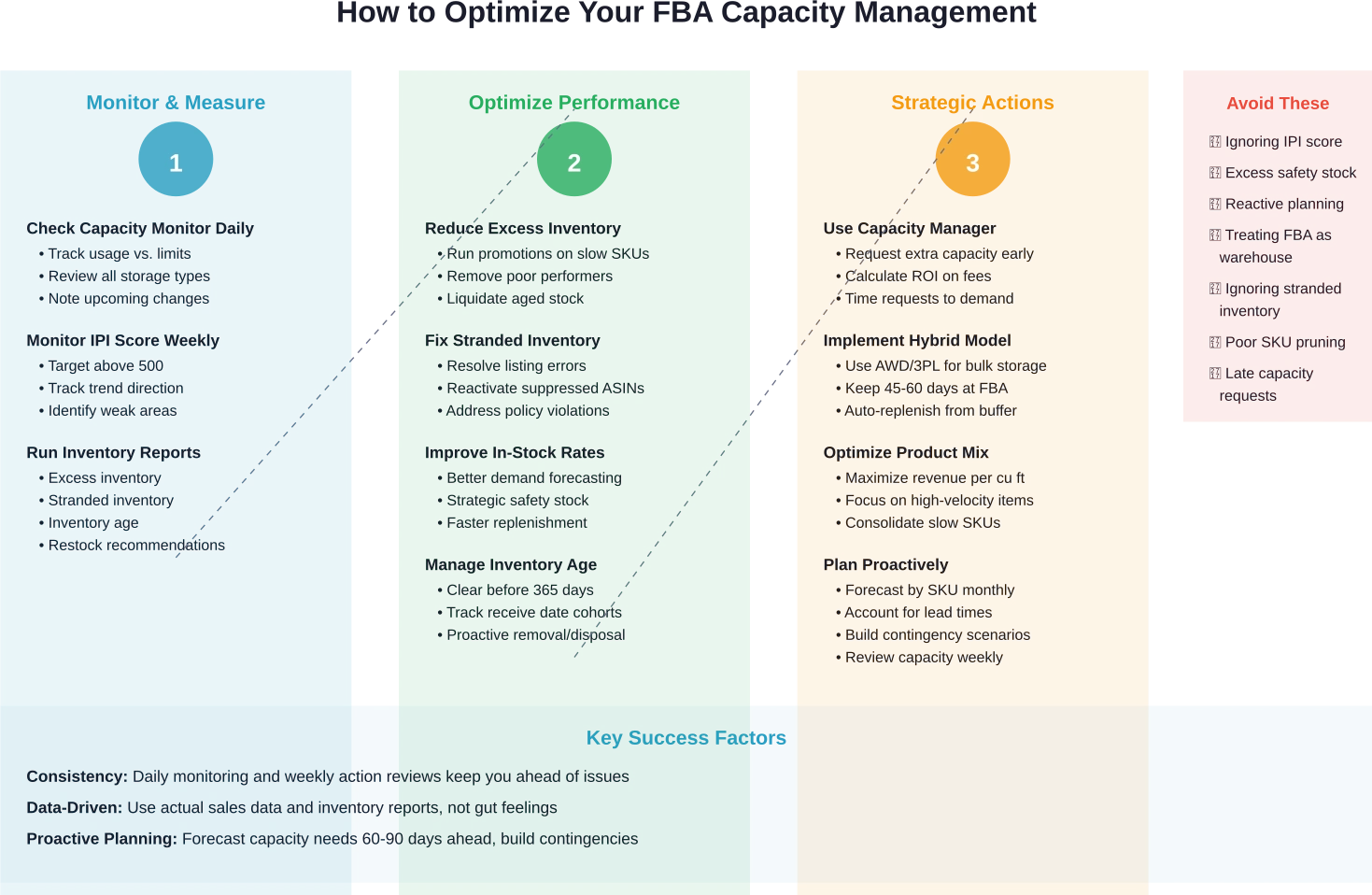
Maintaining high IPI scores evolved from background metric to strategic imperative. Sellers implemented systematic processes to monitor and optimize the four IPI components.
For excess inventory management, sellers run weekly reports identifying slow movers before they become problematic. Products approaching 90+ days of supply get flagged for promotional action or removal.
In-stock rate optimization requires better demand forecasting and buffer stock management. Sellers balance the tension between carrying enough inventory to avoid stockouts while not tying up capacity in excessive safety stock.
Stranded inventory gets monitored daily rather than weekly. Any listing errors, suppression issues, or closed listings trigger immediate action to restore sellability and remove the IPI penalty.
Age management means tracking cohorts of inventory by receive date. Products approaching long-term storage thresholds get targeted for clearance promotions or removal before hitting fee triggers and IPI impacts.
Capacity Planning and Forecasting
The monthly capacity system demands more sophisticated planning than sellers previously employed. Those treating inventory management casually struggle; those developing robust forecasting processes adapt successfully.
Effective planning starts with accurate sales forecasting by SKU. Historical sales data provides baseline expectations, adjusted for seasonality, trends, and upcoming promotions. Forecasts need monthly granularity at minimum, weekly for high-velocity products.
From sales forecasts, sellers calculate capacity requirements. Each product’s volume per unit, multiplied by forecasted unit sales, determines cubic footage needed. Summing across SKUs by storage category produces total capacity requirements against which current limits get compared.
When requirements exceed limits, sellers face strategic choices: request additional capacity through Capacity Manager, reduce SKU count, shift storage to AWD/3PL, or accept planned stockouts on lower-priority items.
Lead time management becomes critical in capacity planning. Long manufacturing or shipping lead times require committing to capacity allocation months in advance. Purchase orders placed in July for October delivery need accounting for in current capacity planning, even though products won’t arrive for months.
Scenario Planning and Contingencies
Sophisticated sellers develop multiple inventory scenarios rather than single plans. Best-case, expected, and worst-case scenarios help prepare responses to capacity changes.
Contingency planning addresses questions like: What if our capacity limit decreases 20% next month? Which SKUs get prioritized? What products move to external storage? What air freight budget covers emergency replenishment?
These plans can’t prevent capacity challenges but enable faster responses when issues arise. Rather than scrambling reactively, sellers execute predetermined playbooks.
Some sellers maintain relationships with 3PLs even when primarily using FBA, treating external fulfillment as insurance. If FBA capacity becomes insufficient, they can quickly shift SKUs to 3PL fulfillment without scrambling to establish new vendor relationships.
The Broader Context: Amazon’s Strategic Direction
The capacity management changes reflect Amazon’s strategic evolution of FBA from general-purpose warehousing to optimized fulfillment network. Understanding this context helps sellers anticipate future developments.
Amazon wants fulfillment centers functioning as distribution hubs with rapid inventory turnover, not long-term storage facilities. Higher velocity through the network improves capital efficiency and enables faster customer delivery.
The shift toward performance-based capacity allocation aligns seller incentives with Amazon’s operational goals. Sellers maintaining lean, fast-turning inventory get rewarded with more capacity. Those treating FBA as cheap warehousing face restrictions.
According to Amazon Accelerate 2025 announcements, Amazon will discontinue the FBA commingling practice. This gives brand owners greater control over their inventory and is estimated to save sellers $600 million annually in stickering costs.
The trend points toward FBA becoming increasingly selective rather than universally available. Access depends on performance metrics and willingness to pay premium fees for guaranteed capacity.
Impact on Different Product Categories
Capacity constraints affect product categories differently based on physical characteristics and demand patterns.
Small, lightweight products with high margins—jewelry, cosmetics, supplements—adapt most successfully. These items consume minimal capacity per dollar of revenue, making efficient use of allocated space. Sellers can maintain full catalog availability even with modest capacity limits.
Large, bulky products face harder math. Furniture, large appliances, bulk commodity goods consume capacity quickly relative to revenue generated. Sellers in these categories find capacity constraints most binding.
Apparel and footwear sellers report particular challenges based on community discussions. These categories have dedicated capacity allocations that often run tighter than standard inventory limits. Seasonal buying patterns create demand surges that strain capacity during peak periods.
Fast-moving consumer goods (FMCG) with predictable demand work reasonably well with monthly limits. Sellers can forecast consumption accurately and schedule replenishments to match. Capacity turns over quickly, freeing space for new shipments.
Products with lumpy, unpredictable demand create planning difficulties. When sales spike unexpectedly, sellers may lack capacity to respond quickly, resulting in lost sales during high-demand periods.
Looking Ahead: Future Capacity System Evolution
Amazon continues refining the capacity management system. Sellers should anticipate further evolution based on recent patterns and strategic direction.
The trend toward tighter integration between capacity and performance metrics will likely intensify. Amazon may introduce additional performance factors beyond IPI that influence capacity allocations, rewarding behaviors aligned with operational efficiency.
Dynamic capacity pricing could expand beyond the current reservation fee system. Rather than static monthly limits with optional paid increases, Amazon might implement surge pricing for capacity during peak periods, with rates adjusting based on supply and demand.
Automation will play increasing roles. Amazon continues investing in AI tools for sellers, as highlighted at Amazon Accelerate 2025 with announcements around “Agentic AI” that can reason, plan, and take action. Future versions might auto-optimize inventory distribution between AWD and FBA based on sales velocity and capacity constraints.
Category-specific rules may proliferate. Different product types have different fulfillment economics and space requirements. Amazon might implement specialized capacity policies for hazmat, oversize, or other categories requiring particular handling.
Conclusion: Adapting to the New FBA Capacity Reality
Amazon’s streamlined FBA capacity management system replaced confusing dual limits with clearer monthly allocations. The four key features—unified monthly limits, Capacity Manager for additional storage, performance-based increases, and competitive reservation bidding—give sellers better planning tools while tying capacity access to inventory performance.
But clarity doesn’t mean simplicity. The system creates new challenges, particularly for sellers with long lead times, seasonal demand patterns, or products in constrained categories. Success requires treating capacity as a strategic resource to optimize rather than an unlimited utility.
The sellers thriving under the new system share common approaches: obsessive IPI management, hybrid storage models combining FBA with AWD or 3PLs, data-driven forecasting, and proactive rather than reactive planning. They monitor capacity daily, act on performance metrics weekly, and forecast needs months ahead.
Amazon’s direction is clear—FBA evolves toward a premium just-in-time fulfillment network rather than general warehousing. Access depends on performance and potentially willingness to pay for guaranteed capacity. Sellers treating FBA as cheap long-term storage increasingly find themselves constrained.
The capacity system will continue evolving. Sellers need to stay informed about policy changes, adapt strategies as Amazon refines the system, and build operational flexibility to adjust quickly when capacity dynamics shift.
Ready to optimize your FBA capacity management? Start by checking your current IPI score and capacity usage in Seller Central’s Capacity Monitor. Identify which performance areas need improvement, calculate your actual capacity needs accounting for lead times, and develop a strategy that aligns your inventory flow with Amazon’s monthly capacity structure. The sellers who adapt fastest will maintain competitive advantages through reliable product availability while others struggle with constraints.
Frequently Asked Questions
How often do FBA capacity limits change?
FBA capacity limits refresh monthly, though Amazon can adjust allocations mid-month based on performance changes or fulfillment center capacity constraints. Sellers typically see their next month’s capacity projection a few weeks in advance through the Capacity Monitor. The limits account for current IPI scores, sales forecasts, and historical performance. Significant IPI score drops can trigger immediate capacity reductions, even within the current month. Sellers should check the Capacity Monitor at least weekly to catch any unexpected changes before they impact shipping plans.
What IPI score do I need to avoid capacity restrictions?
Amazon recommends maintaining an IPI score above 500 to access optimal capacity limits. Scores between 400-500 typically result in reduced capacity allocations but not severe restrictions. Scores below 400 trigger aggressive capacity constraints and potentially limit creation of new listings. The exact capacity impact varies by individual account factors beyond just IPI score. Generally speaking, sellers with scores consistently above 500 report fewer capacity-related issues and better access to additional capacity through Capacity Manager requests.
Does inventory shipped from AWD to FBA count against my capacity limits?
Inventory transferring from Amazon Warehousing and Distribution to FBA through auto-replenishment doesn’t count against capacity limits during the shipment itself. However, once units check into FBA fulfillment centers, they do count toward capacity usage. This means sellers can store large quantities at AWD without consuming FBA capacity, but need to account for auto-replenishment volumes in their FBA capacity planning. AWD-to-FBA transfers consume available FBA capacity just like direct shipments from external sources once they arrive.
Can I request additional capacity for specific ASINs?
Capacity Manager requests apply to storage type categories (standard, oversize, apparel, footwear, etc.) rather than specific ASINs. Sellers can’t request additional capacity targeted to particular products. However, ASIN-level restock limits sometimes prevent replenishment of specific products even when category capacity shows availability. These ASIN restrictions reflect Amazon’s inventory distribution preferences and generally can’t be overridden through Capacity Manager. Sellers facing ASIN-level limits often need to use AWD or 3PL storage as buffers, sending smaller frequent shipments as ASIN restrictions allow.
What happens if my capacity limit drops below my current inventory level?
When capacity limits fall below current usage, Amazon blocks all new shipments until usage decreases to within limits. This can happen through IPI score declines, capacity adjustments, or category rebalancing. Existing inventory remains at FBA and continues fulfilling orders normally—the restriction only prevents new shipments. Sellers in this situation must wait for inventory to sell down or remove units to create space. Seller Support typically cannot override these restrictions manually. The best prevention is maintaining IPI scores above 500 and avoiding situations where usage runs at or near limits.
How do I calculate how much capacity I need?
Calculate capacity needs by multiplying each SKU’s dimensions (length × width × height in inches, divided by 1,728 to convert to cubic feet) by the units needed on hand. Sum across all SKUs in each storage category to determine total cubic feet required. Account for safety stock to handle demand variability, plus inventory in transit that will arrive and consume capacity. Compare required capacity to allocated limits. The calculation should project 60-90 days ahead to align with typical procurement and shipping lead times. When requirements exceed limits, evaluate Capacity Manager requests or hybrid storage models.
Is using reservation fees through Capacity Manager worth it?
Reservation fees make economic sense when the cost per cubic foot is substantially lower than profit generated by products in that space. Calculate your product’s margin per cubic foot per month, then compare against reservation fees. High-margin, fast-turning products easily justify reservation fees. Low-margin or slower items may not. Consider reservation fees as insurance against stockouts during peak periods—the cost of missed sales during high-demand windows often exceeds the fees. Time requests strategically around promotional calendars and seasonal peaks when the revenue impact of having adequate inventory is highest.
Join the WisePPC Beta and Get Exclusive Access Benefits
WisePPC is now in beta — and we’re inviting a limited number of early users to join. As a beta tester, you'll get free access, lifetime perks, and a chance to help shape the product — from an Amazon Ads Verified Partner you can trust.
 No credit card required
Free in beta and free extra month free after release
25% off for life — limited beta offer
Access metrics Amazon Ads won’t show you
Be part of shaping the product with your feedback
No credit card required
Free in beta and free extra month free after release
25% off for life — limited beta offer
Access metrics Amazon Ads won’t show you
Be part of shaping the product with your feedback
