
 EN
EN  ES
ES  FR
FR  DE
DE  IT
IT  KO
KO  JA
JA  ZH
ZH  AR
AR  PT
PT How AWD Makes Your Supply Chain & FBA Work Better (2026)

Quick Summary: Amazon Warehousing and Distribution (AWD) provides low-cost bulk storage and automatic replenishment to FBA centers, helping sellers reduce storage fees by 30-80% during peak seasons. When combined strategically with FBA, AWD streamlines supply chains by storing excess inventory affordably while maintaining fast fulfillment through FBA’s network. Sellers benefit most by storing slow-moving or seasonal products in AWD while keeping fast movers in FBA for immediate order fulfillment.
Managing Amazon inventory has become increasingly complex for FBA sellers. Storage limits tighten during Q4. Fees spike when seasonal products sit too long. And balancing stock levels without running out—or hemorrhaging money on storage—feels like walking a tightrope.
That’s where Amazon Warehousing and Distribution enters the picture.
AWD offers sellers an upstream storage solution designed to work alongside FBA. Think of it as a holding area for bulk inventory that automatically feeds products into FBA centers when stock runs low. The promise? Lower storage costs, simplified replenishment, and better inventory control across your entire supply chain.
But does AWD actually deliver on these claims? And more importantly, how can sellers use both services together without creating new headaches?
Let‘s break down exactly how AWD functions, where it fits into your existing FBA strategy, and when it makes financial sense to split your inventory between both systems.
What Is Amazon Warehousing and Distribution?
Amazon Warehousing and Distribution is a bulk storage service that launched as an upstream solution for FBA sellers. Unlike FBA centers optimized for rapid order fulfillment, AWD facilities focus on long-term inventory storage at significantly reduced rates.
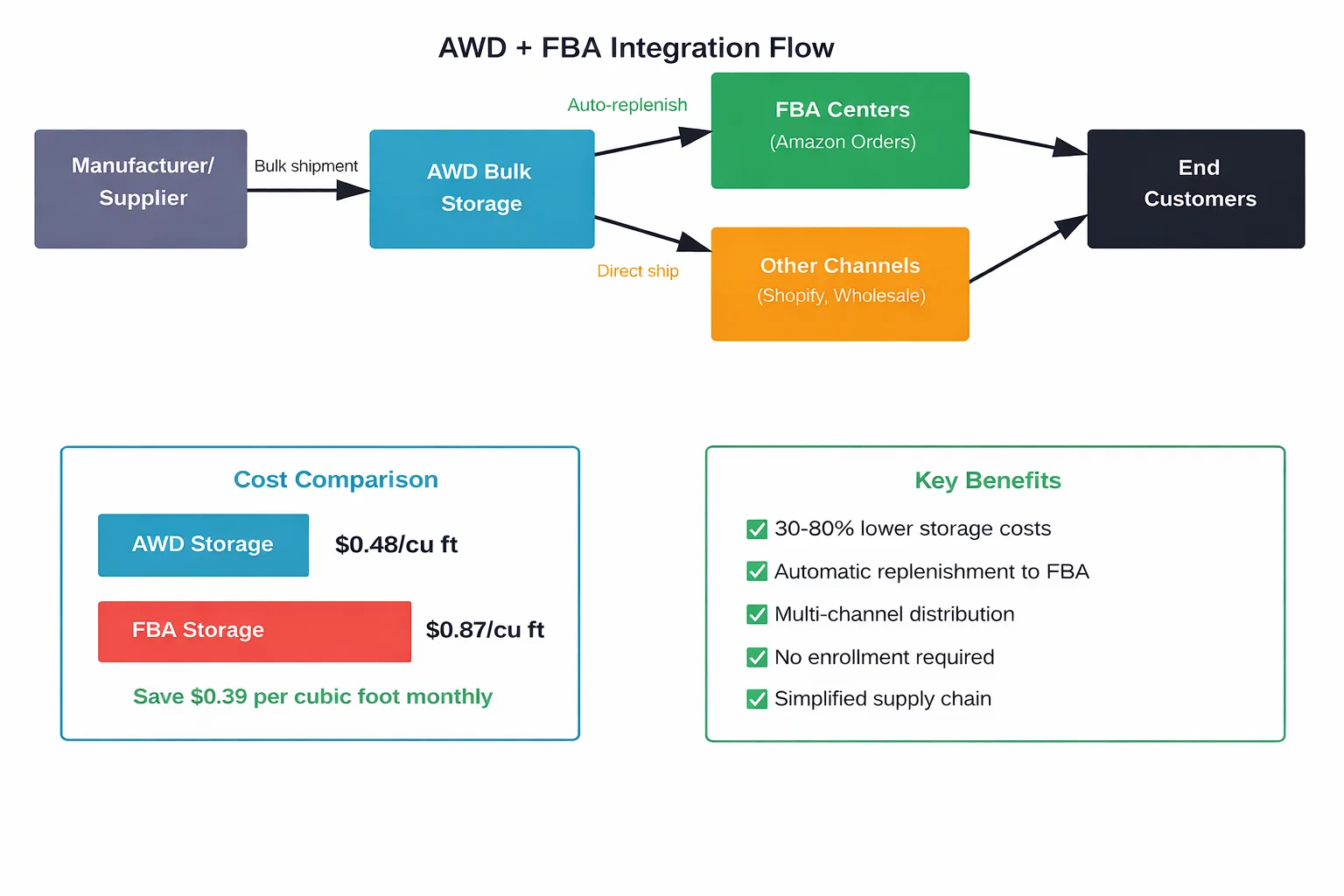
The core concept is straightforward. Sellers send large shipments from manufacturers or third-party warehouses directly to AWD facilities. Amazon stores these products in bulk. Then, based on settings configured by the seller, AWD automatically replenishes FBA centers as inventory depletes.
No enrollment process is required to start using AWD. Sellers can simply create a shipment plan through Seller Central and designate AWD as the destination. This differs from FBA, which requires formal enrollment before sending the first shipment.
AWD serves as a buffer between your supplier and Amazon’s fulfillment network. Products move from manufacturer to AWD to FBA to customer. This staged approach prevents overstocking FBA centers while maintaining healthy inventory levels for order fulfillment.
How AWD Differs From Traditional FBA
The distinction between AWD and FBA comes down to purpose and optimization. FBA centers handle customer orders. AWD facilities manage inventory storage and distribution.
| Feature | AWD | FBA |
|---|---|---|
| Primary purpose | Long-term bulk storage and inventory management | Direct-to-customer order fulfillment |
| Enrollment process | No enrollment needed | Requires enrollment |
| Storage optimization | Bulk storage, pallets, larger quantities | Unit-level storage, fast picking |
| Replenishment | Automatic transfer to FBA | Manual shipments from external sources |
| Storage duration | Designed for extended storage | Optimized for rapid turnover |
| Fee structure | Lower per cubic foot rates | Higher rates, seasonal increases |
Inventory stored in AWD and FBA occupies different parts of Amazon’s logistics network. AWD facilities use warehouse space optimized for bulk pallets and extended storage periods. FBA centers prioritize accessibility and speed, storing products in locations that enable same-day or next-day delivery.
This fundamental difference in design explains why AWD costs less. The facilities don’t need the same level of automation, geographic distribution, or rapid access infrastructure that FBA requires.
Why Sellers Are Adding AWD to Their FBA Strategy
The value proposition for AWD centers on three main benefits: cost reduction, operational simplification, and inventory flexibility. Each addresses specific pain points that FBA sellers commonly face.
Substantial Storage Cost Savings
Storage fees represent one of the largest ongoing expenses for FBA sellers, especially those carrying seasonal products or large inventories. AWD’s rates run significantly lower than standard FBA storage.
For standard-size items, savings can range from 30% to 80% depending on the season. The gap widens dramatically during Q4, when FBA implements peak storage surcharges but AWD rates remain consistent.
Here’s the math that matters. AWD storage costs approximately $0.48 per cubic foot monthly. Standard FBA storage runs $0.87 per cubic foot for the same period. That $0.39 difference per cubic foot compounds quickly across large inventories.
Consider a seller storing 1,000 cubic feet of inventory. In AWD, monthly storage runs $480. The same inventory in FBA costs $870. Over twelve months, that’s $4,680 in savings just from choosing AWD for bulk storage.
The savings become even more pronounced during October through December, when FBA adds peak storage fees. During these months, FBA rates can climb significantly while AWD maintains standard pricing.
Automatic Replenishment Eliminates Manual Work
Managing FBA inventory traditionally requires constant monitoring. Sellers check stock levels, forecast demand, create shipment plans, coordinate with suppliers, and track inbound inventory. It’s time-consuming and prone to human error.
AWD’s automatic replenishment removes most of these manual steps. Sellers configure minimum and maximum stock thresholds for each product. When FBA inventory drops below the minimum, AWD automatically creates a replenishment shipment.
The system handles transfer logistics internally. Products move from AWD facilities to the appropriate FBA centers without seller intervention. No shipment plans to create. No carrier coordination. No tracking multiple inbound shipments.
For products with multiple seller SKUs under the same ASIN, Amazon uses the highest value set across all SKUs to determine replenishment quantity. Updates to these settings can take up to 24 hours to take effect.
This automation particularly benefits sellers managing large catalogs. Instead of monitoring dozens or hundreds of SKUs individually, the replenishment system maintains target stock levels across the entire inventory.
One Inventory Pool for Multi-Channel Distribution
Many sellers operate beyond just Amazon. They might have Shopify stores, wholesale accounts, or other sales channels. Traditional FBA inventory can only fulfill Amazon orders, creating fragmentation across different warehouses and systems.
AWD offers multi-channel distribution capabilities. Inventory stored in AWD facilities can feed FBA for Amazon orders while also supporting shipments to other channels. This creates a single inventory pool rather than splitting stock across multiple locations.
The unified approach reduces total inventory requirements. Instead of maintaining separate stock for Amazon and other channels, sellers can draw from one larger pool. This improves inventory turnover and reduces the risk of stock imbalances where one channel is overstocked while another runs dry.
Strategic Implementation: When to Use AWD vs FBA
The real question isn’t whether AWD or FBA is better. It’s which products belong in each system and how to optimize the split.
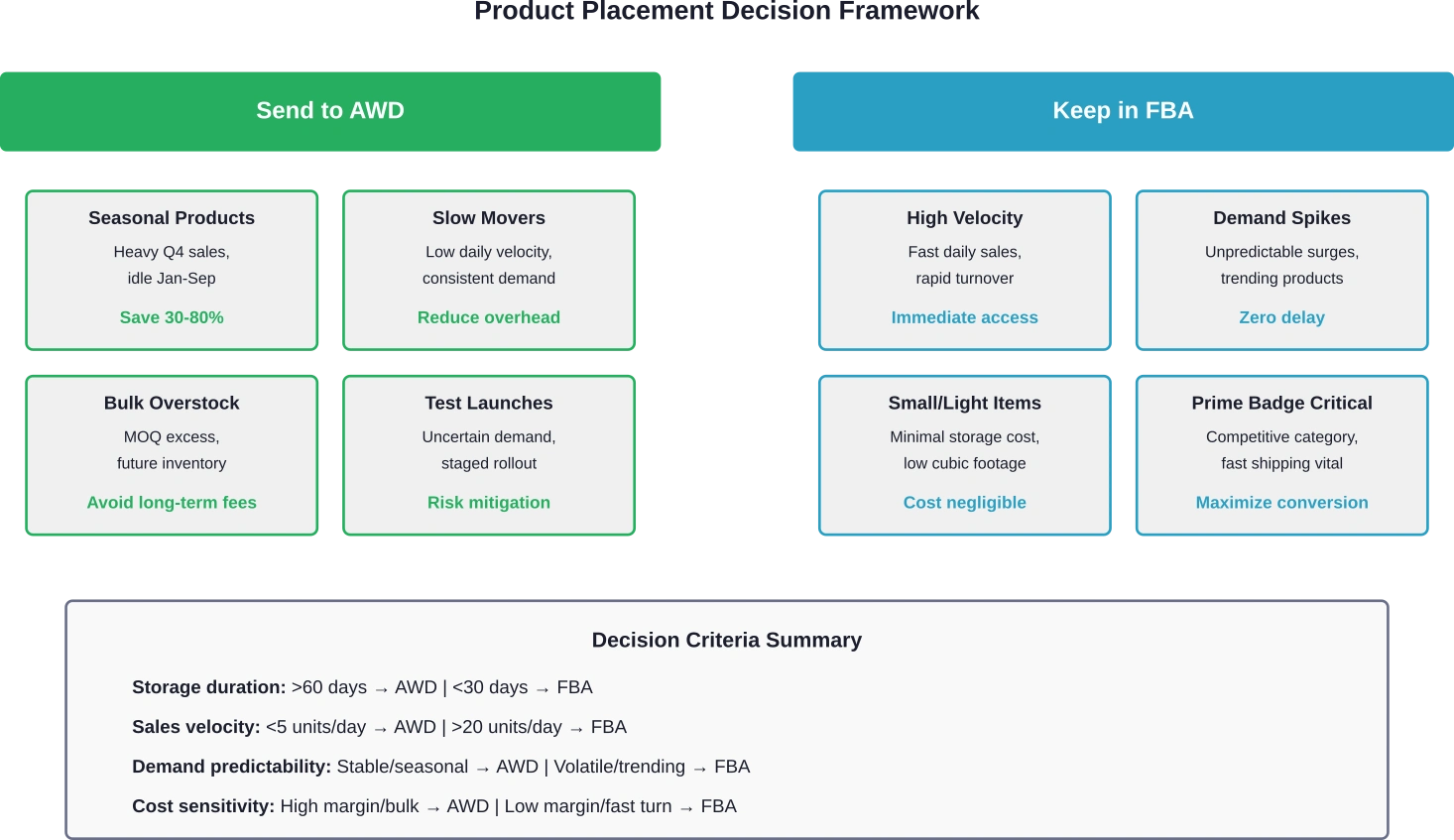
Not every product makes sense for AWD. Fast-moving items with high daily sales velocity need the immediacy of FBA. But slow movers, seasonal products, and bulk overstock? Those are prime candidates for AWD storage.
Products That Belong in AWD
Seasonal inventory represents the clearest use case. Products that sell heavily during specific periods but sit idle the rest of the year incur massive storage fees in FBA. Moving these items to AWD during off-seasons cuts costs dramatically while maintaining availability for replenishment when demand returns.
Slow-moving products with consistent but low sales velocity also benefit from AWD placement. These items tie up expensive FBA space without generating enough velocity to justify the premium storage costs. AWD provides a cost-effective holding area while automatic replenishment ensures FBA never runs dry.
New product launches with uncertain demand create another opportunity. Instead of sending large quantities directly to FBA and risking long-term storage fees, sellers can stage inventory in AWD. Small initial quantities go to FBA for testing. If the product performs well, AWD automatically feeds additional units into the fulfillment network.
Bulk overstock from manufacturer minimum order quantities fits naturally into AWD. Many suppliers require minimum purchases that exceed short-term FBA needs. Sending everything to FBA invites high storage fees. Routing the excess to AWD while keeping active inventory in FBA balances cost and availability.
Products That Should Stay in FBA
High-velocity products need to remain in FBA. These items sell rapidly enough that storage costs become negligible compared to sales revenue. The faster turnover and direct fulfillment path justify FBA’s higher storage rates.
Products with unpredictable demand spikes also work better in FBA. If sales can suddenly triple due to external factors, having inventory already positioned in fulfillment centers prevents stockouts. The automatic replenishment from AWD introduces a delay—typically 2-3 days at minimum—that can miss unexpected demand surges.
Community discussions highlight concerns about AWD replenishment timing. Real data from October 2025 showed AWD averaging 7.1 days for check-in compared to 4.7 days for standard FBA direct shipments. That 2.4-day difference matters for fast-moving inventory. Reports indicate AWD transfer times can vary significantly by fulfillment center and conditions.
Small, lightweight products with minimal storage footprint might not benefit enough from AWD to justify the added complexity. If FBA storage fees are already negligible, splitting inventory between two systems adds operational overhead without meaningful cost savings.
Configuring Automatic Replenishment Settings
The effectiveness of AWD depends heavily on proper replenishment configuration. Set thresholds too high and inventory flows to FBA unnecessarily, negating storage savings. Set them too low and stockouts become a constant threat.
Minimum threshold represents the trigger point. When FBA inventory drops to this level, AWD initiates a replenishment shipment. Setting this requires understanding lead time—how many days between AWD shipment creation and FBA availability.
Based on community discussions, AWD to FBA transfer times can average 7 days or more, with reports of delays extending to 14+ days during peak periods. Conservative minimum thresholds should account for this variability plus a safety buffer.
Maximum threshold determines how much inventory FBA should hold at peak. This prevents over-replenishment that would recreate the storage cost problem AWD is meant to solve. The maximum should cover peak daily sales multiplied by the replenishment cycle time.
Regular monitoring and adjustment of these settings becomes crucial. Seasonal demand shifts, promotional periods, and trending products all require threshold updates to maintain optimal performance.

Need Better Results From AWD and FBA? Start With the Ads
Improving your supply chain with Amazon AWD and FBA can help products move faster and stay in stock – but inventory alone does not drive sales. Once products are available in Amazon’s network, performance often depends on how well your advertising is managed.
WisePPC focuses specifically on Amazon advertising and marketplace growth. Their team works with brands to manage Sponsored Ads, improve campaign structure, and connect advertising data with listing and inventory performance.
If you are investing in AWD and FBA to scale your Amazon operations, WisePPC can help you:
- manage and optimize Amazon PPC campaigns
- improve visibility for stocked products
- align advertising strategy with inventory and fulfillment
The Real Costs: AWD vs FBA Storage Breakdown
Understanding the true cost difference requires looking beyond simple per-cubic-foot rates. Transfer fees, processing times, and operational overhead all factor into the total equation.
AWD storage runs approximately $0.48 per cubic foot monthly for standard-size items. FBA standard storage sits at $0.87 per cubic foot outside peak season. During October through December, FBA rates climb higher while AWD maintains consistent pricing.
But storage represents only one component. AWD to FBA transfers include processing and transportation fees. These costs vary based on distance between facilities and shipment size but typically add $0.10 to $0.30 per unit for standard items.
The transfer fees can erode savings for products with high turnover. If inventory cycles through AWD to FBA multiple times per quarter, the cumulative transfer costs might exceed the storage savings.
Real value emerges with products that sit in AWD for extended periods—60, 90, or 120+ days—before requiring replenishment. The longer storage duration amplifies the monthly savings while transfer fees remain fixed per cycle.
Hidden Costs and Considerations
Replenishment delays create an indirect cost through potential lost sales. User experiences shared in seller communities highlight situations where AWD transfers took 10-14 days during peak periods, causing temporary stockouts despite adequate total inventory.
The opportunity cost of stockouts can exceed storage savings. Extended delays create lost sales during critical periods that may outweigh monthly storage cost reductions.
Reduced control and visibility represent another less tangible cost. FBA shipments provide detailed tracking and predictable check-in times. AWD transfers operate more like a black box—inventory leaves AWD and eventually appears in FBA, but interim visibility remains limited.
This opacity complicates inventory planning and makes it harder to diagnose issues when problems occur. Sellers accustomed to tight control over every shipment may find the reduced transparency frustrating.
Practical Implementation: Sending Your First AWD Shipment
Getting started with AWD requires no special enrollment or application. Sellers with active FBA accounts can create AWD shipments immediately through Seller Central.
The process begins in the inventory management section. Select products to send to AWD and specify quantities. Amazon generates a shipment plan with the designated AWD facility as the destination.
Pack products following standard FBA prep requirements. AWD facilities accept the same packaging specifications as FBA centers. Label boxes with the provided shipment IDs and carrier labels.
Ship using Amazon’s partnered carriers or approved third-party carriers. Tracking information uploads automatically to Seller Central, allowing monitoring of inbound progress.
Once AWD receives and checks in the inventory, products become available for automatic replenishment or manual transfer to FBA. The check-in process typically completes within 3-5 business days for standard shipments.
Setting Up Automatic Replenishment
After inventory arrives at AWD, configure replenishment settings for each SKU. Navigate to the AWD inventory management dashboard and select the products to set up.
Enter minimum and maximum FBA quantities based on sales velocity and desired reorder cycle. Conservative settings prioritize stock availability while aggressive settings maximize storage savings.
Enable automatic replenishment and save the configuration. The system begins monitoring FBA levels immediately and will initiate transfers when thresholds trigger.
Monitor performance during the first few replenishment cycles. Adjust thresholds if stockouts occur or if FBA inventory consistently exceeds maximum targets.
Common Challenges Sellers Face With AWD
AWD isn’t without drawbacks. Several recurring issues emerge from community discussions and user experiences.
Longer and Less Predictable Check-In Times
The most frequently cited complaint involves transfer delays. While FBA direct shipments typically check in within 3-5 days, AWD replenishments average 7 days and can extend significantly longer.
Transfer times vary significantly by fulfillment center location and conditions, with some reports indicating delays of 10-14 days during peak periods compared to 2-5 days for direct FBA shipments.
This unpredictability complicates inventory planning. Sellers can’t reliably predict when replenishments will become available, making it harder to maintain optimal stock levels during high-velocity periods.
Limited Visibility During Transfers
Once inventory ships from AWD to FBA, detailed tracking information becomes sparse. Sellers see that a transfer initiated and eventually that products arrived, but the interim status remains opaque.
This limited visibility creates anxiety during critical periods. Is the shipment delayed? Lost? Sitting in a receiving queue? The lack of detailed status updates makes it difficult to answer these questions or take corrective action.
Minimum Shipment Requirements
AWD works best for bulk storage, and the service reflects this in its requirements. Minimum shipment sizes and quantity restrictions mean not every product qualifies for practical AWD use.
Small test quantities or low-volume SKUs may not meet minimum thresholds, forcing these products to use standard FBA exclusively. This creates operational complexity for sellers with diverse catalogs mixing high and low volume items.
Optimizing Your Mixed AWD and FBA Strategy
The most successful implementations don’t treat AWD and FBA as either-or choices. Instead, they strategically split inventory based on product characteristics and business objectives.
Start by analyzing existing inventory performance. Identify products with low turnover rates, high storage costs relative to sales, or significant seasonal variation. These become the initial AWD candidates.
Keep fast movers and products with unpredictable demand spikes in FBA exclusively. The immediate availability and faster replenishment cycles justify the higher storage costs for these items.
For products sitting in the middle—moderate velocity, predictable demand, significant storage footprint—test AWD with a portion of inventory. Keep a base quantity in FBA while storing excess in AWD. Monitor performance over 30-60 days and adjust based on results.
Track key metrics for AWD products: replenishment frequency, transfer times, stockout incidents, total storage costs, and sales velocity changes. This data drives ongoing optimization and helps identify which products benefit most from the AWD approach.
Seasonal adjustments become particularly important. Pre-load AWD with inventory several months before peak season, allowing time for gradual replenishment to FBA as demand builds. This spreads the transfer timing risk across multiple cycles rather than relying on a single large replenishment during the crucial sales period.
Frequently Asked Questions
What products are eligible for Amazon Warehousing and Distribution?
Most standard FBA-eligible products can use AWD, including standard-size and oversize items. Products must meet FBA prep requirements and cannot include restricted or hazardous materials. Items already enrolled in FBA qualify automatically without additional enrollment for AWD.
How much cheaper is AWD storage compared to FBA?
Effective January 15, 2026, AWD storage in the West Region is $0.57/cu ft (other regions $0.48). Base transportation fees are $1.40/cu ft ($1.26 for Amazon Managed), and processing fees are $1.40 per box.
How long does AWD to FBA replenishment take?
Average transfer times run 5-7 days under normal conditions but can extend to 14+ days during peak periods or for certain fulfillment center destinations. Real data from October 2025 showed AWD averaging 7.1 days compared to 4.7 days for direct FBA shipments. Sellers should factor this longer and more variable timeline into replenishment threshold settings.
Can AWD inventory fulfill orders from other sales channels besides Amazon?
Yes, AWD supports multi-channel distribution. Inventory stored in AWD facilities can be directed to FBA for Amazon orders or shipped directly to other channels including Shopify stores, wholesale accounts, or third-party marketplaces. This creates a unified inventory pool serving multiple sales channels from a single storage location.
What happens if AWD runs out of inventory before replenishing FBA?
If AWD depletes before automatic replenishment triggers or completes, FBA inventory will eventually sell down to zero, creating a stockout. AWD cannot replenish what it doesn’t have. Sellers must monitor total inventory across both systems and send new shipments to AWD before complete depletion to maintain continuous availability.
Does using AWD affect my FBA storage limits?
Inventory in AWD does not count against FBA storage limits. Only products physically stored in FBA centers apply to capacity restrictions. This allows sellers to maintain large total inventory positions while staying within FBA capacity constraints by keeping excess stock in AWD and only transferring what FBA limits permit.
Can I manually control when AWD sends inventory to FBA instead of using automatic replenishment?
Yes, sellers can choose manual or automatic replenishment. Manual mode requires creating transfer requests through Seller Central each time FBA needs additional inventory. Automatic mode handles transfers based on configured minimum and maximum thresholds. Many sellers use automatic replenishment for predictable products and manual control for items with variable or seasonal demand patterns.
Final Thoughts: Making AWD and FBA Work Together
AWD represents a valuable tool for sellers struggling with storage costs, inventory limits, or seasonal demand fluctuations. The cost savings are real—30-80% reductions in storage fees add up quickly for products sitting in inventory for months.
But AWD isn’t a universal solution. The longer transfer times, reduced visibility, and operational complexity mean it works better for some inventory profiles than others. Fast-moving products, trending items, and anything with unpredictable demand typically performs better staying in FBA exclusively.
The sweet spot? Seasonal products, slow movers with consistent demand, bulk overstock, and new product launches with uncertain velocity. These inventory types benefit from AWD’s low-cost storage while automatic replenishment maintains availability in FBA for order fulfillment.
Successful implementation requires thoughtful product selection, conservative replenishment thresholds, and ongoing monitoring. Start with a subset of inventory—10-20% of total SKUs that clearly fit the ideal profile. Learn how AWD performs for your specific business before committing large portions of inventory.
Track the metrics that matter: total storage costs, transfer frequency, stockout incidents, and sales velocity. If storage savings exceed the cost of occasional stockouts and the operational overhead feels manageable, gradually expand AWD usage to additional products.
The question isn’t whether AWD or FBA is better. It’s how to use both strategically to minimize costs while maintaining the inventory availability that drives sales. Get the split right, and the combination delivers lower overhead without sacrificing customer experience.
Ready to optimize your Amazon inventory strategy? Start by analyzing your current storage costs and identifying products spending 60+ days in FBA. Those are your first AWD candidates. Configure conservative replenishment settings and monitor performance for 30 days. Adjust based on results and expand gradually.
The sellers winning with AWD aren’t the ones going all-in. They’re the ones strategically splitting inventory based on data, not hope. Run the numbers for your specific products. The math will tell you exactly where AWD makes sense and where it doesn’t.
Join the WisePPC Beta and Get Exclusive Access Benefits
WisePPC is now in beta — and we’re inviting a limited number of early users to join. As a beta tester, you'll get free access, lifetime perks, and a chance to help shape the product — from an Amazon Ads Verified Partner you can trust.
 No credit card required
Free in beta and free extra month free after release
25% off for life — limited beta offer
Access metrics Amazon Ads won’t show you
Be part of shaping the product with your feedback
No credit card required
Free in beta and free extra month free after release
25% off for life — limited beta offer
Access metrics Amazon Ads won’t show you
Be part of shaping the product with your feedback
